
Qt-网易云音乐界面实现-6 迷你个人中心实现
这个界面除了麻烦耗时,没有啥技术含量。暂时我也就把它称为迷你个人中心,因为后面还有一个个人中心了。
先看下完成品
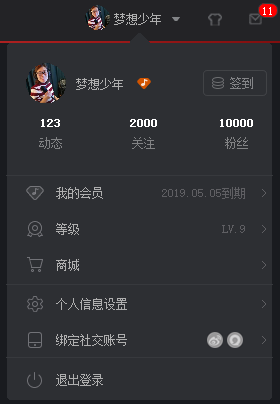

左侧是我的,右侧是原生
个人感觉还可以吧,哈哈哈。给我自己奖励一个鸡腿。
看下头文件
#ifndef PERSONFORM_H

#define PERSONFORM_H

#include <QWidget>

#include <QPaintEvent>

#include <QPainter>

namespace Ui {

class PersonForm;

}

class PersonForm : public QWidget

{

    Q_OBJECT

public:

    explicit PersonForm(QWidget *parent = 0);

    ~PersonForm();

protected:

    void paintEvent(QPaintEvent *event);

private slots:

    void on_pushButton_person_head_image_clicked();

    void on_pushButton_clicked();

    void on_pushButton_sign_clicked();

    void on_pushButton_fans_clicked();

    void on_pushButton_attention_clicked();

    void on_pushButton_dynamic_clicked();

    void on_pushButton_mymember_clicked();

    void on_pushButton_dengji_clicked();

    void on_pushButton_shop_clicked();

    void on_pushButton_person_infor_clicked();

    void on_pushButton_bend_clicked();

    void on_pushButton_off_clicked();

private:

    Ui::PersonForm *ui;

};

#endif // PERSONFORM_H
下面是源文件代码
#include "personform.h"

#include "ui_personform.h"

#include <QDebug>

PersonForm::PersonForm(QWidget *parent) :

    QWidget(parent),

    ui(new Ui::PersonForm)

{

    ui->setupUi(this);

}

PersonForm::~PersonForm()

{

    delete ui;

}

void PersonForm::paintEvent(QPaintEvent *event)

{

    Q_UNUSED(event);

    QPainter painter_mainback(this);

    painter_mainback.drawPixmap(0,0,this->width(),this->height(),QPixmap("./images/Personform/mainback.png"));

    ui->pushButton_person_head_image->setMask(QRegion(0,0,40,40,QRegion::Ellipse));     //设置头像遮罩

}

/*

 * 头像点击按钮

 */

void PersonForm::on_pushButton_person_head_image_clicked()

{

    qDebug()<<"头像按钮点击";

}

/*

 * 个人名字点击效果

 */

void PersonForm::on_pushButton_clicked()

{

    qDebug()<<"用户名字点击";

}

/*

 * 签到按钮槽函数

 */

void PersonForm::on_pushButton_sign_clicked()

{

    qDebug()<<"签到按钮点击";

}

/*

 * 粉丝按钮按下

 */

void PersonForm::on_pushButton_fans_clicked()

{

    qDebug()<<"粉丝按钮点击";

}

/*

 * 关注按钮按下

 */

void PersonForm::on_pushButton_attention_clicked()

{

    qDebug()<<"关注按钮点击";

}

/*

 * 动态按钮按下

 */

void PersonForm::on_pushButton_dynamic_clicked()

{

    qDebug()<<"动态按钮点击";

}

/*

 * 我的会员点击按钮

 */

void PersonForm::on_pushButton_mymember_clicked()

{

    qDebug()<<"我的会员按钮点击";

}

/*

 * 等级按钮

 */

void PersonForm::on_pushButton_dengji_clicked()

{

    qDebug()<<"等级按钮点击";

}

/*

 * 商城按钮

 */

void PersonForm::on_pushButton_shop_clicked()

{

    qDebug()<<"商城按钮点击";

}

/*

 * 个人信息按钮设置

 */

void PersonForm::on_pushButton_person_infor_clicked()

{

    qDebug()<<"个人信息设置按钮点击";

}

/*

 * 绑定社交账号按钮

 */

void PersonForm::on_pushButton_bend_clicked()

{

    qDebug()<<"绑定社交账号按钮点击";

}

/*

 * 退出登录按钮

 */

void PersonForm::on_pushButton_off_clicked()

{

    qDebug()<<"退出登录按钮点击";

}
整个迷你个人中心布局
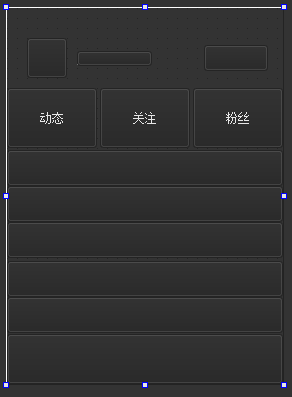
那么怎么调出这个界面了,看下主窗口调用函数
/*

 * 个人信息按钮

 */

void MainWindow::on_pushButton_people_clicked()

{

    if(personform)

    {

        if(personform->isHidden())

        {

            personform->show();

        }

        else

        {

            personform->hide();

        }

    }

    else

    {

        personform = new PersonForm(this);

        personform->setGeometry(588,40,267,367);

        personform->raise();                //提升显示层数

        personform->show();

    }

}
这里的大部分美化都是在Qss文件中完成的,下面看下Qss中文件的实现代码
/*迷你个人中心头像按钮*/

QPushButton#pushButton_person_head_image

{

	border-image:url(images/pretty_girl.png);

}

QPushButton::hover#pushButton_person_head_image

{

	border-image:url(images/pretty_girl.png);

}

QPushButton::pressed#pushButton_person_head_image

{

	border-image:url(images/pretty_girl.png);

}

/*会员表示*/

QLabel#label_user_member_icon

{

	border-image:url(images/Personform/user_nember.png);

}

/*迷你个人中心文本*/

QLabel#label_user_name

{

	color: rgb(175, 175, 175);

}

/*个人中心按钮*/

QPushButton#pushButton

{

	background:#00FFFFFF;

}

QPushButton::hover#pushButton

{

	background:#00FFFFFF;

}

QPushButton::pressed#pushButton

{

	background:#00FFFFFF;

}

/*迷你个人中签到按钮*/

QPushButton#pushButton_sign

{

	border-image:url(images/Personform/btn_tiandao_n.png);

}

QPushButton::hover#pushButton_sign

{

	border-image:url(images/Personform/btn_tiandao_h.png);

}

QPushButton::pressed#pushButton_sign

{

	border-image:url(images/Personform/btn_tiandao_n.png);

}

/*迷你个人中动态按钮*/

QPushButton#pushButton_dynamic

{

	background:#00FFFFFF;

	color: rgb(130,131,133);

}

QPushButton::hover#pushButton_dynamic

{

	background:#00FFFFFF;

	color: rgb(255,255,255);

}

QPushButton::pressed#pushButton_dynamic

{

	background:#00FFFFFF;

	color: rgb(130,131,133);

}

/*迷你个人中心关注按钮*/

QPushButton#pushButton_attention

{

	background:#00FFFFFF;

	color: rgb(130,131,133);

}

QPushButton::hover#pushButton_attention

{

	background:#00FFFFFF;

	color: rgb(255,255,255);

}

QPushButton::pressed#pushButton_attention

{

	background:#00FFFFFF;

	color: rgb(130,131,133);

}

/*迷你个人中心粉丝按钮*/

QPushButton#pushButton_fans

{

	background:#00FFFFFF;

	color: rgb(130,131,133);

}

QPushButton::hover#pushButton_fans

{

	background:#00FFFFFF;

	color: rgb(255,255,255);

}

QPushButton::pressed#pushButton_fans

{

	background:#00FFFFFF;

	color: rgb(130,131,133);

}

/*迷你个人中心分割线*/

QLabel#labelline_1

{

	background: rgb(55, 57, 61);

}

QLabel#labelline_2

{

	background: rgb(55, 57, 61);

}

QLabel#labelline_3

{

	background: rgb(55, 57, 61);

}

/*迷你个人中心关注文本*/

QLabel#label_attention

{

	color: rgb(255, 255, 255);

}

/*迷你个人中心动态文本*/

QLabel#label_dynamic

{

	color: rgb(255, 255, 255);

}

/*迷你个人中心粉丝文本*/

QLabel#label_fans

{

	color: rgb(255, 255, 255);

}

/*迷你个人中心我的会员按钮*/

QPushButton#pushButton_mymember

{

	background:#00393b3e;

}

QPushButton::hover#pushButton_mymember

{

	background:#55393b3e;

	border-width:0;

	border-color:rgb(255,132,0,0);

	border-style: solid;

	border-radius: 0px;

}

QPushButton::pressed#pushButton_mymember

{

	background:#00FFFFFF;

}

/*迷你个人中心我的会员头像*/

QLabel#label_my_menber

{

	border-image:url(images/Personform/user_nember_h.png);

}

/*迷你个人中心我的会员文本*/

QLabel#label_my_member

{

	color: rgb(175, 175, 175);

}

/*迷你个人中心我的会员时间文本*/

QLabel#label_my_member_time

{

	color: rgb(95, 95, 99);

}

/*迷你个人中心我>文本*/

QLabel#label_L_1

{

	color: rgb(95, 95, 99);

}

QLabel#label_L_2

{

	color: rgb(95, 95, 99);

}

/*迷你个人中心等级按钮*/

QPushButton#pushButton_dengji

{

	background:#00393b3e;

}

QPushButton::hover#pushButton_dengji

{

	background:#55393b3e;

	border-width:0;

	border-color:rgb(255,132,0,0);

	border-style: solid;

	border-radius: 0px;

}

QPushButton::pressed#pushButton_dengji

{

	background:#00FFFFFF;

}

/*迷你个人中心商城按钮*/

QPushButton#pushButton_shop

{

	background:#00393b3e;

}

QPushButton::hover#pushButton_shop

{

	background:#55393b3e;

	border-width:0;

	border-color:rgb(255,132,0,0);

	border-style: solid;

	border-radius: 0px;

}

QPushButton::pressed#pushButton_shop

{

	background:#00FFFFFF;

}

/*迷你个人中心个人信息按钮*/

QPushButton#pushButton_person_infor

{

	background:#00393b3e;

}

QPushButton::hover#pushButton_person_infor

{

	background:#55393b3e;

	border-width:0;

	border-color:rgb(255,132,0,0);

	border-style: solid;

	border-radius: 0px;

}

QPushButton::pressed#pushButton_person_infor

{

	background:#00FFFFFF;

}

/*迷你个人中心绑定按钮*/

QPushButton#pushButton_bend

{

	background:#00393b3e;

}

QPushButton::hover#pushButton_bend

{

	background:#55393b3e;

	border-width:0;

	border-color:rgb(255,132,0,0);

	border-style: solid;

	border-radius: 0px;

}

QPushButton::pressed#pushButton_bend

{

	background:#00FFFFFF;

}

/*迷你个人中心关闭按钮*/

QPushButton#pushButton_off

{

	background:#00393b3e;

}

QPushButton::hover#pushButton_off

{

	background:#55393b3e;

	border-width:0;

	border-color:rgb(255,132,0,0);

	border-style: solid;

	border-radius: 0px;

}

QPushButton::pressed#pushButton_off

{

	background:#00FFFFFF;

}

/*迷你个人中心等级头像*/

QLabel#label_my_dengji

{

	border-image:url(images/Personform/dengji.png);

}

/*迷你个人中心等级文本*/

QLabel#label_my_dengji_1

{

	color: rgb(175, 175, 175);

}

/*迷你个人中心我的会员时间文本*/

QLabel#label_my_dengji_2

{

	color: rgb(95, 95, 99);

}

/*商城*/

QLabel#label_my_shop

{

	border-image:url(images/Personform/shop.png);

}

QLabel#label_my_shop2

{

	color: rgb(175, 175, 175);

}

QLabel#label_L_3

{

	color: rgb(95, 95, 99);

}

/*个人信息设置*/

QLabel#label_my_setup

{

	border-image:url(images/Personform/setup.png);

}

QLabel#label_my_setup2

{

	color: rgb(175, 175, 175);

}

QLabel#label_L_4

{

	color: rgb(95, 95, 99);

}

/*绑定社交账号*/

QLabel#label_my_bend

{

	border-image:url(images/Personform/bend.png);

}

QLabel#label_my_bend2

{

	color: rgb(175, 175, 175);

}

QLabel#label_L_5

{

	color: rgb(95, 95, 99);

}

QLabel#label_my_bend_3

{

	border-image:url(images/Personform/xinlang.png);

}

QLabel#label_my_bend_4

{

	border-image:url(images/Personform/qita.png);

}

/*退出登录*/

QLabel#label_my_off

{

	border-image:url(images/Personform/off.png);

}

QLabel#label_my_off2

{

	color: rgb(175, 175, 175);

}

Qt-网易云音乐界面实现-6 迷你个人中心实现的更多相关文章
- Android 开发之网易云音乐(或QQ音乐)的播放界面转盘和自定义SeekBar的实现
这个东西我在eoeAndroid上首发的,但没有详细的实现说明:http://www.eoeandroid.com/thread-317901-1-1.html 在csdn上进行详细的说明吧.(同时上 ...
- Flutter仿网易云音乐:播放界面
写在前头 本来是要做一个仿网易云音乐的flutter项目,但是因为最近事情比较多,项目周期跨度会比较长,因此分几个步骤来完成.这是仿网易云音乐项目系列文章的第一篇.没有完全照搬网易云音乐的UI,借鉴了 ...
- Qt-网易云音乐界面实现-1 窗口隐藏拖拽移动,自定义标题栏
最近也换了公司,也换了新的工作,工资也象征性的涨了一点点,但是最近心里还是慌慌,不知道为什么,没有那种踏实感,感觉自己随时可以被抛弃的感觉.感觉自己在荒废时间,也感觉自己在浪费生命. 为了让自己在被抛 ...
- Qt-网易云音乐界面实现-2 红红的程序运行图标,和相似下方音乐条
被调出来出差了,这次出差可以说是非常不开心,这次出差也算给我自己提了个醒吧,那就是注意自己的精力,自己的口碑,和比人对自己的信任.具体内容如下 我们公司有一款硬件的设备的电路是外包给某个人来做的,这个 ...
- Github获8300星!用Python开发的一个命令行的网易云音乐
最近在逛Github发现了一个非常有趣的库musicbox,是用纯Python打造的,收获了8300颗星.Python语言简单易学,好玩有趣,身边越来越多的小伙伴都开始学习Python.她的魅力非常大 ...
- UWP 动画系列之模仿网易云音乐动画
一.前言 最近在弄毕业设计(那时坑爹选了制作个UWP商店的APP),一个人弄得烦躁,在这里记录一些在做毕业设计时的学习过程.由于我的毕业设计是做一个音乐播放器,那么Windows商店上优秀的软件当然是 ...
- 使用网易云音乐,丢掉QQ音乐吧
我是一个听音乐的重度用户,基本上每天大约有三分之一的时间里我在使用网易云音乐去听音乐.包括工作写代码的时候,跑步的时候,去上班的途中我都去听.首先需要声明的是,在这里我不是故意的去抹黑其他的音乐产品, ...
- 网易云音乐 歌词制作软件 BesLyric
导读 哈哈,喜欢网易云音乐,又愁于制作歌词的童鞋有福啦! BesLyric 为你排忧解难! 上个周末在用网易云音乐听歌,发现一些喜欢的歌还没有滚动歌词,然而网易云音乐还没有自带的歌词编辑功能,要制作歌 ...
- 《云阅》一个仿网易云音乐UI,使用Gank.Io及豆瓣Api开发的开源项目
CloudReader 一款基于网易云音乐UI,使用GankIo及豆瓣api开发的符合Google Material Desgin阅读类的开源项目.项目采取的是Retrofit + RxJava + ...
随机推荐
- BZOJ 1821 Group 部落划分 并查集
题目链接: https://www.lydsy.com/JudgeOnline/problem.php?id=1821 题目大意: 聪聪研究发现,荒岛野人总是过着群居的生活,但是,并不是整个荒岛上的所 ...
- iOS 开源库系列 Aspects核心源码分析---面向切面编程之疯狂的 Aspects
Aspects的源码学习,我学到的有几下几点 Objective-C Runtime 理解OC的消息分发机制 KVO中的指针交换技术 Block 在内存中的数据结构 const 的修饰区别 block ...
- P1710 地铁涨价
题目背景 本题开O2优化,请注意常数 题目描述 博艾市除了有海底高铁连接中国大陆.台湾与日本,市区里也有很成熟的轨道交通系统.我们可以认为博艾地铁系统是一个无向连通图.博艾有N个地铁站,同时有M小段地 ...
- 【原创】大叔经验分享(52)ClouderaManager修改配置报错
Cloudera Manager中修改配置可能报错: Incorrect string value: '\xE7\xA8\x8B\xE5\xBA\x8F...' for column 'MESSAGE ...
- Java代码输出到txt文件(申请专利贴源码的必备利器)
最近公司在申请专利,编写不少文档,项目的代码量实在是过于庞大.如果一个一个的复制粘贴虽然能够完成,但是对于程序员而言实在没有这个必要.shell或者python就能解决这个问题.由于我个人对于shel ...
- 文件上传之MultipartFile使用
转载 文件断点上传,html5实现前端,java实现服务器 一.单/多文件上传使用例子: 工程路径如下 -src |--main.java --controller --service ...
- 插件式程序开发及其应用(C#)
1. 定义 所谓“插件模型”,指应用程序由一些动态的独立模块构成,每个模块均具有一个或多个服务,并满足一定的插件协议,能够借助主程序实现主程序-插件:插件-插件之间的通讯. 应用该模型的系统,具有以 ...
- java 接口的概念
一:概念 接口是功能的集合.同样可以看做一种数据类型,是比抽象类更为抽象的“类”. 接口描述应该具备的方法,并没有具体的实现.具体实现由接口的实现类(相当于接口的子类来完成). 好处: 使功能和实现分 ...
- ejs引擎项目
关于这个我也很懵逼,写这篇博客就是想记录一下,有哪位大神看到之后可以略微指点一二,不胜感激....... 一.项目结构 db model user.js version.js schema xx.js ...
- locust
from locust import HttpLocust,TaskSet,task class UserVue(TaskSet): #tasks = {buy:1,consume:2} #设置权重 ...