
iOS 可高度自定义的底部弹框
概述
详细
一. 运行效果图
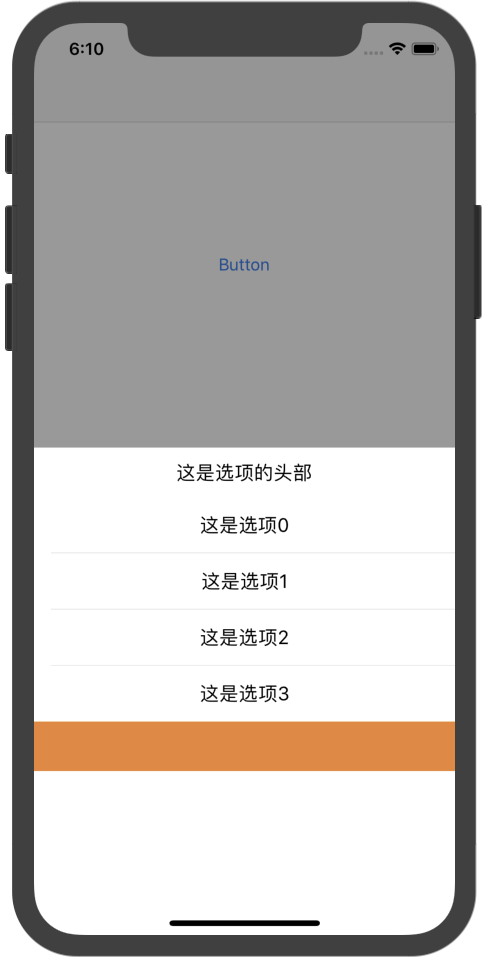
二. 实现过程
1. 实现一个有遮罩效果的半透明 view,然后添加一个可设置展示内容高度的 contentView
// 这个遮罩是可以遮住全屏

- (void)createUI{

    self.frame = CGRectMake(0, 0, SS_ScreenW, SS_ScreenH);

    self.backgroundColor = [UIColor colorWithRed:0 green:0 blue:0 alpha:0.4];

    self.userInteractionEnabled = YES;

    [self addGestureRecognizer:[[UITapGestureRecognizer alloc] initWithTarget:self action:@selector(disMissView)]];

    [self.contentView addSubview:self.tbView];

}

// contentView 是通过懒加载实现的

- (UIView *)contentView{

    if (!_contentView) {

        _contentView = [UIView new];

        _contentView.backgroundColor = [UIColor whiteColor];

        _contentView.frame = CGRectMake(0, SS_ScreenH - _contentHeight - SS_BottomMargin,  SS_ScreenW, _contentHeight + SS_BottomMargin);

        _contentView.opaque = YES;

        [self addSubview:_contentView];

    }

    return _contentView;

}
2. 我们实现的底部弹框实质上一个可滑动的表单(tableView),在 contentView 上添加一个 tableView
- (UITableView *)tbView{

    if (!_tbView) {

//        _tbView = [[UITableView alloc]initWithFrame:CGRectZero style:UITableViewStyleGrouped];

        _tbView = [UITableView new];

        _tbView.delegate = self;

        _tbView.dataSource = self;

        [_tbView registerClass:[UITableViewCell class] forCellReuseIdentifier:@"ss"];

    }

    return _tbView;

}
3. 通过设置UIView 动画,实现遮罩 menuView 的展示和消失效果
// 将 menuView 展示在父 view 上

[view addSubview:self];

    [view addSubview:self.contentView];

    self.contentView.frame = CGRectMake(0, SS_ScreenH, SS_ScreenW, _contentHeight);

    __weak typeof(self) weakSelf = self;

    [UIView animateWithDuration:_animationDuration animations:^{

        self.alpha = 1.0;

        self.contentView.frame = CGRectMake(0, SS_ScreenH - weakSelf.contentHeight - SS_BottomMargin, SS_ScreenW, weakSelf.contentHeight + SS_BottomMargin);

    } completion:^(BOOL finished) {

    }];

// 将 menuView 从父 view 上移除

__weak typeof(self) weakSelf = self;

    [UIView animateWithDuration:_animationDuration animations:^{

        self.alpha = 0.0;

        self.contentView.frame = CGRectMake(0, SS_ScreenH, SS_ScreenW, weakSelf.contentHeight);

    } completion:^(BOOL finished) {

        [self removeFromSuperview];

        [self.contentView removeFromSuperview];

    }];
4. 实现选项和头部的定制化
通过编写自己的代理方法,让开发人员根据自己项目的实际需要设置各个选项,并且可以定制固定的头部以及底部
@protocol SSMenuViewDelegate <NSObject>

@required;

// 返回 tableView 的行数

- (NSInteger)menuTableView:(UITableView *)tableView numberOfRowsInSection:(NSInteger)section;

// 返回 tableViewCell 需要自定义 cell 的分割线

- (UITableViewCell *)menuTableView:(UITableView *)tableView cellForRowAtIndexPath:(NSIndexPath *)indexPath;

@optional;

// 设置组数

- (NSInteger)menuNumberOfSectionsInTableView:(UITableView *)tableView;

// 选中某个 tableView Cell

- (void)menuTableView:(UITableView *)tableView didSelectRowAtIndexPath:(NSIndexPath *)indexPath;

// 定义每个选项的cell的高度

- (CGFloat)menuTableView:(UITableView *)tableView heightForRowAtIndexPath:(NSIndexPath *)indexPath;

// 定义headerView

- (UIView *)menuTableView:(UITableView *)tableView viewForHeaderInSection:(NSInteger)section;

// 定义headerView 的高度

- (CGFloat)menuTableView:(UITableView *)tableView heightForHeaderInSection:(NSInteger)section;

// 定义 footterView

- (UIView *)menuTableView:(UITableView *)tableView viewForFooterInSection:(NSInteger)section;

- (CGFloat)menuTableView:(UITableView *)tableView heightForFooterInSection:(NSInteger)section;

@end
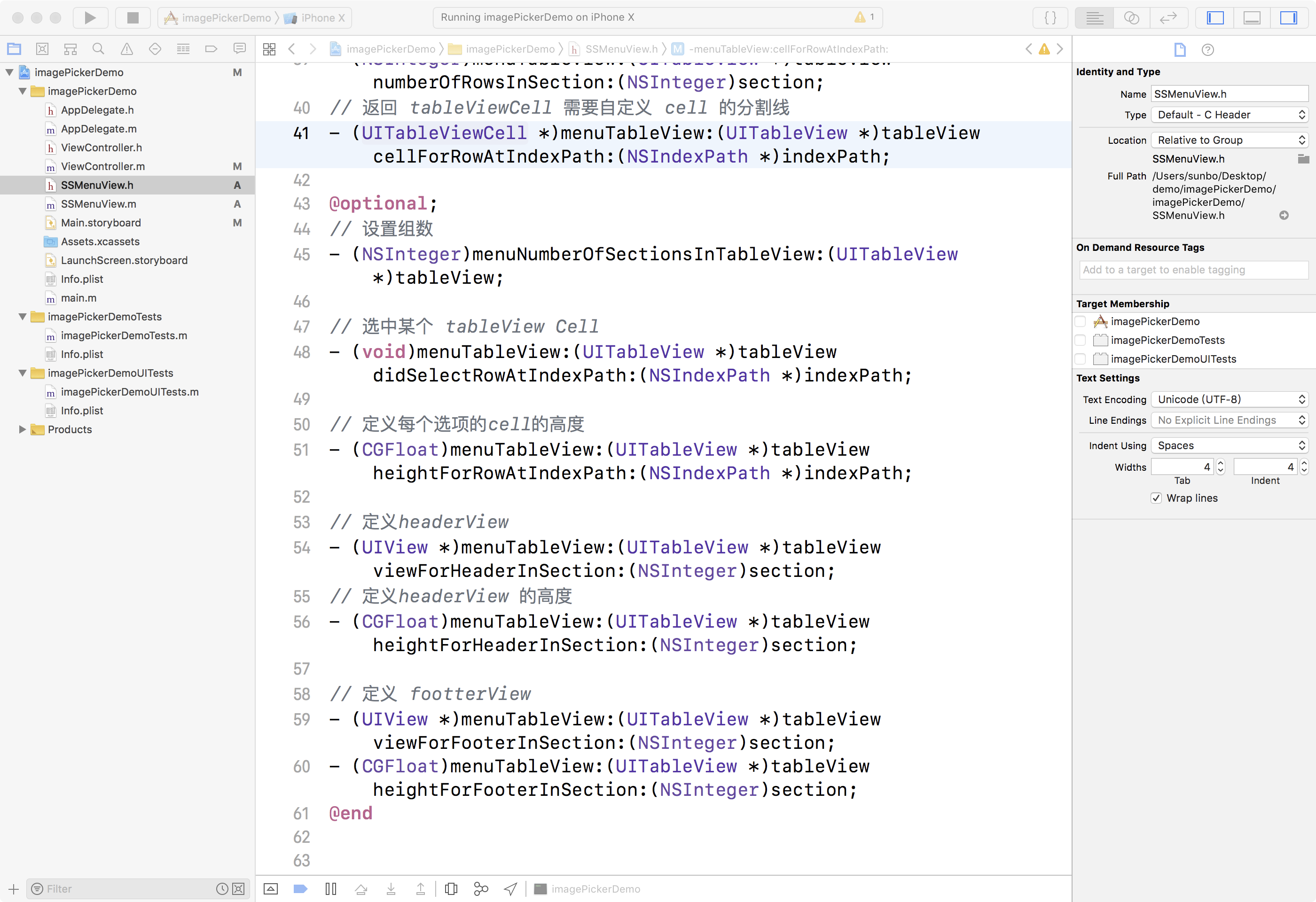
三. 项目结构
四. 使用手册
1. 首先,根据目录,将 SSMenuView.h, SSMenuView.m 文件,添加到自己项目中
2. 创建弹框控件
由于在使用类似弹框的时候,用户可能会多次点击使用,为了避免重复创建,建议使用懒加载创建一个弹窗控件
# pragma

# pragma mark - Lazy -

- (SSMenuView *)menuView{

    if (!_menuView) {

        _menuView = [SSMenuView new];

        _menuView.delegate = self;

//        _menuView.contentHeight = 44 * 6;

//        _menuView.tbView.separatorStyle = UITableViewCellSeparatorStyleNone;

    }

    return _menuView;

}
3. 根据自己的项目需要,创建自己的弹框内容
# pragma

# pragma mark - SSMenuViewDelegate -

- (NSInteger)menuTableView:(UITableView *)tableView numberOfRowsInSection:(NSInteger)section{

    return 4;

}

- (UITableViewCell *)menuTableView:(UITableView *)tableView cellForRowAtIndexPath:(NSIndexPath *)indexPath{

    UITableViewCell *cell = [tableView dequeueReusableCellWithIdentifier:@"cellID"];

    if (!cell) {

        cell = [[UITableViewCell alloc]initWithStyle:(UITableViewCellStyleDefault) reuseIdentifier:@"cellID"];

    }

    cell.textLabel.textAlignment = NSTextAlignmentCenter;

    cell.textLabel.text = [NSString stringWithFormat:@"这是选项%ld",indexPath.row];

    cell.selectionStyle = UITableViewCellSelectionStyleNone;

    return cell;

}

- (CGFloat)menuTableView:(UITableView *)tableView heightForFooterInSection:(NSInteger)section{

    return 44;

}

- (CGFloat)menuTableView:(UITableView *)tableView heightForHeaderInSection:(NSInteger)section{

    return 44;

}

- (UIView *)menuTableView:(UITableView *)tableView viewForFooterInSection:(NSInteger)section{

    UIView *footer = [UIView new];

    footer.backgroundColor = [UIColor orangeColor];

    return footer;

}

- (UIView *)menuTableView:(UITableView *)tableView viewForHeaderInSection:(NSInteger)section{

    UIView *header = [UIView new];

    header.backgroundColor = [UIColor whiteColor];

    header.frame = CGRectMake(0, 0, [UIScreen mainScreen].bounds.size.width, 44);

    UILabel *lab = [UILabel new];

    lab.text = @"这是选项的头部";

    [header addSubview:lab];

    lab.textAlignment = NSTextAlignmentCenter;

    lab.frame = header.frame;

    return header;

}
4. 根据需要,在触发点击事件,弹出弹框
此处,有2种展示方式,根据开发者自己的需要选择是否将弹框完全全屏
- (IBAction)click:(id)sender {

//    [self.menuView showInView:self.view];

    [self.menuView showInWindow];

}

//  隐藏弹框

[self.menuView disMissView];
注:本文著作权归作者,由demo大师发表,拒绝转载,转载需要作者授权
iOS 可高度自定义的底部弹框的更多相关文章
- [组件封装]微信小程序-底部弹框
描述 模仿ios浏览器底部弹框效果. 遮罩层淡入淡出,弹框高度根据内容自适应. 效果 源码 popup-bottom.wxml <!-- popup-bottom.wxml --> < ...
- 微信小程序之底部弹框预约插件
代码地址如下:http://www.demodashi.com/demo/13982.html 一.前期准备工作: 软件环境:微信开发者工具 官方下载地址:https://mp.weixin.qq.c ...
- MUI 自定义从底部弹出的弹出框
1)效果: 点击“点击就送”那个按钮之后,弹窗从底部弹出并自带蒙层,然后点击弹窗之外的灰色部分就从底部消失: 第一步:引入 mui.css或者mui.min.css 引入 mui.min.js或者mu ...
- iOS自定义从底部弹上来的View
概述 自定义蒙层弹起View,点击一下遮罩或界面上关闭按钮,页面会自动下去(从上向下) 详细 代码下载:http://www.demodashi.com/demo/10724.html 在一些少数据没 ...
- 微信小程序底部弹框动画
在写小程序的时候,一般会碰到底部弹出动画,就像下面这样的效果 直接进入正题 https://mp.weixin.qq.com/debug/wxadoc/dev/api/api-animation.ht ...
- MUI 自定义从底部弹出的弹出框内容
最近做的项目都是在使用mui做手机网页,大致是下面的这种弹出效果 首先,引入 mui.css或者mui.min.css 引入 mui.min.js或者mui.js 第二步:<a href=&qu ...
- 微信小程序 --- action-sheet底部弹框
action-sheet:从屏幕底部弹出一个菜单,选择: 使用的时候,在给不同的 action-sheet-item 添加不同的事件. 效果: (这里的确定可以有多个) 代码: <button ...
- presentViewController底部弹框适配ipad
//适配ipad if ([alert respondsToSelector:@selector(popoverPresentationController)]) { alert.popoverPre ...
- svelte组件:Svelte自定义弹窗Popup组件|svelte移动端弹框组件
基于Svelte3.x自定义多功能svPopup弹出框组件(组件式+函数式) 前几天有分享一个svelte自定义tabbar+navbar组件,今天继续带来svelte自定义弹窗组件. svPopup ...
随机推荐
- 爬虫3 requests之json 把json数据转化为字典
#json 将json数据转化为字典,方便操作数据 res = requests.get('http://httpbin.org/get') print(res.json()) #res.json() ...
- bootstrapTable
一个详细的教程 table参数 bootstrap table使用总结 BootstrapTable使用实例 事件event 事件函数的用法: 方法1 $('#table').bootstrapTab ...
- Scala-Unit-2-Scala基础语法1
一.Scala程序的开始->HelloScala 这里的操作如同java的helloworld程序,直接放代码! object HelloScala{ def main(args:Array[S ...
- ELK日志分析方案
针对公司项目微服务化,随着项目及服务器的不断增多,决定采用ELK(Elasticsearch+Logstash+Kibana)日志分析平台进行微服务日志分析. 1.ELK整体方案 1.1 ELK架构图 ...
- 最近24小时记录:虚拟机与Wireshark 2.0
最近24小时记录:虚拟机与Wireshark 2.0 (1)虚拟机如果NAT模式而无法联网,需要检查实体机中VMware的NAT服务是否开启. (2)从Wireshark 2.0版本开始,Wire ...
- codeforces651----A. Joysticks
//贪心,注意特判即可 #include <iostream> using namespace std; int main() { ; cin >> a >> b; ...
- BZOJ2821 作诗(Poetize) 分块
题意 算法 经验总结 代码 题意 不带修改,查询数列[1,n]中[l,r]内的出现正偶数次的数的个数, 数列中的数 <= 1e5, n <= 1e5, 强制在线 算法 查询的内容: 区 ...
- 大道至简第一章Java伪代码
1.编程的精义//愚公移山public class Yugong{public static void main(String[]args){ while(山没平){ ...
- [Python]Marshmallow 代码
schema.dump和schema.load schema.dump()方法返回一个MarshResult的对象,marshmallow官方API说dump和load方法返回的都是dict对象,但查 ...
- 同步方法、同步代码块、volidate变量的使用
当多个线程涉及到共享数据的时候,就会设计到线程安全的问题.非线程安全其实会在多个线程对同一个对象中的实例变量进行并发访问时发生,产生的后果就是“脏读”.发生脏读,就是取到的数据已经被其他的线程改过了. ...