
Effectively bypassing kptr_restrict on Android
墙外通道:http://bits-please.blogspot.com/2015/08/effectively-bypassing-kptrrestrict-on.html
In this blog post, we'll take a look at a few ways that I've discovered in order to bypass kptr_restrict on Android, allowing for easier exploitation of vulnerabilities that require some information on the virtual addresses in which the kernel is loaded. But first, for those of you who aren't familiar with the "protection" offered by kptr_restrict, let's get you up to speed on the subject.
What's kptr_restrict?
As we've seen in the previous blog post, sometimes exploits require knowledge of internal kernel pointers - either in order to hijack them, or in order to corrupt them in a controllable manner.
This fact has been known for quite some time - enough time, in fact, for it to be addressed directly. The Linux kernel contains a feature which enables it to filter out such addresses in order to avoid leaking them to a potential attacker. This configurable feature is called "kptr_restrict", and has been present in the Android kernel source tree for at least two years.
As with nearly all configurable kernel parameters, there exists a special file which allows to set the way in which this feature behaves when attempting to filter kernel addresses. In the case of kptr_restrict, the file resides in "/proc/sys/kernel/kptr_restrict", but has some daunting permissions set:

Essentially, only root can modify its value, but any user can read it.
So how does kptr_restrict work? Well, first of all, kernel developers needed a way to mark kernel pointers as such, whenever those are outputted. This is achieved by using a new format specifier, "%pK", which is used to denote that the value written into that specifier contains a kernel pointer, and as such, should be protected.
There are three different values which control the protection offered by kptr_restrict:
- 0 - The feature is completely disabled
- 1 - Kernel pointers which are printed using "%pK" are hidden (replaced with zeroes), unless the user has the CAP_SYSLOG capability, and has not changed their UID/GID (to prevent leaking pointers from files opened before dropping permissions).
- 2 - All kernel pointers printed using "%pK" are hidden
The default value of this configuration is chosen when building the kernel (via CONFIG_SECURITY_KPTR_RESTRICT), but for all modern Android devices that I've ever encountered, this value is always set to "2".
However - how many kernel developers actually know of the need to protect kernel pointers by using "%pK"? The can be easily answered by grepping the kernel for this format string. The answer is, as expected, quite sad:

Merely 35 times (in 23 files) within the entire kernel source code. Needless to say, kernel pointers are very often printed using the "normal" pointer format specifier, "%p" - a simple search shows many hundreds of such uses.
So now that we've set the stage, let's see why the protection offered by kptr_restrict is insufficient on it's own.
Method #1 - Getting dmesg from shell
All log messages printed by the kernel are written to a circular buffer held within the kernel's memory. Users may read from this buffer by invoking the "dmesg" (display message) command. This command actually accesses the buffer by invoking the syslog system call, as you can see from this strace output:
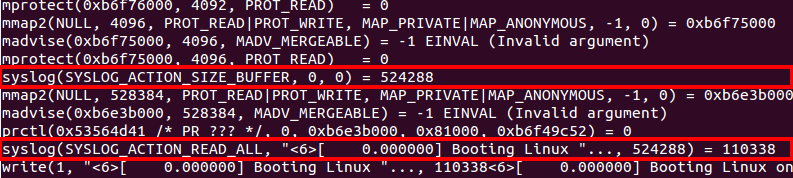
However, the syslog system call can't be accessed by just any user - specifically, the caller must either posses the extremely powerful CAP_SYS_ADMIN capability, or the weaker (and more specific) capability of CAP_SYSLOG.
Either way, most Android processes do not, in fact, have these capabilities, and therefore can't access the kernel log. Or can they? :)
Recall that within Android, the "init" process maintains a list of "services" which can be started or stopped as needed. These services are loaded by "init" upon boot, from a hard-coded list of configuration files, which are almost always stored on the root (read-only) partition, and are therefore read-only.
The configuration files are actually written using a language specific to Android, called the "Android Init Language". This language is pretty simple and easy to use, and allows full control over the permissions with which services are launched (UID/GID) as well as their parameters and "type" (for more information about the language itself, check out the link above).
Another feature of Android are "system properties" - these are key-value pairs which are maintained by the "property service", which is also a thread within the init process. This service allows basic access-control on various "sensitive" system properties, which prevents users from freely modifying any property they please.
These access-permissions for most properties used to be (until Android 4.4) hard-coded within the property service (since Android 5, the permissions are handled by using SELinux labels instead):
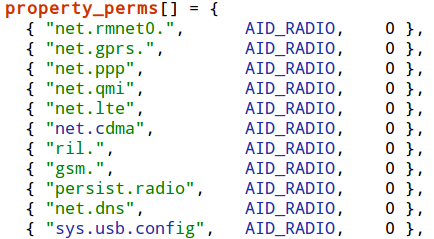
However, some properties get special treatment, namely - the "ctl.start" and "ctl.stop" system properties, which are used to either start or stop system services (defined, as mentioned before, using the "Android Init Language").
These properties are checked strictly using SELinux labels, in order to make sure that the privilege of modifying the status of system services is reserved strictly to certain users.
But here comes the surprising part - when connecting locally to the device using "adb" (Android Debug Bridge), we gain execution as the "shell" user. This user is always permitted start and stop one particular service - "dumpstate". Actually, this is used by a feature offered by the "adb" command-line utility, which enables developers to create bug reports containing full information from the device.

Running "adb" with this command-line argument (or simply executing "bugreport" from the adb shell), actually starts the "dumpstate" service by setting the "ctl.start" system property:

So let's take a look at the configuration for the "dumpstate" service:
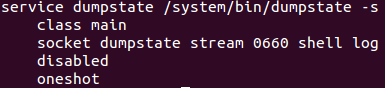
Since the service has no "user" or "group" configurations, it is actually executed with the root user-ID and group-ID, which could be quite dangerous...
Luckily, the developers of the service were well aware of the potential security risks of running with such high capabilities, and therefore immediately after starting, the service drops its capabilities by modifying its user-ID, group-ID and capabilities, like so:
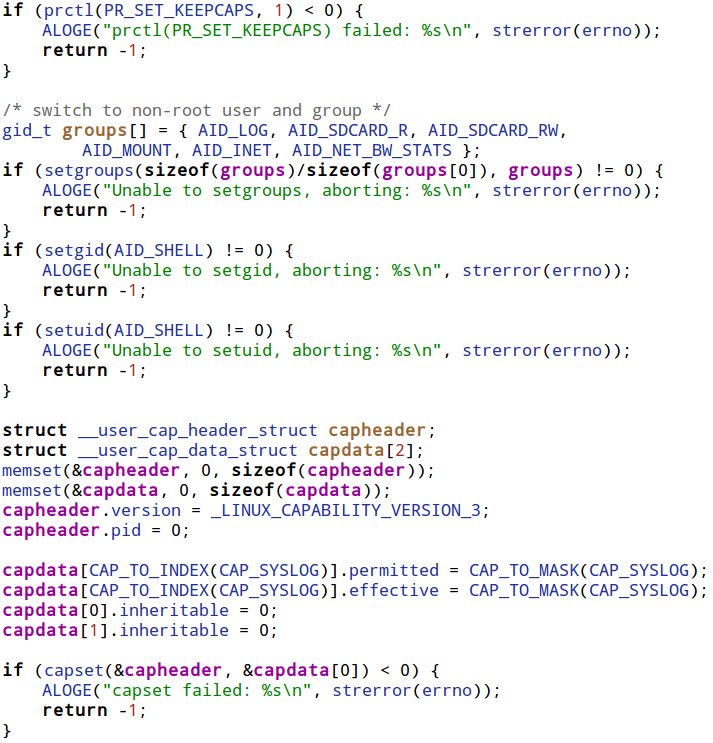
In short, the service sets the user and group IDs to those of the shell user, but makes sure that it keeps the CAP_SYSLOG capability explicitly.
Reading on reveals that "dumpstate" actually reads the kernel log using the syslog system call (which it is capable of executing since it has the CAP_SYSLOG capability), and writes the contents read back to the caller. Essentially, this means that within the context of the "adb shell", we can freely read the kernel log simply by executing the "bugreport" program. Nice.
However, this still doesn't solve the problem of getting needed symbols for exploits - since, as mentioned earlier, these symbols should generally be printed using the "%pK" format specifier, which means they would appear "censored" in the kernel log.
But alas, most pointers within the kernel are certainly not printed using the special format specifier, but instead use the regular "%p" format, and are therefore left uncensored. This means that the kernel log is typically a treasure trove of useful kernel pointers.
For example, when the kernel boots, the memory map of the kernel's different segments is printed, like so:
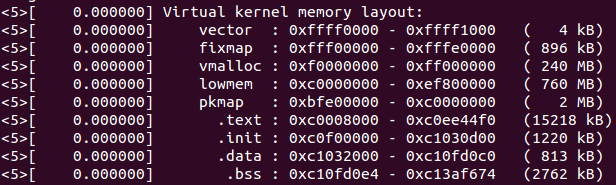
Now, assuming there's a single symbol we would like to find, we could simply dump the list of all kernel symbols using the virtual file containing all the symbols - /proc/kallsyms. When kptr_restrict is enabled, the list returned by kallsyms is censored (since it is printed using "%pK"), and therefore won't show any kernel pointers.
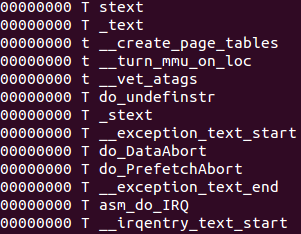
Censored symbols from kallsyms
However, the symbols returned by kallsyms are ordered by their addresses, even if those addresses aren't shown. Moreover, this task is made easier due to the fact that each segment is prefixed and postfixed by specially named marker symbols:
| Segment Name | Start Marker | End Marker |
|---|---|---|
| .text | _text | _etext |
| .init | __init_begin | __init_end |
| .data | _sdata | _edata |
| .bss | ___bss_start | __bss_end |
We can then use this list to deduce the location of different symbols by simply counting the number of symbols from the start or end marker to our wanted symbol, while adding up the sizes of each of the symbols encountered.
Another technique would be to cause a wanted kernel pointer to be written to the kernel log. For example, on Qualcomm-based devices (based on the "msm" kernel), whenever the video device is opened, the kernel virtual address of the video device is written to the kernel log:

msm_vidc_open leaks the pointer to the kernel log
Assuming you have the full access to a live device, you could read the kernel image directly from the MMC, via /dev/block. However, in most cases reading the MMC blocks directly requires root permissions, which would make this method pretty obsolete, since with root access we could already disable kptr_restrict.
The more reasonable path to obtaining the kernel image would be to simply download the firmware file for your particular device, and unpack it. There are many tools which enable firmware unpacking for different devices (for example, I wrote a script to unpack to Nexus 5's bootloader - here), but many such tools are available, and are typically a google-search away.
Just one word of caution - make sure you download the exact kernel image matching the kernel on your device. You can find the running kernel's version by simply running "uname -a":

This means that all we need to do in order to rebuild this table from a raw kernel binary is to understand the exact format in which this symbol table is written. However, for a normally compiled kernel with no additional symbols, this turns out to be a little tricky.
Since the labels written by the script are not visible in the resulting kernel binary, the first thing we'd have to solve is how to find the beginning of the symbol table within the binary. Luckily, the solution turns out to be pretty simple - remember when we previously had a look at the symbol table from kallsyms? The first two symbols were marker symbols pointing to the beginning of the kernel's text segment. Since the kernel's code is loaded at a known address (typically, 0xC0008000), we can search for this value appearing at least twice consecutively within the binary, and attempt to parse the symbol table's structure starting at that address.

Going over the symbol table itself, reveals that it is terminated by a NULL address. Then, immediately following the symbol table, the actual number of symbols is written, which means we can easily verify that the table is actually well-formed.

Then, two tables of "markers" and "symbols" are written into the file. This is done in order to compress the size of the symbols within the table, and by doing so reduce the size of the kernel binary. The compression maps the 256 most used substrings (which are called tokens), into a single byte value. Then, each symbol's name is compressed into a pascal-style string of bytes (meaning, a byte marking the length of the string, then an actual string of characters). Each byte in the compressed name maps to a single tokens, which in turn corresponds to a single "most commonly used" substring. Putting it together, it looks like this:
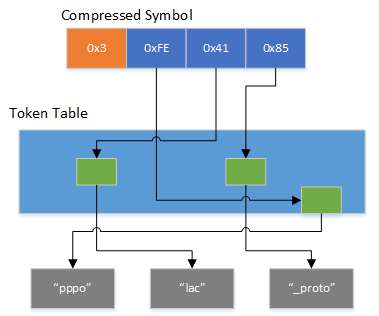
According to kernel developers, thisusually produces a compression ratio of about 50%.
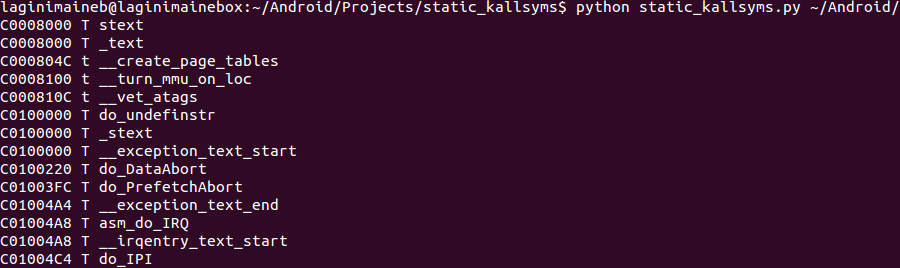
I've written a python script which, given a raw kernel binary, extracts the full symbol table from the binary, in the exact same format as they are written within kallsyms. You can find it here. Please let me know if you find the script useful!
Method #3 - Finding information disclosures within the kernel
This is the "classical" method which is commonly used in order to bypass the restrictions imposed by kptr_restrict. For a remote attacker wishing to target a wide variety of devices, it is quite often the best choice, since:
- The first method typically requires shell access to the device, in order to execute the "bugreport" service
- The second method requires you to obtain the kernel image, which could be tiresome to do for a very wide variety of devices
Sadly, it appears that kernel developers are far less aware of the possible risks of leaking kernel pointers than they are of other (e.g., memory corruption) vulnerabilities.
As a result, finding a kernel memory leak is usually a very short and simple task. To prove this point, after poking around for five minutes on a live device, I've come across such a leak, which is accessible from any context.
Whenever a socket is opened within Android, it is tagged using a netfilter driver called "qtaguid". This driver accounts for all the data sent or received by every socket (and tag), and allows some restrictions to be placed on sockets, based on the tag assigned to them. Android uses this feature in order to account for data usage by the device. The actual per-process breakdown is done by assigning each process a specific tag, and monitoring the data used by the process based on that tag.
The driver also exposes a control interface, with which a user can query the current sockets and their tags, along with the user-ID and process-ID from which the socket has been opened. This control interface is facilitated by a world-accessible file, under /proc/net/xt_qtaguid/ctrl.

However, reading this file reveals that it actually contains the kernel virtual address for each of the sockets which completely uncensored: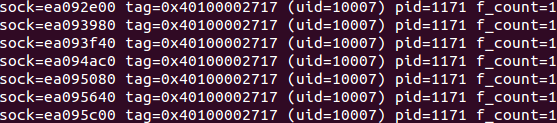
Looking at the source code for the virtual file's "read" implementation, reveals that the address is written without using the special "%pK" format specifier:
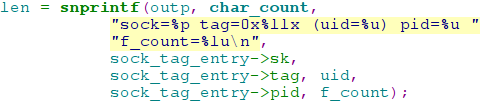
For those interested - the actual pointer written is to the "sock" structure, which is the kernel structure containing the actual "socket" structure, which in turns contains all the function pointers to the operations within this socket.
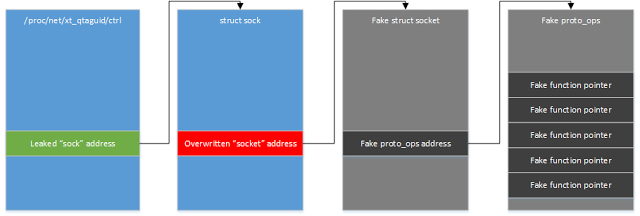
This means that if, for example, we have a vulnerability that allows us to overwrite a specific kernel address (like the vulnerability presented in the previous blog post), we could simply:
- Open a socket and tag it with "qtaguid"
- Look for the socket's address within /proc/net/xt_qtaguid/ctrl
- Overwrite the pointer to the "socket" structure to an address within our address-space
- Populate the overwritten address with a dummy "socket" structure containing fully controller function pointers
- Perform any operation on the socket (like closing it), in order to cause the kernel to execute our own code
Summing it all up
Just like any other mitigation, kptr_restrict adds a layer of defence which can sometimes slow down an attacker, but is generally not a show-stopper for anyone determined enough. However, unlike most other mitigations, kptr_restrict requires the cooperation of kernel developers to be effective. Right now, things aren't so great. Hopefully this changes :)
Effectively bypassing kptr_restrict on Android的更多相关文章
- Android 性能优化(25)*性能工具之「Systrace」Analyzing UI Performance with Systrace:用Systrace得到ui性能报告
Analyzing UI Performance with Systrace In this document Overview 简介 Generating a Trace 生成Systrace文件 ...
- Analyzing UI Performance with Systrace 使用systrace工具分析ui性能
While developing your application, you should check that user interactions are buttery smooth, runni ...
- linux测试工程介绍(Linux Test Project)
http://ltp.sourceforge.net/ Linux Test Project, 后台很硬,由SGI™ 发起, IBM维护,所以质量有保障. 里面介绍了很多工具,对于一般的基准测试应该是 ...
- [fw]linux测试工程介绍(Linux Test Project)
http://ltp.sourceforge.net/ Linux Test Project, 后台很硬,由SGI™ 发起, IBM维护,所以质量有保障. 里面介绍了很多工具,对于一般的基准测试应该是 ...
- Hooking Android System Calls for Pleasure and Benefit
The Android kernel is a powerful ally to the reverse engineer. While regular Android apps are hopele ...
- Android的Message Pool是什么——源码角度分析
原文地址: http://blog.csdn.net/xplee0576/article/details/46875555 Android中,我们在线程之间通信传递通常采用Android的消息机制,而 ...
- Android Handler机制(一)---Message源码分析
Message: 定义: public final class Message implements Parcelable Message类是个final类,就是说不能被继承,同时Message类实现 ...
- 关于android接口回调机制
http://www.cnblogs.com/JohnTsai/p/3975022.html http://www.zhihu.com/question/19801131 In my previous ...
- 【Android】Android 移动应用数据到SD
[Android]Android 移动应用数据到SD 在应用的menifest文件中指定就可以了,在 <manifest> 元素中包含android:installLocation 属性, ...
随机推荐
- java 遇到的问题
1.list.sort(new Comparator<String>() { @override public int compare(String o1, String o2) { re ...
- Python3实战系列之五(获取印度售后数据项目)
问题:续接上一篇.说干咱就干呀,勤勤恳恳写程序呀! 目标:此篇我们试着把python程序打包成.exe程序.这样就可以在服务器上运行了.实现首篇计划列表功能模块的第二步: 2.将python程序转为 ...
- Python学习第四章
1.类和对象: 类对象支持两种操作:属性引用和实例化. 属性引用:obj.name 构造方法:类会定义一个名为__int__()的特殊方法如下 def __init__(self): s ...
- C# Autofac集成之Framework WebAPI
Web API 2集成需要Autofac.WebApi2 NuGet包. Web API集成需要Autofac.WebApi NuGet包. Web API集成为控制器,模型绑定器和操作过滤器提供了依 ...
- Asp.Net Core 禁用预编译
在.NET Core 2 Web API应用程序中,MS VS 2017中的发布到文件夹功能产生: <ProjectAssembly>.PrecompiledViews.dll <P ...
- MongoDB 数据库
数据库: 关系型数据库 mysql 收费 速度快 字段类型 非关系型数据库 MongoDB 不收费 速度慢一些 存储数据都是字符串 ...
- TextView展示富文本时emoj或图片和文字不对齐的解决方案
在项目中,回复框.聊天界面的显示往往会有emoj或者图片,但是一个比较头疼的问题是,会出现emoj表情或者图片和文字的位置不对齐,总是有偏移,这样很影响用户体验的.下面会总结一下如何解决这个问题. 本 ...
- Struts2 项目 Action 查询结果异常 org.apache.struts2.json.JSONException
问题描述 今天进行一个订单管理模块的开发时遇到一个问题:查询的订单时有时会报这个异常: org.apache.struts2.json.JSONException: java.lang.Illegal ...
- Telerik for AJAX RadGrid控件
作为一名.net小白,今天分享一下telerik知识的学习.熟悉ASP.NET Web Form的都知道Grid View或者是List View等表格控件,所以今天和大家分享一下telerik Ra ...
- 一个简单的C语言题背后的故事
最近看到了一个C语言问题,是要计算出这个函数的输出: #include <stdio.h> int Test(int x,int y, int z){ printf("x,y,z ...