
vue-demo(初级)
在使用WebStorm前把字符编码等等设置好!
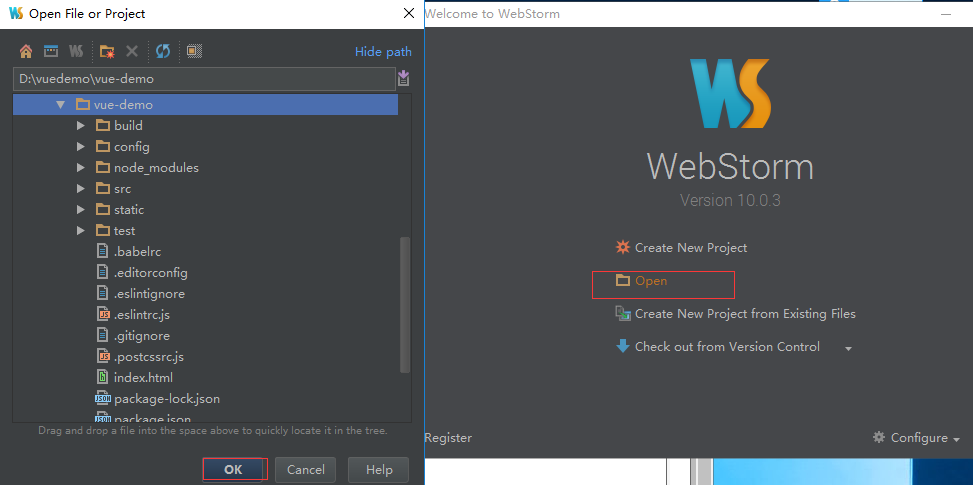
使用WebStorm打开vue项目等待ide索引加载完成
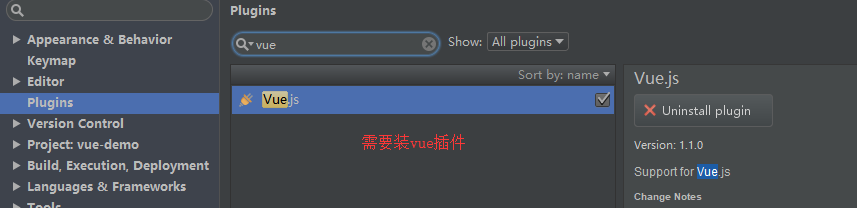
注意要让WebStorm可以创建vue文件需要以下步骤:
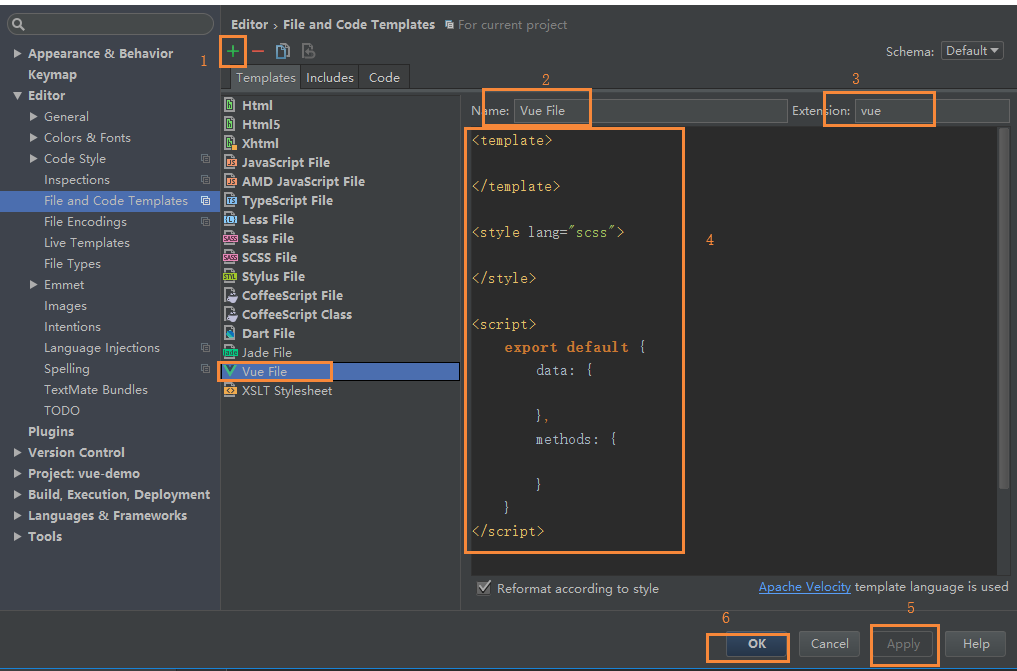
<template>

</template>

<style>

</style>

<script>

    export default {

        data: {

        },

        methods: {

        }

    }

</script>
demo1 构建一个简单的Vue导航栏菜单实例
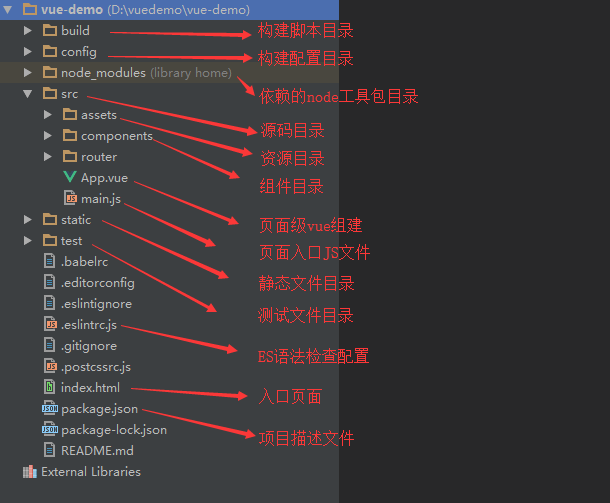
1.新建组件文件夹(pages)及文件(index、userCenter、userInfo):
index.vue代码:
<template>

    <div>

        <p>这是首页</p>

    </div>

</template>

<style>

    p{

        display: block;

        background: #ffe87c;

    }

</style>

<script>

    export default {}

</script>

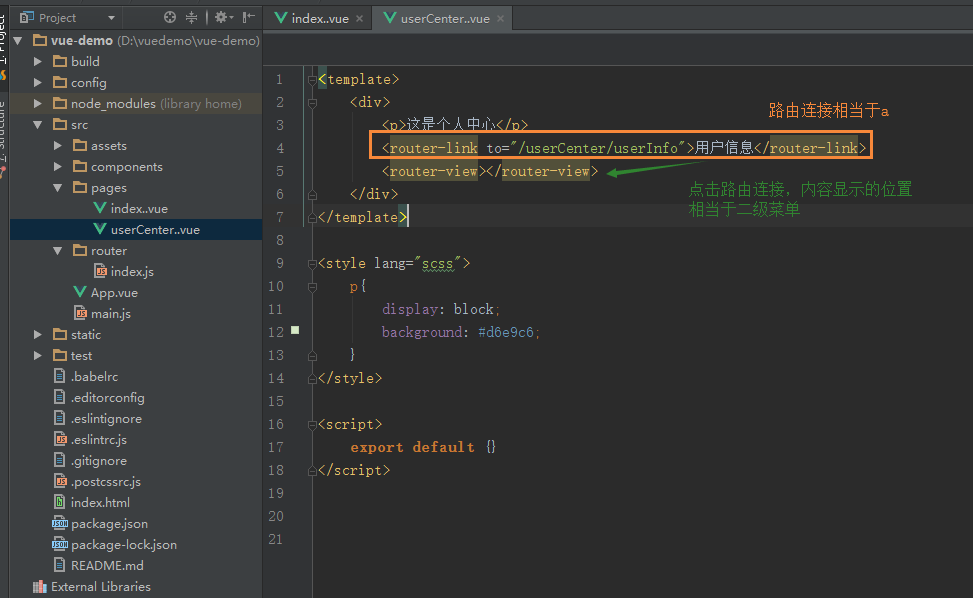
userCenter.vue代码:
<template>

    <div>

        <p>这是个人中心</p>

        <router-link to="/userCenter/userInfo">用户信息</router-link>

        <router-view></router-view>

    </div>

</template>

<style>

    p{

        display: block;

        background: #d6e9c6;

    }

</style>

<script>

    export default {}

</script>

</style>
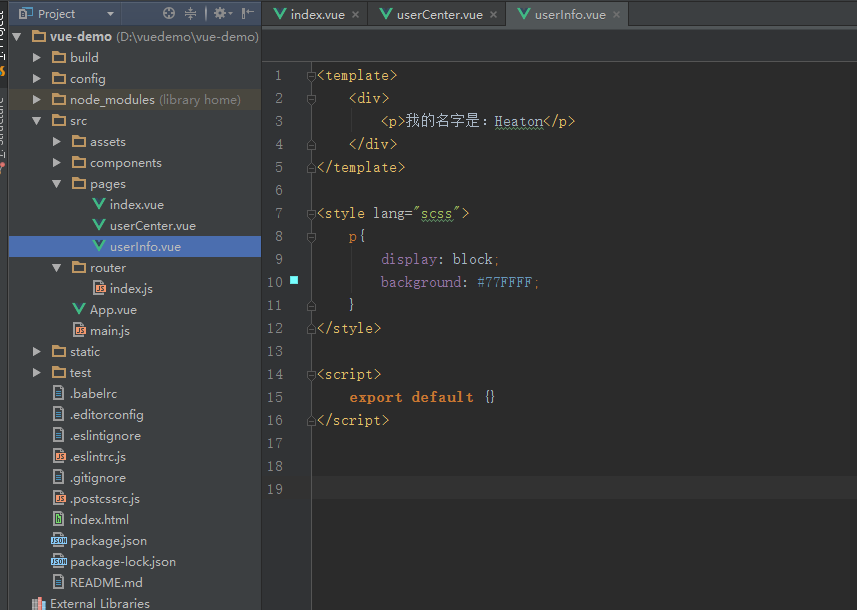
userInfo.vue代码:
<template>

    <div>

        <p>我的名字是:Heaton</p>

    </div>

</template>

<style>

    p{

        display: block;

        background: #77FFFF;

    }

</style>

<script>

    export default {}

</script>
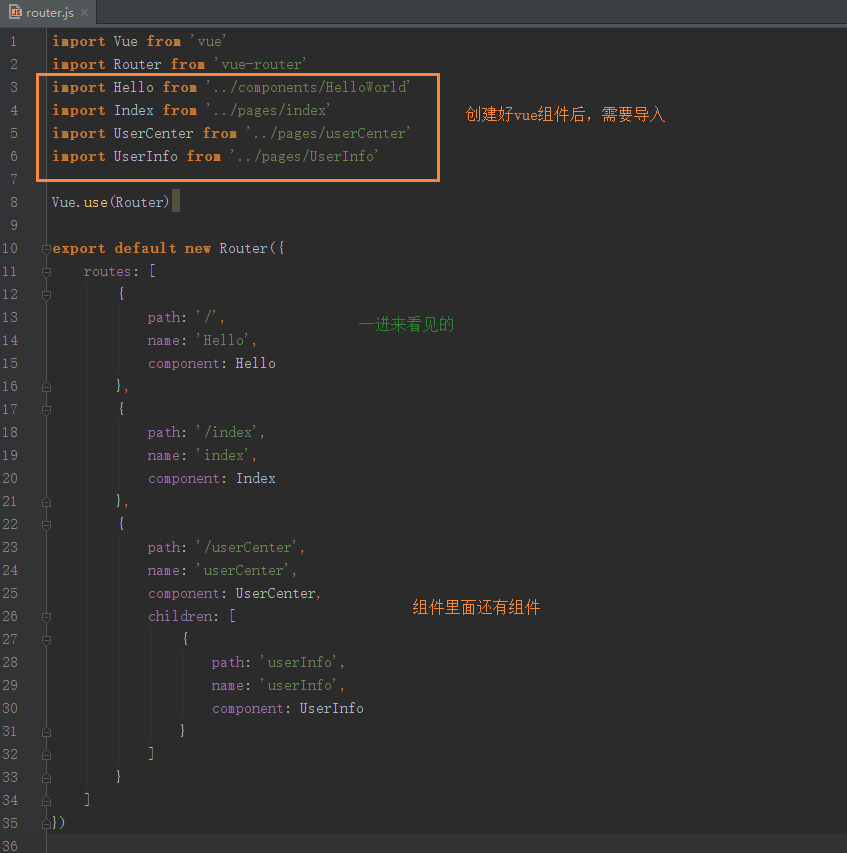
2.在路由配置文件中,导入新建的组件。(index.js我们不用了)
在router文件夹下新建router.js代码:
import Vue from 'vue'

import Router from 'vue-router'

import Hello from '../components/HelloWorld'

import Index from '../pages/index'

import UserCenter from '../pages/userCenter'

import UserInfo from '../pages/userInfo'

Vue.use(Router)

export default new Router({

    routes: [

        {

            path: '/',

            name: 'Hello',

            component: Hello

        },

        {

            path: '/index',

            name: 'index',

            component: Index

        },

        {

            path: '/userCenter',

            name: 'userCenter',

            component: UserCenter,

            children: [

                {

                    path: 'userInfo',

                    name: 'userInfo',

                    component: UserInfo

                }

            ]

        }

    ]

})
3. 在项目入口App.vue中建立导航栏,代码如下:
App.vue代码:
<template>

  <div id="app">

    <img src="./assets/logo.png">

    <p>这可以看做是导航栏</p>

    <router-link to="/index">首页</router-link>

    <router-link to="/userCenter">个人中心</router-link>

    <router-view></router-view>

  </div>

</template>

<script>

export default {

  name: 'App'

}

</script>

<style>

#app {

  font-family: 'Avenir', Helvetica, Arial, sans-serif;

  -webkit-font-smoothing: antialiased;

  -moz-osx-font-smoothing: grayscale;

  text-align: center;

  color: #2c3e50;

  margin-top: 60px;

}

</style>
4.修改mian.js
将import router from './router'
改为import router from './router/router.js'

5.启动项目
npm run dev


6.错误总结
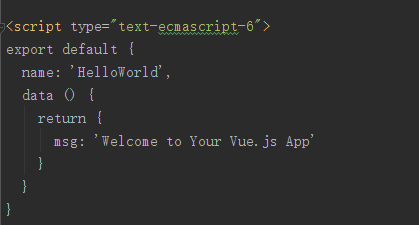
WebStorm的js文件报错:Export/Import declarations are not supported by current JavaScript version

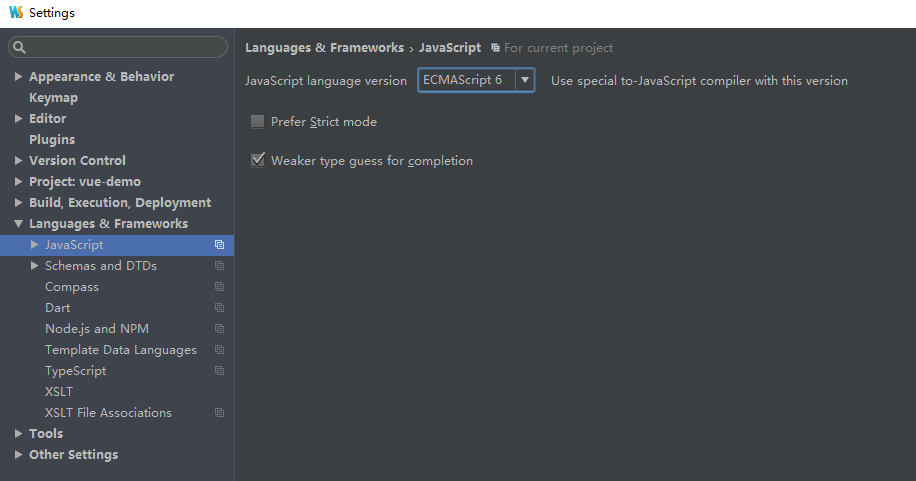
.Vue 文件 ES6 语法 webstorm 中的一个识别Bug

添加 type 类型 指明为: text-ecmascript-6 亲测有效。
type="text-ecmascript-6"
vue-cli 报错 http://eslint.org/docs/....
  ✘✘  http://eslint.org/docs/rules/indent                   Expected indentation of 0 spaces but found 4

  src\pages\index.vue:15:1

      export default {

   ^

  ✘✘  http://eslint.org/docs/rules/indent                   Expected indentation of 2 spaces but found 8

  src\pages\index.vue:16:1

          data: {

   ^

  ✘✘  https://google.com/#q=vue%2Fno-shared-component-data  `data` property in component must be a function

  src\pages\index.vue:16:9

          data: {

           ^

  ✘✘  http://eslint.org/docs/rules/indent                   Expected indentation of 2 spaces but found 8

  src\pages\index.vue:18:1

          },

   ^

  ✘✘  http://eslint.org/docs/rules/indent                   Expected indentation of 2 spaces but found 8

  src\pages\index.vue:19:1

          methods: {

   ^

  ✘✘  http://eslint.org/docs/rules/indent                   Expected indentation of 2 spaces but found 8

  src\pages\index.vue:21:1

          }

   ^

  ✘✘  http://eslint.org/docs/rules/indent                   Expected indentation of 0 spaces but found 4

  src\pages\index.vue:22:1

      }

   ^

  ✘✘  http://eslint.org/docs/rules/no-multiple-empty-lines  Too many blank lines at the end of file. Max of 0 allowed

  src\pages\index.vue:24:1

   ^

✘✘ 8 problems (8 errors, 0 warnings)

Errors:

  6  http://eslint.org/docs/rules/indent

  1  http://eslint.org/docs/rules/no-multiple-empty-lines

  1  https://google.com/#q=vue%2Fno-shared-component-data

  ✘✘  http://eslint.org/docs/rules/indent                   Expected indentation of 0 spaces but found 4

  src\pages\userCenter.vue:17:1

      export default {}

   ^

  ✘✘  http://eslint.org/docs/rules/no-multiple-empty-lines  Too many blank lines at the end of file. Max of 0 allowed

  src\pages\userCenter.vue:19:1

   ^

✘✘ 2 problems (2 errors, 0 warnings)

Errors:

  1  http://eslint.org/docs/rules/no-multiple-empty-lines

  1  http://eslint.org/docs/rules/indent

  ✘✘  http://eslint.org/docs/rules/indent                   Expected indentation of 0 spaces but found 4

  src\pages\userInfo.vue:15:1

      export default {}

   ^

  ✘✘  http://eslint.org/docs/rules/no-multiple-empty-lines  Too many blank lines at the end of file. Max of 0 allowed

  src\pages\userInfo.vue:17:1

   ^

✘✘ 2 problems (2 errors, 0 warnings)

Errors:

  1  http://eslint.org/docs/rules/no-multiple-empty-lines

  1  http://eslint.org/docs/rules/indent

  ✘✘  http://eslint.org/docs/rules/indent  Expected indentation of 2 spaces but found 4

  src\router\router.js:11:1

      routes: [

   ^

  ✘✘  http://eslint.org/docs/rules/indent  Expected indentation of 4 spaces but found 8

  src\router\router.js:12:1

          {

   ^

  ✘✘  http://eslint.org/docs/rules/indent  Expected indentation of 6 spaces but found 12

  src\router\router.js:13:1

              path: '/',

   ^

  ✘✘  http://eslint.org/docs/rules/indent  Expected indentation of 6 spaces but found 12

  src\router\router.js:14:1

              name: 'Hello',

   ^

  ✘✘  http://eslint.org/docs/rules/indent  Expected indentation of 6 spaces but found 12

  src\router\router.js:15:1

              component: Hello

   ^

  ✘✘  http://eslint.org/docs/rules/indent  Expected indentation of 4 spaces but found 8

  src\router\router.js:16:1

          },

   ^

  ✘✘  http://eslint.org/docs/rules/indent  Expected indentation of 4 spaces but found 8

  src\router\router.js:17:1

          {

   ^

  ✘✘  http://eslint.org/docs/rules/indent  Expected indentation of 6 spaces but found 12

  src\router\router.js:18:1

              path: '/index',

   ^

  ✘✘  http://eslint.org/docs/rules/indent  Expected indentation of 6 spaces but found 12

  src\router\router.js:19:1

              name: 'index',

   ^

  ✘✘  http://eslint.org/docs/rules/indent  Expected indentation of 6 spaces but found 12

  src\router\router.js:20:1

              component: Index

   ^

  ✘✘  http://eslint.org/docs/rules/indent  Expected indentation of 4 spaces but found 8

  src\router\router.js:21:1

          },

   ^

  ✘✘  http://eslint.org/docs/rules/indent  Expected indentation of 4 spaces but found 8

  src\router\router.js:22:1

          {

   ^

  ✘✘  http://eslint.org/docs/rules/indent  Expected indentation of 6 spaces but found 12

  src\router\router.js:23:1

              path: '/userCenter',

   ^

  ✘✘  http://eslint.org/docs/rules/indent  Expected indentation of 6 spaces but found 12

  src\router\router.js:24:1

              name: 'userCenter',

   ^

  ✘✘  http://eslint.org/docs/rules/indent  Expected indentation of 6 spaces but found 12

  src\router\router.js:25:1

              component: UserCenter,

   ^

  ✘✘  http://eslint.org/docs/rules/indent  Expected indentation of 6 spaces but found 12

  src\router\router.js:26:1

              children: [

   ^

  ✘✘  http://eslint.org/docs/rules/indent  Expected indentation of 8 spaces but found 16

  src\router\router.js:27:1

                  {

   ^

  ✘✘  http://eslint.org/docs/rules/indent  Expected indentation of 10 spaces but found 20

  src\router\router.js:28:1

                      path: '/userInfo',

   ^

  ✘✘  http://eslint.org/docs/rules/indent  Expected indentation of 10 spaces but found 20

  src\router\router.js:29:1

                      name: 'userInfo',

   ^

  ✘✘  http://eslint.org/docs/rules/indent  Expected indentation of 10 spaces but found 20

  src\router\router.js:30:1

                      component: UserInfo

   ^

  ✘✘  http://eslint.org/docs/rules/indent  Expected indentation of 8 spaces but found 16

  src\router\router.js:31:1

                  }

   ^

  ✘✘  http://eslint.org/docs/rules/indent  Expected indentation of 6 spaces but found 12

  src\router\router.js:32:1

              ]

   ^

  ✘✘  http://eslint.org/docs/rules/indent  Expected indentation of 4 spaces but found 8

  src\router\router.js:33:1

          }

   ^

  ✘✘  http://eslint.org/docs/rules/indent  Expected indentation of 2 spaces but found 4

  src\router\router.js:34:1

      ]

   ^

✘✘ 24 problems (24 errors, 0 warnings)

Errors:

  24  http://eslint.org/docs/rules/indent
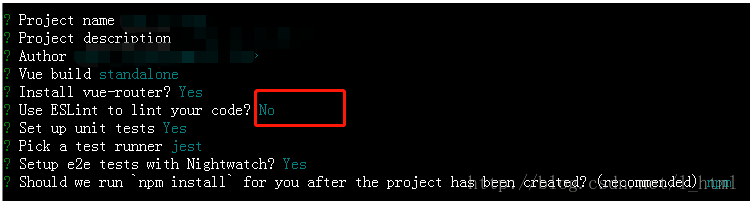
第一种解决办法:
第二种解决办法:
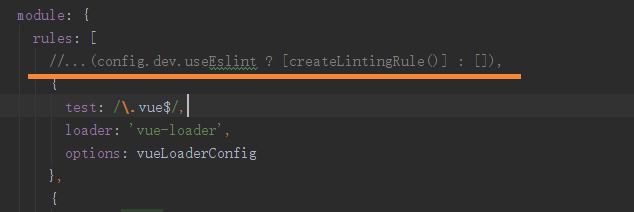
注释掉build里面webpack.base.conf.js里的el规范配置
或者

vue UI组件推荐https://blog.csdn.net/qq_26780317/article/details/80655353
vue-demo(初级)的更多相关文章
- 两个Vue Demo
1 实现 person list <!DOCTYPE html> <html> <head> <meta charset="UTF-8"& ...
- vue demo todo-list
html <input type='text' v-model="todoItem" v-on:keyup.enter='addItem'> <ul> &l ...
- vue+Typescript初级入门
Typescript 在前端圈已经逐渐普及,Vue 2.5.0 改进了类型声明,使得对 TypeScript 更加友好 不过要想在项目中直接使用 TypeScript 仍然需要对项目进行一些改造 PS ...
- vue.js初级入门之最基础的双向绑定操作
首先在页面引入vue.js以及其他需要用到的或者可能要用到的插件(这里我多引用了bootstrap和jquery) 引用的时候需要注意文件的路径,准备工作这样基本就完成了,下面正式开始入门. vue. ...
- Framework7+vue demo
最近看了下f7+vue做了几个测试页面,商品图片来自淘宝,代码等有时间了再传,
- vue.js 初级之一
vue.js 是一个构建数据驱动的 web 界面 渐进式驱动框架. 引用的话,直接使用script标签引入就可以了: <script src="./lib/vue.js"&g ...
- vue环境的搭建与第一个demo
参考两个博客 1 2 git.npm和淘宝镜像的安装过程过程省略了,直接开始webpack + vue-cli + 创建demo 首先,在磁盘创建一个文件夹,命名为vue-projects,里面再建一 ...
- vue之综合Demo:打沙袋
demo7.html <!DOCTYPE html> <html lang="en" xmlns:v-bind="http://www.w3.org/1 ...
- Vue.js之组件嵌套小demo
Vue.js之组件嵌套的小demo项目 第一步:初始化一个wabpack项目,这里不在复述.第二步:在components文件夹下新建Header.vue Footer.vue和Users.vue三个 ...
- Vue.js 实战教程(附demo)
在实战之前,你需要对vuejs的基础语法有一定的了解,可以通过以下几个途径进行学习: vue.js官方文档:https://cn.vuejs.org/v2/guide/index.html vue.j ...
随机推荐
- [python](windows)分布式进程问题:pickle模块不能序列化lambda函数
运行错误:_pickle.PicklingError: Can't pickle <function <lambda> at 0x000002BAAEF12F28>: attr ...
- 漏洞复现——httpd换行解析漏洞
漏洞原理: 在解析php文件时,1.php\x0A这种格式的文件将会被认为php文件解析,进而可以绕过一些服务器的安全策略. 漏洞版本: 2.4.0~2.4.29 漏洞复现: 复现该漏洞是利用dock ...
- NopCommerce 更改发票字体
NopCommerce 默认是用~/App_Data/Pdf/FreeSerif.ttf 这个字体的. 用这个字体,发票里的中文不能显示. 可以把c:\windows\font\simhei.ttf ...
- npm 设置和取消代理配置
设置代理npm config set proxy=http://127.0.0.1:8087npm config set registry=http://registry.npmjs.org12关于h ...
- Python爬虫之requests
爬虫之requests 库的基本用法 基本请求: requests库提供了http所有的基本请求方式.例如 r = requests.post("http://httpbin.org/pos ...
- excel表格中,怎么根据一列重复的数据求对应另一列总和
如下: 求出姓名对应分数总和对应 : 首先复制一份Sheet2 对Sheet1进行操作选中A列姓名 数据->删除重复项->以前选中区域排序->删除重复项 然后删除对应成绩项选中张三对 ...
- Python---高级函数map, filter, zip, enumerate等的用法
今天看自然语言处理这本书的时候,被这里的高级函数的概念吸引了,因为我觉得所有的函数都只是函数而已,是为了实现特定功能而实现的,不应该有高级,低级之分啊!不过了解之后,发现这几个函数确实是有点高级,非常 ...
- LCA最近公共祖先模板代码
vector模拟邻接表: #include<iostream> #include<cstdio> #include<cstring> #include<cma ...
- Vue 学习Day001
入门 基本使用 安装Vue 直接引入本地或者cdn Vue地址 使用npm 使用cli 示例 <!DOCTYPE html> <html lang="en"> ...
- String Permutation
Given two strings, write a method to decide if one is a permutation of the other. Example abcd is a ...