
thymeleaf(二)
项目demo http://pan.baidu.com/s/1wg6PC
compile("org.springframework.boot:spring-boot-starter-thymeleaf")

<?xml version="1.0" encoding="UTF-8"?>

<web-app xmlns="http://java.sun.com/xml/ns/javaee"

         xmlns:xsi="http://www.w3.org/2001/XMLSchema-instance"

         xsi:schemaLocation="http://java.sun.com/xml/ns/javaee

                 http://java.sun.com/xml/ns/javaee/web-app_3_0.xsd"

         version="3.0">

    <!--配置WEB-INF下的servlet-context.xml文件-->

    <servlet>

        <servlet-name>appServlet</servlet-name>

        <servlet-class>org.springframework.web.servlet.DispatcherServlet</servlet-class>

        <init-param>

            <param-name>contextConfigLocation</param-name>

            <param-value>/WEB-INF/servlet-context.xml</param-value>

        </init-param>

        <load-on-startup>1</load-on-startup>

    </servlet>

    <servlet-mapping>

        <servlet-name>appServlet</servlet-name>

        <url-pattern>/</url-pattern>

    </servlet-mapping>

</web-app>
<?xml version="1.0" encoding="UTF-8"?>

<beans xmlns="http://www.springframework.org/schema/beans"

       xmlns:xsi="http://www.w3.org/2001/XMLSchema-instance"

       xmlns:context="http://www.springframework.org/schema/context"

       xmlns:mvc="http://www.springframework.org/schema/mvc"

       xsi:schemaLocation="http://www.springframework.org/schema/mvc

       http://www.springframework.org/schema/mvc/spring-mvc-3.1.xsd

       http://www.springframework.org/schema/beans http://www.springframework.org/schema/beans/spring-beans-3.1.xsd

       http://www.springframework.org/schema/context http://www.springframework.org/schema/context/spring-context-3.1.xsd">

       <!-- Scans the classpath of this application for @Components to deploy as beans -->

       <context:component-scan base-package="com.test.thymeleaf.controller" />

       <!-- Configures the @Controller programming model -->

       <mvc:annotation-driven />

        <!--Resolves view names to protected .jsp resources within the /WEB-INF/views directory -->

        <!--springMVC+jsp的跳转页面配置-->

       <!--<bean class="org.springframework.web.servlet.view.InternalResourceViewResolver">-->

              <!--<property name="prefix" value="/WEB-INF/views/" />-->

              <!--<property name="suffix" value=".jsp" />-->

       <!--</bean>-->

       <!--springMVC+thymeleaf的跳转页面配置-->

       <bean id="templateResolver"

          class="org.thymeleaf.templateresolver.ServletContextTemplateResolver">

         <property name="prefix" value="/WEB-INF/views/" />

         <property name="suffix" value=".html" />

         <property name="templateMode" value="HTML5" />

       </bean>

       <bean id="templateEngine"

           class="org.thymeleaf.spring4.SpringTemplateEngine">

          <property name="templateResolver" ref="templateResolver" />

       </bean>

       <bean class="org.thymeleaf.spring4.view.ThymeleafViewResolver">

         <property name="templateEngine" ref="templateEngine" />

       </bean>

</beans>
package com.test.thymeleaf.controller;

import com.test.thymeleaf.domain.User;

import org.springframework.stereotype.Controller;

import org.springframework.ui.Model;

import org.springframework.web.bind.annotation.RequestMapping;

import org.springframework.web.bind.annotation.RequestMethod;

@Controller

public class HomeController {

    User user = new User();
    //入口

    @RequestMapping(value = "/home")

    public String home(Model model) {

        model.addAttribute("user",user);

        return "aa";

    }


  //提交表单后进行数据读取,并将数据传出

    @RequestMapping(value = "/bb",method = RequestMethod.POST)

    public String bb(User user,Model model) {

        model.addAttribute("user", user);

        model.addAttribute("message", ",welcome");

        return "bb";

    }

}
<!DOCTYPE html>

<html xmlns="http://www.w3.org/1999/xhtml"

      xmlns:th="http://www.thymeleaf.org">
<!DOCTYPE html>

<html xmlns="http://www.w3.org/1999/xhtml"

      xmlns:th="http://www.thymeleaf.org">

<head>

  <title>Home</title>

</head>

<body>

<form th:action="@{/bb}" th:object="${user}" th:method="post">

    <input type="text" th:field="*{name}"/>

    <input type="text" th:field="*{msg}"/>

    <input type="submit"/>

</form>

</body>

</html>
bb.html(用${}读取后台传出的数据动态替换静态数据“vinphy,”和"welcome!")
<!DOCTYPE html>

<html xmlns="http://www.w3.org/1999/xhtml"

      xmlns:th="http://www.thymeleaf.org">

<head>

    <meta charset="utf-8"/>

  <title>Home</title>

</head>

<body>

<div>

<sapn th:text="${user.name}">vinphy,</sapn>

<sapn th:text="${message}">welcome!</sapn>

</div>

</body>

</html>
7.部署访问
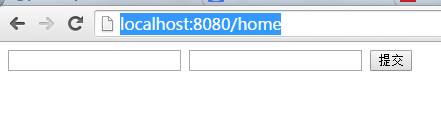
部署后访问http://localhost:8080/home进行访问,出现aa.html的内容
I386P8MNSACP.png)

thymeleaf(二)的更多相关文章
- Spring MVC : Java模板引擎 Thymeleaf (二)
本文原计划直接介绍Thymeleaf的视图解析,但考虑到学习的方便,决定先构建一个spring-mvc. 以下的全部过程仅仅要一个记事本和JDK就够了. 第一步,使用maven构建一个web app. ...
- Thymeleaf模板引擎的使用
Thymeleaf模板引擎的使用 1.模板引擎 JSP.Velocity.Freemarker.Thymeleaf 2.springboot推荐使用Thymeleaf模板引擎 特点:语法更简单,功能更 ...
- Thymeleaf3语法详解和实战
Thymeleaf3语法详解 Thymeleaf是Spring boot推荐使用的模版引擎,除此之外常见的还有Freemarker和Jsp.Jsp应该是我们最早接触的模版引擎.而Freemarker工 ...
- Thymeleaf3语法详解
每天学习一点点 编程PDF电子书.视频教程免费下载:http://www.shitanlife.com/code Thymeleaf是Spring boot推荐使用的模版引擎,除此之外常见的还有F ...
- vfd-cloud——一个适合练习上手的云存储网盘springboot项目(开发中)
vfd-cloud 一个基于SpringBoot的云存储网盘项目,适合练手学习SpringBoot,用到的技术栈列到了下面.支持用户的注册登陆及修改密码,利用邮箱进行验证.支持 ...
- (二)SpringBoot基础篇- 静态资源的访问及Thymeleaf模板引擎的使用
一.描述 在应用系统开发的过程中,不可避免的需要使用静态资源(浏览器看的懂,他可以有变量,例:HTML页面,css样式文件,文本,属性文件,图片等): 并且SpringBoot内置了Thymeleaf ...
- Spring Boot学习记录(二)--thymeleaf模板 - CSDN博客
==他的博客应该不错,没有细看 Spring Boot学习记录(二)--thymeleaf模板 - CSDN博客 http://blog.csdn.net/u012706811/article/det ...
- (二)SpringBoot2.0基础篇- 静态资源的访问及Thymeleaf模板引擎的使用
一.描述 在应用系统开发的过程中,不可避免的需要使用静态资源(浏览器看的懂,他可以有变量,例:HTML页面,css样式文件,文本,属性文件,图片等): 并且SpringBoot内置了Thymeleaf ...
- Spring Boot (二):模版引擎 Thymeleaf 渲染 Web 页面
Spring Boot (二):模版引擎 Thymeleaf 渲染 Web 页面 在<Spring Boot(一):快速开始>中介绍了如何使用 Spring Boot 构建一个工程,并且提 ...
随机推荐
- Docker学习笔记1 -- 刚入手docker时的几个命令
目录 Hello World 后台运行 停止运行 容器 载入镜像 指定端口映射 查看日志 查看应用的进程 登入镜像内部 移除容器 镜像 查看本地镜像 拉取镜像 查找镜像 更新镜像 构建镜像 设置镜像标 ...
- Android 仿QQ界面的实现
废话不说 上图 适合新手学习 watermark/2/text/aHR0cDovL2Jsb2cuY3Nkbi5uZXQv/font/5a6L5L2T/fontsize/400/fill/I0JBQ ...
- FFM及DeepFFM模型在推荐系统的探索及实践
12月20日至23日,全球人工智能与机器学习技术大会 AiCon 2018 在北京国际会议中心盛大举行,新浪微博AI Lab 的资深算法专家 张俊林@张俊林say 主持了大会的 搜索推荐与算法专题,并 ...
- EditPlus 自用正则替换
分享下自己用EditPlus 的一些些正则技巧,editplus版本v3.5.1 1.替换a标签链接地址为空 例如: 把所有的 1 <a href="..囧.."> 替 ...
- JAVA使用Logback发送日志到控制台、文件、ELK的最简单用法
一.简述 本文讲JAVA使用Logback发送日志到控制台.文件.ELK的最简单用法. 二.教程 1.新建pom.xml项目引入下列依赖: <dependencies> <!--Be ...
- Xcode10.1 import头文件无法索引
如下路径,修改设置 Xcode --> File --> Workspace Settings --> Build System --> Legacy Build System
- PowerShell 显示气球提示框 2
https://www.itninja.com/blog/view/reboot-required-toast-notifications-for-windows-machines [void][Sy ...
- Implementation of Message Receiver
- Python PhantomJS 爬虫 示例
from selenium import webdriver# 请求url url = "https://auctions.freemansauction.com/auction-lot-d ...
- laravel中及其常用的一些函数方法(自己看)和技巧(不断添加中)
手册:https://laravelacademy.org/ 1.中间件的定义Middleware 2.路由的定义和写法 3.控制器Controller之Request 4.控制器Controller ...