
What is the NETStandard.Library metapackage?
In my last post, I took a quick look at the Microsoft.AspNetCore meta package. One of the libraries referenced by the package, is the NETStandard.Library NuGet package. In this post I take a quick look at this package and what it contains.
If you're reading this post, you have hopefully already heard of .NET Standard. This is acts as an interface to .NET Platforms, and aims to define a unified set of APIs that those platforms must implement. It is the spiritual successor to PCLs, and allow you to target .NET Framework, .NET Core, and other .NET platforms with the same library code base.
The NETStandard.Library metapackage references a set of NuGet packages that define the .NET Standard library. Like the Microsoft.AspNetCore package from my last post, the package does not contain dlls itself, but rather references a number of other packages, hence the name metapackage. Depending on the target platform of your project, different packages will be added to the project, in line with the appropriate version of .NET Standard the platform implements.
For example, the .NET Standard 1.3 dependencies for the NETStandard.Library package includes the System.Security.Cryptography.X509Certificates package, but this does not appear in the 1.0, 1.1 or 1.2 target platforms. You can also see this on the nuget.org web page for the package.
It's worth noting that the NETStandard.Library package will typically be referenced by projects, though not by libraries. It's also worth noting that the version number of the package does not correspond to the version of .NET Standard, it is just the package version.
So even if your project is targeting .NET Standard version 1.3 (or multi-targeting), you can still use the latest NETStandard.Library package version (1.6.1 at the time of writing). The package itself is versioned primarily because it also contains various tooling support such as the list of .NET Standard versions.
It's also worth bearing in mind that the NETStandard.Library is essentially only an API definition, it does not contain the actual implementation itself - that comes from the underlying platform that implements the standard, such as the .NET Framework or .NET Core.
If you download one of the packages referenced in the NETStandard.Library package, System.Collectionsfor example, and open up the nuget package as before, you'll see there's a lot more too it than the Microsoft.AspNetCore metapackage. In particular, there's a lib folder and a ref folder:
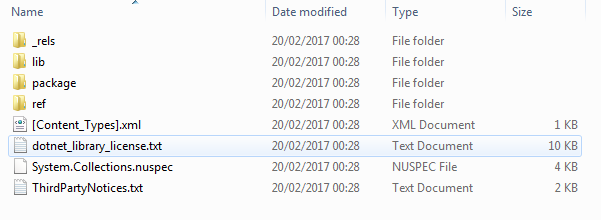
In a typical NuGet package, lib is where the actual dlls for the package would live. However, if we do a search for all the files in the lib folder, you can see that there aren't actually any dlls, just a whole load of empty placeholder files called _._ :
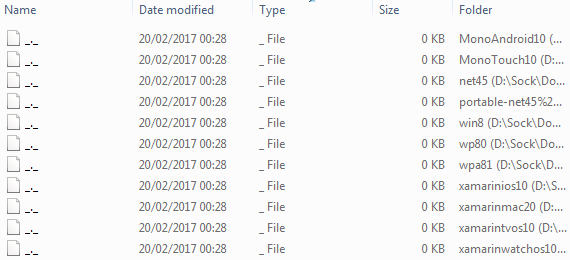
So if there aren't any dlls in here, where are they? Taking a look through the ref folder you find a similar thing - mostly _._ placeholders. However that's not entirely the case. The netstandard1.0 and netstandard 1.3 folders do contain a dll (and a load of xml metadata files):
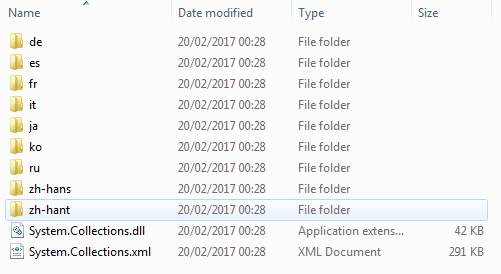
But look at the size of that System.Collections.dll - only 42kb! Remember, the NETStandard.Library only includes reference assemblies, not the actual implementations. The implementation comes from the final platform you target; for example .NET Framework 4.6.1, .NET Core or Mono etc. The reference dlls just define the various APIs that these platforms must expose for a given version of .NET Standard.
You can see this for yourself by decompiling the contained dll using something like ILSpy. If you do that, you can see what looks likes the source code for System.Collections, but without any method bodies, showing that this really is just a reference assembly:
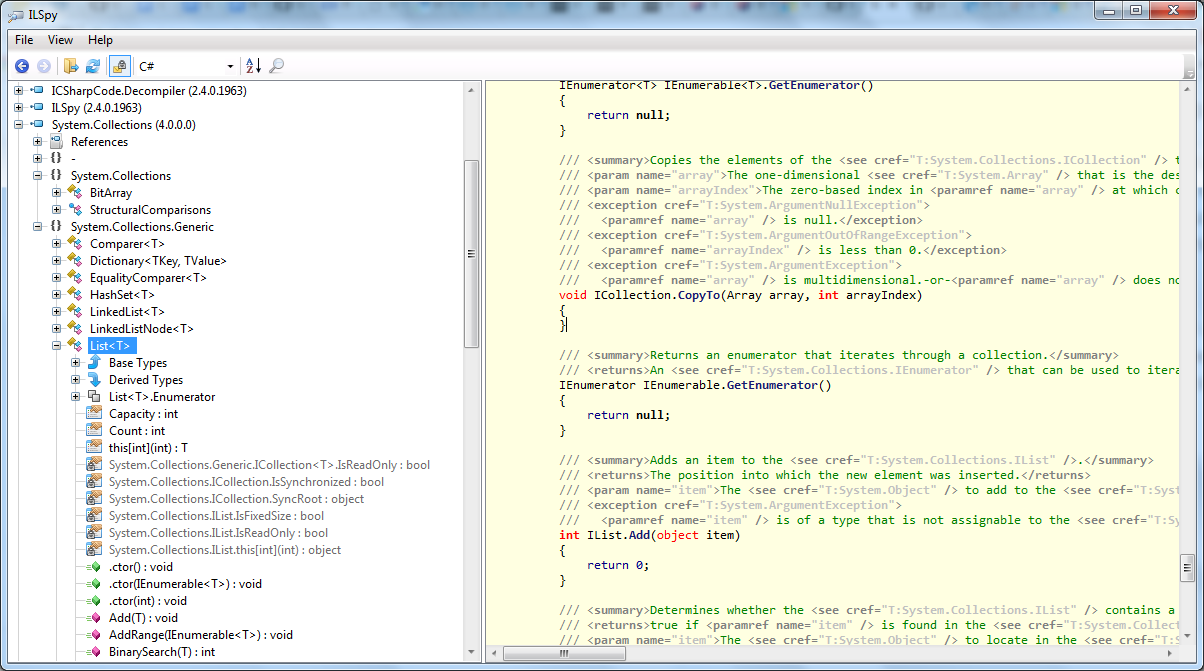
These placeholder assemblies are are a key part of the the .NET Standard infrastructure. They provide concrete APIs against which you can compile your projects, without tying you to a specific implementation (i.e. .NET Framework or .NET Core).
Final thoughts
If this all seems confusing and convoluted, that's because it is! It doesn't that every time you think you've got your head around it, things have moved on, are being changed or improved…
Having said that, most of this is more detail than you'll need. Generally, it's enough to understand the broad concept of .NET Standard, and the fact that it allows you to share code between multiple platforms.
There's a whole host of bits I haven't gone into, such as type forwarding, so if you want to get further into the details, and really try to understand what's going on, I suggest checking out the links below. In particular, I highly recommend the video series by Immo Landwerth on the subject.
Of course, when .NET Standard 2.0 is out, all this will change again, so brace yourself!
- https://blogs.msdn.microsoft.com/dotnet/2016/09/26/introducing-net-standard/
- https://github.com/dotnet/standard/blob/master/docs/faq.md
- https://docs.microsoft.com/en-us/dotnet/articles/standard/library
- https://github.com/dotnet/standard/blob/master/docs/netstandard-20/packaging.md
- https://www.youtube.com/watch?v=YI4MurjfMn8&list=PLRAdsfhKI4OWx321A_pr-7HhRNk7wOLLY
from:https://andrewlock.net/what-is-the-netstandard-library-metapackage/
What is the NETStandard.Library metapackage?的更多相关文章
- 'Newtonsoft.Json' already has a dependency defined for 'NETStandard.Library'
安装NEST的时候报了如下的错误: PM> Install-Package NEST Attempting to resolve dependency 'Elasticsearch.Net (≥ ...
- .Net Core 中的包、元包与框架(Packages, Metapackages and Frameworks)
包,元包与框架 本文翻译自 Packages, Metapackages and Frameworks. .Net Core 是一种由 NuGet 包组成的平台.一些产品体验受益于代码包的细粒度定义, ...
- .NET Core中的包、元包与框架
本文为翻译文章,原文:Packages, Metapackages and Frameworks .NET Core是一个由NuGet包组成的平台.一些产品受益于细粒度包的定义,也有一些受益于粗粒度包 ...
- .Net Core 学习笔记1——包、元包、框架
.Net Core 是由NuGet包(package)组成的平台. 一起使用的多个包的集合:元包(Metapackage) package 包 (对应以前的程序集概念) Framework 框架 as ...
- .NET Core 系列5 :使用 Nuget打包类库
NuGet是个开源项目,项目包括 NuGet VS插件/NuGet Explorer/NuGetServer/NuGet命令行等项目,.NET Core项目完全使用Nuget 管理组件之间的依赖关系, ...
- .NET Core系列 :3 、使用多个项目
通过前面的两篇文章,我们已经知道如何创建新的项目,如何生成并运行我们的应用程序,也知道(大致) project.json 文件中的内容是什么意思.但大多数项目往往也需要多个项目或引用的类库.我们要创建 ...
- .NET Core系列 : 2 、project.json 这葫芦里卖的什么药
.NET Core系列 : 1..NET Core 环境搭建和命令行CLI入门 介绍了.NET Core环境,本文介绍.NET Core中最重要的一个配置文件project.json的相关内容.我们可 ...
- MVC Core 网站开发(Ninesky) 2.1、栏目的前台显示
上次创建了栏目模型,这次主要做栏目的前台显示.涉及到数据存储层.业务逻辑层和Web层.用到了迁移,更新数据库和注入的一些内容. 一.添加数据存储层 1.添加Ninesky.DataLibrary(与上 ...
- MVC Core 网站开发(Ninesky) 2、栏目
栏目是网站的常用功能,按照惯例栏目分常规栏目,单页栏目,链接栏目三种类型,这次主要做添加栏目控制器和栏目模型两个内容,控制器这里会用到特性路由,模型放入业务逻辑层中(网站计划分数据访问.业务逻辑和We ...
随机推荐
- 学习之"setjmp和longjmp函数"
Linux学习之"setjmp和longjmp函数" 转贴,原文地址:http://www.cnblogs.com/lq0729/archive/2011/10/23/2222 ...
- React 入门实例教程(转载)
现在最热门的前端框架,毫无疑问是 React . 上周,基于 React 的 React Native 发布,结果一天之内,就获得了 5000 颗星,受瞩目程度可见一斑. React 起源于 Face ...
- python--异常捕获
#异常捕获---指定异常类型 try: #尝试 fi=open(r'D:\Users\4399-3046\Desktop\test.txt',mode='wb'); fi.write('写入文字'); ...
- 将xml 写到内存中再已string类型读出来
System.IO.MemoryStream ms = new System.IO.MemoryStream(); xmlDoc.Save(ms); System.IO.StreamReader sr ...
- day64 url用法以及django的路由系统
此篇博客是以备后查的,用到的时候记得过来查找即可! 路由系统:就是我们的django项目创建的时候自带的那个urls.py 它本身里面是映射的对应关系,一个大的列表里面,一个个元祖,元祖里面是url或 ...
- Maya Max python PySide集成 shiboken版本对应关系
Maya_Max _python_PySide集成_shiboken版本对应关系 1.如何查看 Maya Max 集成的 Python版本: Maya:在 Maya 的安装目录下的 bin 文件夹中找 ...
- RBF:RBF基于近红外光谱的汽油辛烷值含量预测结果对比—Jason niu
load spectra_data.mat temp = randperm(size(NIR,1)); P_train = NIR(temp(1:50),:)'; T_train = octane(t ...
- 【python】TCP/IP编程
No1: [TCP] 客户端 import socket s=socket.socket(socket.AF_INET,socket.SOCK_STREAM) s.connect(('www.sina ...
- eclipse tomcat报Several ports(8005 8080 8009)端口被占用问题解决方案
在启动tomcat的时候eclipse突然报错 Several ports (8005,8080,8009) required by Tomcat v6.0 Server at localhost a ...
- Qt创建任务栏进度条
一.正文 任务栏进度条是Windows7就引入的一种UI形式,通常用于显示软件当前正在执行的任务的进度(如编译程序的进度.下载任务的进度).如下: 在Qt中使用任务栏进度条也是非常容易的一件事情.Qt ...