
安装tesserocr错误(未解决)
在win10下使用pip install tesserocr安装时,始终报错,未解决问题
解压tesserocr-2.2.2.tar.gz该文件夹后,查看setup.py文件,发现似乎model只能再linux下安装。
记录该问题,希望以后能够找到根本问题所在,并解决。
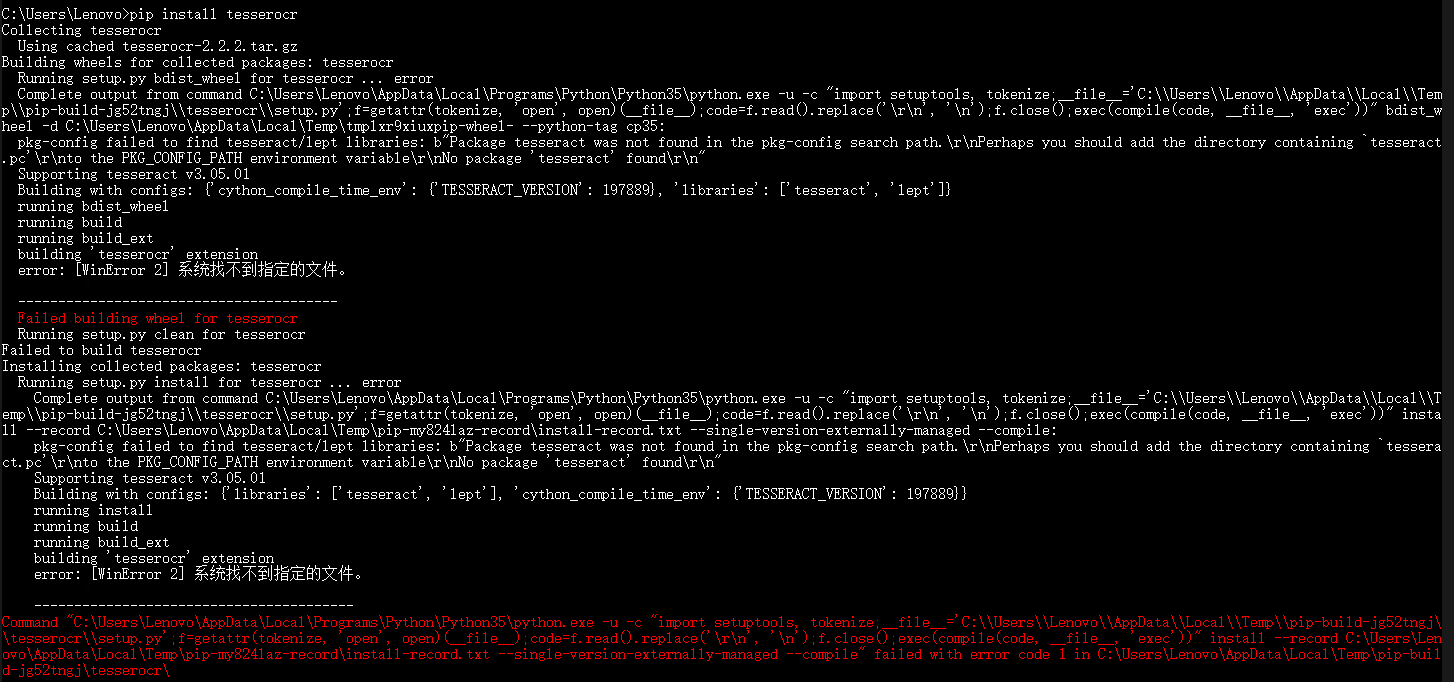
C:\Users\Lenovo>pip install tesserocr

Collecting tesserocr

  Using cached tesserocr-2.2..tar.gz

Building wheels for collected packages: tesserocr

  Running setup.py bdist_wheel for tesserocr ... error

  Complete output from command C:\Users\Lenovo\AppData\Local\Programs\Python\Python35\python.exe -u -c "import setuptools, tokenize;__file__='C:\\Users\\Lenovo\\AppData\\Local\\Temp\\pip-build-jg52tngj\\tesserocr\\setup.py';f=getattr(tokenize, 'open', open)(__file__);code=f.read().replace('\r\n', '\n');f.close();exec(compile(code, __file__, 'exec'))" bdist_wheel -d C:\Users\Lenovo\AppData\Local\Temp\tmplxr9xiuxpip-wheel- --python-tag cp35:

  pkg-config failed to find tesseract/lept libraries: b"Package tesseract was not found in the pkg-config search path.\r\nPerhaps you should add the directory containing `tesseract.pc'\r\nto the PKG_CONFIG_PATH environment variable\r\nNo package 'tesseract' found\r\n"

  Supporting tesseract v3.05.01

  Building with configs: {'cython_compile_time_env': {'TESSERACT_VERSION': }, 'libraries': ['tesseract', 'lept']}

  running bdist_wheel

  running build

  running build_ext

  building 'tesserocr' extension

  error: [WinError ] 系统找不到指定的文件。

  ----------------------------------------

  Failed building wheel for tesserocr

  Running setup.py clean for tesserocr

Failed to build tesserocr

Installing collected packages: tesserocr

  Running setup.py install for tesserocr ... error

    Complete output from command C:\Users\Lenovo\AppData\Local\Programs\Python\Python35\python.exe -u -c "import setuptools, tokenize;__file__='C:\\Users\\Lenovo\\AppData\\Local\\Temp\\pip-build-jg52tngj\\tesserocr\\setup.py';f=getattr(tokenize, 'open', open)(__file__);code=f.read().replace('\r\n', '\n');f.close();exec(compile(code, __file__, 'exec'))" install --record C:\Users\Lenovo\AppData\Local\Temp\pip-my824laz-record\install-record.txt --single-version-externally-managed --compile:

    pkg-config failed to find tesseract/lept libraries: b"Package tesseract was not found in the pkg-config search path.\r\nPerhaps you should add the directory containing `tesseract.pc'\r\nto the PKG_CONFIG_PATH environment variable\r\nNo package 'tesseract' found\r\n"

    Supporting tesseract v3.05.01

    Building with configs: {'libraries': ['tesseract', 'lept'], 'cython_compile_time_env': {'TESSERACT_VERSION': }}

    running install

    running build

    running build_ext

    building 'tesserocr' extension

    error: [WinError ] 系统找不到指定的文件。

    ----------------------------------------

Command "C:\Users\Lenovo\AppData\Local\Programs\Python\Python35\python.exe -u -c "import setuptools, tokenize;__file__='C:\\Users\\Lenovo\\AppData\\Local\\Temp\\pip-build-jg52tngj\\tesserocr\\setup.py';f=getattr(tokenize, 'open', open)(__file__);code=f.read().replace('\r\n', '\n');f.close();exec(compile(code, __file__, 'exec'))" install --record C:\Users\Lenovo\AppData\Local\Temp\pip-my824laz-record\install-record.txt --single-version-externally-managed --compile" failed with error code  in C:\Users\Lenovo\AppData\Local\Temp\pip-build-jg52tngj\tesserocr\
安装tesserocr错误(未解决)的更多相关文章
- 安装sql server 2005时出现“安装汇编”错误的解决办法
今天安装sql server 2005 management studio到最后步骤的时候报“安装汇编”错误,卸载重装的几遍还是不行,最后将net framework 3.5删除后,终于安装成功了.
- php源代码安装常见错误与解决办法分享
错误:configure: error: libevent >= 1.4.11 could not be found 解决:yum -y install libevent libevent-de ...
- Httpsqs的安装以及安装过程错误的解决方法 转
需求 :进行商品搜索的时候,要从索引中进行搜索,由于后台要更新商品和插入商品,当时考虑到了怎么来插入新的索引和更新索引的问题,通过讨论,大家决定用Httpsqs这个消息中间来通知插入新索引和删除索引最 ...
- 安装vue错误详情解决办法
寄语:vue的安装不是理想化的,会出现很多问题,需要静下心认真研究,熬过去就会懂得更多,以下是我遇到的问题和最真挚的建议,按照我的方法不会出错,一定会成功,我尝试了很多次方式,查阅了很多资料,最终总结 ...
- Python3.6及以上pip安装pymssql错误的解决办法[Windows&Linux freetds安装]
只有由于Python3.6装不上 pymssql,所以一直用Python3.5的版本. 报错界面 现在有了新的解决方法: 原帖如下: https://docs.microsoft.com/en-us/ ...
- Microsoft .NET Framework 4 安装 1603错误的解决
首先找到 C:\Windows\SoftwareDistribution\Download"这个文件夹,把里面的东西全删除了,然后把你更新失败的 NET Framework 4卸载了,然后 ...
- 安装Office时出现windows installer服务不能更新一个或多个受保护的windows文件错误的解决方法
今天在Windows XP上安装Microsoft Office 2010时,总是遇到“Windows Installer服务不能更新一个或多个受保护的windows文件,安装失败,正在回滚更改”提示 ...
- Win8.1无法安装更新,提示0x800*****错误的解决方法
Win8.1无法安装更新,提示0x800*****错误的解决方法 注:本教程同样适用于Win10系统 有时候Win8.1某个系统文件的损坏会导致无法安装Windows更新,表现为Windows更新 ...
- CentOS 安装hping3工具及安装遇到的错误及解决方法
hping是用于生成和解析TCPIP协议数据包的开源工具.创作者是Salvatore Sanfilippo.目前最新版是hping3,支持使用tcl脚本自动化地调用其API.hping是安全审计.防火 ...
随机推荐
- 需求规格说明书——阿里八八“好记”APP
工作流程 ① 组长查阅相关文档.示例文件等,根据本小组项目特点进行定制需求规格说明书目录. ② 根据选题报告工作进行任务分配,追求工作量最小化.效率最大化. ③ 分工编辑文档. ④ 组长搭建Githu ...
- Spring容器技术内幕之BeanDefinition类介绍
引言 org.springframework.beans.factory.config.BeanDefinition是配置文件< bean >元素标签在容器中地内部表示.< bean ...
- kuangbin fire搜索bfs
Joe works in a maze. Unfortunately, portions of the maze have caught on fire, and the owner of the ma ...
- php单例模式实现对象只被创建一次
这是我在php面试题中遇到的一道试题,单例模式按字面来看就是某一个类只有一个实例,这样做的好处还是很大的,比如说数据库的连接,我们只需要实例化一次,不需要每次都去new了,这样极大的降低了资源的耗费. ...
- 代码编辑器monaco-editor之基础使用
1.下载安装monaco-editor npm install monaco-editor 我的安装目录在 C://Windows//SystemApps//Microsoft.MicrosoftEd ...
- 面面俱到的Java接口自动化测试实战
第1章 接口自动化测试整体认知了解什么是接口和为什么要做接口测试.并且知道接口自动化测试应该学习哪些技术以及接口自动化测试的落地过程. 1-1 导学章节 1-2 什么是接口 1-3 为什么要做接口测试 ...
- SD-WAN助力解决多云问题
导读 SD-WAN供应商和云服务供应商之间的合作,有助于跨多个云供应商轻松管理云连接,并创建安全.低延迟的多云环境. 随着SD-WAN成为远程用户访问基于云的应用程序的主要途径,促使越来越多的部署多云 ...
- PAT A1109 Group Photo (25 分)——排序
Formation is very important when taking a group photo. Given the rules of forming K rows with N peop ...
- PAT A1098 Insertion or Heap Sort (25 分)——堆排序和插入排序,未完待续。。
According to Wikipedia: Insertion sort iterates, consuming one input element each repetition, and gr ...
- arcgis_js_api_3.12的project实践
esri.config.defaults.geometryService = new esri.tasks.GeometryService("http://localhost:6080/ar ...