
ASP.NET ActiveMQ 消息队列
1.引入
2.发送消息
3.接收消息
概述:MQ消息存放在内存,重启后,消息丢失。接收后,消息丢失(只取一次),不取,一直在且速度快。
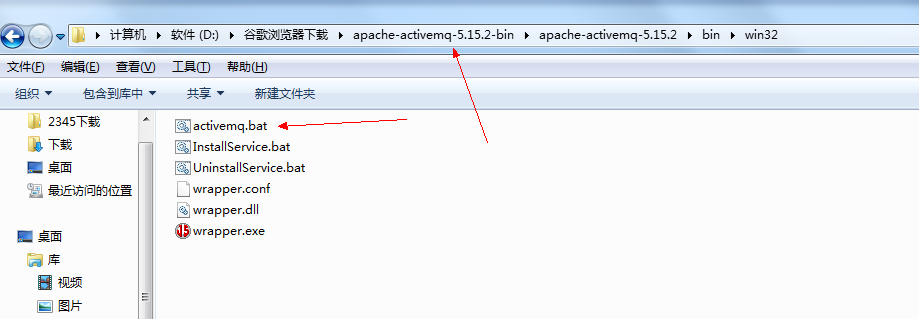
使用前:下载apache-activemq-5.15.2-bin ,下载完运行activemq.bat(必须提前安装Java sdk)
注册成功后:http://localhost:8161/admin/ 用户名:admin 密码:admin 登录


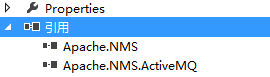
一 引入DLL
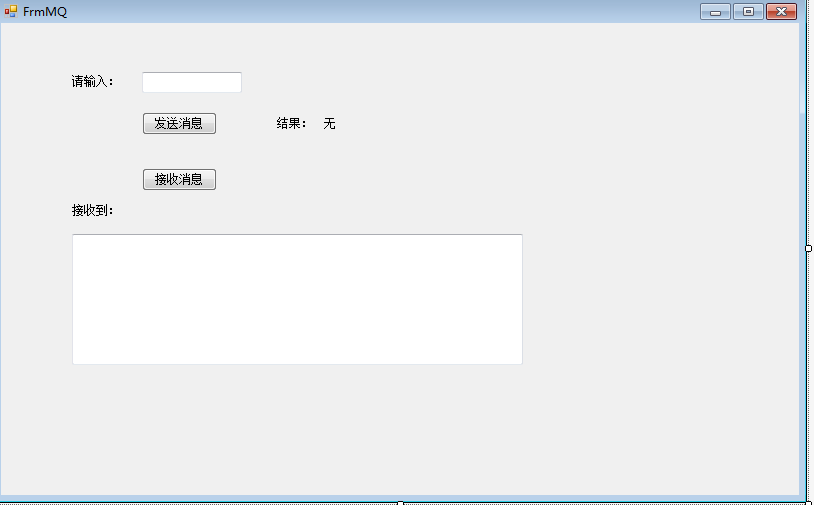
二 发送消息、接收消息
using Apache.NMS;

using Apache.NMS.ActiveMQ;

using System;

using System.Collections.Generic;

using System.ComponentModel;

using System.Data;

using System.Drawing;

using System.Linq;

using System.Text;

using System.Threading.Tasks;

using System.Windows.Forms;

namespace WinformQuartz

{

    public partial class FrmMQ : Form

    {

        public FrmMQ()

        {

            InitializeComponent();

        }

        private void button1_Click(object sender, EventArgs e)

        {

            var input = this.textBox1.Text.Trim();

            if(string.IsNullOrEmpty(input))

            {

                this.lblMsg.ForeColor = Color.Red;

                this.lblMsg.Text = "请输入需要发送的消息";

                return;

            }

            Send();

        }

        public void Send()

        {

            ConnectionFactory factory = new ConnectionFactory("tcp://localhost:61616");

            //通过工厂建立连接

            using (IConnection connection = factory.CreateConnection())

            {

                //通过连接创建Session会话

                using (ISession session = connection.CreateSession())

                {

                    //通过会话创建生产者,方法里面new出来的是MQ中的Queue

                    IMessageProducer prod = session.CreateProducer(new Apache.NMS.ActiveMQ.Commands.ActiveMQQueue("firstQueue"));

                    //创建一个发送的消息对象

                    ITextMessage message = prod.CreateTextMessage();

                    //给这个对象赋实际的消息

                    message.Text = this.textBox1.Text.Trim();

                    //设置消息对象的属性,这个很重要哦,是Queue的过滤条件,也是P2P消息的唯一指定属性

                    message.Properties.SetString("filter", "demo");

                    //生产者把消息发送出去,几个枚举参数MsgDeliveryMode是否长链,MsgPriority消息优先级别,发送最小单位,当然还有其他重载

                    prod.Send(message, MsgDeliveryMode.NonPersistent, MsgPriority.Normal, TimeSpan.MinValue);

                    this.lblMsg.Text = "发送成功!!";

                }

            }

        }

        public void Recieve()

        {

            //创建连接工厂

            IConnectionFactory factory = new ConnectionFactory("tcp://localhost:61616");

            //通过工厂构建连接

            IConnection connection = factory.CreateConnection();

            //这个是连接的客户端名称标识

            connection.ClientId = "firstQueueListener";

            //启动连接,监听的话要主动启动连接

            connection.Start();

            //通过连接创建一个会话

            ISession session = connection.CreateSession();

            //通过会话创建一个消费者,这里就是Queue这种会话类型的监听参数设置

            IMessageConsumer consumer = session.CreateConsumer(new Apache.NMS.ActiveMQ.Commands.ActiveMQQueue("firstQueue"), "filter='demo'");

            //注册监听事件

            consumer.Listener += new MessageListener(consumer_Listener);

            //connection.Stop();

            //connection.Close();

        }

        void consumer_Listener(IMessage message)

        {

            ITextMessage msg = (ITextMessage)message;

            //异步调用下,否则无法回归主线程

            this.textBox2.Invoke(new DelegateRevMessage(RevMessage), msg);

        }

        public delegate void DelegateRevMessage(ITextMessage message);

        public void RevMessage(ITextMessage message)

        {

            this.textBox2.Text += string.Format(@"接收到:{0}{1}", message.Text, Environment.NewLine);

        }

        private void button2_Click(object sender, EventArgs e)

        {

            Recieve();

        }

    }

}

ASP.NET ActiveMQ 消息队列的更多相关文章
- activemq消息队列的使用及应用docker部署常见问题及注意事项
activemq消息队列的使用及应用docker部署常见问题及注意事项 docker用https://hub.docker.com/r/rmohr/activemq/配置在/data/docker/a ...
- JAVA的设计模式之观察者模式----结合ActiveMQ消息队列说明
1----------------------观察者模式------------------------------ 观察者模式:定义对象间一对多的依赖关系,当一个对象的状态发生改变时,所有依赖于它的 ...
- ActiveMQ消息队列从入门到实践(4)—使用Spring JMS收发消息
Java消息服务(Java Message Service ,JMS)是一个Java标准,定义了使用消息代理的通用API .在JMS出现之前,每个消息代理都有私有的API,这就使得不同代理之间的消息代 ...
- ASP.NET Core消息队列RabbitMQ基础入门实战演练
一.课程介绍 人生苦短,我用.NET Core!消息队列RabbitMQ大家相比都不陌生,本次分享课程阿笨将给大家分享一下在一般项目中99%都会用到的消息队列MQ的一个实战业务运用场景.本次分享课程不 ...
- C#实现ActiveMQ消息队列
本文使用C#实现ActiveMQ消息队列功能. 一.首先需要导入两个包,分别是:Apache.NMS 和 Apache.NMS.ActiveMQ 二.创建Winform程序实现生产者功能. 三.Pro ...
- SpringBoot集成ActiveMq消息队列实现即时和延迟处理
原文链接:https://blog.csdn.net/My_harbor/article/details/81328727 一.安装ActiveMq 具体安装步骤:自己谷歌去 二.新建springbo ...
- ActiveMQ 消息队列服务
1 ActiveMQ简介 1.1 ActiveMQ是什么 ActiveMQ是一个消息队列应用服务器(推送服务器).支持JMS规范. 1.1.1 JMS概述 全称:Java Message Serv ...
- ActiveMQ基础教程(四):.net core集成使用ActiveMQ消息队列
接上一篇:ActiveMQ基础教程(三):C#连接使用ActiveMQ消息队列 这里继续说下.net core集成使用ActiveMQ.因为代码比较多,所以放到gitee上:https://gitee ...
- ActiveMQ消息队列的使用及应用
这里就不说怎么安装了,直接解压出来就行了. 谢绝转载,作者保留所有权力 目录: 一:JMQ的两种消息模式 1.1:点对点的消息模式 1.2:订阅模式 二:点对点的实现代码 2.1:点对点的发送端 2 ...
随机推荐
- 设计模式之观察者模式(Observer)
观察者模式通常的叫法叫做订阅-发布模式,类似于报刊杂志的订阅,观察者和被观察者就是读者和邮局的关系,读者先要在邮局订阅想要的报刊,当报刊发行时,邮局会将报刊邮寄到读者家里.观察者(Observer)和 ...
- SQL Server 基本SELECT语句
1.SELECT 和 FROM 语句 SELECT表示执行的是查询,接着需要更知道从哪边查询数据,FROM就是限制读取的数据在哪一个表或哪几个表中,这样就构成了一个基本语句. SELECT * FRO ...
- 【代码笔记】Web-ionic-按钮
一,效果图. 二,代码.index.html文件如下所示. <!DOCTYPE html> <html> <head> <meta charset=" ...
- GDAL中GDALDataType中值与其在C++中数据类型对应
GDAL中的GDALDataType是一个枚举型,其中的值为: GDT_Unknown : 未知数据类型 GDT_Byte : 8bit正整型 (C++中对应unsigned char) GDT_UI ...
- recovery 升级'@/cache/recovery/block.map' failed错误问题
随着android版本升级,升级包越来越大,当升级包无法存储在cache分区的时候,会把升级包下载到data分区,然后从data分区升级,最近从data分区加载升级包升级的时候,遇到了如下错误: [ ...
- JavaScript大杂烩9 - 理解BOM
毫无疑问,我们学习JavaScript是为了完成特定的功能.在最初的JavaScript类型系统中,我们已经分析过JavaScript在页面开发中充当着添加逻辑的角色,而且我们知道JavaScript ...
- IO事件驱动模型
1:IO事件驱动模型简介 通常,我们写服务器处理模型的程序时,有以下几种模型: (1)每收到一个请求,创建一个新的进程,来处理该请求: (2)每收到一个请求,创建一个新的线程,来处理该请求: (3)每 ...
- IP地址及子网划分
1.IP地址 2.子网掩码 网络号全转为1,主机号全转为0,之后再转化为10进制表示. 3.无分类编址
- WPF:验证登录后关闭登录窗口,显示主窗口的解决方法
http://www.27ba.com/post/145.html WPF:验证登录后关闭登录窗口,显示主窗口的解决方法 最近想做一个基于Socket的通讯工具,想模仿QQ那样,需要先登录,登录成功后 ...
- linux下安装mysql简单步骤
linux下使用yum安装mysql 1.安装 查看有没有安装过: yum list installed mysql* rpm -qa | grep mysql* 查看有没有安装包: yum list ...