
用STM32CudeMX 点亮红色LED灯(软件操作步骤为主)
1、收获如何使用软件STM32CudeMX配置代码
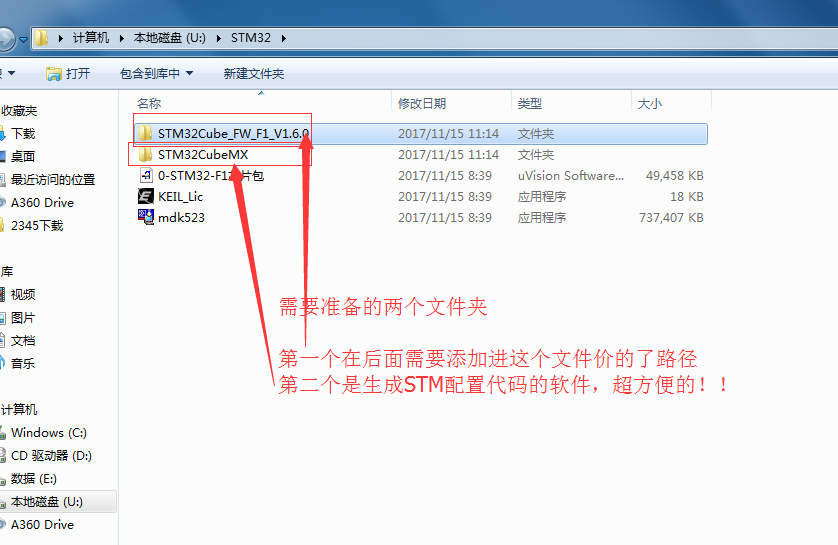
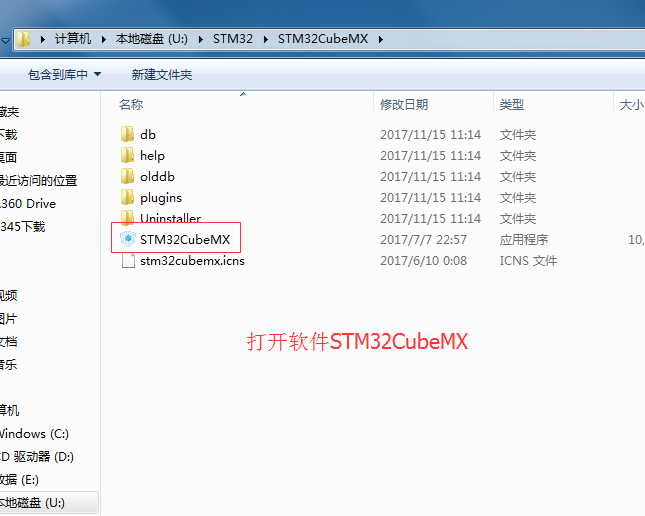
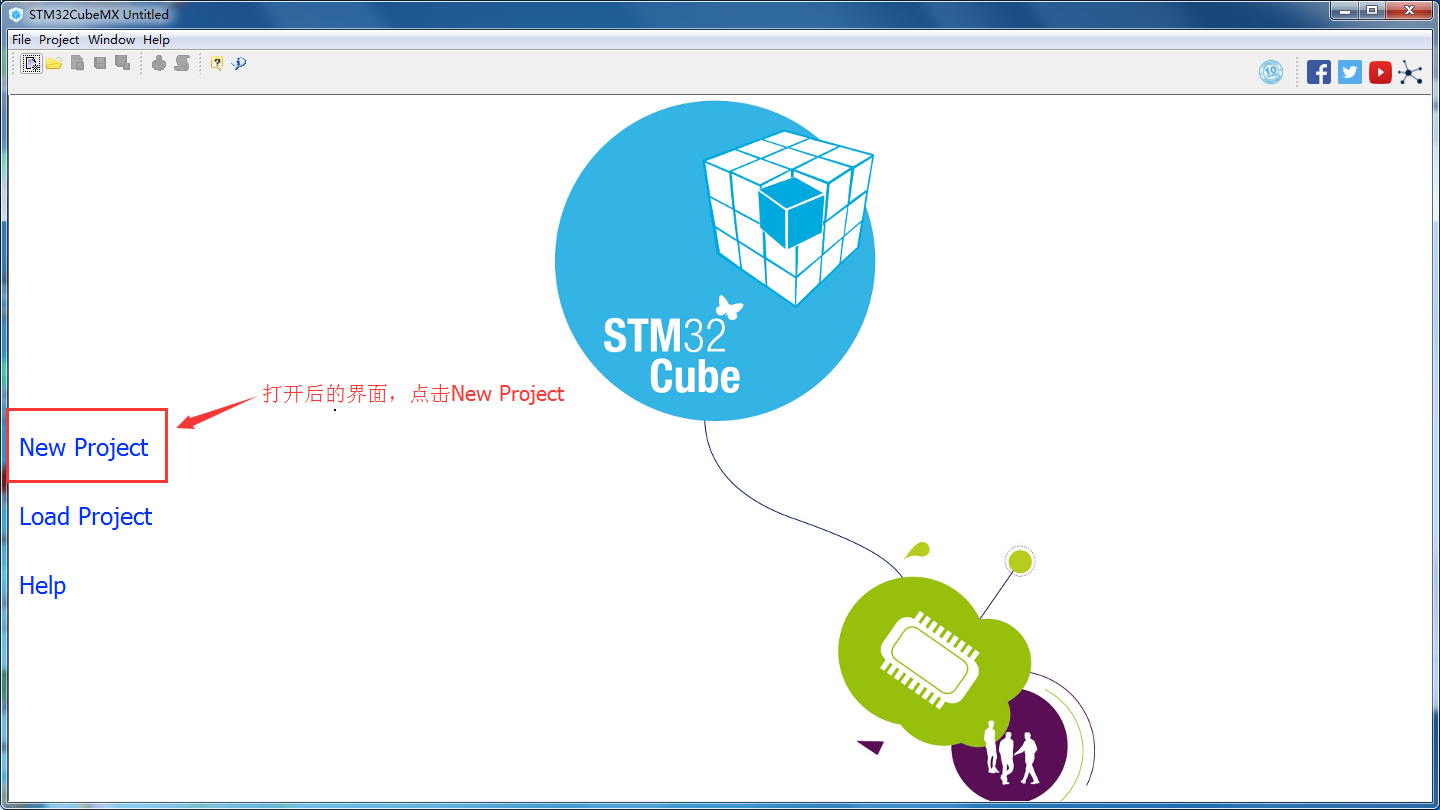
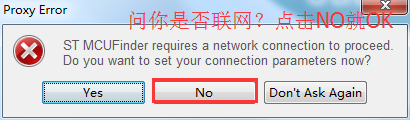
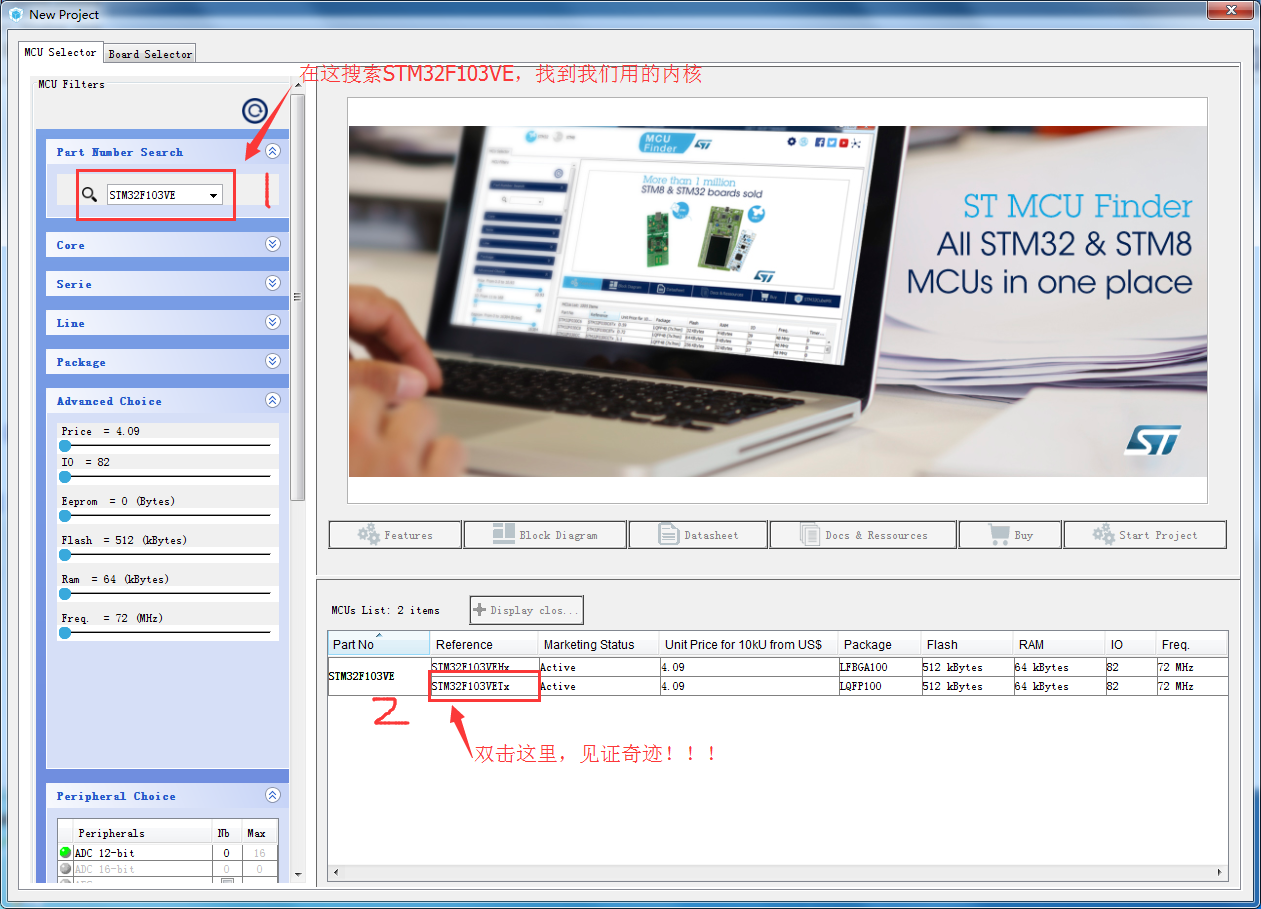
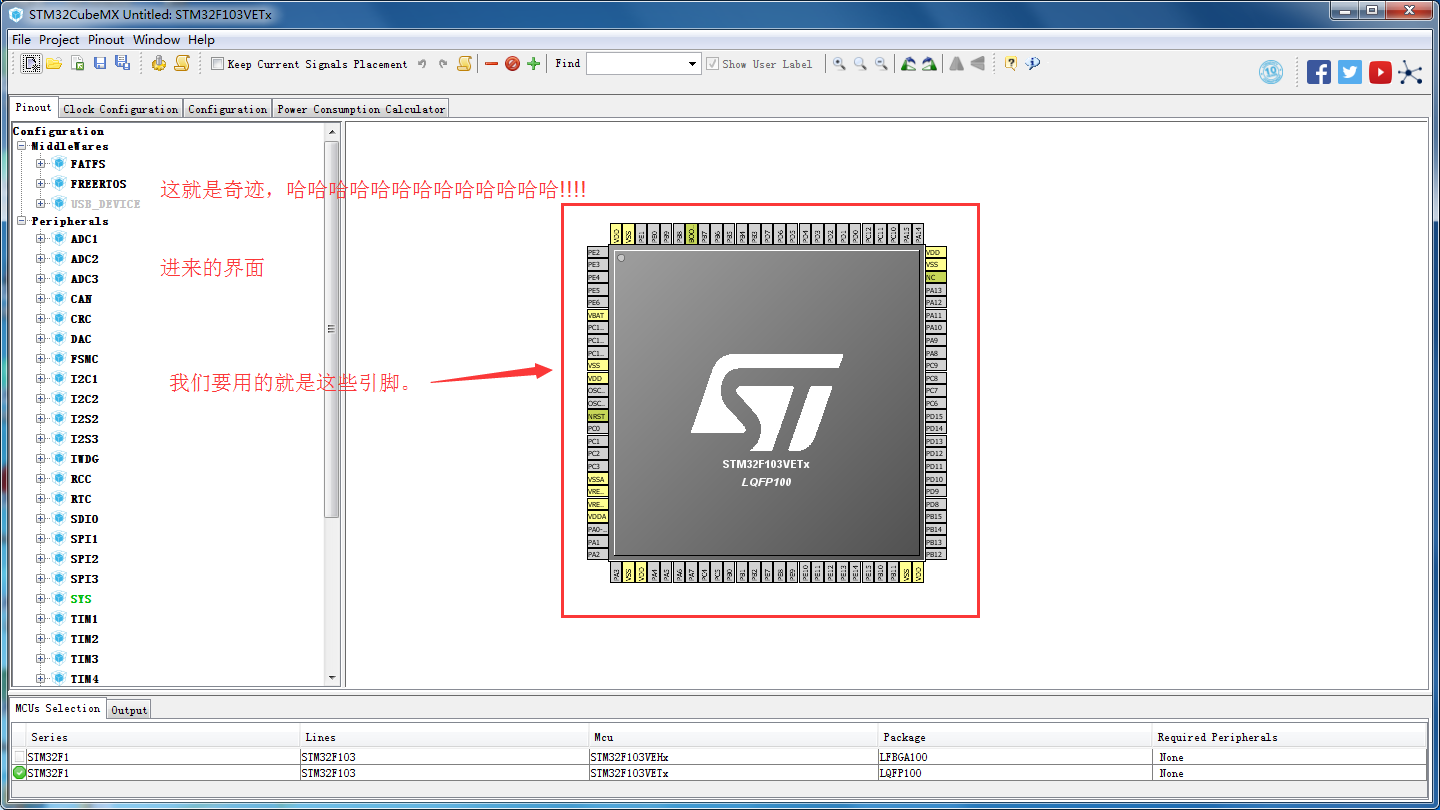
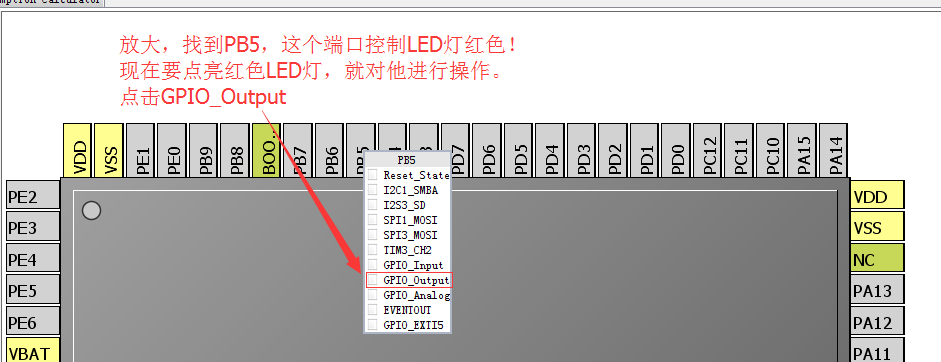


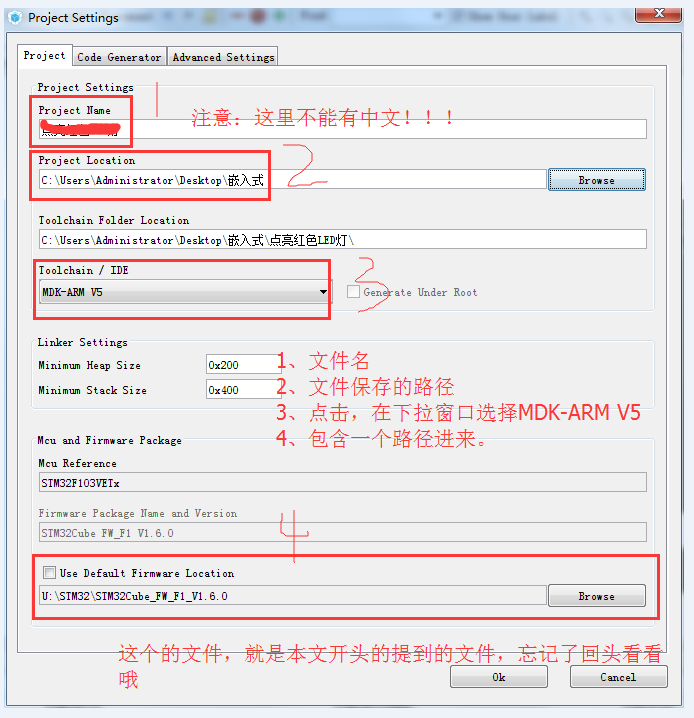

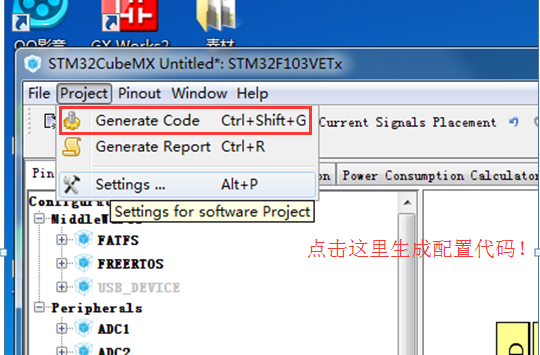
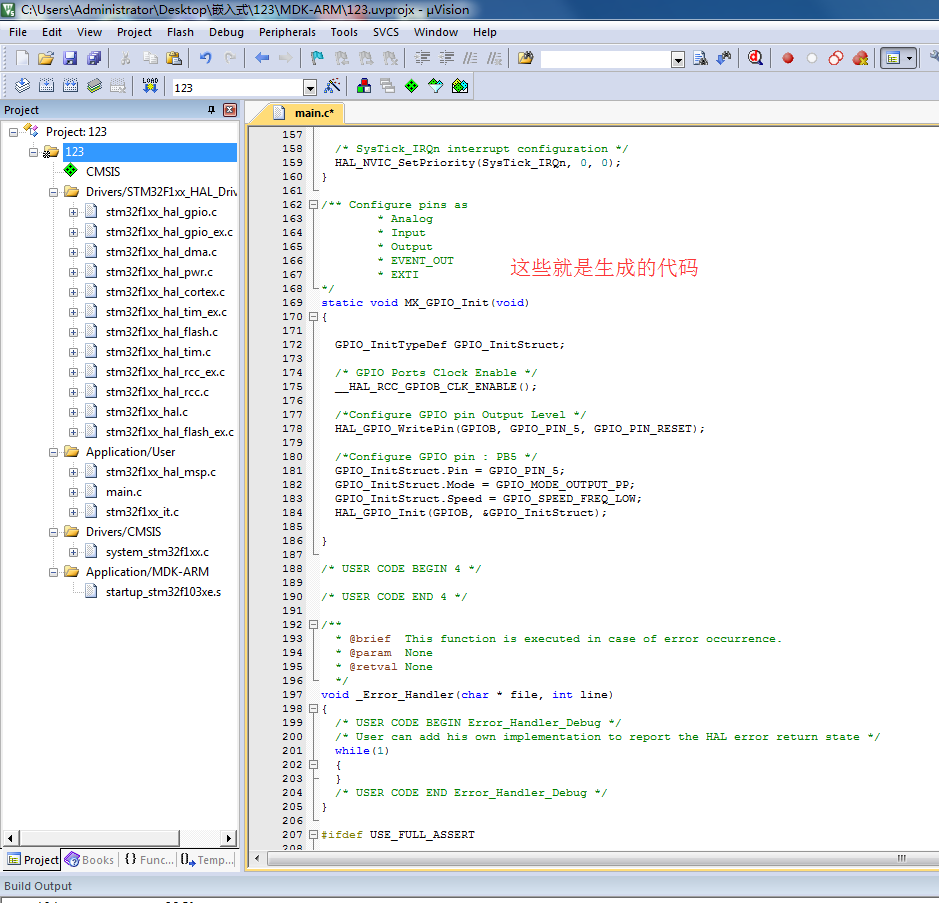
注意:自己要敲的代码,直接看102行,其他是软件配置的。!!!
 /**

   ******************************************************************************

   * File Name          : main.c

   * Description        : Main program body

   ******************************************************************************

   ** This notice applies to any and all portions of this file

   * that are not between comment pairs USER CODE BEGIN and

   * USER CODE END. Other portions of this file, whether

   * inserted by the user or by software development tools

   * are owned by their respective copyright owners.

   *

   * COPYRIGHT(c) 2017 STMicroelectronics

   *

   * Redistribution and use in source and binary forms, with or without modification,

   * are permitted provided that the following conditions are met:

   *   1. Redistributions of source code must retain the above copyright notice,

   *      this list of conditions and the following disclaimer.

   *   2. Redistributions in binary form must reproduce the above copyright notice,

   *      this list of conditions and the following disclaimer in the documentation

   *      and/or other materials provided with the distribution.

   *   3. Neither the name of STMicroelectronics nor the names of its contributors

   *      may be used to endorse or promote products derived from this software

   *      without specific prior written permission.

   *

   * THIS SOFTWARE IS PROVIDED BY THE COPYRIGHT HOLDERS AND CONTRIBUTORS "AS IS"

   * AND ANY EXPRESS OR IMPLIED WARRANTIES, INCLUDING, BUT NOT LIMITED TO, THE

   * IMPLIED WARRANTIES OF MERCHANTABILITY AND FITNESS FOR A PARTICULAR PURPOSE ARE

   * DISCLAIMED. IN NO EVENT SHALL THE COPYRIGHT HOLDER OR CONTRIBUTORS BE LIABLE

   * FOR ANY DIRECT, INDIRECT, INCIDENTAL, SPECIAL, EXEMPLARY, OR CONSEQUENTIAL

   * DAMAGES (INCLUDING, BUT NOT LIMITED TO, PROCUREMENT OF SUBSTITUTE GOODS OR

   * SERVICES; LOSS OF USE, DATA, OR PROFITS; OR BUSINESS INTERRUPTION) HOWEVER

   * CAUSED AND ON ANY THEORY OF LIABILITY, WHETHER IN CONTRACT, STRICT LIABILITY,

   * OR TORT (INCLUDING NEGLIGENCE OR OTHERWISE) ARISING IN ANY WAY OUT OF THE USE

   * OF THIS SOFTWARE, EVEN IF ADVISED OF THE POSSIBILITY OF SUCH DAMAGE.

   *

   ******************************************************************************

   */

 /* Includes ------------------------------------------------------------------*/

 #include "main.h"

 #include "stm32f1xx_hal.h"

 /* USER CODE BEGIN Includes */

 /* USER CODE END Includes */

 /* Private variables ---------------------------------------------------------*/

 /* USER CODE BEGIN PV */

 /* Private variables ---------------------------------------------------------*/

 /* USER CODE END PV */

 /* Private function prototypes -----------------------------------------------*/

 void SystemClock_Config(void);

 static void MX_GPIO_Init(void);

 /* USER CODE BEGIN PFP */

 /* Private function prototypes -----------------------------------------------*/

 /* USER CODE END PFP */

 /* USER CODE BEGIN 0 */

 /* USER CODE END 0 */

 int main(void)

 {

   /* USER CODE BEGIN 1 */

   /* USER CODE END 1 */

   /* MCU Configuration----------------------------------------------------------*/

   /* Reset of all peripherals, Initializes the Flash interface and the Systick. */

   HAL_Init();

   /* USER CODE BEGIN Init */

   /* USER CODE END Init */

   /* Configure the system clock */

   SystemClock_Config();

   /* USER CODE BEGIN SysInit */

   /* USER CODE END SysInit */

   /* Initialize all configured peripherals */

   MX_GPIO_Init();

   /* USER CODE BEGIN 2 */

   /* USER CODE END 2 */

   /* Infinite loop */

   /* USER CODE BEGIN WHILE */

     /*下面一行代码需要自己敲的*/

     //意思是给PB5端口低电平,记住这个函数哦

         HAL_GPIO_WritePin(GPIOB,GPIO_PIN_5,GPIO_PIN_RESET);

   while ()

   {

   /* USER CODE END WHILE */

   /* USER CODE BEGIN 3 */

   }

   /* USER CODE END 3 */

 }

 /** System Clock Configuration

 */

 void SystemClock_Config(void)

 {

   RCC_OscInitTypeDef RCC_OscInitStruct;

   RCC_ClkInitTypeDef RCC_ClkInitStruct;

     /**Initializes the CPU, AHB and APB busses clocks

     */

   RCC_OscInitStruct.OscillatorType = RCC_OSCILLATORTYPE_HSI;

   RCC_OscInitStruct.HSIState = RCC_HSI_ON;

   RCC_OscInitStruct.HSICalibrationValue = ;

   RCC_OscInitStruct.PLL.PLLState = RCC_PLL_NONE;

   if (HAL_RCC_OscConfig(&RCC_OscInitStruct) != HAL_OK)

   {

     _Error_Handler(__FILE__, __LINE__);

   }

     /**Initializes the CPU, AHB and APB busses clocks

     */

   RCC_ClkInitStruct.ClockType = RCC_CLOCKTYPE_HCLK|RCC_CLOCKTYPE_SYSCLK

                               |RCC_CLOCKTYPE_PCLK1|RCC_CLOCKTYPE_PCLK2;

   RCC_ClkInitStruct.SYSCLKSource = RCC_SYSCLKSOURCE_HSI;

   RCC_ClkInitStruct.AHBCLKDivider = RCC_SYSCLK_DIV1;

   RCC_ClkInitStruct.APB1CLKDivider = RCC_HCLK_DIV1;

   RCC_ClkInitStruct.APB2CLKDivider = RCC_HCLK_DIV1;

   if (HAL_RCC_ClockConfig(&RCC_ClkInitStruct, FLASH_LATENCY_0) != HAL_OK)

   {

     _Error_Handler(__FILE__, __LINE__);

   }

     /**Configure the Systick interrupt time

     */

   HAL_SYSTICK_Config(HAL_RCC_GetHCLKFreq()/);

     /**Configure the Systick

     */

   HAL_SYSTICK_CLKSourceConfig(SYSTICK_CLKSOURCE_HCLK);

   /* SysTick_IRQn interrupt configuration */

   HAL_NVIC_SetPriority(SysTick_IRQn, , );

 }

 /** Configure pins as

         * Analog

         * Input

         * Output

         * EVENT_OUT

         * EXTI

 */

 static void MX_GPIO_Init(void)

 {

   GPIO_InitTypeDef GPIO_InitStruct;

   /* GPIO Ports Clock Enable */

   __HAL_RCC_GPIOB_CLK_ENABLE();

   /*Configure GPIO pin Output Level */

   HAL_GPIO_WritePin(GPIOB, GPIO_PIN_5, GPIO_PIN_RESET);

   /*Configure GPIO pin : PB5 */

   GPIO_InitStruct.Pin = GPIO_PIN_5;

   GPIO_InitStruct.Mode = GPIO_MODE_OUTPUT_PP;

   GPIO_InitStruct.Speed = GPIO_SPEED_FREQ_LOW;

   HAL_GPIO_Init(GPIOB, &GPIO_InitStruct);

 }

 /* USER CODE BEGIN 4 */

 /* USER CODE END 4 */

 /**

   * @brief  This function is executed in case of error occurrence.

   * @param  None

   * @retval None

   */

 void _Error_Handler(char * file, int line)

 {

   /* USER CODE BEGIN Error_Handler_Debug */

   /* User can add his own implementation to report the HAL error return state */

   while()

   {

   }

   /* USER CODE END Error_Handler_Debug */

 }

 #ifdef USE_FULL_ASSERT

 /**

    * @brief Reports the name of the source file and the source line number

    * where the assert_param error has occurred.

    * @param file: pointer to the source file name

    * @param line: assert_param error line source number

    * @retval None

    */

 void assert_failed(uint8_t* file, uint32_t line)

 {

   /* USER CODE BEGIN 6 */

   /* User can add his own implementation to report the file name and line number,

     ex: printf("Wrong parameters value: file %s on line %d\r\n", file, line) */

   /* USER CODE END 6 */

 }

 #endif

 /**

   * @}

   */

 /**

   * @}

 */

 /************************ (C) COPYRIGHT STMicroelectronics *****END OF FILE****/
感谢您的浏览!!!如有问题请留言。后期继续出其他的,请尽请关注。
用STM32CudeMX 点亮红色LED灯(软件操作步骤为主)的更多相关文章
- K1 K2作为中断源控制红色LED灯,实现任意键按一下LED灯亮或者灭
#include "stm32f10x.h" // 相当于51单片机中的 #include <reg51.h> #include "stm32f10x_gpi ...
- 嵌入式学习笔记(综合提高篇 第一章) -- 利用串口点亮/关闭LED灯
1 前言 从踏入嵌入式行业到现在已经过去了4年多,参与开发过的产品不少,有交换机.光端机以及光纤收发器,停车场出入缴费系统,二维码扫码枪,智能指纹锁以及数字IC芯片开发等; 涉及产品中中既有 ...
- 点亮一个led灯
/********************************* 代码功能:点亮一个led灯 使用函数: pinMode(引脚号,模式); digitalWrite(引脚号,电平状态); //默认 ...
- 进阶之路(基础篇) - 001 亮一个led灯
/********************************* 代码功能:点亮一个led灯 使用函数: pinMode(引脚号,模式); digitalWrite(引脚号,电平状态); //默认 ...
- STM32点亮闪烁LED灯
详解请看其他博客: http://www.cnblogs.com/whik/p/6672730.html http://www.51hei.com/bbs/dpj-38605-1.html /*本程序 ...
- 《STM32CubeMX配置STM32H743XI工程》第一讲《初始化UART,重定义printf函数,点亮一个LED灯》
1.打开STM32CubeMX软件->新建一个工程(软件自行到ST官网下载安装) 2.输入对应的芯片型号(本次基于野火STM32H743XI Pro 开发板)点击Start Project生成项 ...
- 在 S5PV210 的 开发板上 点亮 一个 LED 灯
参考学习教程:周立功嵌入式Linux开发教程-(上册) 材料:首先 准备一个 安装好 Linux 的 开发板 使用 xshell 工具 连接 开发板 ,winscp 工具 连接 开发板 , 准 ...
- linux IMX6 汇编点亮一个LED灯
驱动Linux引脚与驱动STM32其实是一样的,都是在操作寄存器,在相应的寄存器上附上相应的值即可驱动. IMX6U手册上有各个管脚的命名,跟STM32不同,IOMUXC_SW_MUC_CTL_PAD ...
- 单片机基础——使用GPIO输出点亮一个LED灯
1. 准备工作 硬件准备 开发板首先需要准备一个小熊派IoT开发板,并通过USB线与电脑连接. 软件准备 需要安装好Keil - MDK及芯片对应的包,以便编译和下载生成的代码,可参考MDK安装教程 ...
随机推荐
- java获取当前时间精确到毫秒
转载:http://af8991.iteye.com/blog/1217672 import java.text.SimpleDateFormat; import java.util.Date; im ...
- Eclipse编写ExtJS5卡死问题
本篇以eclipse为例,导入后在编译时很容易出现eclipse的卡死现象,这主要是js文件的校验引起的. 我们可通过如下方法进行配置: 打开该项目的.project文件,删除如下配置即可: < ...
- 论文阅读笔记二十六:Fast R-CNN (ICCV2015)
论文源址:https://arxiv.org/abs/1504.08083 参考博客:https://blog.csdn.net/shenxiaolu1984/article/details/5103 ...
- Ubuntu强制重启后提示emergency mode
起因 win10+Ubuntu16.04双系统,在ubuntu下训练一个卷积网但是显存拙计卡死了,于是手贱强制按下电源开关重启. 现象 重启后从grub进ubuntu,并不进图形化的登录界面,而是提示 ...
- js调试console.log使用总结图解
一 实例 打印字符串和对象: 可展开对象查看内部情况: 看一下console对象本身的定义情况: 输出对象情况: utag对象所在文件: 输出对象: 二 Console.log 总结 1 如果你j ...
- 原生开发小程序 和 wepy 、 mpvue, Taro 对比
https://blog.csdn.net/yang450712123/article/details/79623518 mpvue https://www.cnblogs.com/bgwhite/p ...
- NHibernate:no persister for 异常
几种原因: 1.配置文件后缀名写错 mapping file 必须是.hbm.xml结尾 2.Web.config配置里面引用实体 <session-factory> .......... ...
- 盘点那些Vs中常用到的Tab快捷编码
1.快速声明for循环:for+Tab 2.快速声明Foreach遍历:foreach+Tab 3.快速定义属性:prop+Tab 4.
- 异象石(就是sdio宝藏那题)
题解: 之前这道题写过两次题解了吧.. 实现的时候可以用set<int,cmp>来实现按照dfn排序 代码: 感觉别人的分类讨论比我的简单.. 但我觉得我这个写起来也不烦就不看别人的了.. ...
- 【C#】使用OWIN创建Web API
OWIN的介绍 OWIN 的全称是 "Open Web Interface for .NET", OWIN 在 .NET Web 服务器和 .NET Web 应用之间定义了一套标准 ...