
oracle utl_http 访问https类型
https://oracle-base.com/articles/misc/utl_http-and-ssl
http://blog.whitehorses.nl/2010/05/27/access-to-https-via-utl_http-using-the-orapki-wallet-command/
UTL_HTTP and SSL (HTTPS) using Oracle Wallets
Since Oracle 9i Release 2, the UTL_HTTP package has had the ability to access resources over HTTPS as well as HTTP. This article describes the method for enabling HTTPS access from the UTL_HTTPpackage.
- Access Control List (ACL)
- Test Unsecured Connection
- Get Site Certificates
- Create an Oracle Wallet Containing the Certificates
- Test Secured Connection
- Authentication
- SSLv3, TLSv1 and POODLE
Access Control List (ACL)
If you are using Oracle 11g, you will need to provide an ACL to allow the UTL_HTTP package to interact with an external host. This is described here.
Test Unsecured Connection
Before we start trying to configure SSL, lets see what happens if we attempt to access a HTTPS resource using the UTL_HTTP package. To do this, create the following procedure.
CREATE OR REPLACE PROCEDURE show_html_from_url (p_url  IN  VARCHAR2,

                                                p_username IN VARCHAR2 DEFAULT NULL,

                                                p_password IN VARCHAR2 DEFAULT NULL) AS

  l_http_request   UTL_HTTP.req;

  l_http_response  UTL_HTTP.resp;

  l_text           VARCHAR2(32767);

BEGIN

  -- Make a HTTP request and get the response.

  l_http_request  := UTL_HTTP.begin_request(p_url);

  -- Use basic authentication if required.

  IF p_username IS NOT NULL and p_password IS NOT NULL THEN

    UTL_HTTP.set_authentication(l_http_request, p_username, p_password);

  END IF;

  l_http_response := UTL_HTTP.get_response(l_http_request);

  -- Loop through the response.

  BEGIN

    LOOP

      UTL_HTTP.read_text(l_http_response, l_text, 32766);

      DBMS_OUTPUT.put_line (l_text);

    END LOOP;

  EXCEPTION

    WHEN UTL_HTTP.end_of_body THEN

      UTL_HTTP.end_response(l_http_response);

  END;

EXCEPTION

  WHEN OTHERS THEN

    UTL_HTTP.end_response(l_http_response);

    RAISE;

END show_html_from_url;

/
This procedure works for a regular HTTP resource, but what happens if we call it using a HTTPS resource? The following example uses "https://gb.redhat.com/".
SET SERVEROUTPUT ON

EXEC show_html_from_url('https://gb.redhat.com/');

*

ERROR at line 1:

ORA-29273: HTTP request failed

ORA-06512: at "SYS.UTL_HTTP", line 1527

ORA-29261: bad argument

ORA-06512: at "TEST.SHOW_HTML_FROM_URL", line 22

ORA-29273: HTTP request failed

ORA-06512: at "SYS.UTL_HTTP", line 1130

ORA-29024: Certificate validation failure

ORA-06512: at line 1

SQL>
The error stack shows the "ORA-29024: Certificate validation failure" error.
Get Site Certificates
In order to make connections to a secured resource, we need to get the necessary certificate. The easiest way to do this is using a browser. The example below uses the Chrome browser.
Using the browser, go to the URL you are attempting to access from PL/SQL. In this case "https://gb.redhat.com/". Click the lock icon in the URL bar to display the certificate menu and click on the "Connection" tab.
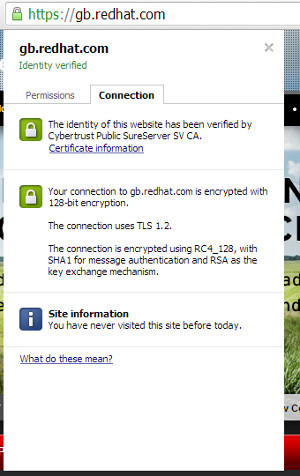
Click the "Certificate information" link and click the "Certification Path" tab on the resulting dialog.
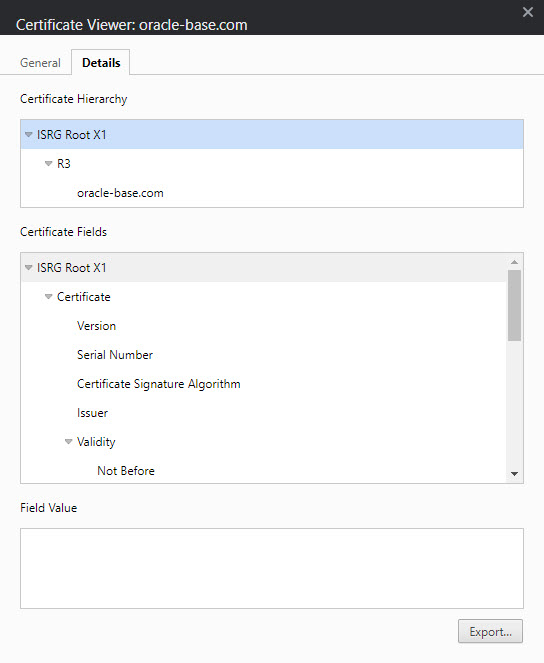
For the root node in the "Certification path", highlight the node and click the "View Certificate" button. On the resulting dialog, click the "Details" tab and click the "Copy to File..." button to save the certificate information.
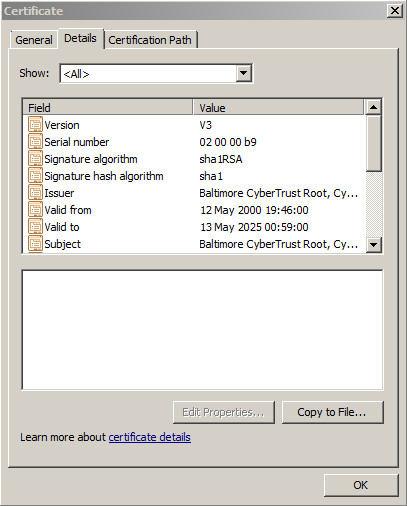
On the resulting wizard, do the following.
- Click the "Next" button on the welcome screen.
- Select the "Base-64 encoded X.509 (.CER)" option and click the "Next" button. Other formats work, but I've found this to be the most consistent.
- Enter suitable file name and click the "Next" button.
- Click the "Finish" button.
A similar dialog is displayed in Firefox by clicking "URL Icon > More Information > View Certificate > Details Tab".
Thanks to Erik for pointing out I don't need to download the intermediate certificates. Just the root certificate.
Create an Oracle Wallet Containing the Certificates
Create a new location to hold the wallet.
$ mkdir -p /u01/app/oracle/admin/DB11G/wallet
Create a new wallet.
$ orapki wallet create -wallet /u01/app/oracle/admin/DB11G/wallet -pwd WalletPasswd123 -auto_login
If the wallet password is too weak, you will get a message telling you so.
Invalid password....

PASSWORD_POLICY : Passwords must have a minimum length of eight

characters and contain alphabetic characters combined with numbers or

special characters.
In Oracle 11.2 the same issue causes a failure to create the wallet with the following message.
Unable to save wallet at /u01/app/oracle/admin/DB11G/wallet
With the wallet created, we can add the certificate we saved earlier.
$ orapki wallet add -wallet /u01/app/oracle/admin/DB11G/wallet -trusted_cert -cert "/host/BaltimoreCyberTrustRoot.crt" -pwd WalletPasswd123
The root certificate may fail to load with the following message, which can be ignored. It just means it was already present by default.
Could not install trusted cert at/host/Builtin Object Token:GTE CyberTrust Global Root

PKI-04003: The trusted certificate is already present in the wallet.
Test Secured Connection
We are now ready to access the secured resource, but we must provide the UTL_HTTP package with the wallet details so it can make the secured connections. This is done using the UTL_HTTP.SET_WALLET procedure. Repeating the previous test now works successfully.
SET SERVEROUTPUT ON

EXEC UTL_HTTP.set_wallet('file:/u01/app/oracle/admin/DB11G/wallet', 'WalletPasswd123');

EXEC show_html_from_url('https://gb.redhat.com/');

... HTML output removed ...

PL/SQL procedure successfully completed.

SQL>
Authentication
If you are accessing a site that requires authentication, you will need to do one of two things depending on the type of authentication used.
If the site uses basic authentication, simply specify the credentials in the call to SHOW_HTOM_FROM_URL, which will use them in the UTL_HTTP.SET_AUTHENTICATION call.
SET SERVEROUTPUT ON

EXEC UTL_HTTP.set_wallet('file:/u01/app/oracle/admin/DB11G/wallet', 'WalletPasswd123');

EXEC show_html_from_url('https://gb.redhat.com/', 'username', 'password');

... HTML output removed ...

PL/SQL procedure successfully completed.

SQL>
If the page uses digest authentication, then you will need to will need to install the digest_auth_api package, then make the following modification to the test code.
CREATE OR REPLACE PROCEDURE show_html_from_url (p_url  IN  VARCHAR2,

                                                p_username IN VARCHAR2 DEFAULT NULL,

                                                p_password IN VARCHAR2 DEFAULT NULL) AS

  l_http_request   UTL_HTTP.req;

  l_http_response  UTL_HTTP.resp;

  l_text           VARCHAR2(32767);

BEGIN

  -- Make a HTTP request and get the response.

  l_http_request  := digest_auth_api.begin_request(p_url          => p_url,

                                                   p_username     => p_username,

                                                   p_password     => p_password,

                                                   p_method       => 'GET');

  l_http_response := UTL_HTTP.get_response(l_http_request);

  -- Loop through the response.

  BEGIN

    LOOP

      UTL_HTTP.read_text(l_http_response, l_text, 32766);

      DBMS_OUTPUT.put_line (l_text);

    END LOOP;

  EXCEPTION

    WHEN UTL_HTTP.end_of_body THEN

      UTL_HTTP.end_response(l_http_response);

  END;

EXCEPTION

  WHEN OTHERS THEN

    UTL_HTTP.end_response(l_http_response);

    RAISE;

END show_html_from_url;

/
You can then call the test code in the same way you did for basic authentication.
SET SERVEROUTPUT ON

EXEC UTL_HTTP.set_wallet('file:/u01/app/oracle/admin/DB11G/wallet', 'WalletPasswd123');

EXEC show_html_from_url('https://gb.redhat.com/', 'username', 'password');

... HTML output removed ...

PL/SQL procedure successfully completed.

SQL>
SSLv3, TLSv1 and POODLE
With the publicity about the POODLE bug, many web masters are turning off SSLv3 support. Depending on your Oracle database version/patch, that can present a bit of a problem for people using UTL_HTTP to access HTTPS resources, as described here.
UTL_HTTPPackage Fails With ORA-29273 ORA-28860 When Using TLSv1 (Doc ID 727118.1) : Basically, older database releases only allow HTTPS using the SSLv3 protocol fromUTL_HTTP. If you want to use the TLSv1 protocol you need to make sure you are on a patched up version of 11.2.
Interestingly, if you upgrade to Oracle 12c, you might have problems in the other direction, since Oracle 12c prevents UTL_HTTP calls over HTTPS to anything older than TLSv1.2, as described here.
UTL_HTTPGives Error Over HTTPS Using RDBMS 12.1.0.1.0 (Doc ID 1675966.1) So you might have trouble accessing legacy systems, without reverting to HTTP.
For more information see:
Hope this helps. Regards Tim...
oracle utl_http 访问https类型的更多相关文章
- AFNetworking 原作者都无法解决的问题: 如何使用ip直接访问https网站?
背景 最近App似乎有报异常是DNS无法解析,尝试解决此问题.搜集到的资料很少,甚至连AFN原作者都判定这可能是一个无解的问题,参见: https://github.com/AFNetworking/ ...
- Oracle数据库的锁类型
Oracle数据库的锁类型 博客分类: oracle Oracle数据库的锁类型 根据保护的对象不同,Oracle数据库锁可以分为以下几大类:DML锁(data locks,数据锁),用于保护 ...
- ORACLE透明网关访问SQL Server配置总结
透明网关概念 ORACLE透明网关(Oracle Transparent Gateway)可以解决ORACLE数据库和非ORACLE数据库交互数据的需求.在一个异构的分布式环境中,通过ORACLE ...
- Oracle UTL_HTTP(收集汇总有用资料)
From Oracle The UTL_HTTP package makes Hypertext Transfer Protocol (HTTP) callouts from SQL and PL/S ...
- 【原创】CA证书申请+IIS配置HTTPS+默认访问https路径
一.CA证书申请 (一). 新StartSSL注册帐号 1. StartSSL官网 官方网站:https://www.startssl.com/ 2. 进入到StartSSL后,直接点击注 ...
- IIS7配置HTTPS+默认访问https路径
一.下载证书(这里我使用的是阿里云免费的证书) 文件说明: 1. 1532858285913.key(证书私钥文件).1532858285913.pem(证书文件).1532858285913.pfx ...
- 【Oracle】Oracle透明网关访问MSSQLServer
Oracle 数据库的透明网关 ( transparent gateway )是这样的一个接口:通过它,我们可以 sqlplus 操纵其他数据库,如 MS SQLServer . s ...
- oracle 网络访问配置tnsnames.ora文件的路径
转自:https://blog.csdn.net/jaray/article/details/22379811 oracle 网络访问配置tnsnames.ora文件的路径 oracle 9i 是: ...
- Oracle数据库访问客户端 sqldeveloper-18.4.0-376.1900-x64 下载
Oracle数据库访问客户端 sqldeveloper-18.4.0-376.1900-x64 下载地址:https://pan.baidu.com/s/1RnHVuMcCNZQ7ncHLKDJ33Q
随机推荐
- 判断是否某App
<!DOCTYPE html><html> <head> <meta charset="UTF-8"> <meta name= ...
- 在cxGrid表格中如何获得当前列的字段名
var GridDBTableView:TcxGridDBTableView; ColIndex:Integer; FieldName:string; begin GridDBTableView := ...
- css选择器querySelectorAll
* querySelectorAll(css的选择器)* 通过css的选择器获取到的一组元素* 获取的也是类数组** 主语* document 从整个页面去获取一组元素* 父级 从父级下去获取一组元素 ...
- cdn贝四层协议配置端口映射TCP端口转发
端口映射就是将外网主机的IP地址的一个端口映射到内网中一台机器,提供相应的服务.当用户访问该IP的这个端口时,服务器自动将请求映射到对应局域网内部的机器上.端口映射有动态和静态之分 1.安装好节点后初 ...
- Java学习笔记(十九):Object类
- python命名规则
1 包.模块的命名规则:全部以小写字母形式来命名.比如:import random 2 类.对象的命名规则:类是每个单词的首字母要大写,其他字母小写比如:class MyFamily: ,类的私有属性 ...
- Curl 基本命令
下载单个文件,默认将输出打印到标准输出中(STDOUT)中 curl http://www.centos.org 通过-o/-O选项保存下载的文件到指定的文件中:-o:将文件保存为命令行中指定的文件名 ...
- AltiumDesigner 查找相似对象
同类器件的集体选中.集体选中的方法是:先选中一个标识符,右击在选项表中选择Find Similar Objects,然后就会出现一个对话框,在这个对话框中,有一些any项,根据自己的需要把一些any改 ...
- JavaSE基础知识(3)—流程控制结构
一.顺序结构 1.说明 程序从上往下依次执行,中间没有任何跳转或选择2.特点 变量必须遵循 “前向引用” (局部变量必须先声明.赋值,然后再使用!) 二.分支结构(条件) 1.说明 程序从两条或多条路 ...
- linux下部署monogoDB服务(以及安装php mogodb扩展)
这两天网站转移到新的服务器后,登录时出现一个问题,会等待几分钟服务器才响应. 开始以为是nginx服务器的问题,后面经过排查发现是php一个登陆验证的函数的问题,每次跑到这个函数就会迟钝几分钟. 经过 ...