
.net core Identity集成IdentityServer4 (1)基本操作
一. 新建asp.net core identity项目
新建项目->asp.net core web应用程序-> web应用程序(模型视图控制器)&更改身份验证为个人.
新建一个空数据库, 然后在appsettings中的连接字符串指向该空库.
"DefaultConnection": "Data Source=.;Initial Catalog=IdentityDBTest;Integrated Security=False;Persist Security Info=False;User ID=sa;Password=sa1234;MultipleActiveResultSets=True;Pooling=True;Min Pool Size=1;Max Pool Size=300;"
cmd进入项目根目录, 然后执行 dotnet ef database update -c ApplicationDbContext
会在指定的空库中创建Identity的相应数据表.
修改launchSettings的Project执行方式的url为 http://localhost:40010
在Startup.cs中添加如下代码, 配置asp.net core identity的用户相关信息
public void ConfigureServices(IServiceCollection services)

        {

            services.AddDbContext<ApplicationDbContext>(options =>

                options.UseSqlServer(Configuration.GetConnectionString("DefaultConnection")));

            services.AddIdentity<ApplicationUser, IdentityRole>()

                .AddEntityFrameworkStores<ApplicationDbContext>()

                .AddDefaultTokenProviders();

            services.Configure<IdentityOptions>(options =>

            {

                // Password settings

                options.Password.RequireDigit = false;

                options.Password.RequiredLength = ;

                options.Password.RequireNonAlphanumeric = false;

                options.Password.RequireUppercase = false;

                options.Password.RequireLowercase = false;

                //options.Password.RequiredUniqueChars = 6;

                // Lockout settings

                //options.Lockout.DefaultLockoutTimeSpan = TimeSpan.FromMinutes(30);

                //options.Lockout.MaxFailedAccessAttempts = 10;

                //options.Lockout.AllowedForNewUsers = true;

                // User settings

                options.User.RequireUniqueEmail = true;

            });

            services.ConfigureApplicationCookie(options =>

            {

                // Cookie settings

                options.Cookie.Name = "identityCookieJJL";

                options.Cookie.HttpOnly = true;

                options.ExpireTimeSpan = TimeSpan.FromMinutes();

                // If the LoginPath isn't set, ASP.NET Core defaults

                // the path to /Account/Login.

                options.LoginPath = "/Account/Login";

                // If the AccessDeniedPath isn't set, ASP.NET Core defaults

                // the path to /Account/AccessDenied.

                options.AccessDeniedPath = "/Account/AccessDenied";

                options.SlidingExpiration = true;

            });

            // Add application services.

            services.AddTransient<IEmailSender, EmailSender>();
启动并运行, 注册一个用户, 并且确保登录成功
二. 集成IdentityServer
添加IdentityServer4.aspnetIdentity的Nuget包, 同时会自动添加IdentityServer4.
在根目录下新建一个AuthorizationConfig.cs类.
添加如下代码
/// <summary>

        ///  哪些API可以使用这个authorization server.

        /// </summary>

        /// <returns></returns>

        public static IEnumerable<ApiResource> ApiResources()

        {

            return new[]

            {

                new ApiResource("ProductApi", "微服务之产品Api")

            };

        }
public static IEnumerable<IdentityResource> GetIdentityResources()

        {

            return new List<IdentityResource> {

                new IdentityResources.OpenId(),

                new IdentityResources.Profile()

            };

        }
public static IEnumerable<Client> Clients()

        {

            return new[]

            {

                new Client

                {

                    ClientId = "WebClientImplicit",

                    ClientSecrets = new [] { new Secret("SecretKey".Sha256()) },

                    AllowedGrantTypes = GrantTypes.Implicit,

                    AllowAccessTokensViaBrowser = true,

                    RedirectUris = { http://localhost:40011/signin-oidc },

                    // where to redirect to after logout

                    PostLogoutRedirectUris = { http://localhost:40011/signout-callback-oidc },

                    AllowedScopes = new List<string>

                    {

                        IdentityServerConstants.StandardScopes.OpenId,

                        IdentityServerConstants.StandardScopes.Profile,

                        "ProductApi",

                        IdentityServerConstants.ClaimValueTypes.Json

                    }

                    ,

                    RequireConsent=false,//不需要确认授权页面,方便直接跳转

                    AlwaysIncludeUserClaimsInIdToken=true

                }

            };

        }
在StartUp.cs中的服务注册方法中添加代码
// configure identity server with in-memory stores, keys, clients and scopes

            //我们在将Asp.Net Identity添加到DI容器中时,一定要把注册IdentityServer放在Asp.Net Identity之后,

            //因为注册IdentityServer会覆盖Asp.Net Identity的一些配置,这个非常重要。

            services.AddIdentityServer()

                .AddDeveloperSigningCredential()

                .AddInMemoryPersistedGrants()

                .AddInMemoryIdentityResources(AuthorizationConfig.GetIdentityResources())

                .AddInMemoryApiResources(AuthorizationConfig.ApiResources())

                .AddInMemoryClients(AuthorizationConfig.Clients())

                .AddAspNetIdentity<ApplicationUser>();

            services.AddMvc();
在选暖宝的Configure使用注册项的方法中添加如下代码
// app.UseAuthentication(); // not needed, since UseIdentityServer adds the authentication middleware

            app.UseIdentityServer();
接下来使用命令dotnet run启动项目
三. 新建地址为http://localhost:40011/的asp.net core mvc项目, 命名为MvcClientImplict
新建项目的方法和上面的.net core identity一样, 只是不需要个人验证. 修改launchSettings的端口是40010, 对应identityserver的配置url
nuget获取 identitymodel
public void ConfigureServices(IServiceCollection services)

        {

            services.AddAuthentication(options =>

            {

                options.DefaultScheme = "Cookies";

                options.DefaultChallengeScheme = "oidc";

            })

           .AddCookie("Cookies")

           .AddOpenIdConnect("oidc", options =>

           {

               options.SignInScheme = "Cookies";

               options.Authority = "http://localhost:40010";

               options.RequireHttpsMetadata = false;

                //options.ResponseType = "id_token code";

                options.ResponseType = "id_token token";

               options.ClientId = "WebClientImplicit";

               options.SaveTokens = true;

               options.ClientSecret = "SecretKey";

                options.Scope.Add("ProductApi");

               //options.Scope.Add("offline_access");

               options.GetClaimsFromUserInfoEndpoint = true;//

            });

            services.AddMvc();

        }
下面也别忘了 app.UseAuthentication()
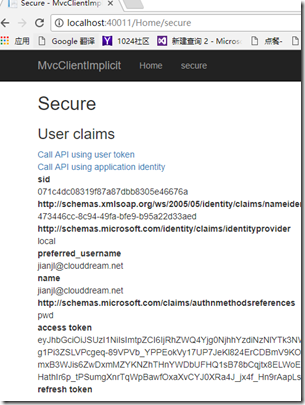
运行并验证授权成功成功
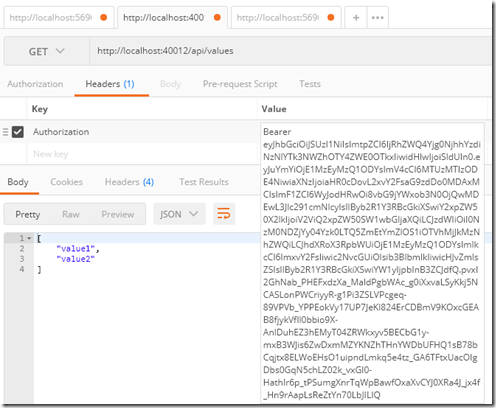
四. 新建一个webApi(端口40012), 配置受到identityserver的保护
nuget :IdentityServer4.AccessTokenValidation
public void ConfigureServices(IServiceCollection services)

        {

            services.AddAuthentication("Bearer")

                .AddIdentityServerAuthentication(option =>

                {

                    option.Authority = "http://localhost:40010";//这里填写/.well-known/openid-configuration里看到的issuer

                    option.RequireHttpsMetadata = false;

                    option.ApiName = "ProductApi";

                    option.ApiSecret = "SecretKey";

                });

            services.AddMvc();

        }
app.UseAuthentication();
在默认的api上添加验证
[Authorize]
[Route("api/[controller]")]
public class ValuesController : Controller
{
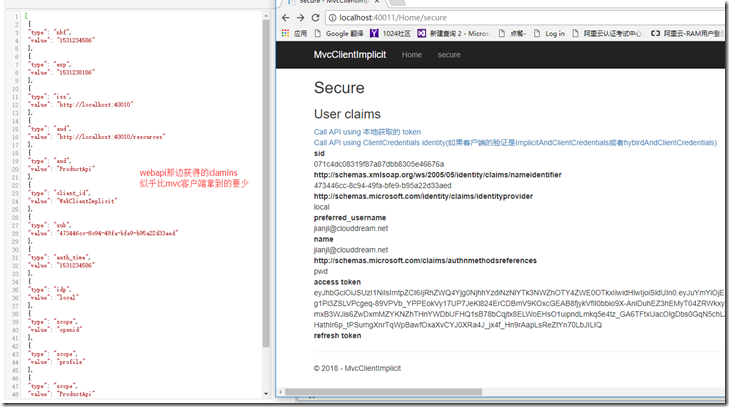
在webapi里面新建一个 controller
[Route("api/[controller]")]

    [Authorize]

    public class IdentityController : ControllerBase

    {

        [HttpGet]

        public IActionResult Get()

        {

            return new JsonResult(from c in User.Claims select new { c.Type, c.Value });

        }

    }
.net core Identity集成IdentityServer4 (1)基本操作的更多相关文章
- .net core Identity集成IdentityServer(3) 一键登出
在客户端程序, 我们补充一键登出操作. 使用了idsv之后, 退出的操作需要删除本地cookie, 然后去请求认证服务器, 也删除认证服务器的cookie. 官网给的退出的代码 public asyn ...
- .net core Identity集成IdentityServer(2) 实现IprofileService接口在accesstoken中增加自定义claims
导读 1. 如何添加自定义的claims. 前请提要 目前我们拥有了三个web应用. localhost:40010, 验证服务器 localhost:40011, mvc客户端, 充当webapp请 ...
- .net core identity集成微信授权登录
最快的方式是直接nuget安装AspNetCore.Authentication.WeChat包. 想要知道是如何实现的,可以看下面github上面的源码. 源码在这里:https://github. ...
- 从零搭建一个IdentityServer——集成Asp.net core Identity
前面的文章使用Asp.net core 5.0以及IdentityServer4搭建了一个基础的验证服务器,并实现了基于客户端证书的Oauth2.0授权流程,以及通过access token访问被保护 ...
- IdentityServer(12)- 使用 ASP.NET Core Identity
IdentityServer具有非常好的扩展性,其中用户及其数据(包括密码)部分你可以使用任何想要的数据库进行持久化. 如果需要一个新的用户数据库,那么ASP.NET Core Identity是你的 ...
- IdentityServer4 中文文档 -14- (快速入门)使用 ASP.NET Core Identity
IdentityServer4 中文文档 -14- (快速入门)使用 ASP.NET Core Identity 原文:http://docs.identityserver.io/en/release ...
- IdentityServer4【QuickStart】之使用asp.net core Identity
使用asp.net core Identity IdentityServer灵活的设计中有一部分是可以将你的用户和他们的数据保存到数据库中的.如果你以一个新的用户数据库开始,那么,asp.net co ...
- 第16章 使用ASP.NET Core Identity - Identity Server 4 中文文档(v1.0.0)
注意 对于任何先决条件(例如模板),首先要查看概述. IdentityServer旨在提供灵活性,其中一部分允许您为用户及其数据(包括账户密码)使用所需的任何数据库.如果您从新的用户数据库开始,那么A ...
- asp.net core系列 53 IdentityServer4 (IS4)介绍
一.概述 在物理层之间相互通信必须保护资源,需要实现身份验证和授权,通常针对同一个用户存储.对于资源安全设计包括二个部分,一个是认证,一个是API访问. 1 认证 认证是指:应用程序需要知道当前用户的 ...
随机推荐
- 数据库-mysql语句-查
复习: 列类型: 数值类型: 20 '20' tinyint / smallint / int / bigint float / double / decimal(m,d) bool (TRU ...
- HTTP1.1协议-RFC2616-中文版
转自:http://www.cnblogs.com/k1988/archive/2010/01/12/2165683.html 说明 本文档规定了互联网社区的标准组协议,并需要讨论和建议以便更加完善. ...
- javascript Date对象扩展相关function
本篇均以es5为主: 1,月份加减来推日期 // 根据所给月份往后推出日期 function getMonth(count) { var date = new Date(); var year = d ...
- s3 Docker的镜像和容器
Docker技术里最为基础的两大概念:镜像和容器.镜像的 获取方式:从registry拉取,从Dockerfile构建:容器的基本操作 1 Docker架构和底层技术简介 Docker Platfor ...
- Hiberbate注解
JPA:出现后,所有的ORM框架都有@注解 ,在所有的ORM框架里面是通用的,因此一般是建议大家使用注解进行配置. 实体类一般都有唯一属性,普通属性,集合属性 如何体现ORM思想的? @Entity ...
- Rabbit mq 简单应用
参考:http://rabbitmq.mr-ping.com/AMQP/AMQP_0-9-1_Model_Explained.html 简答模式(exchange不工作) import pika # ...
- 系统性能--CPU
对于cpu,目前比较关心的是cpu的利用率还有cpu的load,或者还有cpu运行队列. cpu利用率 cpu利用率分为sys,us.分别为操作系统和用户进程所占用的cpu利用率.sys的占用,一般是 ...
- ubuntu16.04下idea、webstorm等开发工具不能输入中文问题
问题: ubuntu16.04下idea.webstorm开发工具不能输入中文,就算切换到中文输入法输入的也是英文字母. 解决方案: 1.vim打开开发工具的启动文件(idea下就是idea.sh) ...
- iOS 不能加载电子签名
问题: 1:使用WKWebView在iOS12.0以上的系统中,可以显示PDF中的电子图章,签名.在iOS12.0以下的系统中不能显示电子签名,图章. 2: 解决方案,使用PDF.js加载. pdf ...
- js中的行为委托和无类编程
概述 <你不知道的JavaScript>中有这么一段话:不幸的是,将类和继承的设计模式思维带入Javascript的想法是你所做的最坏的事情,因为语法可能会让你迷惑不已,让你以为真的有类这 ...