
.net core Identity集成IdentityServer4 (1)基本操作
一. 新建asp.net core identity项目
新建项目->asp.net core web应用程序-> web应用程序(模型视图控制器)&更改身份验证为个人.
新建一个空数据库, 然后在appsettings中的连接字符串指向该空库.
"DefaultConnection": "Data Source=.;Initial Catalog=IdentityDBTest;Integrated Security=False;Persist Security Info=False;User ID=sa;Password=sa1234;MultipleActiveResultSets=True;Pooling=True;Min Pool Size=1;Max Pool Size=300;"
cmd进入项目根目录, 然后执行 dotnet ef database update -c ApplicationDbContext
会在指定的空库中创建Identity的相应数据表.
修改launchSettings的Project执行方式的url为 http://localhost:40010
在Startup.cs中添加如下代码, 配置asp.net core identity的用户相关信息
public void ConfigureServices(IServiceCollection services)

        {

            services.AddDbContext<ApplicationDbContext>(options =>

                options.UseSqlServer(Configuration.GetConnectionString("DefaultConnection")));

            services.AddIdentity<ApplicationUser, IdentityRole>()

                .AddEntityFrameworkStores<ApplicationDbContext>()

                .AddDefaultTokenProviders();

            services.Configure<IdentityOptions>(options =>

            {

                // Password settings

                options.Password.RequireDigit = false;

                options.Password.RequiredLength = ;

                options.Password.RequireNonAlphanumeric = false;

                options.Password.RequireUppercase = false;

                options.Password.RequireLowercase = false;

                //options.Password.RequiredUniqueChars = 6;

                // Lockout settings

                //options.Lockout.DefaultLockoutTimeSpan = TimeSpan.FromMinutes(30);

                //options.Lockout.MaxFailedAccessAttempts = 10;

                //options.Lockout.AllowedForNewUsers = true;

                // User settings

                options.User.RequireUniqueEmail = true;

            });

            services.ConfigureApplicationCookie(options =>

            {

                // Cookie settings

                options.Cookie.Name = "identityCookieJJL";

                options.Cookie.HttpOnly = true;

                options.ExpireTimeSpan = TimeSpan.FromMinutes();

                // If the LoginPath isn't set, ASP.NET Core defaults

                // the path to /Account/Login.

                options.LoginPath = "/Account/Login";

                // If the AccessDeniedPath isn't set, ASP.NET Core defaults

                // the path to /Account/AccessDenied.

                options.AccessDeniedPath = "/Account/AccessDenied";

                options.SlidingExpiration = true;

            });

            // Add application services.

            services.AddTransient<IEmailSender, EmailSender>();
启动并运行, 注册一个用户, 并且确保登录成功
二. 集成IdentityServer
添加IdentityServer4.aspnetIdentity的Nuget包, 同时会自动添加IdentityServer4.
在根目录下新建一个AuthorizationConfig.cs类.
添加如下代码
/// <summary>

        ///  哪些API可以使用这个authorization server.

        /// </summary>

        /// <returns></returns>

        public static IEnumerable<ApiResource> ApiResources()

        {

            return new[]

            {

                new ApiResource("ProductApi", "微服务之产品Api")

            };

        }
public static IEnumerable<IdentityResource> GetIdentityResources()

        {

            return new List<IdentityResource> {

                new IdentityResources.OpenId(),

                new IdentityResources.Profile()

            };

        }
public static IEnumerable<Client> Clients()

        {

            return new[]

            {

                new Client

                {

                    ClientId = "WebClientImplicit",

                    ClientSecrets = new [] { new Secret("SecretKey".Sha256()) },

                    AllowedGrantTypes = GrantTypes.Implicit,

                    AllowAccessTokensViaBrowser = true,

                    RedirectUris = { http://localhost:40011/signin-oidc },

                    // where to redirect to after logout

                    PostLogoutRedirectUris = { http://localhost:40011/signout-callback-oidc },

                    AllowedScopes = new List<string>

                    {

                        IdentityServerConstants.StandardScopes.OpenId,

                        IdentityServerConstants.StandardScopes.Profile,

                        "ProductApi",

                        IdentityServerConstants.ClaimValueTypes.Json

                    }

                    ,

                    RequireConsent=false,//不需要确认授权页面,方便直接跳转

                    AlwaysIncludeUserClaimsInIdToken=true

                }

            };

        }
在StartUp.cs中的服务注册方法中添加代码
// configure identity server with in-memory stores, keys, clients and scopes

            //我们在将Asp.Net Identity添加到DI容器中时,一定要把注册IdentityServer放在Asp.Net Identity之后,

            //因为注册IdentityServer会覆盖Asp.Net Identity的一些配置,这个非常重要。

            services.AddIdentityServer()

                .AddDeveloperSigningCredential()

                .AddInMemoryPersistedGrants()

                .AddInMemoryIdentityResources(AuthorizationConfig.GetIdentityResources())

                .AddInMemoryApiResources(AuthorizationConfig.ApiResources())

                .AddInMemoryClients(AuthorizationConfig.Clients())

                .AddAspNetIdentity<ApplicationUser>();

            services.AddMvc();
在选暖宝的Configure使用注册项的方法中添加如下代码
// app.UseAuthentication(); // not needed, since UseIdentityServer adds the authentication middleware

            app.UseIdentityServer();
接下来使用命令dotnet run启动项目
三. 新建地址为http://localhost:40011/的asp.net core mvc项目, 命名为MvcClientImplict
新建项目的方法和上面的.net core identity一样, 只是不需要个人验证. 修改launchSettings的端口是40010, 对应identityserver的配置url
nuget获取 identitymodel
public void ConfigureServices(IServiceCollection services)

        {

            services.AddAuthentication(options =>

            {

                options.DefaultScheme = "Cookies";

                options.DefaultChallengeScheme = "oidc";

            })

           .AddCookie("Cookies")

           .AddOpenIdConnect("oidc", options =>

           {

               options.SignInScheme = "Cookies";

               options.Authority = "http://localhost:40010";

               options.RequireHttpsMetadata = false;

                //options.ResponseType = "id_token code";

                options.ResponseType = "id_token token";

               options.ClientId = "WebClientImplicit";

               options.SaveTokens = true;

               options.ClientSecret = "SecretKey";

                options.Scope.Add("ProductApi");

               //options.Scope.Add("offline_access");

               options.GetClaimsFromUserInfoEndpoint = true;//

            });

            services.AddMvc();

        }
下面也别忘了 app.UseAuthentication()
运行并验证授权成功成功
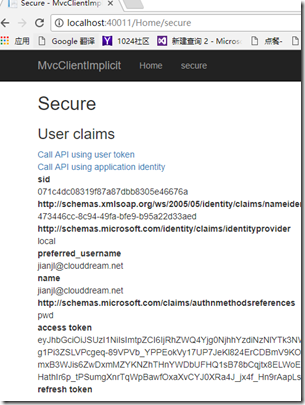
四. 新建一个webApi(端口40012), 配置受到identityserver的保护
nuget :IdentityServer4.AccessTokenValidation
public void ConfigureServices(IServiceCollection services)

        {

            services.AddAuthentication("Bearer")

                .AddIdentityServerAuthentication(option =>

                {

                    option.Authority = "http://localhost:40010";//这里填写/.well-known/openid-configuration里看到的issuer

                    option.RequireHttpsMetadata = false;

                    option.ApiName = "ProductApi";

                    option.ApiSecret = "SecretKey";

                });

            services.AddMvc();

        }
app.UseAuthentication();
在默认的api上添加验证
[Authorize]
[Route("api/[controller]")]
public class ValuesController : Controller
{
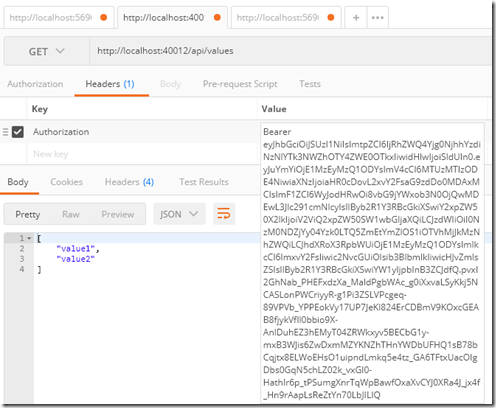
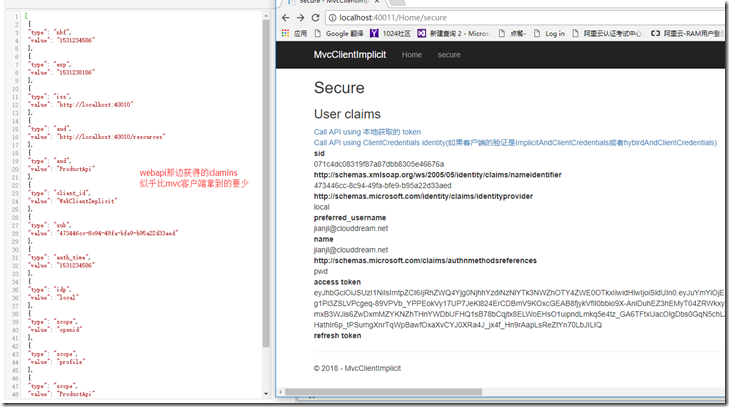
在webapi里面新建一个 controller
[Route("api/[controller]")]

    [Authorize]

    public class IdentityController : ControllerBase

    {

        [HttpGet]

        public IActionResult Get()

        {

            return new JsonResult(from c in User.Claims select new { c.Type, c.Value });

        }

    }
.net core Identity集成IdentityServer4 (1)基本操作的更多相关文章
- .net core Identity集成IdentityServer(3) 一键登出
在客户端程序, 我们补充一键登出操作. 使用了idsv之后, 退出的操作需要删除本地cookie, 然后去请求认证服务器, 也删除认证服务器的cookie. 官网给的退出的代码 public asyn ...
- .net core Identity集成IdentityServer(2) 实现IprofileService接口在accesstoken中增加自定义claims
导读 1. 如何添加自定义的claims. 前请提要 目前我们拥有了三个web应用. localhost:40010, 验证服务器 localhost:40011, mvc客户端, 充当webapp请 ...
- .net core identity集成微信授权登录
最快的方式是直接nuget安装AspNetCore.Authentication.WeChat包. 想要知道是如何实现的,可以看下面github上面的源码. 源码在这里:https://github. ...
- 从零搭建一个IdentityServer——集成Asp.net core Identity
前面的文章使用Asp.net core 5.0以及IdentityServer4搭建了一个基础的验证服务器,并实现了基于客户端证书的Oauth2.0授权流程,以及通过access token访问被保护 ...
- IdentityServer(12)- 使用 ASP.NET Core Identity
IdentityServer具有非常好的扩展性,其中用户及其数据(包括密码)部分你可以使用任何想要的数据库进行持久化. 如果需要一个新的用户数据库,那么ASP.NET Core Identity是你的 ...
- IdentityServer4 中文文档 -14- (快速入门)使用 ASP.NET Core Identity
IdentityServer4 中文文档 -14- (快速入门)使用 ASP.NET Core Identity 原文:http://docs.identityserver.io/en/release ...
- IdentityServer4【QuickStart】之使用asp.net core Identity
使用asp.net core Identity IdentityServer灵活的设计中有一部分是可以将你的用户和他们的数据保存到数据库中的.如果你以一个新的用户数据库开始,那么,asp.net co ...
- 第16章 使用ASP.NET Core Identity - Identity Server 4 中文文档(v1.0.0)
注意 对于任何先决条件(例如模板),首先要查看概述. IdentityServer旨在提供灵活性,其中一部分允许您为用户及其数据(包括账户密码)使用所需的任何数据库.如果您从新的用户数据库开始,那么A ...
- asp.net core系列 53 IdentityServer4 (IS4)介绍
一.概述 在物理层之间相互通信必须保护资源,需要实现身份验证和授权,通常针对同一个用户存储.对于资源安全设计包括二个部分,一个是认证,一个是API访问. 1 认证 认证是指:应用程序需要知道当前用户的 ...
随机推荐
- To me
1.流泪的时候不做任何决定: 2.不反复思考同一个问题: 3.不害怕做错什么: 4.有负面情绪是正常的: 5.一切的烦恼都是自找的: 6.说过的话一定要做到: 7.不要去害怕做一件事: 8.无论是对是 ...
- Python select模块学习
select 是常用的异步socket 处理方法 一般用法: # iwtd,owtd,ewtd 分别为需要异步处理的读socket队列, 写socket队列(一般不用), 和错误socket队列, 返 ...
- Python开发——4.集合和字符串拼接
一.集合(set) 1.集合的特性: 不同元素组成.元素是无序排列的可hash值 2.集合转为列表 s1 = {11,"hechouzi",(11,22,33)} names = ...
- 日期Data类,日历类Calendar
用于得到当前时间,和设置日期类数据 public void testDate() { // 创建一个日期对象 Date date = new Date(); /** * 从1900年1月1日 00:0 ...
- Html5与Css3知识点拾遗(五)
css3更新的颜色 RGBA:红.绿.蓝.不透明度 rgba(89,0,127,0.4); HSL和HSLA:色相.饱和度.亮度.不透明度 hsl(282,100%,25%); hsl(282,100 ...
- 11g统计信息自动收集任务
1.查看统计信息自动收集任务的开启情况. select client_name,status from dba_autotask_client; 2.查看自动收集任务各个窗口的开启情况. col op ...
- 重新编译安装swoole支持OpenSSL
1.下载:wget http://pecl.php.net/get/swoole-1.9.22.tgz 2.解压:tar zxvf swoole-1.9.22.tgz 3.扩展模块:cd swoole ...
- 【LOJ6036】 「雅礼集训 2017 Day4」编码
传送门 LOJ Solution 因为?只有两种可能为0,1,所以就把这两个串搞出来. 那么现在?取0和?取1不能并存,前缀不能并存,所以就是一个\(2-SAT\),现在问题在于这个东西可能会有很多条 ...
- vscode 集成 cygwin 的注意事项
vscode 集成 cygwin vscode 现在是我的主力开发编辑器,它自带 terminal 不需要我各种切换,我还想要在 windows 下执行一些简单的 .sh 文件.所以,我希望有一款工具 ...
- Springboot中读取.yml文件
自定义配置文件application-dev.yml spring: dataresource: druid: driver-class-name: com.mysql.jdbc.Driver url ...