
Spark Streaming官方文档学习--下
def getWordBlacklist(sparkContext):if ('wordBlacklist' not in globals()):globals()['wordBlacklist'] = sparkContext.broadcast(["a", "b", "c"])return globals()['wordBlacklist']def getDroppedWordsCounter(sparkContext):if ('droppedWordsCounter' not in globals()):globals()['droppedWordsCounter'] = sparkContext.accumulator(0)return globals()['droppedWordsCounter']def echo(time, rdd):# Get or register the blacklist Broadcastblacklist = getWordBlacklist(rdd.context)# Get or register the droppedWordsCounter AccumulatordroppedWordsCounter = getDroppedWordsCounter(rdd.context)# Use blacklist to drop words and use droppedWordsCounter to count themdef filterFunc(wordCount):if wordCount[0] in blacklist.value:droppedWordsCounter.add(wordCount[1])Falseelse:Truecounts = "Counts at time %s %s" % (time, rdd.filter(filterFunc).collect())wordCounts.foreachRDD(echo)
# Lazily instantiated global instance of SparkSessiondef getSparkSessionInstance(sparkConf):if ('sparkSessionSingletonInstance' not in globals()):globals()['sparkSessionSingletonInstance'] = SparkSession\.builder\.config(conf=sparkConf)\.getOrCreate()return globals()['sparkSessionSingletonInstance']...# DataFrame operations inside your streaming programwords = ... # DStream of stringsdef process(time, rdd):print("========= %s =========" % str(time))try:# Get the singleton instance of SparkSessionspark = getSparkSessionInstance(rdd.context.getConf())# Convert RDD[String] to RDD[Row] to DataFramerowRdd = rdd.map(lambda w: Row(word=w))wordsDataFrame = spark.createDataFrame(rowRdd)# Creates a temporary view using the DataFramewordsDataFrame.createOrReplaceTempView("words")# Do word count on table using SQL and print itwordCountsDataFrame = spark.sql("select word, count(*) as total from words group by word")wordCountsDataFrame.show()except:passwords.foreachRDD(process)
- Metadata checkpointing - Saving of the information defining the streaming computation to fault-tolerant storage like HDFS. This is used to recover from failure of the node running the driver of the streaming application. Metadata includes:
Configuration - The configuration that was used to create the streaming application.DStream operations - The set of DStream operations that define the streaming application.Incomplete batches - Batches whose jobs are queued but have not completed yet. - Data checkpointing - Saving of the generated RDDs to reliable storage.
- Usage of stateful transformations - If either updateStateByKey or reduceByKeyAndWindow (with inverse function) is used in the application, then the checkpoint directory must be provided to allow for periodic(周期的) RDD checkpointing.
- Recovering from failures of the driver running the application - Metadata checkpoints are used to recover with progress information.
- When the program is being started for the first time, it will create a new StreamingContext, set up all the streams and then call start().
- When the program is being restarted after failure, it will re-create a StreamingContext from the checkpoint data in the checkpoint directory.
# Function to create and setup a new StreamingContextdef functionToCreateContext():sc = SparkContext(...) # new contextssc = new StreamingContext(...)lines = ssc.socketTextStream(...) # create DStreams...ssc.checkpoint(checkpointDirectory) # set checkpoint directoryreturn ssc# Get StreamingContext from checkpoint data or create a new onecontext = StreamingContext.getOrCreate(checkpointDirectory, functionToCreateContext)# Do additional setup on context that needs to be done,# irrespective of whether it is being started or restartedcontext. ...# Start the contextcontext.start()context.awaitTermination()
StreamingContext.getOrCreate(checkpointDirectory, None).
- Cluster with a cluster manager
- Package the application JAR
If you are using spark-submit to start the application, then you will not need to provide Spark and Spark Streaming in the JAR. However, if your application uses advanced sources (e.g. Kafka, Flume), then you will have to package the extra artifact they link to, along with their dependencies, in the JAR that is used to deploy the application. - Configuring sufficient memory for the executors
Note that if you are doing 10 minute window operations, the system has to keep at least last 10 minutes of data in memory. So the memory requirements for the application depends on the operations used in it. - Configuring checkpointing
- Configuring automatic restart of the application driver
- Spark Standalone
the Standalone cluster manager can be instructed to supervise the driver, and relaunch it if the driver fails either due to non-zero exit code, or due to failure of the node running the driver. - YARN automatically restarting an application
- Mesos Marathon has been used to achieve this with Mesos
- Configuring write ahead logs
If enabled, all the data received from a receiver gets written into a write ahead log in the configuration checkpoint directory. - Setting the max receiving rate
- 更新的应用和旧的应用并行的执行,Once the new one (receiving the same data as the old one) has been warmed up and is ready for prime time, the old one be can be brought down.这要求,数据源可以向两个地方发送数据。
- 优雅的停止,就是处理完接受到的数据之后再停止。ensure data that has been received is completely processed before shutdown。Then the upgraded application can be started, which will start processing from the same point where the earlier application left off.为了实现这个需要数据源的数据是可以缓存的。
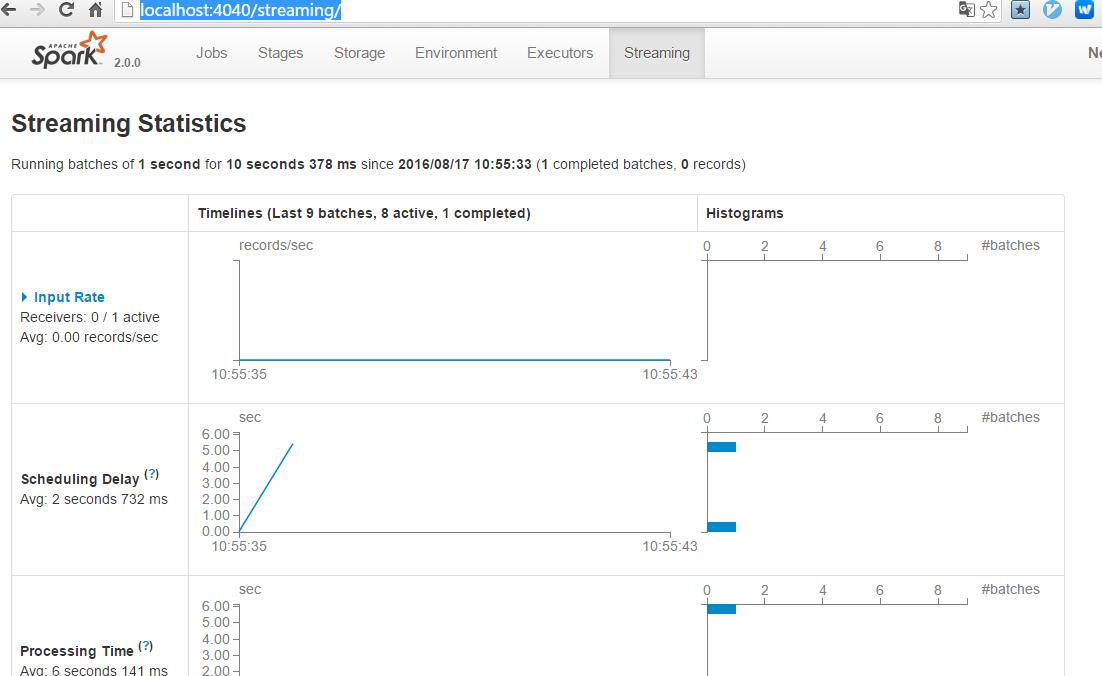
- Reducing the processing time of each batch of data by efficiently using cluster resources.
- Setting the right batch size such that the batches of data can be processed as fast as they are received (that is, data processing keeps up with the data ingestion).
Spark Streaming官方文档学习--下的更多相关文章
- Spark Streaming官方文档学习--上
官方文档地址:http://spark.apache.org/docs/latest/streaming-programming-guide.html Spark Streaming是spark ap ...
- Spark监控官方文档学习笔记
任务的监控和使用 有几种方式监控spark应用:Web UI,指标和外部方法 Web接口 每个SparkContext都会启动一个web UI,默认是4040端口,用来展示一些信息: 一系列调度的st ...
- Spring 4 官方文档学习(十一)Web MVC 框架
介绍Spring Web MVC 框架 Spring Web MVC的特性 其他MVC实现的可插拔性 DispatcherServlet 在WebApplicationContext中的特殊的bean ...
- Spark SQL 官方文档-中文翻译
Spark SQL 官方文档-中文翻译 Spark版本:Spark 1.5.2 转载请注明出处:http://www.cnblogs.com/BYRans/ 1 概述(Overview) 2 Data ...
- Spring 4 官方文档学习(十二)View技术
关键词:view technology.template.template engine.markup.内容较多,按需查用即可. 介绍 Thymeleaf Groovy Markup Template ...
- Spring 4 官方文档学习(十一)Web MVC 框架之配置Spring MVC
内容列表: 启用MVC Java config 或 MVC XML namespace 修改已提供的配置 类型转换和格式化 校验 拦截器 内容协商 View Controllers View Reso ...
- Spring Data Commons 官方文档学习
Spring Data Commons 官方文档学习 -by LarryZeal Version 1.12.6.Release, 2017-07-27 为知笔记版本在这里,带格式. Table o ...
- Spring 4 官方文档学习(十一)Web MVC 框架之resolving views 解析视图
接前面的Spring 4 官方文档学习(十一)Web MVC 框架,那篇太长,故另起一篇. 针对web应用的所有的MVC框架,都会提供一种呈现views的方式.Spring提供了view resolv ...
- Spring Boot 官方文档学习(一)入门及使用
个人说明:本文内容都是从为知笔记上复制过来的,样式难免走样,以后再修改吧.另外,本文可以看作官方文档的选择性的翻译(大部分),以及个人使用经验及问题. 其他说明:如果对Spring Boot没有概念, ...
随机推荐
- js 中的call()函数
a.call(b); 官方说:什么对象替换什么对象. a对象的方法应用到b对象上(函数apply的意思正好说明符合这样理解:a对象应用到b对象上去) a对象既然添加到b对象上了.那么b对象自然就拥有了 ...
- git log用法【转】
转自:http://www.cnblogs.com/gbyukg/archive/2011/12/12/2285419.html PHP技术交流群 170855791 git log 查看提交记录,参 ...
- Overview of Flashback Technology
Oracle Flashback Query : SELECT AS OFOracle Flashback Version Query :DBMS_FLASHBACK PackageOracle Fl ...
- 检测内存泄露:Instruments中的Leaks
前言 如果要检测内存泄露,我们会使用Xcode7自带的Instruments中的Leaks工具来检测. 现在的开发环境是ARC,所以很少会出现内存泄漏的情况. 不过我们一定要养好码代码的规范性. 例如 ...
- HDU 5768:Lucky7(中国剩余定理 + 容斥原理)
http://acm.hdu.edu.cn/showproblem.php?pid=5768 Lucky7 Problem Description When ?? was born, seven ...
- hdwiki 数据库结构说明
HDWiki数据库结构说明 以下标有“A”的表示该列为自增列,标有“P”的表示该列为主码,标有“I”的表示该列为索引列,标有“U”的表示该列为唯一列,标有“F”的表示全文搜索. ...
- js 闭包理解
闭包主要应用于两种情况: 1 函数作为返回值. 2 函数作为参数传递. 第一种举例: function fn(){ var max = 10; return function bar(){ if(x ...
- JavaScript DOM 编程艺术(第2版)读书笔记(2)
JavaScript 语法 注释 单行注释:// 多行注释:/* */ "<!--"可以用作单行注释,由于和HTML的"<!-- -->"多 ...
- 清空html代码
不要使用 $("XXX").html(""); 清空html代码块一般有两种方式: 1)非miniui等组件区块:$("#id").empt ...
- C Looooops(扩展欧几里得)
C Looooops Time Limit: 1000MS Memory Limit: 65536K Total Submissions: 20128 Accepted: 5405 Descripti ...