
activemq安装与简单消息发送接收实例
安装环境:
Activemq5.11.1, jdk1.7(activemq5.11.1版本需要jdk升级到1.7),虚拟机: 192.168.147.131
[root@localhost software]# pwd

/export/software

[root@localhost software]# tar -zxvf apache-activemq-5.11.-bin.tar.gz

[root@localhost software]# mv apache-activemq-5.11. /usr/local
配置Nginx代理Activemq后台管理应用默认绑定的8161端口
upstream tomcat_tools.activemq.local {

        server 127.0.0.1:  weight= max_fails= fail_timeout=300s;

}

server {

        listen                   ;

        server_name              tools.activemq.local.com;

        root                     /usr/local/apache-activemq-5.11./webapps/;

        access_log               /usr/local/apache-activemq-5.11./logs/tools.activemq.local.com_access.log main;

        error_log                /usr/local/apache-activemq-5.11./logs/tools.activemq.local.com_error.log warn;

        error_page                 /40x.html;

        location / {

            index index.html index.htm;

            proxy_next_upstream     http_500 http_502 http_503 http_504 error timeout invalid_header;

            proxy_set_header        Host  $host;

            proxy_set_header       X-Real-IP        $remote_addr;

            proxy_set_header        X-Forwarded-For $proxy_add_x_forwarded_for;

            proxy_pass              http://tomcat_tools.activemq.local;

        }

        #静态文件,nginx自己处理

            location ~ ^/(images|javascript|js|css|flash|media|static)/ {

                    #过期30天,静态文件不怎么更新,过期可以设大一点,

                    #如果频繁更新,则可以设置得小一点。

                    expires 30d;

            }

}
重启nginx
启动activemq
[root@localhost linux-x86-]# pwd

/usr/local/apache-activemq-5.11./bin/linux-x86-

[root@localhost linux-x86-]# ./activemq start
配置host[192.168.147.131 tools.activemq.local.com]

登录activemq的后台,默认账号 admin/admin
http://tools.activemq.local.com/admin

实例展示MQ消息的发送和接收[消息类型分为queue 和 Topic]
pom引入
 <dependency>

     <groupId>org.apache.activemq</groupId>

     <artifactId>activemq-all</artifactId>

     <version>5.11.1</version>

 </dependency>
Queue类型消息

1、定义消息destination和brokerUrl[61616为activemq用于消息通讯的端口]
public class Constant {

    public static final String brokerURL = "tcp://192.168.147.131:61616";

    public static final String queueDestination = "testQueue";

}
2、编写消息的发送程序
package com.mq.base.queue;

import javax.jms.*;

import org.apache.activemq.ActiveMQConnection;

import org.apache.activemq.ActiveMQConnectionFactory;

/**

 * created on 2015/6/4

 * @author dennisit@163.com

 * @version 1.0

 */

public class MqSender {

    public static void main(String[] args) throws JMSException {

        // 默认的账号和密码为null

        String username = ActiveMQConnection.DEFAULT_USER;

        String password = ActiveMQConnection.DEFAULT_PASSWORD;

        // 初始化连接工厂, DEFAULT_BROKER_URL =failover://tcp://localhost:61616

        ConnectionFactory factory = new ActiveMQConnectionFactory(username, password, Constant.brokerURL);

        // 创建连接

        Connection connection = factory.createConnection();

        connection.start();

        // 创建会话

        Session session = connection.createSession(Boolean.TRUE, Session.AUTO_ACKNOWLEDGE);

        // 创建消息主题Queue

        Destination destination = session.createQueue(Constant.queueDestination);

        // MessageProducer负责发送消息

        MessageProducer producer = session.createProducer(destination);

        // 消息不持久化

        producer.setDeliveryMode(DeliveryMode.NON_PERSISTENT);

        ObjectMessage message = session.createObjectMessage("hello world...");

        producer.send(message);

        // 只有commit之后,消息才会进入队列

        session.commit();

        System.out.println("send...");

        // 测试状态,这里把关闭会话和连接注释掉了。

        // session.close();

        // connection.close();

    }

}
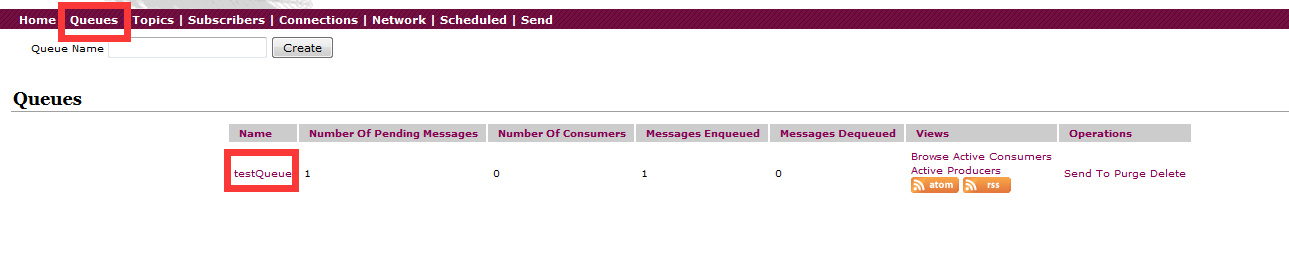
执行消息发送,在管理后台查看
3、编写消息的消费程序
package com.mq.base.queue;

import javax.jms.Connection;

import javax.jms.ConnectionFactory;

import javax.jms.Destination;

import javax.jms.JMSException;

import javax.jms.MessageConsumer;

import javax.jms.ObjectMessage;

import javax.jms.Session;

import org.apache.activemq.ActiveMQConnection;

import org.apache.activemq.ActiveMQConnectionFactory;

/**

 * created on 2015/6/4

 * @author dennisit@163.com

 * @version 1.0

 */

public class MqReceiver {

    public static void main(String[] args) throws JMSException {

        // 默认的账号和密码为null

        String username = ActiveMQConnection.DEFAULT_USER;

        String password = ActiveMQConnection.DEFAULT_PASSWORD;

        // 初始化连接工厂, DEFAULT_BROKER_URL =failover://tcp://localhost:61616

        ConnectionFactory factory = new ActiveMQConnectionFactory(username, password, Constant.brokerURL);

        // 创建连接

        Connection connection = factory.createConnection();

        connection.start();

        // 创建会话

        Session session = connection.createSession(Boolean.TRUE, Session.AUTO_ACKNOWLEDGE);

        Destination destination = session.createQueue(Constant.queueDestination);

        // MessageConsumer负责接受消息

        MessageConsumer consumer = session.createConsumer(destination);

        ObjectMessage message = (ObjectMessage)consumer.receive();

        if (null != message) {

            String messageString = (String)message.getObject();

            System.out.println("Receive : " + messageString);

        }

        // 测试状态,这里把关闭会话和连接注释掉了。

        // session.close();

        // connection.close();

    }

}
执行这段代码会输出接收到的消息内容:

管理后台在查看queue中心结果如下:

Topic类型消息
1、定义消息destination和brokerUrl[61616为activemq用于消息通讯的端口]
public class Constant {

    public static final String brokerURL = "tcp://192.168.147.131:61616";

    public static final String topicDestination = "testTopic";

}
2、编写消息生产者
package com.mq.base.topic;

import org.apache.activemq.ActiveMQConnection;

import org.apache.activemq.ActiveMQConnectionFactory;

import javax.jms.*;

/**

 * created on 2015/6/4

 * @author dennisit@163.com

 * @version 1.0

 */

public class MqSender {

    public static void main(String[] args) throws JMSException {

        // 默认的账号和密码为null

        String username = ActiveMQConnection.DEFAULT_USER;

        String password = ActiveMQConnection.DEFAULT_PASSWORD;

        // 初始化连接工厂, DEFAULT_BROKER_URL =failover://tcp://localhost:61616

        ConnectionFactory factory = new ActiveMQConnectionFactory(username, password, com.mq.base.queue.Constant.brokerURL);

        // 创建连接

        Connection connection = factory.createConnection();

        connection.start();

        // 创建会话

        Session session = connection.createSession(Boolean.TRUE, Session.AUTO_ACKNOWLEDGE);

        // 创建消息主题Topic,和Queue的区别就在此

        Destination destination = session.createTopic(Constant.topicDestination);

        // MessageProducer负责发送消息

        MessageProducer producer = session.createProducer(destination);

        // 消息不持久化

        producer.setDeliveryMode(DeliveryMode.NON_PERSISTENT);

        TextMessage message = session.createTextMessage(); // createObjectMessage("hello world...");

        message.setStringProperty("msgId","topicMessage");

        producer.send(message);

        // 只有commit之后,消息才会进入队列

        session.commit();

        System.out.println("send...");

        // 测试状态,这里把关闭会话和连接注释掉了。

        // session.close();

        // connection.close();

    }

}
3、编写消息消费者
package com.mq.base.topic;

import org.apache.activemq.ActiveMQConnection;

import org.apache.activemq.ActiveMQConnectionFactory;

import javax.jms.*;

/**

 * created on 2015/6/4

 * @author dennisit@163.com

 * @version 1.0

 */

public class MqReceiver {

    public static void main(String[] args) throws JMSException {

        // 默认的账号和密码为null

        String username = ActiveMQConnection.DEFAULT_USER;

        String password = ActiveMQConnection.DEFAULT_PASSWORD;

        // 初始化连接工厂, DEFAULT_BROKER_URL =failover://tcp://localhost:61616

        ConnectionFactory factory = new ActiveMQConnectionFactory(username, password, com.mq.base.queue.Constant.brokerURL);

        // 创建连接

        Connection connection = factory.createConnection();

        connection.start();

        // 创建会话

        Session session = connection.createSession(Boolean.TRUE, Session.AUTO_ACKNOWLEDGE);

        Destination destination = session.createTopic(Constant.topicDestination);

        // MessageConsumer负责接受消息

        MessageConsumer consumer = session.createConsumer(destination);

        TextMessage message = (TextMessage)consumer.receive();

        if (null != message) {

            String messageString = message.getStringProperty("msgId");

            System.out.println("Receive : " + messageString);

            session.commit();

        }

        // 测试状态,这里把关闭会话和连接注释掉了。

        // session.close();

        // connection.close();

    }

}
先启动消费者:

启动生产者,生产消息,此时会接收到消息如图:

观察topic后台管理

Queue模型消息和Topic模型消息区别
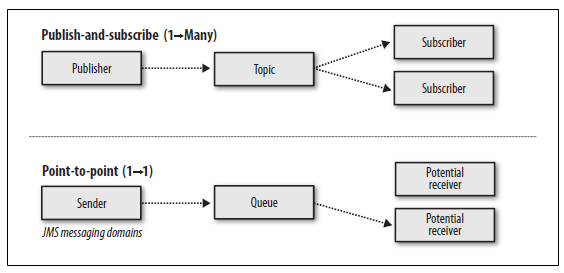
queue[点对点模型]
 1、只有一个消费者
 每条消息只有一个消费者,如果这条消息被消费,那么其它消费者不能接受到此消息。
 2、时间无关性
 消息的消费和时间无关,只要消息被发送了,在消息过期之前,如果没有其他消费者消费了这个消息,那么客户端可以在任何时候来消费这条消息。
 3、消费者必须确认
 消费者收到消息之后,必须向Message Provider确认,否则会被认为消息没有被消费,仍然可以被其他消费者消费。可以设置自动确认。这个特点其实也是保证一条消息只能由一个消费者来消费。
 4、非持久化的消息只发一次
 非持久化的消息,可能会丢失,因为消息会过期,另外Message Provider可能宕机。
 5、持久化的消息严格发一次
 消息可以被持久化,比如持久化在文件系统或者数据库中,这样可以避免Message Provider的异常或者其它异常导致消息丢失。

Topic[发布者/订阅者模型]
 1、每条消息可以有多个订阅者
 2、订阅者只能消费它们订阅topic之后的消息
 3、非持久化订阅,订阅者必须保持为活动状态才能使用这些消息,如果一个订阅者A断开了10分钟,那么A就会收不到这10分钟内的消息。
 4、持久化订阅,Message Provider会保存这些消息,即使订阅者因为网络原因断开了,再重新连接以后,能让消费这些消息。
 5、是否使用持久化订阅,需要根据业务场景判断。
转载请注明出处:[http://www.cnblogs.com/dennisit/p/4551182.html]
activemq安装与简单消息发送接收实例的更多相关文章
- ActiveMQ(2)---ActiveMQ原理分析之消息发送
持久化消息和非持久化消息的发送策略 消息同步发送和异步发送 ActiveMQ支持同步.异步两种发送模式将消息发送到broker上.同步发送过程中,发送者发送一条消息会阻塞直到broker反馈一个确认消 ...
- php实现简单消息发送+极光推送系统
前几天刚写完的一个东西,写的比较简单,没有使用其他插件,原生php+计划任务实现 极光推送的代码 /* $receiver="registration_id" : [ " ...
- ActiveMQ安装与持久化消息
activityMQ官网:http://activemq.apache.org/ 有windows版与linux版 windows版启动 在bin目录下双击activemq.bat linux版的安 ...
- rocketmq简单消息发送
有以下3种方式发送RocketMQ消息 可靠同步发送 reliable synchronous 可靠异步发送 reliable asynchronous 单向发送 one-way transmissi ...
- C++ TCP客户端网络消息发送接收同步实现
废话不多说, 直入主题, 我们在写客户单的时候希望在哪里发消息出去,然后在哪里返回消息(同步), 然后继续往下运行-, 而不是在这里发送了一个消息给服务端, 在另一个地方接受消息(异步) , 也不知道 ...
- ActiveMQ JMS实现消息发送
一.创建配置消息发送接收目的地. ActiveMQ中间件地址 JMS_BROKER_URL=failover://(tcp://192.168.1.231:61616) QUEUE_BUSP_TP_S ...
- spring整合activemq发送MQ消息[Topic模式]实例
Topic模式消息发送实例 1.pom引入 <dependency> <groupId>junit</groupId> <artifactId>juni ...
- 【ActiveMQ】ActiveMQ在Windows的安装,以及点对点的消息发送案例
公司最近会用MQ对某些业务进行处理,所以,这次我下载了apache-activemq-5.12.0-bin把玩下. 基于练习方便需要,使用Windows的版本. 参考的优秀文章: activemq的几 ...
- spring整合activemq发送MQ消息[queue模式]实例
queue类型消息 pom依赖 <dependency> <groupId>junit</groupId> <artifactId>junit</ ...
随机推荐
- jsp 和jspf
http://www.cnblogs.com/liaojie970/p/5035077.html
- 横竖屏切换时Activity的生命周期
设置横竖屏切换时Activity生命周期的属性设置,在清单文件中的Activity节点中设置.根据具体需求设置: 1.不设置Activity的android:configChanges时,切屏会重新调 ...
- C#开发中使用Npoi操作excel实例代码
C#开发中使用Npoi操作excel实例代码 出处:西西整理 作者:西西 日期:2012/11/16 9:35:50 [大 中 小] 评论: 0 | 我要发表看法 Npoi 是什么? 1.整个Exce ...
- (二分)Block Towers(cf626)
http://www.codeforces.com/contest/626/problem/C 题意是有一群小朋友在堆房子,现在有n个小孩每次可以放两个积木,m个小孩,每次可以放3个积木,最后每个小孩 ...
- CLR内存管理
CLR管理内存的区域,主要有三块,分别为: 1.线程的堆栈:(在程序应该编译过程为值类型实例分配好内存) 用于分配值类型实例.堆栈主要由操作系统管理,而不受垃圾收集器的控制,当值类型实例所在方法结束时 ...
- JQuery学习(选择器-基本-*)
<%@ page language="java" import="java.util.*" pageEncoding="UTF-8"% ...
- OGLplus 0.33.0 发布,OpenGL 的 C 封装库
OGLplus 0.33.0 引入很多新的 OGLplus 和 OALplus 示例,更新了构建系统.CamMatrix::LookingAt 构造器.Texture::MaxLevel getter ...
- log4net简单配置内容
首先将log4net.dll下载来,添加到项目引用中: 在assembly文件最后面加(其实没关系的): [assembly: log4net.Config.XmlConfigurator(Confi ...
- 《JavaScript高级程序设计》学习笔记12篇
写在前面: 这12篇博文不是给人看的,而是用来查的,忘记了什么基础知识,点开页面Ctrl + F关键字就好了 P.S.如果在对应分类里没有找到,麻烦告诉我,以便尽快添上.当然,我也会时不时地添点遗漏的 ...
- Reading Notes of Acceptance Test Engineering Guide
The Acceptance Test Engineering Guide will provide guidance for technology stakeholders (developers, ...