
IOS 欢迎页(UIScrollView,UIPageControl)
本文介绍了app欢迎页的简单实现。只有第一次运行程序时才说会出现,其余时间不会出现。下面是效果图。
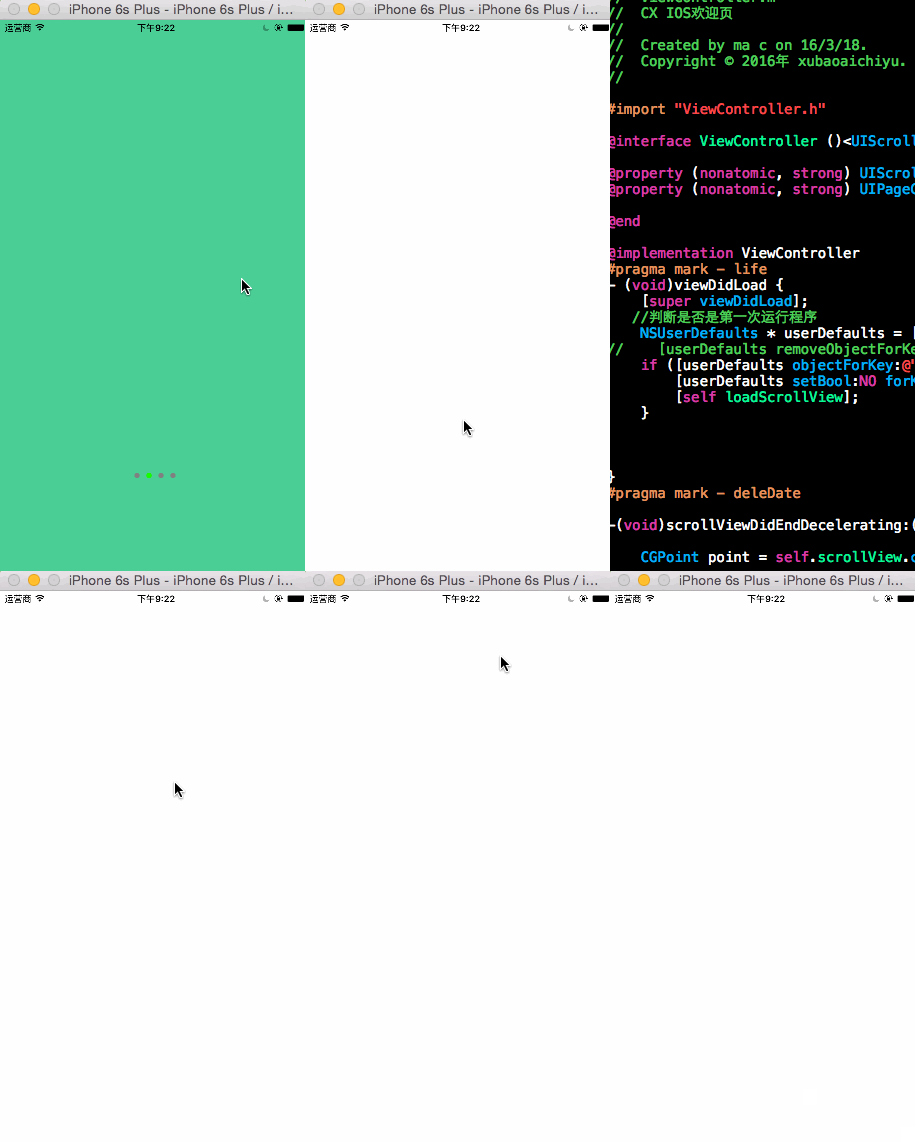
代码如下:(如有不明白的可以评论我,我会详细讲解)
//

//  ViewController.m

//  CX IOS欢迎页

//

//  Created by ma c on 16/3/18.

//  Copyright © 2016年 xubaoaichiyu. All rights reserved.

//

#import "ViewController.h"

@interface ViewController ()<UIScrollViewDelegate>

@property (nonatomic, strong) UIScrollView * scrollView;

@property (nonatomic, strong) UIPageControl * pageControl;

@end

@implementation ViewController

#pragma mark - life

- (void)viewDidLoad {

    [super viewDidLoad];

   //判断是否是第一次运行程序

    NSUserDefaults * userDefaults = [NSUserDefaults standardUserDefaults];

//    [userDefaults removeObjectForKey:@"FirstLoad"];

    if ([userDefaults objectForKey:@"FirstLoad"] == nil) {

        [userDefaults setBool:NO forKey:@"FirstLoad"];

        [self loadScrollView];

    }

}

#pragma mark - deleDate

-(void)scrollViewDidEndDecelerating:(UIScrollView *)scrollView{

    CGPoint point = self.scrollView.contentOffset;

    NSInteger current = point.x / self.view.frame.size.width;

    self.pageControl.currentPage = current;

}

#pragma mark - function

-(void)loadScrollView{

    CGRect rect = [UIScreen mainScreen].bounds;

    self.scrollView = [[UIScrollView alloc]initWithFrame:rect];

    //分页

    self.scrollView.pagingEnabled = YES;

    self.scrollView.delegate = self;

    self.scrollView.showsHorizontalScrollIndicator = NO;

    self.scrollView.showsVerticalScrollIndicator = NO;

    //scrollView滚动区域大小

    self.scrollView.contentSize = CGSizeMake(rect.size.width * , rect.size.height);

    for (NSInteger i = ; i < ; i ++) {

        UIImageView * imageView = [[UIImageView alloc]init];

        imageView.frame = CGRectMake(i * rect.size.width, , rect.size.width, rect.size.height);

        //为了区别imageView而又简单操作,建立随机颜色。

        imageView.backgroundColor = [UIColor colorWithRed:arc4random() %  / .f green:arc4random() %  / .f blue:arc4random() %  / .f alpha:];

        [self.scrollView addSubview:imageView];

        //添加开启软件

        UIButton * removeBUtton = [UIButton buttonWithType:UIButtonTypeCustom];

        removeBUtton.frame = CGRectMake( +  * rect.size.width, rect.size.height * 0.7, rect.size.width - , );

        [removeBUtton setTitle:@"开启旅行" forState:UIControlStateNormal];

        [removeBUtton setTitleColor:[UIColor whiteColor] forState:UIControlStateNormal];

        removeBUtton.backgroundColor = [UIColor orangeColor];

        [removeBUtton addTarget:self action:@selector(start) forControlEvents:UIControlEventTouchUpInside];

        [self.scrollView addSubview:removeBUtton];

    }

    [self.view addSubview:self.scrollView];

    [self loadPageControl];

}

-(void)start{

    [self.pageControl removeFromSuperview];

    [self.scrollView removeFromSuperview];

}

-(void)loadPageControl{

    CGRect rect = [UIScreen mainScreen].bounds;

    self.pageControl = [[UIPageControl alloc]init];

    self.pageControl.numberOfPages = ;

    CGSize pageControlSize = [self.pageControl sizeForNumberOfPages:];

    self.pageControl.frame = CGRectMake((rect.size.width - pageControlSize.width) / , rect.size.height * 0.8, pageControlSize.width, pageControlSize.height);

    self.pageControl.currentPage = ;

    self.pageControl.currentPageIndicatorTintColor = [UIColor greenColor];

    self.pageControl.pageIndicatorTintColor = [UIColor grayColor];

    [self.view addSubview:self.pageControl];

    [self.view bringSubviewToFront: self.pageControl];

}

@end
IOS 欢迎页(UIScrollView,UIPageControl)的更多相关文章
- IOS初级:UIScrollView & UIPageControl
UIScrollView其实构建的就像一列很长的火车,每滑动一个屏幕,展示一节车厢. //主屏幕高度 #define kScreenHeight [UIScreen mainScreen].bound ...
- 【iOS系列】-UIScrollView的介绍及结合UIPageControl实现图片播放的实例
[iOS系列]-UIScrollView的介绍及结合UIPageControl实现图片播放的实例 第一:UIScrollView的常用属性 //表示UIScrollView内容的尺寸,滚动范围 @pr ...
- UIScrollView,UIPageControl
#import <UIKit/UIKit.h> @interface ViewController : UIViewController<UIScrollViewDelegate&g ...
- iOS纯代码制作欢迎界面——UIScrollView, UIPageControl, UIImageView,UIButton, NSTimer
欢迎界面,还是比较简单的,一个UIScrollView控件,一个UIPageControl,几个UIImageView即可摆平.在这里光玩这些,就显得诚意不足了.特意拓展一下,再加几个UIButton ...
- IOS 怎么用UIScrollView来滚动和缩放他的内容第一篇
本篇文章来自于互联网资料翻译 UIScrollView是在IOS最有用的控件之一.他是一个来展现超过一个屏幕的内容的很好的方式.下面有很多的技巧来使用他. 这篇文章就是关于UIScrollView的, ...
- iOS新手引导页的实现,源码。
/*.在Main.storyboard中找到,ScrollView和PageControl并添加到ViewController中. .在ScrollView中添加ImageView,新手引导页有几个图 ...
- UIScrollView,UIPageControl,UIImageView 实现图片轮播的效果
上一篇博客介绍了如何将XCode创立的项目提交到Git版本控制,这次就直接做一个图片轮播的展示demo,刚好可以把UIScrollView.UIPageControl.UIImageView这三个控件 ...
- 启动图实现:UIScrollView+UIPageControl简单实现
#import "MJViewController.h"#import "RootViewController.h" @interface MJViewCont ...
- iOS学习之UIScrollView
一.UIScrollView的创建和常用属性 1.UIScrollView概述 UIScrollView是UIView的子类. UIScrollView作为所有滚动视图的基类. UIScro ...
随机推荐
- iOS8 VPN 应用内连接
iOS8 开放了关于VPN的API,开发者能够在应用中创建VPN配置,并控制VPN的连接.不过只支持了IPSec和IKEv2两种协议. 关于这方面资料,很少,在这里要感谢一下 今晚打老虎,是在他得帮助 ...
- c# 时间戳转换为Datetime类型的时间
private static DateTime GetConvertTime(long ltime) { DateTime dt_time=new DateTime(1970,1,1,8,0,0,0) ...
- ECMASCRIPT 6中字符串的新特性
本文将覆盖在ECMAScript 6 (ES6)中,字符串的新特性. Unicode 码位(code point)转义 Unicode字符码位的长度是21位[2].而JavaScript的字符串,是1 ...
- Tip8:Unity中诸如 Awake() Start() Update()等函数的 执行顺序
Unity脚本中有很多的事件函数,下面是各种函数的执行顺序: 1.reset(); 2.Awake(); 3.OnEnable; 4.OnLevelWasLoaded(); 5.Start(); 6. ...
- 【转载】关于Embedded Linux启动的经典问题
转载自:http://linux.chinaunix.net/techdoc/install/2009/04/13/1107608.shtml 发信人: armlinux (armlinux), 信区 ...
- 最近一段时间开发客户端app的感悟
关于android和cocos2d 凭着对大学时候写html+css的一点点的记忆,我还是认为android的布局xml文件还是参考了html+css,只是他更加臃肿!就想 android平台本身那样 ...
- struts2基础——自定义拦截器
一.自定义拦截器 默认的拦截器能实现的功能是有限的,Struts2 支持自定义拦截器. 二.拦截器类 1.实现 Interceptor 接口 2.继承 AbstractInterceptor 抽象类, ...
- 解决tomcat was unable to start within问题
这个问题可能大家都熟悉,以前碰到这个问题,重新启动一次eclipse就好了,随着我的一个项目的增大,我发现这种情况越来越多,到底是怎么回事? 出现这个情况的原因有两个,要么是你的数据库连接connec ...
- ChartDirector应用笔记(一)
ChartDirector介绍 ChartDirector是一款小巧精细的商业图表库.其适用的语言范围非常广泛,包括.Net, Java, Asp, VB, PHP, Python, Ruby, C+ ...
- 在执行Action之间检验是否登录
在执行Action之间检验是否登录,也可以在执行Action前先执行某一个操作 public class BaseController : Controller { protected string ...