
Windows Phone 8.1 新特性 - 控件之应用程序栏
2014年4月3日的微软Build 2014 大会上,Windows Phone 8.1 正式发布。相较于Windows Phone 8,不论从用户还是开发者的角度,都产生了很大的变化。接下来我们会用几篇文章来了解一下这些变化给开发者带来的影响,以及我们如何更好的利用WP8.1 的新特性。
WP8.1 最大的变化就是与Windows Store App 的结合,我们把它们统称为Windows RunTime apps。WP8.1 中的控件位于Windows.UI.XAML.Controls 命名空间下,这和Windows Store App是一致的。
本篇我们先来介绍第一个 WP8.1 的新控件:应用程序栏
应用程序栏想必大家都不陌生,它在WP8 中有很重要的应用,我们也把它叫做ApplicationBar。ApplicationBar 中可以添加按钮和菜单项,我们来看看简单的实现代码:
    <phone:PhoneApplicationPage.ApplicationBar>

        <shell:ApplicationBar>

            <shell:ApplicationBar.Buttons>

                <shell:ApplicationBarIconButton Text="Btn1" IconUri="***.png"/>

                <shell:ApplicationBarIconButton Text="Btn2" IconUri="***.png">

            </shell:ApplicationBar.Buttons>

            <shell:ApplicationBar.MenuItems>

                <shell:ApplicationBarMenuItem Text="Menu Item 1"/>

                <shell:ApplicationBarMenuItem Text="Menu Item 2"/>

            </shell:ApplicationBar.MenuItems>

        </shell:ApplicationBar>

    </phone:PhoneApplicationPage.ApplicationBar>
这个例子里,ApplicationBar 包含了两个按钮和两个菜单项。下面我们来看在WP8.1 中如何实现应用程序栏:
在Windows Store App 中,应用程序栏分为两种,TopAppBar 和 BottomAppBar,分别用做顶部导航栏和底部命令栏。而在WP8.1 中只有BottomAppBar,它起到的作用跟WP8 中的ApplicationBar是相同的。BottomAppBar 可以包含CommandBar, 而CommandBar 中可以使用两种命令元素,主命令元素和辅助命令元素。这两种元素在作用上类似于WP8 中的按钮和菜单项。来看看代码:
    <Page.BottomAppBar>

        <CommandBar IsSticky="True">

            <CommandBar.PrimaryCommands>

                <AppBarButton Icon="ZoomOut" IsCompact="False" Label="ZoomOut"/>

                <AppBarButton IsCompact="True">

                    <AppBarButton.Icon>

                        <PathIcon Data="F1 M 20, 10L 10,30L 30,30"/>

                    </AppBarButton.Icon>

                </AppBarButton>

                <AppBarButton IsCompact="True">

                    <AppBarButton.Icon>

                        <BitmapIcon UriSource="Assets/setting.png"/>

                    </AppBarButton.Icon>

                </AppBarButton>

                <AppBarToggleButton IsCompact="False" Label="Omega" IsChecked="True">

                    <AppBarToggleButton.Icon>

                        <FontIcon FontFamily="Candara" Glyph="Ω"/>

                    </AppBarToggleButton.Icon>

                </AppBarToggleButton>

            </CommandBar.PrimaryCommands>

            <CommandBar.SecondaryCommands>

                <AppBarButton Label="Test01"/>

                <AppBarButton Label="Test02"/>

            </CommandBar.SecondaryCommands>

        </CommandBar>

    </Page.BottomAppBar>
我们为CommandBar定义了两种集合元素,PrimaryCommands 和 SecondaryCommands,集合中的元素可以是AppBarButton 或 AppBarToggleButton。
来看看AppBarButton中几个重要的属性:
* Icon:用于显示应用程序栏按钮的图形内容。它有几种表现方式:
- SymbolIcon - 基于Segoe UI Symbol 字体的字型预定义列表
- FontIcon - 基于指定字体系列的字型
- BitmapIcon - 基于指定Uri的位图图像文件
- PathIcon - 基于路径数据
* Label:程序栏上显示的文字说明
* IsCompact:布尔值,指示是否显示不带标签且边距已缩小的按钮
再来看看AppBarToggleButton, 它与AppBarButton 的不同在于他可以有选中状态:
* IsChecked - 布尔值,选中为True,未选中为False,否则为null。默认为False。
我们在示例中对这几种属性做了演示,PrimaryCommands 中的四个按钮分别采用了四种表现方式,另外结合了Label、IsChecked 和 IsCompact 的属性区别。其中SecondaryCommands 中使用Label 属性来显示信息(而且字母不会像WP8 那样被转换为小写字母)。Icon 和 IsCompact 属性并没有体现。来看看运行效果图:
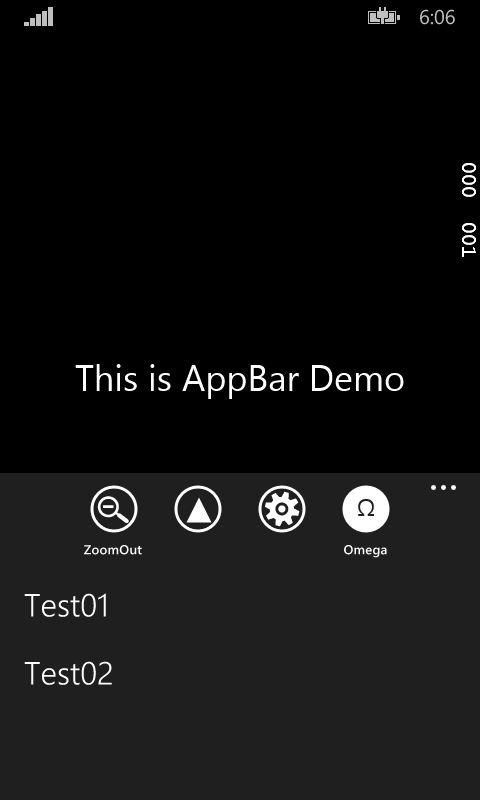
这样我们就把Windows Phone 8.1 中的应用程序栏的变化演示完了。总体来说新的应用程序栏给我们带来了更多的可选择性和便利,按钮可以有多种表现方式,而不是单一的图片方式;按钮可选择是否显示文字标签,等等。接下来的几篇我会继续介绍Windows Phone 8.1 中的新控件,谢谢大家。
Windows Phone 8.1 新特性 - 控件之应用程序栏的更多相关文章
- Windows Phone 8.1 新特性 - 控件之列表选择控件
本篇我们来介绍Windows Phone 8.1 新特性中的列表选择控件. 在Windows Phone 8 时代,大家都会使用 LongListSelector 来实现列表选择控件,对数据进行分组显 ...
- Windows Phone 8.1 新特性 - 控件之FlipView
本篇为大家介绍 Windows Phone 8.1 中新增的 FlipView 控件,它的中文名字叫做:翻转视图. 虽然听起来有点拗口,但是它的用途大家一定不会陌生.在 Windows Phone 8 ...
- 与众不同 windows phone (34) - 8.0 新的控件: LongListSelector
[源码下载] 与众不同 windows phone (34) - 8.0 新的控件: LongListSelector 作者:webabcd 介绍与众不同 windows phone 8.0 之 新的 ...
- 重新想象 Windows 8.1 Store Apps (78) - 控件增强: ScrollViewer, FlipView, Popup
[源码下载] 重新想象 Windows 8.1 Store Apps (78) - 控件增强: ScrollViewer, FlipView, Popup 作者:webabcd 介绍重新想象 Wind ...
- 重新想象 Windows 8.1 Store Apps (79) - 控件增强: MediaElement, Frame
[源码下载] 重新想象 Windows 8.1 Store Apps (79) - 控件增强: MediaElement, Frame 作者:webabcd 介绍重新想象 Windows 8.1 St ...
- 重新想象 Windows 8.1 Store Apps (93) - 控件增强: GridView, ListView
[源码下载] 重新想象 Windows 8.1 Store Apps (93) - 控件增强: GridView, ListView 作者:webabcd 介绍重新想象 Windows 8.1 Sto ...
- 与众不同 windows phone (51) - 8.1 新增控件: DatePickerFlyout, TimePickerFlyout
[源码下载] 与众不同 windows phone (51) - 8.1 新增控件: DatePickerFlyout, TimePickerFlyout 作者:webabcd 介绍与众不同 wind ...
- 重新想象 Windows 8.1 Store Apps (81) - 控件增强: WebView 之加载本地 html, 智能替换 html 中的 url 引用, 通过 Share Contract 分享 WebView 中的内容, 为 WebView 截图
[源码下载] 重新想象 Windows 8.1 Store Apps (81) - 控件增强: WebView 之加载本地 html, 智能替换 html 中的 url 引用, 通过 Share Co ...
- Windows Phone 8.1新特性 - 应用商店启动协议
Windows Phone 8.1 Preview SDK 发布也有几个月了,之前断断续续也写过几篇 Windows Phone 8.1 新特性的文章,今天给大家介绍一下应用商店启动协议相关的知识. ...
随机推荐
- Jquery异步上传图片
网页中这样: <!DOCTYPE html><html xmlns="http://www.w3.org/1999/xhtml"><head id=& ...
- 『GreenPlum系列』GreenPlum 4节点集群安装(图文教程)
目标架构如上图 一.硬件评估 cpu主频,核数推荐CPU核数与磁盘数的比例在12:12以上Instance上执行时只能利用一个CPU核资源进行计算,推荐高主频 内存容量 网络带宽重分布操作 R ...
- 种类并查集(POJ 1703)
1703 -- Find them, Catch them http://poj.org/problem?id=1703 题目大意:有2个敌对帮派,输入D a b表示a,b在不同帮派,输入A a b表 ...
- 计时函数 clock() in c and c++
在MSDN中,查得对clock函数定义如下: clock_t clock(void) ; 返回该程序从启动到函数调用占用CPU的时间.这个函数返回从“开启这个程序进程”到“程序中调用clock()函数 ...
- cell的自适应
+(CGFloat)getCellHeightWithItem:(FXOwnershipStrutureInfo *)item { if (item.rowH) {//如有rowH就直接返回,避免重新 ...
- Unsupported major.minor version
by: java.lang.UnsupportedClassVersionError: com/dayang/product/pubinfo/dao/ProPubInfoDAO : Unsupport ...
- Spring----->projects----->Spring Boot
1.概述:(about Spring Boot) Spring boot是在spring framework的基础上搭建起来的一个基本项目,该项目中已经集成了spring框架下的若干模块以及sprin ...
- ELK日志管理之——elasticsearch部署
1.配置官方yum源 [root@localhost ~]# rpm --import http://packages.elasticsearch.org/GPG-KEY-elasticsearch ...
- IQKeyboardManager在某个页面取消键盘上面的Toolbar
使用IQKeyboardManager的时候,如果想在某个页面取消键盘上面的Toolbar,请使用如下方法,按控制器去操作 // 取消IQKeyboardManager Toolbar [[IQKey ...
- Spinal Tap Case
function spinalCase(str) { // "It's such a fine line between stupid, and clever." // --Dav ...