
iOS开发-VFL(Visual format language)和Autolayout
AutoLayout不管是在StoryBorad还是在xib中都相对来说比较简单,VFL(Visual fromat language)可视化语言基本上用到的比较少,在xCode4时候自动布局的概念还没有,直接使用VFL会很方便,可视化语言依赖于oc运行时创建对应的约束,如果IBOutlet发生改变有的时候会造成莫名其妙的Bug。xCode5之后可视化语言用到的场景相对较少,但是作为一个工作的辅助还是可以稍微了解下。
基础知识
在StotyBoard中添加一个标签一个按钮,不适用自动布局,简单的控制它们之间的水平距离为80,如下图所示:
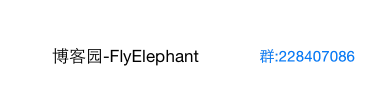
视图中添加约束:
    NSLayoutConstraint  *labelContraint=[NSLayoutConstraint constraintWithItem:self.changeButton attribute:NSLayoutAttributeLeft relatedBy:NSLayoutRelationEqual toItem:self.descriptionLabel attribute:NSLayoutAttributeRight multiplier:1.0 constant:60];

    [self.view addConstraint:labelContraint];
这个只是视图约束的一种方式,下面这种方式才是本文的主角:
    //使用可视化语言添加约束

    NSDictionary  *viewDictionary=NSDictionaryOfVariableBindings(_descriptionLabel,_changeButton);

    NSArray  *visualConstraint=[NSLayoutConstraint constraintsWithVisualFormat:@"[_descriptionLabel]-60-[_changeButton]" options:0 metrics:nil views:viewDictionary];

    [self.view addConstraints:visualConstraint];
这里面用到的constraintsWithVisualFormat方法,具体参数说明如下:
format:参数是vfl语句,语句的基本元素下面会详细解释一下;
opts:枚举参数,默认写0;
metrics:字典,当在format中使用了动态数据,会根据字典去匹配,接下来会具体有例子;
views:字典,传入需要用到的视图集合;
具体format需要参考一下表达式的意思:
水平方向 H:
垂直方向 V:
Views [需要定义的视图]
SuperView |
关系 >=,==,<=
间隙 -
视图内部约束 ()
Demo实战
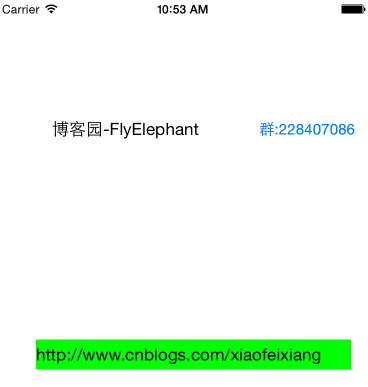
通过VFL控制手动添加的标签的位置,具体效果如下:

代码实现如下:
    UILabel *link=[[UILabel alloc]init];

    link.text=@"http://www.cnblogs.com/xiaofeixiang";

    link.translatesAutoresizingMaskIntoConstraints=NO;

    [link setBackgroundColor:[UIColor greenColor]];

    [self.view addSubview:link];

    NSArray *horizontal=[NSLayoutConstraint constraintsWithVisualFormat:@"H:|-40-[link]-20-|" options:0 metrics:nil views:NSDictionaryOfVariableBindings(link)];

    NSArray *vertical=[NSLayoutConstraint constraintsWithVisualFormat:@"V:[_descriptionLabel]-100-[link(>=30)]" options:0 metrics:nil views:NSDictionaryOfVariableBindings(link,_descriptionLabel)];

    [self.view addConstraints:horizontal];

    [self.view addConstraints:vertical];
第一个约束是控制标签距离父视图左右之间的距离,第二个控制标签和”博客园-FlyElephant"之间的垂直距离为100.当然如果你想通过字典控制垂直之间的距离可以按照下面这么做:
NSArray *vertical=[NSLayoutConstraint constraintsWithVisualFormat:@"V:[_descriptionLabel]-Vertical-[link(>=30)]" options:0 metrics:@{@"Vertical":@200} views:NSDictionaryOfVariableBindings(link,_descriptionLabel)];
最后的结果:
友情提示在添加约束的时候不要和StoryBoard中的冲突,如果添加的水平约束StoryBoard中也有的话,就会出现下面这种情况:
2015-07-01 10:54:13.537 VFLDemo[2358:60863] Unable to simultaneously satisfy constraints.

	Probably at least one of the constraints in the following list is one you don't want. Try this: (1) look at each constraint and try to figure out which you don't expect; (2) find the code that added the unwanted constraint or constraints and fix it. (Note: If you're seeing NSAutoresizingMaskLayoutConstraints that you don't understand, refer to the documentation for the UIView property translatesAutoresizingMaskIntoConstraints)

(

    "<NSLayoutConstraint:0x7fc5e3732860 H:[UILabel:0x7fc5e372ef30'\U535a\U5ba2\U56ed-FlyElephant']-(15)-[UIButton:0x7fc5e372d550'\U7fa4:228407086']>",

    "<NSLayoutConstraint:0x7fc5e37344e0 H:[UILabel:0x7fc5e372ef30'\U535a\U5ba2\U56ed-FlyElephant']-(60)-[UIButton:0x7fc5e372d550'\U7fa4:228407086']>"

)

Will attempt to recover by breaking constraint

<NSLayoutConstraint:0x7fc5e37344e0 H:[UILabel:0x7fc5e372ef30'博客园-FlyElephant']-(60)-[UIButton:0x7fc5e372d550'群:228407086']>

Make a symbolic breakpoint at UIViewAlertForUnsatisfiableConstraints to catch this in the debugger.

The methods in the UIConstraintBasedLayoutDebugging category on UIView listed in <UIKit/UIView.h> may also be helpful.
iOS开发-VFL(Visual format language)和Autolayout的更多相关文章
- 使用Auto Layout中的VFL(Visual format language)--代码实现自动布局
使用Auto Layout中的VFL(Visual format language)--代码实现自动布局 2014-12-09 10:56 编辑: zhiwupei 分类:iOS开发 来源:机智的新手 ...
- 使用Auto Layout中的VFL(Visual format language)--代码实现自动布局【转】
本文将通过简单的UI来说明如何用VFL来实现自动布局.在自动布局的时候避免不了使用代码来加以优化以及根据内容来实现不同的UI. 一:API介绍 NSLayoutConstraint API 1 2 3 ...
- 转载自@机智的新手:使用Auto Layout中的VFL(Visual format language)--代码实现自动布局
本文将通过简单的UI来说明如何用VFL来实现自动布局.在自动布局的时候避免不了使用代码来加以优化以及根据内容来实现不同的UI. 一:API介绍 NSLayoutConstraint API 1 2 3 ...
- 【转】使用Auto Layout中的VFL(Visual format language)--代码实现自动布局
本文将通过简单的UI来说明如何用VFL来实现自动布局.在自动布局的时候避免不了使用代码来加以优化以及根据内容来实现不同的UI. 一:API介绍 NSLayoutConstraint API 1 2 3 ...
- 转载:使用Auto Layout中的VFL(Visual format language)--代码实现自动布局
本文将通过简单的UI来说明如何用VFL来实现自动布局.在自动布局的时候避免不了使用代码来加以优化以及根据内容来实现不同的UI. 一:API介绍 NSLayoutConstraint API 1 2 3 ...
- 使用Auto Layout中的VFL(Visual format language)——代码实现自动布局
本文将通过简单的UI来说明如何用VFL来实现自动布局.在自动布局的时候避免不了使用代码来加以优化以及根据内容来实现不同的UI. 一:api介绍 1.NSLayoutConstraint API NSL ...
- IOS使用 Visual Format Language 定义水平和垂直约束
定义限制条件来改变一个 UI 组件在其父视图的水平和垂直方向布局的方法. 可以使用方程式里 H:方向符号代表水平方向的边距,使用 V:方向符号代表垂直方向的边 距. 转载请注明,本文转自:http:/ ...
- Visual format language
所谓的VFL语言其实就是Visual format language 的缩写,是一种使用代码添加约束的方式,类似于Masonry SDAutolayout的效果,但是操作起来可能要相对简单.一行代码 ...
- iOS开发-VFL初窥
VFL是苹果为了简化Autolayout的编码而推出的抽象语言,在上一篇博客中我们发现如果使用NSLayoutConstraint来添加约束是非常繁琐的. 一个简单的Frame需要添加四个NSLayo ...
随机推荐
- c# 作业1
using System; using System.Collections.Generic; using System.Linq; using System.Text; using System.T ...
- LoadRunner中取Request、Response
LoadRunner中取Request.Response LoadRunner两个“内置变量”: 1.REQUEST,用于提取完整的请求头信息. 2.RESPONSE,用于提取完整的响应头信息. 响应 ...
- Aqua Data Studio中文乱码
使用Aqua Data Studio 查询数据时,如果表中的数据有中文时,会显示乱码,如下图: 解决方法很简单,只能更改字体即可,步骤如下: 更改字体后,显示的结果如下:
- elk是指logstash,elasticsearch,kibana三件套,这三件套可以组成日志分析和监控工具
Logstash是一个完全开源的工具,他可以对你的日志进行收集.分析,并将其存储供以后使用(如,搜索),您可以使用它.说到搜索,logstash带有一个web界面,搜索和展示所有日志.kibana 也 ...
- 【python游戏编程之旅】第五篇---嗷大喵爱吃鱼小游戏开发实例
本系列博客介绍以python+pygame库进行小游戏的开发.有写的不对之处还望各位海涵. 我们一同在前几期的博客中已经学到了很多pygame的基本知识了,现在该做个小游戏实战一下了. 前几期博客链接 ...
- BZOJ2102 : [Usaco2010 Dec]The Trough Game
暴力枚举答案然后检验. #include<cstdio> int n,m,i,j,k,a[100],b[100],cnt,ans;char s[20]; int main(){ for(s ...
- (centos)linux下访问双系统windows7文件系统
fdisk -l 无法挂载 NTFS格式的分区:mount: unknown filesystem type ‘ntfs’. 问题: # mount –t ntfs /dev/sdb1 ...
- ccc2016
连炸两题,身败名裂. 看来不拍暴力就会die. A题 滑动窗口或什么前缀和二分之类的就行了. #include<cstdio> #include<cstring> #inclu ...
- Range of int, long, 和 long long 的数值范围
unsigned int 0-4294967295 int -2147483648-2147483647 unsigned long 0-4294967295 long -2147 ...
- 三、saltstack证书管理
192.168.1.65 super65.cn master192.168.1.66 super66.cn minion saltstack使用SSL签证的方式进行安全认证. minion上线 ...