
Spring4学习笔记-AOP(基于配置文件的方式)
引入的jar包与基于注解的方式引入的jar包相同
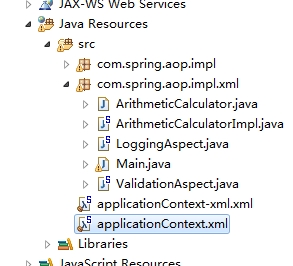
ArithmeticCalculator接口
|
1
2
3
4
5
6
7
8
9
10
11
|
package com.spring.aop.impl.xml;public interface ArithmeticCalculator { public int add(int i, int j); public int sub(int i, int j); public int mul(int i, int j); public int div(int i, int j);} |
接口实现类 ArithmeticCalculatorImpl.java
|
1
2
3
4
5
6
7
8
9
10
11
12
13
14
15
16
17
18
19
20
21
22
23
24
25
26
27
28
29
|
package com.spring.aop.impl.xml;public class ArithmeticCalculatorImpl implements ArithmeticCalculator{ @Override public int add(int i, int j) { int result = i + j; return result; } @Override public int sub(int i, int j) { int result = i - j; return result; } @Override public int mul(int i, int j) { int result = i * j; return result; } @Override public int div(int i, int j) { int result = i / j; return result; }} |
切面类 LoggingAspect.java
|
1
2
3
4
5
6
7
8
9
10
11
12
13
14
15
16
17
18
19
20
21
22
23
24
25
26
27
28
29
30
31
32
33
34
35
36
37
38
39
40
41
42
43
44
45
46
47
48
49
50
51
52
|
package com.spring.aop.impl.xml;import java.util.Arrays;import java.util.List;import org.aspectj.lang.JoinPoint;import org.aspectj.lang.ProceedingJoinPoint;public class LoggingAspect { public void beforeMethod(JoinPoint joinpoint) { String methodName = joinpoint.getSignature().getName(); List<Object>args = Arrays.asList(joinpoint.getArgs()); System.out.println("前置通知:The method "+ methodName +" begins with " + args); } public void afterMethod(JoinPoint joinpoint) { String methodName = joinpoint.getSignature().getName(); //List<Object>args = Arrays.asList(joinpoint.getArgs()); 后置通知方法中可以获取到参数 System.out.println("后置通知:The method "+ methodName +" ends "); } public void afterReturnning(JoinPoint joinpoint, Object result) { String methodName = joinpoint.getSignature().getName(); System.out.println("返回通知:The method "+ methodName +" ends with " + result); } public void afterThrowing(JoinPoint joinpoint, Exception e) { String methodName = joinpoint.getSignature().getName(); System.out.println("异常通知:The method "+ methodName +" occurs exception " + e); } public Object aroundMethod(ProceedingJoinPoint point) { Object result = null; String methodName = point.getSignature().getName(); try { //前置通知 System.out.println("The method "+ methodName +" begins with " + Arrays.asList(point.getArgs())); //执行目标方法 result = point.proceed(); //翻译通知 System.out.println("The method "+ methodName +" ends with " + result); } catch (Throwable e) { //异常通知 System.out.println("The method "+ methodName +" occurs exception " + e); throw new RuntimeException(e); } //后置通知 System.out.println("The method "+ methodName +" ends"); return result; }} |
切面类 ValidationAspect.java
|
1
2
3
4
5
6
7
8
9
10
11
12
|
package com.spring.aop.impl.xml;import java.util.Arrays;import org.aspectj.lang.JoinPoint;public class ValidationAspect { public void validateArgs(JoinPoint joinPoint) { System.out.println("validate:" + Arrays.asList(joinPoint.getArgs())); }} |
applicationContext-xml.xml
|
1
2
3
4
5
6
7
8
9
10
11
12
13
14
15
16
17
18
19
20
21
22
23
24
25
26
27
28
29
30
31
32
33
34
35
36
37
38
39
40
|
<?xml version="1.0" encoding="UTF-8"?><beans xmlns="http://www.springframework.org/schema/beans" xmlns:xsi="http://www.w3.org/2001/XMLSchema-instance" xmlns:aop="http://www.springframework.org/schema/aop" xsi:schemaLocation="http://www.springframework.org/schema/beans http://www.springframework.org/schema/beans/spring-beans.xsd http://www.springframework.org/schema/aop http://www.springframework.org/schema/aop/spring-aop-4.1.xsd"> <!-- 配置bean --> <bean id="arithmeticCalculator" class="com.spring.aop.impl.xml.ArithmeticCalculatorImpl"></bean> <!-- 配置切面的bean --> <bean id="loggingAspect" class="com.spring.aop.impl.xml.LoggingAspect"></bean> <bean id="validationAspect" class="com.spring.aop.impl.xml.ValidationAspect"></bean> <!-- 配置AOP --> <aop:config> <!-- 配置切点表达式 --> <aop:pointcut expression="execution(* com.spring.aop.impl.xml.ArithmeticCalculator.*(..))" id="pointcut"/> <!-- 配置切面及通知,使用order指定优先级 --> <aop:aspect ref="loggingAspect" order="1"> <!-- 环绕通知 --> <!-- <aop:around method="aroundMethod" pointcut-ref="pointcut"/> --> <!-- 前置通知 --> <aop:before method="beforeMethod" pointcut-ref="pointcut"/> <!-- 后置通知 --> <aop:after method="afterMethod" pointcut-ref="pointcut"/> <!-- 异常通知 --> <aop:after-throwing method="afterThrowing" pointcut-ref="pointcut" throwing="e"/> <!-- 返回通知 --> <aop:after-returning method="afterReturnning" pointcut-ref="pointcut" returning="result"/> </aop:aspect> <aop:aspect ref="validationAspect" order="2"> <!-- 前置通知 --> <aop:before method="validateArgs" pointcut-ref="pointcut"/> </aop:aspect> </aop:config></beans> |
Main.java
|
1
2
3
4
5
6
7
8
9
10
11
12
13
14
15
16
17
18
19
20
21
22
23
|
package com.spring.aop.impl.xml;import org.springframework.context.ApplicationContext;import org.springframework.context.support.ClassPathXmlApplicationContext;public class Main {public static void main(String[] args) { //创建spring IOC容器 ApplicationContext applicationContext = new ClassPathXmlApplicationContext("applicationContext-xml.xml"); //从IOC容器中获取bean实例 ArithmeticCalculator arithmeticCalculator = applicationContext.getBean(ArithmeticCalculator.class); int result = arithmeticCalculator.add(4, 6); System.out.println(result); result = arithmeticCalculator.sub(4, 6); System.out.println(result); System.out.println(result); result = arithmeticCalculator.mul(4, 6); System.out.println(result); System.out.println(result); result = arithmeticCalculator.div(4, 0); System.out.println(result);}} |
源码 http://yunpan.cn/cgsrQHmUvrIQt 提取码 6564
本文出自 “优赛工作室” 博客,请务必保留此出处http://shamrock.blog.51cto.com/2079212/1557743
Spring4学习笔记-AOP(基于配置文件的方式)的更多相关文章
- Spring4学习笔记-AOP
1.加入jar包 com.springsource.org.aopalliance-1.0.0.jar com.springsource.org.aspectj.weaver-1.6.8.RELEAS ...
- Spring(二十):Spring AOP(四):基于配置文件的方式来配置 AOP
基于配置文件的方式来配置 AOP 前边三个章节<Spring(十七):Spring AOP(一):简介>.<Spring(十八):Spring AOP(二):通知(前置.后置.返回. ...
- Spring AOP基于配置文件的面向方法的切面
Spring AOP基于配置文件的面向方法的切面 Spring AOP根据执行的时间点可以分为around.before和after几种方式. around为方法前后均执行 before为方法前执行 ...
- SpringBoot学习笔记:读取配置文件
SpringBoot学习笔记:读取配置文件 配置文件 在以往的项目中,我们主要通过XML文件进行框架配置,业务的相关配置会放在属性文件中,然后通过一个属性读取的工具类来读取配置信息.在SpringBo ...
- .NET Remoting学习笔记(二)激活方式
目录 .NET Remoting学习笔记(一)概念 .NET Remoting学习笔记(二)激活方式 .NET Remoting学习笔记(三)信道 参考:百度百科 ♂风车车.Net 激活方式概念 在 ...
- 【转载】.NET Remoting学习笔记(二)激活方式
目录 .NET Remoting学习笔记(一)概念 .NET Remoting学习笔记(二)激活方式 .NET Remoting学习笔记(三)信道 参考:百度百科 ♂风车车.Net 激活方式概念 在访 ...
- go微服务框架kratos学习笔记四(kratos warden-quickstart warden-direct方式client调用)
目录 go微服务框架kratos学习笔记四(kratos warden-quickstart warden-direct方式client调用) warden direct demo-server gr ...
- 详解AOP——用配置文件的方式实现AOP
AOP概念 1.AOP:面向切面(方面)编程,扩展功能不修改源代码实现 AOP原理 AOP采用横向抽取机制,取代了传统纵向继承体系重复性代码 传统的纵向抽取机制: 横向抽取机制: AOP操作术语 1. ...
- Java学习笔记-多线程-创建线程的方式
创建线程 创建线程的方式: 继承java.lang.Thread 实现java.lang.Runnable接口 所有的线程对象都是Thead及其子类的实例 每个线程完成一定的任务,其实就是一段顺序执行 ...
随机推荐
- Event-Souring模式
Event-Sourcing模式使用仅附加存储来记录或描写叙述域中数据所採取的动作,从而记录完整的一系列系列事件,而不是仅存储实体的当前状态.由于存储包括全部的事件,能够用来具体化域对象. Event ...
- hdu1243 最长公共子序列(LCS)
原题地址 题目分析 这道题基本上是在普通LCS问题上的一点小小的变形,由求LCS的长度,改为求LCS的权值.架构还是不变的.可作为LCS问题的模板题.时间复杂度O(N^2). 注意 题目中的字母都是小 ...
- 多线程-ConcurrentHashMap(JDK1.8)
前言 HashMap非线程安全的,HashTable是线程安全的,所有涉及到多线程操作的都加上了synchronized关键字来锁住整个table,这就意味着所有的线程都在竞争一把锁,在多线程的环境下 ...
- 如何将git 关联到Pycharm
一,预置条件 1,安装pycharm 2,安装git 仓库 二,关联步骤 1,打开Pycharm File | Settings | Version Control | Git 2,配置需要关联的 ...
- AES_CBC_PKCS5Padding 加密
在项目中需要对一些关键信息进行传输,但又不能是明文,所以采用此种方式进行加密,另一端再进行解密. AES: 算法 CBC: 模式 使用CBC模式,需要一个向量iv,可增加加密算法的强度 PKCS5 ...
- PHP学习笔记(16)AJAX无刷新技术--深入理解
Ajax里的onreadystatechange的作用是什么 发送一个请求后,客户端无法确定什么时候会完成这个请求,所以需要用事件机制来捕获请求的状态,XMLHttpRequest对象提供了onrea ...
- hdu6000 Wash 巧妙地贪心
/** 题目:hdu6000 Wash 巧妙地贪心 链接:https://vjudge.net/contest/173364#problem/B 转自:http://blog.csdn.net/ove ...
- (转)Python爬虫学习笔记(2):Python正则表达式指南
以下内容转自CNBLOG:http://www.cnblogs.com/huxi/archive/2010/07/04/1771073.html 1. 正则表达式基础 1.1. 简单介绍 正则表达式并 ...
- 【vijos】1791 骑士的旅行(特殊的技巧)
https://vijos.org/p/1791 暴力的话只想到bfs,然后估计是状态超了才得20分. 噗,为啥暴力就不能想得简单点QAQ.....这种思想很好啊. 这一题我看了题解后不得不说我竟然没 ...
- VSCode调试配置
http://code.visualstudio.com/docs/editor/debugging#_launch-configurations VSCode内置Node.js运行时, 能调试jav ...