
PHP练习4 留言板
一、要求

二、示例页面


三、网页代码及网页显示
1.denglu.php 登录页面
<!DOCTYPE html PUBLIC "-//W3C//DTD XHTML 1.0 Transitional//EN" "http://www.w3.org/TR/xhtml1/DTD/xhtml1-transitional.dtd">

<html xmlns="http://www.w3.org/1999/xhtml">

<head>

<meta http-equiv="Content-Type" content="text/html; charset=utf-8" />

<title>无标题文档</title>

<style type="text/css">

*{ margin:0px auto; padding:0px}

#aa{ width:400px; height:89px; font-size:36px; color:#39F; text-align:center; line-height:89px; vertical-align:middle; border-bottom:1px solid #999}

.bb{ width:400px; height:59px}

.cc{ width:159px; height:59px; float:left; font-size:20px; text-align:right; line-height:59px; vertical-align:middle}

.dd{ width:200px; height:59px; float:left}

.ee{ width:150px; height:30px; text-align:center; margin-top:15px}

.ff{ width:80px; height:30px}

</style>

</head>

<body>

<form action="dengluchuli.php" method="post">

<div style="width:400px; height:259px; margin-top:100px; border:1px solid #999">

    <div id="aa">汉企网络0904留言板</div>

    <div class="bb">

        <div class="cc">用户名:</div>

        <div class="dd"><input id="yonghuming" class="ee" type="text" name="uid" /></div>

    </div>

    <div class="bb">

        <div class="cc">密码:</div>

        <div class="dd"><input class="ee" type="password" name="pwd" /></div>

    </div>

    <div style="width:400px; height:50px; text-align:center; margin-top:10px">

        <input class="ff" type="submit" value="登录" />

        <input class="ff" type="button" value="复位" onclick="Fuwei()" />

    </div>

</div>

</form>

</body>

<script type="text/javascript">

function Fuwei()

{

    document.getElementById("yonghuming").value = "";

}

</script>

</html>
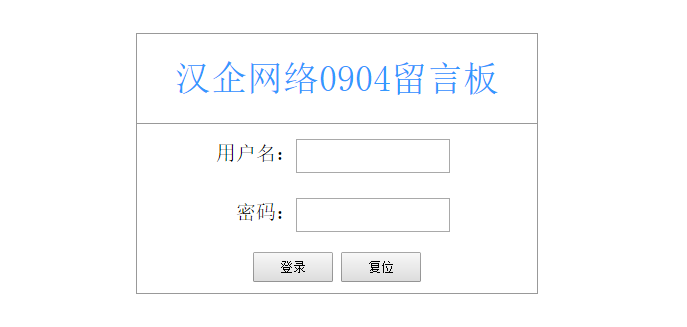
2.dengluchili.php 登录处理页面
<?php

session_start();

$UserName = $_POST["uid"];

$PassWord = $_POST["pwd"];

include("DBDA.class.php");

$db = new DBDA();

$sql = "select PassWord from yuangong where UserName='$UserName'";

$mm = $db->StrQuery($sql);

if($PassWord !="" && $PassWord==$mm)

{

    $_SESSION['views']=$UserName;

    header("location:main.php");

}

else

{

    echo "用户名或密码输入错误";

}
3.main.php 主页面,显示所有的信息。
<?php

session_start();

?>
<!DOCTYPE html PUBLIC "-//W3C//DTD XHTML 1.0 Transitional//EN" "http://www.w3.org/TR/xhtml1/DTD/xhtml1-transitional.dtd">

<html xmlns="http://www.w3.org/1999/xhtml">

<head>

<meta http-equiv="Content-Type" content="text/html; charset=utf-8" />

<title>无标题文档</title>

</head>

<body>
<?php

include("DBDA.class.php");

$db = new DBDA();

$sall = "select count(*) from liuyan";

$total = $db->StrQuery($sall);

include("../page.class.php");

$page = new Page($total,20);

$sql = "select * from liuyan ".$page->limit;

$result = $db->Query($sql);

foreach($result as $v)

{

}

?>
<br />
<div><a href="fabuxinxi.php">发布信息</a> <a href="tuichuchuli.php">退出系统</a></div>
<br />
<table width="50%" border="1" cellpadding="0" cellspacing="0">
<tr>
<td>发送人</td>
<td>接收人</td>
<td>发送时间</td>
<td>信息内容</td>
</tr>
<?php

foreach($result as $v)

{

    echo "<tr><td>$v[1]</td><td>$v[2]</td><td>$v[3]</td><td>$v[4]</td></tr>";

}

    ?>

</table>

<?php

echo $page->fpage();//显示表格下方的数据和页面的信息。

if(empty($_SESSION["views"]))

{

    header("location:denglu.php");

    exit;

}

?>
</body>

</html>

4.fabuxinxi.php 发布信息页面
<?php

session_start();

?>
<!DOCTYPE html PUBLIC "-//W3C//DTD XHTML 1.0 Transitional//EN" "http://www.w3.org/TR/xhtml1/DTD/xhtml1-transitional.dtd">
<html xmlns="http://www.w3.org/1999/xhtml">
<head>
<meta http-equiv="Content-Type" content="text/html; charset=utf-8" />
<title>无标题文档</title>
<style type="text/css">
*{ margin:0px; padding:0px}
.aa{ width:300px; height:40px; border:2px solid #999; border-bottom:0px; text-align:center; line-height:40px; vertical-align:middle}
.bb{ width:80px; height:30px}
#text1{ float:left; margin-top:10px; width:150px; height:20px; margin-left:2px}
</style>
</head>
<body>
<form action="fabuxinxichuli.php" method="post" onclick="return true">
<div style="position:relative; left:100px; top:40px">
<div><a href="chakanxinxi.php">查看信息</a> <a href="tuichuchuli.php">退出系统</a></div>
<br />
<div class="aa">
<div style="float:left; width:100px; height:40px; text-align:right">接收人:</div>
<!--<input id="text1" type="text" name="jieshouren" />-->
<select name="jishouren" style="width:100px; height:25px; margin-top:8px; margin-left:-100px">
<option selected="selected">所有人</option>
 <?php

 include("DBDA.class.php");

 $db = new DBDA();

 $sql = "select firend from firend";

 $result = $db->Query($sql);

 foreach($result as $v)

 {

     echo "<option>$v[0]</option>";

 }

 ?>
        </select>

    </div>

    <div class="aa" style="height:90px">

        <div style="float:left; width:100px; height:90px; text-align:right; line-height:90px; vertical-align:middle">信息内容:</div>

        <div style="text-align:left"><textarea id="text2" name="xinxineirong" style="margin-top:4px; height:80px"></textarea></div>

    </div>

    <div class="aa" style="border-bottom:2px solid #999">

        <input class="bb" type="submit" value="发送" />

        <input class="bb" type="button" value="复位" onclick="Fuwei()" />

    </div>

</div>

</form>
<?php

if(empty($_SESSION["views"]))

{

    header("location:denglu.php");

}
?>

</body>

<script type="text/javascript">

function Fuwei()

{

    document.getElementById("text1").value = "";

    document.getElementById("text2").value = "";

}

</script>

</html>

5.fabuxinxichuli.php 发布信息处理页面
<?php

session_start();

$fasongren = $_SESSION['views'];

$time = date("Y-m-d h:i:s");

$jieshouren = $_POST["jieshouren"];

$xinxineirong = $_POST["xinxineirong"];

include("DBDA.class.php");

$db = new DBDA();

$sql ="insert into liuyan values('','{$fasongren}','{$jieshouren}','{$time}','{$xinxineirong}')";

$db->Query($sql,0);

if(empty($_SESSION["views"]))

{

    header("location:denglu.php");

}

else

{

    header("location:main.php");

}
6.chakanxinxi.php 只显示和登陆者有关系的信息
<?php

session_start();

?>
<!DOCTYPE html PUBLIC "-//W3C//DTD XHTML 1.0 Transitional//EN" "http://www.w3.org/TR/xhtml1/DTD/xhtml1-transitional.dtd">

<html xmlns="http://www.w3.org/1999/xhtml">

<head>

<meta http-equiv="Content-Type" content="text/html; charset=utf-8" />

<title>无标题文档</title>

</head>

<body>
<?php

$sender = $_SESSION['views'];

$Recever = $_SESSION['views'];

include("DBDA.class.php");

$db = new DBDA();

$sall = "select count(*) from liuyan";

$total = $db->StrQuery($sall);

include("../page.class.php");

$page = new Page($total,20);

$sql = "select * from liuyan where Sender='$sender' or Recever='$Recever' ".$page->limit;

$result = $db->Query($sql);

foreach($result as $v)

{

}

?>
<br />

<div><a href="fabuxinxi.php">返回</a></div>

<br />

<table width="50%" border="1" cellpadding="0" cellspacing="0">

    <tr>

        <td>发送人</td>

        <td>接收人</td>

        <td>发送时间</td>

        <td>信息内容</td>

    </tr>
<?php

    foreach($result as $v)

    {

        echo "<tr><td>$v[1]</td><td>$v[2]</td><td>$v[3]</td><td>$v[4]</td></tr>";

    }

    ?>
</table>
<?php

echo $page->fpage();//显示表格下方的数据和页面的信息。

if(empty($_SESSION["views"]))

{

    header("location:denglu.php");

    exit;

}

?>
</body>

</html>

7.tuichuchuli.php 退出系统,清空session。
<?php

session_start();

unset($_SESSION);

session_destroy();

header("location:denglu.php");
PHP练习4 留言板的更多相关文章
- AngularJs学习笔记(制作留言板)
原文地址:http://www.jmingzi.cn/?post=13 初学Anjularjs两天了,一边学一边写的留言板,只有一级回复嵌套.演示地址 这里总结一下学习的过程和笔记.另外,看看这篇文章 ...
- dd——留言板再加验证码功能
1.找到后台-核心-频道模型-自定义表单 2.然后点击增加新的自定义表单 diyid 这个,不管他,默认就好 自定义表单名称 这个的话,比如你要加个留言板还是投诉建议?写上去呗 数据表 这个不要碰, ...
- asp.net留言板项目源代码下载
HoverTree是一个asp.net开源项目,实现了留言板功能. 前台体验网址:http://hovertree.com/guestbook/ 后台请下载源代码安装. 默认用户名:keleyi 默认 ...
- html的留言板制作(js)
这次留言板运用到了最基础的localstorage的本地存储,展现的效果主要有: 1.编写留言2.留言前可以编辑自己的留言昵称.不足之处: 1.未能做出我喜欢的类似于网易的叠楼功能. 2.未能显示评论 ...
- 11月8日PHP练习《留言板》
一.要求 二.示例页面 三.网页代码及网页显示 1.denglu.php 登录页面 <!DOCTYPE html PUBLIC "-//W3C//DTD XHTML 1.0 Tran ...
- [课程设计]Scrum 3.7 多鱼点餐系统开发进度(留言板选择方案)
Scrum 3.7 多鱼点餐系统开发进度(留言板选择方案) 1.团队名称:重案组 2.团队目标:长期经营,积累客户充分准备,伺机而行 3.团队口号:矢志不渝,追求完美 4.团队选题:餐厅到店点餐系统W ...
- [课程设计]Scrum 3.6 多鱼点餐系统开发进度(用户测试反馈页面构思&留言板设计)
Scrum 3.6 多鱼点餐系统开发进度(用户测试反馈页面构思&留言板设计) 1.团队名称:重案组 2.团队目标:长期经营,积累客户充分准备,伺机而行 3.团队口号:矢志不渝,追求完美 4.团 ...
- 用 Express4 写一个简单的留言板
Knowledge Dependence:阅读文本前,你需要熟悉 Node.js 编程.Express 以及相关工具和常用中间件的使用. Node.js 以其单线程异步非阻塞的特点,越来越被广大的 W ...
- 个人网页的留言板实现与sae的数据库账户配置
个人网页(github)的留言板终于搞定了.总之后端的东西不会写,只有修改以前教程里面的文件.记录一下重要的过程. 使用了留言保存的send()函数,模版有注册登录功能.根据需求修改了一下,去掉了登录 ...
- jsp中运用application实现共享留言板功能
jsp中application的知识点总结: 1.一个Web应用程序启动后,将会自动创建一个application对象,在整个应用程序的运行过程中只有这一个application对象,即所有访问该网站 ...
随机推荐
- Unity3d学习日记(二)
跟着教程做让背景可以滚动起来并添加了背景的粒子特效,加入了敌机. ctrl攻击,↑↓←→移动,Game Over后按R重新开始游戏. Space Shooter游戏地址:http://ya ...
- 关于&$地址传递的练习
php默认为传值传递: 既: $a=10;$b=$a; //$b为10$a=+10; //$a 为20 echo $a.'和'.$b; # $a is 20 and $b is 10! 要是想变为地 ...
- 【Python】python更新数据库脚本两种方法
最近项目的两次版本迭代中,根据业务需求的变化,需要对数据库进行更新,两次分别使用了不同的方式进行更新. 第一种:使用python的MySQLdb模块利用原生的sql语句进行更新 1 import ...
- POJ 2785 4 Values whose Sum is 0(折半枚举)
给出四个长度为n的数列a,b,c,d,求从这四个数列中每个选取一个元素后的和为0的方法数.n<=4000,abs(val)<=2^28. 考虑直接暴力,复杂度O(n^4).显然超时. # ...
- Django Models相关
Models的相关知识 1. AutoField:自增整数类型.根据 ID 自增长的 Int字段 2. IntegerField:整数类型 3. BigIntegerField:大整数类型.用于数值较 ...
- 未找到与约束ContractName Microsoft.VisualStudio.Text.ITextDocumentFactoryService...匹配的导出
安装微软的windows补丁 KB2781514 ,补丁主要解决“在 .NET Framework 4.5 更新之后,Visual Studio 用户可能无法打开或创建 C++ 或 JavaScrip ...
- BZOJ3521 [Poi2014]Salad Bar 【线段树 + 单调栈】
题目链接 BZOJ3521 题解 容易想到用前缀和搞 如果我们令\(p\)为\(1\),\(j\)为\(-1\),记前缀和为\(s[i]\) 我们就是要找到一段区间\([l,r]\),使得 \[\fo ...
- Java实验报告(实验四)
北京电子科技学院(BESTI) 实 验 报 告 课程:Java 班级:1352班 姓名:王国伊 学号:20135207 成绩: 指导 ...
- 添加网站标题logo
如何在标题栏title前添加网站logo? 第一种方法:据说在网站根目录下放着我们的ico型logo,命名为favicon.ico,浏览器会自动去找到并显示.试了试,在firefox23和ie8下都没 ...
- JavaScript去除空格trim()的原生实现
W3C那帮人的脑袋被驴踢了,直到javascript1.8.1才支持trim函数(与trimLeft,trimRight),可惜现在只有firefox3.5支持.由于去除字符串两边的空白实在太常用,各 ...