
每个android项目都应该使用的android 库
http://blog.teamtreehouse.com/android-libraries-use-every-project
A good developer knows to never reinvent the wheel (“unless you plan on learning more about wheels“). With its roots in Linux and the open source community, Android has a vibrant and strong ecosystem of open source libraries that developers can freely use in their own apps. While some are for very specific uses that you may never need, others are so helpful and, well, simply delightful that you should never start an app without them.
It may sound like a lot of work to use an open source library in a project, but with Android Studio, it’s easier than ever. Often it only takes one line of code in your app’s build.gradle file to include a library automatically. Gradle is the new build automation tool in Android Studio, and it will automatically download and include libraries if they are set up for it. It is so easy and popular that many libraries have this built in and include instructions on how to do it.
ButterKnife
On to my favorite libraries! Let’s start with a test: which of these do you like better?
protected TextView mWelcomeLabel;

protected EditText mUsernameField;

protected EditText mPasswordField;

protected Button mSubmitButton;

@Override

protected void onCreate(Bundle savedInstanceState) {

  super.onCreate(savedInstanceState);

  setContentView(R.layout.activity_main);

  mWelcomeLabel = (TextView) findViewById(R.id.welcomeLabel);

  mUsernameField = (EditText) findViewById(R.id.usernameField);

  mPasswordField = (EditText) findViewById(R.id.passwordField);

  mSubmitButton = (Button) findViewById(R.id.submitButton);

}
or
@InjectView(R.id.welcomeLabel) protected TextView mWelcomeLabel;

@InjectView(R.id.usernameField) protected EditText mUsernameField;

@InjectView(R.id.passwordField) protected EditText mPasswordField;

@InjectView(R.id.submitButton) protected Button mSubmitButton;

@Override

protected void onCreate(Bundle savedInstanceState) {

  super.onCreate(savedInstanceState);

  setContentView(R.layout.activity_my);

  ButterKnife.inject(this);

}
The latter code is more concise and understandable, don’t you think? The second block of code is using a library called ButterKnife, which uses annotations to “inject” views by creating boilerplate code for you. ButterKnife is small, simple, and lightweight, and because it makes your life as a developer easier, you should pretty much always use it. It would be great if the Android SDK itself could improve in this manner!
There are additional attributes you can use to make OnClickListeners and other common, verbose aspects of Android development easier to write and understand.
Below is all you need to include this library automatically in your Android Studio projects. Just add this one line to your app’s build.gradle file (in app/src):
compile 'com.jakewharton:butterknife:5.1.2'
You need to add it in the dependencies section, like this:
dependencies {

  compile fileTree(dir: 'libs', include: ['*.jar'])

  compile 'com.jakewharton:butterknife:5.1.2'

}
Picasso
You may not need this for every app, but if you are downloading images from the web, then you should use Picasso. There are a few popular libraries that do this kind of work, but Picasso is my favorite because it’s simple and easy and I really like how the API is written. Code should always be this intuitive and pleasurable to use!
If you have never downloaded an image from the web in Android, then perhaps you don’t know why this is so helpful. Here are the steps you need to take to download an image with only the standard Android APIs:
- Get Image URL
- Create AsyncTask to download image
- Execute AsyncTask
- Store result in Bitmap
- Set bitmap as source
- Cache image for future
That’s a lot of work! Doesn’t it seem like you should just be able to provide the URL to an ImageView and magically have it appear? Check out the steps if you use Picasso:
- Get image URL
- Load it into an ImageView with one line:
Picasso.with(this).load(imageUrl).into(mImageView);
This last line says, “With this context, load this image URL into this ImageView.” Not only is it short and sweet, but it also takes care of those other steps mentioned above behind the scenes. It’s an asynchronous download and the image is automatically cached for future use. It also has additional features that make it helpful for debugging and other work.
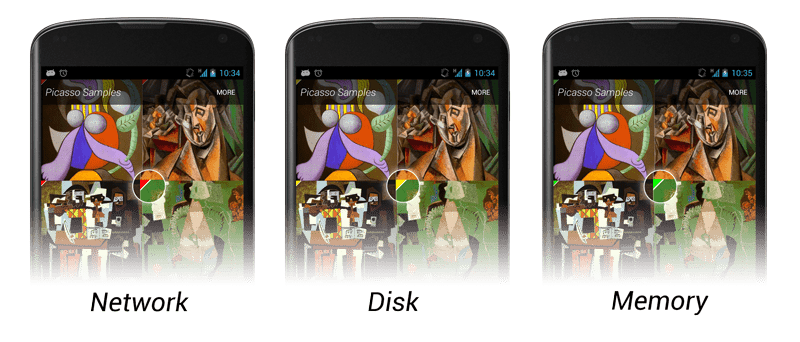
Once again, adding it to your project is super easy in Android Studio. Just add this line to your dependencies section (like ButterKnife above):
compile 'com.squareup.picasso:picasso:2.3.3'
If you want to see this in action, I cover using it in Build a Self-Destructing Message App and Implementing Designs for Android.
Downloading things other than images from the web? Check out android-async-http!
Animations
The Material Design guidelines focus heavily on animation, and if you use it correctly, you can really make your app look polished and make your interactions more intuitive and enjoyable. Animations can be hard, but good libraries make them easy!
For a set of regular View animations, check out AndroidViewAnimations. I’ll let the author’s animated GIF speak for itself:
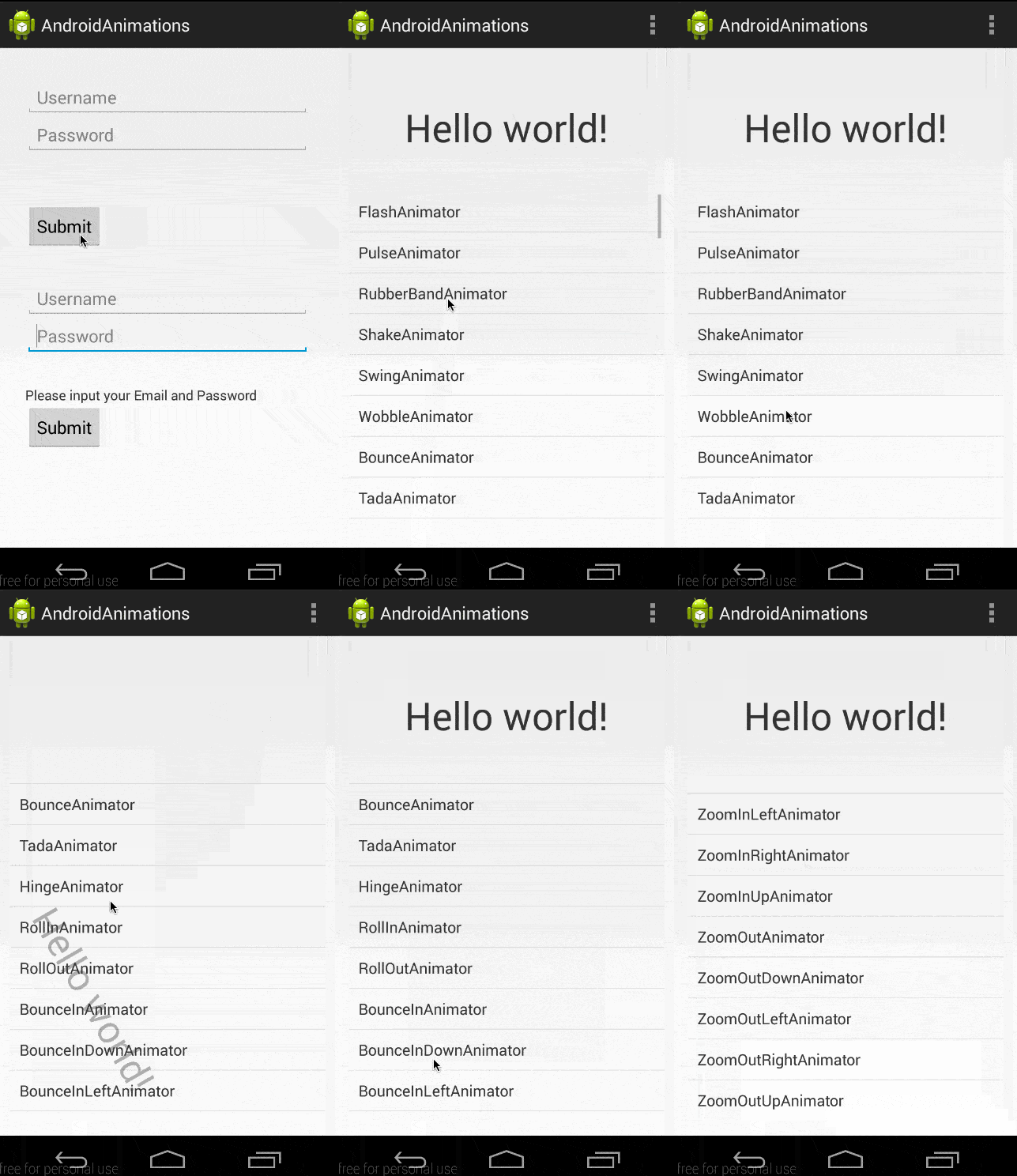
The syntax for this library is similar to what we saw for Picasso above:
YoYo.with(Techniques.Bounce)

    .duration(700)

    .playOn(findViewById(R.id.usernameField));
Including it is simple, though it does require two other projects as well:
dependencies {

  compile 'com.nineoldandroids:library:2.4.0'

  compile 'com.daimajia.easing:library:1.0.0@aar'

  compile 'com.daimajia.androidanimations:library:1.0.8@aar'

}
Another really helpful animations library is ListViewAnimations, which makes animating items in a list very easy. Check out the demo video on Google Play to see examples of everything it can do.
How to Discover Libraries
If you are new to the open source community, you may be wondering how you can find libraries like this on your own. It’s really just a mindset. Every time you go to add new code, ask, “Has somebody done this already?”
- Ask Google
- Ask GitHub
- Ask StackOverflow
- Ask a friend
Then, once you find a library that looks interesting, remember the most important two letters for researching open source libraries: vs.
Whenever I’m researching a library, I google the library’s name followed by “vs”. Then in autocomplete I see competing libraries that the one I’m researching has been compared to. That helps me evaluate similar libraries and choose the best one for me. Check out this example of ButterKnife:
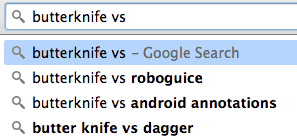
RoboGuice, AndroidAnnotations, and Dagger are all libraries that do similar injection things like we saw ButterKnife does for us.
Lastly, you can utilize social media and newsletters to keep an eye on the open source landscape. I passively monitor the following and bookmark any libraries that look useful.
- Twitter (my “Android” list)
- Google+
- androidweekly.net newsletter
- http://android-arsenal.com/
- http://www.appdevwiki.com/
Remember, one of the main goals of programming is to be efficient and complete. Learning how to use the work of others to augment your own is a valuable skill even the most seasoned professionals rely on.
每个android项目都应该使用的android 库的更多相关文章
- 之前的Android项目报错,新建Android项目报错,代码中找不到错误解决方案
打开一年前的东西,结果发现里面的android项目全部有个红叉,也找不到错误.新建一个项目也报错,首先确定自己的环境应该没问题,然后通过查看网上的资料,发现可能是debug的keystore到期啦. ...
- Android 项目的代码混淆,Android proguard 使用说明
简单介绍 Java代码是非常easy反编译的. 为了非常好的保护Java源码,我们往往会对编译好的class文件进行混淆处理. ProGuard是一个混淆代码的开源项目.它的主要作用就是混淆,当然它还 ...
- 在Android项目中调用已有.so库
注意该.so库指的是android平台的,非一般linux.unix平台:1.现有库libcom_ycan_testLib.so2.新建android项目TestLib23.添加新类:类名:testL ...
- (已解决)Eclipse报错:Could not find XXX.apk. 没有Android项目命名. There is no android project named
可能是你把当前项目设置为library项目了,按以下步骤切换回普通项目: 选择 Project->Properties 在左边的列表中,选择 Android 取消钩中"Is Libra ...
- Android Studio软件技术基础 —Android项目描述---1-类的概念-android studio 组件属性-+标志-Android Studio 连接真机不识别其他途径
学习android对我来说,就是兴趣,所以我以自己的兴趣写出的文章,希望各位多多支持!多多点赞,评论讨论加关注. 最近有点忙碌,对于我来说,学习Android开发,是对于我的考验,最近一位大佬发给我一 ...
- android studio不能创建android项目,或者不能识别android项目的解决方法
1.先点击file->close project回到android studio 欢迎界面,然后按如下图步骤添加相关的plugin就行了,然后重启. 2.如图 3. 4.
- pycharm每次新建项目都要重新安装一些第三方库的解决办法(转载防删)
目前有三个解决办法,也是亲测有用的: 第一个方法:因为之前有通过pycharm的project interpreter里的+号添加过一些库,但添加的库只是指定的项目用的,如果想要用,就必须用之前的项目 ...
- Android项目svn代码管理问题[转]
用svn控制版本,svn本身是不会识别哪些该传,哪些不该传,这就导致有些关于路径的东西(比如拓展jar的路径)也被上传了,而当别人下载后,那个路径对于这个人可能完全不存在,项目编译就会出问题.用ecl ...
- Android项目svn代码管理问题
用svn控制版本,svn本身是不会识别哪些该传,哪些不该传,这就导致有些关于路径的东西(比如拓展jar的路径)也被上传了,而当别人下载后,那个路径对于这个人可能完全不存在,项目编译就会出问题.用ecl ...
随机推荐
- Unity3d Shader开发(五)Fallback ,Category
Fallback定义在所有子着色器后.简单来说,它表示"如果没有任何子着色器能被运行在当前硬件上,请尝试使用降级着色器". Syntax 语法 Fallback "nam ...
- Android openGL ES 2.0里Surfaceview背景透明
surfaceview的黑色背景会挡住其父的背景,现在把surfaceview的背景设为透明,既可以看到所绘的3D物体,又可以看到背景. 在onSurfaceCreated里,调用GLES20.glC ...
- Wix 安装部署(一)同MSBuild 自动生成打包文件 转
原文地址:http://www.cnblogs.com/stoneniqiu/p/3355086.html 因为项目需要,最近在研究Wix打包部署,园子里也有一些关于wix的博客,方方面面,讲的点各不 ...
- 使用.net 的Chart控件绘制曲线图
在进行软件开发过程中我们可能会碰到需要生成图表的情况,在.NET中以前经常用GDI去绘制,虽然效果也不错,自从.NET 4.0开始,专门为绘制图表而生的Chart控件出现了,有了它,就可以轻松的绘制你 ...
- Logback 将日志分级别打印
最近项目中用到了logback 记录日志, 关于为啥使用logback 请百度一下: logback与Log4J的区别 好了,废话不多说,直奔主题, 研究了好久,终于将日志按级别将日志分文件打印出 ...
- sjtu1586 Dog
Description 隔壁村的阿黑的Dog没有跑, 但Dog已经15岁了, 相当于人类达到了79岁. 为了防止Dog患上犬类认知障碍 (Canine cognitive dysfunction, C ...
- Linux +apache+fastcgi运行c/c++
在Linux上搭建apache+fastcgi环境,说多了都是泪啊. 花费我几天时间,开源软件虽说好用,但是版本众多,文档缺乏,什么都只能自己摸索. 终于成功运行起来,特此记录. 一. apache ...
- 服务器部署_nginx报错: [warn] conflicting server name "www.test.com" on 0.0.0.0:80, ignored
今天修改nginx配置文件nginx.conf之后,启动nginx就会报错.经仔细检查是重复配置了 server元素导致, 当nginx检测到重复的 server_name item.test.com ...
- linux 性能分析常规逻辑和手段总结
一. 追查cpu占用较高的进程(线程) 1 . 如何查找出当前系统中占用cpu或者内存最高的进程? ps aux |sort -rn -k 3 |head -n3 查找出当前系统中cpu资源占用前三 ...
- yii
2008年出现的一个以php为基础的框架,特点是:高性能框架.代码重用性.速度非常快(改完代码后直接刷新就可以展示修改后的页面).有小物件.登录组件.日志组件等等. main.php配置与数据库相连的 ...