
Windows phone应用开发[20]-禁止Pivot手势
相比Ios 和Android. Windows Phone 控件库中多了两个比较特殊的空间Pivot 枢轴和Panamera 全景视图控件.在基于枢轴控件Pivot中我们经常会碰到一些比较特殊应用场景.类似Pivot中存在类似Silder 左右滑动时 存在一些手势操作控制. 在某些特殊逻辑下禁止Pivot 左右滑动等需求.本篇幅将详细说明Pivot在这特殊场景中关于Pivot手势控制.以及WP7和WP8 两个版本之间存在的一些差异.
首先要说的是在Pivot枢轴控件在某些特定业务需求下需要禁止左滑或右滑应用场景. 类似我们在WP上基于Pivot控件做新手教程或应用开始时的用户引导.如何来处理禁止PivotItem左右滑动操作?
基于Windows Phone 7.1 的SDK 我们通常采用的方式是在对应的PivotItem下添加GestureService 中GestureListener事件分别监听ManipulationStarted和ManipulationCompleted.或是在后台代码中Loaded方法中手动订阅PivotItem该事件:
1: this.FirstPivot_PV.AddHandler(PivotItem.ManipulationStartedEvent, new EventHandler<ManipulationStartedEventArgs>(pivot_ManipulationStarted), false);
2: this.FirstPivot_PV.AddHandler(PivotItem.ManipulationDeltaEvent, new EventHandler<ManipulationDeltaEventArgs>(pivot_ManipulationCompleted), false);
.csharpcode, .csharpcode pre
{
font-size: small;
color: black;
font-family: consolas, "Courier New", courier, monospace;
background-color: #ffffff;
/*white-space: pre;*/
}
.csharpcode pre { margin: 0em; }
.csharpcode .rem { color: #008000; }
.csharpcode .kwrd { color: #0000ff; }
.csharpcode .str { color: #006080; }
.csharpcode .op { color: #0000c0; }
.csharpcode .preproc { color: #cc6633; }
.csharpcode .asp { background-color: #ffff00; }
.csharpcode .html { color: #800000; }
.csharpcode .attr { color: #ff0000; }
.csharpcode .alt
{
background-color: #f4f4f4;
width: 100%;
margin: 0em;
}
.csharpcode .lnum { color: #606060; }
先在Started事件中表示手势滑动起始点Point的坐标位置.:
1: Point startPoint;
2: private void pivot_ManipulationStarted(object sender, ManipulationStartedEventArgs e)
3: {
4: startPoint = e.ManipulationOrigin;
5: }
.csharpcode, .csharpcode pre
{
font-size: small;
color: black;
font-family: consolas, "Courier New", courier, monospace;
background-color: #ffffff;
/*white-space: pre;*/
}
.csharpcode pre { margin: 0em; }
.csharpcode .rem { color: #008000; }
.csharpcode .kwrd { color: #0000ff; }
.csharpcode .str { color: #006080; }
.csharpcode .op { color: #0000c0; }
.csharpcode .preproc { color: #cc6633; }
.csharpcode .asp { background-color: #ffff00; }
.csharpcode .html { color: #800000; }
.csharpcode .attr { color: #ff0000; }
.csharpcode .alt
{
background-color: #f4f4f4;
width: 100%;
margin: 0em;
}
.csharpcode .lnum { color: #606060; }再在Complated方法中获取手势操作结束时的位置Point坐标位置 通过判断X轴移动距离来 判断当前手势向左还是向右滑动 采用Complate()方法完成操作来达到禁止PivotItem向左或向右滑动的控制:
1: private void pivot_ManipulationCompleted(object sender, ManipulationDeltaEventArgs e)
2: {
3: Point endPoint = e.ManipulationOrigin;
4: if (endPoint.X - startPoint.X >= 0)
5: {
6: #region Control The Right Side
7: e.Complete();
8: e.Handled = true;
9: #endregion
10: }
11:
12: if (endPoint.X - startPoint.X < 0)
13: {
14: #region Control The Left Side
15: e.Complete();
16: e.Handled = true;
17: #endregion
18: }
19: }
.csharpcode, .csharpcode pre
{
font-size: small;
color: black;
font-family: consolas, "Courier New", courier, monospace;
background-color: #ffffff;
/*white-space: pre;*/
}
.csharpcode pre { margin: 0em; }
.csharpcode .rem { color: #008000; }
.csharpcode .kwrd { color: #0000ff; }
.csharpcode .str { color: #006080; }
.csharpcode .op { color: #0000c0; }
.csharpcode .preproc { color: #cc6633; }
.csharpcode .asp { background-color: #ffff00; }
.csharpcode .html { color: #800000; }
.csharpcode .attr { color: #ff0000; }
.csharpcode .alt
{
background-color: #f4f4f4;
width: 100%;
margin: 0em;
}
.csharpcode .lnum { color: #606060; }这样很容易WP SDK7.1控制某个PivotItem在手势操作禁止左右滑动的操作.虽然能够禁止PivotItem左右滑动的操作.但是操作过程中发现如果PivotItem放入其他控件在滑动时很容易引起误操作或左右误滑的情况.而对应系统采用Pivot却不存在这个情况.参考了阿干 @ MoHoo Studio 在博文[有效解决Pivot左右误滑问题]中提出的方案很好解决这个问题.其实原理在使用PivotItem中ManipulationCompleted事件中加入一些判断条件.来处理误操作或误滑动存在的一些情况.
通过扩展方法首先获取Pivot控件的ItemsPresenter可视化树结构.获取其中TransformGroup视图.来控制Pivot左右滑动,首先我们需要继承扩展Pivot控件扩展方法.如果不明白ExtensionMethods如何使用请参考这里[MSDN ExtensionMethods],在扩展方法中分别实现GetVisualDescendents、FindVisualChild、GetVisualChildren三个方法.实现如下:
1: public static class ExtensionMethods
2: {
3: public static FrameworkElement FindVisualChild(this FrameworkElement root, string name)
4: {
5: FrameworkElement temp = root.FindName(name) as FrameworkElement;
6: if (temp != null)
7: return temp;
8:
9: foreach (FrameworkElement element in root.GetVisualDescendents())
10: {
11: temp = element.FindName(name) as FrameworkElement;
12: if (temp != null)
13: return temp;
14: }
15:
16: return null;
17: }
18:
19: public static IEnumerable<FrameworkElement> GetVisualDescendents(this FrameworkElement root)
20: {
21: Queue<IEnumerable<FrameworkElement>> toDo = new Queue<IEnumerable<FrameworkElement>>();
22:
23: toDo.Enqueue(root.GetVisualChildren());
24: while (toDo.Count > 0)
25: {
26: IEnumerable<FrameworkElement> children = toDo.Dequeue();
27: foreach (FrameworkElement child in children)
28: {
29: yield return child;
30: toDo.Enqueue(child.GetVisualChildren());
31: }
32: }
33: }
34:
35: public static IEnumerable<FrameworkElement> GetVisualChildren(this FrameworkElement root)
36: {
37: for (int i = 0; i < VisualTreeHelper.GetChildrenCount(root); i++)
38: yield return VisualTreeHelper.GetChild(root, i) as FrameworkElement;
39: }
40: }
.csharpcode, .csharpcode pre
{
font-size: small;
color: black;
font-family: consolas, "Courier New", courier, monospace;
background-color: #ffffff;
/*white-space: pre;*/
}
.csharpcode pre { margin: 0em; }
.csharpcode .rem { color: #008000; }
.csharpcode .kwrd { color: #0000ff; }
.csharpcode .str { color: #006080; }
.csharpcode .op { color: #0000c0; }
.csharpcode .preproc { color: #cc6633; }
.csharpcode .asp { background-color: #ffff00; }
.csharpcode .html { color: #800000; }
.csharpcode .attr { color: #ff0000; }
.csharpcode .alt
{
background-color: #f4f4f4;
width: 100%;
margin: 0em;
}
.csharpcode .lnum { color: #606060; }
那可以Complated方法中通过如下方式来获取Pivot出现误滑动的情况的,对Pivot控件滑动进行一定控制:
1: private void pivot_ManipulationCompleted(object sender, ManipulationDeltaEventArgs e)
2: {
3: var itemsPresenter = this.pivot.GetVisualDescendents().FirstOrDefault(x => x.GetType() == typeof(ItemsPresenter));
4: var group = itemsPresenter.RenderTransform as TransformGroup;
5: var trans = group.Children.FirstOrDefault(o => o is TranslateTransform) as TranslateTransform;
6:
7: double xvalue = Math.Abs(e.CumulativeManipulation.Translation.X);
8: double yvalue = Math.Abs(e.CumulativeManipulation.Translation.Y);
9: if (xvalue / yvalue < 2 && yvalue > 80 && trans.X == 0.0)
10: {
11: e.Handled = true;
12: }
13: }
.csharpcode, .csharpcode pre
{
font-size: small;
color: black;
font-family: consolas, "Courier New", courier, monospace;
background-color: #ffffff;
/*white-space: pre;*/
}
.csharpcode pre { margin: 0em; }
.csharpcode .rem { color: #008000; }
.csharpcode .kwrd { color: #0000ff; }
.csharpcode .str { color: #006080; }
.csharpcode .op { color: #0000c0; }
.csharpcode .preproc { color: #cc6633; }
.csharpcode .asp { background-color: #ffff00; }
.csharpcode .html { color: #800000; }
.csharpcode .attr { color: #ff0000; }
.csharpcode .alt
{
background-color: #f4f4f4;
width: 100%;
margin: 0em;
}
.csharpcode .lnum { color: #606060; }
xValue和YValue当前Pivot水平滑动距离的值. 其中判断是否执行e.Handled 条件根据自己实际的项目需要来进行微调.这样就很好的实现PivotItem禁止左右滑动和Pivot在滑动的误操作的问题.注意这里基于Windows Phone SDK 7.1 版本.可以在Github上下载到这部分源码[https://github.com/chenkai/ControlLeftPivotDemo]
now 基于WPSDK 7.1 我们现在要基于对PivotItem移植到WP 8.0上.
原来基于SDK 7.1代码并不做任何更改.直接移植到WP8上来却发现原来关于禁止PivotItem左右滑动的控制失去了效果.调试代码发现.当触发手势操作后后台代码只执行了ManipulationStarted事件.并没有执行ManipulationDelta和ManipulationCompleted事件.很诡异.但查看官方MSDN Windows Phone Pivot 控件 文档中可以看出一些端倪.在MSDN文档中提到Pivot应用:
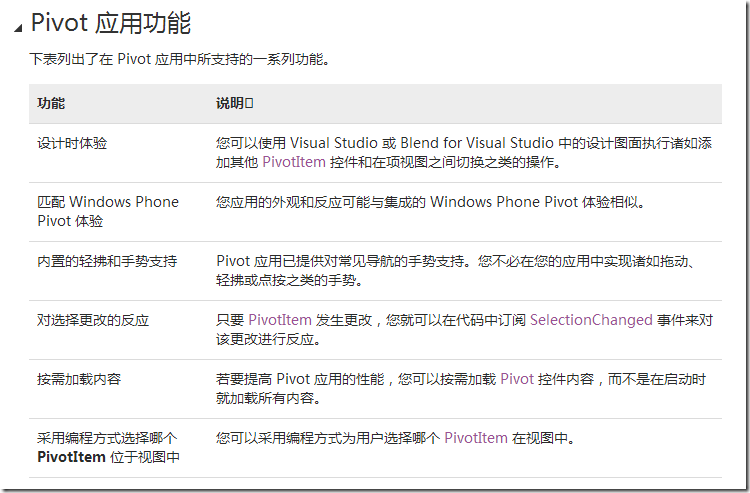
其中有一点提到:
内置的轻拂和手势支持
Pivot 应用已提供对常见导航的手势支持。您不必在您的应用中实现诸如拖动、轻拂或点按之类的手势。
也就是说Pivot在SDK 8.0 已经内置对滑动手势事件处理.我们不能采用WP SDK7.1 时通过GestureService 服务或是Code Behind中强制订阅事件的方式来进行自定义处理.在触发手势时其实执行了Manipulation相关事件,但是被Pivot或Panorama内部封装的手势路由事件给拦截掉了.这样我们后台关于自定义的ManipulationCompleted事件就得不到执行.虽然Pivot控件内置手势处理事件. 我们依然可以采用FrameworkElement.UseOptimizedManipulationRouting =false属性来设置Pivot执行自定义事件.关于该属性说明如下:
FrameworkElement.UseOptimizedManipulationRouting 属性:
获取或设置指示系统是否应处理输入事件或是否 FrameworkElement 应处理输入事件的值。
如果采用系统默认处理输入事件,则为 true;如果 FrameworkElement 应处理输入自定义事件,则为 false。 默认值为true。
适用于以下控件:
可见在WP8.0除了Pivot 在全景视图Panorama 等其他控件也内置手势操作事件处理.这样一来我们Xaml文件设置PivotItem UseOptimizedManipulationRouting =false.重新编译 运行程序发现爆出异常信息:
Can't set UseOptimizedManipulationRouting to false on the control
但当我们把Xaml订阅事件方式放在后台代码来订阅时发现异常消失 代码如下:
1: public void Events()
2: {
3: this.FirstPivot_PV.UseOptimizedManipulationRouting = false;
4: this.FirstPivot_PV.AddHandler(PivotItem.ManipulationStartedEvent, new EventHandler<ManipulationStartedEventArgs>(pivot_ManipulationStarted), true);
5: this.FirstPivot_PV.AddHandler(PivotItem.ManipulationDeltaEvent, new EventHandler<ManipulationDeltaEventArgs>(pivot_ManipulationCompleted), true);
6: }
.csharpcode, .csharpcode pre
{
font-size: small;
color: black;
font-family: consolas, "Courier New", courier, monospace;
background-color: #ffffff;
/*white-space: pre;*/
}
.csharpcode pre { margin: 0em; }
.csharpcode .rem { color: #008000; }
.csharpcode .kwrd { color: #0000ff; }
.csharpcode .str { color: #006080; }
.csharpcode .op { color: #0000c0; }
.csharpcode .preproc { color: #cc6633; }
.csharpcode .asp { background-color: #ffff00; }
.csharpcode .html { color: #800000; }
.csharpcode .attr { color: #ff0000; }
.csharpcode .alt
{
background-color: #f4f4f4;
width: 100%;
margin: 0em;
}
.csharpcode .lnum { color: #606060; }
其实问题在于如果我们Xaml文件中设置PivotItem UseOptimizedManipulationRouting =false 属性后.如果我们同时也在Xaml 文件订阅该PivotItem中直接订阅该事件就会触发这个异常. 第一次运行正常.但第二次就会爆出异常.我们需要采用后台代码添加订阅事件方式来处理来避免这个异常.
1: FirstPivot_PV.AddHandler(PivotItem.ManipulationStartedEvent, new EventHandler<ManipulationStartedEventArgs>(pivot_ManipulationStarted), true);
.csharpcode, .csharpcode pre
{
font-size: small;
color: black;
font-family: consolas, "Courier New", courier, monospace;
background-color: #ffffff;
/*white-space: pre;*/
}
.csharpcode pre { margin: 0em; }
.csharpcode .rem { color: #008000; }
.csharpcode .kwrd { color: #0000ff; }
.csharpcode .str { color: #006080; }
.csharpcode .op { color: #0000c0; }
.csharpcode .preproc { color: #cc6633; }
.csharpcode .asp { background-color: #ffff00; }
.csharpcode .html { color: #800000; }
.csharpcode .attr { color: #ff0000; }
.csharpcode .alt
{
background-color: #f4f4f4;
width: 100%;
margin: 0em;
}
.csharpcode .lnum { color: #606060; }
注意AddHandler方法需要在设置处理方法设置True.为已标记为由其他元素在事件路由过程中处理的路由事件调用所提供的处理程序指向该方法. 具体关于AddHandler请参考UIElement.AddHandler[MSDN]说明.
这样一来.在来调试后台代码发现手势在触发ManipulationStarted事件后 同时也成功的触发了ManipulationCompleted事件.这样一来我们移植原来的代码逻辑来控制PivotItem左右滑动操作 代码如下:
1: Point startPoint;
2: private void pivot_ManipulationStarted(object sender, ManipulationStartedEventArgs e)
3: {
4: startPoint = e.ManipulationOrigin;
5: }
6:
7: private void pivot_ManipulationCompleted(object sender, ManipulationDeltaEventArgs e)
8: {
9: Point endPoint = e.ManipulationOrigin;
10: if (endPoint.X - startPoint.X >= 0)
11: {
12: #region Control Right Side
13: e.Complete();
14: e.Handled = true;
15: #endregion
16: }
17:
18: if (endPoint.X - startPoint.X < 0)
19: {
20: #region Control Left Side
21: e.Complete();
22: e.Handled = true;
23: #endregion
24: }
25: }
.csharpcode, .csharpcode pre
{
font-size: small;
color: black;
font-family: consolas, "Courier New", courier, monospace;
background-color: #ffffff;
/*white-space: pre;*/
}
.csharpcode pre { margin: 0em; }
.csharpcode .rem { color: #008000; }
.csharpcode .kwrd { color: #0000ff; }
.csharpcode .str { color: #006080; }
.csharpcode .op { color: #0000c0; }
.csharpcode .preproc { color: #cc6633; }
.csharpcode .asp { background-color: #ffff00; }
.csharpcode .html { color: #800000; }
.csharpcode .attr { color: #ff0000; }
.csharpcode .alt
{
background-color: #f4f4f4;
width: 100%;
margin: 0em;
}
.csharpcode .lnum { color: #606060; }
我们发现实际效果关于禁止PivotItem 左右滑动的效果成功移植到WP 8.0上来.源码请到Github上下载[https://github.com/chenkai/PivotDisableLeftDemo]
源码下载:
WP7.1 [https://github.com/chenkai/ControlLeftPivotDemo]
WP8.0 [https://github.com/chenkai/PivotDisableLeftDemo]
Contact ME: [@chenkaihome]
参考资料:
FrameworkElement.UseOptimizedManipulationRouting 属性
Handle Swipe Up, Swipe Down, Swipe Left & Swipe Right Gestures in a WinRT app
Windows phone应用开发[20]-禁止Pivot手势的更多相关文章
- 【高德地图API】Pivot控件中加载地图并禁止Pivot手势
如题,解决方案,参考[Windows phone应用开发[20]-禁止Pivot手势]http://www.cnblogs.com/chenkai/p/3408658.html. xaml代码清单 ...
- Windows phone应用开发[22]-再谈下拉刷新
几周之前在博客更新一篇Windows phone应用开发[18]-下拉刷新 博文,有很多人在微博和博客评论中提到了很多问题.其实在实际项目中我基于这篇博文提出解决问题思路优化了这个解决方案.为了能够详 ...
- 利用ArcGIS Engine、VS .NET和Windows控件开发GIS应用
Dixon 原文 用ArcGIS Engine.VS .NET和Windows控件开发GIS应用 此过程说明适合那些使用.NET建立和部署应用的开发者,它描述了使用ArcGIS控件建立和部署 ...
- Windows 8 应用开发 - 挂起与恢复
原文:Windows 8 应用开发 - 挂起与恢复 Windows 8 应用通常涉及到两种数据类型:应用数据与会话数据.在上一篇提到的本地数据存储就是应用层面的数据,包括应用参数设置.用户重 ...
- Windows phone应用开发[19]-RSA数据加密
在这个系列的第十六章节中Windows phone应用开发[16]-数据加密 中曾详细讲解过windows phone 常用的MD5,HMAC_MD5,DES,TripleDES[3DES] 数据加密 ...
- Windows phone应用开发[17]-xap提交异常处理
在windows phone 应用提交操作上早在2011年时就写过一篇Windows phone 应用开发[4]-应用发布,那时wp应用提交官方市场的流程繁杂[超过了5步].因为上传和填写应用信息页面 ...
- Windows搭建python开发环境,python入门到精通[一]
从大学开始玩python到现在参加工作,已经有5年了,现在的公司是一家.net的公司用到python的比较少,最近公司有新项目需要用到python,领导希望我来跟其他同事training,就有了这篇博 ...
- 菜鸟学Windows Phone 8开发(3)——布局和事件基础
本系列文章来源MSDN的 面向完全新手的 Windows Phone 8 开发 本文地址:http://channel9.msdn.com/Series/Windows-Phone-8-Develo ...
- 重新想象 Windows 8 Store Apps (50) - 输入: 边缘手势, 手势操作, 手势识别
[源码下载] 重新想象 Windows 8 Store Apps (50) - 输入: 边缘手势, 手势操作, 手势识别 作者:webabcd 介绍重新想象 Windows 8 Store Apps ...
随机推荐
- iOS简单实现毛玻璃效果
iOS8之后有一个类 UIVisualEffectView // 毛玻璃 UIImageView *img = [[UIImageView alloc] initWithFrame:CGRectMak ...
- java设计模式--策略模式
策略模式属于对象的行为模式.其用意是针对一组算法,将每一个算法封装到具有共同接口的独立的类中,从而使得它们可以相互替换.策略模式使得算法可以在不影响到客户端的情况下发生变化. 本文地址:http:// ...
- 初识JavaScript 变量, 操作符, 数组
这里讲的不会太多, 因为所有的语言都是一样的, 一些基本的东西, 所以就随便写写. 变量 变量就是可变的量, 编程角度理解就是用于存储某种/某些数值的存储器. 我们可以把变量具象理解为一个盒子, 而我 ...
- iOS中的round/ceil/floorf函数略解
extern float ceilf(float); extern double ceil(double); extern long double ceill(long double); extern ...
- numpy中matrix的特殊属性
一.matrix特殊属性解释 numpy中matrix有下列的特殊属性,使得矩阵计算更加容易 摘自 NumPy Reference Release 1.8.1 1.1 The N-dimensiona ...
- Invoke--转载
在多线程编程中,我们经常要在工作线程中去更新界面显示,而在多线程中直接调用界面控件的方法是错误的做法,Invoke 和 BeginInvoke 就是为了解决这个问题而出现的,使你在多线程中安全的更新界 ...
- MongoDB学习笔记~为IMongoRepository接口添加了排序和表达式树,针对官方驱动
回到目录 MongoDB的官方驱动,语法更好,更强 之前写过关于IMongoRepository仓储的文章,在mongodb的驱动选择上使用了NoRM,但是进行$ref引用类型导航时出现了问题,它对引 ...
- BOOST.Asio——Tutorial
=================================版权声明================================= 版权声明:原创文章 谢绝转载 啥说的,鄙视那些无视版权随 ...
- 【转】Java并发编程:深入剖析ThreadLocal
来自: http://www.importnew.com/17849.html 想必很多朋友对ThreadLocal并不陌生,今天我们就来一起探讨下ThreadLocal的使用方法和实现原理.首先,本 ...
- 2016 最佳 Linux 发行版排行榜
2015年,不管在企业市场还是个人消费市场都是 Linux非常重要的一年.作为一个自2005年起就开始使用 Linux的 Linuxer ,我门见证了 Linux在过去十年的成长.2016 Linux ...