
SpringBoot——国际化
更多内容,前往IT-BLOG
一、Spring 编写国际化时的步骤
【1】编写国际化配置文件;
【2】使用 ResourceBundleMessageSource 管理国际化资源文件;
【3】在页面使用 ftp:message 取出国际化内容;
二、SpringBoot编写国际化步骤
【1】创建 i18n目录,并创建 login.properties 国际化默认配置文件,同时创建 login_zh_CN.properties 系统就会自动识别到是配置国际化。就会切换到国际化视图,可以右键 Resource Bundle 'login'——Add——Add Propertie Files To Resource Bundle 快速添加其他国际化文件。
【2】可以通过视图的方式去添加国际化信息:
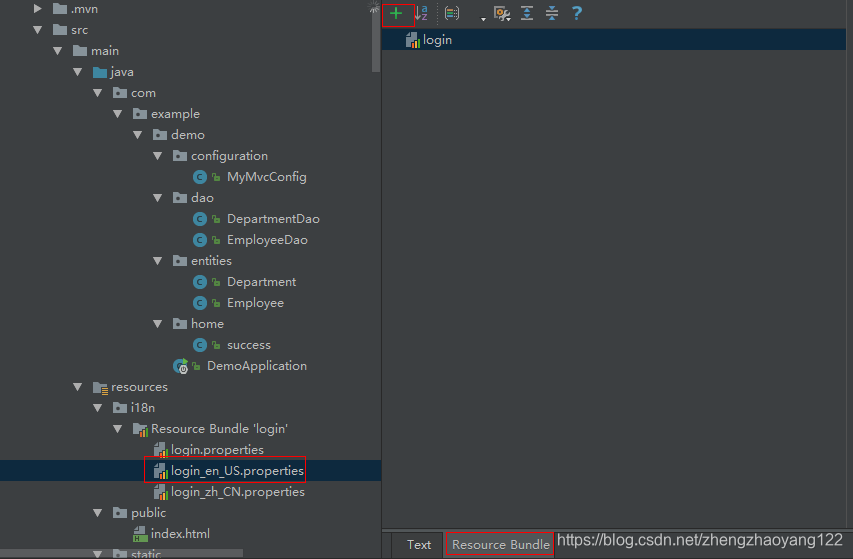

【3】编写国际化配置文件,抽取页面需要显示的国际化信息: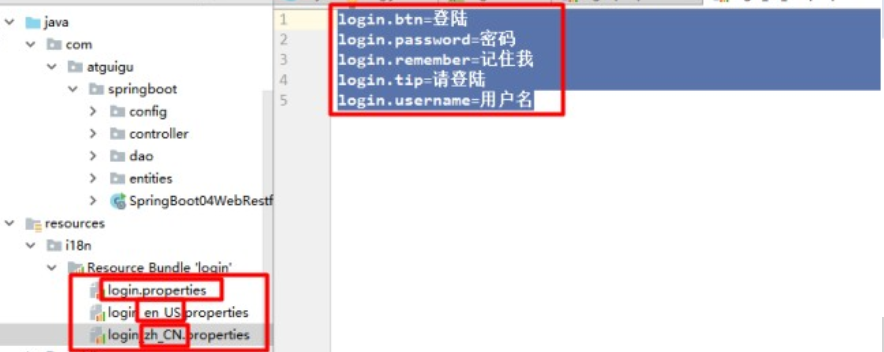
三、国际化原理
【1】进入 MessageSourceAutoConfiguration,发现 SpringBoot 自动配置好了管理国际化资源配置文件的组件;
 1 @ConfigurationProperties(prefix = "spring.messages")

 2 public class MessageSourceAutoConfiguration {

 3

 4     /**

 5      * 以逗号分隔的基名列表(本质上是完全限定的类路径位置),每个都遵循ResourceBundle约定,

 6      * 并对基于斜线的位置。如果它不包含包限定符(例如“org.mypackage”),它将从类路径根解析。

 7      */

 8     private String basename = "messages";

 9     //我们的配置文件可以直接放在类路径下叫messages.properties;

10

11     @Bean

12     public MessageSource messageSource() {

13         ResourceBundleMessageSource messageSource = new ResourceBundleMessageSource();

14         if (StringUtils.hasText(this.basename)) {

15             //设置国际化资源文件的基础名(去掉语言国家代码的)

16             messageSource.setBasenames(StringUtils.commaDelimitedListToStringArray(

17             StringUtils.trimAllWhitespace(this.basename)));

18         }

19         if (this.encoding != null) {

20             messageSource.setDefaultEncoding(this.encoding.name());

21         }

22         messageSource.setFallbackToSystemLocale(this.fallbackToSystemLocale);

23         messageSource.setCacheSeconds(this.cacheSeconds);

24         messageSource.setAlwaysUseMessageFormat(this.alwaysUseMessageFormat);

25     return messageSource;

26 }
【2】如果有中文,需要设置编码格式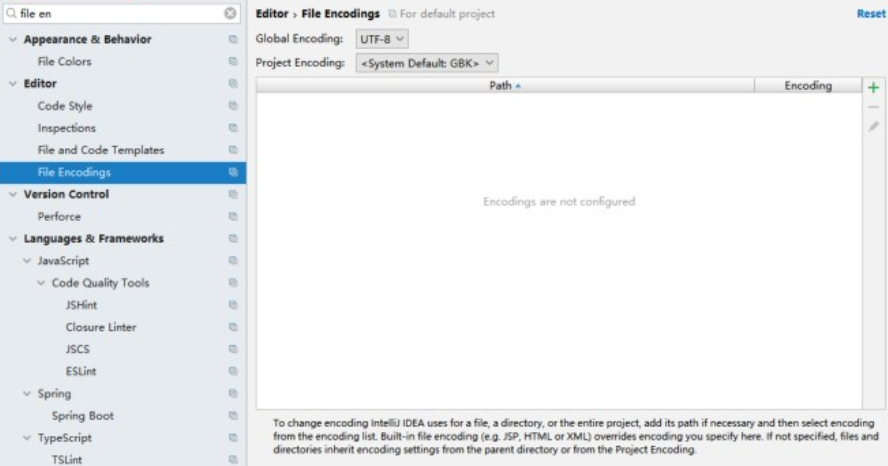
【3】如上可知,我们需要在配置文件中设置国际化资源的 basename属性:
1 <span class="hljs-comment"># i18n目录下的login文件</span>

2 spring.messages.basename=i18n.login
【4】去页面获取国际化值(红色部分,国际化用#{})(链接用@{表示}绿色部分):效果:根据浏览器语言的设置切换国际化。
 1 <!DOCTYPE html>

 2 <html lang="en"  xmlns:th="http://www.thymeleaf.org">

 3     <head>

 4         <meta http‐equiv="Content‐Type" content="text/html; charset=UTF‐8">

 5         <meta name="viewport" content="width=device‐width, initial‐scale=1, shrink‐to‐fit=no">

 6

 7         <meta name="description" content="">

 8         <meta name="author" content="">

 9         <title>Signin Template for Bootstrap</title>

10         <!‐‐ Bootstrap core CSS ‐‐>

11         <link href="asserts/css/bootstrap.min.css" th:href="@{/webjars/bootstrap/4.0.0/css/bootstrap.css}" rel="stylesheet">

12

13         <!‐‐ Custom styles for this template ‐‐>

14         <link href="asserts/css/signin.css" th:href="@{/asserts/css/signin.css}"rel="stylesheet">

15     </head>

16     <body class="text‐center">

17         <form class="form‐signin" action="dashboard.html">

18             <img class="mb‐4" th:src="@{/asserts/img/bootstrap‐solid.svg}" src="asserts/img/bootstrap‐solid.svg" alt="" width="72" height="72">

19             <h1 class="h3 mb‐3 font‐weight‐normal" th:text="#{login.tip}">Please signin</h1>

20             <label class="sr‐only" th:text="#{login.username}">Username</label>

21             <input type="text" class="form‐control" placeholder="Username" th:placeholder="#{login.username}" required="" autofocus="">

22             <label class="sr‐only" th:text="#{login.password}">Password</label>

23             <input type="password" class="form‐control" placeholder="Password" th:placeholder="#{login.password}" required="">

24

25             <div class="checkbox mb‐3">

26                 <label>

27                    <input type="checkbox" value="remember‐me"/> [[#{login.remember}]]

28                 </label>

29             </div>

30             <button class="btn btn‐lg btn‐primary btn‐block" type="submit" th:text="#{login.btn}">Sign in</button>

31             <p class="mt‐5 mb‐3 text‐muted"> 2017‐2018</p>

32             <a class="btn btn‐sm" th:href="@{/index.html(l='zh_CN')}>中文</a>

33             <a class="btn btn‐sm" th:href="@{/index.html(l='en_US')}>English</a>

34          </form>

35     </body>

36 </html>
【5】浏览器切换,能够实现国际化的原理:国际化Locale(区域信息对象),LocaleResolver(获取区域信息对象)进入WebMvcAutoConfiguration类,SpringBoot 配置了默认的 localResolve,如下:
 1 @Bean

 2 @ConditionalOnMissingBean

 3 @ConditionalOnProperty(prefix = "spring.mvc", name = "locale")

 4 public LocaleResolver localeResolver() {

 5     if (this.mvcProperties.getLocaleResolver() == WebMvcProperties.LocaleResolver.FIXED) {

 6         return new FixedLocaleResolver(this.mvcProperties.getLocale());

 7     }

 8     AcceptHeaderLocaleResolver localeResolver = new AcceptHeaderLocaleResolver();

 9     localeResolver.setDefaultLocale(this.mvcProperties.getLocale());

10     return localeResolver;

11 }
【6】当点击页面 “中文” or “English” 时切换中英文,页面参照4)信息。这是我们需要自己写一个 Locale,并加入容器中。
 1 /**

 2  * 可以在连接上携带区域信息

 3  */

 4 public class MyLocaleResolver implements LocaleResolver {

 5

 6     @Override

 7     public Locale resolveLocale(HttpServletRequest request) {

 8         String l = request.getParameter("l");

 9         Locale locale = Locale.getDefault();

10         if(!StringUtils.isEmpty(l)){

11             String[] split = l.split("_");

12             locale = new Locale(split[0],split[1]);

13         }

14         return locale;

15     }

16     @Override

17     public void setLocale(HttpServletRequest request, HttpServletResponse response, Locale locale) {

18     }

19  }
【7】将自己写的类,加入到 IOC容器中,方法的名字必须是 localeResolver,相当于 bean 的 id。以为默认的 localeResolver会判断容器中是否已经存在了 localeResolver。
1 @Bean

2 public LocaleResolver localeResolver(){

3    return new MyLocaleResolver();

4 }
SpringBoot——国际化的更多相关文章
- SpringBoot 国际化配置,SpringBoot Locale 国际化
SpringBoot 国际化配置,SpringBoot Locale 国际化 ================================ ©Copyright 蕃薯耀 2018年3月27日 ht ...
- springboot国际化与@valid国际化支持
springboot国际化 springboot对国际化的支持还是很好的,要实现国际化还简单.主要流程是通过配置springboot的LocaleResolver解析器,当请求打到springboot ...
- SpringBoot 国际化
一.配置文件 二.application.properties 文件( 让国际化的文件被 SpringBoot 识别 ) spring.messages.basename=i18n.login 三.h ...
- Springboot国际化信息(i18n)解析
国际化信息理解 国际化信息也称为本地化信息 . Java 通过 java.util.Locale 类来表示本地化对象,它通过 “语言类型” 和 “国家/地区” 来创建一个确定的本地化对象 .举个例子吧 ...
- 【SpringBoot】SpringBoot 国际化(七)
本周介绍SpringBoot项目的国际化是如何处理的,阅读本章前请阅读[SpringBoot]SpringBoot与Thymeleaf模版(六)的相关内容 国际化原理 1.在Spring中有国际化Lo ...
- 【spring 国际化】springMVC、springboot国际化处理详解
在web开发中我们常常会遇到国际化语言处理问题,那么如何来做到国际化呢? 你能get的知识点? 使用springgmvc与thymeleaf进行国际化处理. 使用springgmvc与jsp进行国际化 ...
- springboot国际化
Session方式的国际化/** * @descripte 请求中如果有{@Param lang},则按照lang的格式国际化 * @descripte 请求中如果无{@Param lang},但se ...
- 12. SpringBoot国际化
1).编写国际化配置文件: 2).使用ResourceBundleMessageSource管理国际化资源文件 3).在页面使用fmt:message取出国际化内容 步骤:1).编写国际化配置文件,抽 ...
- 使用spring-boot 国际化配置所碰到的乱码问题
写好html静态页面 , 也加上了编码格式 , 获取国际化展示在浏览器中还是存在乱码 , 开始以为是浏览器编码格式问题 , 做过处理后任没有得到解决 , 具体的处理方案如下: <meta ht ...
- Spring-boot 国际化
在application.properties文件中配置 spring.message.basename=i18n.login 页面使用 th:text="#{login.tip}" ...
随机推荐
- 类继承(c++ primer plus)课后习题
第一题: // base class class Cd { // represents a CD disk private: char performers[50]; char label[20]; ...
- snpEFF注释的vcf文件转化成maf文件
利用一个perl语言写的工具:snpeffTomaf 一行代码即可实现非常方便 github地址链接:https://github.com/tsy19900929/snpeffToMaf 将此仓库中的 ...
- Logtxt
public static void SSOAuthenLog(string msg, bool isRemoteAuthen = true) { #region ...
- json for python学习笔记
1.json作用 存储数据与数据传输 2.python中的json可以在代码中用字符串表示,字符串内部类似于字典 如: json1 = '{"name":"Bob&quo ...
- AT ARC092F Two Faced Edges
题意:给定一个有向图,保证无重边自环,求将图中的每条边反向后强联通分量的个数是否会改变. 数据范围:$n$ $≤$ $1e3$,$m$ $≤$ $2e5$. 首先考虑一条边的影响. 因为一条边只能连接 ...
- dubbo相关面试题
1.说说Dubbo的分层? 从大的范围来说,dubbo分为三层,business业务逻辑层由我们自己来提供接口和实现还有一些配置信息,RPC层就是真正的RPC调用的核心层,封装整个RPC的调用过程.负 ...
- Honeywell安卓版手持机设置广播方式
设置>Honeywell设置>扫描设置>Internal Scanner>Default profile>Data Processing Settings>Data ...
- HashMap中的Entry接口
利用Entry接口,快速又方便 import java.util.HashMap; import java.util.Map; public class MapDemo { public static ...
- 记安装MySQL数据库
记录一次自己动手安装MySQL数据库所踩的坑 MySQL安装包与操作系统匹配 安装包有amd和Intel,32位.64位多种组合需要确认仔细使用者操作系统和CPU型号 例如我使用的是CentOS ...
- tuxedo 12c 安装
tuxedo12c 安装命令 静默安装 控制台安装 tuxedo版本介绍 Tuxedo Release Name Tuxedo Release Number Note which contains L ...