
nuxt 登录注册加重置密码
<!-- 登录弹框 -->

    <div class="mask" v-show="flag">

      <div class="mask_content" v-show="type_d == 'sign'">

        <p class="mask_gb" @click="cloces">

          <img src="../static/img/home/gw_icon.png" alt="" />

        </p>

        <div class="mas_title">

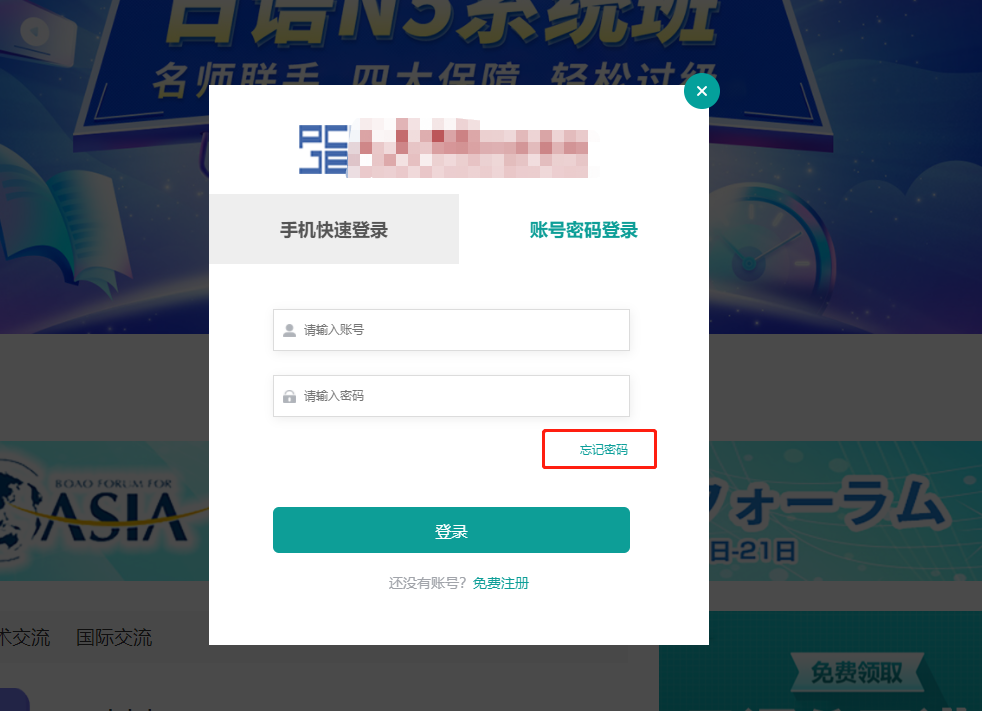
          <h3 class="mas_title_nav">登录</h3>

          <img class="mas_title_img" src="../static/img/home/logo.png" alt="" />

        </div>

        <div class="mask-title">

          <h3 @click="typ = 0" :class="{ mk_a: typ === 0 }">手机快速登录</h3>

          <h3 @click="typ = 1" :class="{ mk_a: typ === 1 }">账号密码登录</h3>

        </div>

        <!-- 手机快速登录 -->

        <div class="mask-meuns font14" v-show="typ == 0">

          <p class="ks_tels fe_tel">

            <img class="tel_icon tel" src="../static/img/home/tel.png" alt="" />

            <input

              class="inp_tel"

              v-model="phone"

              @input="form_mobile(phone)"

              type="text"

              maxlength="11"

              placeholder="+86 手机号"

            />

          </p>

          <p class="p_inp">

            <input

              class="inp_getS"

              v-model="yzm"

              type="text"

              placeholder="手机验证码"

            /><span

              class="yz"

              @click="send(1)"

              :class="color ?'actives_color': ''"

              >{{ sms_interval }}</span

            >

          </p>

          <button class="font16 sign" @click="phone_login">登录</button>

        </div>

        <!-- 账号密码登录 -->

        <div class="mask-meuns" v-show="typ == 1">

          <p class="ks_tels">

            <img

              class="tel_icon icon"

              src="../static/img/home/pep.png"

              alt=""

            />

            <input

              class="inp_tel"

              v-model="username"

              type="text"

              maxlength="11"

              placeholder="请输入账号"

            />

          </p>

          <p class="ks_tels">

            <img class="tel_icon icon" src="../static/img/home/mn.png" alt="" />

            <input

              v-model="passwords"

              class="inp_tel inp_pass"

              type="password"

              maxlength="12"

              placeholder="请输入密码"

            />

          </p>

          <div

            class="wj_ma"

            @click="type_d = 'chongzhi'"

          >

            忘记密码

          </div>

          <button class="font16 sign" @click="pwd_login">登录</button>

        </div>

        <p class="font14 goreg" @click="goto_regist">

          还没有账号?<span class="mf_reg">免费注册</span>

        </p>

      </div>

      <!-- 注册账号 -->

      <div class="mask_content" v-show="type_d == 'register'">

        <p class="mask_gb" @click="cloces">

          <img src="../static/img/home/gw_icon.png" alt="" />

        </p>

        <div class="mas_title">

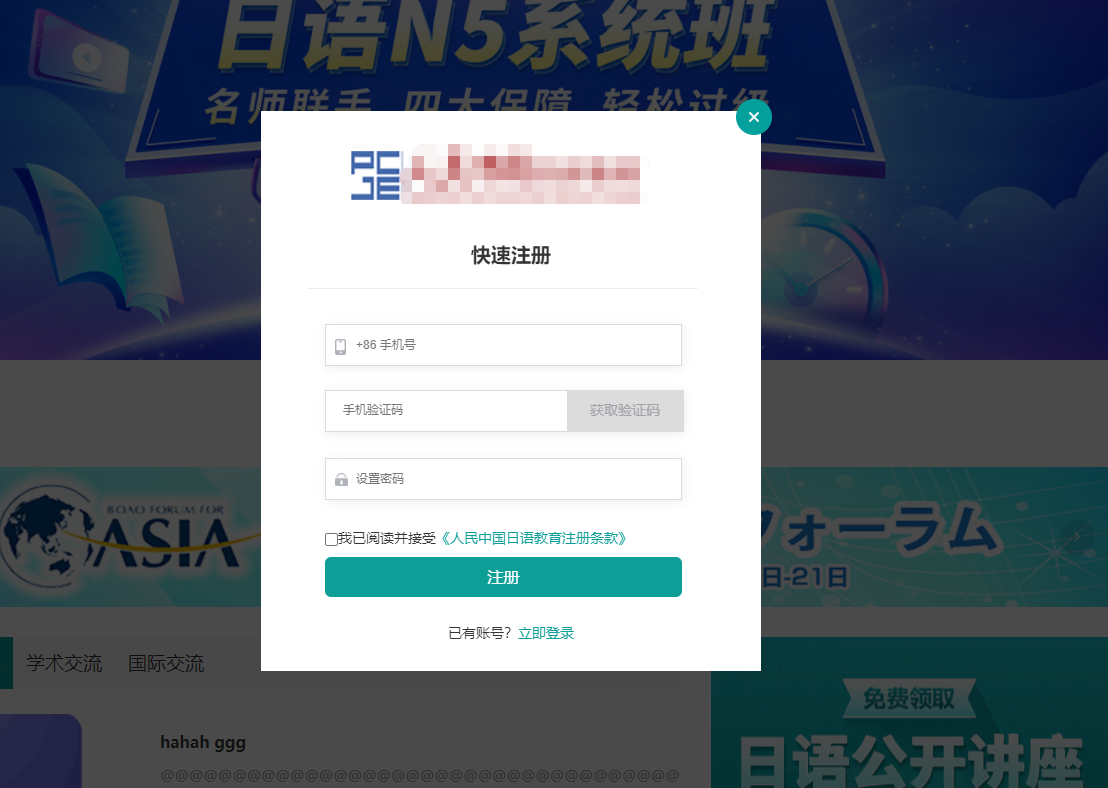
          <h3 class="mas_title_nav">注册</h3>

          <img class="mas_title_img" src="../static/img/home/logo.png" alt="" />

        </div>

        <div class="reg_title">

          <h3 class="font20 ks_title">快速注册</h3>

          <div class="mask-top-link"></div>

        </div>

        <form class="mask-meuns reg_ma font14">

          <p class="ks_tels">

            <img class="tel_icon tel" src="../static/img/home/tel.png" alt="" />

            <input

              v-model="mobile"

              @input="form_mobile(mobile)"

              maxlength="11"

              class="inp_tel"

              type="text"

              placeholder="+86 手机号"

            />

          </p>

          <p class="p_inp">

            <input

              class="inp_getS"

              v-model="sms"

              type="text"

              placeholder="手机验证码"

            />

            <span

              class="yz reg_yz"

              @click="send(2)"

              :class="color ?'actives_color': ''"

              >{{ sms_interval }}</span

            >

          </p>

          <p class="ks_tels">

            <img

              class="tel_icon icon"

              src="../static/img/home/mn.png"

              alt=""

            /><input

              v-model="password"

              class="inp_tel inp_pass"

              type="password"

              maxlength="12"

              placeholder="设置密码"

            />

          </p>

          <form class="font14 regulations">

            <input

              class="inp_check"

              type="checkbox"

              v-model="checked_zc"

            /><span

              >我已阅读并接受<b class="clause" @click="is_kxy = true"

                >《XXX注册条款》</b

              ></span

            >

            <p class="font16 sign reg_zc" @click="register">注册</p>

          </form>

        </form>

        <p class="font14 reg_sign" @click="goto_sign">

          已有账号?<span class="mf_reg">立即登录</span>

        </p>

      </div>

      <!-- 重置密码 -->

      <div class="mask_content" v-show="type_d == 'chongzhi'">

        <p class="mask_gb" @click="cloces">

          <img src="../static/img/home/gw_icon.png" alt="" />

        </p>

        <div class="mas_title">

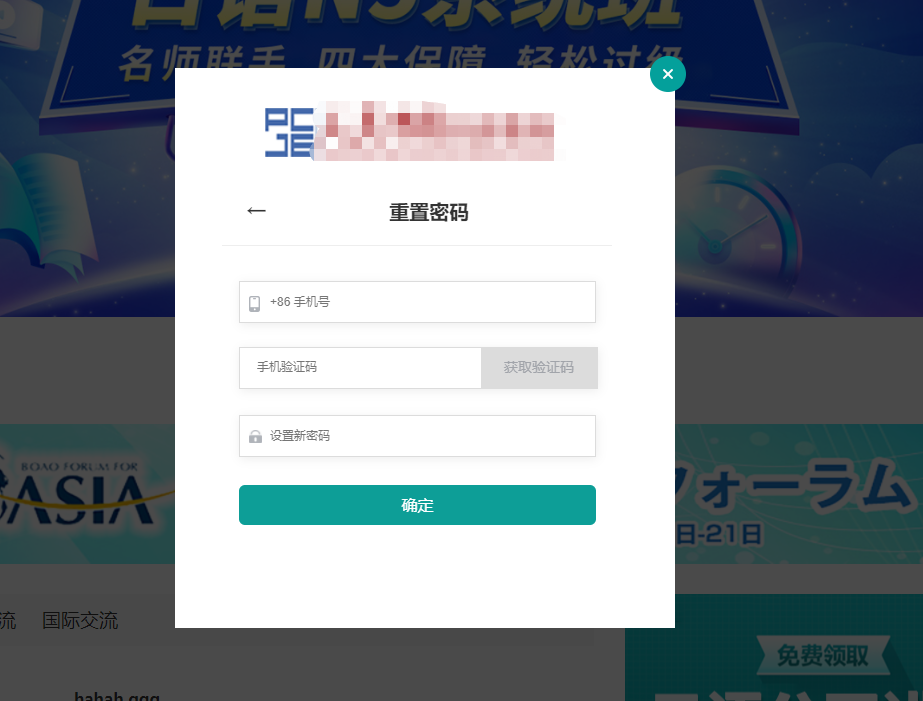
          <h3 class="mas_title_nav">重置</h3>

          <img class="mas_title_img" src="../static/img/home/logo.png" alt="" />

        </div>

        <div class="reg_title">

          <h3 class="new_reg_h3 font20">

            <span @click="go_back">←</span>重置密码

          </h3>

          <div class="mask-top-link"></div>

        </div>

        <form class="mask-meuns reg_ma font14">

          <p class="ks_tels">

            <img class="tel_icon tel" src="../static/img/home/tel.png" alt="" />

            <input

              v-model="new_mobile"

              @input="form_mobile(new_mobile)"

              maxlength="11"

              class="inp_tel"

              type="text"

              placeholder="+86 手机号"

            />

          </p>

          <p class="p_inp">

            <input

              class="inp_getS"

              v-model="captcha_sms"

              type="text"

              placeholder="手机验证码"

            />

            <span

              class="yz reg_yz"

              @click="send(3)"

              :class="color ?'actives_color': ''"

              >{{ sms_interval }}</span

            >

          </p>

          <p class="ks_tels">

            <img

              class="tel_icon icon"

              src="../static/img/home/mn.png"

              alt=""

            /><input

              v-model="new_password"

              class="inp_tel inp_pass"

              type="password"

              maxlength="12"

              placeholder="设置新密码"

            />

          </p>

          <form class="font14 regulations">

            <p class="font16 sign reg_zc" @click="new_register">确定</p>

          </form>

        </form>

      </div>

    </div>
data(){

    return {

          mobile: "",

          sms: "",

          password: "",

          sms_interval: "获取验证码",

          is_send: false,

          phone: "",

          passwords: "",

          username: "",

          yzm: "",

          login_method: "is_pwd",

          color: 0,

          checked_zc: false,

          xiey: "",

    }

}

methods:{

    //重置密码

    new_register() {

      var myreg = /^[1][3,4,5,7,8,9][0-9]{9}$/;

      if(this.new_mobile){

        if(!isNaN(this.new_mobile)){

          if(myreg.test(this.new_mobile)){

            if(this.captcha_sms){

              if(this.new_password){

                if(6 <= this.new_password.length){

                  if(this.new_password.length <= 12){

                      //请求数据

                      this.chz_reg()

                  }else{

                    that.$message.error("密码设置范围为6-12");

                  }

                }else{

                  that.$message.error("密码设置范围为6-12");

                }

              }else{

                this.$message.error("请输入密码!");

              }

            }else{

              this.$message.error("请输入验证码!");

            }

          }else{

            this.$message.error("手机号输入不正确!");

          }

        }else{

          this.$message.error("手机号格式不正确!");

        }

      }else{

        this.$message.error("请输入手机号!");

      }

    },

    //重置密码的后台接口

    chz_reg() {

      return post("api/user/resetPwd", {

        mobile: this.new_mobile,

        captcha: this.captcha_sms,

        newpassword: this.new_password,

      }).then((res) => {

        if (res.code == 1) {

          this.$message({

            message: "重置成功",

            type: "success",

          });

          //关掉注册框

          this.type_d = "sign";

          this.typ = 1;

          (this.new_mobile = ""),

            (this.captcha_sms = ""),

            (this.new_password = "");

        } else {

          this.$message({

            message: "重置失败,请稍后再试",

            type: "error",

          });

        }

      });

    },

    //倒计时

     hqyzm_zc(){

      var that = this;

      var time = 60;

      that.sms_interval = '('+time+')秒后重新发送';

      that.color = false;

      that.is_send = true;

      var zc_time = setInterval(function () {

        time-=1;

        that.sms_interval = '('+time+')秒后重新发送';

        that.color = false;

        that.is_send = true;

        if(time==0){

          clearInterval(zc_time);

          that.sms_interval = '发送验证码';

          that.color = true;

          that.is_send = false;

        }

      },1000);

    },

    //手机号验证

    form_mobile(value){

      var myreg = /^[1][3,4,5,7,8,9][0-9]{9}$/;

      if(value.length==11){

        if(myreg.test(value)){

          if(this.sms_interval=='发送验证码'){

            this.color = true;

          }else {

            this.color = false;

          }

        }else {

          this.color = false;

        }

      }else {

        this.color = false;

      }

    },

    mobile_phone(phone,type){

      var that = this;

      return post('/api/Sms/send', {mobile: phone,event:type})

        .then((res) => {

            if(res!=0){

              that.hqyzm_zc();

            }

          }

        );

    },

    //发送验证码请求

    send(key){

      if(!this.is_send){

        if(this.color){

          if(key==1){

            this.mobile_phone(this.phone,'mobilelogin');

          }else if(key==2){

            this.mobile_phone(this.mobile,'register');

          }else if(key==3){

            this.mobile_phone(this.new_mobile,'resetpwd');

          }

        }else {

          this.$message.error("手机号输入不正确");

        }

      }else {

        this.$message.error("验证码发送中...");

      }

    },

    //注册

    register() {

      var myreg = /^[1][3,4,5,7,8,9][0-9]{9}$/;

      if(this.mobile){

        if(!isNaN(this.mobile)){

          if(myreg.test(this.mobile)){

            if(this.sms){

              if(this.password){

                if(6 <= this.password.length){

                  if(this.password.length <= 12){

                    if(this.checked_zc){

                      //请求数据

                      this.is_reg()

                    }else{

                      this.$message.error("请阅读并勾选隐私协议!");

                    }

                  }else{

                    this.$message.error("密码设置范围为6-12");

                  }

                }else{

                  this.$message.error("密码设置范围为6-12");

                }

              }else{

                this.$message.error("请输入密码!");

              }

            }else{

              this.$message.error("请输入验证码!");

            }

          }else{

            this.$message.error("手机号输入不正确!");

          }

        }else{

          this.$message.error("手机号格式不正确!");

        }

      }else{

        this.$message.error("请输入手机号!");

      }

    },

    //注册接口

    is_reg() {

      return post("api/User/register", {

        mobile: this.mobile,

        code: this.sms,

        password: this.password,

      }).then((res) => {

        if (res.code == 1) {

          this.$message({

            message: "注册成功",

            type: "success",

          });

          //关掉注册框

          this.flag = false;

          this.xisign = 1;

          localStorage.setItem("token", res.data.userinfo.token);

          this.$router.push({

            name: "index",

          });

          (this.mobile = ""), (this.sms = ""), (this.password = "");

        } else {

          this.$message({

            message: "注册失败,请稍后再试",

            type: "error",

          });

        }

      });

    },

    //  密码 登录

    pwd_login() {

      var myreg = /^[1][3,4,5,7,8,9][0-9]{9}$/;

      if(this.username){

        if(!isNaN(this.username)){

          if(myreg.test(this.username)){

              if(this.passwords){

                if(6 <= this.passwords.length){

                  if(this.passwords.length <= 12){

                      //请求数据

                      this.phone_pwd()

                  }else{

                    this.$message.error("密码设置范围为6-12");

                  }

                }else{

                  this.$message.error("密码设置范围为6-12");

                }

              }else{

                this.$message.error("请输入密码!");

              }

          }else{

            this.$message.error("手机号输入不正确!");

          }

        }else{

          this.$message.error("手机号格式不正确!");

        }

      }else{

        this.$message.error("请输入手机号!");

      }

    },

    //手机密码登录接口

    phone_pwd(){

      return post("api/User/login", {

          account: this.username,

          password: this.passwords,

        }).then((res) => {

          if (res.code == 1) {

            //登录成功

            this.$message({

              message: res.msg,

              type: "success",

            });

            localStorage.setItem("token", res.data.userinfo.token);

            //2 销毁框

            this.flag = false;

            this.xisign = 1;

            this.username = "";

            this.passwords = "";

          } else {

            this.$message({

              message: res.msg,

              type: "error",

            });

          }

        });

    },

    //手机号 验证码登录

    phone_login() {

      var myreg = /^[1][3,4,5,7,8,9][0-9]{9}$/;

      if(this.phone){

        if(!isNaN(this.phone)){

          if(myreg.test(this.phone)){

            if(this.yzm){

              this.phone_yzm()

            }else{

              this.$message.error("请输入验证码!");

            }

          }else{

            this.$message.error("手机号输入不正确!");

          }

        }else{

          this.$message.error("手机号格式不正确!");

        }

      }else{

        this.$message.error("请输入手机号!");

      }

    },

    //手机验证码登录接口

    phone_yzm(){

      return post("api/user/mobileLogin", {

          mobile: this.phone,

          captcha: this.yzm,

        }).then((res) => {

          if (res.code == 1) {

            //登录成功

            this.$message({

              message: res.msg,

              type: "success",

            });

            localStorage.setItem("token", res.data.userinfo.token);

            this.flag = false;

            this.xisign = 1;

            (this.phone = ""), (this.yzm = "");

          } else {

            this.$message({

              message: res.msg,

              type: "error",

            });

          }

        });

    },

    //退出登录

    out_login() {

      return get("api/User/logout").then((res) => {

        if (res.code == 1) {

          this.$message({

            message: res.msg,

            type: "success",

          });

          this.$router.push({

            name: "index",

          });

          localStorage.removeItem("token");

          this.xisign = 0;

        } else {

          if (res.code == 10401) {

            localStorage.removeItem("token");

            this.xisign = 0;

          } else {

            this.$message({

              message: res.msg,

              type: "error",

            });

          }

        }

      });

    },

    mo_flag() {

      var that = this;

      that.mo_isflag = !that.mo_isflag;

    },

    close_mo_isflag() {

      var that = this;

      that.mo_isflag = !that.mo_isflag;

    },

    //登录

    go_sign() {

      var that = this;

      that.flag = true;

      that.type_d = "sign";

    },

    go_register() {

      var that = this;

      that.flag = !that.flag;

      that.type_d = "register";

    },

    go_back() {

      this.type_d = "sign";

      this.typ = 1;

    },

    //关闭弹窗

    cloces() {

      var that = this;

      that.flag = false;

    },

    //去注册页面

    goto_regist() {

      var that = this;

      that.flag = true;

      that.type_d = "register";

    },

    //去登录页面

    goto_sign() {

      var that = this;

      that.flag = true;

      that.type_d = "sign";

    },

    flag_tel() {

      this.isShows = true;

    },

    no_flag_tel() {

      this.isShows = false;

    },

    flag_wechat() {

      this.isFlag = true;

    },

    no_flag_wechat() {

      this.isFlag = false;

    },

}
此登录注册要求:点击其中一个验证码按钮,所有带验证码的地方都会倒计时60s,重复点击会出现 验证码发送中... 的提示
nuxt 登录注册加重置密码的更多相关文章
- django登录注册验证之密码包含特殊字符,确认密码一致实现,Form验证
Form验证的原理 首先用户在注册界面提交表单,后台收到表单之后通过request.post取到数据然后传入已经写好的Form类 执行obj.is_valid()这里的obj为Form的实例,在For ...
- Azure AD B2C(二)使用Azure AD B2C为ASP.NET Core 应用设置社交帐户(邮箱)登录/注册
一,引言 上次关于Azure AD B2C 讲到一些概念,有介绍到,Azure AD B2C 也是一种身份验证的解决方案,但是它运行客户使用其首选的社交,企业或者本地账户标识对应用程序和API进行单一 ...
- App测试经验分享之登录注册
要诀 另外自己总结了一些要诀,仅供参考: 1)快:快速操作,营造冲突的场景,例如加载过程中返回键交互,快速点击登录按钮,快速切换菜单项,快速多次上下拉刷新 2)变:手机横竖屏.手机切换语言.手机调整字 ...
- Mysql8.0.17忘记密码情况下重置密码
1.以管理员身份打开命令窗口cmd,输入命令: net stop mysql 2.开启跳过密码验证登录的mysql服务,输入命令 mysqld --console --skip-grant-table ...
- Android高效率编码-第三方SDK详解系列(二)——Bmob后端云开发,实现登录注册,更改资料,修改密码,邮箱验证,上传,下载,推送消息,缩略图加载等功能
Android高效率编码-第三方SDK详解系列(二)--Bmob后端云开发,实现登录注册,更改资料,修改密码,邮箱验证,上传,下载,推送消息,缩略图加载等功能 我的本意是第二篇写Mob的shareSD ...
- CBV加装饰器解决登录注册问题和 <<中间件>>
文本目录 CBV加装饰器解决登录注册问题 一:什么是中间件 二:中间件有什么用 三:自定义中间件 四:中间件应用场景 五:SCRF TOKEN跨站请求伪造 六: 其他操作 CBV加装饰器解决登录注册问 ...
- mysql 忘记root密码,重置密码,及重置密码后权限问题不能登录的解决方案
由于一段时间没有使用MySQL,忘记了root登录密码. 决定重置下密码,搜索帮助. 参考文档: http://blog.csdn.net/odailidong/article/details/507 ...
- zabbix忘记admin登录密码重置密码
问题描述: 有时候忘记admin的密码了,因为账号太多 解决方案: 1.zabbix连接的是mysql数据库 [root@localhost /]# mysql -uroot -pAbc123 #-u ...
- 64位 windows10,MYSQL8.0.13重置密码(忘记密码或者无法登录)
上一节的MySQL的配置安装里,并没有用到配置文件my.ini.那在MYSQL8.0.13如何解决密码重置问题呢.我去网上搜了好多的资料都是改配置文件my.ini的,后来终于找到了一条命令:操作步骤如 ...
随机推荐
- HDU4734 F(x) (数位DP)
(如此简短的题目给人一种莫名的压迫感......) 题目中定义一个数的权值求解函数:F(x) = An * 2n-1 + An-1 * 2n-2 + ... + A2 * 2 + A1 * 1. 观察 ...
- 个人数据保全计划:(1) NAS开箱
前言 从几年前第一个硬盘故障导致参赛的文件丢失之后,我就开始意识到数据安全的重要性,开始用各种云盘做备份,当时还不是百度云一家独大,我们也都没意识到网盘备份是极其不靠谱的行为,直到因为某些不可抗力因素 ...
- 后端框架的学习----mybatis框架(8、lombok)
8.lombok #测试环境搭建 1.导入lombok 2.新建实体类Teacher,Student 3.建立mapper接口 4.建立mapper.xml文件 5.在核心配置文件中绑定注册mappe ...
- Codeforces1695 D1.+D2 Tree Queries
题意 给一个n个点的无向图,其中有一个隐藏点X,可以进行一组询问S来确定S是n个节点中的哪个点.S包括k个询问节点.询问返回的值也为k个值,每个值为X点到每个询问节点的最短路距离,求k最小为多少. 提 ...
- 硬核剖析ThreadLocal源码,面试官看了直呼内行
工作面试中经常遇到ThreadLocal,但是很多同学并不了解ThreadLocal实现原理,到底为什么会发生内存泄漏也是一知半解?今天一灯带你深入剖析ThreadLocal源码,总结ThreadLo ...
- .Net Core redis 调用报错 '6000 Redis requests per hour' 解决 6000 此调用限制
问题描述 redis 是一种基于内存,性能高效的 NoSQL 数据库,性能高主要就体现在数据交互耗时较短,能够段时快速的对用户的请求做出反应,所以在业务比较复杂或交互量需求大时,必然会超过 6000次 ...
- Rocky之Mysql-MHA高可用
9.半同步复制 安装插件三种方法: 第一种: mysql>INSTALL PLUGIN rpl_semi_sync_master SONAME 'semisync_master.so' 安装 在 ...
- MyBatis&Spring Framrwork
1. MyBatis 1.1 概述 MyBatis是一款优秀的持久层框架,用于简化JDBC开发 MyBatis本是Apache的一个开源项目iBatis,2010年这个项目迁移到了google cod ...
- 万万没想到,除了香农计划,Python3.11竟还有这么多性能提升!
众所周知,Python 3.11 版本带来了较大的性能提升,但是,它具体在哪些方面上得到了优化呢?除了著名的"香农计划"外,它还包含哪些与性能相关的优化呢?本文将带你一探究竟! 作 ...
- 【题解】CF1013B And
题面传送门 解决思路 首先我们可以得出,$ a $ \(\&\) $ x $ \(=\) $ a $ \(\&\) $ x $ \(\&\) $ x $.由此得知,同一个 \( ...