
应用集成-在Hexo、Hugo博客框架中使用Gitalk基于Github上仓库项目的issue无后端服务评论系统实践
设为「特别关注」每天带你玩转网络安全运维、应用开发、物联网IOT学习!
希望各位看友【关注、点赞、评论、收藏、投币】,助力每一个梦想。

本章目录
作者: WeiyiGeek [唯一极客]
首发地址: https://mp.weixin.qq.com/s/2LLVDf7Fj4cX3IRZUtUfnA
原文地址: https://blog.weiyigeek.top/2022/5-28-588.html
0x00 Gitalk - 基于Github的评论系统
描述: 我想对于所有使用hexo、Hugo或者WordPress自建博客的博主来说GitTalk应该不陌生,GitTalk通过Github的OpenAPI以及issues功能实现社区评论确实还是很方便的,除开对国内访问速度较慢就没啥毛病,但是考虑到新手朋友此处还是简单介绍一下。
1.快速介绍
描述: Gitalk 是一个基于 Github Issue 和 Preact 的现代评论组件。
功能:
- 使用 github 帐号进行身份验证
- 无服务器,所有评论将存储为 github 问题
- 个人和组织的github项目都可以用来存储评论
- 本地化,支持多国语言 [en, zh-CN, zh-TW, es-ES, fr, ru, de, pl, ko, fa, ja]
- 类似 Facebook 的无干扰模式(可以通过 DistentionFreeMode 选项启用)
- 热键提交评论(cmd|ctrl + enter)
项目地址:https://github.com/gitalk/gitalk
帮助文档:https://github.com/gitalk/gitalk/blob/master/readme-cn.md
温馨提示: 当前 Gitalk 最新版本为 1.7.2 (Mar 3, 2021), 如后续随着时间推移,可能会有些许变化,建议参考官网(https://github.com/gitalk/gitalk/tags)
2.安装部署
描述:安装引用Gitalk评论系统的两种方式,
安装实践
- 方式1.在你的HTML页面中使用 link 与 script 标签引入。
<link rel="stylesheet" href="https://cdn.jsdelivr.net/npm/gitalk@1/dist/gitalk.css">

<script src="https://cdn.jsdelivr.net/npm/gitalk@1/dist/gitalk.min.js"></script>

<!-- or -->

<link rel="stylesheet" href="https://unpkg.com/gitalk/dist/gitalk.css">

<script src="https://unpkg.com/gitalk/dist/gitalk.min.js"></script>
- 方式2.使用 npm 安装 gital 模块。
# 模块安装

npm i --save gitalk

# 项目导入

import 'gitalk/dist/gitalk.css'

import Gitalk from 'gitalk'
配置实践
首先,您需要为商店评论选择一个公共 github 存储库(已存在或创建一个新存储库),然后创建一个 GitHub 应用程序,如果你没有,点击这里 (https://github.com/settings/applications/new) 注册一个新的。
Application name : BlogTalk

Homepage URL : https://blog.weiyigeek.top

Application description : 欢迎访问 WeiyiGeek blog\'s [blog.weiyigeek.top] talk about , 欢迎留言骚扰哟,亲!

Authorization callback URL : https://blog.weiyigeek.top
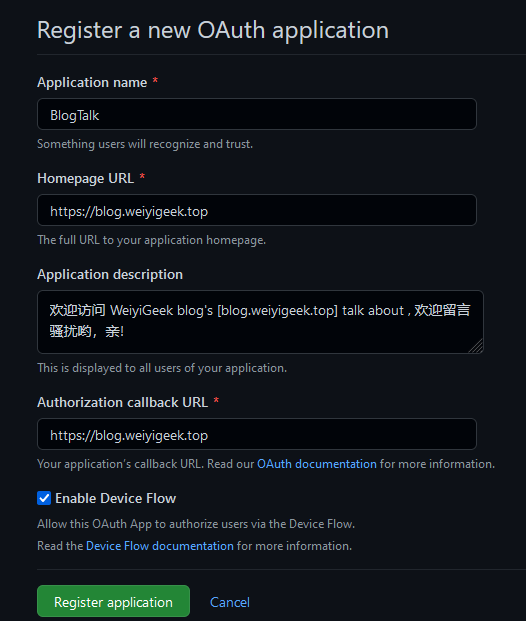
注意:您必须在授权回调 URL 字段中指定网站域 url。
然后,创建完成后你将获取Client ID 与 Client Secret,如下所示:
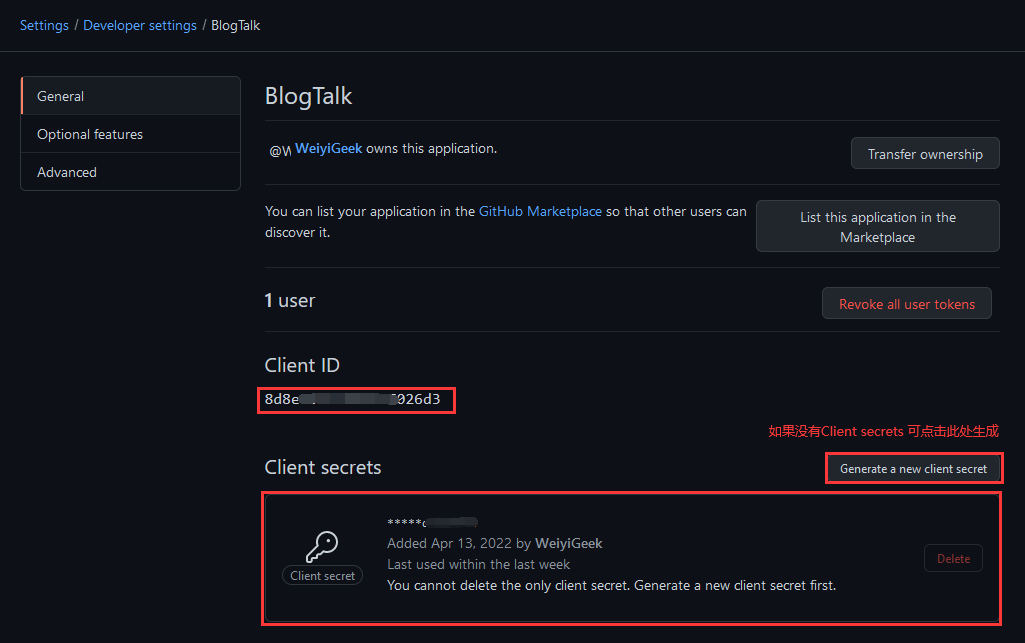
注意:后续更新修改可以进行访问 Settings/Developer settings ( https://github.com/settings/developers )
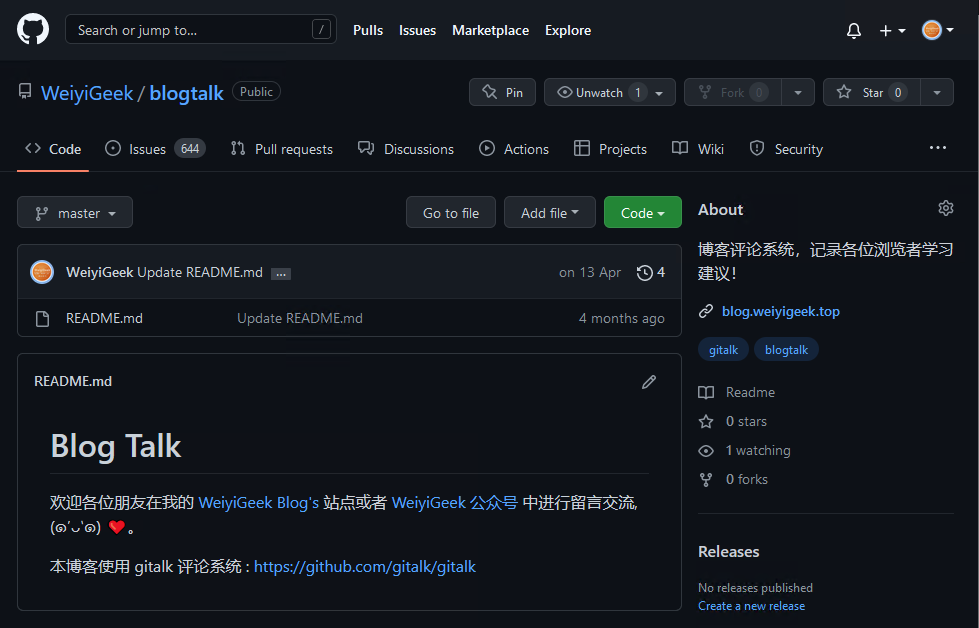
最后,创建一个公共仓库此处我创建的是blogtalk,创建完后在项目的(https://github.com/WeiyiGeek/blogtalk/settings)中启用 issue 即可
使用方式1.将如下代码添加到您的页面:
<head>

    <link rel="stylesheet" href="https://cdn.jsdelivr.net/npm/gitalk@1/dist/gitalk.css">

    <script src="https://cdn.jsdelivr.net/npm/gitalk@1/dist/gitalk.min.js"></script>

</head>

<body>

    <div id="gitalk-container"></div>

    <script>

        const gitalk = new Gitalk({

          clientID: 'GitHub Application Client ID',          // 8d8e96********797026d3

          clientSecret: 'GitHub Application Client Secret',  // secrets**********secrets

          repo: 'GitHub repo',          // blogtalk

          owner: 'GitHub repo owner',   // WeiyiGeek

          admin: ['GitHub repo owner and collaborators, only these guys can initialize github issues'], // ['WeiyiGeek']

          id: location.pathname,      // Ensure uniqueness and length less than 50

          distractionFreeMode: false  // Facebook-like distraction free mode

        })

        gitalk.render('gitalk-container')

    </script>

</body>
使用方式2.在React中使用
import GitalkComponent from "gitalk/dist/gitalk-component";

// 并使用类似的组件

<GitalkComponent options={{

  clientID: "...",

  // ...

  // options below

}} />
温馨提示: Gitalk 对象实例化参数参考 (https://github.com/gitalk/gitalk#options)
3.使用实践
在 Hexo 中使用
描述: 此处以我的博客[https://blog.weiyigeek.top] 为例进行演示配置,此处笔者使用的是 hexo + mellow 主题 , 已经经过二次魔改(有需要该博客主题请在公众号回复【mellow博客主题】或者访问 https://weiyigeek.top/wechat.html?key=mellow博客主题 )。
- Step 1.在 Hexo 主题中的 _config.yaml 配置加入如下配置片段。
# gittalk 评论系统

gitalk:

  enable: true

  owner: WeiyiGeek  # github账号

  repo: blogtalk    # 留言仓库

  proxy: /github/login/oauth/access_token # 反向代理解决跨域问题,后续将会主要讲解哦。

  oauth:

    client_id: 8d8e965c******97026d3       # Github App Auth ID

    client_secret: e9c6141cb1f02f721********d01cb4d7a8f069 #  Github App Auth secret

  perPage: 15
- Step 2.在主题文档引擎中加入如下片段。
<div id="gitalk-container"></div>

<!-- 实际上是将 <script src="https://cdn.jsdelivr.net/npm/gitalk@1/dist/gitalk.min.js"></script> js 下载到了本地 -->

<script type="text/javascript" src="<%- url_for(theme_js('/js/plugins/gitalk.min', cache)) %>"></script>

<script type="text/javascript" src="<%- url_for(theme_js('/js/custom/gitalk.init', cache)) %>"></script>

<!-- themes\mellow\source\js\custom\gitalk.init.js -->

var gitalk = new Gitalk({

  clientID: '<%- theme.gitalk.oauth.client_id %>',

  clientSecret: '<%- theme.gitalk.oauth.client_secret %>',

  repo: '<%- theme.gitalk.repo %>',

  owner: '<%- theme.gitalk.owner %>',

  admin: ['<%- theme.gitalk.owner %>'],

  id: location.pathname,

  proxy: '<%- theme.gitalk.proxy %>',

  distractionFreeMode: true

})

#  hexo g 生成静态文件后的样子

# var gitalk = new Gitalk({

#   clientID: '8d8e965c******97026d3',

#   clientSecret: 'e9c6141cb1f02f721********d01cb4d7a8f069',

#   repo: 'blogtalk',

#   owner: 'WeiyiGeek',

#   admin: ['WeiyiGeek'],

#   id: location.pathname,

#   proxy: '/github/login/oauth/access_token',

#   distractionFreeMode: false

# })

# 创建 gitalk-container

gitalk.render('gitalk-container')
温馨提示: 建议将distractionFreeMode设置为false,因为True真心难看。
温馨提示: 为了 Github Apps ID 与 Secrets 的安全,我们需要针对上面 new Gitalk 实例化参数进行js加密混淆 (http://www.esjson.com/jsEncrypt.html)
n.入坑出坑
1.使用Gitalk进行Github的Oauth认证无法跨域获取Token问题解决办法
描述: 在最开始之初我们也是使用官方演示代码中,使用的第三方提供的CORS代理服务,他会默认放行所有CORS请求,但是随着而来的问题是登陆会出现网络错误 Error: Network Error 或者在使用时出现 Forbidden 错误 (https://github.com/gitalk/gitalk/issues/514) 。
目前由于该CORS代理服务遭到滥用,因此做了限制,导致GitTalk失效,在实践中发现如下CORS代理服务其要么有限制要么根本不能使用,所以实践的朋友们就不要像使用如下CORS代理服务:
# 限流

https://cors-anywhere.herokuapp.com/https://github.com/login/oauth/access_token

# 被墙

https://cors-anywhere.azm.workers.dev/https://github.com/login/oauth/access_token
温馨提示: CORS Anywhere 是一个 NodeJS 代理,它将 CORS 标头添加到代理请求中。 项目地址 (https://github.com/Rob--W/cors-anywhere)
在 百度 CSDN 中捡了一圈垃圾之后,还是没有最好的解决方案,然后通过某种方式Google了一下,找到两种替代的方式利用cloudflare worker (不幸得是默认的cf worker的域名workers.dev被墙了)或者 Vercel 搭建在线代理(无vps推荐使用Vercel) 或者 使用VPS中的nginx服务器来反代 https://github.com (比较推荐-当前博主正在使用)。
方式1.没有VPS或者自己的服务器(想白嫖的)
描述: 在 cloudflare (https://dash.cloudflare.com/login/) 上创建一个免费的在线代理来解决gitalk授权登录跨域问题,利用CloudFlare Worker创建在线代理,不需要我们有服务器,也不需要搭建Node.js服务,只需要注册一个CloudFlare账号,创建一个Worker,部署一个JS脚本就可以了,简单方便,下面我们就来看看如何创建吧。
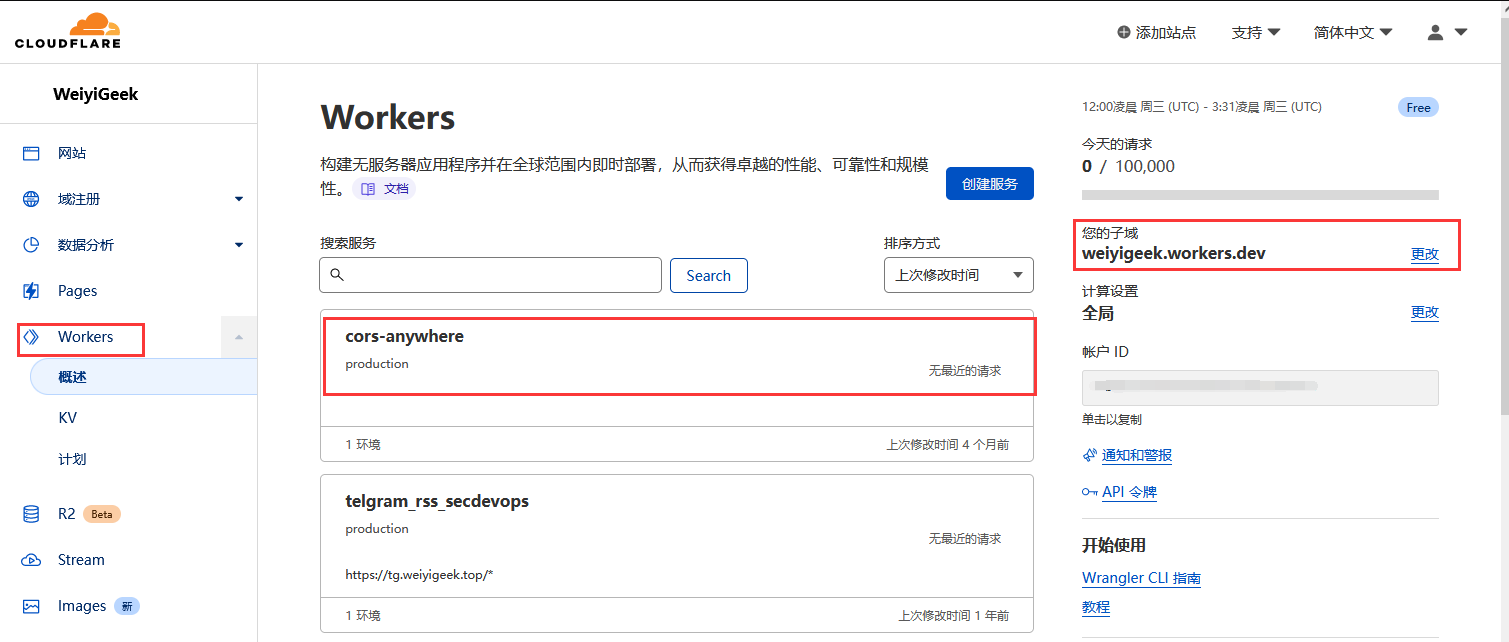
创建好之后我们便可编辑其 Worker 服务代码,如下代码也可通过 https://github.com/WeiyiGeek/SecOpsDev/tree/master/Application/Blog/Hexo/Gitalk 获得。
const exclude = [];     // Regexp for blacklisted urls

const include = [/^https?:\/\/.*weiyigeek\.top$/, /^https?:\/\/localhost/]; // Regexp for whitelisted origins e.g.

const apiKeys = {

	EZWTLwVEqFnaycMzdhBz: {

		name: 'Test App',

		expired: false,

		expiresAt: new Date('2023-01-01'),

		exclude: [], // Regexp for blacklisted urls

		include: ["^http.?://www.weiyigeek.top$", "weiyigeek.top$", "^https?://localhost/"], // Regexp for whitelisted origins

	},

};

// Config is all above this line.

// It should not be necessary to change anything below.

function verifyCredentials(request) {

	// Throws exception on verification failure.

	const requestApiKey = request.headers.get('x-cors-proxy-api-key');

	if (!Object.keys(apiKeys).includes(requestApiKey)) {

		throw new UnauthorizedException('Invalid authorization key.');

	}

	if (apiKeys[requestApiKey].expired) {

		throw new UnauthorizedException('Expired authorization key.');

	}

	if (apiKeys[requestApiKey].expiresAt && apiKeys[requestApiKey].expiresAt.getTime() < Date.now()) {

		throw new UnauthorizedException(`Expired authorization key.\nKey was valid until: ${apiKeys[requestApiKey].expiresAt}`);

	}

	return apiKeys[requestApiKey];

}

function checkRequiredHeadersPresent(request) {

	// Throws exception on verification failure.

	if (!request.headers.get('Origin') && !request.headers.get('x-requested-with')) {

		throw new BadRequestException('Missing required request header. Must specify one of: origin,x-requested-with');

	}

}

function UnauthorizedException(reason) {

	this.status = 401;

	this.statusText = 'Unauthorized';

	this.reason = reason;

}

function BadRequestException(reason) {

	this.status = 400;

	this.statusText = 'Bad Request';

	this.reason = reason;

}

function isListed(uri, listing) {

	let returnValue = false;

	console.log(uri);

	if (typeof uri === 'string') {

		for (const m of listing) {

			if (uri.match(m) !== null) {

				returnValue = true;

			}

		}

	} else { //   Decide what to do when Origin is null

		returnValue = true; // True accepts null origins false rejects them.

	}

	return returnValue;

}

function fix(myHeaders, request, isOPTIONS) {

	myHeaders.set('Access-Control-Allow-Origin', request.headers.get('Origin'));

	if (isOPTIONS) {

		myHeaders.set('Access-Control-Allow-Methods', request.headers.get('access-control-request-method'));

		const acrh = request.headers.get('access-control-request-headers');

		if (acrh) {

			myHeaders.set('Access-Control-Allow-Headers', acrh);

		}

		myHeaders.delete('X-Content-Type-Options');

	}

	return myHeaders;

}

function parseURL(requestUrl) {

	const match = requestUrl.match(/^(?:(https?:)?\/\/)?(([^/?]+?)(?::(\d{0,5})(?=[/?]|$))?)([/?][\S\s]*|$)/i);

	//                              ^^^^^^^          ^^^^^^^^      ^^^^^^^                ^^^^^^^^^^^^

	//                            1:protocol       3:hostname     4:port                 5:path + query string

	//                                              ^^^^^^^^^^^^^^^^^^^^^^^^^^^^^^^^^^^^

	//                                            2:host

	if (!match) {

		console.log('no match');

		throw new BadRequestException('Invalid URL for proxy request.');

	}

	console.log('parseURL:match:', match);

	if (!match[1]) {

		console.log('nothing in match group 1');

		if (/^https?:/i.test(requestUrl)) {

			console.log('The pattern at top could mistakenly parse "http:///" as host="http:" and path=///.');

			throw new BadRequestException('Invalid URL for proxy request.');

		}

		// Scheme is omitted.

		if (requestUrl.lastIndexOf('//', 0) === -1) {

			console.log('"//" is omitted');

			requestUrl = '//' + requestUrl;

		}

		requestUrl = (match[4] === '443' ? 'https:' : 'http:') + requestUrl;

	}

	const parsed = new URL(requestUrl);

	if (!parsed.hostname) {

		console.log('"http://:1/" and "http:/notenoughslashes" could end up here.');

		throw new BadRequestException('Invalid URL for proxy request.');

	}

	return parsed;

}

async function proxyRequest(request, activeApiKey) {

	const isOPTIONS = (request.method === 'OPTIONS');

	const originUrl = new URL(request.url);

	const origin = request.headers.get('Origin');

	// ParseURL throws when the url is invalid

	const fetchUrl = parseURL(request.url.replace(originUrl.origin, '').slice(1));

	// Throws if it fails the check

	checkRequiredHeadersPresent(request);

	// Excluding urls which are not allowed as destination urls

	// Exclude origins which are not int he included ones

	if (isListed(fetchUrl.toString(), [...exclude, ...(activeApiKey?.exclude || [])]) || !isListed(origin, [...include, ...(activeApiKey?.include || [])])) {

		throw new BadRequestException('Origin or Destination URL is not allowed.');

	}

	let corsHeaders = request.headers.get('x-cors-headers');

	if (corsHeaders !== null) {

		try {

			corsHeaders = JSON.parse(corsHeaders);

		} catch {}

	}

	if (!originUrl.pathname.startsWith('/')) {

		throw new BadRequestException('Pathname does not start with "/"');

	}

	const recvHpaireaders = {};

	for (const pair of request.headers.entries()) {

		if ((pair[0].match('^origin') === null)

        && (pair[0].match('eferer') === null)

        && (pair[0].match('^cf-') === null)

        && (pair[0].match('^x-forw') === null)

        && (pair[0].match('^x-cors-headers') === null)

		) {

			recvHpaireaders[pair[0]] = pair[1];

		}

	}

	if (corsHeaders !== null) {

		for (const c of Object.entries(corsHeaders)) {

			recvHpaireaders[c[0]] = c[1];

		}

	}

	const newRequest = new Request(request, {

		headers: recvHpaireaders,

	});

	const response = await fetch(fetchUrl, newRequest);

	let myHeaders = new Headers(response.headers);

	const newCorsHeaders = [];

	const allh = {};

	for (const pair of response.headers.entries()) {

		newCorsHeaders.push(pair[0]);

		allh[pair[0]] = pair[1];

	}

	newCorsHeaders.push('cors-received-headers');

	myHeaders = fix(myHeaders, request, isOPTIONS);

	myHeaders.set('Access-Control-Expose-Headers', newCorsHeaders.join(','));

	myHeaders.set('cors-received-headers', JSON.stringify(allh));

	const body = isOPTIONS ? null : await response.arrayBuffer();

	return new Response(body, {

		headers: myHeaders,

		status: (isOPTIONS ? 200 : response.status),

		statusText: (isOPTIONS ? 'OK' : response.statusText),

	});

}

function homeRequest(request) {

	const isOPTIONS = (request.method === 'OPTIONS');

	const originUrl = new URL(request.url);

	const origin = request.headers.get('Origin');

	const remIp = request.headers.get('CF-Connecting-IP');

	const corsHeaders = request.headers.get('x-cors-headers');

	let myHeaders = new Headers();

	myHeaders = fix(myHeaders, request, isOPTIONS);

	let country = false;

	let colo = false;

	if (typeof request.cf !== 'undefined') {

		country = typeof request.cf.country === 'undefined' ? false : request.cf.country;

		colo = typeof request.cf.colo === 'undefined' ? false : request.cf.colo;

	}

	return new Response(

		'CLOUDFLARE-CORS-ANYWHERE\n\n'

        + 'Source:\nhttps://github.com/chrisspiegl/cloudflare-cors-anywhere\n\n'

        + 'Usage:\n'

        + originUrl.origin + '/{uri}\n'

        + 'Header x-cors-proxy-api-key must be set with valid api key\n'

        + 'Header origin or x-requested-with must be set\n\n'

        // + 'Limits: 100,000 requests/day\n'

        // + '          1,000 requests/10 minutes\n\n'

        + (origin === null ? '' : 'Origin: ' + origin + '\n')

        + 'Ip: ' + remIp + '\n'

        + (country ? 'Country: ' + country + '\n' : '')

        + (colo ? 'Datacenter: ' + colo + '\n' : '') + '\n'

        + ((corsHeaders === null) ? '' : '\nx-cors-headers: ' + JSON.stringify(corsHeaders)),

		{status: 200, headers: myHeaders},

	);

}

async function handleRequest(request) {

	const {protocol, pathname} = new URL(request.url);

	// In the case of a "Basic" authentication, the exchange MUST happen over an HTTPS (TLS) connection to be secure.

	if (protocol !== 'https:' || request.headers.get('x-forwarded-proto') !== 'https') {

		throw new BadRequestException('Must use a HTTPS connection.');

	}

	switch (pathname) {

		case '/favicon.ico':

		case '/robots.txt':

			return new Response(null, {status: 204});

		case '/':

			return homeRequest(request);

		default: {

			// Not 100% sure if this is a good idea…

			// Right now all OPTIONS requests are just simply replied to because otherwise they fail.

			// This is necessary because apparently, OPTIONS requests do not carry the `x-cors-proxy-api-key` header so this can not be authorized.

			if (request.method === 'OPTIONS') {

				return new Response(null, {

					headers: fix(new Headers(), request, true),

					status: 200,

					statusText: 'OK',

				});

			}

			// The "x-cors-proxy-api-key" header is sent when authenticated.

			//if (request.headers.has('x-cors-proxy-api-key')) {

				// Throws exception when authorization fails.

				//const activeApiKey = verifyCredentials(request);

				// Only returns this response when no exception is thrown.

				return proxyRequest(request);

			//}

			// Not authenticated.

			//throw new UnauthorizedException('Valid x-cors-proxy-api-key header has to be provided.');

		}

	}

}

addEventListener('fetch', async event => {

	event.respondWith(

		handleRequest(event.request).catch(error => {

			const message = error.reason || error.stack || 'Unknown Error';

			return new Response(message, {

				status: error.status || 500,

				statusText: error.statusText || null,

				headers: {

					'Content-Type': 'text/plain;charset=UTF-8',

					// Disables caching by default.

					'Cache-Control': 'no-store',

					// Returns the "Content-Length" header for HTTP HEAD requests.

					'Content-Length': message.length,

				},

			});

		}),

	);

});
部署结果: https://cors-anywhere.weiyigeek.workers.dev/
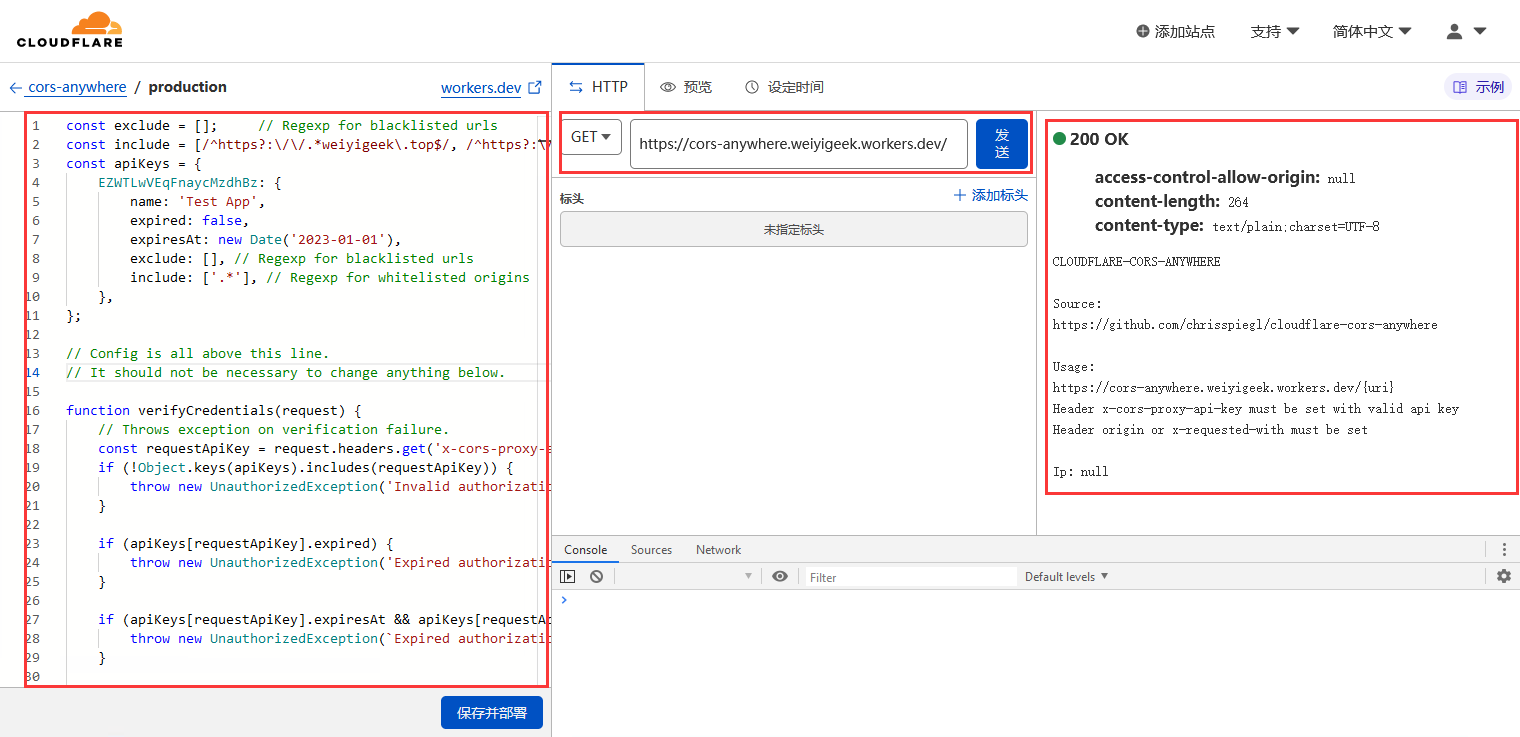
温馨提示: cloudflare 构建无服务器应用程序免费版本每天限额10万次请求,所有为了避免其它 people 恶意使用,请在使用时设置访问白名单, 上述源码来源于 (https://github.com/chrisspiegl/cloudflare-cors-anywhere)。
温馨提示: 除了使用 cloudflare 还可以使用 Vercel 免费部署node.js项目解决跨域问题,你可参考该项目 (https://github.com/Dedicatus546/cors-server) ,此处就不在累述。
方式2.有公网VPS、服务器
描述: 由于我自己有VPS所以就不借用 cloudflare 与 Vercel,因为其国内网络原因,时而通畅时而有缓慢 , 此处我将使用Nginx服务在blog.conf配置Nginx文件中加入如下location指令片段
# https - www.weiyigeek.top

server {

  listen       80;

  listen       443 ssl http2;

  server_name  blog.weiyigeek.top;

  # CORS

  add_header Access-Control-Allow-Origin '*.weiyigeek.top';

  add_header Access-Control-Allow-Methods 'GET,POST,OPTIONS';

  add_header Access-Control-Allow-Headers 'DNT,X-Mx-ReqToken,Keep-Alive,User-Agent,X-Requested-With,If-Modified-Since,Cache-Control,Content-Type,Authorization';

...

  # Gitalk Auth Use

  location /github {

    if ($request_method = 'OPTIONS') {

      return 204;

    }

    proxy_pass https://github.com/; # 注意尾部斜杠不能少

  }

...

  error_page  403          /warn/403.html;

  error_page  404          /warn/404.html;

  error_page  500 502 503  /warn/500.html;

  error_page  504          /warn/504.html;

}
配置完成后检测blog.conf配置以及重载nginx服务 nginx -t && nginx -s reload, 然后修改Hexo 主题中的 _config.yaml 将 Gitalk 的 proxy 配置为 proxy: /github/login/oauth/access_token 即可。
# gittalk 评论系统

gitalk:

  enable: true

  owner: WeiyiGeek  # github账号

  repo: blogtalk    # 留言仓库

  proxy: /github/login/oauth/access_token # 关键点 (前台请求是https://blog.weiyigeek.top/github/login/oauth/access_token, 而实际请求是https://github.com/login/oauth/access_token,所以解决了跨域问题)

  oauth:

    client_id: 8d8e965c******97026d3       # Github App Auth ID

    client_secret: e9c6141cb1f02f721********d01cb4d7a8f069 #  Github App Auth secret

  perPage: 15
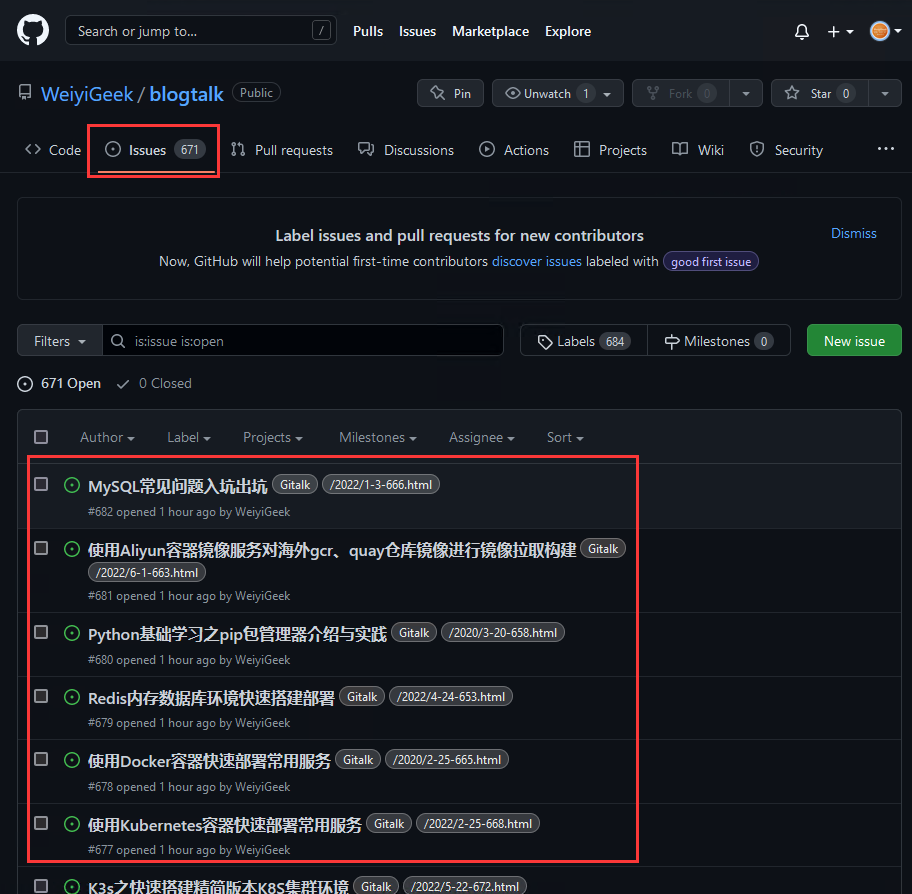
之后,我们需要批量初始每篇文章issue根据其路径/2020/3-20-658.html,此处采用了gitalk-auto-init.js脚本进行批量初始化文章issue。
温馨提示: 下述 gitalk-auto-init.js 脚本可以通过如下连接( https://github.com/WeiyiGeek/SecOpsDev/tree/master/Application/Blog/Hexo/Gitalk )进行获取
脚本依赖:
$ npm i -S hexo-generator-sitemap

$ npm i -D md5 moment request xml-parser

+ moment@2.29.2

+ request@2.88.2

+ md5@2.3.0

+ xml-parser@1.2.1

added 55 packages from 70 contributors in 8.467s
配置运行:
// gitalk-auto-init.js 脚本部分片段

// 配置信息

const config = {

  username: 'weiyigeek',   // GitHub repository 所有者,可以是个人或者组织。对应Gitalk配置中的owner

  repo: "blogtalk",         // 储存评论issue的github仓库名,仅需要仓库名字即可。对应 Gitalk配置中的repo

  token: 'ghp_wnpWqL********6RIf0NR5iD',   // 前面在Github中的 personal access token

  sitemap: path.join(__dirname, './public/sitemap.xml'), // 自己站点的 sitemap 文件地址

  cache: true, // 是否启用缓存,启用缓存会将已经初始化的数据写入配置的 gitalkCacheFile 文件,下一次直接通过缓存文件判断

  gitalkCacheFile: path.join(__dirname, './gitalk-init-cache.json'), // 用于保存 gitalk 已经初始化的 id 列表

  gitalkErrorFile: path.join(__dirname, './gitalk-init-error.json'), // 用于保存 gitalk 初始化报错的数据

};

// sitemap.xml 示例

<?xml version="1.0" encoding="UTF-8"?>

<urlset xmlns="http://www.sitemaps.org/schemas/sitemap/0.9">

    <url>

    <loc>https://blog.weiyigeek.top/2020/5-28-588.html</loc>

    <lastmod>2022-08-15T14:39:08.638Z</lastmod>

    <title>Ingress-Nginx进阶学习实践扩充配置记录</title>

  </url>

    ....

</urlset>
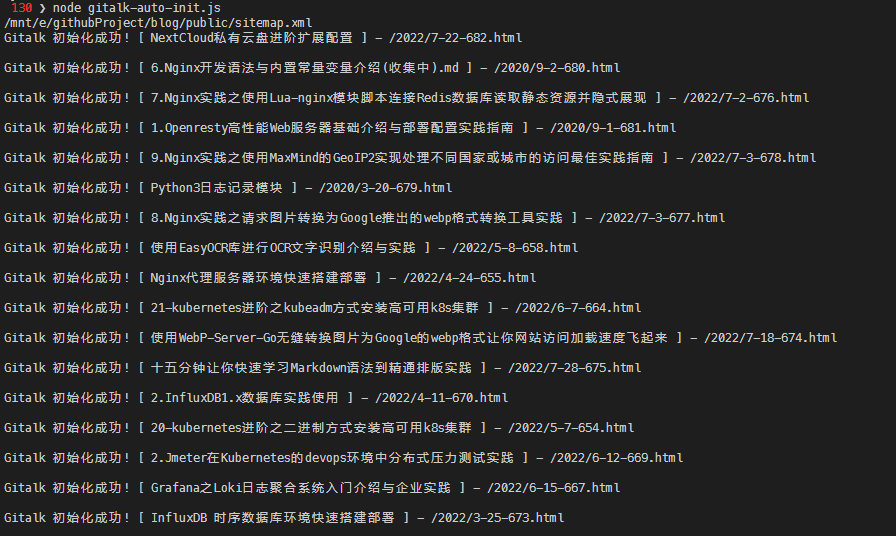
执行结果:
--------- 运行结果 ---------

报错数据: 1 条。参考文件 /mnt/e/githubProject/blog/gitalk-init-error.json。

本次成功: 27 条。

写入缓存: 90 条,已初始化 63 条,本次成功: 27 条。参考文件 /mnt/e/githubProject/blog/gitalk-init-cache.json。
我们也可以通过 blogtalk 项目中 issue (https://github.com/WeiyiGeek/blogtalk/issues) 查看初始化结果以及最新评论。
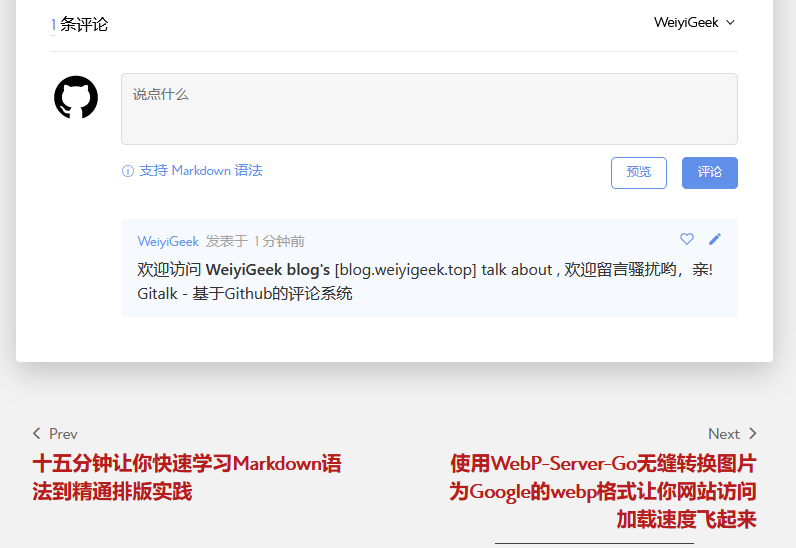
在初始化issue完成之后,我们可以找到一篇 https://blog.weiyigeek.top/about/ 文章进行留言验证。
原文地址: https://blog.weiyigeek.top/2022/5-28-588.html
本文至此完毕,更多技术文章,尽情期待下一章节!
【WeiyiGeek Blog 个人博客 - 为了能到远方,脚下的每一步都不能少 】
欢迎各位志同道合的朋友一起学习交流【点击加入交流群】,如文章有误请在下方留下您宝贵的经验知识!
作者主页: 【 https://weiyigeek.top】
博客地址: 【 https://blog.weiyigeek.top 】
专栏书写不易,如果您觉得这个专栏还不错的,请给这篇专栏 【点个赞、投个币、收个藏、关个注,转个发,留个言】(人间六大情),这将对我的肯定,谢谢!。
echo "【点个赞】,动动你那粗壮的拇指或者芊芊玉手,亲!"
printf("%s", "【投个币】,万水千山总是情,投个硬币行不行,亲!")
fmt.Printf("【收个藏】,阅后即焚不吃灰,亲!")
console.info("【转个发】,让更多的志同道合的朋友一起学习交流,亲!")
System.out.println("【关个注】,后续浏览查看不迷路哟,亲!")
cout << "【留个言】,文章写得好不好、有没有错误,一定要留言哟,亲! " << endl;

更多网络安全、系统运维、应用开发、物联网实践、网络工程、全栈文章,尽在 https://blog.weiyigeek.top 之中,谢谢各位看又支持!
应用集成-在Hexo、Hugo博客框架中使用Gitalk基于Github上仓库项目的issue无后端服务评论系统实践的更多相关文章
- Hexo搭建博客教程(3) - 远程部署到GitHub Pages
本章讲的是如何将本地的个人项目远程部署到 GitHub Pages,涉及到GitHub的项目仓库.Git的使用,以及Hexo的远程部署等. 1. 安装 hexo-deployer-git 插件 想要将 ...
- Hexo 静态博客指南:建站教程(上)
本文最初发布于我的个人博客Bambrow's Blog,采用 BY-NC-SA 许可协议,转载请注明出处.若有后续更新,将更新于原博客.欢迎去我的博客阅读更多文章! 本文详细记录一下站点建立过程,以便 ...
- 使用Github Pages和Hexo构建博客
Github Pages可以创建免费的静态站点,支持自带主题.支持自制页面等,并且可以使用Jekyll或者Hexo等静态博客框架进行管理. 独立博客是博客园等博客平台之外的一个良好补充,相比使用虚拟主 ...
- GithubPages + Hexo + Disqus博客教程
文章主要描述了利用github page,hexo静态博客框架以及disqus来搭建个人静态博客的详细步骤. github page用来搭建博客的主页,hexo用来更改博客主题.发布文章等等,并通过配 ...
- 手摸手带你用Hexo撸博客(二)之配置主题
在上一篇博客手摸手带你用Hexo撸博客(一)中主要介绍了博客的初步搭建 今天我们继续讲如何在Hexo搭建的博客中应用主题 官网选择自己喜欢的主题 点击这里Hexo主题进入官网主题页面 然后选择自己喜欢 ...
- Hexo - 快速,轻量,强大的 Node.js 博客框架
Hexo 是一个快速,轻量,强大的 Node.js 博客框架.带给你难以置信的编译速度,瞬间生成静态文件:支持 Markdown,甚至可以在 Hexo 中集合 Octopress 插件:只需要一个命令 ...
- hexo —— 简单、快速、强大的Node.js静态博客框架
hexo是一款基于Node.js的静态博客框架.目前在GitHub上已有1375 star 和 219 fork. 特性 风一般的速度 Hexo基于Node.js,支持多进程,几百篇文章也可以秒生成. ...
- 码云上部署hexo博客框架
title: 码云上部署hexo博客框架 Hexo框架在码云上实现个人博客 本文受 https://www.jianshu.com/p/84ae2ba1c133 启发编写 本地调试 安装完Node.j ...
- Hexo博客框架攻略
前言 前天无意在b站看到up主CodeSheep上传的博客搭建教程,引起了我这个有需求但苦于没学过什么博客框架的小白的兴趣.于是花了两天时间终于终于把自己的博客搭建好了,踩了无数的坑,走偏了无数的路, ...
随机推荐
- QC快速充电
QC快充 一.高通QC快充的介绍 二.识别充电类型的芯片介绍 三.QC充电曲线 四.如何在log中看QC充电类型 五.QC3识别错误 六.波形图 一.高通QC快充的介绍 高通QC快充技术,又称Quic ...
- unittest框架里的常用断言方法:用于检查数据
1.unittest框架里的常用断言方法:用于检查数据. (1)assertEqual(x,y) 检查两个参数类型相同并且值相等.(2)assertTrue(x) 检查唯一的参数值等于True(3)a ...
- python爬虫之JS逆向某易云音乐
Python爬虫之JS逆向采集某易云音乐网站 在获取音乐的详情信息时,遇到请求参数全为加密的情况,现解解决方案整理如下: JS逆向有两种思路: 一种是整理出js文件在Python中直接使用execjs ...
- Base64编码知识详解
在我们进行前端开发时,针对项目优化,常会提到一条:针对较小图片,合理使用Base64字符串替换内嵌,可以减少页面http请求. 并且还会特别强调下,必须是小图片,大小不要超过多少KB,等等. 那么,B ...
- 在C#中使用正则表达式最简单的方式
更新记录 本文迁移自Panda666原博客,原发布时间:2021年5月11日. 在.NET中使用正则表达式与其他语言并无太大差异.最简单的使用就是使用Regex类型自带的静态方法. 注意:在.NET中 ...
- .NET Core 企业微信回调配置
1.配置API接收 2.下载加密解密库 地址:https://developer.work.weixin.qq.com/devtool/introduce?id=36388,也可以复制下面的代码 2. ...
- Leetcode----<Diving Board LCCI>
题解如下: public class DivingBoardLCCI { /** * 暴力解法,遍历每一种可能性 时间复杂度:O(2*N) * @param shorter * @param long ...
- kali 漏洞扫描
前言 漏洞扫描器是一种能够自动在计算机.信息系统.网络及应用软件中寻找和发现安全弱点的程序.它通过网络对目录系统进行探测,向目标系统发送数据,并将反馈数据与自带的漏洞特征库进行匹配,进而列举目标系统上 ...
- SpringBoot 整合文件上传 elment Ui 上传组件
SpringBoot 整合文件上传 elment Ui 上传组件 本文章记录 自己学习使用 侵权必删! 前端代码 博主最近在学 elment Ui 所以 前端使用 elmentUi 的 upload ...
- 令你瞠目结舌的 Python 代码技巧
0. for-else 在 Python 中,else 不仅可以与 if 搭配使用,还可以与 for 结合. python答疑 咨询 学习交流群2:660193417### for x in rang ...