
Ubuntu 静默安装DEB包(非交互式)~解决Ubuntu下安装DEB包弹窗交互的问题
在Ubuntu环境下安装DEB包时,比如安装MySQL式经常会弹出交互式要输入密码的操作。有时候我们期望编写Shell脚本一键部署MySQL时不想要弹窗交互时,则可以使用以下方式实现自动化安装Deb软件。
概述
debconf-utils是一个可以在Ubuntu下预先配置要安装程序的小工具,它可以避免在安装一个DEB程序时的弹窗输入问题,这可能在编写一键部署脚本的时候非常有用。
以下我们用安装MySQL-APT源作为示例。
1、安装debconf-utils
root@ubuntu:~# apt-get -y install debconf-utils
2、更新APT源
root@ubuntu:~# apt-get update
3、先手动安装一遍MySQL-APT源
此时有弹窗!根据弹窗和自己的需求输入并安装一遍。
root@ubuntu:~# wget https://repo.mysql.com/mysql-apt-config_0.8.13-1_all.deb

root@ubuntu:~# dpkg -i mysql-apt-config_0.8.13-1_all.deb
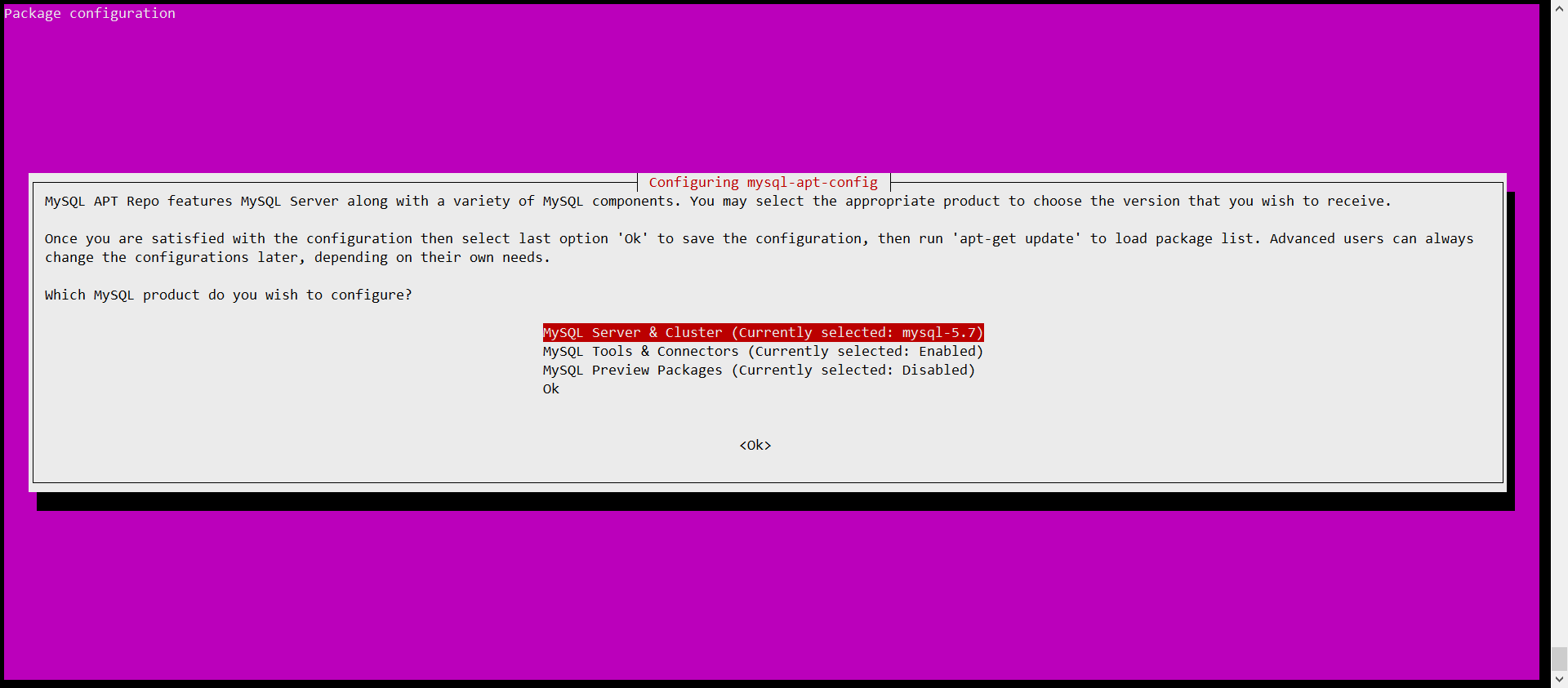
4、查询想要预先配置的DEB程序的相关配置信息
通过已安装的DEB程序,获取到想要静默安装预配置信息。
root@ubuntu:~# debconf-get-selections |grep 'mysql-apt-config'

mysql-apt-config	mysql-apt-config/select-tools	select	Enabled

mysql-apt-config	mysql-apt-config/select-server	select	mysql-5.7

mysql-apt-config	mysql-apt-config/repo-url	string	http://repo.mysql.com/apt

mysql-apt-config	mysql-apt-config/preview-component	string

mysql-apt-config	mysql-apt-config/repo-codename	select	xenial

mysql-apt-config	mysql-apt-config/tools-component	string	mysql-tools

mysql-apt-config	mysql-apt-config/select-preview	select	Disabled

mysql-apt-config	mysql-apt-config/select-product	select	Ok

mysql-apt-config	mysql-apt-config/repo-distro	select	ubuntu

mysql-apt-config	mysql-apt-config/unsupported-platform	select	abort

mysql-apt-config	mysql-apt-config/dmr-warning	note
5、然后卸载已安装的DEB包
卸载刚刚需要通过图形化弹窗安装程序。
root@ubuntu:~# apt-get -y remove mysql-apt-config
6、重新安装DEB包,预配置软件
根据上面获取到预配置信息,预配置软件。
root@ubuntu:~# debconf-set-selections << EOF

mysql-apt-config mysql-apt-config/select-tools select Enabled

mysql-apt-config mysql-apt-config/select-server select mysql-5.7

mysql-apt-config mysql-apt-config/repo-url string http://repo.mysql.com/apt

mysql-apt-config mysql-apt-config/preview-component string

mysql-apt-config mysql-apt-config/repo-codename select xenial

mysql-apt-config mysql-apt-config/tools-component string mysql-tools

mysql-apt-config mysql-apt-config/select-preview select Disabled

mysql-apt-config mysql-apt-config/select-product select Ok

mysql-apt-config mysql-apt-config/repo-distro select ubuntu

mysql-apt-config mysql-apt-config/unsupported-platform select abort

mysql-apt-config mysql-apt-config/dmr-warning note

EOF
6、关闭交互式的静默安装DEB包
你会发现没有弹窗提示了!
root@ubuntu:~# DEBIAN_FRONTEND=noninteractive apt-get -y install ./mysql-apt-config_0.8.13-1_all.deb
如果您觉得本文章受用,请点个赞,给个评论!谢谢.~~~
Ubuntu 静默安装DEB包(非交互式)~解决Ubuntu下安装DEB包弹窗交互的问题的更多相关文章
- 解决VirtualBox下安装虚拟机(Ubuntu)出错(不能为虚拟电脑Ubuntu打开一个新的任务)的有关问题
[转]http://www.myexception.cn/program/1964906.html 解决VirtualBox下安装虚拟机(Ubuntu)出错(不能为虚拟电脑Ubuntu打开一个新的任务 ...
- 解决mac下安装yeoman时没有权限问题
在mac下安装yeoman经常会出现如下图错误: 解决办法:在命令行执行-- sudo chown -R $USER /usr/local/lib/node_modules 回车就OK
- 解决pycharm下安装reportLab报错的问题
在利用pycharm中自带的第三方安装工具安装reportLab时提示安装失败.失败的原因是缺失第三方扩展包.经过查阅查阅资料了解到一些python的第三方扩展包是需要python-dev支持的.我装 ...
- 解决Esxi5下安装Windows 8的问题
在VM8工作站版下安装windows 8没有问题,可是到了Esxi5下,非得安装补丁不可.补丁下载地址: http://kb.vmware.com/selfservice/microsites/sea ...
- 解决 linux 下安装 node 报: command not found
注意:有时安装成功后,需要关闭xshell,重新启动.nvm才会生效. 1. 在 linux 下安装 node 提示 -bash: node: command not found. 2. 这种情况可 ...
- 安装SQL SERVER2005时,需要win7下安装IIS,记录下
安装SQL server2005 时,需要先安装IIS,这里描述win7系统下配置IIS的方法. 虽然很多文章都有写过,这里只是重复一下 关键是IIS组件全都勾选上,如果没有全部勾选上,IIS组件没有 ...
- 解决Windows10下安装Ubuntu16.04双系统后开机没有Ubuntu引导
转载 https://blog.csdn.net/qq_27838307/article/details/79149791 1.按照网上教程在磁盘中压缩硬盘并且不需要给他新建卷标,就让他显示空闲就好了 ...
- 解决VMware下安装Ubuntu 16.04 不支持1920X1080分辨率的问题
解决方法: flashmx@ubuntu:~$ cvt # 192.07M9) hsync: 67.16 kHz; pclk: 173.00 MHz Modeline -hsync +vsync fl ...
- 解决 windows下安装Anaconda后python pip不可用的情况
在windows系统下通过安装Anaconda的方式安装的python使用中发现不能再通过pip安装python包.只能通过conda install packname 的方法,导致很多conda不支 ...
- 解决VMware下安装Ubuntu15不支持1920X1080分辨率的问题
解决步骤如下: flashmx@ubuntu:~$ cvt # 192.07M9) hsync: 67.16 kHz; pclk: 173.00 MHz Modeline -hsync +vsync ...
随机推荐
- Microservices
Microservices What are Microservices? What are Microservices - microservices.io Microservices - mart ...
- CSS实例:翻转图片、滚动图片栏、打开大门
CSS 翻转图片主要用到的技术除了3D翻转和定位 ,还用到了一个属性 backface-visibility:visable|hidden;该属性主要是用来设定元素背面是否可见. 效果图如下: 具体的 ...
- turnjs fabricjs canvas 翻书
最近做了一个翻书效果的项目, 来总结一下实现过程和遇到的一些问题, 供自己以后快速解决问题, 希望也能帮到同样遇到此类问题的同学, 如果有更好的方法,希望你能分享给我git地址 插件: Turn.js ...
- 自己给idea下载Scala插件
场景:有时候在idea上直接下载的scala可能因为太新所以有bug,需要手动下载插件 经验:自己下载完之后发现比较老的版本idea根本不让你装,只能装一些跟idea上推荐的scala相近的版本,感觉 ...
- 一个chome的广告拦截小插件
先附上下载地址:https://chromecj.com/productivity/2015-03/391.html 可以屏蔽绝大多数广告啊,浏览器用起来神清气爽! 下载完成后有一个名字为这个的文件, ...
- C++---使用类
运算符重载 概念 运算符重载就是想法转换, 目的是简化函数调用的方式 重载就是赋予新的含义, 运算符重载也是, 即同一个运算符可以有不同的功能 C++本身已经对一些运算符进行了重载, 同时C++允许程 ...
- Java重载容易引发的错误—返回类型
方法的签名仅仅与方法名和参数类型相关,而与访问控制符.返回类型无关,以及方法体中的内容都没有关系,下面用一个例子说明; 如果Student类两种签名,myStudent(int,int)返回int 类 ...
- hashlib加密模块、logging日志模块
hashlib模块 加密:将明文数据通过一系列算法变成密文数据 目的: 就是为了数据的安全 基本使用 基本使用 import hashlib # 1.先确定算法类型(md5普遍使用) md5 = ha ...
- FFMPEG第一次学习
习惯用OneNote笔记,直接复制了,链接和一些命令放在最下面了 里面的库文件是我下的雷神的课件文件,我传到了自己github,链接也放最后了 转载自:https://blog.csdn.net/le ...
- 小米手环解锁MacOS系统笔记本MacBookPro
通过小米手环解锁笔记本 官方windows是提供了方法的. 我目前用的MacBookPro,所以说下苹果笔记本的解锁方式. 安装软件BLEUnlock 库 安装方式: brew 安装 brew ins ...