
快速创建springboot项目,并进行增删改
创建普通maven项目,pom依赖如下
<parent>

        <artifactId>spring-boot-starter-parent</artifactId>

        <groupId>org.springframework.boot</groupId>

        <version>2.1.4.RELEASE</version>

    </parent>

    <dependencies>

        <dependency>

            <groupId>org.springframework.boot</groupId>

            <artifactId>spring-boot-starter-web</artifactId>

        </dependency>

        <dependency>

            <groupId>org.projectlombok</groupId>

            <artifactId>lombok</artifactId>

            <version>1.18.6</version>

        </dependency>

        <!--swagger可视化接口测试,不需要可以不添加-->

        <dependency>

            <groupId>io.springfox</groupId>

            <artifactId>springfox-swagger-ui</artifactId>

            <version>2.9.2</version>

        </dependency>

        <dependency>

            <groupId>io.springfox</groupId>

            <artifactId>springfox-swagger2</artifactId>

            <version>2.9.2</version>

        </dependency>

        <!--连接数据库需要的-->

        <dependency>

            <groupId>mysql</groupId>

            <artifactId>mysql-connector-java</artifactId>

            <version>5.1.47</version>

        </dependency>

        <dependency>

            <groupId>com.alibaba</groupId>

            <artifactId>druid</artifactId>

            <version>1.2.6</version>

        </dependency>

        <!--mybatis-->

        <dependency>

            <groupId>org.mybatis.spring.boot</groupId>

            <artifactId>mybatis-spring-boot-starter</artifactId>

            <version>2.1.1</version>

        </dependency>

    </dependencies>
启动类如下:
@SpringBootApplication

@MapperScan(basePackages = "com.hrw.dao")

public class TestApplication {

    public static void main(String[] args) {

        SpringApplication.run(TestApplication.class, args);

    }

}
application.yml配置内容如下:
server:

  port: 8009

spring:

  application:

    name: testSpringBootAndSwagger

  datasource:

    username: root

    password: 123456

    url: jdbc:mysql://localhost:3306/ssm2?useUnicode=true&characterEncoding=utf-8&useSSL=true

    type: com.alibaba.druid.pool.DruidDataSource

    driver-class-name: com.mysql.jdbc.Driver
包结构如下:
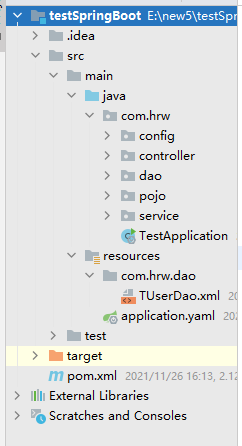
如果要写swagger可视化接口的话,除了加swagger依赖之外,还需要一个配置类,配置类放在config包下,如下:
@Configuration

@EnableSwagger2

public class SwaggerConfiguration {

    @Bean

    public Docket buildDocket() {

        return new Docket(DocumentationType.SWAGGER_2)

                .apiInfo(buildApiInfo())

                .select()

                // 要扫描的API(Controller)基础包,记得改成自己对应的包名

                .apis(RequestHandlerSelectors.basePackage("com.hrw"))

                .paths(PathSelectors.any())

                .build();

    }

    private ApiInfo buildApiInfo() {

        Contact contact = new Contact("黄大虾","","");

        return new ApiInfoBuilder()

                .title("测试新建SpringBoot和swagger,API文档")

                .description("平台管理服务api")

                .contact(contact)

                .version("1.0.0").build();

    }

}
然后就可以在controller上用swagger注解了,参考controller:
@Api(value = "用户管理TUser",tags = "SwaggerTestController",description = "用户管理API")

@Controller

@RequestMapping("/test")

public class TestController {

    @Autowired

    private TUserService tUserService;

    /**

     * 传入一个id,返回一个id

     * @param id

     * @return

     */

    @ApiOperation("随便传一个id,返回一个id")

    @GetMapping("/test1/{id}")

    public String test1(@PathVariable(value = "id") Integer id){

        return "id =" + id;

    }

    /**

     * 传入一个TUser对象,返回一个对象

     * @param user

     * @return

     */

    @ApiOperation("根据用户对象查询一个用户,查询依据是对象内的id")

    @ResponseBody

    @PostMapping(value = "/test2")

    public TUser test2(@RequestBody TUser user){

        TUser tUser = tUserService.queryUserById(user);

        return tUser;

    }

    /**

     * 修改用户信息

     * @param tUser

     * @return

     */

    @ApiOperation("传入一个TUser,用来修改用户信息,必须要有id值")

    @ResponseBody

    @PostMapping(value = "update")

    public String updateUser(@RequestBody TUser tUser){

        int i = tUserService.updateById(tUser);

        System.out.println("i = " + i);

        return i>0?"修改成功":"修改失败";

    }

    /**

     * 添加一个用户

     * @param tUser

     * @return

     */

    @ApiOperation("添加一个用户对象,没有的参数则不添加")

    @ResponseBody

    @PostMapping(value = "/add")

    public TUser addUser(@RequestBody TUser tUser){

        TUser user = tUserService.add(tUser);

        return user;

    }

}
里面功能实现,需要自己完成。。。
启动启动类之后,浏览器打开http://localhost:8009/swagger-ui.html,就可以看到swagger的效果了
ok,,,然后就可以愉快的进行增删改查了
快速创建springboot项目,并进行增删改的更多相关文章
- 2springboot:快速创建springboot项目
使用IDEA快速创建springboot项目流程: 创建新的项目选择 项目的命名以及包名 需要什么包就导入什么包 进行测试的单元 <dependency> <groupId>o ...
- Spring-boot(一)通过向导快速创建Spring-boot项目
通过向导快速创建Spring-boot项目 创建步骤: 选择Spring Initializr 填写组织和模块名 选择对应的模块 注:这里左侧的模块比较多,玩家可以根据自己的实际需要自由选择,此处暂时 ...
- 【快学springboot】1.快速创建springboot项目
若图片查看异常,请前往掘金查看:https://juejin.im/post/5d00e793f265da1b614ff10b 使用spring initialize工具快速创建springboot项 ...
- SpringBoot入门系列(一)如何快速创建SpringBoot项目
这段时间也没什么事情,所以就重新学习整理了Spring Boot的相关内容.今天开始整理更新Spring Boot学习笔记,感兴趣的朋友可以关注我的博客:https://www.cnblogs.com ...
- 在线快速创建SpringBoot项目
都2020年了,你还在手动创建SpringBoot项目吗?今天教你在线快速创建一个SpringBoot项目,瞬间高大上有木有! 进入正题,首先打开创建SpringBoot的官网:https://sta ...
- 3 快速创建SpringBoot项目
一.Intellij IDEA 创建Spring Boot项目 1.创建工程 2.选择Spring Initializr 3.设置Maven版本管理参数 4.选择引用模块 5.命名工程名 6.选 ...
- 2.快速创建springboot项目 连pom文件里面的配置都不用配了
无论是创建项目 还是module 模块 选择这个 .然后在后面的选择中选择自己要的功能 就可以把相关的依赖都加进去 省去了依赖 其后的写法跟第一篇一样 在这个项目下面有一个配置文件 ====>a ...
- 使用spring initialization创建SpringBoot项目
https://blog.csdn.net/liutong123987/article/details/79385513 有很多方法可以快速创建Springboot项目,可以通过idea的spring ...
- SrpingBoot入门到入坟03-基于idea快速创建SpringBoot应用
先前先创建Maven项目然后依照官方文档再然后编写主程序写业务逻辑代码才建立好SpringBoot项目,这样太过麻烦,IDE都支持快速创建,下面基于idea: 使用Spring Initializer ...
随机推荐
- 【Java并发编程】Synchronized关键字实现原理
想必在面试中经常会被问到Synchronized关键字,它有什么特性,原理什么 它的主要特性是同步锁.非公平锁.阻塞锁.可以保证线程安全(可见性.原子性.有序性) JDK1.6之后对Synchroni ...
- 3D还原货拉拉女孩身亡真相,这一环值得反思!
货拉拉女孩跳车身亡的消息,让人惋惜又震惊.司机多次偏离原始路线,女孩最终选择跳车,结果不幸身亡. 货拉拉女孩跳车真相被3D还原 有人质疑平台监管不力,造成如此惨剧,有人吐槽企业压榨员工,司机绕路是不得 ...
- js中通过ajax调用网上接口
<!DOCTYPE html><html lang="en"><head> <meta charset="UTF-8&qu ...
- 2022giao考游记
Day -12: 今年高考准备去考着玩玩,考前心态十分稳健.~~毕竟我才高一/cy~~ 这次高考我倒是没啥目标,主要是来试试水,感受一下高考的氛围,体会一下自己和高三应届生们的水平的差距.也算是丰富自 ...
- Docker 与 K8S学习笔记(二十五)—— Pod的各种调度策略(上)
上一篇,我们学习了各种工作负载的使用,工作负载它会自动帮我们完成Pod的调度和部署,但有时我们需要自己定义Pod的调度策略,这个时候该怎么办呢?今天我们就来看一下如何定义Pod调度策略. 一.Node ...
- rhel6下eth1恢复eth0
问题:VMware 虚拟机中,从模板克隆出来的虚拟机的网卡名都会变成为eth1,而程序或者脚本,默认网卡是eth0,这时需要将eth1改为eth0. 原因:/etc/udev/rules.d/70-p ...
- python小题目练习(二)
题目:输出1-100之间不包括7的倍数,含有7的数的其他数 """Author:mllContent:输出1-100之间不包括7的倍数,含有7的数的其他数Date:202 ...
- Spring Boot 知识点总结
现在仅总结重要和实用的知识点,更加全面的请见链接:1.:2.. 微服务:架构风格(服务微化):一个应用应该是一组小型服务:可以通过HTTP的方式进行互通:微服务:每一个功能元素终都是一个可独立替换和独 ...
- 常用类-Java比较器
一.Comparable接口 Java中的对象,正常情况只能进行比较 == 或 !=不能使用 > 或 < 的,但是在实际开发中有需要进行对象的比较 comparable接口的使用举例: 1 ...
- nginx 日志按日期分隔
#user nobody; user root; worker_processes 1; error_log /spdblogs/nginx/logs/error.log; error_log /sp ...