
在线快速创建SpringBoot项目
都2020年了,你还在手动创建SpringBoot项目吗?今天教你在线快速创建一个SpringBoot项目,瞬间高大上有木有!
进入正题,首先打开创建SpringBoot的官网:https://start.spring.io/
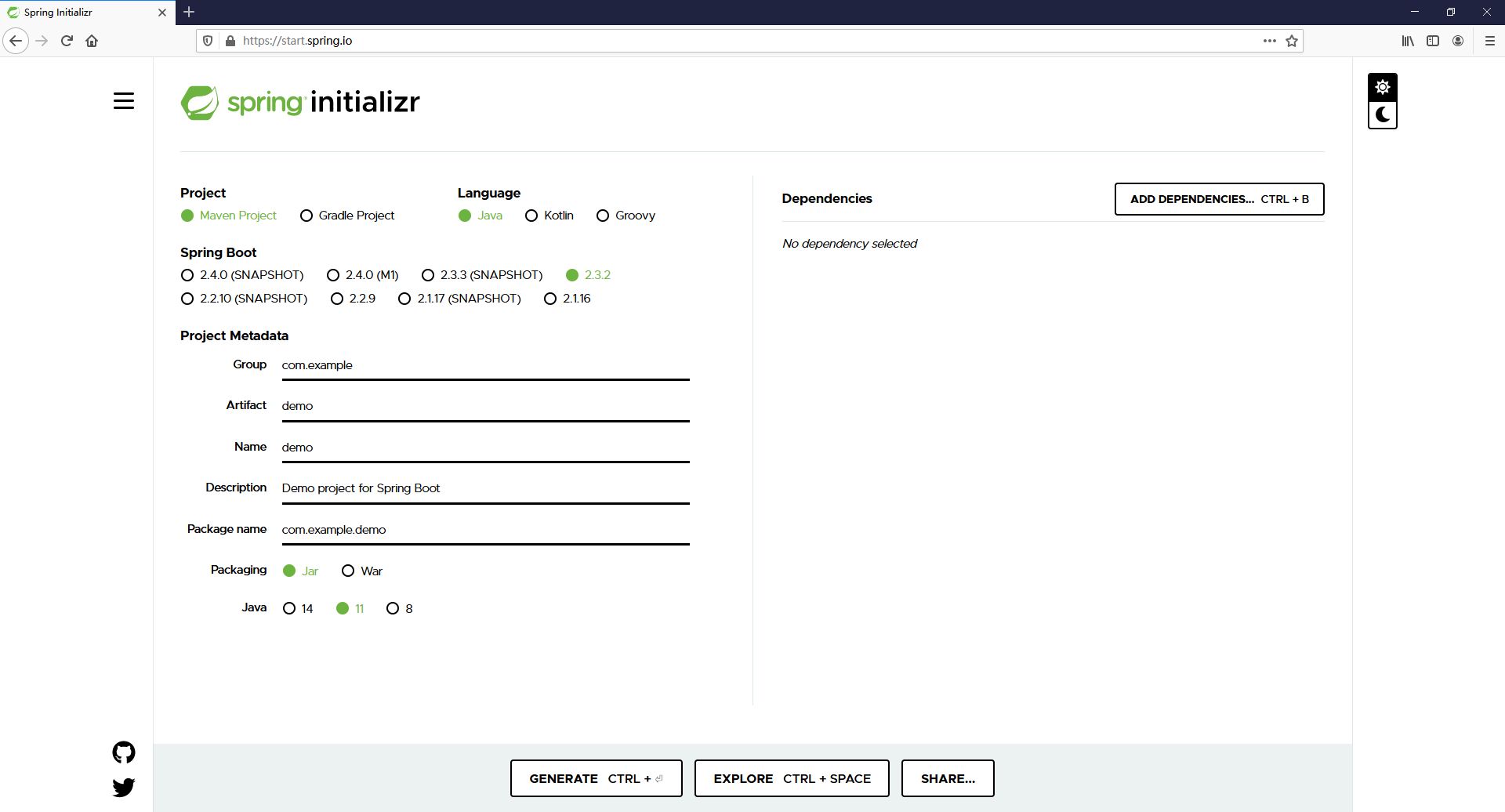
①选择Project构建工具 -> Maven Project
②选择Language -> Java
③选择Spring Boot版本 -> 2.3.2当前稳定版本
④填入Project Metadata
Group:一般是倒域名【org.louis】
Artifact:项目名【blog】
Name:项目名【blog】
Description:描述【A popular online mall.】
Packaging:打包类型【Jar】,SpringBoot运行时的打包项目,一般SpringBoot都是打为Jar包,如果使用Tomcat容器的话就选择War包
Java:Java版本,主流项目选Java8,个人项目可以选择Java11进行测试
接下来是重点:引入依赖【Dependencies】
这里推荐一些经常使用的依赖:
①Spring Web:Build web, including RESTful, applications using Spring MVC. Uses Apache Tomcat as the default embedded container.
②Spring Data JPA:Persist data in SQL stores with Java Persistence API using Spring Data and Hibernate.
③Spring Data Redis:Advanced and thread-safe Java Redis client for synchronous, asynchronous, and reactive usage. Supports Cluster, Sentinel, Pipelining, Auto-Reconnect, Codecs and much more.
④Spring Boot Actuator:Supports built in (or custom) endpoints that let you monitor and manage your application - such as application health, metrics, sessions, etc.
⑤MySQL Driver:MySQL JDBC and R2DBC driver.
⑥Java Mail Sender:Send email using Java Mail and Spring Framework's JavaMailSender.
⑦Thymeleaf:A modern server-side Java template engine for both web and standalone environments. Allows HTML to be correctly displayed in browsers and as static prototypes.
⑧Lombok:Java annotation library which helps to reduce boilerplate code.
再额外推荐一些常用的依赖:
        <!-- WebSocket -->

        <dependency>

            <groupId>org.springframework.boot</groupId>

            <artifactId>spring-boot-starter-websocket</artifactId>

        </dependency>

        <!-- Test -->

        <dependency>

            <groupId>org.springframework.boot</groupId>

            <artifactId>spring-boot-starter-test</artifactId>

            <scope>test</scope>

        </dependency>

        <!-- gson依赖 -->

        <dependency>

            <groupId>com.google.code.gson</groupId>

            <artifactId>gson</artifactId>

            <version>2.8.2</version>

        </dependency>

        <!--依赖nekoHTML 1.9.15 or newer的版本  -->

        <dependency>

            <groupId>net.sourceforge.nekohtml</groupId>

            <artifactId>nekohtml</artifactId>

            <version>1.9.22</version>

        </dependency>

        <!-- 支持 @ConfigurationProperties 注解 -->

        <dependency>

            <groupId>org.springframework.boot</groupId>

            <artifactId>spring-boot-configuration-processor</artifactId>

            <optional>true</optional>

        </dependency>

        <!-- JWT  Token -->

        <dependency>

            <groupId>io.jsonwebtoken</groupId>

            <artifactId>jjwt</artifactId>

            <version>0.6.0</version>

        </dependency>

        <!-- 文件上传所依赖的jar包 -->

        <dependency>

            <groupId>commons-fileupload</groupId>

            <artifactId>commons-fileupload</artifactId>

            <version>1.3.1</version>

        </dependency>

        <dependency>

            <groupId>commons-net</groupId>

            <artifactId>commons-net</artifactId>

            <version>3.3</version>

        </dependency>

        <dependency>

            <groupId>cn.hutool</groupId>

            <artifactId>hutool-all</artifactId>

            <version>4.5.10</version>

        </dependency>

        <!-- https://mvnrepository.com/artifact/com.google.zxing/core -->

        <dependency>

            <groupId>com.google.zxing</groupId>

            <artifactId>core</artifactId>

            <version>3.1.0</version>

        </dependency>

        <!-- Swagger2-ui用于生成、描述、调用和可视化 RESTful 风格的 Web 服务 -->

        <dependency>

            <groupId>io.springfox</groupId>

            <artifactId>springfox-swagger2</artifactId>

            <version>2.9.2</version>

        </dependency>

        <dependency>

            <groupId>io.springfox</groupId>

            <artifactId>springfox-swagger-ui</artifactId>

            <version>2.9.2</version>

        </dependency>

        <!-- alibabaJSON -->

        <dependency>

            <groupId>com.alibaba</groupId>

            <artifactId>fastjson</artifactId>

            <version>1.2.58</version>

        </dependency>

        <!-- 实现跨服务器文件传输 -->

        <dependency>

          <groupId>com.jcraft</groupId>

          <artifactId>jsch</artifactId>

          <version>0.1.49</version>

        </dependency>

        <!-- Emoji表情 -->

        <dependency>

            <groupId>com.vdurmont</groupId>

            <artifactId>emoji-java</artifactId>

            <version>4.0.0</version>

        </dependency>

        <!--WebSocket作为Java客户端-->

        <dependency>

            <groupId>org.java-websocket</groupId>

            <artifactId>Java-WebSocket</artifactId>

            <version>1.3.5</version>

        </dependency>

        <!--compress压缩解压包-->

        <dependency>

            <groupId>org.apache.commons</groupId>

            <artifactId>commons-compress</artifactId>

            <version>1.18</version>

        </dependency>

        <!-- ZeroMQ -->

        <dependency>

              <groupId>org.zeromq</groupId>

              <artifactId>jeromq</artifactId>

              <version>0.3.1</version>

        </dependency>

        <!-- @Transactional注解写在class上,就会导致InterceptorBinding类报错 -->

        <!-- 引入InterceptorBinding依赖, 启动不会报错,否则直接注解方法不会报错-->

        <dependency>

            <groupId>javax.interceptor</groupId>

            <artifactId>javax.interceptor-api</artifactId>

            <version>1.2</version>

        </dependency>
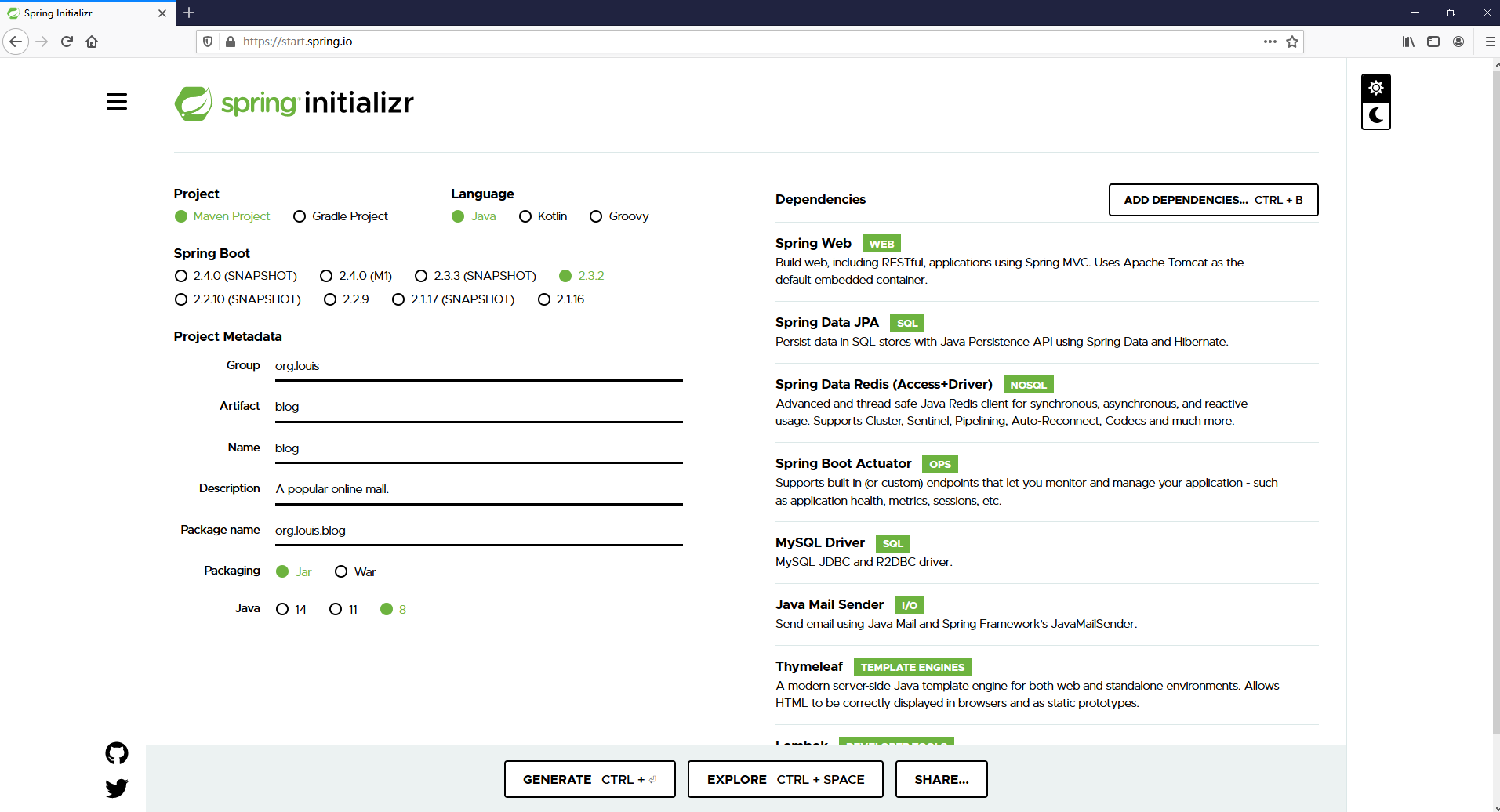
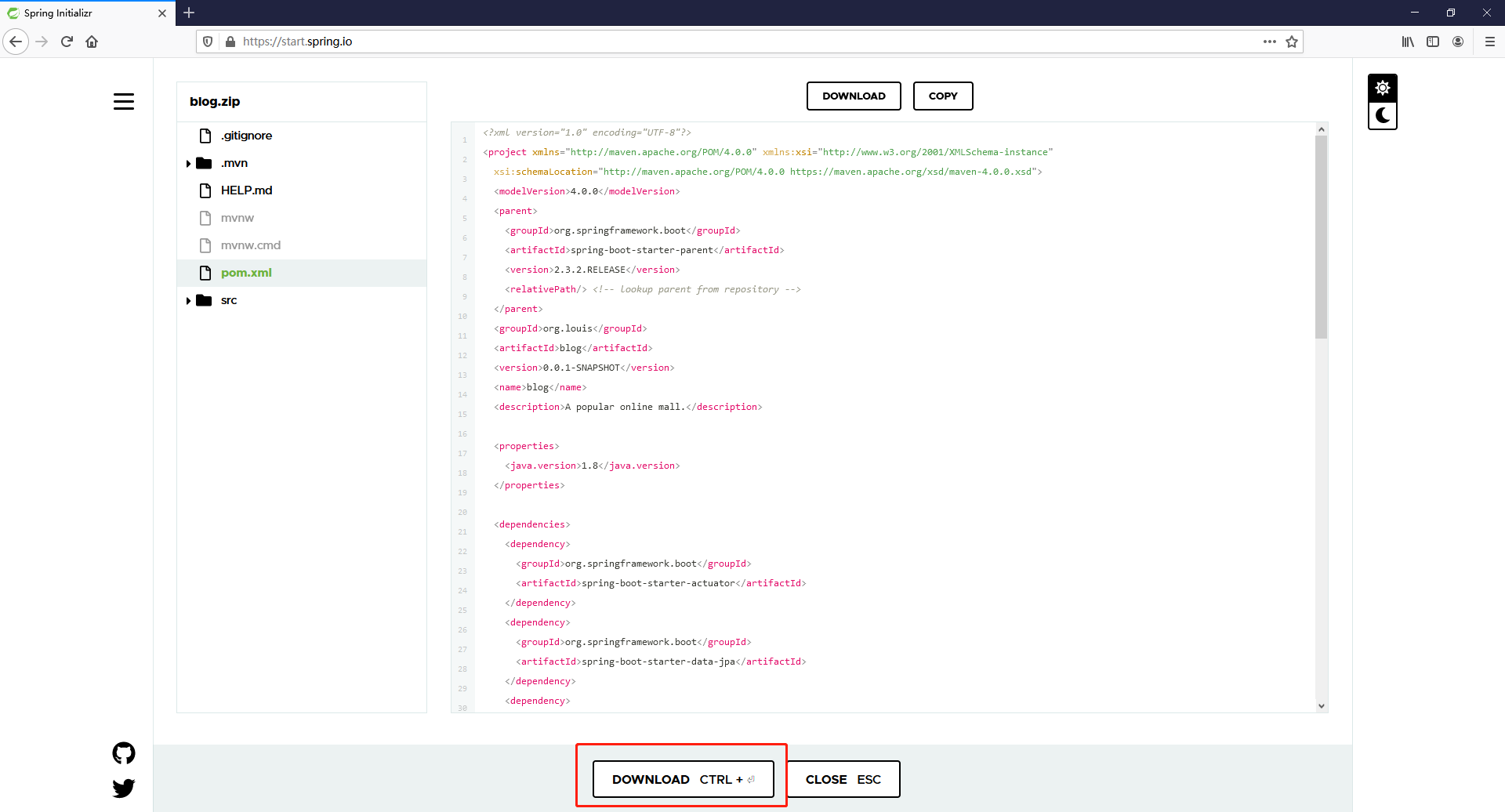
配置好之后,点击 EXPLORE 开始导出

在弹窗后点击 DOWNLOAD 开始下载
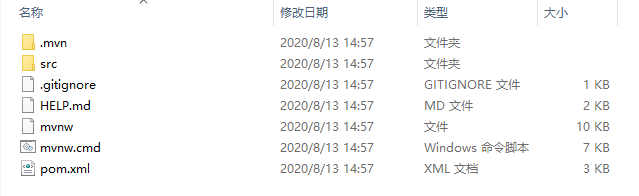
现在,一个完整的SpringBoot项目就创建好了!

解压出来用编辑器打开就可以开心的撸代码了!
推荐阅读:强烈推荐的 IntelliJ IDEA 插件,别说我没告诉你
喜欢的话记得推荐并收藏哦~~~
在线快速创建SpringBoot项目的更多相关文章
- 2springboot:快速创建springboot项目
使用IDEA快速创建springboot项目流程: 创建新的项目选择 项目的命名以及包名 需要什么包就导入什么包 进行测试的单元 <dependency> <groupId>o ...
- Spring-boot(一)通过向导快速创建Spring-boot项目
通过向导快速创建Spring-boot项目 创建步骤: 选择Spring Initializr 填写组织和模块名 选择对应的模块 注:这里左侧的模块比较多,玩家可以根据自己的实际需要自由选择,此处暂时 ...
- 【快学springboot】1.快速创建springboot项目
若图片查看异常,请前往掘金查看:https://juejin.im/post/5d00e793f265da1b614ff10b 使用spring initialize工具快速创建springboot项 ...
- SpringBoot入门系列(一)如何快速创建SpringBoot项目
这段时间也没什么事情,所以就重新学习整理了Spring Boot的相关内容.今天开始整理更新Spring Boot学习笔记,感兴趣的朋友可以关注我的博客:https://www.cnblogs.com ...
- 3 快速创建SpringBoot项目
一.Intellij IDEA 创建Spring Boot项目 1.创建工程 2.选择Spring Initializr 3.设置Maven版本管理参数 4.选择引用模块 5.命名工程名 6.选 ...
- 快速创建springboot项目,并进行增删改
创建普通maven项目,pom依赖如下 <parent> <artifactId>spring-boot-starter-parent</artifactId> & ...
- 2.快速创建springboot项目 连pom文件里面的配置都不用配了
无论是创建项目 还是module 模块 选择这个 .然后在后面的选择中选择自己要的功能 就可以把相关的依赖都加进去 省去了依赖 其后的写法跟第一篇一样 在这个项目下面有一个配置文件 ====>a ...
- 使用spring initialization创建SpringBoot项目
https://blog.csdn.net/liutong123987/article/details/79385513 有很多方法可以快速创建Springboot项目,可以通过idea的spring ...
- SrpingBoot入门到入坟03-基于idea快速创建SpringBoot应用
先前先创建Maven项目然后依照官方文档再然后编写主程序写业务逻辑代码才建立好SpringBoot项目,这样太过麻烦,IDE都支持快速创建,下面基于idea: 使用Spring Initializer ...
随机推荐
- antd踩坑:value.locale is not a function
这个问题来源于日期选择器 RangerPicker 的特殊情况. <Col span={7} key={9}> <FormItem label="投运时间" {. ...
- java消除整型数组中重复的元素,排序后输出新数组
法一: import java.util.Arrays; import java.util.Scanner; public class Main { public static void main(S ...
- Bug -- WebService报错(两个类具有相同的 XML 类型名称 "{http://webService.com/}getPriceResponse"。请使用 @XmlType.name 和 @XmlType.namespace 为类分配不同的名称。)
调用WebService时报错 解决方法: 在提示的两个java文件中加如一行代码namespace = "http://namespace.thats.not.the.same.as.th ...
- Django学习路25_ifequal 和 ifnotequal 判断数值是否相等及加减法 {{数值|add 数值}}
{% ifequal 数值 数值 %} <body> {# 判断是否相等 #} num 当前的值 {{ num }}<br/> {% ifequal num 5 %} {# 判 ...
- Seaborn基础1
import seaborn as sns import numpy as np import matplotlib.pyplot as plt # # 折线图 def sinplot(flip = ...
- 女生学Java编程是什么感受?
那我就代表女生来说说感受 在编程的世界很难遇到好看的帅哥 记得当年15年7月4号是我实习生入职的日子,因为是校企合作,所以没有面试.老师推荐.直接入职.刚来北京第一个感觉就是人多,还有就是热.刚到公司 ...
- PHP is_int() 、is_integer()、is_long() 函数
is_int() 函数用于检测变量是否是整数.高佣联盟 www.cgewang.com 注意: 若想测试一个变量是否是数字或数字字符串(如表单输入,它们通常为字符串),必须使用 is_numeric( ...
- PHP zip_open() 函数
定义和用法 zip_open() 函数打开 zip 档案以供读取.高佣联盟 www.cgewang.com 如果成功,该函数则返回 zip 文件资源.如果失败,则返回 FALSE. 语法 zip_op ...
- Skill 返回一个数字list的大小排序信息
https://www.cnblogs.com/yeungchie/ code procedure(ycSortList(numlist) prog((size sort) foreach(main ...
- loj #6247. 九个太阳 k次单位根 神仙构造 FFT求和原理
LINK:九个太阳 不可做系列. 构造比较神仙. 考虑FFT的求和原理有 \(\frac{1}{k}\sum_{j=0}^{k-1}(w_k^j)^n=[k|n]\) 带入这道题的式子. 有\(\su ...