
Winform帮助文档(C#打开chm定位到特定页面)国内最全总结写法。原文文档带翻译
Help.ShowHelp(null,"C:\help.hcm", HelpNavigator.Topic,"index.htm")
方法一: Process.Start()
在没有更多需求的情况下,用这种方法可以打开 chm 文件并定位至文件首页。
using System.Diagnostics;
string filepath = @"C:\helpdoc.chm";
Process.Start(filepath);
方法二: Help.ShowHelp()
如果需要在打开 chm 文件的同时定位到某一特定页面,则可以使用 Help.ShowHelp(),
这个方法原本用于 WinForm 程序中操作帮助文档。
方法有四个重载,详见http://msdn.microsoft.com/en-us/library/system.windows.forms.help.showhelp.aspx
  |
ShowHelp(Control, String) | Displays the contents of the Help file at the specified URL. |
  |
ShowHelp(Control, String, String) | Displays the contents of the Help file found at the specified URL for a specific keyword. |
  |
ShowHelp(Control, String, HelpNavigator) | Displays the contents of the Help file found at the specified URL for a specific topic. |
  |
ShowHelp(Control, String, HelpNavigator, Object) | Displays the contents of the Help file located at the URL supplied by the user. |
其中 HelpNavigator 用于指定文件打开时显示的内容。HelpNavigator 的具体介绍如下:
http://msdn.microsoft.com/en-us/library/system.windows.forms.helpnavigator.aspx
这里使用了 ShowHelp() 的最后一个重载:
using System.Windows.Forms;
string filepath = @"C:\helpdoc.chm";
Help.ShowHelp(null, filename, HelpNavigator.Topic, "index.html");
//index.html 是打开文件时要显示的页面
url:http://greatverve.cnblogs.com/archive/2012/05/24/csharp-chm.html
用C#实现利用F1打开帮助文件
1. 首先这篇文章是比较详细的一个介绍:
Open Help file on F1 function key press in windows application
This article explains how to open help file on F1 Function key press in windows application.
Almost all applications need Help file. It could be .chm , .PPT, . HTML, .PDF or any other kind of file which you want to open on F1 key press. Lets see how can we do that.
.NET Framework provides F1helpProvider component to handle F1 key press. You can use this component to show help file (.chm, .PPT, .PDF etc.,) to the user. The developer need not have to write even a single line of C# or Vb.Net code to display help file on press of F1 function key from keyboard.
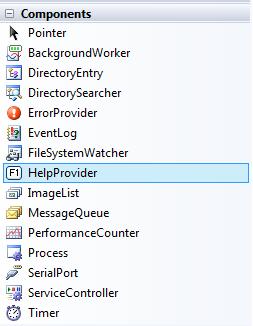
You can find the helpProvider component under Component tab of ToolBox in Visual Studio. Below is the pic which will guide you to find Helpprovider component.
(在windows应用程序中按F1功能键打开帮助文件
本文介绍如何在windows应用程序中按F1功能键打开帮助文件。
几乎所有应用程序都需要帮助文件。它可以是.chm、.PPT、.HTML、.PDF或任何其他类型的文件,您可以按F1键打开这些文件。让我们看看如何做到这一点。
.NET Framework提供F1helpProvider组件来处理F1键按下。您可以使用此组件向用户显示帮助文件(.chm、.PPT、.PDF等)。开发人员无需编写哪怕是一行C#或Vb.Net代码,就可以在按下键盘上的F1功能键时显示帮助文件。
您可以在Visual Studio中的ToolBox的“组件”选项卡下找到helpProvider组件。下面是指导您查找帮助提供者组件的图片。)
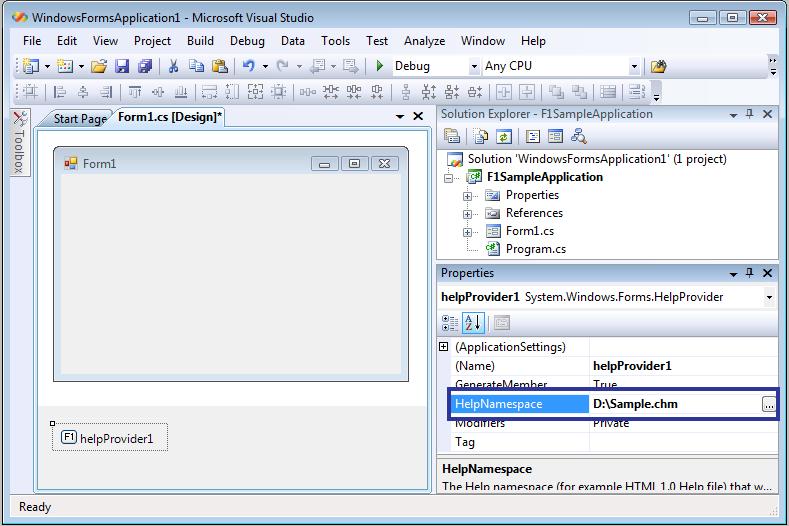
Once you set the property, then compile and run your sample application.
Now click F1 Button from your keyboard when the focus is on your application and you will see your help file opened.
You can also set the different property of helpProvider componet (Which you have added in the main form) from the MainForm property window, for eg., set the TOC when user clicks on the F1 key. You can also set the property to show window help button etc.,
(设置属性后,编译并运行示例应用程序。
现在,当焦点放在应用程序上时,单击键盘上的F1按钮,您将看到帮助文件已打开。
您还可以从MainForm属性窗口设置helpProvider组件的不同属性(已在主窗体中添加),例如,当用户单击F1键时设置TOC。您还可以将属性设置为显示窗口帮助按钮等。,
)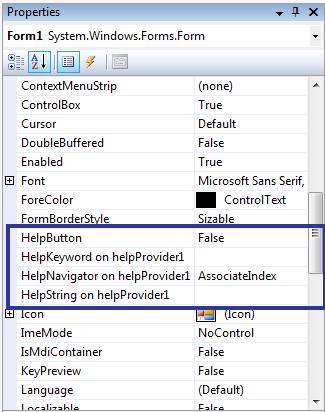
Step 1 -> Click Button1 and display its properties.
Step 2 ->Set the HelpKeywordonHelpProvider1 property to "Your .CHM Topic".
Step 3 -> Set the HelpNavigatoronHelpProvider1 property to "KeywordIndex".
Step 4 -> Compile and run your application
If you want to set using Code you can do like this
helpProvider1.HelpNamespace =
"C:/helpFile.chm";
HelpNavigator.KeywordIndex); //Set the Keyword
helpProvider1.SetHelpKeyword(Button1,
"Your .CHM Topic"); // Topic in help file.
helpProvider1.SetHelpNavigator(Button1,
Hope this will help all who wants to integrate F1 key press to open help file in windows application.
(希望这将帮助所有想要集成F1键以在windows应用程序中打开帮助文件的人。)
2. 这里主要用到HelpProvider类,它用于提供控件的弹出或联机帮助。
每个 HelpProvider 实例均维护一个对关联控件的引用的集合。若要使帮助文件与 HelpProvider 关联,请设置 HelpNamespace 属性。通过调用 SetHelpNavigator 方法并提供指定控件的 HelpNavigator 值来指定提供的帮助类型。通过调用 SetHelpKeyword 方法为帮助提供关键字或主题。若要打开特定主题的帮助,则应以 topicName.htm 的形式传入关键字。
若要使特定的帮助字符串与控件关联,请使用 SetHelpString 方法。如果用户在控件包含焦点时按下 F1 键,使用此方法与控件关联的字符串将显示在弹出窗口中。
如果尚未设置 HelpNamespace 属性,则必须使用 SetHelpString 方法提供帮助文本。如果同时设置了 HelpNamespace 和帮助字符串,则基于 HelpNamespace 的帮助信息优先。
HelpProvider 在 Help 类上调用方法来提供帮助功能。
HelpProvider控件可以挂起控件,显示帮助主题。
1.SetShowHelp()方法:设置指定控件是否显示帮助信息;
2.HelpNamespace()方法:设置帮助文件;
3.SetHelpKeyword()方法:为帮助文件设置关键字;
4.SetHelpNavigator()方法:设置显示帮助中的元素;
5.SetHelpString()方法:将帮助信息的文本字符串关联到控件上。
TestHelpProvider:
- using System;
- using System.Collections.Generic;
- using System.ComponentModel;
- using System.Data;
- using System.Drawing;
- using System.Text;
- using System.Windows.Forms;
- namespace TestHelpProvider
- {
- public partial class Form1 : Form
- {
- public Form1()
- {
- InitializeComponent();
- }
- private void Form1_Load(object sender, EventArgs e)
- {
- //将帮助信息的文本字符串关联到控件上,在相应控件上按下F1键时显示
- helpProvider1.SetHelpString(textBox1, "Enter an age that is less than 65.");
- helpProvider1.SetHelpString(textBox2, "Enter a 5 digit post code.");
- }
- }
- }
3. 介绍了菜单项显示帮助文档:
The HelpProvider control is used to show how to link to specific keyword in a .chm help file.
private void mnuContentsHelp_Click(object sender, System.EventArgs e)
{
// Show the contents of the help file.
Help.ShowHelp(this, hpAdvancedCHM.HelpNamespace);
}
private void mnuIndexHelp_Click(object sender, System.EventArgs e)
{
// Show index of the help file.
Help.ShowHelpIndex(this, hpAdvancedCHM.HelpNamespace);
}
private void mnuSearchHelp_Click(object sender, System.EventArgs e)
{
// Show the search tab of the help file.
Help.ShowHelp(this, hpAdvancedCHM.HelpNamespace, HelpNavigator.Find, "");
}
4. 一个邮件介绍:
If you use F1HelpProvider control. When you press F1 on the active control It will shows a pop up with Text which you have set already. Follow the Steps Below:
1. Select the F1HelpProvider control from ToolBox and Drag it to your Windows Form.
2. Set the following code in the Page Load event of your Form.
helpProvider1.SetHelpString(txtPinCode, "Please Enter Ur city pin Code.");
In the above code txtPinCode is a TextBox.
3. Then run your application by pressing F5.
4. If you have focus on the Text Box Pin Code then press F1. It will shows a Message that you have set likely to be ToolTip.
5.一个最好的例子,看了就明白。
Donwload example project C# 2005 Express from:
http://www.help-info.de/download/CSharp_CHM.zip
The CHM file resides in the DEBUG folder and you have to do following before giving that a try:
to open the CHM file right-click the saved file, click Properties, and then click Unblock.
(他说需要对CHM文件做这样的操作,我试了,可以直接F1打开,你们要是有问题就按照步骤)。
下面是代码:
private void Form1_Load(object sender, EventArgs e)
{
// set F1 help topic for this form
helpProvider1.HelpNamespace = Application.StartupPath + @"\" + sHTMLHelpFileName;
helpProvider1.SetHelpNavigator(this, HelpNavigator.Topic);
helpProvider1.SetHelpKeyword(this, @"/Garden/garden.htm");
helpProvider1.SetHelpNavigator(this.btnStart, HelpNavigator.Topic);
helpProvider1.SetHelpKeyword(this.btnStart, @"/Garden/flowers.htm");
helpProvider1.SetHelpNavigator(this.btnExit, HelpNavigator.Topic);
helpProvider1.SetHelpKeyword(this.btnExit, @"/Garden/tree.htm");
helpProvider1.SetHelpNavigator(this.chkMain, HelpNavigator.Topic);
helpProvider1.SetHelpKeyword(this.chkMain, @"/HTMLHelp_Examples/jump_to_anchor.htm#AnchorSample");
}
Thanking you
我这个博客废弃不用了,今天想寻找外链的时候,突然想到这个博客权重很高。
有需要免费外链的,留言即可,我准备把这个博客变成免费的友情链接站点。
Winform帮助文档(C#打开chm定位到特定页面)国内最全总结写法。原文文档带翻译的更多相关文章
- 史上最全Beyond Compare中文文档.CHM (根据官网整理编辑)
截图如下: 下载地址: 链接:https://pan.baidu.com/s/1Ml98_biT1leXxGLr9fqI_w 提取码:p8jg
- IdentityServer4 中文文档 -7- (简介)贡献
IdentityServer4 中文文档 -7- (简介)贡献 原文:http://docs.identityserver.io/en/release/intro/contributing.html ...
- 一、frp官方中文文档
frp 是一个可用于内网穿透的高性能的反向代理应用,支持 tcp, udp, http, https 协议. 目录 frp 的作用 开发状态 架构 使用示例 通过 ssh 访问公司内网机器 通过自定义 ...
- FRP 中文文档
https://github.com/fatedier/frp/blob/master/README_zh.md README | 中文文档 frp 是一个可用于内网穿透的高性能的反向代理应用,支持 ...
- IdentityServer4 中文文档 -11- (快速入门)添加基于 OpenID Connect 的用户认证
IdentityServer4 中文文档 -11- (快速入门)添加基于 OpenID Connect 的用户认证 原文:http://docs.identityserver.io/en/releas ...
- IdentityServer4 中文文档 -9- (快速入门)使用客户端凭证保护API
IdentityServer4 中文文档 -9- (快速入门)使用客户端凭证保护API 原文:http://docs.identityserver.io/en/release/quickstarts/ ...
- 教你阅读MSDN英文文档,迅速提升编程能力
在教大家阅读英文文档之前,首先给大家明确一个概念.C#和.NET的区别? 有一定编程经验的同学应该多多少少知道这方面的概念,但是可能模糊,理解的不一定深刻.我在这里简单给出两者的基本定义: C#:仅仅 ...
- Kotlin 中文文档
Kotlin 中文文档 标签: Kotlinkotlin中文文档 2017-02-14 18:14 4673人阅读 评论(0) 收藏 举报 分类: kotlin 转载地址:http://www.tu ...
- java中文文档官方下载
一直在寻找它,今天无意之间终于发现它了! http://download.oracle.com/technetwork/java/javase/6/docs/zh/api/overview-summa ...
- jQuery API中文文档
jQuery API中文文档 http://www.css88.com/jqapi-1.9/category/events/event-handler-attachment/ jQuery UI AP ...
随机推荐
- 代码随想录算法训练营day20 | leetcode ● 654.最大二叉树 ● 617.合并二叉树 ● 700.二叉搜索树中的搜索 ● 98.验证二叉搜索树
LeetCode 654.最大二叉树 分析1.0 if(start == end) return节点索引 locateMaxNode(arr,start,end) new root = 最大索引对应节 ...
- 基于ArcGIS的三维路网可视化
1. 引言 ArcGIS作为GIS的集大成者,对于三维可视化方面也有集成,参考自:3D 折线 (polyline) 要素-ArcMap | 文档 (arcgis.com),可以使用ArcGIS来构造与 ...
- Postgres的count统计误区
数据库统计数据量时常常用的是count(1)或者count(*),这两者区别不大,在postgres里面统计数据总量时,要注意count(column_name)与count(*)的区别,有些场景下会 ...
- pat乙级 1019 数字黑洞
#include <stdio.h> #include <stdlib.h> #include <string.h> #include <math.h> ...
- MyBatis-Plus通用Iservice 方法详解
public interface IService<T> { /** * 默认批次提交数量 */ int DEFAULT_BATCH_SIZE = 1000; /** * 插入一条记录(选 ...
- 10.MyBatis-Plus的使用
整合MyBatis-Plus 导入依赖 在解决逆向工程生成的代码报错时候已经给bianen-common导入了依赖 导入数据库的驱动 导入驱动和MySql的版本有关,我安装的MySql版本是5.7.3 ...
- 暴风影音16 v9.05.1202.1111 绿色版
修改历史:2022.12.14:自改官方 9.05.1202.1111 最新正式版本2022.06.27:自改官方 9.04.1029.1111 最新正式版本...... 修改内容:by.呆彤儿 / ...
- Python爬取亚马逊商品页面
仍然利用Requests库来实现 1 import requests 2 r=requests.get('https://www.amazon.cn/gp/product/B01M8L5Z3Y') 3 ...
- c++获取类型信息
获取类型信息 typeid typeid运算符用来获取一个表达式的类型信息. 对于基本类型数据, 类型信息比较简单, 主要指数据的类型; 对于对象(类类型的数据), 类型信息指: 对象所属的类, 所包 ...
- ComWin’ round 11部分题解
https://vjudge.net/contest/325913#overview A.Threehouses 题意:一直二维平面上的$n$个点中,前$e$个点落在小岛周围,并且有$p$条边已经连接 ...