
Android自定义Dialog及其布局
实际项目开发中默认的Dialog样式无法满足需求,需要自定义Dialog及其布局,并响应布局中控件的事件。
上效果图:
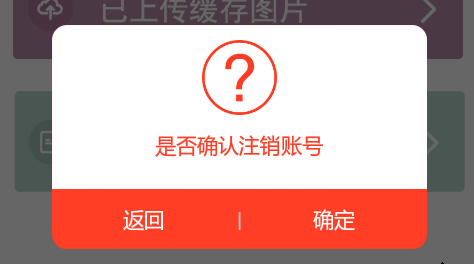
自定义Dialog,LogoutDialog:
要将自定义布局传入构造函数中,才能在Activity中通过 dialog.findviewbyid 获取到控件,否则返回null。
public class LogoutDialog extends Dialog{

  Context context;

  public LogoutDialog(Context context) {

  super(context);

  this.context=context;

  this.setContentView(R.layout.logout_dialog);

  }

  public LogoutDialog(Context context, int theme){

  super(context, theme);

  this.context = context;

  this.setContentView(R.layout.logout_dialog);

  }

  @Override

  protected void onCreate(Bundle savedInstanceState) {

  super.onCreate(savedInstanceState);

  //this.setContentView(R.layout.logout_dialog);

  }

}
自定义布局文件,logout_dialog.xml:
<?xml version="1.0" encoding="utf-8"?>

<LinearLayout xmlns:android="http://schemas.android.com/apk/res/android"

android:layout_width="250dp"

android:layout_height="wrap_content"

android:orientation="vertical"

android:background="@android:color/transparent"

>

  <LinearLayout

  android:layout_width="match_parent"

  android:layout_height="wrap_content"

  android:background="@drawable/dialog_top_bg"

  android:orientation="vertical"

  android:paddingTop="10dp"

  >

    <ImageView

    android:layout_width="50dp"

    android:layout_height="50dp"

    android:src="@drawable/pop_icon1"

    android:layout_gravity="center_horizontal"

    android:layout_marginBottom="10dp"

    />

    <TextView

    android:layout_width="wrap_content"

    android:layout_height="wrap_content"

    android:text="是否确认注销账号"

    android:layout_gravity="center_horizontal"

    android:layout_marginBottom="20dp"

    android:textColor="#FF3C25"

    android:layout_marginLeft="20dp"

    android:layout_marginRight="20dp"

    />

  </LinearLayout>

  <LinearLayout

    android:layout_width="match_parent"

    android:layout_height="40dp"

    android:gravity="center_vertical"

    android:background="@drawable/dialog_buttom_bg"

    >

    <TextView

    android:id="@+id/back_btn_dialog"

    android:layout_width="wrap_content"

    android:layout_height="match_parent"

    android:text="返回"

    android:layout_weight="1"

    android:textColor="#FFFFFF"

    android:gravity="center"

    />

    <TextView

    android:layout_width="wrap_content"

    android:layout_height="match_parent"

    android:text="|"

    android:textColor="#C9CACC"

    android:gravity="center"

    />

    <TextView

    android:id="@+id/submit_btn_dialog"

    android:layout_width="wrap_content"

    android:layout_height="match_parent"

    android:text="确定"

    android:layout_weight="1"

    android:textColor="#FFFFFF"

    android:gravity="center"

    />

  </LinearLayout>

</LinearLayout>
两个Shape的布局,dialog_buttom_bg.xml:
<?xml version="1.0" encoding="utf-8"?>

<shape xmlns:android="http://schemas.android.com/apk/res/android"

>

  <corners

  android:bottomLeftRadius="@dimen/dialog_corners"

  android:bottomRightRadius="@dimen/dialog_corners"

  />

  <gradient

  android:startColor="#FF3E25"

  android:endColor="#FF3E25"

  android:centerColor="#FF3E25"

  android:angle="270"

  />

</shape>
dialog_top_bg.xml:
<?xml version="1.0" encoding="utf-8"?>

<shape xmlns:android="http://schemas.android.com/apk/res/android" >

  <corners

  android:topLeftRadius="@dimen/dialog_corners"

  android:topRightRadius="@dimen/dialog_corners"

  />

  <gradient

  android:startColor="#ffffff"

  android:endColor="#ffffff"

  android:centerColor="#ffffff"

  android:angle="270"

  />

</shape>
自定义样式Style,来改变默认的Dialog样式。在values/styles.xml下新加样式:
<style name="UpdateErrorFinishDialog" parent="@android:style/Theme.Dialog">

  <item name="android:windowFrame">@null</item>

  <item name="android:windowNoTitle">true</item>

  <item name="android:windowBackground">@drawable/dialog_background</item>

  <item name="android:windowIsFloating">true</item>

  <item name="android:windowContentOverlay">@null</item>

</style>
在Activity中调用:
Dialog dialog==new LogoutDialog(TempActivity.this, R.style.UpdateErrorFinishDialog);

dialog.setCanceledOnTouchOutside(false);

dialog.show();

TextView submit_btn_dialog=(TextView) dialog.findViewById(R.id.submit_btn_dialog);

TextView back_btn_dialog=(TextView) dialog.findViewById(R.id.back_btn_dialog);

submit_btn_dialog.setOnClickListener(new View.OnClickListener() {

  @Override

  public void onClick(View v) {

    //Toaster.showLongToast("确定");

    dialog.dismiss();

  }

});

back_btn_dialog.setOnClickListener(new View.OnClickListener() {

  @Override

  public void onClick(View v) {

    //Toaster.showLongToast("返回");

    dialog.dismiss();

  }

});
Android自定义Dialog及其布局的更多相关文章
- Android自定义 Dialog 对话框
Android自定义Dialoghttp://www.cnblogs.com/and_he/archive/2011/09/16/2178716.html Android使用自定义AlertDialo ...
- android自定义dialog布局
dialog使用系统自带的有时候不是很美观,就想要自己来设计一个dialog界面,以下就是可以设计的dialog界面: public class CustomDialog extends Dialog ...
- Android—自定义Dialog
在 Android 日常的开发中,Dialog 使用是比较广泛的.无论是提示一个提示语,还是确认信息,还是有一定交互的(弹出验证码,输入账号密码登录等等)对话框. 而我们去看一下原生的对话框,虽然随着 ...
- Android自定义Dialog(美化界面)
前言:在做项目的时候,发现dialog界面太丑陋,从csdn上下载了一份自定义dialog的源码,在他的基础上对界面进行美化...有需要的朋友可以直接拿走 效果图如下: 主要代码: /** * 自定义 ...
- android 自定义Dialog背景透明及显示位置设置
先贴一下显示效果图,仅作参考: 代码如下: 1.自定义Dialog public class SelectDialog extends AlertDialog{ public SelectDialog ...
- Android自定义Dialog
Android开发过程中,常常会遇到一些需求场景——在界面上弹出一个弹框,对用户进行提醒并让用户进行某些选择性的操作, 如退出登录时的弹窗,让用户选择“退出”还是“取消”等操作. Android系统提 ...
- Android 自定义Dialog类,并在Activity中实现按钮监听。
实际开发中,经常会用到Dialog,比如退出时候会弹出是否退出,或者还有一些编辑框也会用Dialog实现,效果图如下: 开发中遇到的问题无非在于如果在Activity中监听这个Dialog中实现的 ...
- android 自定义Dialog去除黑色边框
在自定义Dialog时显示的界面中老是有黑色的边框,下面就介绍使用style去除黑色边框方法. 首先在values/styles定义自定义样式: <style name="MyDial ...
- Android 自定义Dialog 去除阴影
自定义Dialog中添加下列代码: window.clearFlags( WindowManager.LayoutParams.FLAG_DIM_BEHIND);
随机推荐
- angularjs ocLazyLoad分步加载js文件,angularjs ocLazyLoad按需加载js
用angular有一段时间了,平日里只顾着写代码,没有注意到性能优化的问题,而今有时间,于是捋了捋,讲学习过程记录于此: 问题描述:由于采用angular做了网页的单页面应用,需要一次性在主布局中将所 ...
- 使用css3制作蚂蚁线
涉及知识点:background-clip.animation; 代码请查看codepen:https://codepen.io/guoxianqiang/pen/jVXPbm
- ABP框架详解(一)ABPBootstrapper
在ABP框架的AbpBootstrapper主要用于框架的基本配置的注册和初始化,在Web应用启动阶段实例化一个AbpBootstrapper并调用Initialize方法初始化,该类主要包含两个公有 ...
- linux-9基本命令之-查看系统负载 uptime
uptime 查看系统负载 uptime @1.查看每一秒的刷新一次系统负载运行情况 [root@localhost /]# watch -n uptime 系统当前时间 系统已运行时间 ...
- TableLayout表格布局详解
一.Tablelayout简介 Tablelayout类以行和列的形式对控件进行管理,每一行为一个TableRow对象,或一个View控件.当为TableRow对象时,可在TableRow下添加子控件 ...
- mongodb( 实现join)
mongodb提供ref和populate的方法,支持类似join的SQL操作.本文给出一个实际的例子: 1. 数据1: var daob = new Schema({ user: { type: S ...
- Java虚拟机12:Java内存模型
什么是Java内存模型 Java虚拟机规范中试图定义一种Java内存模型(Java Memory Model,JMM)来屏蔽掉各种硬件和操作系统的访问差异,以实现让Java程序在各种平台下都能达到一致 ...
- Linux及文件系统基本介绍
Linux及文件系统基本介绍 1 互联网行业现状 在服务器端市场: 超级计算机 2014年11月的数据显示前500系统中的485个系统都在运行着 Linux 的发布系统,而仅仅只有一台运行着 Wi ...
- 如何将Icon转成Bitmap
最近工作中有个需求是将Icon转成带Alpha通道的Bitmap, 虽然网上有不少这方面的文章,但很多都是错的, 这里记录下,或许对后来人有用. 要实现这个功能,我们首先需要理解Icon的格式,我们可 ...
- ECMAScript5 Object的新属性方法
虽然说现在并不是所有的浏览器都已经支持ECMAScript5的新特性,但相比于ECMAScript4而言ECMAScript5被广大浏览器厂商广泛接受,目前主流的浏览器中只有低版本的IE不支持,其它都 ...