
Android自定义Dialog及其布局
实际项目开发中默认的Dialog样式无法满足需求,需要自定义Dialog及其布局,并响应布局中控件的事件。
上效果图:
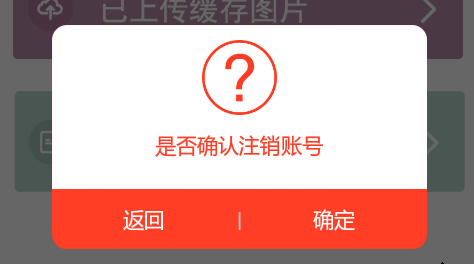
自定义Dialog,LogoutDialog:
要将自定义布局传入构造函数中,才能在Activity中通过 dialog.findviewbyid 获取到控件,否则返回null。
public class LogoutDialog extends Dialog{

  Context context;

  public LogoutDialog(Context context) {

  super(context);

  this.context=context;

  this.setContentView(R.layout.logout_dialog);

  }

  public LogoutDialog(Context context, int theme){

  super(context, theme);

  this.context = context;

  this.setContentView(R.layout.logout_dialog);

  }

  @Override

  protected void onCreate(Bundle savedInstanceState) {

  super.onCreate(savedInstanceState);

  //this.setContentView(R.layout.logout_dialog);

  }

}
自定义布局文件,logout_dialog.xml:
<?xml version="1.0" encoding="utf-8"?>

<LinearLayout xmlns:android="http://schemas.android.com/apk/res/android"

android:layout_width="250dp"

android:layout_height="wrap_content"

android:orientation="vertical"

android:background="@android:color/transparent"

>

  <LinearLayout

  android:layout_width="match_parent"

  android:layout_height="wrap_content"

  android:background="@drawable/dialog_top_bg"

  android:orientation="vertical"

  android:paddingTop="10dp"

  >

    <ImageView

    android:layout_width="50dp"

    android:layout_height="50dp"

    android:src="@drawable/pop_icon1"

    android:layout_gravity="center_horizontal"

    android:layout_marginBottom="10dp"

    />

    <TextView

    android:layout_width="wrap_content"

    android:layout_height="wrap_content"

    android:text="是否确认注销账号"

    android:layout_gravity="center_horizontal"

    android:layout_marginBottom="20dp"

    android:textColor="#FF3C25"

    android:layout_marginLeft="20dp"

    android:layout_marginRight="20dp"

    />

  </LinearLayout>

  <LinearLayout

    android:layout_width="match_parent"

    android:layout_height="40dp"

    android:gravity="center_vertical"

    android:background="@drawable/dialog_buttom_bg"

    >

    <TextView

    android:id="@+id/back_btn_dialog"

    android:layout_width="wrap_content"

    android:layout_height="match_parent"

    android:text="返回"

    android:layout_weight="1"

    android:textColor="#FFFFFF"

    android:gravity="center"

    />

    <TextView

    android:layout_width="wrap_content"

    android:layout_height="match_parent"

    android:text="|"

    android:textColor="#C9CACC"

    android:gravity="center"

    />

    <TextView

    android:id="@+id/submit_btn_dialog"

    android:layout_width="wrap_content"

    android:layout_height="match_parent"

    android:text="确定"

    android:layout_weight="1"

    android:textColor="#FFFFFF"

    android:gravity="center"

    />

  </LinearLayout>

</LinearLayout>
两个Shape的布局,dialog_buttom_bg.xml:
<?xml version="1.0" encoding="utf-8"?>

<shape xmlns:android="http://schemas.android.com/apk/res/android"

>

  <corners

  android:bottomLeftRadius="@dimen/dialog_corners"

  android:bottomRightRadius="@dimen/dialog_corners"

  />

  <gradient

  android:startColor="#FF3E25"

  android:endColor="#FF3E25"

  android:centerColor="#FF3E25"

  android:angle="270"

  />

</shape>
dialog_top_bg.xml:
<?xml version="1.0" encoding="utf-8"?>

<shape xmlns:android="http://schemas.android.com/apk/res/android" >

  <corners

  android:topLeftRadius="@dimen/dialog_corners"

  android:topRightRadius="@dimen/dialog_corners"

  />

  <gradient

  android:startColor="#ffffff"

  android:endColor="#ffffff"

  android:centerColor="#ffffff"

  android:angle="270"

  />

</shape>
自定义样式Style,来改变默认的Dialog样式。在values/styles.xml下新加样式:
<style name="UpdateErrorFinishDialog" parent="@android:style/Theme.Dialog">

  <item name="android:windowFrame">@null</item>

  <item name="android:windowNoTitle">true</item>

  <item name="android:windowBackground">@drawable/dialog_background</item>

  <item name="android:windowIsFloating">true</item>

  <item name="android:windowContentOverlay">@null</item>

</style>
在Activity中调用:
Dialog dialog==new LogoutDialog(TempActivity.this, R.style.UpdateErrorFinishDialog);

dialog.setCanceledOnTouchOutside(false);

dialog.show();

TextView submit_btn_dialog=(TextView) dialog.findViewById(R.id.submit_btn_dialog);

TextView back_btn_dialog=(TextView) dialog.findViewById(R.id.back_btn_dialog);

submit_btn_dialog.setOnClickListener(new View.OnClickListener() {

  @Override

  public void onClick(View v) {

    //Toaster.showLongToast("确定");

    dialog.dismiss();

  }

});

back_btn_dialog.setOnClickListener(new View.OnClickListener() {

  @Override

  public void onClick(View v) {

    //Toaster.showLongToast("返回");

    dialog.dismiss();

  }

});
Android自定义Dialog及其布局的更多相关文章
- Android自定义 Dialog 对话框
Android自定义Dialoghttp://www.cnblogs.com/and_he/archive/2011/09/16/2178716.html Android使用自定义AlertDialo ...
- android自定义dialog布局
dialog使用系统自带的有时候不是很美观,就想要自己来设计一个dialog界面,以下就是可以设计的dialog界面: public class CustomDialog extends Dialog ...
- Android—自定义Dialog
在 Android 日常的开发中,Dialog 使用是比较广泛的.无论是提示一个提示语,还是确认信息,还是有一定交互的(弹出验证码,输入账号密码登录等等)对话框. 而我们去看一下原生的对话框,虽然随着 ...
- Android自定义Dialog(美化界面)
前言:在做项目的时候,发现dialog界面太丑陋,从csdn上下载了一份自定义dialog的源码,在他的基础上对界面进行美化...有需要的朋友可以直接拿走 效果图如下: 主要代码: /** * 自定义 ...
- android 自定义Dialog背景透明及显示位置设置
先贴一下显示效果图,仅作参考: 代码如下: 1.自定义Dialog public class SelectDialog extends AlertDialog{ public SelectDialog ...
- Android自定义Dialog
Android开发过程中,常常会遇到一些需求场景——在界面上弹出一个弹框,对用户进行提醒并让用户进行某些选择性的操作, 如退出登录时的弹窗,让用户选择“退出”还是“取消”等操作. Android系统提 ...
- Android 自定义Dialog类,并在Activity中实现按钮监听。
实际开发中,经常会用到Dialog,比如退出时候会弹出是否退出,或者还有一些编辑框也会用Dialog实现,效果图如下: 开发中遇到的问题无非在于如果在Activity中监听这个Dialog中实现的 ...
- android 自定义Dialog去除黑色边框
在自定义Dialog时显示的界面中老是有黑色的边框,下面就介绍使用style去除黑色边框方法. 首先在values/styles定义自定义样式: <style name="MyDial ...
- Android 自定义Dialog 去除阴影
自定义Dialog中添加下列代码: window.clearFlags( WindowManager.LayoutParams.FLAG_DIM_BEHIND);
随机推荐
- hdu 5720
考虑三个树枝:a,b,c若c是将要抛出的树枝,那么形成三角形的条件是a+b>c and a-b<c 可以写成 c属于开区间(a-b,a+b)对于每个C和许许多多的其他边,如何保证C不构成三 ...
- Jquery的multifile使用随记
1.多文件上传: 2.如上几个验证不重复,和限制上传数量的验证显示的是英文,改成中文文本时,如果不用国标解码,到时候提示框会出现乱码现象.所以一般需要中文显示的时候,我们应该这样做: 拿denied做 ...
- python安装MySQLdb模块
以Ubuntu下安装为例: 下载地址:https://pypi.python.org/pypi/MySQL-python/ 解压后直接进入解压目录运行安装命令. python setup.py ins ...
- step by step设置postgresql用户密码并配置远程连接
设置pgsql默认用户posgres的密码 1.确认pgsql是开启的 /etc/init.d/postgresql status 2.使用默认用户登录 sudo su postgres 3.进入ps ...
- Hasor-Core v0.0.4 & Web v0.0.3 发布
“Hasor是一款开源的 Java 应用开发框架.它是围绕 Guice 为核心创建的一系列模块组合而成.使用Hasor 会加快软件软件开发效率并降低开发成本.目前 Hasor包含了 Hasor-Cor ...
- IOS内测分发策略
当苹果应用没有上交appstore审核,出于开始内侧阶段时,我们如何邀请别人测试和使用? plist苹果安装包实现 使用七牛云存储解决ios7.1的app部署问题 推荐两个现在比较流行的app内测辅助 ...
- ENode 2.0 - 整体架构介绍
前言 今天是个开心的日子,又是周末,可以轻轻松松的写写文章了.去年,我写了ENode 1.0版本,那时我也写了一个分析系列.经过了大半年的时间,我对第一个版本做了很多架构上的改进,最重要的就是让ENo ...
- 千万用户级别应用系统背后的SOA组件化容器
背景 在<我们的应用系统是如何支撑千万级别用户的>随笔中已经从“宏观”角度去介绍了整个应用系统的布局.组件化是整个系统由头到尾都始终坚持的一个设计原则,其中“SOA组件化容器”也是我们应用 ...
- 3、CC2541芯片中级教程-OSAL操作系统(ADC光敏电阻和修改串口波特率)
本文根据一周CC2541笔记汇总得来—— 适合概览和知识快速索引—— 全部链接: 中级教程-OSAL操作系统\OSAL操作系统-实验01 OSAL初探 [插入]SourceInsight-工程建立方法 ...
- mysql C API的使用
<MySQL++简介>介绍了如何使用C++来访问mysql,本文记录下使用C API访问mysql,mysql++就是对本文介绍的C-API的封装. 常用函数(名字就能告诉我们用法): M ...