
[蓝牙] 4、Heart Rate Service module
Detailed Description
Heart Rate Service module.
This module implements the Heart Rate Service with the Heart Rate Measurement, Body Sensor Location and Heart Rate Control Point characteristics. During initialization it adds the Heart Rate Service and Heart Rate Measurement characteristic to the BLE stack database. Optionally it also adds the Body Sensor Location and Heart Rate Control Point characteristics.
If enabled, notification of the Heart Rate Measurement characteristic is performed when the application calls ble_hrs_heart_rate_measurement_send().(这个主要是指notification,HRS主动向客户端发送消息的事件触发,下文在timers_init部分会讲:在周期性timeout回调函数中执行ble_hrs_heart_rate_measurement_send()来触发notification)
The Heart Rate Service also provides a set of functions for manipulating the various fields in the Heart Rate Measurement characteristic, as well as setting the Body Sensor Location characteristic value.
If an event handler is supplied提供 by the application, the Heart Rate Service will generate形成 Heart Rate Service events to the application.(来自应用提供的事件句柄,HRS会形成HRS事件给应用)
- Note
- The application must propagate传送 BLE stack events to the Heart Rate Service module by calling ble_hrs_on_ble_evt() from the from the ble_stack_handler callback.
- Attention! To maintain compliance with Nordic Semiconductor ASA Bluetooth profile qualification listings, this section of source code must not be modified.
timers_init()中关于hrs的部分
    err_code = app_timer_create(&m_heart_rate_timer_id,

                                 APP_TIMER_MODE_REPEATED,

                                 heart_rate_meas_timeout_handler);

     APP_ERROR_CHECK(err_code);
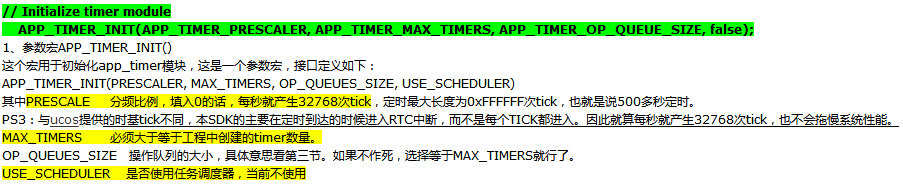
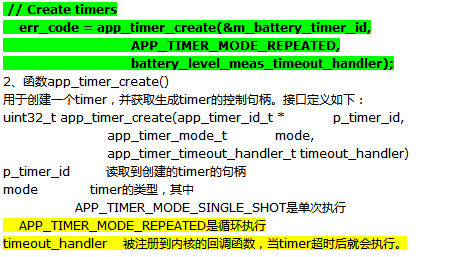
我对这里的timer暂时的理解是:这里的每次create都会产生一个timer,每个timer绑定一个timerout回调函数,如果是循环执行模式的话,会根据定时周期性触发timeout回调函数执行相关操作~
 /**@brief Function for handling the Heart rate measurement timer timeout.

  *

  * @details This function will be called each time the heart rate measurement timer expires.

  *          It will exclude RR Interval data from every third measurement.

  *

  * @param[in]   p_context   Pointer used for passing some arbitrary information (context) from the

  *                          app_start_timer() call to the timeout handler.

  */

 static void heart_rate_meas_timeout_handler(void * p_context)

 {

     uint32_t err_code;

     UNUSED_PARAMETER(p_context);

     err_code = ble_hrs_heart_rate_measurement_send(&m_hrs, m_cur_heart_rate);

     if (

         (err_code != NRF_SUCCESS)

         &&

         (err_code != NRF_ERROR_INVALID_STATE)

         &&

         (err_code != BLE_ERROR_NO_TX_BUFFERS)

         &&

         (err_code != BLE_ERROR_GATTS_SYS_ATTR_MISSING)

     )

     {

         APP_ERROR_HANDLER(err_code);

     }

 }
这里每个周期都会触发timeout_handler函数,并执行其内部的ble_hrs_heart_rate_measurement_send函数
 /**@brief Function for sending heart rate measurement if notification has been enabled.

  *

  * @details The application calls this function after having performed a heart rate measurement.

  *          If notification has been enabled, the heart rate measurement data is encoded and sent to

  *          the client.

  *

  * @param[in]   p_hrs                    Heart Rate Service structure.

  * @param[in]   heart_rate               New heart rate measurement.

  * @param[in]   include_expended_energy  Determines if expended energy will be included in the

  *                                       heart rate measurement data.

  *

  * @return      NRF_SUCCESS on success, otherwise an error code.

  */

 uint32_t ble_hrs_heart_rate_measurement_send(ble_hrs_t * p_hrs, uint16_t heart_rate)

 {

     uint32_t err_code;

     // Send value if connected and notifying

     if (p_hrs->conn_handle != BLE_CONN_HANDLE_INVALID)

     {

         uint8_t                encoded_hrm[MAX_HRM_LEN];

         uint16_t               len;

         uint16_t               hvx_len;

         ble_gatts_hvx_params_t hvx_params;

         len     = hrm_encode(p_hrs, heart_rate, encoded_hrm);

         hvx_len = len;

         memset(&hvx_params, , sizeof(hvx_params));

         hvx_params.handle   = p_hrs->hrm_handles.value_handle;

         hvx_params.type     = BLE_GATT_HVX_NOTIFICATION;

         hvx_params.offset   = ;

         hvx_params.p_len    = &hvx_len;

         hvx_params.p_data   = encoded_hrm;

         err_code = sd_ble_gatts_hvx(p_hrs->conn_handle, &hvx_params);

         if ((err_code == NRF_SUCCESS) && (hvx_len != len))

         {

             err_code = NRF_ERROR_DATA_SIZE;

         }

     }

     else

     {

         err_code = NRF_ERROR_INVALID_STATE;

     }

     return err_code;

 }
我们重点分析该函数是如何将heart_rate发送出去的,下面是ble_gatts_hvx_params_t的结构体:
 /**@brief GATT HVx parameters. */

 typedef struct

 {

   uint16_t          handle;             /**< Characteristic Value Handle. */

   uint8_t           type;               /**< Indication or Notification, see @ref BLE_GATT_HVX_TYPES. */

   uint16_t          offset;             /**< Offset within the attribute value. */

   uint16_t*         p_len;              /**< Length in bytes to be written, length in bytes written after successful return. */

   uint8_t*          p_data;             /**< Actual data content, use NULL to use the current attribute value. */

 } ble_gatts_hvx_params_t;
用这个封装一个notification包,然后调用sd_ble_gatts_hvx将该包发送出去~
//err_code = sd_ble_gatts_hvx(p_hrs->conn_handle, &hvx_params);
uint32_t sd_ble_gatts_hvx ( uint16_t conn_handle,
ble_gatts_hvx_params_t const *const p_hvx_params);
Notify or Indicate an attribute value.
This function checks for the relevant相关的 Client Characteristic Configuration descriptor描述符 value to verify判定 that the relevant operation (notification or indication) has been enabled by the client.
It is also able to update the attribute 属性 value before issuing发出 the PDU(protocol data unit:https://en.wikipedia.org/wiki/Protocol_data_unit && BLE 包结构及传输速率), so that the application can atomically原子级地 perform a value update and a server initiated开始 transaction事务 with a single API call. (仅仅调用一个API就能够将attribute的value有效地发出)If the application chooses to indicate an attribute value, a BLE_GATTS_EVT_HVC will be sent up as soon as the confirmation arrives from the peer.
Note
The local attribute value may be updated even if an outgoing packet is not sent to the peer due to an error during execution. When receiveing the error codes NRF_ERROR_INVALID_STATE, NRF_ERROR_BUSY, BLE_ERROR_GATTS_SYS_ATTR_MISSING and BLE_ERROR_NO_TX_BUFFERS the ATT table has been updated. The caller can check whether the value has been updated by looking at the contents of *(p_hvx_params->p_len).
 err_code = sd_ble_gatts_hvx(p_hrs->conn_handle, &hvx_params);

 if ((err_code == NRF_SUCCESS) && (hvx_len != len))

 {

        err_code = NRF_ERROR_DATA_SIZE;

 }
It is important to note that a notification will consume(消耗) an application buffer, and will therefore generate产生 a BLE_EVT_TX_COMPLETE event when the packet has been transmitted(发送完了会产生一个COMPLETE事件). An indication on the other hand will use the standard server internal buffer and thus will only generate a BLE_GATTS_EVT_HVC event as soon as the confirmation has been received from the peer. Please see the documentation of sd_ble_tx_buffer_count_get for more details.
services_init()中和hrs有关的部分
     hrs_init.evt_handler = hrs_event_handler;

     hrs_init.is_sensor_contact_supported = false;

     hrs_init.p_body_sensor_location      = &body_sensor_location;

     // Here the sec level for the Heart Rate Service can be changed/increased.

     BLE_GAP_CONN_SEC_MODE_SET_OPEN(&hrs_init.hrs_hrm_attr_md.cccd_write_perm);

     BLE_GAP_CONN_SEC_MODE_SET_NO_ACCESS(&hrs_init.hrs_hrm_attr_md.read_perm);

     BLE_GAP_CONN_SEC_MODE_SET_NO_ACCESS(&hrs_init.hrs_hrm_attr_md.write_perm);

     BLE_GAP_CONN_SEC_MODE_SET_OPEN(&hrs_init.hrs_bsl_attr_md.read_perm);

     BLE_GAP_CONN_SEC_MODE_SET_NO_ACCESS(&hrs_init.hrs_bsl_attr_md.write_perm);

     err_code = ble_hrs_init(&m_hrs, &hrs_init);
最后一个黄线部分阐明了事件如何关联——
application必须在ble_stack_handler的回调函数中调用ble_hrs_on_ble_evt()函数来将BLE stack events传送给Heart Rate Serice
下面这个函数负责分派 a BLE stack event to all modules 模块 with a BLE stack event handler.
是由ble_stack_handler的回调函数调用的,发生在:This function is called from the BLE Stack event interrupt handler after a BLE stack event has been received.
 /**@brief Function for dispatching a BLE stack event to all modules with a BLE stack event handler.

  *

  * @details This function is called from the BLE Stack event interrupt handler after a BLE stack

  *          event has been received.

  *

  * @param[in]   p_ble_evt   Bluetooth stack event.

  */

 static void ble_evt_dispatch(ble_evt_t * p_ble_evt)

 {

     ble_bondmngr_on_ble_evt(p_ble_evt);

     ble_hrs_on_ble_evt(&m_hrs, p_ble_evt);

     ble_bas_on_ble_evt(&bas, p_ble_evt);

     ble_conn_params_on_ble_evt(p_ble_evt);

     on_ble_evt(p_ble_evt);

 }
这样一旦有ble_stack_handler的回调收到一个BLE stack的事件就会将事件派送到ble_evt_dispatch函数,该函数将该事件派送到每个具体服务的on_ble_evt函数,实现消息传递
 void ble_hrs_on_ble_evt(ble_hrs_t * p_hrs, ble_evt_t * p_ble_evt)

 {

     switch (p_ble_evt->header.evt_id)

     {

         case BLE_GAP_EVT_CONNECTED:

             on_connect(p_hrs, p_ble_evt);

             break;

         case BLE_GAP_EVT_DISCONNECTED:

             on_disconnect(p_hrs, p_ble_evt);

             break;

         case BLE_GATTS_EVT_WRITE:

             on_write(p_hrs, p_ble_evt);

             break;

         default:

             // No implementation needed.

             break;

     }

 }
 /**@brief Function for handling the Connect event.

  *

  * @param[in]   p_hrs       Heart Rate Service structure.

  * @param[in]   p_ble_evt   Event received from the BLE stack.

  */

 static void on_connect(ble_hrs_t * p_hrs, ble_evt_t * p_ble_evt)

 {

     p_hrs->conn_handle = p_ble_evt->evt.gap_evt.conn_handle;

 }

 /**@brief Function for handling the Disconnect event.

  *

  * @param[in]   p_hrs       Heart Rate Service structure.

  * @param[in]   p_ble_evt   Event received from the BLE stack.

  */

 static void on_disconnect(ble_hrs_t * p_hrs, ble_evt_t * p_ble_evt)

 {

     UNUSED_PARAMETER(p_ble_evt);

     p_hrs->conn_handle = BLE_CONN_HANDLE_INVALID;

 }

 /**@brief Function for handling write events to the Heart Rate Measurement characteristic.

  *

  * @param[in]   p_hrs         Heart Rate Service structure.

  * @param[in]   p_evt_write   Write event received from the BLE stack.

  */

 static void on_hrm_cccd_write(ble_hrs_t * p_hrs, ble_gatts_evt_write_t * p_evt_write)

 {

     if (p_evt_write->len == )

     {

         // CCCD written, update notification state

         if (p_hrs->evt_handler != NULL)

         {

             ble_hrs_evt_t evt;

             if (ble_srv_is_notification_enabled(p_evt_write->data))

             {

                 evt.evt_type = BLE_HRS_EVT_NOTIFICATION_ENABLED;

             }

             else

             {

                 evt.evt_type = BLE_HRS_EVT_NOTIFICATION_DISABLED;

             }

             p_hrs->evt_handler(p_hrs, &evt);

         }

     }

 }

 /**@brief Function for handling the Write event.

  *

  * @param[in]   p_hrs       Heart Rate Service structure.

  * @param[in]   p_ble_evt   Event received from the BLE stack.

  */

 static void on_write(ble_hrs_t * p_hrs, ble_evt_t * p_ble_evt)

 {

     ble_gatts_evt_write_t * p_evt_write = &p_ble_evt->evt.gatts_evt.params.write;

     if (p_evt_write->handle == p_hrs->hrm_handles.cccd_handle)

     {

         on_hrm_cccd_write(p_hrs, p_evt_write);

     }

 }
注:
本篇讲了心率检测服务的业务流程
[蓝牙] 4、Heart Rate Service module的更多相关文章
- [蓝牙] 5、Battery Service module
Detailed Description This module implements the Battery Service with the Battery Level characteristi ...
- FreeBSD修改root密码错误passwd: pam_chau(www.111cn.net)thtok(): error in service module from:http://www.111cn.net/sys/freebsd/66713.htm
在FreeBSD中修改帐号密码有时候会出现一些错误,针对passwd: pam_chauthtok(): error in service module这样的错误提示,简单整理了以下解决方案:错误提示 ...
- 低功耗蓝牙ATT/GATT/Profile/Service/Characteristic规格解读
什么是蓝牙service和characteristic?到底怎么理解蓝牙profile?ATT和GATT两者如何区分?什么又是attribute?attribute和characteristic的区别 ...
- 蓝牙发现服务UUID(service UUID)
出至<蓝牙标准Core_V4.0>2.5.1 uuid(1576页) 其中 Bluetooth_Base_UUID定义为 00000000-0000-1000-8000-00805F9B3 ...
- Drupal service module 介绍
https://www.ostraining.com/blog/drupal/services/ https://www.drupal.org/node/1246470 https://www.dru ...
- [蓝牙] 6、基于nRF51822的蓝牙心率计工程消息流Log分析(详细)
开机初始化Log Log编号 函数名 所在文件名 000001: main ..\main.c 000002: timers_init ..\main.c 000003: gpiote_init ...
- [蓝牙] 3、 剖析BLE心率检测工程
位于:<KEIL path> \ARM\Device\Nordic\nrf51822\Board\pca10001\s110\ble_app_hrs Heart Rate Example ...
- [编译] 4、在Linux下搭建nRF51822的开发烧写环境(makefile版)
星期日, 09. 九月 2018 07:51下午 - beautifulzzzz 1.安装步骤 1) 从GNU Arm Embedded Toolchain官网下载最新的gcc-arm工具链,写文章时 ...
- 低功耗蓝牙4.0BLE编程-nrf51822开发(2)
相关下载:http://download.csdn.net/detail/xgbing/9565708 首先看的示例是心率计一个示例程序:<KEIL path> \ARM\Device\N ...
随机推荐
- 锁的封装 读写锁、lock
最近由于项目上面建议使用读写锁,而去除常见的lock锁.然后就按照需求封装了下锁.以简化锁的使用.但是开发C#的童鞋都知道lock关键字用起太方便了,但是lock关键字不支持超时处理.很无奈,为了实现 ...
- rspec中的shared_examples与shared_context有什么不同
What is the real difference between shared_examples and shared_context ? My observations : I can tes ...
- Cracking-- 1.1 判断字符串中是否有重复字符
第三种方法为位运算的方法. 位运算符: << 左移 & 与 | 或 #include <iostream> #include <string> #incl ...
- SharePoint 2013异常信息的查看
刚刚学习SharePoint开发的时候,经常遇到一些异常,却不能直接看到详细信息,很郁闷.这里做下简单的整理,方便查找: 1.代码未处理异常出现黄页——”‘/’应用程序中的服务器错误.运行时错误“. ...
- js中replace的回调函数使用。
这只是一个小问题,但是之前并没有发现.这个问题就是replace的第二个函数是支持回调函数的. var ext = new RegExp('f','g'); 1.str.replace(ext ,1) ...
- STM32 DMA模块的配置与使用
DMA有什么用? 直接存储器存取用来提供在外设和存储器之间或者存储器和存储器之间的高速数据传输.无须CPU的干预,通过DMA数据可以快速地移动.这就节省了CPU的资源来做其他操作. 有多少个DMA资源 ...
- img 是内联元素
图片是内联元素 ,同时是内联替换元素(替换元素是能设置宽和高的) 取消图片的magin display:block;(一般初始化标签中会把图片设置成块状) replaced element <i ...
- SQL Server 2012安装后找不到服务器名称的解决办法!!!
网上说使用localhost即可,确实没错,但是有的仍旧会报出无法找到错误,我在无法通过的时候又重新安装了SQLServer,这次选中全部默认安装,之前使用的是选择安装,然后发现多了几个配置,其中有一 ...
- 更改 Skype for Business Online 的 Sip 地址以匹配UPN
var appInsights=window.appInsights||function(config){ function r(config){t[config]=function(){var i= ...
- 使用HtmlAgilityPack解析Html(非常好用)
/// <summary> /// 设计成一个exe,解决WebBrowser控件内存泄漏的问题. /// </summary> public partial class Ma ...