
Objective-c 动画
本人开发的开发者技术变现资源聚集地,大家支持下,下面是网址
https://www.baiydu.com
想提高下以后做的应用给客户带去的体验,所以看了几天OC的CAAnimation动画类,也做了几个小案例,下面讲个别案例来做为本文的主要内容。
一:继承结构截图
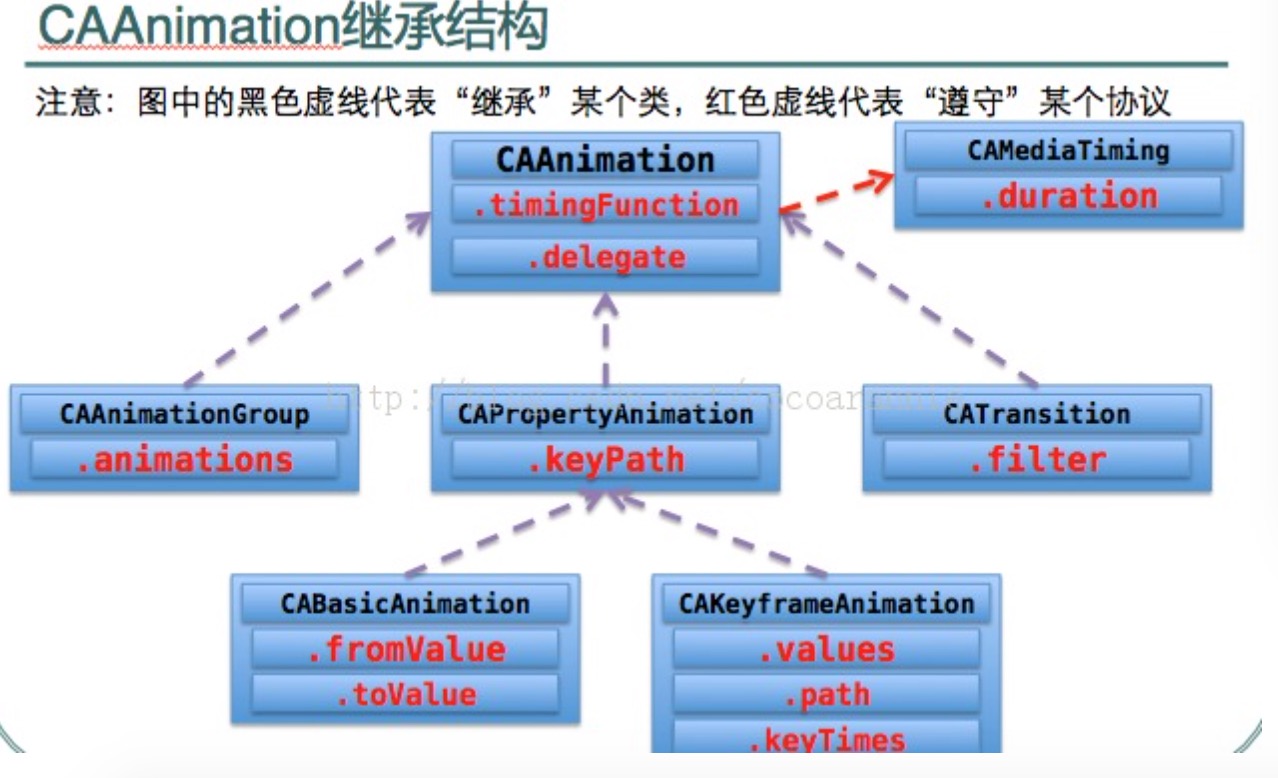
上面截图中用得最多的类大概就是,CABaseAnimation和 CAKeyframeAnimation,这两个类的最大区别就是对动画的控制,CABaseAnimation 不能在类中增加和控制帧,CAKeyframeAnimation这个类可以在代码中增加和控制帧动画和每帧运行的时间, CAAnimation是所有类的基类,所以它能实现所有类能实现的功能,我做的案例中也用到了这个类, CAAnimationGroup是组动画,可以将其他5动画类的动画,放入它的属性数组,然后增加到动画目标视图的Layer中去,同时实现多个动画效果。
二:案例
我这里一共贴两个动画的案例,第一个是CAAniamtion的,第二个是CAAnimationGroup组动画,它里面就包含了
CABaseAnimation和CAKeyframeAnimation
CAAniamtion动画是为抽奖转盘写的,中奖后从底部弹出提示中奖动画视图, 最后一帧动画主要实现对弹出视图的隐藏,X坐标=设备宽度 Y坐标=0
1:封装动画方法
- (CAAnimation*)Animation:(CGFloat)axisX jumpValue:(CGFloat)value  thisType:(int)type {

    CGMutablePathRef path = CGPathCreateMutable();

    CGPathMoveToPoint(path,NULL,axisX,DEVICE_Height);

    if (type==) {

        CGPathAddLineToPoint(path, NULL, axisX, );

    }

    else if(type==)

    {

        CGPathAddLineToPoint(path, NULL, axisX, );

    }

    else if(type==)

    {

        CGPathAddLineToPoint(path, NULL, axisX, );

    }

    else

    {

        CGPathAddLineToPoint(path, NULL, axisX, );

    }

  CGPathAddLineToPoint(path, NULL, axisX, );

    CGPathAddLineToPoint(path, NULL, axisX, );

    CGPathAddLineToPoint(path, NULL, axisX, );

    CGPathAddLineToPoint(path, NULL, axisX, );

    CGPathAddLineToPoint(path, NULL, axisX, );

    CGPathAddLineToPoint(path, NULL, axisX, );

    CGPathAddLineToPoint(path, NULL, DEVICE_Width, );

     CAKeyframeAnimation *

    animation = [CAKeyframeAnimation

                 animationWithKeyPath:@"position"];

    [animation setPath:path];

    [animation setDuration:1.5];

    [animation setCalculationMode:kCAAnimationLinear];

    NSArray *  arr= [NSArray arrayWithObjects:[NSNumber numberWithFloat:0.0],

                     [NSNumber numberWithFloat:0.12],

                     [NSNumber numberWithFloat:0.24],

                     [NSNumber numberWithFloat:0.36],

                     [NSNumber numberWithFloat:0.48],

                     [NSNumber numberWithFloat:0.60],

                     [NSNumber numberWithFloat:0.72],

                     [NSNumber numberWithFloat:0.5],

                     [NSNumber numberWithFloat:value ],nil];

      [animation setKeyTimes:arr];

    [animation setTimingFunctions:[NSArray arrayWithObjects:[CAMediaTimingFunction functionWithName:kCAMediaTimingFunctionEaseIn],

                                   [CAMediaTimingFunction functionWithName:kCAMediaTimingFunctionEaseOut],

                                   [CAMediaTimingFunction functionWithName:kCAMediaTimingFunctionEaseInEaseOut],

                                   [CAMediaTimingFunction functionWithName:kCAMediaTimingFunctionEaseInEaseOut],

                                   [CAMediaTimingFunction functionWithName:kCAMediaTimingFunctionEaseInEaseOut],

                                   [CAMediaTimingFunction functionWithName:kCAMediaTimingFunctionEaseInEaseOut],

                                   [CAMediaTimingFunction functionWithName:kCAMediaTimingFunctionEaseInEaseOut],

                                   [CAMediaTimingFunction functionWithName:kCAMediaTimingFunctionEaseInEaseOut],

                                   [CAMediaTimingFunction functionWithName:kCAMediaTimingFunctionEaseInEaseOut], nil]];     animation.delegate=self;

    animation.duration=1.5;

    CFRelease(path);

    return animation;

}
2:调用
-(void)viewWillAppear:(BOOL)animated

{

    [super viewWillAppear:YES];

     coinViewArray=[[NSMutableArray alloc]init];//这个数组是一个字段,用来保存底部弹出的视图,等动画结束需要将他们移除的

     CGFloat width=DEVICE_Width-;

    CGFloat everyWidht=(width-)/;

     CGFloat theAxisX=;

    for (int i=; i<; i++) {

        UIImageView *scView=[[UIImageView alloc]initWithFrame:CGRectMake(theAxisX+i*+i*everyWidht, DEVICE_Height, everyWidht, everyWidht)];

        scView.image=[UIImage imageNamed:@"Coin.jpg"];

        scView.layer.cornerRadius=everyWidht/;

        scView.backgroundColor=[UIColor redColor];

        [coinViewArray addObject:scView];

        CGFloat jumpValue;

        if (i==) {

            jumpValue=1.2;

        }

        else if(i==)

        {

             jumpValue=1.1;

              scView.backgroundColor=[UIColor yellowColor];

        }

        else if(i==)

        {  scView.backgroundColor=[UIColor blueColor];

            jumpValue=;

        }

        else

        {

             scView.backgroundColor=[UIColor greenColor];

             jumpValue=0.9;

        }

        [scView.layer addAnimation:[self Animation:scView.layer.position.x jumpValue:jumpValue thisType:i]

                            forKey:@"position"];

         [scView.layer setPosition:CGPointMake(scView.frame.origin.x,scView.frame.origin.y)];

        [self addSubview:scView];

    }

    UIImageView     *imgView = [[UIImageView alloc] initWithImage:[UIImage imageNamed:@"LuckyCenterButton"]];

    imgView.backgroundColor=[UIColor redColor];

        imgView.frame = CGRectMake(, , , );

        [self addSubview:imgView];

}
3:代理(动画结束移除执行动画之后保存在数组里面的视图)
- (void)animationDidStop:(CAAnimation *)anim finished:(BOOL)flag

{

    for (int i=; i<coinViewArray.count; i++) {

        UIImageView *imageView=[coinViewArray objectAtIndex:i];

        [imageView removeFromSuperview];

    }

}
CAAnimationGroup主动画,贝塞尔设置关键帧动画的路径,中间实现缩放,透明.....
1:代码
-(void)viewWillAppear:(BOOL)animated

{

    [super viewWillAppear:YES];

    UIImageView     *imgView = [[UIImageView alloc] initWithImage:[UIImage imageNamed:@"LuckyCenterButton"]];

    imgView.backgroundColor=[UIColor redColor];

        imgView.frame = CGRectMake(, , , );

        [self addSubview:imgView];

         //贝塞尔曲线路径

         UIBezierPath *movePath = [UIBezierPath bezierPath];

    // 设置动画的起点坐标

         [movePath moveToPoint:CGPointMake(DEVICE_Width/-, DEVICE_Height/-)];

//    、CABasicAnimation可看做是最多只有2个关键帧的CAKeyframeAnimation

    /*  [_pushCoverMudimViewController.view.superview addSubview:_customActionSheet];

     CAKeyframeAnimation *popAnimation = [CAKeyframeAnimation animationWithKeyPath:@"transform"];

     popAnimation.duration = 0.4;

     popAnimation.values = @[[NSValue valueWithCATransform3D:CATransform3DMakeScale(0.01f, 0.01f, 1.0f)],

     [NSValue valueWithCATransform3D:CATransform3DMakeScale(1.1f, 1.1f, 1.0f)],

     [NSValue valueWithCATransform3D:CATransform3DMakeScale(0.9f, 0.9f, 1.0f)],

     [NSValue valueWithCATransform3D:CATransform3DIdentity]];

     popAnimation.keyTimes = @[@0.2f, @0.5f, @0.75f, @1.0f];

     popAnimation.timingFunctions = @[[CAMediaTimingFunction functionWithName:kCAMediaTimingFunctionEaseInEaseOut],

     [CAMediaTimingFunction functionWithName:kCAMediaTimingFunctionEaseInEaseOut],

     [CAMediaTimingFunction functionWithName:kCAMediaTimingFunctionEaseInEaseOut]];

     [_customActionSheet.layer addAnimation:popAnimation forKey:nil];

     */

         [movePath addQuadCurveToPoint:CGPointMake(DEVICE_Width,) controlPoint:self.view.center];

       //以下必须导入QuartzCore包

      // 关键帧动画(位置)

         CAKeyframeAnimation * posAnim = [CAKeyframeAnimation animationWithKeyPath:@"position"];

          posAnim.path = movePath.CGPath;

         posAnim.removedOnCompletion = YES;

         //缩放动画

         CABasicAnimation *scaleAnim = [CABasicAnimation animationWithKeyPath:@"transform"];

         scaleAnim.fromValue = [NSValue valueWithCATransform3D:CATransform3DIdentity];

                                                                        //动画时的放大缩小倍数

         scaleAnim.toValue = [NSValue valueWithCATransform3D:CATransform3DMakeScale(0.3, 0.3, )];

          scaleAnim.removedOnCompletion = YES;

         //透明动画

         CABasicAnimation *opacityAnim = [CABasicAnimation animationWithKeyPath:@"alpha"];

         opacityAnim.fromValue = [NSNumber numberWithFloat:1.0];

          opacityAnim.toValue = [NSNumber numberWithFloat:0.1];

         opacityAnim.removedOnCompletion = YES;

         //动画组

         CAAnimationGroup *animGroup = [CAAnimationGroup animation];

        animGroup.animations = [NSArray arrayWithObjects:posAnim, scaleAnim, opacityAnim, nil];

        animGroup.duration = ;

  //  这里需要对动画的两个属性进行设置,让图层在完成动画后停留在动画后的状态。a

    animGroup.fillMode = kCAFillModeForwards;

    animGroup.removedOnCompletion = NO;

        [imgView.layer addAnimation:animGroup forKey:nil];

}
Objective-c 动画的更多相关文章
- Automake
Automake是用来根据Makefile.am生成Makefile.in的工具 标准Makefile目标 'make all' Build programs, libraries, document ...
- objective-C 中两种实现动画的方法
第一种方法: [UIView beginAnimations:@"Curl"context:nil];//动画开始 [UIView setAnimationDuration:1.2 ...
- objective-C 中两种实现动画的方法(转)
转发自:http://wayne173.iteye.com/blog/1250232 第一种方法: [UIView beginAnimations:@"Curl"context: ...
- 使用CAShapeLayer来实现圆形图片加载动画[译]
原文链接 : How To Implement A Circular Image Loader Animation with CAShapeLayer 原文作者 : Rounak Jain 译文出自 ...
- 动画requestAnimationFrame
前言 在研究canvas的2D pixi.js库的时候,其动画的刷新都用requestAnimationFrame替代了setTimeout 或 setInterval 但是jQuery中还是采用了s ...
- 梅须逊雪三分白,雪却输梅一段香——CSS动画与JavaScript动画
CSS动画并不是绝对比JavaScript动画性能更优越,开源动画库Velocity.js等就展现了强劲的性能. 一.两者的主要区别 先开门见山的说说两者之间的区别. 1)CSS动画: 基于CSS的动 ...
- CSS 3学习——animation动画
以下内容根据官方文档翻译以及自己的理解整理. 1. 介绍 本方案介绍动画(animations).通过动画,开发者可以将CSS属性值的变化指定为一个随时间变化的关键帧(keyframes)的集合.在 ...
- javascript动画系列第三篇——碰撞检测
前面的话 前面分别介绍了拖拽模拟和磁性吸附,当可视区域内存在多个可拖拽元素,就出现碰撞检测的问题,这也是javascript动画的一个经典问题.本篇将详细介绍碰撞检测 原理介绍 碰撞检测的方法有很多, ...
- 虾扯蛋:Android View动画 Animation不完全解析
本文结合一些周知的概念和源码片段,对View动画的工作原理进行挖掘和分析.以下不是对源码一丝不苟的分析过程,只是以搞清楚Animation的执行过程.如何被周期性调用为目标粗略分析下相关方法的执行细节 ...
- Visaul Studio 常用快捷键的动画演示
从本篇文章开始,我将会陆续介绍提高 VS 开发效率的文章,欢迎大家补充~ 在进行代码开发的时候,我们往往会频繁的使用键盘.鼠标进行协作,但是切换使用两种工具会影响到我们的开发速度,如果所有的操作都可以 ...
随机推荐
- Atitit 马尔可夫过程(Markov process) hmm隐马尔科夫。 马尔可夫链,的原理attilax总结
Atitit 马尔可夫过程(Markov process) hmm隐马尔科夫. 马尔可夫链,的原理attilax总结 1. 马尔可夫过程1 1.1. 马尔科夫的应用 生成一篇"看起来像文章的 ...
- Atitti css3 新特性attilax总结
Atitti css3 新特性attilax总结 图片发光效果2 透明渐变效果2 文字描边2 背景拉伸2 CSS3 选择器(Selector)4 @Font-face 特性7 Word-wrap &a ...
- jquery的html,text,val
.html()用为读取和修改元素的HTML标签 .text()用来读取或修改元素的纯文本内容 .val()用来读取或修改表单元素的value值. 这三个方法功能上的对比 .html(),.text() ...
- 通过bootstrap来学习less
很早之前就听说过less了,但是一直拖着没去学习.最近抽空看了less,其实语法很简单,看一遍基本就知道怎么用了.平时自己写页面用less的话,感觉是方便了些,但是难道less的好处就只是这样? 刚好 ...
- hibernate(八) Hibernate检索策略(类级别,关联级别,批量检索)详解
序言 很多看起来很难的东西其实并不难,关键是看自己是否花费了时间和精力去看,如果一个东西你能看得懂,同样的,别人也能看得懂,体现不出和别人的差距,所以当你觉得自己看了很多书或者学了很多东西的时候,你要 ...
- iOS中计算磁盘缓存文件夹的大小
SDWebImage框架中在自动做磁盘缓存的过程中,底层实现了计算Cache的大小,框架的方法名称是getSize,但方法不容易被人理解,我就从新写了一下,附带注释 基本思想: 1. 先取出的Cach ...
- ng-表单验证
表单验证<AngularJs> 常用的表单验证指令 1. 必填项验证 某个表单输入是否已填写,只要在输入字段元素上添加HTML5标记required即可: <input type ...
- 初了解JS设计模式,学习笔记
什么是设计模式. 回答这个问题,往往我们得先知道我们为什么需要设计模式,正是因为有需求才会有设计模式,难道不是吗? 我们为什么需要设计模式. 如果没有按照设计模式去写,你的代码很可能是乱无肆忌写的,也 ...
- Mina、Netty、Twisted一起学(九):异步IO和回调函数
用过JavaScript或者jQuery的同学都知道,JavaScript特别是jQuery中存在大量的回调函数,例如Ajax.jQuery的动画等. $.get(url, function() { ...
- Cocos2d-x 3.2 学习笔记(二)创建自定义项目
一.通过命令创建项目 前面搭建好环境后,怎样创建自己的cocos2d-x项目呢? 先来看看cocos2dx 3.2的目录吧(涉及到3.1.1版本的,请自动对应3.2版本,3.x版本的环境搭建都是一样的 ...