
rest-framework之频率控制
rest-framework之频率控制
本文目录
一 频率简介
为了控制用户对某个url请求的频率,比如,一分钟以内,只能访问三次
二 自定义频率类,自定义频率规则
自定义的逻辑
#(1)取出访问者ip

# (2)判断当前ip不在访问字典里,添加进去,并且直接返回True,表示第一次访问,在字典里,继续往下走

# (3)循环判断当前ip的列表,有值,并且当前时间减去列表的最后一个时间大于60s,把这种数据pop掉,这样列表中只有60s以内的访问时间,

# (4)判断,当列表小于3,说明一分钟以内访问不足三次,把当前时间插入到列表第一个位置,返回True,顺利通过

# (5)当大于等于3,说明一分钟内访问超过三次,返回False验证失败
代码实现:
class MyThrottles():

    VISIT_RECORD = {}

    def __init__(self):

        self.history=None

    def allow_request(self,request, view):

        #(1)取出访问者ip

        # print(request.META)

        ip=request.META.get('REMOTE_ADDR')

        import time

        ctime=time.time()

        # (2)判断当前ip不在访问字典里,添加进去,并且直接返回True,表示第一次访问

        if ip not in self.VISIT_RECORD:

            self.VISIT_RECORD[ip]=[ctime,]

            return True

        self.history=self.VISIT_RECORD.get(ip)

        # (3)循环判断当前ip的列表,有值,并且当前时间减去列表的最后一个时间大于60s,把这种数据pop掉,这样列表中只有60s以内的访问时间,

        while self.history and ctime-self.history[-1]>60:

            self.history.pop()

        # (4)判断,当列表小于3,说明一分钟以内访问不足三次,把当前时间插入到列表第一个位置,返回True,顺利通过

        # (5)当大于等于3,说明一分钟内访问超过三次,返回False验证失败

        if len(self.history)<3:

            self.history.insert(0,ctime)

            return True

        else:

            return False

    def wait(self):

        import time

        ctime=time.time()

        return 60-(ctime-self.history[-1])
三 内置频率类及局部使用
写一个类,继承自SimpleRateThrottle,(根据ip限制)问:要根据用户现在怎么写
from rest_framework.throttling import SimpleRateThrottle

class VisitThrottle(SimpleRateThrottle):

    scope = 'luffy'

    def get_cache_key(self, request, view):

        return self.get_ident(request)
在setting里配置:(一分钟访问三次)
REST_FRAMEWORK = {

    'DEFAULT_THROTTLE_RATES':{

        'luffy':'3/m'

    }

}
在视图类里使用
throttle_classes = [MyThrottles,]
错误信息的中文提示:
class Course(APIView):

    authentication_classes = [TokenAuth, ]

    permission_classes = [UserPermission, ]

    throttle_classes = [MyThrottles,]

    def get(self, request):

        return HttpResponse('get')

    def post(self, request):

        return HttpResponse('post')

    def throttled(self, request, wait):

        from rest_framework.exceptions import Throttled

        class MyThrottled(Throttled):

            default_detail = '傻逼啊'

            extra_detail_singular = '还有 {wait} second.'

            extra_detail_plural = '出了 {wait} seconds.'

        raise MyThrottled(wait)
内置频率限制类:
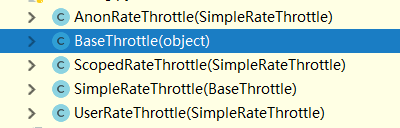
BaseThrottle是所有类的基类:方法:def get_ident(self, request)获取标识,其实就是获取ip,自定义的需要继承它
AnonRateThrottle:未登录用户ip限制,需要配合auth模块用
SimpleRateThrottle:重写此方法,可以实现频率现在,不需要咱们手写上面自定义的逻辑
UserRateThrottle:登录用户频率限制,这个得配合auth模块来用
ScopedRateThrottle:应用在局部视图上的(忽略)
四 内置频率类及全局使用
REST_FRAMEWORK = {

    'DEFAULT_THROTTLE_CLASSES':['app01.utils.VisitThrottle',],

    'DEFAULT_THROTTLE_RATES':{

        'luffy':'3/m'

    }

}
五 源码分析
    def check_throttles(self, request):

        for throttle in self.get_throttles():

            if not throttle.allow_request(request, self):

                self.throttled(request, throttle.wait())

    def throttled(self, request, wait):

        #抛异常,可以自定义异常,实现错误信息的中文显示

        raise exceptions.Throttled(wait)
class SimpleRateThrottle(BaseThrottle):

    # 咱自己写的放在了全局变量,他的在django的缓存中

    cache = default_cache

    # 获取当前时间,跟咱写的一样

    timer = time.time

    # 做了一个字符串格式化,

    cache_format = 'throttle_%(scope)s_%(ident)s'

    scope = None

    # 从配置文件中取DEFAULT_THROTTLE_RATES,所以咱配置文件中应该配置,否则报错

    THROTTLE_RATES = api_settings.DEFAULT_THROTTLE_RATES

    def __init__(self):

        if not getattr(self, 'rate', None):

            # 从配置文件中找出scope配置的名字对应的值,比如咱写的‘3/m’,他取出来

            self.rate = self.get_rate()

        #     解析'3/m',解析成 3      m

        self.num_requests, self.duration = self.parse_rate(self.rate)

    # 这个方法需要重写

    def get_cache_key(self, request, view):

        """

        Should return a unique cache-key which can be used for throttling.

        Must be overridden.

        May return `None` if the request should not be throttled.

        """

        raise NotImplementedError('.get_cache_key() must be overridden')

    def get_rate(self):

        if not getattr(self, 'scope', None):

            msg = ("You must set either `.scope` or `.rate` for '%s' throttle" %

                   self.__class__.__name__)

            raise ImproperlyConfigured(msg)

        try:

            # 获取在setting里配置的字典中的之,self.scope是 咱写的luffy

            return self.THROTTLE_RATES[self.scope]

        except KeyError:

            msg = "No default throttle rate set for '%s' scope" % self.scope

            raise ImproperlyConfigured(msg)

    # 解析 3/m这种传参

    def parse_rate(self, rate):

        """

        Given the request rate string, return a two tuple of:

        <allowed number of requests>, <period of time in seconds>

        """

        if rate is None:

            return (None, None)

        num, period = rate.split('/')

        num_requests = int(num)

        # 只取了第一位,也就是 3/mimmmmmmm也是代表一分钟

        duration = {'s': 1, 'm': 60, 'h': 3600, 'd': 86400}[period[0]]

        return (num_requests, duration)

    # 逻辑跟咱自定义的相同

    def allow_request(self, request, view):

        """

        Implement the check to see if the request should be throttled.

        On success calls `throttle_success`.

        On failure calls `throttle_failure`.

        """

        if self.rate is None:

            return True

        self.key = self.get_cache_key(request, view)

        if self.key is None:

            return True

        self.history = self.cache.get(self.key, [])

        self.now = self.timer()

        # Drop any requests from the history which have now passed the

        # throttle duration

        while self.history and self.history[-1] <= self.now - self.duration:

            self.history.pop()

        if len(self.history) >= self.num_requests:

            return self.throttle_failure()

        return self.throttle_success()

    # 成功返回true,并且插入到缓存中

    def throttle_success(self):

        """

        Inserts the current request's timestamp along with the key

        into the cache.

        """

        self.history.insert(0, self.now)

        self.cache.set(self.key, self.history, self.duration)

        return True

    # 失败返回false

    def throttle_failure(self):

        """

        Called when a request to the API has failed due to throttling.

        """

        return False

    def wait(self):

        """

        Returns the recommended next request time in seconds.

        """

        if self.history:

            remaining_duration = self.duration - (self.now - self.history[-1])

        else:

            remaining_duration = self.duration

        available_requests = self.num_requests - len(self.history) + 1

        if available_requests <= 0:

            return None

        return remaining_duration / float(available_requests)
SimpleRateThrottle源码分析
rest-framework之频率控制的更多相关文章
- Django Rest Framework源码剖析(三)-----频率控制
一.简介 承接上篇文章Django Rest Framework源码剖析(二)-----权限,当服务的接口被频繁调用,导致资源紧张怎么办呢?当然或许有很多解决办法,比如:负载均衡.提高服务器配置.通过 ...
- windows类书的学习心得
原文网址:http://www.blogjava.net/sound/archive/2008/08/21/40499.html 现在的计算机图书发展的可真快,很久没去书店,昨日去了一下,真是感叹万千 ...
- Django REST framework 内置访问频率控制
对匿名用户采用 IP 控制访问频率,对登录用户采用 用户名 控制访问频率. from rest_framework.throttling import SimpleRateThrottle class ...
- Django Rest Framework(二)
•基于Django 先创建一个django项目,在项目中创建一些表,用来测试rest framework的各种组件 models.py class UserInfo(models.Model): &q ...
- Django Rest framework 框架之认证使用和源码执行流程
用这个框架需要先安装: pip3 install djangorestframework 如果写了一个CBV的东西,继承了View. # 继承Django里面View class APIView(Vi ...
- Django之REST framework源码分析
前言: Django REST framework,是1个基于Django搭建 REST风格API的框架: 1.什么是API呢? API就是访问即可获取数据的url地址,下面是一个最简单的 Djang ...
- django rest framework restful 规范
内容回顾: . django请求生命周期 -> 执行遵循wsgi协议的模块(socket服务端) -> 中间件(路由匹配) -> 视图函数(业务处理:ORM.模板渲染) -> ...
- django的rest framework框架——认证、权限、节流控制
一.登录认证示例 模拟用户登录,获取token,当用户访问订单或用户中心时,判断用户携带正确的token,则允许查看订单和用户信息,否则抛出异常: from django.conf.urls impo ...
- Django REST Framework之频率限制
开放平台的API接口调用需要限制其频率,以节约服务器资源和避免恶意的频繁调用 使用 自定义频率限制组件:utils/thottle.py class MyThrottle(BaseThrottle): ...
- Django REST Framework概述
什么是REST REST与技术无关,代表的是一种软件架构风格,REST是Representational State Transfer的简称,中文翻译为“表征状态转移”.这里说的表征性,就是指资源,通 ...
随机推荐
- Guidelines for Writing a Good NIPS Paper
By the NIPS 2006 Program Committee With input from Andrew Ng, Peter Dayan, Daphne Koller, Sebastian ...
- PAT-GPLT训练集 L1-039 古风排版
PAT-GPLT训练集 L1-039 古风排版 注意:在输入字符串时,最后一个字符为'\0', 虽然输出时显示为空格,但是系统检查为‘\0’!!! 代码: #include<stdio.h> ...
- 延时显示(类QQ头像显示)
<!doctype html> <html> <head> <meta charset="utf-8"> <meta name ...
- 对象关系_many2many
jdbc: package demo.test.many2many; import java.util.HashSet; import java.util.Set; public class Stud ...
- C/S与B/S架构对比
概述 在这个信息急剧膨胀的社会,我们不得不说人类正进入一个崭新的时代,那就是信息时代.信息时代的一个主要而显著的特征就是计算机网络的应用.计算机网络从最初的集中式计算,经过了Client/Server ...
- Spring、SpringMVC、Hibernate详细整合实例,包含所有步骤
Eclipse完整工程如下 Jar包如下 CSDN下载地址:https://download.csdn.net/download/zhutouaizhuwxd/9721062 其中,整个工程主要可以分 ...
- rancher中使用ingress-lbs做负载均衡
rancher 相关资料 http://rancher.com/docs/rancher/v1.6/zh/kubernetes/ingress/ lvs, haproxy, nginx负载均衡器比较 ...
- L267 How to save money
When it comes to saving money, the struggle is all too real. It's like your bank account and your 20 ...
- Linux运维命令总结(-)
Linux运维命令总结(-) 此次整理linux运维常用命令13个,常用linux运维命令大概有150个,约占百分之十,大牛见笑,本人菜鸟一枚不才整理如下,如有不正确之处,请多多指正. 1.创建目录 ...
- PAT 乙级 1061. 判断题(15)
判断题的评判很简单,本题就要求你写个简单的程序帮助老师判题并统计学生们判断题的得分. 输入格式: 输入在第一行给出两个不超过100的正整数N和M,分别是学生人数和判断题数量.第二行给出M个不超过5的正 ...