
使用AdminLTE 在content区,打开相应网页
参考:https://bbs.csdn.net/topics/391846671
问:
比如打开starter.html,然后点击其左边栏的链接(如user.html
)的时候,怎么实现在右边的content区打开user.html的网页。看他的实现范例,好像u
ser.html也带有如starter.html完整的边栏、上面导航条的信息?
答:
首先,在主页面的<div class="content-wrapper">区的<section class="content">中,增加一个iframe,如<iframe id="menuFrame" name="menuFrame" src="main.htm" style="overflow:visible;" scrolling="yes" frameborder="no" height="100%" width="100%"></iframe>,注意:其中的main.html是默认显示的一个页面。name为menuFrame。
然后在侧边栏的链接处,设置<a>标签的target属性为menuFrame,如下所示:
<li class="active"><a href="pages/test.html" target="menuFrame" ><i class="fa fa-link"></i> <span>用户管理</span></a></li>
例子
首页:
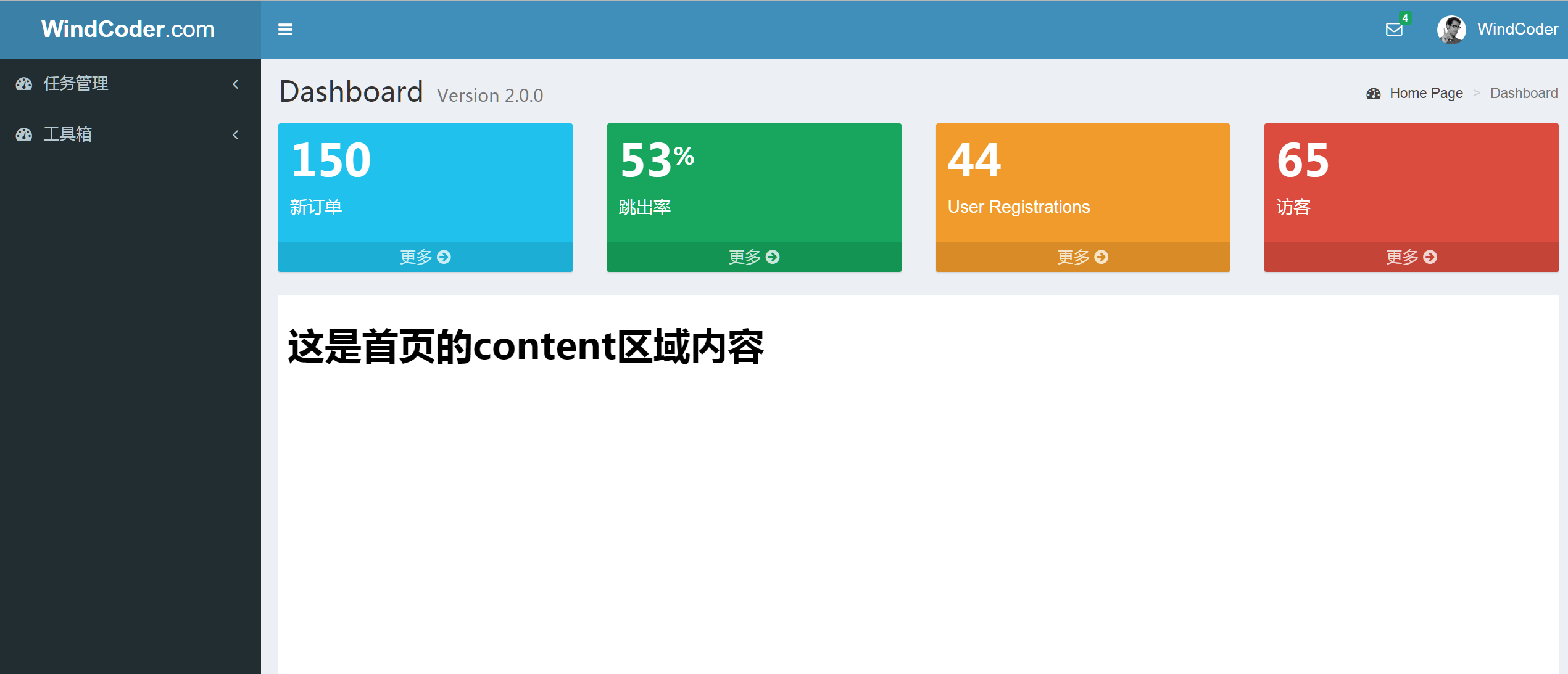
完整代码:
index.html
<!DOCTYPE html>

<html xmlns="http://www.w3.org/1999/xhtml"

      xmlns:th="http://www.thymeleaf.org">

<head>

    <title>管理后台</title>

    <meta charset="utf-8">

    <meta http-equiv="X-UA-Compatible" content="IE=edge">

    <!-- Tell the browser to be responsive to screen width -->

    <meta content="width=device-width, initial-scale=1, maximum-scale=1, user-scalable=no" name="viewport">

    <!-- Bootstrap 3.3.7 -->

    <link rel="stylesheet" th:href="@{/assets/plugins/bootstrap/css/bootstrap.min.css}">

    <!--<link rel="stylesheet" th:href="@{/bootstrap/css/bootstrap.min.css}">-->

    <!-- Font Awesome -->

    <link rel="stylesheet" th:href="@{/assets/plugins/font-awesome/css/font-awesome.min.css}">

    <!-- Ionicons -->

    <!-- Theme style -->

    <link rel="stylesheet" th:href="@{/assets/css/AdminLTE.min.css}">

    <!-- AdminLTE Skins. Choose a skin from the css/skins

       folder instead of downloading all of them to reduce the load. -->

    <link rel="stylesheet" th:href="@{/assets/css/_all-skins.min.css}">

    <!-- iCheck -->

    <link rel="stylesheet" th:href="@{/assets/plugins/iCheck/square/blue.css}">

    <link rel="stylesheet" th:href="@{/assets/css/home.css}">

    <!-- HTML5 Shim and Respond.js IE8 support of HTML5 elements and media queries -->

    <!-- WARNING: Respond.js doesn't work if you view the page via file:// -->

    <!--[if lt IE 9]>

    <script src="https://oss.maxcdn.com/html5shiv/3.7.3/html5shiv.min.js"></script>

    <script src="https://oss.maxcdn.com/respond/1.4.2/respond.min.js"></script>

    <![endif]-->

</head>

<body class="hold-transition skin-blue  sidebar-mini">

<div class="wrapper">

    <header class="main-header">

        <!-- Logo -->

        <a href="#" class="logo">

            <!-- mini logo for sidebar mini 50x50 pixels -->

            <span class="logo-mini"><b>A</b>LT</span>

            <!-- logo for regular state and mobile devices -->

            <span class="logo-lg"><b>WindCoder</b>.com</span>

        </a>

        <!-- Header Navbar: style can be found in header.less -->

        <nav class="navbar navbar-static-top">

            <!-- Sidebar toggle button-->

            <a href="#" class="sidebar-toggle" data-toggle="push-menu" role="button">

                <span class="sr-only">Toggle navigation</span>

            </a>

            <div class="navbar-custom-menu">

                <ul class="nav navbar-nav">

                    <!-- Messages: style can be found in dropdown.less-->

                    <li class="dropdown messages-menu">

                        <a href="#" class="dropdown-toggle" data-toggle="dropdown">

                            <i class="fa fa-envelope-o"></i>

                            <span class="label label-success">4</span>

                        </a>

                        <ul class="dropdown-menu">

                            <li class="header">您有4条信息</li>

                            <li>

                                <!-- inner menu: contains the actual data -->

                                <ul class="menu">

                                    <li><!-- start message -->

                                        <a href="#">

                                            <div class="pull-left">

                                                <img th:src="@{/assets/img/user2-160x160.jpg}" class="img-circle" alt="User Image">

                                            </div>

                                            <h4>

                                                小西西

                                                <small><i class="fa fa-clock-o"></i> 5 mins</small>

                                            </h4>

                                            <p>你是谁?</p>

                                        </a>

                                    </li>

                                    <!-- end message -->

                                </ul>

                            </li>

                            <li class="footer"><a href="#">查看所有信息</a></li>

                        </ul>

                    </li>

                    <!-- User Account: style can be found in dropdown.less -->

                    <li class="dropdown user user-menu">

                        <a href="#" class="dropdown-toggle" data-toggle="dropdown">

                            <img th:src="@{/assets/img/user2-160x160.jpg}" class="user-image" alt="User Image">

                            <span class="hidden-xs">WindCoder</span>

                        </a>

                        <ul class="dropdown-menu">

                            <!-- User image -->

                            <li class="user-header">

                                <img th:src="@{/assets/img/user2-160x160.jpg}" class="img-circle" alt="User Image">

                                <p>

                                    WindCoder - 超级管理员

                                    <small>Member since Nov. 2012</small>

                                </p>

                            </li>

                            <!-- Menu Body -->

                            <li class="user-body">

                                <div class="row">

                                    <div class="col-xs-6 text-center">

                                        <a href="#">粉丝</a>

                                    </div>

                                    <div class="col-xs-6 text-center">

                                        <a href="#">关注</a>

                                    </div>

                                </div>

                                <!-- /.row -->

                            </li>

                            <!-- Menu Footer-->

                            <li class="user-footer">

                                <div class="pull-left">

                                    <a href="#" class="btn btn-default btn-flat">个人信息</a>

                                </div>

                                <div class="pull-right">

                                    <a href="/logout" class="btn btn-default btn-flat">退出</a>

                                </div>

                            </li>

                        </ul>

                    </li>

                    <!-- Control Sidebar Toggle Button -->

                </ul>

            </div>

        </nav>

    </header>

    <!-- Left side column. contains the logo and sidebar -->

    <aside class="main-sidebar">

        <!-- sidebar: style can be found in sidebar.less -->

        <section class="sidebar">

            <!-- Sidebar user panel -->

            <!-- /.search form -->

            <!-- sidebar menu: : style can be fo\

        <section class="content-header">

            <h1>

                Dashboard

                <small>Version 2.0.0</small>

            </h1>

            <ol class="breadcrumb">

                <li><a href="#"><i class="fa fa-dashboard"></i> Home Page</a></li>

                <li class="active">Dashboard</li>

            </ol>

        </section>

        <!-- Main content -->

        <section class="content">

            <!-- Small boxes (Stat box) -->

            <div class="row">

                <div class="col-lg-3 col-xs-6">

                    <!-- small box -->

                    <div class="small-box bg-aqua">

                        <div class="inner">

                            <h3>150</h3>

                            <p>新订单</p>

                        </div>

                        <div class="icon">

                            <i class="ion ion-bag"></i>

                        </div>

                        <a href="#" class="small-box-footer">更多 <i class="fa fa-arrow-circle-right"></i></a>

                    </div>

                </div>

                <!-- ./col -->

                <div class="col-lg-3 col-xs-6">

                    <!-- small box -->

                    <div class="small-box bg-green">

                        <div class="inner">

                            <h3>53<sup style="font-size: 20px">%</sup></h3>

                            <p>跳出率</p>

                        </div>

                        <div class="icon">

                            <i class="ion ion-stats-bars"></i>

                        </div>

                        <a href="#" class="small-box-footer">更多 <i class="fa fa-arrow-circle-right"></i></a>

                    </div>

                </div>

                <!-- ./col -->

                <div class="col-lg-3 col-xs-6">

                    <!-- small box -->

                    <div class="small-box bg-yellow">

                        <div class="inner">

                            <h3>44</h3>

                            <p>User Registrations</p>

                        </div>

                        <div class="icon">

                            <i class="ion ion-person-add"></i>

                        </div>

                        <a href="#" class="small-box-footer">更多 <i class="fa fa-arrow-circle-right"></i></a>

                    </div>

                </div>

                <!-- ./col -->

                <div class="col-lg-3 col-xs-6">

                    <!-- small box -->

                    <div class="small-box bg-red">

                        <div class="inner">

                            <h3>65</h3>

                            <p>访客</p>

                        </div>

                        <div class="icon">

                            <i class="ion ion-pie-graph"></i>

                        </div>

                        <a href="#" class="small-box-footer">更多 <i class="fa fa-arrow-circle-right"></i></a>

                    </div>

                </div>

                <!-- ./col -->

            </div>

            <!-- /.row -->

            <iframe scrolling="yes" frameborder="0"

                    style="width: 100%; min-height: 450px; overflow: visible; background: #fff;"

                    id="menuFrame" name="menuFrame" src="/main"></iframe>

            <!--<iframe id="menuFrame" name="menuFrame" src="main.html" style="overflow:visible;"-->

                    <!--scrolling="yes" frameborder="no" height="100%" width="100%"></iframe>-->

        </section>

    </div>

</div>

<!-- ./wrapper -->

<script>

    var basePath = "";

</script>

<!-- jQuery 3 -->

<script th:src="@{/assets/js/jquery.min.js}"></script>

<!-- Bootstrap 3.3.7 -->

<script th:src="@{/assets/plugins/bootstrap/js/bootstrap.min.js}"></script>

<!-- AdminLTE App -->

<script th:src="@{/assets/js/adminlte.js}"></script>

</body>

</html>
点击用户管理
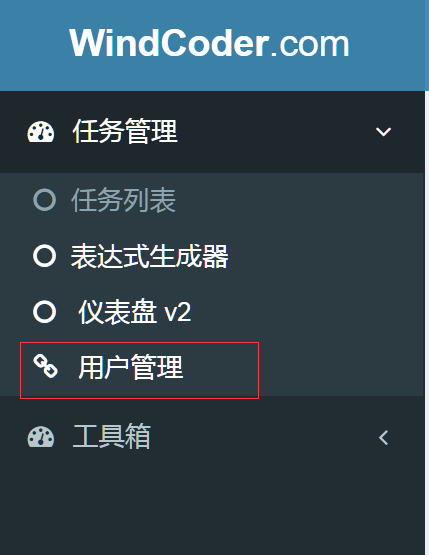
<li class="active"><a href="/test" target="menuFrame" ><i class="fa fa-link"></i> <span>用户管理</span></a></li>

点击之后的效果如下

首页WindCoder.com参考:https://github.com/HalfWater/WebDemos
仪表盘及控制面板参考:http://adminlte.la998.com/
使用AdminLTE 在content区,打开相应网页的更多相关文章
- 使用C语言在windows下一口气打开一批网页
作者:郝峰波 mail : fengbohello@qq.com 本博客地址:http://www.cnblogs.com/fengbohello/p/4374450.html 1.核心函数说明 核心 ...
- 从tcp的角度看,打开一个网页到底发生了什么
使用wireshark进行抓包分析:新建表达式过滤器,选择协议,字段,匹配方式,应用就能筛选出想要的数据包. 一个示例:(tcp.srcport == 1523 or tcp.dstport == 1 ...
- PHP 连接打开新网页带参数
PHP 连接打开新网页带参数 detail.php?ID=<?PHP echo $row['ID'];?> aa.php?ID=123 取ID参数 $aid=$_GET['ID']; 网页 ...
- jQuery 实现网页跳转或用命令打开指定网页!
Jquery实现网页跳转或用命令打开指定网页! location.href = "www.baidu.com"; location.href = "aa.aspx&quo ...
- Python-webbrowser实现自动打开关、定时打开关闭网页/刷新网页
webbrowser- 方便的Web浏览器控制器,是Python一个模块,可实现自动打开关.定时打开关闭网页/刷新网页,在Unix下,图形浏览器在X11下更受欢迎,但如果图形浏览器不可用或X11显示器 ...
- 火狐插件simple timer 定时打开指定网页
今天我要介绍的是火狐浏览器一款插件:Simple Timer,该插件是火狐一个可以添加计时器和定时提醒功能插件,该插件的主要作用就是当你的设置在某一个时刻提醒时,插件会自动弹出通知,并且自动打开你想要 ...
- 树莓派开机自动启动Chomium浏览器并打开指定网页
树莓派开机自动启动Chomium浏览器并打开指定网页 cd /home/pi/.config mkdir autostart cd autostart vi my.desktop [Desktop E ...
- 2015.2.16 关于delphi web控件打开新网页时弹出关闭页面(js代码)出错的解决办法研究
参考网址1:http://www.csharpwin.com/csharpspace/2360.shtml...参考网址2:http://www.oschina.net/question/234345 ...
- 点击TextView浏览器打开指定网页
直接上代码: /** * 点击跳转到版权页面 */ private void getCopyRight() { // TODO Auto-generated method stub TextView ...
随机推荐
- PHP中SESSION自定义会话管理器
<?php class CustomSession implements SessionHandlerInterface{ private $link; private $lifetime; p ...
- EF Code First 整不明白 继续完善
1.Add-Migration RenameDesc 要修改列名先用这个,然后把要修改的列名手动修改一下. 多出这个文件 public partial class RenameDesc : DbM ...
- unity3d 加载优化建议 总结 from 侑虎科技
第一部分 我们对于纹理资源的加载建议如下: 1.严格控制RGBA32和ARGB32纹理的使用,在保证视觉效果的前提下,尽可能采用“够用就好”的原则,降低纹理资源的分辨率,以及使用硬件支持的纹理格式. ...
- 3.3 idea中使用git遇到的一些问题
1. 修改TortoiseGit用户名和密码 修改TortoiseGit用户名和密码其实就是对Git的用户名和密码就行修改. 控制面板 -> 点击“用户账户” -> 管理windows凭据 ...
- leecode第二十六题(删除排序数组中的重复项)
class Solution { public: int removeDuplicates(vector<int>& nums) { int len=nums.size(); ) ...
- 查询选修了全部课程的学生姓名_如何解?-MS-SQLServer/应用实例
查询选修了全部课程的学生姓名:student 是学生表 course 是选课表 sc 是课程表select snamefrom studentwhere not exists(select *from ...
- QTableWidget自定义表头QHeaderView加全选复选框
1 QTableWidget自定义表头QHeaderView加全选复选框 在使用QTableWidget时需要在表头添加全选复选框,但是默认的表头无法添加复选框,只能用图片画上去一个复 ...
- cocos2dx spine之一 :spine缓存 (c++ & lua)
cocos2dx版本为3.10 1.在使用spine的过程中,发现了一个比较严重的问题:每次创建SkeletonAnimation的时候都会很卡,即使是使用同一个骨骼数据skeletonData. 跟 ...
- python读取配置文件&&简单封装
之前有做过把爬虫数据写到数据库中的练习,这次想把数据库信息抽离到一个ini配置文件中,这样做的好处在于可以在配置文件中添加多个数据库,方便切换(另外配置文件也可以添加诸如邮箱.url等信息) 1.co ...
- mybatis-generator使用心得
通过web service给前端返回数据 首先后台先建表, 再针对表进行CRUD的各种sql, 然鹅,现在流行做法是使用mybatis,直接xml把sql融合了,什么事都有利弊,像我这样的手写sql党 ...