
Emgu 学习(7)threshold ,图像过滤
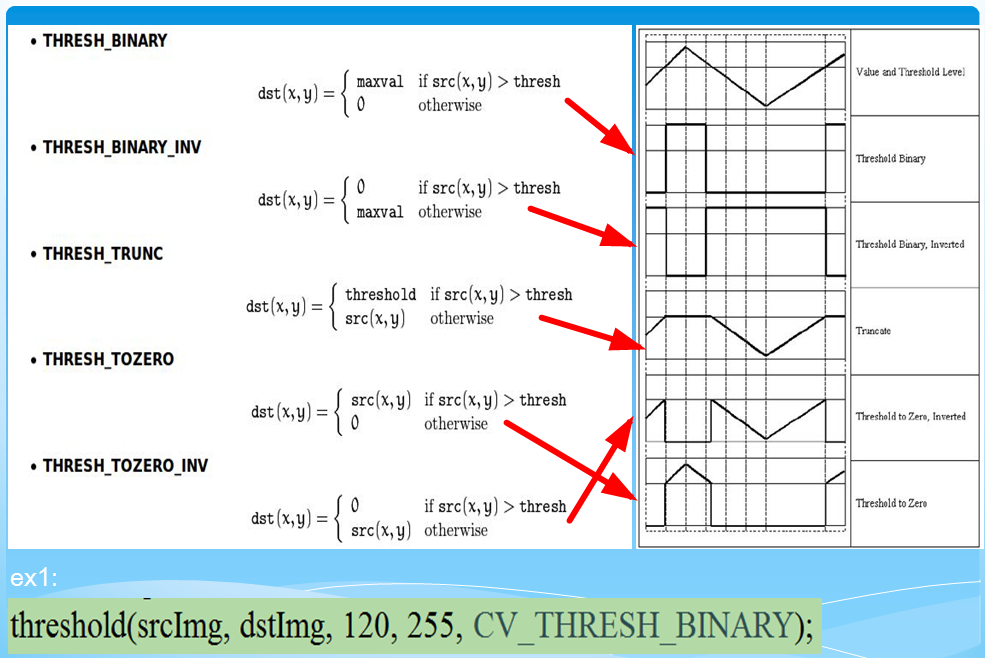
Threshold

代码如下
        static void Main(String[] args)

        {

            Mat img = CvInvoke.Imread(@"C:\Users\dell\Pictures\facesGray.png", ImreadModes.Grayscale);

            Mat dst = new Mat();

            double thresholdValue = ;

            double max = ;

            CvInvoke.Threshold(img, dst, thresholdValue, max, ThresholdType.Binary);

            CvInvoke.Imshow("src", img);

            CvInvoke.Imshow("Binary", dst);

            CvInvoke.Threshold(img, dst, thresholdValue, max, ThresholdType.BinaryInv);

            CvInvoke.Imshow("BinaryInv", dst);

            CvInvoke.Threshold(img, dst, thresholdValue, max, ThresholdType.Otsu);

            CvInvoke.Imshow("Otsu", dst);

            CvInvoke.Threshold(img, dst, thresholdValue, max, ThresholdType.ToZero);

            CvInvoke.Imshow("ToZero", dst);

            CvInvoke.Threshold(img, dst, thresholdValue, max, ThresholdType.ToZeroInv);

            CvInvoke.Imshow("ToZeroInv", dst);

            CvInvoke.Threshold(img, dst, thresholdValue, max, ThresholdType.Trunc);

            CvInvoke.Imshow("Trunc", dst);

            CvInvoke.WaitKey();

        }
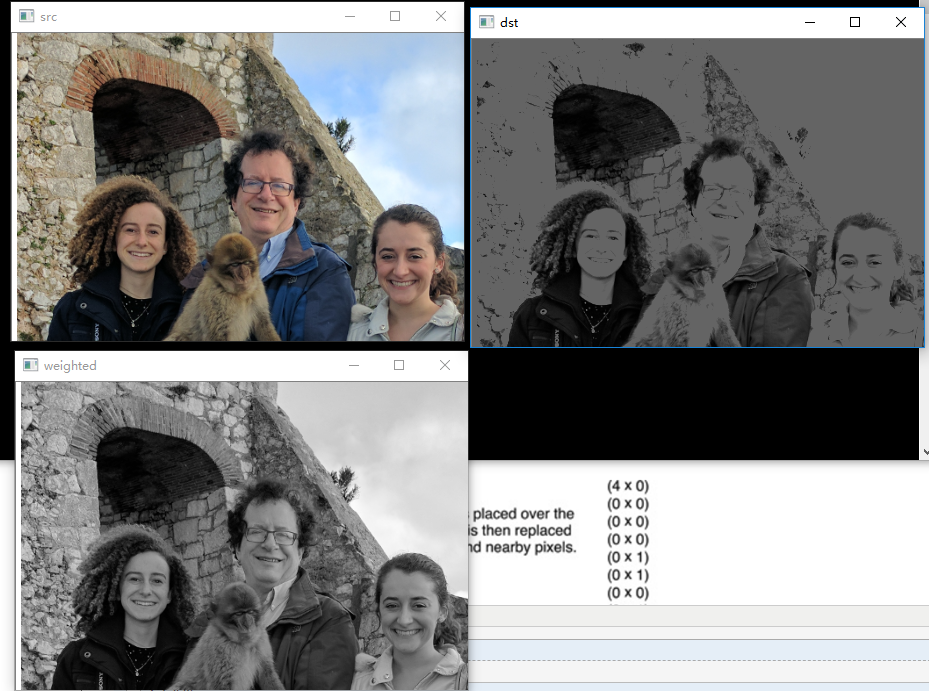
例子
    class Program

    {

        static void Main(String[] args)

        {

            Mat img = CvInvoke.Imread(@"C:\Users\dell\Pictures\faces.png");

            Mat dst = new Mat();

            Mat weighted = new Mat();

            weighted = sum_rgb(img, dst).Clone();

            CvInvoke.Imshow("src", img);

            CvInvoke.Imshow("weighted", weighted);

            CvInvoke.Imshow("dst", dst);

            CvInvoke.WaitKey();

        }

        static Mat sum_rgb(Mat src,Mat dst)

        {

            int ch = src.NumberOfChannels;

            VectorOfMat vMat = new VectorOfMat(ch);

            CvInvoke.Split(src, vMat);

            Mat b = vMat[];

            Mat g = vMat[];

            Mat r=  vMat[];

            Mat s = new Mat();

            CvInvoke.AddWeighted(r, 1.0 / , g, 1.0 / , 0.0,s);

            CvInvoke.AddWeighted(s, 1.0, b, 1.0 / , 0.0, s);

            CvInvoke.Threshold(s, dst, , , ThresholdType.Trunc);

            return s;

        }

    }
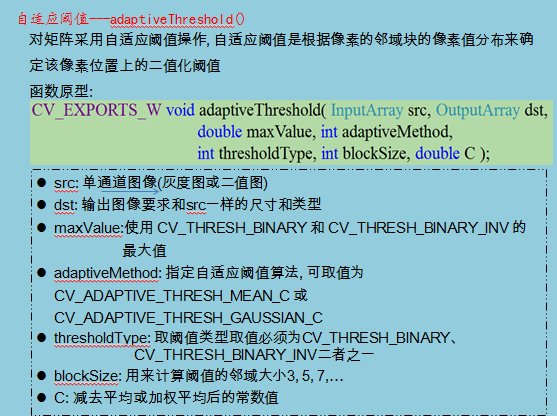
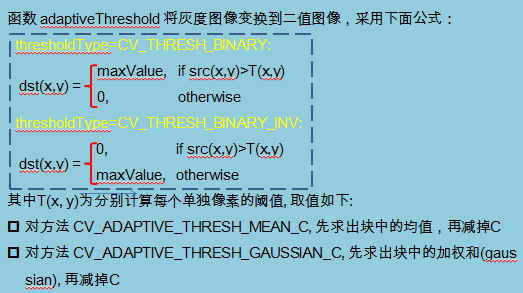
自适应Threshold

代码
        static void Main(String[] args)

        {

            Mat img = CvInvoke.Imread(@"C:\Users\dell\Pictures\faces.png",);

            Mat Gaussian = new Mat();

            Mat Mean = new Mat();

            CvInvoke.AdaptiveThreshold(img, Gaussian, , AdaptiveThresholdType.GaussianC, ThresholdType.Binary, , );

            CvInvoke.AdaptiveThreshold(img, Mean, , AdaptiveThresholdType.MeanC, ThresholdType.Binary, , );

            CvInvoke.Imshow("src", img);

            CvInvoke.Imshow("Gaussian", Gaussian);

            CvInvoke.Imshow("Mean", Mean);

            CvInvoke.WaitKey();

        }

代码
        static void Main(String[] args)

        {

            Mat img = CvInvoke.Imread(@"C:\Users\dell\Pictures\faces.png");

            Mat dst = new Mat();

            CvInvoke.BoxFilter(img, dst, DepthType.Default, new Size(, ), new Point(-, -));

            CvInvoke.Imshow("src", img);

            CvInvoke.Imshow("boxFilter", dst);

            CvInvoke.Blur(img, dst, new Size(, ), new Point(-, -));

            CvInvoke.Imshow("blur", dst);

            CvInvoke.GaussianBlur(img, dst, new Size(, ), );

            CvInvoke.Imshow("Gaussian", dst);

            CvInvoke.MedianBlur(img, dst, );

            CvInvoke.Imshow("median", dst);

            CvInvoke.BilateralFilter(img, dst, , 30.0, 2.0);

            CvInvoke.Imshow("Bilateral", dst);

            CvInvoke.WaitKey();

        }
效果如下

Emgu 学习(7)threshold ,图像过滤的更多相关文章
- Emgu学习之(四)——图像阈值
http://www.cnblogs.com/CoverCat/p/5043833.html Visual Studio Community 2015 工程和代码:http://pan.baidu.c ...
- Emgu学习之(二)——图像读取、显示、保存
visual Studio Community 2015 工程和源代码:http://pan.baidu.com/s/1o6u5Fdw 内容 在这篇文章中将提到以下内容: 从文件中读取图像 Image ...
- Emgu学习之(三)——操作图像数据
Visual Studio Community 2015 工程和代码:http://pan.baidu.com/s/1jHmlQeE 内容 在这篇文章中将提到以下内容: 修改像素值 图像ROI 图像加 ...
- Emgu学习手册
作为opencv的c#封装库.emgu可以满足基本的图像处理功能,经过测试,效果还可以,主要用于windows窗体应用程序的开发,或者wpf,你可以用来做ocr,也可以用来做人脸识别或者可以用来做定位 ...
- B1066 图像过滤 (15分)
B1066 图像过滤 (15分) 图像过滤是把图像中不重要的像素都染成背景色,使得重要部分被凸显出来.现给定一幅黑白图像,要求你将灰度值位于某指定区间内的所有像素颜色都用一种指定的颜色替换. 输入格式 ...
- PAT 1066 图像过滤
https://pintia.cn/problem-sets/994805260223102976/problems/994805266514558976 图像过滤是把图像中不重要的像素都染成背景色, ...
- openCV学习——一、图像读取、显示、输出
openCV学习——一.图像读取.显示.输出 一.Mat imread(const string& filename,int flags=1),用于读取图片 1.参数介绍 filename ...
- PAT 乙级 1066. 图像过滤(15)
图像过滤是把图像中不重要的像素都染成背景色,使得重要部分被凸显出来.现给定一幅黑白图像,要求你将灰度值位于某指定区间内的所有像素颜色都用一种指定的颜色替换. 输入格式: 输入在第一行给出一幅图像的分辨 ...
- PAT 乙级 1066 图像过滤(15) C++版
1066. 图像过滤(15) 时间限制 400 ms 内存限制 65536 kB 代码长度限制 8000 B 判题程序 Standard 作者 CHEN, Yue 图像过滤是把图像中不重要的像素都染成 ...
随机推荐
- Elasticsearch:运用shard filtering来控制索引分配给哪个节点
在我们的实际部署中,我们的各个node(节点)的能力是不一样的.比如有的节点的计算能力比较强,而且配有高性能的存储,速度也比较快,同时我们可能有一些node的能力稍微差一点,比如计算能力及存储器的速度 ...
- Spring——JdbcTemplate
一.JdbcTemplate介绍: 为了使 JDBC 更加易于使用,Spring 在 JDBCAPI 上定义了一个抽象层, 以此建立一个JDBC存取框架,Spring Boot Spring Data ...
- 关于Additive Ensembles of Regression Trees模型的快速打分预测
一.论文<QuickScorer:a Fast Algorithm to Rank Documents with Additive Ensembles of Regression Trees&g ...
- Codeforces 981 D.Bookshelves(数位DP)
Codeforces 981 D.Bookshelves 题目大意: 给n个数,将这n个数分为k段,(n,k<=50)分别对每一段求和,再将每个求和的结果做与运算(&).求最终结果的最大 ...
- ssh以及双机互信
当我们要远程到其他主机上面时就需要使用ssh服务了. 我们就来安装一下sshd服务以及ssh命令的使用方法. 服务安装: 需要安装OpenSSH 四个安装包: 安装包: openssh-5.3p1-1 ...
- gRPC-Web正式发布
前言: gRPC-Web是一个JavaScript客户端库,可以使Web应用程序直接与后端gRPC服务进行通信,而无需HTTP服务器充当中介. 这意味着可以通过使用.proto文件定义客户端和服务器端 ...
- 有趣但是没有用的linux命令
1,小火车 #yum install sl 2,黑客帝国,代码雨 # wget https://jaist.dl.sourceforge.net/project/cmatrix/cmatrix/1.2 ...
- ftp协议在linux上的配置
第一步:安装 yum install -y vsftpd 第二步:启动ftp服务:vsftpd [root@localhost ~]# systemctl start vsftpd 第三步:查看启动状 ...
- (一)C语言的四大数据类型
- LeetCode 142. 环形链表 II(Linker List Cycle II)
题目描述 给定一个链表,返回链表开始入环的第一个节点. 如果链表无环,则返回 null. 说明:不允许修改给定的链表. 进阶: 你是否可以不用额外空间解决此题? 解题思路 分为三步: 首先判断是否存在 ...