
Java浅拷贝与深拷贝(思维导图)
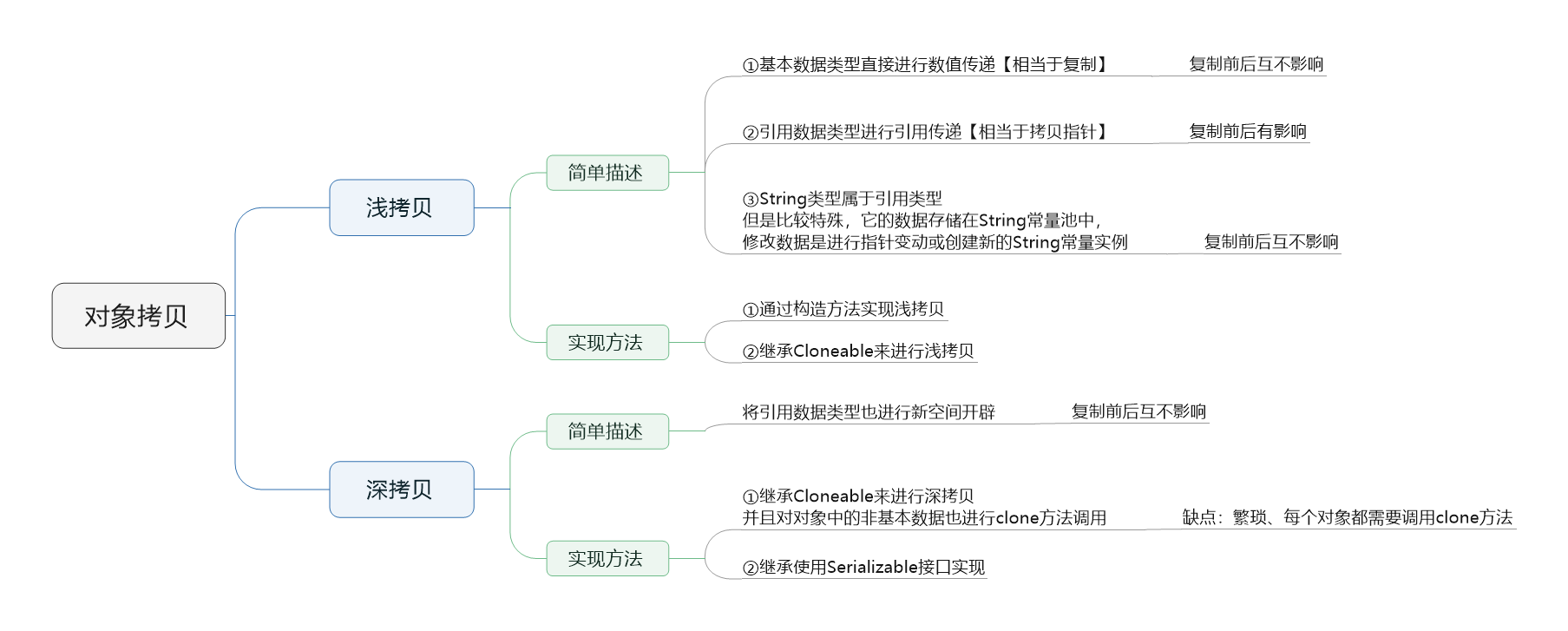
图1 拷贝思维导图(点击查看图片)
1,拷贝
有两个相同属性的对象A和B,A拥有初始化值,将其值拷贝到B中,使得B拥有与A“相同”数据的属性!注意这里的相同我有加双引号!
相同可能表示这么几个意思:①数值相同【指向不同的内存空间】;②地址相同【指向相同的内存空间】;
下面是直接使用"="进行复制的操作
 package com.cnblogs.mufasa.Demo1;

 import java.util.Date;

 class Person{//

     private int age=0;

     private Birth birth=new Birth();

     private String name="";

     public Person(int age, Birth birth, String name) {

         this.age = age;

         this.birth = birth;

         this.name = name;

     }

     public int getAge() {

         return age;

     }

     public void setAge(int age) {

         this.age = age;

     }

     public Birth getBirth() {

         return birth;

     }

     public void setBirth(Birth birth) {

         this.birth = birth;

     }

     public String getName() {

         return name;

     }

     public void setName(String name) {

         this.name = name;

     }

     public String toString(){

         return "姓名:"+name+",年龄:"+age+",出生日期:"+birth.toString();

     }

 }

 class Birth{//生日

     private String date="";

     public Birth(){}

     public Birth(String date){

         this.date=date;

     }

     public String getDate() {

         return date;

     }

     public void setDate(String date) {

         this.date = date;

     }

     @Override

     public String toString() {

         return this.date;

     }

 }

 public class Demo1 {//浅拷贝

     public static void main(String[] args) {

         Person p1=new Person(18,new Birth("19950729"),"万雨");

         Person p2=p1;

         System.out.println(p1.toString());

         System.out.println(p2.toString());

         p1.setAge(17);

         p1.setBirth(new Birth("2018"));

         p1.setName("Mufasa");

         System.out.println(p1.toString());

         System.out.println(p2.toString());

     }

 }
姓名:万雨,年龄:18,出生日期:19950729

姓名:万雨,年龄:18,出生日期:19950729

姓名:Mufasa,年龄:17,出生日期:2018

姓名:Mufasa,年龄:17,出生日期:2018
其实就相当于对原始对象进行操作
2,浅拷贝
Perosn类型对象有两个属性Age、name,将p1浅复制给p2
基本类型直接进行数值复制,引用类型进行地址拷贝(String类型比较特殊,属于引用类型,但是它存在一个常量池需要进行特殊对待)

图2 浅拷贝
使用构造方法进行浅拷贝:
 package com.cnblogs.mufasa.Demo;

 import java.util.Date;

 class Person{//

     private Age age;

     private String name;

     private int birth;

     public Person(Age age, String name,int birth) {

         this.age = age;

         this.name = name;

         this.birth = birth;

     }

     public Person(Person p1){

         this.age=p1.age;

         this.name=p1.name;

         this.birth=p1.birth;

     }

     public int getAge() {

         return this.age.getAge();

     }

     public void setAge(int age) {

         this.age.setAge(age); ;

     }

     public void setAge(Age age) {

         this.age = age;

     }

     public int getBirth() {

         return birth;

     }

     public void setBirth(int birth) {

         this.birth = birth;

     }

     public String getName() {

         return this.name;

     }

     public void setName(String name) {

         this.name = name;

     }

     public String toString(){

         return "姓名:"+this.name+",年龄:"+this.age+",出生日期:"+this.birth;

     }

 }

 class Age{

     private int age;

     public Age(){}

     public Age(int age){

         this.age=age;

     }

     public int getAge() {

         return age;

     }

     public void setAge(int age) {

         this.age = age;

     }

     public String toString(){

         return this.age+"";

     }

 }

 public class Demo {//浅拷贝-构造方法实现

     public static void main(String[] args) {

         Person p1=new Person(new Age(18),"万雨",1995);

         Person p2=new Person(p1);

         System.out.println(p1.toString());

         System.out.println(p2.toString());

         p1.setAge(17);

         p1.setBirth(2019);

         p1.setName("Mufasa");

         System.out.println(p1.toString());

         System.out.println(p2.toString());

     }

 }
使用继承Cloneable接口调用clone方法进行浅拷贝
 package com.cnblogs.mufasa.Demo2;

 import java.util.Date;

 class Person implements Cloneable{//

     private Age age;

     private String name;

     private int birth;

     public Person(Age age, String name,int birth) {

         this.age = age;

         this.name = name;

         this.birth = birth;

     }

     public Person clone(){

         Person obj=null;

         try {

             obj=(Person) super.clone();

         }catch (CloneNotSupportedException e){

             e.printStackTrace();

         }

 //        obj.age=(Age) this.getAge().clone();

         return obj;

     }

     public Age getAge() {

         return this.age;

     }

     public void setAge(int age) {

         this.age.setAge(age); ;

     }

     public void setAge(Age age) {

         this.age = age;

     }

     public int getBirth() {

         return birth;

     }

     public void setBirth(int birth) {

         this.birth = birth;

     }

     public String getName() {

         return this.name;

     }

     public void setName(String name) {

         this.name = name;

     }

     public String toString(){

         return "姓名:"+this.name+",年龄:"+this.age+",出生日期:"+this.birth;

     }

 }

 class Age implements Cloneable{

     private int age;

     public Age(){}

     public Age(int age){

         this.age=age;

     }

 //    public Age clone(){

 //        Age obj=null;

 //        try {

 //            obj=(Age) super.clone();

 //        }catch (CloneNotSupportedException e){

 //            e.printStackTrace();

 //        }

 //        return obj;

 //    }

     public int getAge() {

         return age;

     }

     public void setAge(int age) {

         this.age = age;

     }

     public String toString(){

         return this.age+"";

     }

 }

 public class Demo2 {//浅拷贝-继承Cloneable接口实现

     public static void main(String[] args) {

         Person p1=new Person(new Age(18),"万雨",1995);

         Person p2=(Person)p1.clone();

         System.out.println(p1.toString());

         System.out.println(p2.toString());

         p1.setAge(17);

         p1.setBirth(2019);

         p1.setName("Mufasa");

         System.out.println(p1.toString());

         System.out.println(p2.toString());

     }

 }
姓名:万雨,年龄:18,出生日期:1995

姓名:万雨,年龄:18,出生日期:1995

姓名:Mufasa,年龄:17,出生日期:2019

姓名:万雨,年龄:17,出生日期:1995
3,深拷贝
引用类型数据也进行新内存开辟与幅值,
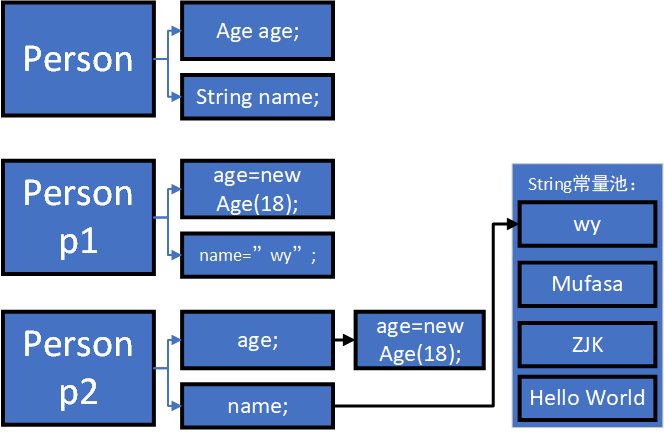
图3 深拷贝
使用继承Cloneable接口调用clone方法进行深拷贝【每个引用对象都需要使用clone方法进行拷贝】
 package com.cnblogs.mufasa.Demo2;

 import java.util.Date;

 class Person implements Cloneable{//

     private Age age;

     private String name;

     private int birth;

     public Person(Age age, String name,int birth) {

         this.age = age;

         this.name = name;

         this.birth = birth;

     }

     public Person clone(){

         Person obj=null;

         try {

             obj=(Person) super.clone();

         }catch (CloneNotSupportedException e){

             e.printStackTrace();

         }

         obj.age=(Age) this.getAge().clone();

         return obj;

     }

     public Age getAge() {

         return this.age;

     }

     public void setAge(int age) {

         this.age.setAge(age); ;

     }

     public void setAge(Age age) {

         this.age = age;

     }

     public int getBirth() {

         return birth;

     }

     public void setBirth(int birth) {

         this.birth = birth;

     }

     public String getName() {

         return this.name;

     }

     public void setName(String name) {

         this.name = name;

     }

     public String toString(){

         return "姓名:"+this.name+",年龄:"+this.age+",出生日期:"+this.birth;

     }

 }

 class Age implements Cloneable{

     private int age;

     public Age(){}

     public Age(int age){

         this.age=age;

     }

     public Age clone(){

         Age obj=null;

         try {

             obj=(Age) super.clone();

         }catch (CloneNotSupportedException e){

             e.printStackTrace();

         }

         return obj;

     }

     public int getAge() {

         return age;

     }

     public void setAge(int age) {

         this.age = age;

     }

     public String toString(){

         return this.age+"";

     }

 }

 public class Demo2 {//浅拷贝-继承Cloneable接口实现

     public static void main(String[] args) {

         Person p1=new Person(new Age(18),"万雨",1995);

         Person p2=(Person)p1.clone();

         System.out.println(p1.toString());

         System.out.println(p2.toString());

         p1.setAge(17);

         p1.setBirth(2019);

         p1.setName("Mufasa");

         System.out.println(p1.toString());

         System.out.println(p2.toString());

     }

 }
使用继承Serializable接口进行序列化与反序列化进行深拷贝【注意对象不能使用transient进行修饰,原因:transient修饰的对象无法进行序列化!】
 package com.cnblogs.mufasa.Demo3;

 import java.io.*;

 class Person implements Serializable{

     private Age age;

     private String name;

     private int birth;

     public Person(Age age, String name,int birth) {

         this.age = age;

         this.name = name;

         this.birth = birth;

     }

     public Age getAge() {

         return this.age;

     }

     public void setAge(int age) {

         this.age.setAge(age); ;

     }

     public void setAge(Age age) {

         this.age = age;

     }

     public int getBirth() {

         return birth;

     }

     public void setBirth(int birth) {

         this.birth = birth;

     }

     public String getName() {

         return this.name;

     }

     public void setName(String name) {

         this.name = name;

     }

     public String toString(){

         return "姓名:"+this.name+",年龄:"+this.age+",出生日期:"+this.birth;

     }

 }

 class Age implements Serializable {

     private int age;

     public Age(){}

     public Age(int age){

         this.age=age;

     }

     public int getAge() {

         return age;

     }

     public void setAge(int age) {

         this.age = age;

     }

     public String toString(){

         return this.age+"";

     }

 }

 public class Demo3 {//浅拷贝-继承Cloneable接口实现

     public static void main(String[] args) throws IOException, ClassNotFoundException {

         Person p1=new Person(new Age(18),"万雨",1995);

         ByteArrayOutputStream bos=new ByteArrayOutputStream();

         ObjectOutputStream oos=new ObjectOutputStream(bos);

         oos.writeObject(p1);//1,先进行序列化

         oos.flush();

         ObjectInputStream ois=new ObjectInputStream(new ByteArrayInputStream(bos.toByteArray()));

         Person p2=(Person)ois.readObject();//2,进行反序列化

         System.out.println(p1.toString());

         System.out.println(p2.toString());

         p1.setAge(17);

         p1.setBirth(2019);

         p1.setName("Mufasa");

         System.out.println(p1.toString());

         System.out.println(p2.toString());

     }

 }
姓名:万雨,年龄:18,出生日期:1995

姓名:万雨,年龄:18,出生日期:1995

姓名:Mufasa,年龄:17,出生日期:2019

姓名:万雨,年龄:18,出生日期:1995
Java浅拷贝与深拷贝(思维导图)的更多相关文章
- [Java 并发] Java并发编程实践 思维导图 - 第一章 简单介绍
阅读<Java并发编程实践>一书后整理的思维导图.
- [Java 并发] Java并发编程实践 思维导图 - 第二章 线程安全性
依据<Java并发编程实践>一书整理的思维导图.
- [Java 并发] Java并发编程实践 思维导图 - 第四章 对象的组合
依据<Java并发编程实践>一书整理的思维导图. 第一部分: 第二部分:
- 学习Java的9张思维导图
转自:https://blog.csdn.net/aitaozi11/article/details/79652943 网上搜集了java的学习思维导图,分享给大家. 01.Java程序设计(基础) ...
- Java建造者模式(思维导图)
图1 建造者模式[点击查看大图] 基本的知识点已在思维导图中,下面是demo 1,Builder 为创建一个产品对象的各个部件指定抽象接口 public interface PersonBuilder ...
- Java组合模式(思维导图)
图1 组合模式[点击查看图片] 1,以公司职员为例的结构 package com.cnblogs.mufasa.demo3; import java.util.ArrayList; import ja ...
- Java门面模式(思维导图)
图1 门面模式[点击查看图片] 1,实体对象类 package com.cnblogs.mufasa.demo1; //3个子系统,解决问题的实体 public class StoreA { //示意 ...
- Java Web学习过程的思维导图
今天找文件,无意中翻到老师前段时间总结的知识点.觉得应该有点用处,所以分享给大家. 第一次在博客园发表,如有错误,还请指正.
- java编程思想-泛型思维导图
- java编程思想-并发思维导图
随机推荐
- DELPHI10.3.1安卓照相
DELPHI10.3.1安卓照相 解决方法:
- JS模拟Touch事件
var ele = document.getElementsByClassName('target_node_class')[0] //may have x and y properties in s ...
- LINUX 上 实现SNTP (时间同步)
Network Time Protocol (NTP) 也是RHCE新增的考试要求. 学习的时候也顺便复习了一下如何设置Linux的时间,现在拿出来和大家分享 设置NTP服务器不难但是NTP本身是一个 ...
- 前端js保存页面为图片下载到本地
前端js保存页面为图片下载到本地 手机端点击下载按钮将页面保存成图片到本地 前端js保存页面为图片下载到本地的坑 html2canvas 识别 svg 解决方案 方案 html2canvas.js:可 ...
- 总结SQL查询慢的50个原因
查询速度慢的原因很多,本文总结SQL查询慢的50个原因: 1.没有索引或者没有用到索引(这是查询慢最常见的问题,是程序设计的缺陷) 2.I/O吞吐量小,形成了瓶颈效应. 3.没有创建计算列导致查询不优 ...
- linux下怎么用ssh连接另一台linux服务器
linux系统大家都知道是服务器版本一般都没有图像界面,通过字符界面操作.用ssh远程方式远程,如果要从一台linux远程到另外一台系统应该怎么操作呢本经验咗嚛以cenots7为例演示 方法/步骤 ...
- wm_concat()函数
转: Oracle wm_concat()函数 oracle wm_concat(column)函数使我们经常会使用到的,下面就教您如何使用oraclewm_concat(column)函数实现字段合 ...
- 怎么通过原生JS改变元素的class属性
解决方法:document.getElementById('test').className = 'emphasis' Eg: <!doctype html> <html lang= ...
- lexicalized Parsing
$q$(S $\rightarrow$ NP VP) * $q$(NP $\rightarrow$ NNP) * $q$(VP $\rightarrow$ VB NP) * $q$(NP $\righ ...
- appium1.4.1版本下载
链接:https://pan.baidu.com/s/1PvgeoPNW6bJg50uguL9fpA 密码:0fm7