
【VS开发】VSTO 学习笔记(十)Office 2010 Ribbon开发
微软的Office系列办公套件从Office 2007开始首次引入了Ribbon导航菜单模式,其将一系列相关的功能集成在一个个Ribbon中,便于集中管理、操作。这种Ribbon是高度可定制的,用户可以将自己常用的功能进行单独设置,提高工作效率。但是由于Office 2003时代用户的操作习惯已经养成,结果到了Office 2007很多菜单、按钮都找不到了,着实有些尴尬。经过一段时间的适应,相信大多数用户已经习惯Ribbon式的界面了。到了Office 2010时代,微软已经将所有Office产品加上了Ribbon界面:
本系列所有示例代码均在 Visual Studio 2010 Ultimate RTM + Office 2010 Professional Plus RTM x64 中测试通过
转载请注明出处:http://www.cnblogs.com/brooks-dotnet/archive/2010/12/31/1923519.html
Word 2010

Excel 2010

PowerPoint 2010

Publisher 2010

Project 2010

Visio 2010

Access 2010



SharePoint Workspace 2010(原Groove)


也有很多软件也推出了Ribbon界面,著名的如Autodesk系列、WinZip、Xencoder等:

作为开发人员我们就想如何才能开发这种Ribbon界面。我查找了一些资料,整理如下,如果你有更好的方案,欢迎补充。
一、Windows Ribbon Framework
Developer Audience
The Windows Ribbon framework is designed for use by C/C++ developers and UI designers.
Recommended proficiencies:
- COM programming
- Windows API programming
- XML/XAML programming
Recommended foundational knowledge:
- UI programming concepts
- General UI concepts
Minimum Requirements
|
Minimum supported client |
Windows 7 Windows Vista with Service Pack 2 (SP2) and Platform |
|
Minimum supported server |
Windows Server 2008 R2 Windows Server 2008 with SP2 and Platform |
|
Windows Software Development Kit (SDK) |
7.0 |
|
Header and IDL files |
uiribbon.h, uiribbon.idl |
二、Office 2010 AddIns
Office PIA中提供了接口、类来对Ribbon进行操作,可以参见我之前的一篇博文:VSTO学习笔记(三) 开发Office
2010 64位COM加载项
主要利用CommandBar类进行相关操作。利用Office PIA操作Ribbon很不直观,需要控制很多细节,但是非常灵活,可以最大程度的自定义Ribbon。
三、OpenXML SDK 2.0
如果你还没有安装OpenXML SDK 2.0,可以在这里下载。
Office 2007时代首次推出了OpenXML格式,并且通过了ISO国际标准。OpenXML格式有诸多好处,微软也发布了OpenXML SDK来对Office 2007、Office 2010的文档进行操作,提供了除Office PIA之外的另一种选择。采用OpenXML格式的Office文档实际上就是一个标准ZIP压缩包,可以将一个Office文档的扩展名修改为.zip并解压缩来查看其中的内容。
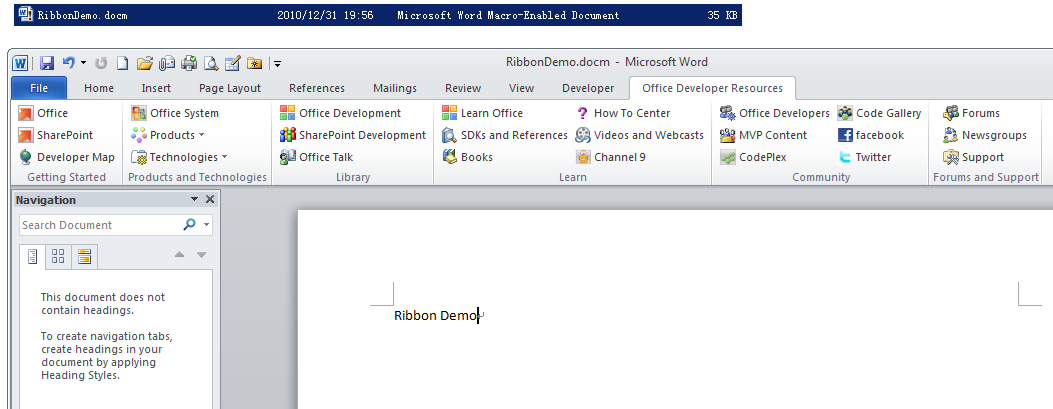
用户自定的Ribbon在OpenXML中保存在一个名为customUI.xml的XML文件中,如图,我打开了一个包含有加载宏的Word 2010文档,其中有一个自定义Ribbon,Office Developer Resources:
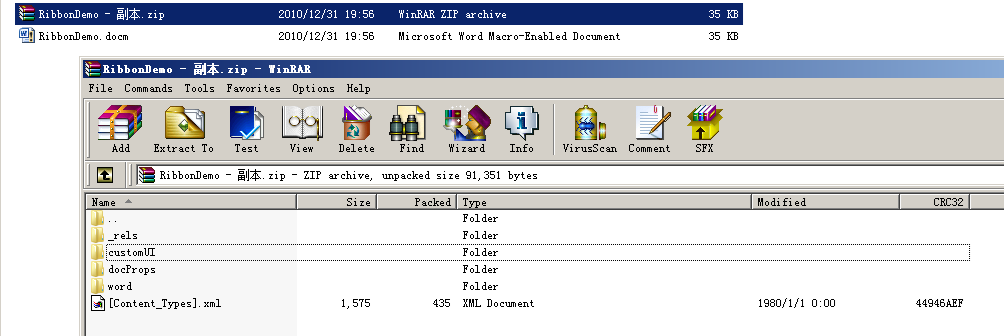
将这个文档的扩展名修改为.zip:
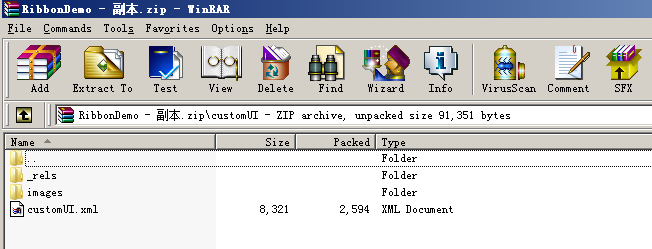
可以看到其文档结构,在customUI文件夹下保存了用户自定义Ribbon的信息:
打开customUI文件:
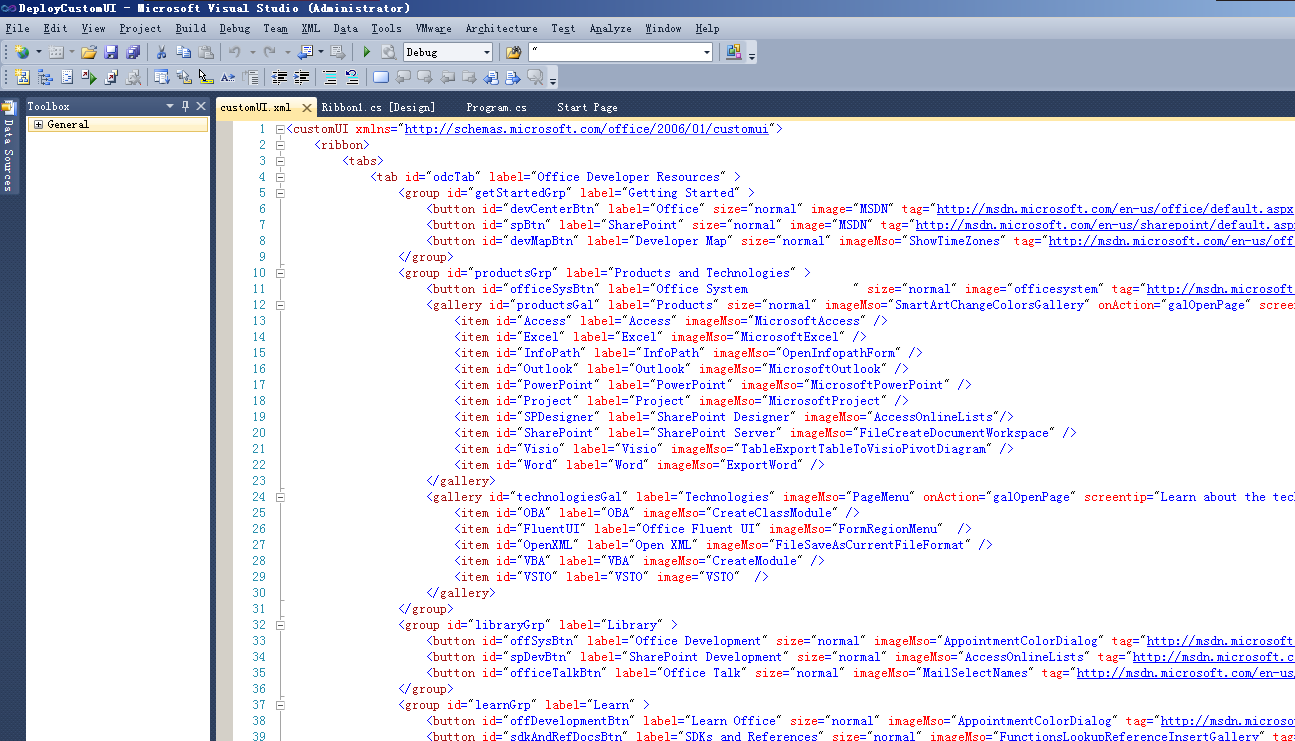
可以看到用户自定义Ribbon的具体描述,customUI.xml需要遵循Office 2010的XML架构规范,可以在这里下载。Office
2007的XML架构规范可以在这里下载。
下载下来解压缩后,是一个xsd文件,查找关于Ribbon的部分:
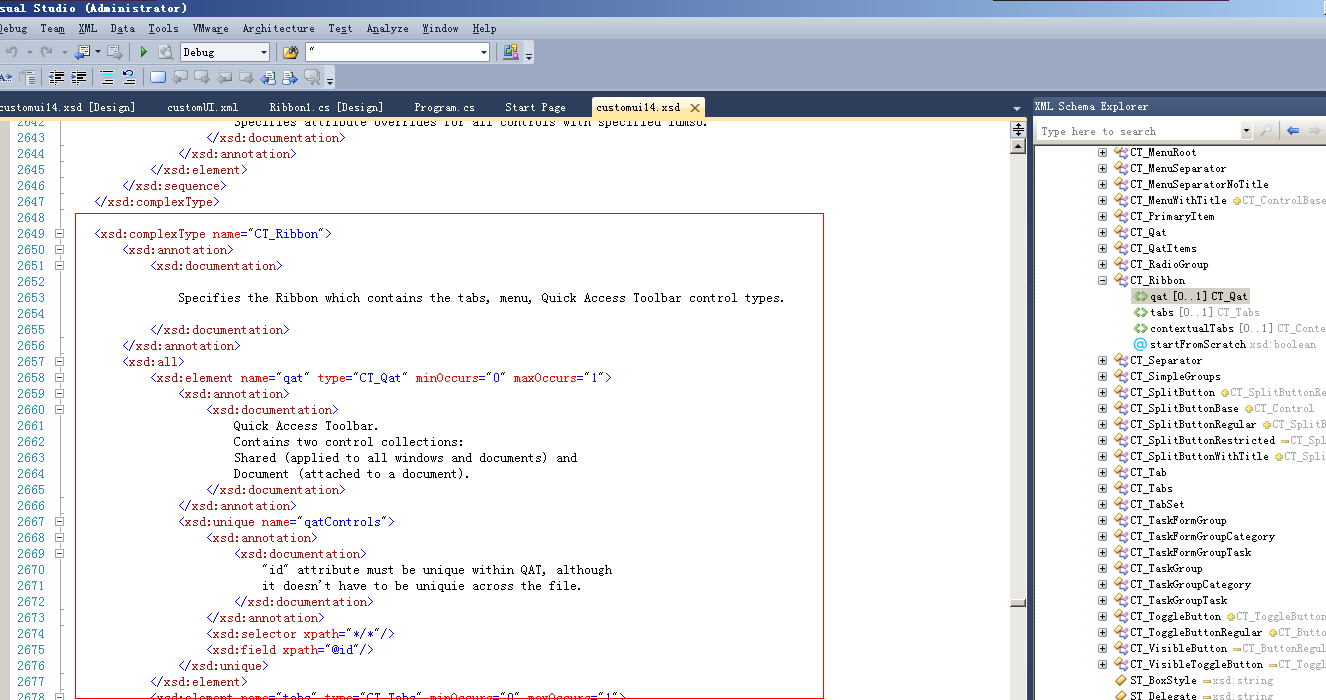
阅读这个xsd文件需要有一定的XML Schema基础,我们只需要大概了解即可,主要为了后面添加自定义的customUI文件。OpenXML SDK 2.0对此提供了支持,可以对Ribbon进行控制:
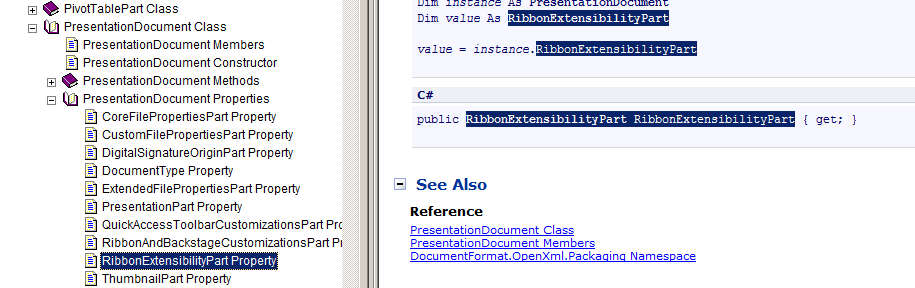
下面我们给一个Word 2010的文档添加一个自定义Ribbon。
首先准备customUI.xml文件,写入如下内容:
<customUI xmlns='http://schemas.microsoft.com/office/2006/01/customui'>
<ribbon>
<tabs>
<tab id='odcTab' label='Office Developer Resources' >
<group id='getStartedGrp' label='Getting Started' >
<button id='devCenterBtn' label='Office' size='normal' image='MSDN' tag='http://msdn.microsoft.com/en-us/office/default.aspx'
onAction='openPage' screentip='Learn about the possibilities offered by the Microsoft Office system to develop solutions.' />
<button id='spBtn' label='SharePoint' size='normal' image='MSDN' tag='http://msdn.microsoft.com/en-us/sharepoint/default.aspx'
onAction='openPage' screentip='Helps teams stay connected and productive by providing easy access to the people, documents, and information that they need.' />
<button id='devMapBtn' label='Developer Map' size='normal' imageMso='ShowTimeZones'
tag='http://msdn.microsoft.com/en-us/office/bb497969.aspx' onAction='openPage' screentip='Helps you visualize the different programs, servers, services, and tools that will help build Office solutions.' />
</group>
<group id='productsGrp' label='Products and Technologies' >
<button id='officeSysBtn' label='Office System ' size='normal' image='officesystem'
tag='http://msdn.microsoft.com/en-us/office/aa905369.aspx' onAction='openPage' screentip='A powerful collection of integrated programs, servers, services, tools, and technologies.' />
<gallery id='productsGal' label='Products' size='normal' imageMso='SmartArtChangeColorsGallery'
onAction='galOpenPage' screentip='Get the help and information you need on each Office product.' >
<item id='Access' label='Access' imageMso='MicrosoftAccess' />
<item id='Excel' label='Excel' imageMso='MicrosoftExcel' />
<item id='InfoPath' label='InfoPath' imageMso='OpenInfopathForm' />
<item id='Outlook' label='Outlook' imageMso='MicrosoftOutlook' />
<item id='PowerPoint' label='PowerPoint' imageMso='MicrosoftPowerPoint'
/>
<item id='Project' label='Project' imageMso='MicrosoftProject' />
<item id='SPDesigner' label='SharePoint Designer' imageMso='AccessOnlineLists'/>
<item id='SharePoint' label='SharePoint Server' imageMso='FileCreateDocumentWorkspace'
/>
<item id='Visio' label='Visio' imageMso='TableExportTableToVisioPivotDiagram'
/>
<item id='Word' label='Word' imageMso='ExportWord' />
</gallery>
<gallery id='technologiesGal' label='Technologies' imageMso='PageMenu' onAction='galOpenPage'
screentip='Learn about the technologies supported by the Microsoft Office system.' >
<item id='OBA' label='OBA' imageMso='CreateClassModule' />
<item id='FluentUI' label='Office Fluent UI' imageMso='FormRegionMenu'
/>
<item id='OpenXML' label='Open XML' imageMso='FileSaveAsCurrentFileFormat'
/>
<item id='VBA' label='VBA' imageMso='CreateModule' />
<item id='VSTO' label='VSTO' image='VSTO' />
</gallery>
</group>
<group id='libraryGrp' label='Library' >
<button id='offSysBtn' label='Office Development' size='normal' imageMso='AppointmentColorDialog'
tag='http://msdn.microsoft.com/en-us/library/bb726436.aspx' onAction='openPage' screentip='A set of helpful links to get you up to speed on Office development.' />
<button id='spDevBtn' label='SharePoint Development' size='normal' imageMso='AccessOnlineLists'
tag='http://msdn.microsoft.com/en-us/library/bb931739.aspx' onAction='openPage' screentip='A set of helpful links to get you up to speed on SharePoint products and technologies.' />
<button id='officeTalkBtn' label='Office Talk' size='normal' imageMso='MailSelectNames'
tag='http://msdn.microsoft.com/en-us/library/bb660514(office.11).aspx' onAction='openPage' screentip='Columns by long-time Office developers and members of the Office Developer Documentation team.' />
</group>
<group id='learnGrp' label='Learn' >
<button id='offDevelopmentBtn' label='Learn Office' size='normal' imageMso='AppointmentColorDialog'
tag='http://msdn.microsoft.com/en-us/office/aa905375.aspx' onAction='openPage' screentip='Explore this set of helpful links to get you up-to-speed creating Office system solutions.' />
<button id='sdkAndRefDocsBtn' label='SDKs and References' size='normal' imageMso='FunctionsLookupReferenceInsertGallery'
tag='http://msdn.microsoft.com/en-us/office/aa905496.aspx' onAction='openPage' screentip='Use these SDKs and developer references to leverage your skills in creating rich Office and SharePoint solutions.' />
<button id='booksdBtn' label='Books' size='normal' imageMso='VisualBasicReferences'
tag='http://msdn.microsoft.com/en-us/office/dd537534.aspx' onAction='openPage' screentip='Want to buy a book? Read a sample chapter online? Visit this bookstore first.' />
<button id='howDoIBtn' label='How To Center' size='normal' imageMso='TentativeAcceptInvitation'
tag='http://msdn.microsoft.com/en-us/office/bb266408.aspx' onAction='openPage' screentip='Find over 200 how-to video demos, sample code, and conceptual overviews.' />
<button id='videosBtn' label='Videos and Webcasts' size='normal' imageMso='SlideMasterMediaPlaceholderInsert'
tag='http://msdn.microsoft.com/en-us/office/aa905350.aspx' onAction='openPage' screentip='Need information quickly? No time to read about it? Watch these videos.' />
<button id='channel9Btn' label='Channel 9' size='normal' image='Channel9'
tag='http://channel9.msdn.com/tags/MS%20Office' onAction='openPage' screentip='Channel 9 is a place for learning and sharing information, created by developers for developers.' />
</group>
<group id='communityGrp' label='Community' >
<button id='communityBtn' label='Office Developers' size='normal' imageMso='OutlookGears'
tag='http://msdn.microsoft.com/en-us/office/aa905341.aspx' onAction='openPage' screentip='Check out the latest from the Office developer community.' />
<button id='mvpBtn' label='MVP Content' size='normal' imageMso='MeetingsWorkspace'
tag='http://msdn.microsoft.com/en-us/office/cc441428.aspx' onAction='openPage' screentip='Take a look at the latest content submitted by Office and SharePoint MVPs, third-parties, and experts in the Office developer community.' />
<button id='codePlexBtn' label='CodePlex' size='normal' image='CodePlex'
tag='http://www.codeplex.com/site/search?projectSearchText=office' onAction='openPage' screentip='Provides you with access to a variety of resources, including download areas, communication forums and product information.' />
<button id='codeGalleryBtn' label='Code Gallery' size='normal' image='CodeGallery'
tag='http://code.msdn.microsoft.com/Project/ProjectDirectory.aspx?ProjectSearchText=office' onAction='openPage' screentip='Download and share sample applications, code snippets, and other resources with the developer community.' />
<button id='facebookBtn' label='facebook' size='normal' image='facebook'
tag='http://www.facebook.com/group.php?gid=51196093535' onAction='openPage' screentip='A place for comments, questions, and answers about development with Office products.' />
<button id='twitterBtn' label='Twitter' size='normal' image='twitter' tag='http://twitter.com/MSDN_Office'
onAction='openPage' screentip='Follow what is currently happening with Microsoft Office development.' />
</group>
<group id='supportGrp' label='Forums and Support' >
<button id='forumsBtn' label='Forums' size='normal' imageMso='WorkgroupAdmin'
tag='http://social.msdn.microsoft.com/Forums/en-US/category/officedev,oldevelopment,sharepoint,uc/' onAction='openPage' screentip='Get your questions answered by experts in their respective Office products.' />
<button id='newsgroupBtn' label='Newsgroups' size='normal' imageMso='FileCreateDocumentWorkspace'
tag='http://msdn.microsoft.com/en-us/office/aa905346.aspx' onAction='openPage' screentip='Ask questions, share information, or exchange ideas with others, including experts from around the globe.' />
<button id='supportBtn' label='Support' size='normal' imageMso='ControlsGallery'
tag='http://msdn.microsoft.com/en-us/office/aa905515.aspx' onAction='openPage' screentip='Search to find a resource, ask a question in the forums, or contact Microsoft support for help.' />
</group>
</tab>
</tabs>
</ribbon>
</customUI>
注意为了避免转义,全部使用了单引号。
使用OpenXML SDK 2.0添加此Ribbon:
 使用OpenXML
SDK 2.0添加此Ribbon:
运行后可以看到Word中出现了一个自定义Ribbon:
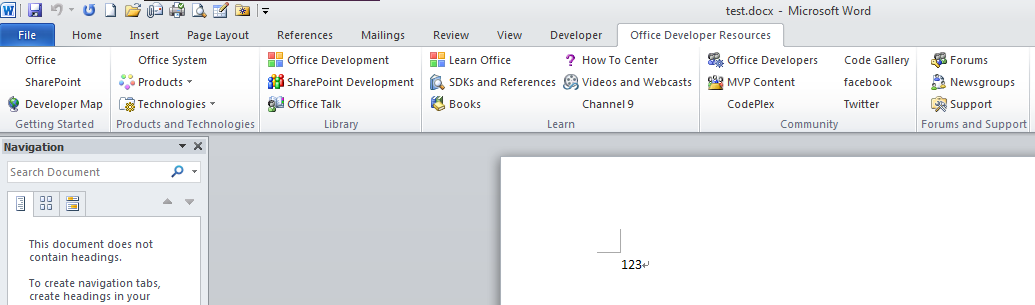
这个自定义Ribbon我取自MSDN上的一篇博客,原文地址。下面的这个例子就来自这篇博客,我对其进行了少许修改。
注:作者写此Demo时使用的OpenXML SDK版本较老,导致在OpenXML SDK 2.0下编译失败,经查是一个类的继承关系做了更改,我已经做了修正。
Demo2:将一个文档中的Ribbon复制到另一个文档中。
将一个文档中的Ribbon复制到另一个文档中运行结果:
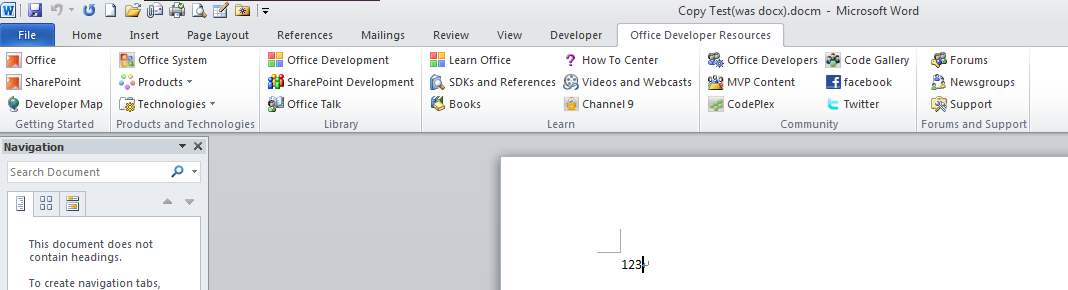
Alt + F11 打开VBA 7.0的编辑器,可以看到Ribbon中的事件处理函数:
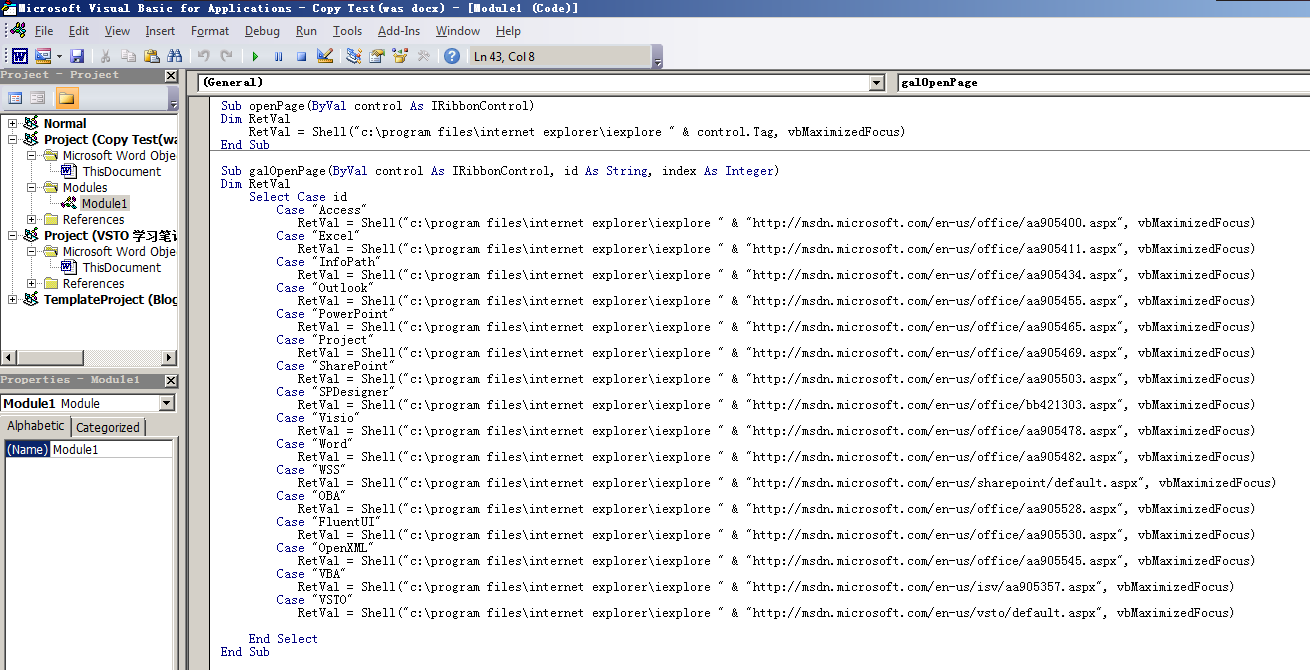
函数的功能很简单,是当点击Ribbon中的按钮时跳转到指定网站,相当于一个浏览器收藏夹的作用。
四、VSTO 4.0 Ribbon Controls
安装Visual Studio 2010的Office开发工具后,就可以使用VSTO 4.0来方便的进行Office开发了。
如图我建立了一个Excel 2010 Workbook项目,Add Item时有一个可视化Ribbon的选项:
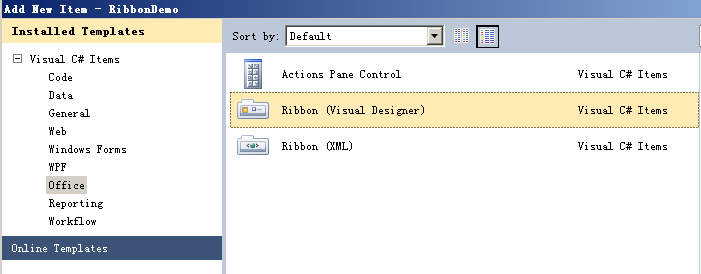
添加之后就可以像开发Windows Form一样设计Ribbon,同时工具箱中叶出现了Office Ribbon Controls:
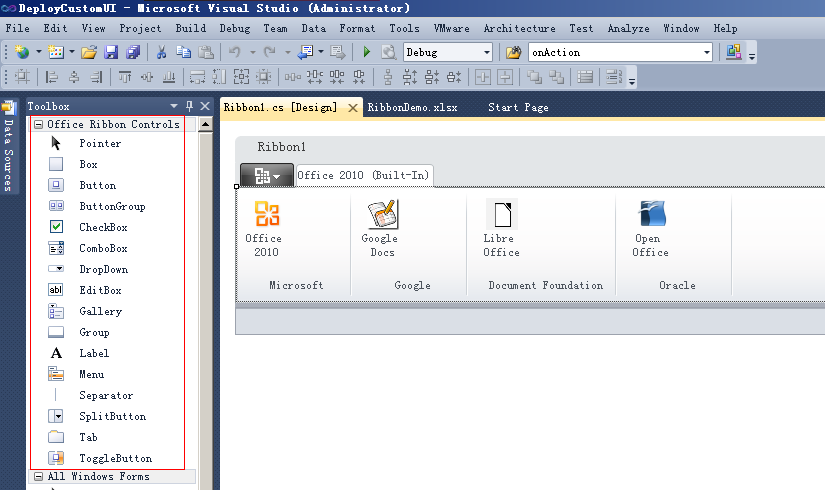
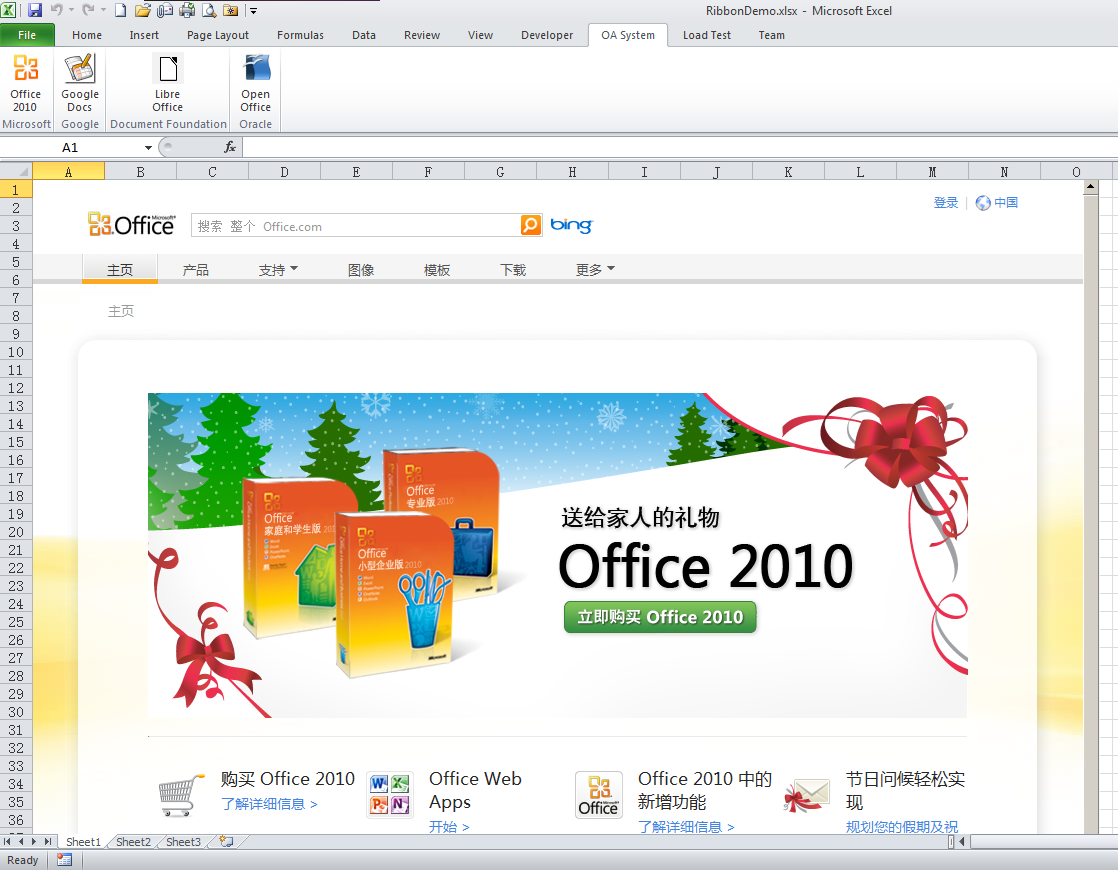
如上图所示,我添加了一个Tab,分了4个组,每个组中添加了图标按钮,Excel中添加了一个Web Browser控件,当点击相应按钮时Web Browser跳转到各自项目官方网站:
代码运行结果:
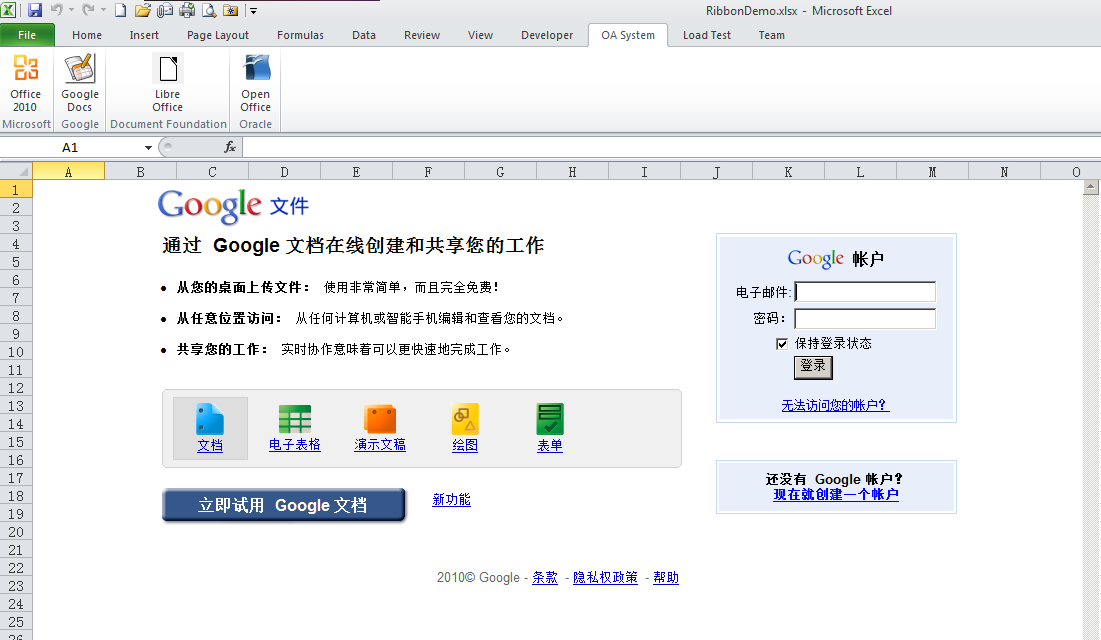

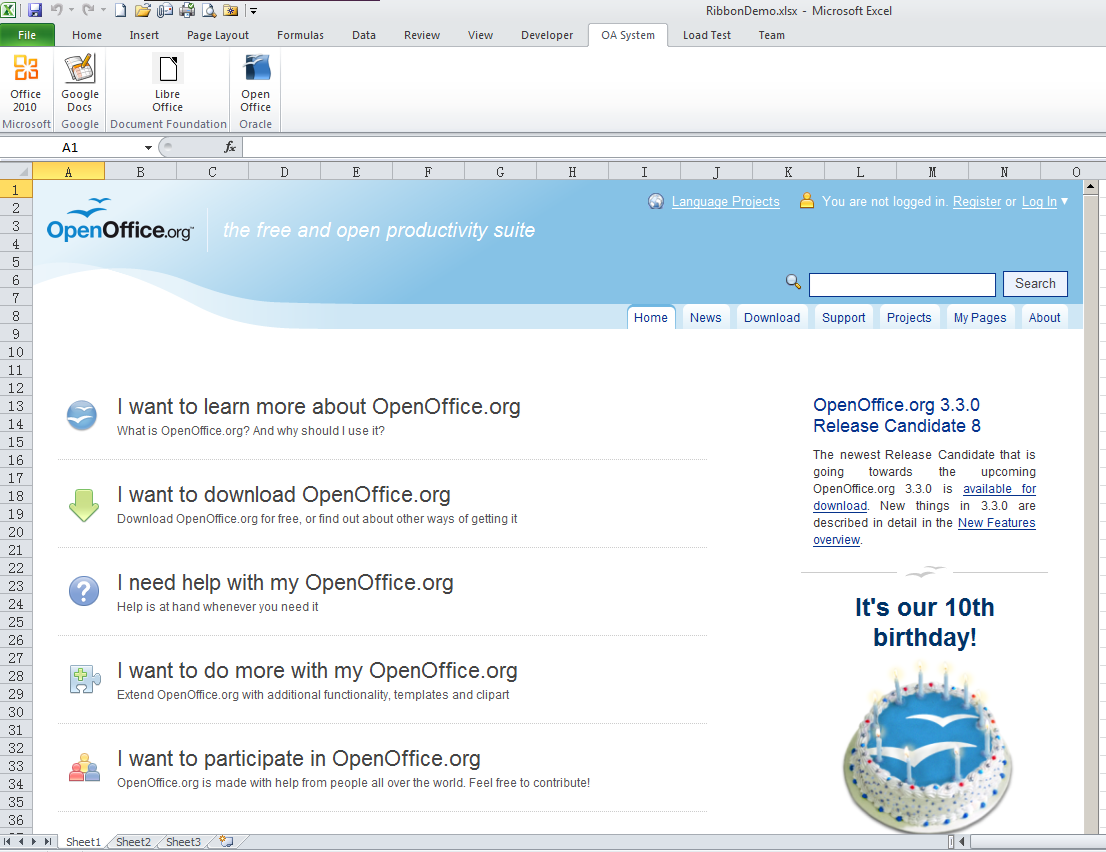
Ribbon支持右键导出为XML,即上文提到的customUI.xml:

点击导出为XML后会自动生成两个文件:
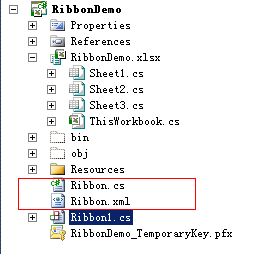
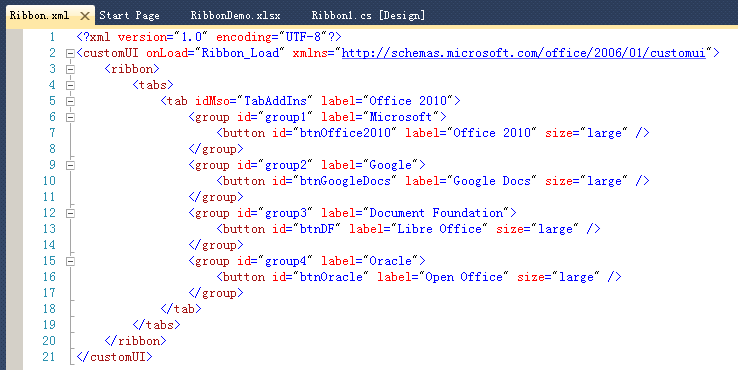
XML文件的内容格式符合Office 2010 XML架构规范:
五、第三方商业组件
现在有很多的控件、组件开发公司设计的软件也相当好用,如果你的项目有充足的预算,可以考虑使用这些商业组件。
5.1、add-in-express
这是一家专门做插件的公司,官方主页:http://www.add-in-express.com
其产品线包括:
Add-in Express 2010
for Microsoft Office and .net
Add-in Express
2010 for Microsoft Office and CodeGear VCL
Add-in
Express 2010 for Internet Explorer and Microsoft .net
Security Manager
2010 for Microsoft Outlook
add-in-express公司对Office的插件开发做了很好的封装,大大简化了开发Office插件的过程,如果你感兴趣,可以进行试用。
5.2、devcomponents
这家公司的业务范围稍微大了一些,官方主页:http://www.devcomponents.com/
其主要为Windows Forms、WPF、Silverlight设计Ribbon界面,产品线包括:
小结
本次介绍了5种Office 2010 Ribbon的开发方法,适合不同的人群与需求。如果你的C++水平很高,且对Windows API很熟悉,那么我建议你使用微软的Windows Ribbon Framework,有官方支持,且效率很高。
我个人更倾向于使用VSTO 4.0 + OpenXML SDK 2.0的方式,这样可以使用更熟悉的技术来开发,便于系统后续升级、维护。Office AddIn的方式处理起来非常复杂,需要进行很多控制,如果你需要非常高的自由度,建议采用此方法。至于最后一种商业组件,那属于有钱人了 :) 开个玩笑。采用哪种方案,具体应取决于业务需求,合适的才是最好的。如果你有其他更好的方案,欢迎讨论。
【VS开发】VSTO 学习笔记(十)Office 2010 Ribbon开发的更多相关文章
- VSTO 学习笔记(十)Office 2010 Ribbon开发
原文:VSTO 学习笔记(十)Office 2010 Ribbon开发 微软的Office系列办公套件从Office 2007开始首次引入了Ribbon导航菜单模式,其将一系列相关的功能集成在一个个R ...
- VSTO学习笔记(三) 开发Office 2010 64位COM加载项
原文:VSTO学习笔记(三) 开发Office 2010 64位COM加载项 一.加载项简介 Office提供了多种用于扩展Office应用程序功能的模式,常见的有: 1.Office 自动化程序(A ...
- VSTO学习笔记(十五)Office 2013 初体验
原文:VSTO学习笔记(十五)Office 2013 初体验 Office 2013 近期发布了首个面向消费者的预览版本,我也于第一时间进行了更新试用.从此开始VSTO系列全面转向Office 201 ...
- VSTO 学习笔记(十一)开发Excel 2010 64位自定义公式
原文:VSTO 学习笔记(十一)开发Excel 2010 64位自定义公式 Excel包含很多公式,如数学.日期.文本.逻辑等公式,非常方便,可以灵活快捷的对数据进行处理,达到我们想要的效果.Exce ...
- VSTO 学习笔记(十二)自定义公式与Ribbon
原文:VSTO 学习笔记(十二)自定义公式与Ribbon 这几天工作中在开发一个Excel插件,包含自定义公式,根据条件从数据库中查询结果.这次我们来做一个简单的测试,达到类似的目的. 即在Excel ...
- VSTO学习笔记(十四)Excel数据透视表与PowerPivot
原文:VSTO学习笔记(十四)Excel数据透视表与PowerPivot 近期公司内部在做一种通用查询报表,方便人力资源分析.统计数据.由于之前公司系统中有一个类似的查询使用Excel数据透视表完成的 ...
- VSTO学习笔记(四)从SharePoint 2010中下载文件
原文:VSTO学习笔记(四)从SharePoint 2010中下载文件 上一次我们开发了一个简单的64位COM加载项,虽然功能很简单,但是包括了开发一个64位COM加载项的大部分过程.本次我们来给CO ...
- VSTO学习笔记(八)向 Word 2010 中写入表结构
原文:VSTO学习笔记(八)向 Word 2010 中写入表结构 前几天公司在做CMMI 3级认证,需要提交一系列的Word文档,其中有一种文档要求添加公司几个系统的数据库中的表结构.我临时接到了这项 ...
- VSTO 学习笔记(六)在 Excel 2010中使用RDLC报表
原文:VSTO 学习笔记(六)在 Excel 2010中使用RDLC报表 Excel具有强大的图表显示.分析功能,这点毋庸置疑,但是如果将常规MIS系统中的数据以报表的形式在Excel中显示,却并不那 ...
随机推荐
- flask调试模式
想要启用调试模式,发现安装目前网上流行的两种方式均无法在Pycharm中打开调试模式. 1)直接在对象上设置 flask 更新到1.0以后 不支持使用debug =True 来开启调试模式了. Pri ...
- spark-聚合算子aggregatebykey
spark-聚合算子aggregatebykey Aggregate the values of each key, using given combine functions and a neutr ...
- Codeforces Round #589 (Div. 2) B. Filling the Grid
链接: https://codeforces.com/contest/1228/problem/B 题意: Suppose there is a h×w grid consisting of empt ...
- Luogu P4141 消失之物 背包 分治
题意:给出$n$个物品的体积和最大背包容量$m$,求去掉一个物品$i$后,装满体积为$w\in [1,m]$背包的方案数. 有 N 个物品, 体积分别是 W1, W2, …, WN. 由于她的疏忽, ...
- 路由器配置——路由重分布1(rip)
一.实验目的:使用路由重分布达到全网互通 二.拓扑图: 三.具体实验步骤配置 先给各个主机配置ip地址和网关以PC1为例: (1)R1路由器配置 Router>enable --进入特权模式R ...
- c语言if-else的效率比较
闲着没事测试下if-else的执行效率 测试环境:Mac pro i7 2.3Ghz ...编译器gcc 4.9,代码没有进行优化-O0: 测试代码:c代码1: int main(){ int n=1 ...
- 【集训队作业2018】line
DP方程十分简单,考虑前对后贡献即可. \(f_i = \min_{l_i \leq j < i} \left\{ f_j + \left(\max_{j < k \leq i} \lef ...
- 初次使用自己写的testbench 验证了简单的NOT门。
先是简单的非门模型: module notgate(a,b); input a; output b; assign b=~a; endmodule 下面是自己写的简陋的testbench: `time ...
- heartrbeat实现web服务器高可用
今天的内容是用heartbeat实现web服务器高可用 一.简介: heartbeat的工作原理:heartbeat最核心的包括两个部分,心跳监测部分和资源接管部分,心跳监测可以通过网络链路和串口进行 ...
- 8.5 JavaScript的BOM(二)
8.5 JavaScript的BOM 即 浏览器对象模型(Browser Object Model) 浏览器对象包括 一.Window(窗口) 如果需要打开一个新的网站,应该通过超级链接等方式让用户主 ...