
启动oracle 服务
-- 参考(https://blog.csdn.net/loongshawn/article/details/51162196)
1、启动oracle的步骤
Linux下启动oracle分为以下两步:
- 1.1、启动lsnrctl监听。
- 1.2、启动数据库实例。
2、启动oracle监听
首先登陆服务器,切换到oracle用户。
[admin@dataserver ~]$ su - oracle

密码:

[oracle@dataserver ~]$- 1
- 2
- 3

接下来,检查oracle监听器运行状态,通过lsnrctl status命令查看。
[oracle@dataserver ~]$ lsnrctl status

LSNRCTL for Linux: Version 11.2.0.1.0 - Production on 15-4月 -2016 14:39:39

Copyright (c) 1991, 2009, Oracle.  All rights reserved.

Connecting to (DESCRIPTION=(ADDRESS=(PROTOCOL=IPC)(KEY=EXTPROC1521)))

TNS-12541: TNS:no listener

 TNS-12560: TNS:protocol adapter error

  TNS-00511: No listener

   Linux Error: 2: No such file or directory

Connecting to (DESCRIPTION=(ADDRESS=(PROTOCOL=TCP)(HOST=30.85.227.24)(PORT=1521)))

TNS-12543: TNS:destination host unreachable

 TNS-12560: TNS:protocol adapter error

  TNS-00513: Destination host unreachable

   Linux Error: 113: No route to host

Connecting to (DESCRIPTION=(ADDRESS=(PROTOCOL=TCP)(HOST=30.85.227.23)(PORT=1521)))

TNS-12541: TNS:no listener

 TNS-12560: TNS:protocol adapter error

  TNS-00511: No listener

   Linux Error: 111: Connection refused

[oracle@dataserver ~]$ exit
- 1
- 2
- 3
- 4
- 5
- 6
- 7
- 8
- 9
- 10
- 11
- 12
- 13
- 14
- 15
- 16
- 17
- 18
- 19
- 20
- 21
- 22
- 23
上述反馈的结果即为oracle监听没有启动,下面执行启动监听,通过命令lsnrctl start,结果如下:
[oracle@dataserver ~]$ lsnrctl start

LSNRCTL for Linux: Version 11.2.0.1.0 - Production on 15-4月 -2016 14:51:06

Copyright (c) 1991, 2009, Oracle.  All rights reserved.

Starting /u01/app/oracle/product/11.2.0/dbhome_1/bin/tnslsnr: please wait...

TNSLSNR for Linux: Version 11.2.0.1.0 - Production

System parameter file is /u01/app/oracle/product/11.2.0/dbhome_1/network/admin/listener.ora

Log messages written to /u01/app/oracle/diag/tnslsnr/dataserver/listener/alert/log.xml

Listening on: (DESCRIPTION=(ADDRESS=(PROTOCOL=ipc)(KEY=EXTPROC1521)))

Error listening on: (DESCRIPTION=(ADDRESS=(PROTOCOL=TCP)(HOST=30.85.227.24)(PORT=1521)))

TNS-12545: Connect failed because target host or object does not exist

 TNS-12560: TNS:protocol adapter error

  TNS-00515: Connect failed because target host or object does not exist

   Linux Error: 99: Cannot assign requested address

Listener failed to start. See the error message(s) above...

[oracle@dataserver ~]$ - 1
- 2
- 3
- 4
- 5
- 6
- 7
- 8
- 9
- 10
- 11
- 12
- 13
- 14
- 15
- 16
- 17
- 18
- 19
- 20
- 21
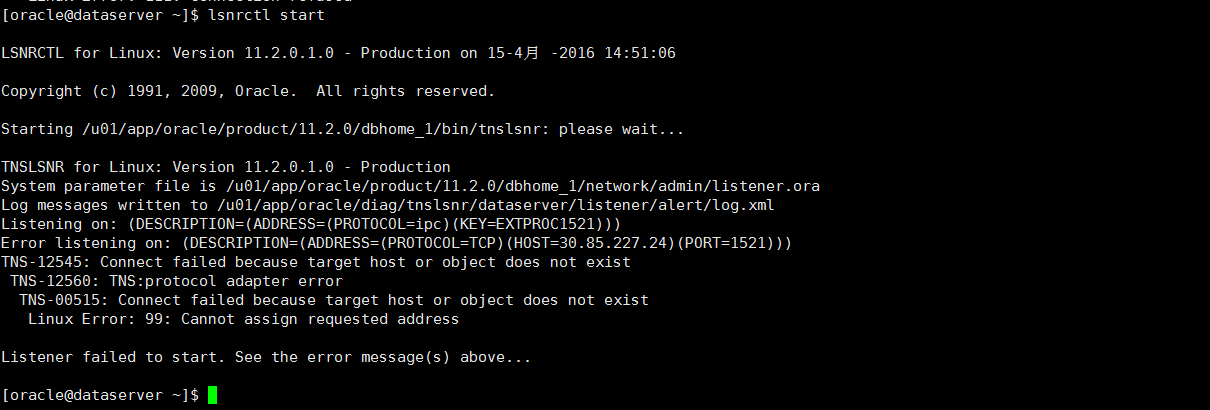
上述反馈为监听启动失败,是因为其监听的IP30.85.227.24,并非服务器的IP,所以需要调整这个IP为服务器当前的IP。
在oracle用户下,进入目录/u01/app/oracle/product/11.2.0/dbhome_1/network/admin,修改listener.ora文件。注意这个目录因具体服务器而异。
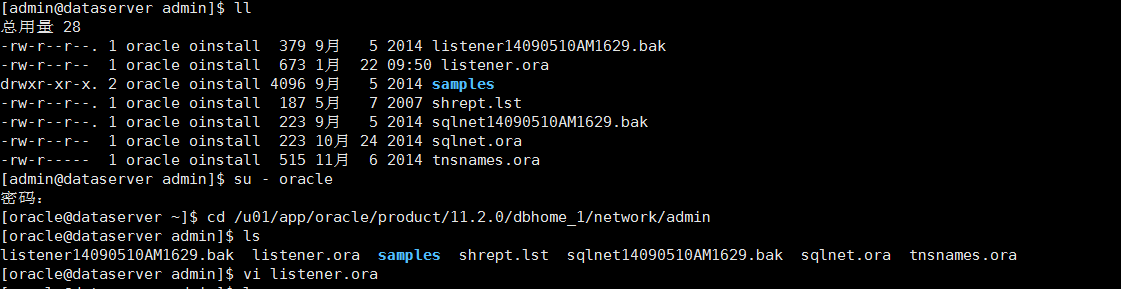
listener.ora文件打开,内容如下,调整其中的HOST IP即可。
# listener.ora Network Configuration File: /u01/app/oracle/product/11.2.0/dbhome_1/network/admin/listener.ora

# Generated by Oracle configuration tools.

SID_LIST_LISTENER =

  (SID_LIST =

    (SID_DESC =

      (GLOBAL_DBNAME = ORCL)

      (ORACLE_HOME = /u01/app/oracle/product/11.2.0/dbhome_1)

      (SID_NAME = ORCL)

    )

  )

LISTENER =

  (DESCRIPTION_LIST =

    (DESCRIPTION =

      (ADDRESS = (PROTOCOL = IPC)(KEY = EXTPROC1521))

    )

    (DESCRIPTION =

      (ADDRESS = (PROTOCOL = TCP)(HOST = 30.85.227.28)(PORT = 1521))

    )

    (DESCRIPTION =

      (ADDRESS = (PROTOCOL = TCP)(HOST = 30.85.227.23)(PORT = 1521))

    )

  )

ADR_BASE_LISTENER = /u01/app/oracle
- 1
- 2
- 3
- 4
- 5
- 6
- 7
- 8
- 9
- 10
- 11
- 12
- 13
- 14
- 15
- 16
- 17
- 18
- 19
- 20
- 21
- 22
- 23
- 24
- 25
- 26
- 27
- 28
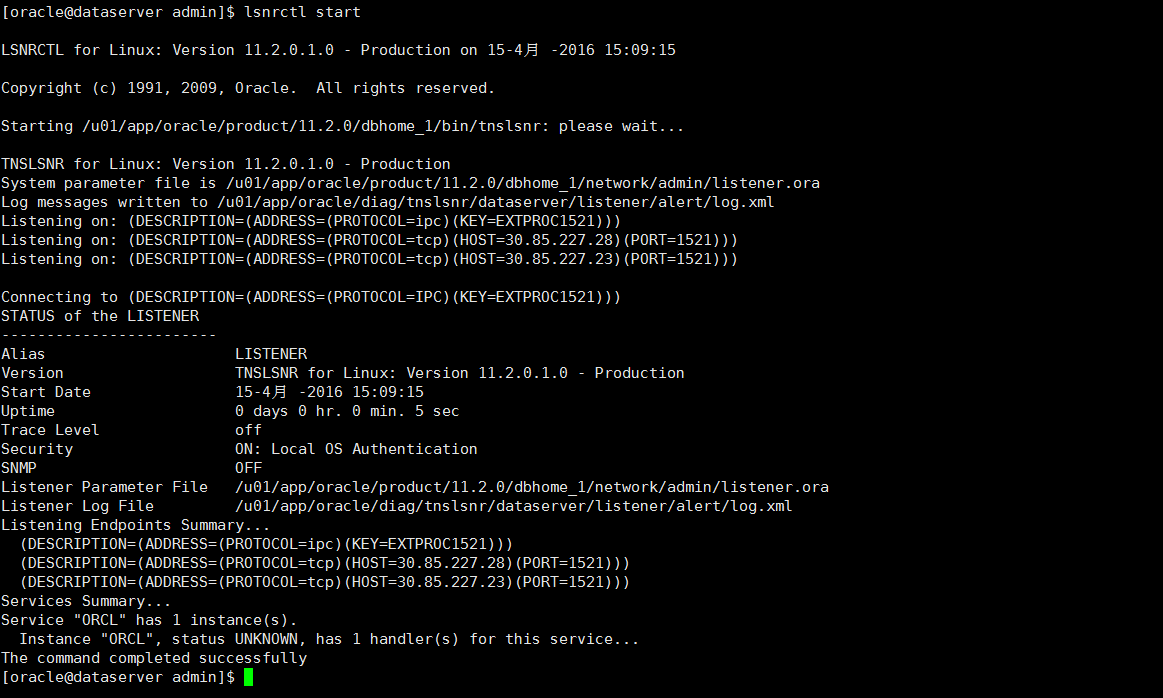
调整完监听IP后,重启监听器,执行lsnrctl start,
[oracle@dataserver admin]$ lsnrctl start

LSNRCTL for Linux: Version 11.2.0.1.0 - Production on 15-4月 -2016 15:09:15

Copyright (c) 1991, 2009, Oracle.  All rights reserved.

Starting /u01/app/oracle/product/11.2.0/dbhome_1/bin/tnslsnr: please wait...

TNSLSNR for Linux: Version 11.2.0.1.0 - Production

System parameter file is /u01/app/oracle/product/11.2.0/dbhome_1/network/admin/listener.ora

Log messages written to /u01/app/oracle/diag/tnslsnr/dataserver/listener/alert/log.xml

Listening on: (DESCRIPTION=(ADDRESS=(PROTOCOL=ipc)(KEY=EXTPROC1521)))

Listening on: (DESCRIPTION=(ADDRESS=(PROTOCOL=tcp)(HOST=30.85.227.28)(PORT=1521)))

Listening on: (DESCRIPTION=(ADDRESS=(PROTOCOL=tcp)(HOST=30.85.227.23)(PORT=1521)))

Connecting to (DESCRIPTION=(ADDRESS=(PROTOCOL=IPC)(KEY=EXTPROC1521)))

STATUS of the LISTENER

------------------------

Alias                     LISTENER

Version                   TNSLSNR for Linux: Version 11.2.0.1.0 - Production

Start Date                15-4月 -2016 15:09:15

Uptime                    0 days 0 hr. 0 min. 5 sec

Trace Level               off

Security                  ON: Local OS Authentication

SNMP                      OFF

Listener Parameter File   /u01/app/oracle/product/11.2.0/dbhome_1/network/admin/listener.ora

Listener Log File         /u01/app/oracle/diag/tnslsnr/dataserver/listener/alert/log.xml

Listening Endpoints Summary...

  (DESCRIPTION=(ADDRESS=(PROTOCOL=ipc)(KEY=EXTPROC1521)))

  (DESCRIPTION=(ADDRESS=(PROTOCOL=tcp)(HOST=30.85.227.28)(PORT=1521)))

  (DESCRIPTION=(ADDRESS=(PROTOCOL=tcp)(HOST=30.85.227.23)(PORT=1521)))

Services Summary...

Service "ORCL" has 1 instance(s).

  Instance "ORCL", status UNKNOWN, has 1 handler(s) for this service...

The command completed successfully

[oracle@dataserver admin]$
- 1
- 2
- 3
- 4
- 5
- 6
- 7
- 8
- 9
- 10
- 11
- 12
- 13
- 14
- 15
- 16
- 17
- 18
- 19
- 20
- 21
- 22
- 23
- 24
- 25
- 26
- 27
- 28
- 29
- 30
- 31
- 32
- 33
- 34
- 35
- 36
- 37
至此,oracle监听器启动成功!
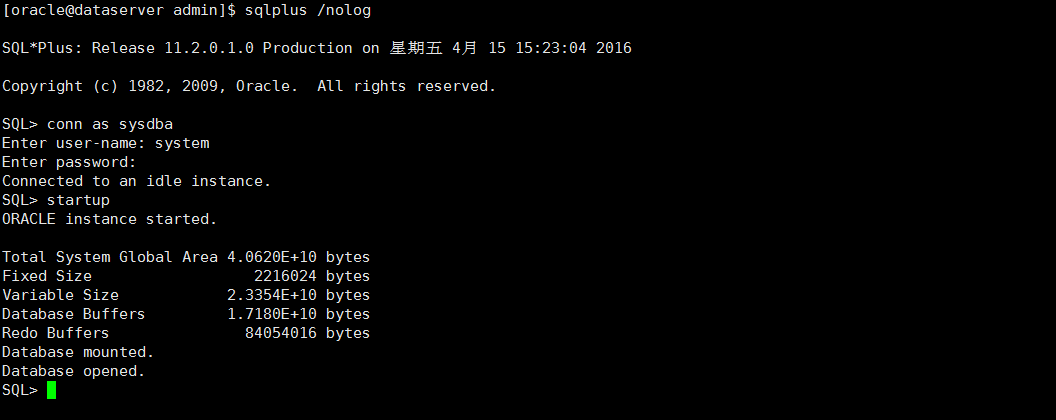
3、启动oracle实例
以system用户身份登陆oracle
[oracle@dataserver admin]$ sqlplus /nolog

SQL*Plus: Release 11.2.0.1.0 Production on 星期五 4月 15 15:23:04 2016

Copyright (c) 1982, 2009, Oracle.  All rights reserved.

SQL> conn as sysdba

Enter user-name: system

Enter password:

Connected to an idle instance.
- 1
- 2
- 3
- 4
- 5
- 6
- 7
- 8
- 9
- 10
- 11
然后启动实例,通过startup命令:
SQL> startup

ORACLE instance started.

Total System Global Area 4.0620E+10 bytes

Fixed Size          2216024 bytes

Variable Size        2.3354E+10 bytes

Database Buffers     1.7180E+10 bytes

Redo Buffers           84054016 bytes

Database mounted.

Database opened.

SQL>
- 1
- 2
- 3
- 4
- 5
- 6
- 7
- 8
- 9
- 10
- 11
- 12
4、关闭oracle实例
通过shutdown命令关闭oracle实例。
SQL> shutdown

Database closed.

Database dismounted.

ORACLE instance shut down.

SQL>
启动oracle 服务的更多相关文章
- linux下启动oracle服务命令
以redflag(redhat /centos)linux下的 oracle 10g 为例: 如果oracle安装和配置都没有问题的话: 依次执行以下代码即可启动oracle服务. #su - ora ...
- Windows下命令行下启动ORACLE服务
检查监听器状态:C:\>lsnrctl statusLSNRCTL for 32-bit Windows: Version 9.2.0.1.0 - Production on 30-6月 -20 ...
- 手动启动 oracle 服务
手动启动 Oracle 服务 为了学习,我们常常会在个人PC上安装 Oracle 数据库,这大大影响了计算机的运行速度,尤其是计算机开机速度,如果 Oracle 使用频率并不是非常高,我们可以禁止 ...
- Linux下启动Oracle服务和监听程序步骤
Linux下启动Oracle服务和监听程序启动和关闭步骤整理如下: 1.安装oracle: 2.创建oracle系统用户: 3./home/oracle下面的.bash_profile添加几个环境变量 ...
- Linux服务器重启后启动Oracle服务
目录 1. 启动Oracle服务 2. 启动Oracle监听服务 © 版权声明:本文为博主原创文章,转载请注明出处 1. 启动Oracle服务 重启Linux服务器后,Oracle服务还需要手动启动. ...
- 快速启动Oracle服务
快速启动Oracle服务的批处理命令步骤 新建记事本 粘贴如下内容: @echo off echo 确定要启动Oracle 11g服务吗? pause net start OracleOraDb11g ...
- Oracle学习.Windows 命令行 启动ORACLE服务与实例
使用数据库前要先打开数据库的实例和监听器! --总结启动命令如下: lsnrctl [start|stop|status] --启动监听器,停止监听器,查看监听器的 ...
- Linux下启动Oracle服务和监听程序
$ su – oracle $ sqlplus / nolog sql> conn / as sysdba sql> startup #启动Oracle,需 ...
- 手动启动Oracle服务的.bat文件
Oracle数据库的基本服务会占用很大的内存,有的程序员会在不用的时候Oracle服务关闭来减少对电脑内存资源的占用. 我在这准备了一个可以开启/关闭Oracle服务的bat文件,希望被采纳!!! 新 ...
- Linux下的启动oracle服务 启动监听 开放端口操作
尝试登录oracle 使用root用户将没有sqlplus命令 [root@localhost ~]# sqlplus /nolog bash: sqlplus: 未找到命令... [root ...
随机推荐
- [转]CLion安装及无限试用
Clion安装及无限试用:链接:https://pan.baidu.com/s/1mreUx5QyS4nkVQMOhdjf7g提取码:ylqw 翻译 搜索 复制
- [转]CLion 2022.2.4破解教程详细图解mac,windows,linux均适用(2022.11.10亲测有效)
前言 此教程为CLion 2022.2.4 破解教程,且此教程以及下面提供的破解补丁适用与2022.2以后的新版本.2022年11月10日亲测有效,mac与windows均测试完美破解 CLion ...
- Intellij IDEA IDE中采用Maven集成SSM框架时配置文件的功能和关系说明
Intellij IDEA IDE中采用Maven集成SSM框架时设计的配置文件主要有:pom.xml.web.xml.applicationContext.xml.springmvc-config. ...
- 即时通讯技术文集(第20期):IM架构设计技术文章(Part3) [共14篇]
为了更好地分类阅读 52im.net 总计1000多篇精编文章,我将在每周三推送新的一期技术文集,本次是第20 期. [-1-] 融云技术分享:全面揭秘亿级IM消息的可靠投递机制 [链接] http: ...
- [LC593]有效的正方形-Valid Square
题目描述 给定2D空间中四个点的坐标 p1, p2, p3 和 p4,如果这四个点构成一个正方形,则返回 true . 点的坐标 pi 表示为 [xi, yi] .输入 不是 按任何顺序给出的. 一个 ...
- Linux软连接与硬链接的概念
- ChatRoom pg walkthrough Intermediate
NMAP ┌──(root㉿kali)-[~/lab] └─# nmap -p- -A 192.168.189.110 Starting Nmap 7.94SVN ( https://nmap.org ...
- 在没有网关的IP地址上编写路由,实现另一个网段可以访问到该主机
应用场景:该主机两个网卡分别对应两个IP地址 192.168.1.2网段为医保网,并且主机使用了改网段的的网关.192.168.100.99网段地址为互联网地址,没有使用该网段的网关. 我们开发小组通 ...
- 使用Gradle创建springcloud项目
第一步新建项目,这都不用说了,有手就行 第二步选中SpringInitalizr Project SDK 是项目使用的jdk版本 直接引入就可以了 Group 选你需要的依赖,无所谓,你也可以什么都 ...
- Windows下安装和配置NodeJS
1.下载 中文地址:https://nodejs.cn/download/ 官网地址:https://nodejs.org/en/download/ 如这里我们下载当前最新版:https://node ...