
基于 doo-sabin的细分
简介
没有 cc 细分好。
参考链接
http://graphics.stanford.edu/courses/cs468-10-fall/LectureSlides/10_Subdivision.pdf 非常好对于细分的介绍
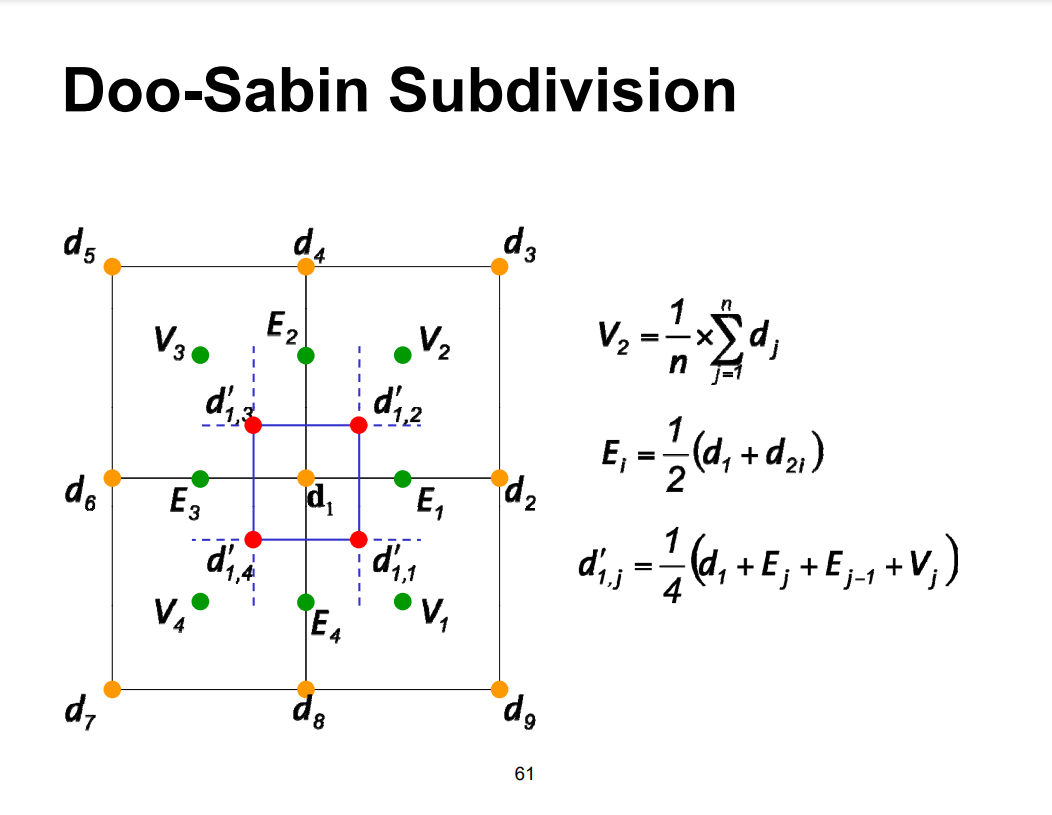
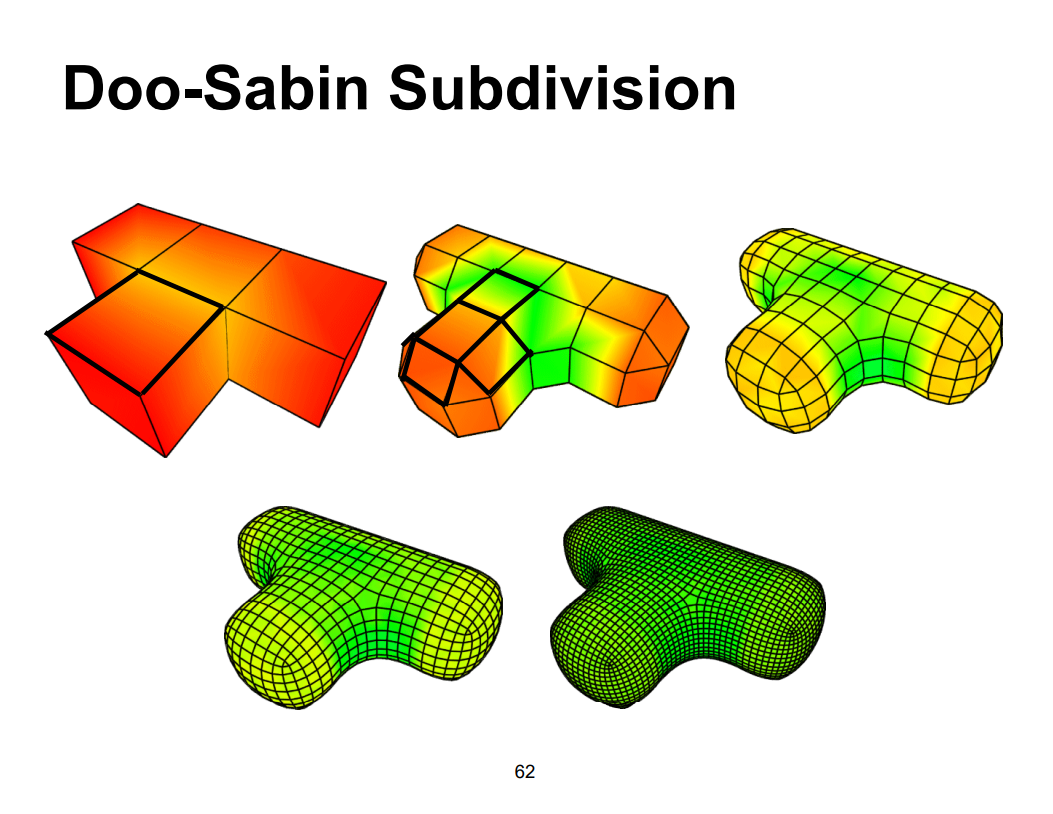
细分示意图
codeTip
代码实现过程,比较潦草。主要看第一张示意图,由于openmesh在加面的时候需要判断面的法向,做的比较粗糙,但是对于立方体的细分是支持的。
code
#include "doo_sabin_surface_subdivision.h"

#include <iostream>

#include <unordered_map>

#include <QInputDialog>

/**

 * @description: 构造函数

 * @param {type}

 * @return {type}

 */

DS::DS(Data* data_) : Strategy(data_) {

    times = 1;

    genCube();

}

/**

 * @description: 析构函数

 * @param {type}

 * @return {type}

 */

DS::~DS() {}

/*!

*	Computes the weight factor for the ith vertex of a face with k

*	vertices. The formula of Doo and Sabin is used.

*

*	@param i Index of vertex in face (0, 1, ..., k-1)

*	@param k Number of vertices

*

*	@return Weight

*/

inline double DS::weights_doo_sabin(size_t k, size_t i)

{

    if (i == 0)

        return(0.25 + 5.0 / (4.0 * k));

    else

        return((3.0 + 2.0 * cos(2 * M_PI * i / k)) / (4.0 * k));

}

/**

 * @description: 一整套流程

 * @param {type}

 * @return {int} 管线运行是否成功

 */

bool DS::Run() {

    times = QInputDialog::getInt(this, "Surface Mesh", "Please input times",

        1, 1, 1000, 1);

    for (int i = 0; i <= times; i++) {

        if (i == 0) {

            char a[20];

            sprintf(a, "output%d.off", i);

            genMesh(a);

        }

        else {

            genFacePoint();

            genEdgePoint();

            genVertexPoint();

            connectPoints();

            char a[20];

            sprintf(a, "output%d.off", i);

            genMesh(a);

        }

        // 清空变量

        std::cout << "[DEBUG] 迭代了第 " << i << " 次。" << std::endl;

    }

    getResult();

    return true;

}

/**

 * @description: 生成一个立方体(四边形网格)

 * @param {type}

 * @return {type}

 */

void DS::genCube()

{

    MyMesh::VertexHandle vhandle[9];

    vhandle[0] = mesh.add_vertex(MyMesh::Point(-1, -1, 1));

    vhandle[1] = mesh.add_vertex(MyMesh::Point(1, -1, 1));

    vhandle[2] = mesh.add_vertex(MyMesh::Point(1, 1, 1));

    vhandle[3] = mesh.add_vertex(MyMesh::Point(-1, 1, 1));

    vhandle[4] = mesh.add_vertex(MyMesh::Point(-1, -1, -1));

    vhandle[5] = mesh.add_vertex(MyMesh::Point(1, -1, -1));

    vhandle[6] = mesh.add_vertex(MyMesh::Point(1, 1, -1));

    vhandle[7] = mesh.add_vertex(MyMesh::Point(-1, 1, -1));

    std::vector<MyMesh::VertexHandle> face_vhandles;

    face_vhandles.push_back(vhandle[0]);

    face_vhandles.push_back(vhandle[1]);

    face_vhandles.push_back(vhandle[2]);

    face_vhandles.push_back(vhandle[3]);

    mesh.add_face(face_vhandles);

    face_vhandles.clear();

    face_vhandles.push_back(vhandle[7]);

    face_vhandles.push_back(vhandle[6]);

    face_vhandles.push_back(vhandle[5]);

    face_vhandles.push_back(vhandle[4]);

    mesh.add_face(face_vhandles);

    face_vhandles.clear();

    face_vhandles.push_back(vhandle[1]);

    face_vhandles.push_back(vhandle[0]);

    face_vhandles.push_back(vhandle[4]);

    face_vhandles.push_back(vhandle[5]);

    mesh.add_face(face_vhandles);

    face_vhandles.clear();

    face_vhandles.push_back(vhandle[2]);

    face_vhandles.push_back(vhandle[1]);

    face_vhandles.push_back(vhandle[5]);

    face_vhandles.push_back(vhandle[6]);

    mesh.add_face(face_vhandles);

    face_vhandles.clear();

    face_vhandles.push_back(vhandle[3]);

    face_vhandles.push_back(vhandle[2]);

    face_vhandles.push_back(vhandle[6]);

    face_vhandles.push_back(vhandle[7]);

    mesh.add_face(face_vhandles);

    face_vhandles.clear();

    face_vhandles.push_back(vhandle[0]);

    face_vhandles.push_back(vhandle[3]);

    face_vhandles.push_back(vhandle[7]);

    face_vhandles.push_back(vhandle[4]);

    mesh.add_face(face_vhandles);

}

/**

 * @description: 生成所有面点

 * @param {type} TODO

 * @return {type}

 */

void DS::genFacePoint()

{

    facePoints.clear();

    for (const auto& fh : mesh.faces())

    {

        OpenMesh::Vec3d facePoint(0, 0, 0);

        int facePointsNumber = 0;

        for (const auto& fvh : mesh.fv_range(fh))

        {

            OpenMesh::DefaultTraits::Point point = mesh.point(fvh);

            facePoint += point;

            facePointsNumber++;

        }

        facePoint /= facePointsNumber;

        facePoints[fh.idx()] = facePoint;

    }

}

/**

 * @description: 生成所有的边点暂时不考虑hole 就是全是日子结构的

 * @param {type}

 * @return {type}

 */

void DS::genEdgePoint()

{

    edgePoints.clear();

    for (auto e_it = mesh.edges_begin(); e_it != mesh.edges_end(); ++e_it)

    {

        // 得到边所代表的半边

        OpenMesh::HalfedgeHandle heh1 = mesh.halfedge_handle(*e_it, 0); // 默认一个方向的半边

        OpenMesh::Vec3d edgePoint(0, 0, 0);

        int edgePointsNumber = 0;

        OpenMesh::DefaultTraits::Point pointV = mesh.point(mesh.from_vertex_handle(heh1)); // 这条(半)边的起点

        OpenMesh::DefaultTraits::Point pointW = mesh.point(mesh.to_vertex_handle(heh1));   // 这条(半)边的终点

        edgePoints[heh1.idx()] = (pointV + pointW) / 2.0;

    }

}

/**

 * @description: 生成新的顶点

 * @param {type}

 * @return {type}

 */

void DS::genVertexPoint()

{

    vertexPoints.clear();

    vertexPoints_.clear();

    // 原始点接触的面的所有的面点的均值

    for (auto v_it = mesh.vertices_begin(); v_it != mesh.vertices_end(); v_it++)

    {

        OpenMesh::Vec3d originPoint = (OpenMesh::Vec3d)mesh.point(*v_it);

        OpenMesh::Vec3d facePoint(0, 0, 0);

        int faceNumber = 0;

        std::vector<OpenMesh::Vec3d> facePoints_;

        std::vector<OpenMesh::Vec3d> edgePoints_;

        for (auto vf_it = mesh.vf_iter(*v_it); vf_it.is_valid(); ++vf_it)

        { //这个顶点所带有的面迭代器

            facePoints_.push_back(facePoints[(*vf_it).idx()]);

        }

        // 原始点接触的边的中间点的值的均值 * 2

        OpenMesh::Vec3d edgePoint(0, 0, 0);

        int edgeNumber = 0;

        for (auto vv_it = mesh.vv_begin(*v_it); vv_it != mesh.vv_end(*v_it); vv_it++) { // 为啥还有孤立点?

            OpenMesh::Vec3d point = (OpenMesh::Vec3d)mesh.point(*vv_it);

            edgePoints_.push_back((point + originPoint) / 2.0);

        }

        int index = 0;

        for (auto vf_it = mesh.vf_iter(*v_it); vf_it.is_valid(); ++vf_it)

        { //这个顶点所带有的面迭代器

            vertexPoints_[(*v_it).idx()].push_back(1.0/4.0*(originPoint + edgePoints_[index] +

                edgePoints_[(index - 1 + edgePoints_.size())% edgePoints_.size()] + facePoints_[index]));

            index++;

        }

    }

}

/**

 * @description: 连接面点和边点   (要严格的封闭的四边形)

 * @param {type}

 * @return {type}

 */

void DS::connectPoints() {

    if (!mesh.has_vertex_status())  mesh.request_vertex_status();

    if (!mesh.has_face_status())    mesh.request_face_status();

    if (!mesh.has_edge_status())    mesh.request_edge_status();

    std::vector<MyMesh::VertexHandle> vertexDelHandle;// 存储将要删除的顶点

    for (const auto& v : mesh.vertices()) {

        vertexDelHandle.push_back(v);

    }

    // 加入所有新增节点

    std::vector<MyMesh::VertexHandle> facePointsHandle;

    std::vector<std::vector<MyMesh::VertexHandle>> faceHandles;

    std::map<OpenMesh::Vec3d, MyMesh::VertexHandle> out;

    for (const auto& v : vertexPoints_) {

        std::vector<MyMesh::VertexHandle> facePointHandle;

        for (const auto& vv : v.second) {

            facePointHandle.push_back(mesh.add_vertex((OpenMesh::DefaultTraits::Point)vv));

            out[vv] = facePointHandle[facePointHandle.size() - 1];

        }

        faceHandles.push_back(facePointHandle);

    }

    std::vector<std::vector<MyMesh::VertexHandle>> faceEdgeHandles;

    std::vector<std::vector<MyMesh::VertexHandle>> faceFaceHandles;

    // 距离边最近的四个顶点构成一个面

    int iindex = 0;

    for (auto e_it = mesh.edges_begin(); e_it != mesh.edges_end(); ++e_it)

    {

        // 得到边所代表的半边

        OpenMesh::HalfedgeHandle heh1 = mesh.halfedge_handle(*e_it, 0); // 默认一个方向的半边

        OpenMesh::Vec3d edgePoint(0, 0, 0);

        int edgePointsNumber = 0;

        OpenMesh::DefaultTraits::Point pointV = mesh.point(mesh.from_vertex_handle(heh1)); // 这条(半)边的起点

        OpenMesh::DefaultTraits::Point pointW = mesh.point(mesh.to_vertex_handle(heh1));   // 这条(半)边的终点

        std::vector<OpenMesh::Vec3d> vs;

        for (const auto& vt : vertexPoints_[mesh.from_vertex_handle(heh1).idx()]) {

            vs.push_back(vt);

        }

        for (const auto& vt : vertexPoints_[mesh.to_vertex_handle(heh1).idx()]) {

            vs.push_back(vt);

        }

        sort(vs.begin(), vs.end(), [=](const auto& a, const auto& b) {

            return  (a - edgePoints[heh1.idx()]).norm() < (b - edgePoints[heh1.idx()]).norm();

            });

        // 再对这些顶点进行排序, 按照

        sort(vs.begin(), vs.begin()+4, [=](const auto& a, const auto& b) {

            return  (a - vs[0]).norm() < (b - vs[0]).norm();

            });

        std::vector<MyMesh::VertexHandle> vvs;

        faceEdgeHandles.push_back(vvs);

        faceEdgeHandles[iindex].push_back(out[vs[0]]);

        faceEdgeHandles[iindex].push_back(out[vs[2]]);

        faceEdgeHandles[iindex].push_back(out[vs[3]]);

        faceEdgeHandles[iindex].push_back(out[vs[1]]);

        iindex++;

    }

    iindex = 0;

    for (const auto& fh : mesh.faces())

    {

        OpenMesh::Vec3d facePoint(0, 0, 0);

        int facePointsNumber = 0;

        std::vector<OpenMesh::Vec3d> vs;

        int ix = 0;

        for (const auto& fvh : mesh.fv_range(fh))

        {

            ix++;

            for (const auto& vt : vertexPoints_[(fvh).idx()]) {

                vs.push_back(vt);

            }

        }

        // 选取最近的四个顶点

        sort(vs.begin(), vs.end(), [=](const auto& a, const auto& b) {

            return  (a - facePoints[fh.idx()]).norm() < (b - facePoints[fh.idx()]).norm();

            });

        // 再对这些顶点进行排序, 按照

        sort(vs.begin(), vs.begin() + 4, [=](const auto& a, const auto& b) {

            return  (a - vs[0]).norm() < (b - vs[0]).norm();

            });

        std::vector<MyMesh::VertexHandle> vvs;

        faceFaceHandles.push_back(vvs);

        if (ix == 3) {

            faceFaceHandles[iindex].push_back(out[vs[0]]);

            faceFaceHandles[iindex].push_back(out[vs[1]]);

            faceFaceHandles[iindex].push_back(out[vs[2]]);

        }

        else {

            faceFaceHandles[iindex].push_back(out[vs[0]]);

            faceFaceHandles[iindex].push_back(out[vs[2]]);

            faceFaceHandles[iindex].push_back(out[vs[3]]);

            faceFaceHandles[iindex].push_back(out[vs[1]]);

        }

        iindex++;

    }

    std::vector<std::vector<MyMesh::VertexHandle>> v;

    int i = 0;

    std::vector<MyMesh::FaceHandle> faceDelHandle;// 存储将要删除的面

    for (const auto& fh : mesh.faces()) {

        faceDelHandle.push_back(fh);

    }

    // 开始新增顶点的面

    for (const auto& fvh : faceHandles) {

        mesh.add_face(fvh);

    }

    // 开始新增边的面

    int indexx = 0;

    for (const auto& fvh : faceEdgeHandles) {

        if (mesh.add_face(fvh)==OpenMesh::FaceHandle(-1)) {

            auto tmp = faceEdgeHandles[indexx][1];

            faceEdgeHandles[indexx][1] = faceEdgeHandles[indexx][3];

            faceEdgeHandles[indexx][3] = tmp;

            mesh.add_face(fvh);

        }

        indexx++;

    }

    // 开始新增面的面

    indexx = 0;

    for (const auto& fvh : faceFaceHandles) {

        if (mesh.add_face(fvh) == OpenMesh::FaceHandle(-1)) {

            if (faceFaceHandles[indexx].size() == 4) {

                auto tmp = faceFaceHandles[indexx][1];

                faceFaceHandles[indexx][1] = faceFaceHandles[indexx][3];

                faceFaceHandles[indexx][3] = tmp;

            }

            else if(faceFaceHandles[indexx].size() == 3){

                auto tmp = faceFaceHandles[indexx][1];

                faceFaceHandles[indexx][1] = faceFaceHandles[indexx][2];

                faceFaceHandles[indexx][2] = tmp;

            }

            mesh.add_face(fvh);

        }

        indexx++;

    }

    //// 开始删除面

    for (int i = 0; i < faceDelHandle.size(); i++) {

        mesh.delete_face(faceDelHandle[i], true);

    }

    //开始删除顶点

    for (int i = 0; i < vertexDelHandle.size(); i++) {

        mesh.delete_vertex(vertexDelHandle[i], true);

    }

    mesh.garbage_collection();

    if (mesh.has_vertex_status())  mesh.release_vertex_status();

    if (mesh.has_face_status())    mesh.release_face_status();

    if (mesh.has_edge_status())    mesh.release_edge_status();

}

/**

 * @description: 输出新网格

 * @param {string} name 文件名称 默认 output.obj

 * @return {type}

 */

void DS::genMesh(std::string name) {

    if (name == "") {

        name = "output.off";

    }

    try {

        if (!OpenMesh::IO::write_mesh(mesh, name)) {

            std::cerr << "Cannot write mesh to file 'output.off'" << std::endl;

            return;

        }

    }

    catch (std::exception& e) {

        std::cerr << e.what() << std::endl;

        return;

    }

}

void DS::getResult() {

    //if (getData()->edges.size() == 0) {

    //	getData()->edges.push_back(std::vector<V3f>());

    //}

    getData()->edges.push_back(std::vector<V3f>());

    for (auto e_it = mesh.edges_begin(); e_it != mesh.edges_end(); ++e_it)

    {

        // 得到边所代表的半边

        OpenMesh::HalfedgeHandle heh1 = mesh.halfedge_handle(*e_it, 0); // 默认一个方向的半边

        OpenMesh::Vec3d edgePoint(0, 0, 0);

        int edgePointsNumber = 0;

        OpenMesh::DefaultTraits::Point pointV = mesh.point(mesh.from_vertex_handle(heh1)); // 这条(半)边的起点

        OpenMesh::DefaultTraits::Point pointW = mesh.point(mesh.to_vertex_handle(heh1));   // 这条(半)边的终点

        getData()->edges[0].push_back({ pointV[0], pointV[1], pointV[2] });

        getData()->edges[0].push_back({ pointW[0], pointW[1], pointW[2] });

    }

}
#pragma once

#include "strategy.h"

#include "qwidget.h"

#include <OpenMesh/Core/Mesh/PolyMesh_ArrayKernelT.hh>

#include <OpenMesh/Core/IO/MeshIO.hh>

#include <map>

//typedef struct FFACE {

//    int faceId;

//    int edgeId1;

//    int vertexId;

//    int edgeId2;

//}FFACE;

class DS :public Strategy, public QWidget

{

    Q_OBJECT

private:

    typedef OpenMesh::PolyMesh_ArrayKernelT<> MyMesh;

    MyMesh mesh;

    std::map<int, OpenMesh::Vec3d> facePoints;

    std::map<int, OpenMesh::Vec3d> edgePoints;

    std::map<int, OpenMesh::Vec3d> vertexPoints;

    std::map<int, std::vector<OpenMesh::Vec3d>> vertexPoints_;

    int times;

public:

    DS(Data* data_);

    ~DS();

    double weights_doo_sabin(size_t k, size_t i);

    void genCube();

    void genFacePoint();

    void genEdgePoint();

    void genVertexPoint();

    void connectPoints();

    void genMesh(std::string name);

    bool Run();

    void getResult();

};
image
基于 doo-sabin的细分的更多相关文章
- Unity3d 使用DX11的曲面细分
Unity3d surface Shaderswith DX11 Tessellation Unity3d surface shader 在DX11上的曲面细分 I write this articl ...
- Google Analytics之增强型电子商务报告
虽然Google Analytics很多年以前就提供了电子商务报告的功能,但对于电子商务网站来说,这个报告缺失的东西还太多.而Google Analytics即将推出的增强型电子商务报告有望弥补这一短 ...
- Vulkan Tutorial 10 图形管线
操作系统:Windows8.1 显卡:Nivida GTX965M 开发工具:Visual Studio 2017 Introduction 通过接下来的章节,我们将会开启有关图形管线的话题,通过对图 ...
- Flexconnect部署
该记录主要用于针对于无线网络中Flexconnect的部署,可能涉及到的有Flexconnect中的组件,如何部署.(注意:在7.2版本以前,Flexconnect叫做HREAP),目前都称作为Fle ...
- 【译】Gartner CWPP市场指南
https://www.gartner.com/doc/reprints?id=1-1YSHGBQ8&ct=200416&st=sb?utm_source=marketo&ut ...
- 2020国防科大综述:3D点云深度学习——综述(3D点云分割部分)
目录 摘要 1.引言: 2.背景 2.1 数据集 2.2评价指标 3.3D点云分割 3.1 3D语义分割 3.1.1 基于投影的方法 多视图表示 球形表示 3.1.2 基于离散的方法 稠密离散表示 稀 ...
- 【Machine Learning】决策树案例:基于python的商品购买能力预测系统
决策树在商品购买能力预测案例中的算法实现 作者:白宁超 2016年12月24日22:05:42 摘要:随着机器学习和深度学习的热潮,各种图书层出不穷.然而多数是基础理论知识介绍,缺乏实现的深入理解.本 ...
- 基于token的多平台身份认证架构设计
基于token的多平台身份认证架构设计 1 概述 在存在账号体系的信息系统中,对身份的鉴定是非常重要的事情. 随着移动互联网时代到来,客户端的类型越来越多, 逐渐出现了 一个服务器,N个客户端的格 ...
- 记一次企业级爬虫系统升级改造(二):基于AngleSharp实现的抓取服务
爬虫系统升级改造正式启动: 在第一篇文章,博主主要介绍了本次改造的爬虫系统的业务背景与全局规划构思: 未来Support云系统,不仅仅是爬虫系统,是集爬取数据.数据建模处理统计分析.支持全文检索资源库 ...
- 码途有道----基于系统观的核心能力构建-by-韩宏老师
原文链接:http://blog.sina.com.cn/s/blog_7d5a09f90102v341.html 有感于同学们在大学中如何学习计算机技术有些感概,将我书(老码识途)中的序言整理了一下 ...
随机推荐
- 一文搞懂Docker Compose
什么是Docker Compose Docker Compose 是 Docker 的一个编排管理工具,它允许你使用一个 YAML 文件来配置应用程序的服务.通过这个文件,你可以定义多个容器如何通过网 ...
- [笔记]通过命令行连接MySQL数据库服务器的几种方式总结如下
通过命令行连接MySQL数据库服务器的几种方式总结如下: 1.连接本地数据库,用户名为"root",密码"123456"(注意:"-p"和& ...
- 凯亚物联网平台如何通过MQTT网络组件接入设备
一.概述 有人提议我用kestrel代替Dotnetty ,那是不可能的, 物联网平台MQTT,rtmp,rtsp,httpflv,tcp,udp,rpc 都是基于dotnetty实现,压测没有问题, ...
- Fortify工具安装以及使用
工具简介: Fortify是一款强大的静态代码扫描分析工具,其发现代码漏洞缺陷的能力十分强悍,主要是将代码经过编译,依托于其强大的内置规则库来发现漏洞的.Fortify 是一个静态的.白盒的软件源代 ...
- Laravel RCE(CVE-2021-3129)漏洞复现
Laravel框架简介 Laravel是一套简洁.优雅的PHP Web开发框架(PHP Web Framework).它可以让你从面条一样杂乱的代码中解脱出来:它可以帮你构建一个完美的网络APP,而且 ...
- Java IO--实现文件的加密解密
我们知道文件存储的方式在计算机当中是以字节的方式进行存储的,可以通过对文件字节的操作来实现文件的加密. 下面的例子是通过读取文件的字节,然后使字节中的每一位取反(1变0,0变1),再进行倒置,来实现加 ...
- Navicat Premiun已经停止工作
与网易有道词典冲突.退出词典即可.
- 时间工具之“js初始化当前时间数据”
⑨前端:初始化当前时间数据 方案一(峰哥认可) // 2023-02this.$moment().format('yyyy-MM'),// 2023-02-02this.$moment().form ...
- HarmonyOS NEXT开发实战教程—淘宝搜索页
今天忙里偷闲,分享一个淘宝搜索页实现过程,先上效果图: 界面部分比较简单,大体分为导航栏.历史搜索.猜你想搜和热搜榜几个部分,历史搜索采用用户首选项进行存储数据. 导航栏部分相关代码如下: Flex( ...
- SQL 日常练习 (十七)
五一了, 2020过去近乎一半了, 疫情原因, 哪都没去, 其实与其出去玩, 不如呆着学习, 终身学习, 学无止境, 气有浩然, 这是我从上大学开始一直刻在脑海的训诫. 都说今年很艰难, 回头一想, ...