
kindeditor 上传下载文件
jsp代码
 1 <script type="text/javascript" src="${pageContext.request.contextPath}/kindeditor/lang/zh-CN.js"></script>

 2 <script type="text/javascript" src="${pageContext.request.contextPath}/kindeditor/kindeditor-all.js"></script>

 3 <script type="text/javascript" src="${pageContext.request.contextPath}/js/jquery.js"></script>

 4 <script type="text/javascript">

 5     var options = {

 6        items:['insertfile','image'],

 7         uploadJson:"${pageContext.request.contextPath}/UploadServlet"

 8         //uploadJson:"${pageContext.request.contextPath}/kindeditor/jsp/upload_json.jsp"

 9     //    fileManagerJson : "${pageContext.request.contextPath}/kindeditor/jsp/file_manager_json.jsp",

10     //    allowFileManager : true,

11    //     afterUpload: function(){this.sync();}

12     };

13

14      KindEditor.ready(function(k) {

15         window.editor = k.create("textarea[name='content1']",options);

16      });

17 </script>

18 </head>

19 <body>

20     <!-- 使用kindeditor上传文件 -->

21     <div style="text-align:center">

22     <form name="example" method="post" action="#">

23         <textarea name="content1" style="width:700px;height:200px;visibility:visible;">

24

25

26         </textarea>

27         <br />

28         <input type="submit" name="button" value="提交内容" /> (提交快捷键: Ctrl + Enter)

29     </form>

30

31      </textarea>

32    </div>

33

34 </body>

35 </html>
UploadServlet
 package cn.tele.servlet;

 import java.io.File;

 import java.io.IOException;

 import java.io.PrintWriter;

 import java.text.SimpleDateFormat;

 import java.util.Arrays;

 import java.util.Date;

 import java.util.HashMap;

 import java.util.Iterator;

 import java.util.List;

 import java.util.Random;

 import javax.servlet.ServletException;

 import javax.servlet.http.HttpServlet;

 import javax.servlet.http.HttpServletRequest;

 import javax.servlet.http.HttpServletResponse;

 import org.apache.commons.fileupload.FileItem;

 import org.apache.commons.fileupload.FileItemFactory;

 import org.apache.commons.fileupload.FileUploadException;

 import org.apache.commons.fileupload.disk.DiskFileItemFactory;

 import org.apache.commons.fileupload.servlet.ServletFileUpload;

 import org.json.simple.JSONObject;

 public class UploadServlet extends HttpServlet {

     public void doGet(HttpServletRequest request, HttpServletResponse response)

             throws ServletException, IOException {

         response.setContentType("text/html;charset = utf-8");

         //文件保存目录路径

         String savePath = request.getSession().getServletContext().getRealPath("/") + "WEB-INF/attached/";

         PrintWriter out = response.getWriter();

         //文件保存目录URL

         String saveUrl  = request.getContextPath() + "/WEB-INF/attached/";

         //定义允许上传的文件扩展名

         HashMap<String, String> extMap = new HashMap<String, String>();

         extMap.put("image", "gif,jpg,jpeg,png,bmp");

         extMap.put("flash", "swf,flv");

         extMap.put("media", "swf,flv,mp3,wav,wma,wmv,mid,avi,mpg,asf,rm,rmvb");

         extMap.put("file", "doc,docx,xls,xlsx,ppt,htm,html,txt,zip,rar,gz,bz2");

         //最大文件大小

         long maxSize = 1000000000;

         response.setContentType("text/html; charset=UTF-8");

         if(!ServletFileUpload.isMultipartContent(request)){

             out.println(getError("请选择文件。"));

             return;

         }

         //检查目录

         File uploadDir = new File(savePath);

         if(!uploadDir.isDirectory()){

             out.println(getError("上传目录不存在。"));

             return;

         }

         //检查目录写权限

         if(!uploadDir.canWrite()){

             out.println(getError("上传目录没有写权限。"));

             return;

         }

         //单独使用组件时要传递dirName,参考demo3.jsp

         String dirName = request.getParameter("dir");

         if (dirName == null) {

         //    dirName = "image";

         }

         System.out.println("dirName--------" + dirName);

         if(!extMap.containsKey(dirName)){

             out.println(getError("目录名不正确。"));

             return;

         }

         //创建文件夹

 //        savePath += dirName + "/";

 //        saveUrl += dirName + "/";

         File saveDirFile = new File(savePath);

         if (!saveDirFile.exists()) {

             saveDirFile.mkdirs();

         }

         SimpleDateFormat sdf = new SimpleDateFormat("yyyyMMdd");

         String ymd = sdf.format(new Date());

 //        savePath += ymd + "/";

 //        saveUrl += ymd + "/";

         File dirFile = new File(savePath);

         if (!dirFile.exists()) {

             dirFile.mkdirs();

         }

         FileItemFactory factory = new DiskFileItemFactory();

         ServletFileUpload upload = new ServletFileUpload(factory);

         upload.setHeaderEncoding("UTF-8");

         List items;

         try {

             items = upload.parseRequest(request);

             Iterator itr = items.iterator();

             while (itr.hasNext()) {

                 FileItem item = (FileItem) itr.next();

                 String fileName = item.getName();

                 String oldFileName = fileName;

                 long fileSize = item.getSize();

                 if (!item.isFormField()) {

                     //检查文件大小

                     if(item.getSize() > maxSize){

                         out.println(getError("上传文件大小超过限制。"));

                         return;

                     }

                     //检查扩展名

                     String fileExt = fileName.substring(fileName.lastIndexOf(".") + 1).toLowerCase();

                     if(!Arrays.<String>asList(extMap.get(dirName).split(",")).contains(fileExt)){

                         out.println(getError("上传文件扩展名是不允许的扩展名。\n只允许" + extMap.get(dirName) + "格式。"));

                         return;

                     }

                     SimpleDateFormat df = new SimpleDateFormat("yyyyMMddHHmmss");

                     String newFileName = df.format(new Date()) + new Random().nextInt(1000) + "." + fileExt;

                     File uploadedFile = new File(savePath, newFileName);

                     item.write(uploadedFile);

                     JSONObject obj = new JSONObject();

                     obj.put("error", 0);

                 //    obj.put("url", saveUrl + newFileName);

                     obj.put("url",oldFileName);//回显原文件名

                     out.println(obj.toJSONString());

          }

         }

       }catch (FileUploadException e1) {

         // TODO Auto-generated catch block

         e1.printStackTrace();

     } catch (Exception e) {

         // TODO Auto-generated catch block

         e.printStackTrace();

     }

     }

     public void doPost(HttpServletRequest request, HttpServletResponse response)

             throws ServletException, IOException {

         response.setContentType("text/html;charset = utf-8");

         doGet(request, response);

     }

     private String getError(String message) {

         JSONObject obj = new JSONObject();

         obj.put("error", 1);

         obj.put("message", message);

         return obj.toJSONString();

     }

 }
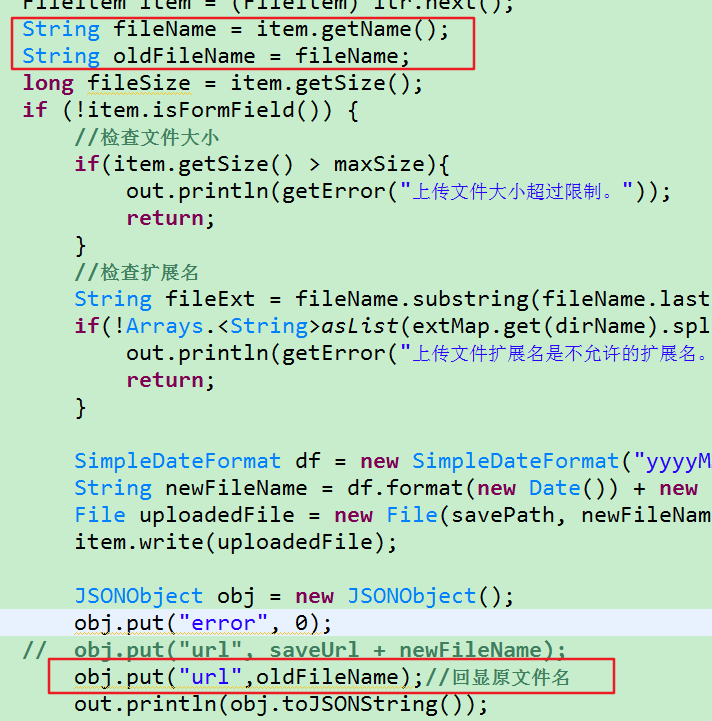
默认的uploadJson是一个jsp页面,我把其中的代码拷贝到了UploadServlet中,并进行了一些修改
1.修改文件夹的创建方式,默认的创建方式是/attached/fiile(或者是image等)/今天日期/,只保留/attached/

2.修改了上传文件的回显名称
默认的回显路径是这种,非常难以辨认,想显示原来的上传文件名怎么办?
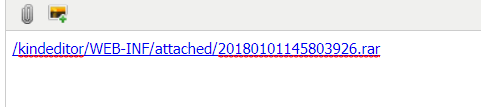
只需更改返回的json格式的url的值即可
这样重新上传回显的文件名是这样的

你会发现这样多个/kindeditor(我的项目名),如果想要去除,可以到kindeditor.js中搜索insertfile,注释掉formaturl即可

重新上传,回显文件名
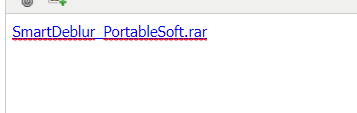
ps:如果操作之后没有变化,清理下浏览器缓存即可
3.关于中文乱码
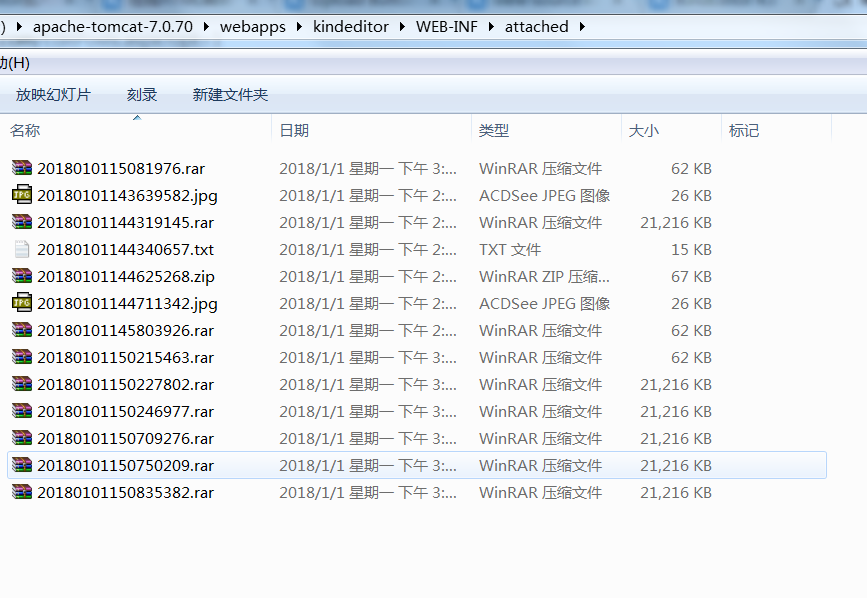
由于文件名已重新命名,避免文件名重复,所以没有中文编码的问题

测试结果:
至此文件上传已完成,接下来是文件下载
文件下载的思路很简单,在jsp页面显示文件列表,然后io下载即可
ListFileServlet此Servlet用于提供下载列表,将列表显示在jsp页面
 package cn.tele.servlet;

 import java.io.File;

 import java.io.IOException;

 import java.net.URI;

 import java.net.URL;

 import java.util.ArrayList;

 import java.util.HashMap;

 import java.util.List;

 import java.util.Map;

 import javax.servlet.ServletException;

 import javax.servlet.http.HttpServlet;

 import javax.servlet.http.HttpServletRequest;

 import javax.servlet.http.HttpServletResponse;

 /**

  * 显示可供下载的文件列表

  * @author Administrator

  *

  */

 public class ListFileServlet extends HttpServlet {

     public void doGet(HttpServletRequest request, HttpServletResponse response)

             throws ServletException, IOException {

         response.setContentType("text/html;charset = utf-8");

         //使用kindeditor上传的文件均被重命名为:yyyyMMddHHssmm+三位随机数的形式,所以文件名不需要编码转换

         String dirPath = this.getServletContext().getRealPath("/WEB-INF/attached/");

         Map<String,String> map = new HashMap<String, String>();

         File dir = new File(dirPath);

         if(dir.isDirectory()) {

             File[] files = dir.listFiles();

             for(File file : files) {

                 map.put(file.getName(),file.getAbsolutePath());

             }

         }

         request.setAttribute("map",map);

         request.getRequestDispatcher("/WEB-INF/jsp/listFile.jsp").forward(request, response);

     }

     public void doPost(HttpServletRequest request, HttpServletResponse response)

             throws ServletException, IOException {

         doGet(request, response);

     }

 }
DownLoadServlet,此Servlet用于提供下载功能,注意千万要设置响应头为content-disposition
注意:此程序没有判断文件是否存在
 package cn.tele.servlet;

 import java.io.BufferedInputStream;

 import java.io.BufferedOutputStream;

 import java.io.File;

 import java.io.FileInputStream;

 import java.io.IOException;

 import javax.servlet.ServletException;

 import javax.servlet.ServletOutputStream;

 import javax.servlet.http.HttpServlet;

 import javax.servlet.http.HttpServletRequest;

 import javax.servlet.http.HttpServletResponse;

 import javax.swing.filechooser.FileNameExtensionFilter;

 /**

  * 文件下载

  * @author Administrator

  *

  */

 public class DownloadServlet extends HttpServlet {

     public void doGet(HttpServletRequest request, HttpServletResponse response)

             throws ServletException, IOException {

         response.setContentType("text/html;charset = utf-8");

         String fileName  = request.getParameter("fileName");

         BufferedInputStream bis = new BufferedInputStream(new FileInputStream(new File(fileName)));

         byte[] buff = new byte[1024];

         ServletOutputStream outputStream = response.getOutputStream();

         fileName = fileName.replace("\\","_");

         //设置响应头

         response.setHeader("content-disposition","attachment;filename="+fileName.substring(fileName.lastIndexOf("_")+1));

         BufferedOutputStream bos = new BufferedOutputStream(outputStream);

         int count = 0;

         while((count=bis.read(buff)) != -1) {

             bos.write(buff,0,count);

         }

         bos.flush();

         bos.close();

         bis.close();

     }

     public void doPost(HttpServletRequest request, HttpServletResponse response)

             throws ServletException, IOException {

         doGet(request, response);

     }

 }
测试结果:
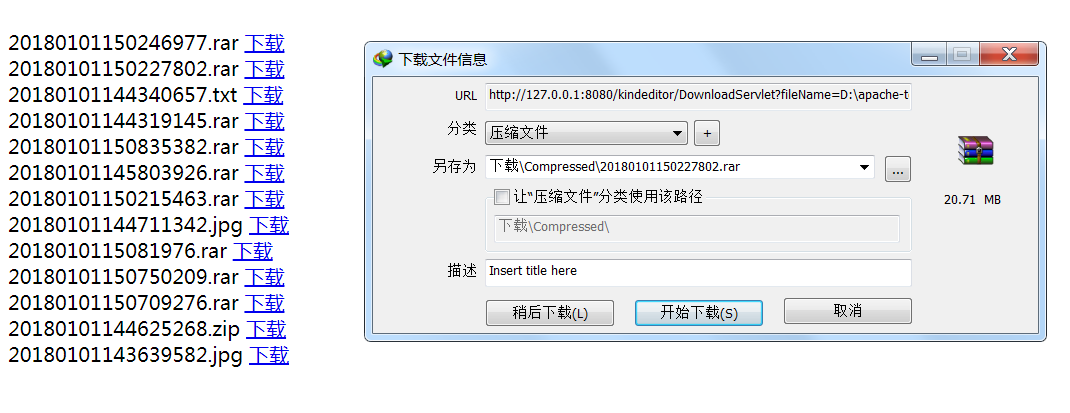
上传图片与之想类似,需要注意的是如果使用了默认的upload_json.jsp和file_manager_json.jsp,要根据你的需要修改其中的代码,比如上传的路径尽量放在WEB-INF下,
使用file_manager_json.jsp.浏览图片空间时会生成一个mage文件夹,可以根据需要修改
kindeditor 上传下载文件的更多相关文章
- kindeditor 4 上传下载文件
jsp代码 1 <script type="text/javascript" src="${pageContext.request.contextPath}/kin ...
- rz和sz上传下载文件工具lrzsz
######################### rz和sz上传下载文件工具lrzsz ####################################################### ...
- linux上很方便的上传下载文件工具rz和sz
linux上很方便的上传下载文件工具rz和sz(本文适合linux入门的朋友) ##########################################################&l ...
- shell通过ftp实现上传/下载文件
直接代码,shell文件名为testFtptool.sh: #!/bin/bash ########################################################## ...
- SFTP远程连接服务器上传下载文件-qt4.8.0-vs2010编译器-项目实例
本项目仅测试远程连接服务器,支持上传,下载文件,更多功能开发请看API自行开发. 环境:win7系统,Qt4.8.0版本,vs2010编译器 qt4.8.0-vs2010编译器项目实例下载地址:CSD ...
- linux下常用FTP命令 上传下载文件【转】
1. 连接ftp服务器 格式:ftp [hostname| ip-address]a)在linux命令行下输入: ftp 192.168.1.1 b)服务器询问你用户名和密码,分别输入用户名和相应密码 ...
- C#实现http协议支持上传下载文件的GET、POST请求
C#实现http协议支持上传下载文件的GET.POST请求using System; using System.Collections.Generic; using System.Text; usin ...
- HttpClient上传下载文件
HttpClient上传下载文件 java HttpClient Maven依赖 <dependency> <groupId>org.apache.httpcomponents ...
- 初级版python登录验证,上传下载文件加MD5文件校验
服务器端程序 import socket import json import struct import hashlib import os def md5_code(usr, pwd): ret ...
随机推荐
- Spring依赖注入原理
接触过spring 的同学应该都知道依赖注入,依赖注入又称控制反转,其内涵就是,将创建某个bean的控制权力,由原来需要引用这个bean的bean转移(反转)到外部的spring IOC容器,由IOC ...
- Java对象转换成xml对象和Java对象转换成JSON对象
1.把Java对象转换成JSON对象 apache提供的json-lib小工具,它可以方便的使用Java语言来创建JSON字符串.也可以把JavaBean转换成JSON字符串. json-lib的核心 ...
- [转]ubuntu下安装fiddler
转 ubuntu下安装fiddler biangbiang 因为工作中需要用到fiddler工具 现在工作环境迁移到ubuntu14 下 发现fiddler只支持windows网上也有很多推荐 ...
- java.net.BindException: Cannot assign requested address: bind
异常信息 时间:2017-03-16 10:21:05,644 - 级别:[ERROR] - 消息: [other] Failed to start end point associated with ...
- MVC+EF 入门教程(二)
一.前沿 为了使以后项目分开,所以我会添加3个类库.用于存储 实体.数据库迁移.服务.这种思路是源于我使用的一个框架 ABP.有兴趣的您,可以去研究和使用这个框架. 二.修改本地连接 在项目中,找到 ...
- iOS tableViewCell 在自定义高度方法中遇到的问题,cell高度为0,cell显示不出来,cell直接显示第几个而不是...cell显示个数不对
遇到以上问题可以看看你的cell高度中是否有,自定的高度,有了继续看,没有了继续百度... 在文字排版中,少不了自适应文字高度,行间距什么的:显然cell的高度时不固定的,如果复用自定义的cell的话 ...
- xml文件解析(使用解析器)
一.Xml解析,解析xml并封装到list中的javabean中 OM是用与平台和语言无关的方式表示XML文档的官方W3C标准.DOM是以层次结构组织的节点或信息片断的集合.这个层次结构允许开发人员在 ...
- NOI2009 植物大战僵尸
啊一道好题感觉写得挺爽的啊这题这种有一点懵逼然后学了一点东西之后很明朗的感觉真是好!预处理参考 :http://www.cppblog.com/MatoNo1/archive/2014/11/01/1 ...
- 对于group by 和 order by 并用 的分析
今天朋友问我一个sql查询. 需求是 找到idapi最近那条数据,说明idapi 是重复的,于是就简单的写了 SELECT * FROM `ag_alarm_history` group by ` ...
- 闲来无事做了一个批处理的win10账号管理
@echo off %1 mshta vbscript:CreateObject("Shell.Application").ShellExecute("cmd.exe&q ...