
kindeditor 上传下载文件
jsp代码
 1 <script type="text/javascript" src="${pageContext.request.contextPath}/kindeditor/lang/zh-CN.js"></script>

 2 <script type="text/javascript" src="${pageContext.request.contextPath}/kindeditor/kindeditor-all.js"></script>

 3 <script type="text/javascript" src="${pageContext.request.contextPath}/js/jquery.js"></script>

 4 <script type="text/javascript">

 5     var options = {

 6        items:['insertfile','image'],

 7         uploadJson:"${pageContext.request.contextPath}/UploadServlet"

 8         //uploadJson:"${pageContext.request.contextPath}/kindeditor/jsp/upload_json.jsp"

 9     //    fileManagerJson : "${pageContext.request.contextPath}/kindeditor/jsp/file_manager_json.jsp",

10     //    allowFileManager : true,

11    //     afterUpload: function(){this.sync();}

12     };

13

14      KindEditor.ready(function(k) {

15         window.editor = k.create("textarea[name='content1']",options);

16      });

17 </script>

18 </head>

19 <body>

20     <!-- 使用kindeditor上传文件 -->

21     <div style="text-align:center">

22     <form name="example" method="post" action="#">

23         <textarea name="content1" style="width:700px;height:200px;visibility:visible;">

24

25

26         </textarea>

27         <br />

28         <input type="submit" name="button" value="提交内容" /> (提交快捷键: Ctrl + Enter)

29     </form>

30

31      </textarea>

32    </div>

33

34 </body>

35 </html>
UploadServlet
 package cn.tele.servlet;

 import java.io.File;

 import java.io.IOException;

 import java.io.PrintWriter;

 import java.text.SimpleDateFormat;

 import java.util.Arrays;

 import java.util.Date;

 import java.util.HashMap;

 import java.util.Iterator;

 import java.util.List;

 import java.util.Random;

 import javax.servlet.ServletException;

 import javax.servlet.http.HttpServlet;

 import javax.servlet.http.HttpServletRequest;

 import javax.servlet.http.HttpServletResponse;

 import org.apache.commons.fileupload.FileItem;

 import org.apache.commons.fileupload.FileItemFactory;

 import org.apache.commons.fileupload.FileUploadException;

 import org.apache.commons.fileupload.disk.DiskFileItemFactory;

 import org.apache.commons.fileupload.servlet.ServletFileUpload;

 import org.json.simple.JSONObject;

 public class UploadServlet extends HttpServlet {

     public void doGet(HttpServletRequest request, HttpServletResponse response)

             throws ServletException, IOException {

         response.setContentType("text/html;charset = utf-8");

         //文件保存目录路径

         String savePath = request.getSession().getServletContext().getRealPath("/") + "WEB-INF/attached/";

         PrintWriter out = response.getWriter();

         //文件保存目录URL

         String saveUrl  = request.getContextPath() + "/WEB-INF/attached/";

         //定义允许上传的文件扩展名

         HashMap<String, String> extMap = new HashMap<String, String>();

         extMap.put("image", "gif,jpg,jpeg,png,bmp");

         extMap.put("flash", "swf,flv");

         extMap.put("media", "swf,flv,mp3,wav,wma,wmv,mid,avi,mpg,asf,rm,rmvb");

         extMap.put("file", "doc,docx,xls,xlsx,ppt,htm,html,txt,zip,rar,gz,bz2");

         //最大文件大小

         long maxSize = 1000000000;

         response.setContentType("text/html; charset=UTF-8");

         if(!ServletFileUpload.isMultipartContent(request)){

             out.println(getError("请选择文件。"));

             return;

         }

         //检查目录

         File uploadDir = new File(savePath);

         if(!uploadDir.isDirectory()){

             out.println(getError("上传目录不存在。"));

             return;

         }

         //检查目录写权限

         if(!uploadDir.canWrite()){

             out.println(getError("上传目录没有写权限。"));

             return;

         }

         //单独使用组件时要传递dirName,参考demo3.jsp

         String dirName = request.getParameter("dir");

         if (dirName == null) {

         //    dirName = "image";

         }

         System.out.println("dirName--------" + dirName);

         if(!extMap.containsKey(dirName)){

             out.println(getError("目录名不正确。"));

             return;

         }

         //创建文件夹

 //        savePath += dirName + "/";

 //        saveUrl += dirName + "/";

         File saveDirFile = new File(savePath);

         if (!saveDirFile.exists()) {

             saveDirFile.mkdirs();

         }

         SimpleDateFormat sdf = new SimpleDateFormat("yyyyMMdd");

         String ymd = sdf.format(new Date());

 //        savePath += ymd + "/";

 //        saveUrl += ymd + "/";

         File dirFile = new File(savePath);

         if (!dirFile.exists()) {

             dirFile.mkdirs();

         }

         FileItemFactory factory = new DiskFileItemFactory();

         ServletFileUpload upload = new ServletFileUpload(factory);

         upload.setHeaderEncoding("UTF-8");

         List items;

         try {

             items = upload.parseRequest(request);

             Iterator itr = items.iterator();

             while (itr.hasNext()) {

                 FileItem item = (FileItem) itr.next();

                 String fileName = item.getName();

                 String oldFileName = fileName;

                 long fileSize = item.getSize();

                 if (!item.isFormField()) {

                     //检查文件大小

                     if(item.getSize() > maxSize){

                         out.println(getError("上传文件大小超过限制。"));

                         return;

                     }

                     //检查扩展名

                     String fileExt = fileName.substring(fileName.lastIndexOf(".") + 1).toLowerCase();

                     if(!Arrays.<String>asList(extMap.get(dirName).split(",")).contains(fileExt)){

                         out.println(getError("上传文件扩展名是不允许的扩展名。\n只允许" + extMap.get(dirName) + "格式。"));

                         return;

                     }

                     SimpleDateFormat df = new SimpleDateFormat("yyyyMMddHHmmss");

                     String newFileName = df.format(new Date()) + new Random().nextInt(1000) + "." + fileExt;

                     File uploadedFile = new File(savePath, newFileName);

                     item.write(uploadedFile);

                     JSONObject obj = new JSONObject();

                     obj.put("error", 0);

                 //    obj.put("url", saveUrl + newFileName);

                     obj.put("url",oldFileName);//回显原文件名

                     out.println(obj.toJSONString());

          }

         }

       }catch (FileUploadException e1) {

         // TODO Auto-generated catch block

         e1.printStackTrace();

     } catch (Exception e) {

         // TODO Auto-generated catch block

         e.printStackTrace();

     }

     }

     public void doPost(HttpServletRequest request, HttpServletResponse response)

             throws ServletException, IOException {

         response.setContentType("text/html;charset = utf-8");

         doGet(request, response);

     }

     private String getError(String message) {

         JSONObject obj = new JSONObject();

         obj.put("error", 1);

         obj.put("message", message);

         return obj.toJSONString();

     }

 }
默认的uploadJson是一个jsp页面,我把其中的代码拷贝到了UploadServlet中,并进行了一些修改
1.修改文件夹的创建方式,默认的创建方式是/attached/fiile(或者是image等)/今天日期/,只保留/attached/

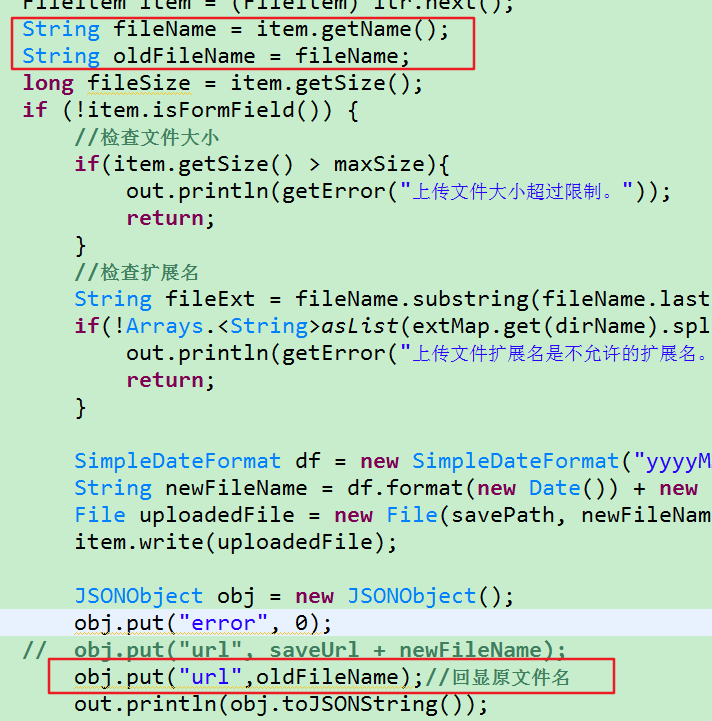
2.修改了上传文件的回显名称
默认的回显路径是这种,非常难以辨认,想显示原来的上传文件名怎么办?
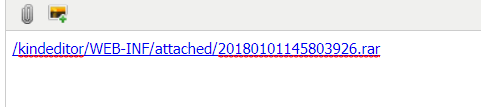
只需更改返回的json格式的url的值即可
这样重新上传回显的文件名是这样的

你会发现这样多个/kindeditor(我的项目名),如果想要去除,可以到kindeditor.js中搜索insertfile,注释掉formaturl即可

重新上传,回显文件名
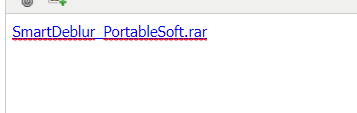
ps:如果操作之后没有变化,清理下浏览器缓存即可
3.关于中文乱码
由于文件名已重新命名,避免文件名重复,所以没有中文编码的问题

测试结果:
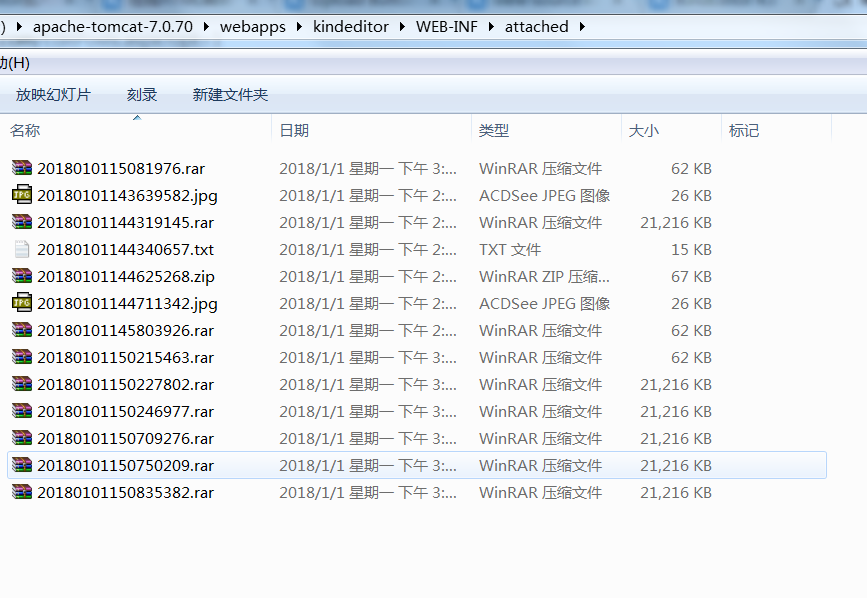
至此文件上传已完成,接下来是文件下载
文件下载的思路很简单,在jsp页面显示文件列表,然后io下载即可
ListFileServlet此Servlet用于提供下载列表,将列表显示在jsp页面
 package cn.tele.servlet;

 import java.io.File;

 import java.io.IOException;

 import java.net.URI;

 import java.net.URL;

 import java.util.ArrayList;

 import java.util.HashMap;

 import java.util.List;

 import java.util.Map;

 import javax.servlet.ServletException;

 import javax.servlet.http.HttpServlet;

 import javax.servlet.http.HttpServletRequest;

 import javax.servlet.http.HttpServletResponse;

 /**

  * 显示可供下载的文件列表

  * @author Administrator

  *

  */

 public class ListFileServlet extends HttpServlet {

     public void doGet(HttpServletRequest request, HttpServletResponse response)

             throws ServletException, IOException {

         response.setContentType("text/html;charset = utf-8");

         //使用kindeditor上传的文件均被重命名为:yyyyMMddHHssmm+三位随机数的形式,所以文件名不需要编码转换

         String dirPath = this.getServletContext().getRealPath("/WEB-INF/attached/");

         Map<String,String> map = new HashMap<String, String>();

         File dir = new File(dirPath);

         if(dir.isDirectory()) {

             File[] files = dir.listFiles();

             for(File file : files) {

                 map.put(file.getName(),file.getAbsolutePath());

             }

         }

         request.setAttribute("map",map);

         request.getRequestDispatcher("/WEB-INF/jsp/listFile.jsp").forward(request, response);

     }

     public void doPost(HttpServletRequest request, HttpServletResponse response)

             throws ServletException, IOException {

         doGet(request, response);

     }

 }
DownLoadServlet,此Servlet用于提供下载功能,注意千万要设置响应头为content-disposition
注意:此程序没有判断文件是否存在
 package cn.tele.servlet;

 import java.io.BufferedInputStream;

 import java.io.BufferedOutputStream;

 import java.io.File;

 import java.io.FileInputStream;

 import java.io.IOException;

 import javax.servlet.ServletException;

 import javax.servlet.ServletOutputStream;

 import javax.servlet.http.HttpServlet;

 import javax.servlet.http.HttpServletRequest;

 import javax.servlet.http.HttpServletResponse;

 import javax.swing.filechooser.FileNameExtensionFilter;

 /**

  * 文件下载

  * @author Administrator

  *

  */

 public class DownloadServlet extends HttpServlet {

     public void doGet(HttpServletRequest request, HttpServletResponse response)

             throws ServletException, IOException {

         response.setContentType("text/html;charset = utf-8");

         String fileName  = request.getParameter("fileName");

         BufferedInputStream bis = new BufferedInputStream(new FileInputStream(new File(fileName)));

         byte[] buff = new byte[1024];

         ServletOutputStream outputStream = response.getOutputStream();

         fileName = fileName.replace("\\","_");

         //设置响应头

         response.setHeader("content-disposition","attachment;filename="+fileName.substring(fileName.lastIndexOf("_")+1));

         BufferedOutputStream bos = new BufferedOutputStream(outputStream);

         int count = 0;

         while((count=bis.read(buff)) != -1) {

             bos.write(buff,0,count);

         }

         bos.flush();

         bos.close();

         bis.close();

     }

     public void doPost(HttpServletRequest request, HttpServletResponse response)

             throws ServletException, IOException {

         doGet(request, response);

     }

 }
测试结果:
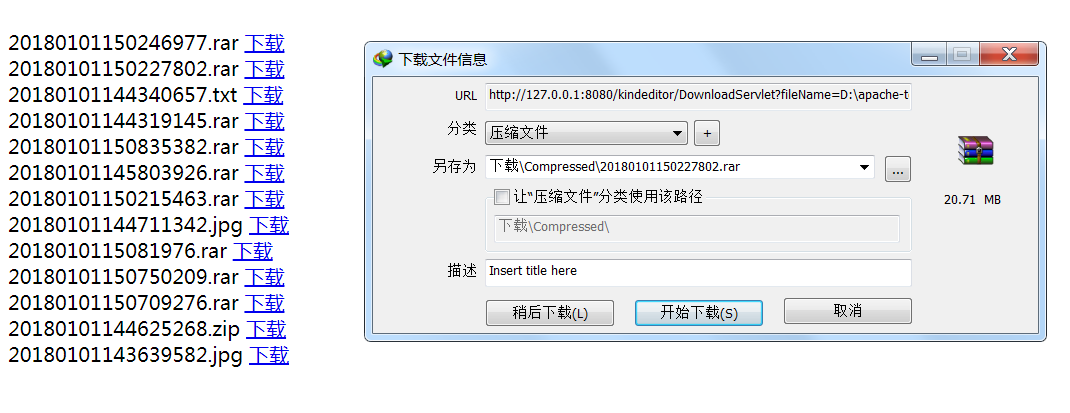
上传图片与之想类似,需要注意的是如果使用了默认的upload_json.jsp和file_manager_json.jsp,要根据你的需要修改其中的代码,比如上传的路径尽量放在WEB-INF下,
使用file_manager_json.jsp.浏览图片空间时会生成一个mage文件夹,可以根据需要修改
kindeditor 上传下载文件的更多相关文章
- kindeditor 4 上传下载文件
jsp代码 1 <script type="text/javascript" src="${pageContext.request.contextPath}/kin ...
- rz和sz上传下载文件工具lrzsz
######################### rz和sz上传下载文件工具lrzsz ####################################################### ...
- linux上很方便的上传下载文件工具rz和sz
linux上很方便的上传下载文件工具rz和sz(本文适合linux入门的朋友) ##########################################################&l ...
- shell通过ftp实现上传/下载文件
直接代码,shell文件名为testFtptool.sh: #!/bin/bash ########################################################## ...
- SFTP远程连接服务器上传下载文件-qt4.8.0-vs2010编译器-项目实例
本项目仅测试远程连接服务器,支持上传,下载文件,更多功能开发请看API自行开发. 环境:win7系统,Qt4.8.0版本,vs2010编译器 qt4.8.0-vs2010编译器项目实例下载地址:CSD ...
- linux下常用FTP命令 上传下载文件【转】
1. 连接ftp服务器 格式:ftp [hostname| ip-address]a)在linux命令行下输入: ftp 192.168.1.1 b)服务器询问你用户名和密码,分别输入用户名和相应密码 ...
- C#实现http协议支持上传下载文件的GET、POST请求
C#实现http协议支持上传下载文件的GET.POST请求using System; using System.Collections.Generic; using System.Text; usin ...
- HttpClient上传下载文件
HttpClient上传下载文件 java HttpClient Maven依赖 <dependency> <groupId>org.apache.httpcomponents ...
- 初级版python登录验证,上传下载文件加MD5文件校验
服务器端程序 import socket import json import struct import hashlib import os def md5_code(usr, pwd): ret ...
随机推荐
- Linux高性能server编程——信号及应用
信号 信号是由用户.系统或者进程发送给目标进程的信息.以通知目标进程某个状态的改变或系统异常. Linux信号可由例如以下条件产生: 对于前台进程.用户能够通过输入特殊的终端字符来给它发送信号. ...
- Android数据存储之内部存储、外部存储
首先来介绍下什么是内部存储? 在Android平台下,有着自己独立的数据存储规则,在windows平台下,应用程序能够自由的或者在特定的訪问权限基础上訪问或改动其它应用程序下的文件资源. 可是在And ...
- 轻松上云,从容实施Office 365项目
这个是我在MVP 社区活动的一节课程,讲述Office 365部署中一些大的挑战和解决的方法 视频URL 例如以下: http://edu.51cto.com/lesson/id-17440.html ...
- 深入了解MyBatis返回值
深入了解MyBatis返回值 想了解返回值,我们须要了解resultType,resultMap以及接口方法中定义的返回值. 我们先看resultType和resultMap resultType和r ...
- AVL树 & 重平衡概念
AVL树是有平衡条件的二叉搜索树.这个平衡条件必须容易保持,而且需要保证树的深度是O(logN). AVL=BBST 作为二叉搜索树的最后一部分,我们来介绍最为经典的一种平衡二叉搜索树:AVL树.回顾 ...
- springboot定时任务——整合Quartz
http://blog.csdn.net/liuchuanhong1/article/details/60873295 http://blog.csdn.net/lyg_come_on/article ...
- Office Web Add-in的技术原理和开发常见问题剖析
作者:陈希章 发表于 2017年12月20日 我过去发表过一些Office Add-in开发的文章,并且也在不同的场合分享过新的开发模式及其带来的机遇.有不少朋友给我反馈,也讨论到一些常见问题,我这里 ...
- 【SqlServer】【问题收集】必须声明标量变量
1 问题概述 在DAL层,通过标量给变量赋值时,出现如下异常 我们来看看在数据访问层的SQL语句: //根据EmployeeName条件获取数据 public DataTable GetEmplo ...
- 十五、Spring Boot 环境变量读取 和 属性对象的绑定
凡是被spring管理的类,实现接口 EnvironmentAware 重写方法 setEnvironment 可以在工程启动时,获取到系统环境变量和application配置文件中的变量. 如: @ ...
- python decorator 基础
一般来说,装饰器是一个函数,接受一个函数(或者类)作为参数,返回值也是也是一个函数(或者类).首先来看一个简单的例子: # -*- coding: utf-8 -*- def log_cost_tim ...