
利用generator自动生成model(实体)、dao(接口)、mapper(映射)
1 在MySQL数据库中创建相应的表
/*

Navicat MySQL Data Transfer

Source Server         : 虚拟机_zeus01

Source Server Version : 50717

Source Host           : 10.24.3.108:3306

Source Database       : security

Target Server Type    : MYSQL

Target Server Version : 50717

File Encoding         : 65001

Date: 2017-12-10 16:44:58

*/

SET FOREIGN_KEY_CHECKS=0;

-- ----------------------------

-- Table structure for `sys_acl`

-- ----------------------------

DROP TABLE IF EXISTS `sys_acl`;

CREATE TABLE `sys_acl` (

  `id` int(11) NOT NULL AUTO_INCREMENT COMMENT '权限ID',

  `code` varchar(20) NOT NULL DEFAULT '' COMMENT '权限码',

  `name` varchar(20) NOT NULL DEFAULT '' COMMENT '权限名称',

  `acl_module_id` int(11) NOT NULL DEFAULT '0' COMMENT '权限所在的权限模块ID',

  `url` varchar(100) NOT NULL DEFAULT '' COMMENT '请求的URL,可以填正则表达式',

  `type` int(11) NOT NULL DEFAULT '3' COMMENT '类型,1:菜单,2:按钮,3:其他',

  `status` int(11) NOT NULL DEFAULT '1' COMMENT '状态,1:正常,0:冻结',

  `seq` int(11) NOT NULL DEFAULT '0' COMMENT '权限在当前模块的顺序,有效到大',

  `remark` varchar(200) DEFAULT '' COMMENT '备注',

  `operator` varchar(20) NOT NULL DEFAULT '' COMMENT '最后更新者',

  `operator_time` datetime NOT NULL DEFAULT CURRENT_TIMESTAMP COMMENT '最后更新时间',

  `operator_ip` varchar(20) NOT NULL DEFAULT '' COMMENT '最后更新者的IP地址',

  PRIMARY KEY (`id`)

) ENGINE=InnoDB DEFAULT CHARSET=utf8mb4;

-- ----------------------------

-- Records of sys_acl

-- ----------------------------

-- ----------------------------

-- Table structure for `sys_acl_module`

-- ----------------------------

DROP TABLE IF EXISTS `sys_acl_module`;

CREATE TABLE `sys_acl_module` (

  `id` int(11) NOT NULL AUTO_INCREMENT COMMENT '权限模块ID',

  `name` varchar(20) NOT NULL DEFAULT '' COMMENT '权限模块名称',

  `parent_id` int(11) NOT NULL DEFAULT '0' COMMENT '上级权限模块ID',

  `level` varchar(200) NOT NULL DEFAULT '' COMMENT '权限模块层级',

  `seq` int(11) NOT NULL DEFAULT '0' COMMENT '权限模块在当前层级的顺序,由小到大',

  `status` int(11) NOT NULL DEFAULT '1' COMMENT '状态,1:正常,0:冻结',

  `remark` varchar(200) DEFAULT '' COMMENT '备注',

  `operator` varchar(20) NOT NULL DEFAULT '' COMMENT '最后一次更新的操作者',

  `operator_time` datetime NOT NULL DEFAULT CURRENT_TIMESTAMP COMMENT '最后一次修改时间',

  `operator_ip` varchar(20) NOT NULL DEFAULT '' COMMENT '最后一次更新操作者的IP地址 ',

  PRIMARY KEY (`id`)

) ENGINE=InnoDB DEFAULT CHARSET=utf8mb4;

-- ----------------------------

-- Records of sys_acl_module

-- ----------------------------

-- ----------------------------

-- Table structure for `sys_dept`

-- ----------------------------

DROP TABLE IF EXISTS `sys_dept`;

CREATE TABLE `sys_dept` (

  `id` int(11) NOT NULL AUTO_INCREMENT COMMENT '部门ID',

  `name` varchar(20) NOT NULL DEFAULT '' COMMENT '部门名称',

  `parent_id` int(11) NOT NULL DEFAULT '0' COMMENT '上级部门ID',

  `level` varchar(200) NOT NULL DEFAULT '' COMMENT '部门层级',

  `seq` int(11) NOT NULL DEFAULT '0' COMMENT '部门在当前层级的顺序,由小到大',

  `remark` varchar(200) DEFAULT '' COMMENT '备注',

  `operator` varchar(20) NOT NULL DEFAULT '' COMMENT '最后一次更新的操作者',

  `operator_time` datetime NOT NULL DEFAULT CURRENT_TIMESTAMP COMMENT '最后一次修改时间',

  `operator_ip` varchar(20) NOT NULL DEFAULT '' COMMENT '最后一次更新操作者的IP地址 ',

  PRIMARY KEY (`id`)

) ENGINE=InnoDB DEFAULT CHARSET=utf8mb4;

-- ----------------------------

-- Records of sys_dept

-- ----------------------------

-- ----------------------------

-- Table structure for `sys_log`

-- ----------------------------

DROP TABLE IF EXISTS `sys_log`;

CREATE TABLE `sys_log` (

  ` id` int(11) NOT NULL AUTO_INCREMENT,

  `type` int(11) NOT NULL DEFAULT '0' COMMENT '权限更新的类型,1:部门,2:用户,3:权限模块,4:权限,5:角色,6:角色用户关系,7:角色权限关系',

  `target_id` int(11) NOT NULL COMMENT '基于type后制定的对象ID,比如用户、权限、角色等表的主键',

  `old_value` text COMMENT '原始值',

  `new_value` text COMMENT '新值',

  `status` int(11) NOT NULL DEFAULT '0' COMMENT '当前是否复原过,0:没有,1:复原过',

  `operator` varchar(20) NOT NULL DEFAULT '' COMMENT '最后更新者',

  `operator_time` datetime NOT NULL DEFAULT CURRENT_TIMESTAMP COMMENT '最后更新时间',

  `operator_ip` varchar(20) NOT NULL DEFAULT '' COMMENT '最后更新者的IP地址',

  PRIMARY KEY (` id`)

) ENGINE=InnoDB DEFAULT CHARSET=utf8mb4;

-- ----------------------------

-- Records of sys_log

-- ----------------------------

-- ----------------------------

-- Table structure for `sys_role`

-- ----------------------------

DROP TABLE IF EXISTS `sys_role`;

CREATE TABLE `sys_role` (

  `id` int(11) NOT NULL AUTO_INCREMENT COMMENT '角色ID',

  `name` varchar(20) NOT NULL DEFAULT '',

  `type` int(11) NOT NULL DEFAULT '1' COMMENT '角色类型,1:管理角色,2:其他',

  `status` int(11) NOT NULL DEFAULT '1' COMMENT '状态,1:可用,0:冻结',

  `remark` varchar(200) DEFAULT '' COMMENT '备注',

  `operator` varchar(20) NOT NULL DEFAULT '' COMMENT '最后更新者',

  `operator_time` datetime NOT NULL DEFAULT CURRENT_TIMESTAMP COMMENT '最后更新时间',

  `operator_ip` varchar(20) NOT NULL DEFAULT '' COMMENT '最后更新者的IP地址',

  PRIMARY KEY (`id`)

) ENGINE=InnoDB DEFAULT CHARSET=utf8mb4;

-- ----------------------------

-- Records of sys_role

-- ----------------------------

-- ----------------------------

-- Table structure for `sys_role_acl`

-- ----------------------------

DROP TABLE IF EXISTS `sys_role_acl`;

CREATE TABLE `sys_role_acl` (

  `id` int(11) NOT NULL AUTO_INCREMENT,

  `role_id` int(11) NOT NULL COMMENT '角色ID',

  `acl_id` int(11) NOT NULL COMMENT '权限ID',

  `operator` varchar(20) NOT NULL DEFAULT '' COMMENT '最后更新者',

  `operator_time` datetime NOT NULL DEFAULT CURRENT_TIMESTAMP COMMENT '最后更新时间',

  `operator_ip` varchar(20) NOT NULL DEFAULT '' COMMENT '最后更新者的IP地址',

  PRIMARY KEY (`id`)

) ENGINE=InnoDB DEFAULT CHARSET=utf8mb4;

-- ----------------------------

-- Records of sys_role_acl

-- ----------------------------

-- ----------------------------

-- Table structure for `sys_role_user`

-- ----------------------------

DROP TABLE IF EXISTS `sys_role_user`;

CREATE TABLE `sys_role_user` (

  `id` int(11) NOT NULL AUTO_INCREMENT,

  `role_id` int(11) NOT NULL COMMENT '角色ID',

  `user_id` int(11) NOT NULL COMMENT '用户ID',

  `operator` varchar(20) NOT NULL DEFAULT '' COMMENT '最后更新者',

  `operator_time` datetime NOT NULL DEFAULT CURRENT_TIMESTAMP COMMENT '最后更新时间',

  `operator_ip` varchar(20) NOT NULL DEFAULT '' COMMENT '最后更新者的IP地址',

  PRIMARY KEY (`id`)

) ENGINE=InnoDB DEFAULT CHARSET=utf8mb4;

-- ----------------------------

-- Records of sys_role_user

-- ----------------------------

-- ----------------------------

-- Table structure for `sys_user`

-- ----------------------------

DROP TABLE IF EXISTS `sys_user`;

CREATE TABLE `sys_user` (

  `id` int(11) NOT NULL AUTO_INCREMENT COMMENT '用户ID',

  `username` varchar(20) NOT NULL DEFAULT '' COMMENT '用户名称',

  `telephone` varchar(13) NOT NULL DEFAULT '' COMMENT '手机号',

  `email` varchar(20) NOT NULL DEFAULT '' COMMENT '邮箱',

  `password` varchar(40) NOT NULL DEFAULT '' COMMENT '加密后的密码',

  `dept_id` int(11) NOT NULL DEFAULT '0' COMMENT '所在部门的ID',

  `status` int(11) NOT NULL DEFAULT '1' COMMENT '状态, 1:正常,0:冻结,2:删除',

  `remark` varchar(200) DEFAULT '' COMMENT '备注',

  `operator` varchar(20) NOT NULL DEFAULT '' COMMENT '最后更新者',

  `operator_time` datetime NOT NULL DEFAULT CURRENT_TIMESTAMP COMMENT '最后更新时间',

  `operator_ip` varchar(20) NOT NULL DEFAULT '' COMMENT '最后一次更新者的IP',

  PRIMARY KEY (`id`)

) ENGINE=InnoDB DEFAULT CHARSET=utf8mb4;

-- ----------------------------

-- Records of sys_user

-- ----------------------------
create.sql
2 导入generator工具文件夹到springMVC项目根目录下
生成工具包:点击获取
3 根据自己的项目修改生成配置文件
<?xml version="1.0" encoding="UTF-8"?>

<!DOCTYPE generatorConfiguration PUBLIC "-//mybatis.org//DTD MyBatis Generator Configuration 1.0//EN" "http://mybatis.org/dtd/mybatis-generator-config_1_0.dtd">

<generatorConfiguration>

    <!-- 数据库驱动包位置 -->

    <classPathEntry location="F:\javaProgramming\springCloud\permission\generator\mysql-connector-java-5.1.34.jar" /> <!-- 1 -->

    <context id="DB2Tables" targetRuntime="MyBatis3">

        <commentGenerator>

            <property name="suppressAllComments" value="true" />

        </commentGenerator>

        <!-- 数据库链接URL、用户名、密码 -->

        <jdbcConnection driverClass="com.mysql.jdbc.Driver" connectionURL="jdbc:mysql://10.24.3.108:3306/security?characterEncoding=utf8" userId="root" password="123456">  <!-- 2 -->

        </jdbcConnection>

        <javaTypeResolver>

            <property name="forceBigDecimals" value="false" />

        </javaTypeResolver>

        <!-- 生成模型的包名和位置 --> <!-- 3 -->

        <javaModelGenerator targetPackage="cn.xiangxu.model" targetProject="F:\javaProgramming\springCloud\permission\generator\src">

            <property name="enableSubPackages" value="true" />

            <property name="trimStrings" value="true" />

        </javaModelGenerator>

        <!-- 生成的映射文件包名和位置 --> <!-- 4 -->

        <sqlMapGenerator targetPackage="cn.xiangxu.mapper" targetProject="F:\javaProgramming\springCloud\permission\generator\src">

            <property name="enableSubPackages" value="true" />

        </sqlMapGenerator>

        <!-- 生成DAO的包名和位置 --> <!-- 5 -->

        <javaClientGenerator type="XMLMAPPER" targetPackage="cn.xiangxu.dao" targetProject="F:\javaProgramming\springCloud\permission\generator\src">

            <property name="enableSubPackages" value="true" />

        </javaClientGenerator>

        <!-- 要生成那些表(更改tableName和domainObjectName就可以) --><!-- 6 -->

        <table tableName="sys_user" domainObjectName="SysUser" enableCountByExample="false" enableUpdateByExample="false" enableDeleteByExample="false" enableSelectByExample="false" selectByExampleQueryId="false" />

        <table tableName="sys_dept" domainObjectName="SysDept" enableCountByExample="false" enableUpdateByExample="false" enableDeleteByExample="false" enableSelectByExample="false" selectByExampleQueryId="false" />

        <table tableName="sys_acl" domainObjectName="SysAcl" enableCountByExample="false" enableUpdateByExample="false" enableDeleteByExample="false" enableSelectByExample="false" selectByExampleQueryId="false" />

        <table tableName="sys_acl_module" domainObjectName="SysAclModule" enableCountByExample="false" enableUpdateByExample="false" enableDeleteByExample="false" enableSelectByExample="false" selectByExampleQueryId="false" />

        <table tableName="sys_role" domainObjectName="SysRole" enableCountByExample="false" enableUpdateByExample="false" enableDeleteByExample="false" enableSelectByExample="false" selectByExampleQueryId="false" />

        <table tableName="sys_role_acl" domainObjectName="SysRoleAcl" enableCountByExample="false" enableUpdateByExample="false" enableDeleteByExample="false" enableSelectByExample="false" selectByExampleQueryId="false" />

        <table tableName="sys_role_user" domainObjectName="SysRoleUser" enableCountByExample="false" enableUpdateByExample="false" enableDeleteByExample="false" enableSelectByExample="false" selectByExampleQueryId="false" />

        <table tableName="sys_log" domainObjectName="SysLog" enableCountByExample="false" enableUpdateByExample="false" enableDeleteByExample="false" enableSelectByExample="false" selectByExampleQueryId="false" />

    </context>

</generatorConfiguration>
生成文件
3.1 修改驱动包的位置

<classPathEntry location="F:\javaProgramming\springCloud\permission\generator\mysql-connector-java-5.1.34.jar" /> <!-- 1 -->
3.2 修改数据库连接信息

<jdbcConnection driverClass="com.mysql.jdbc.Driver" connectionURL="jdbc:mysql://IP地址:端口/数据库?characterEncoding=utf8" userId="用户名" password="密码"> <!-- 2 -->
3.3 修改生成文件的包名和存放路径
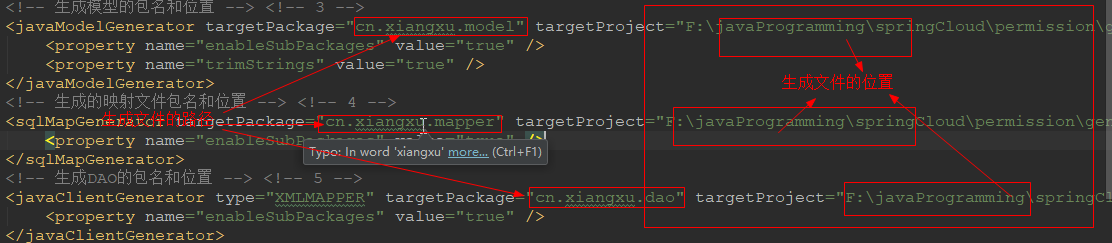
<!-- 生成模型的包名和位置 --> <!-- 3 -->

        <javaModelGenerator targetPackage="cn.xiangxu.model" targetProject="F:\javaProgramming\springCloud\permission\generator\src">

            <property name="enableSubPackages" value="true" />

            <property name="trimStrings" value="true" />

        </javaModelGenerator>

        <!-- 生成的映射文件包名和位置 --> <!-- 4 -->

        <sqlMapGenerator targetPackage="cn.xiangxu.mapper" targetProject="F:\javaProgramming\springCloud\permission\generator\src">

            <property name="enableSubPackages" value="true" />

        </sqlMapGenerator>

        <!-- 生成DAO的包名和位置 --> <!-- 5 -->

        <javaClientGenerator type="XMLMAPPER" targetPackage="cn.xiangxu.dao" targetProject="F:\javaProgramming\springCloud\permission\generator\src">

            <property name="enableSubPackages" value="true" />

        </javaClientGenerator>
3.4 设置数据库表名和model、dao、mapper的对应关系

<!-- 要生成那些表(更改tableName和domainObjectName就可以) --><!-- 6 -->

        <table tableName="sys_user" domainObjectName="SysUser" enableCountByExample="false" enableUpdateByExample="false" enableDeleteByExample="false" enableSelectByExample="false" selectByExampleQueryId="false" />

        <table tableName="sys_dept" domainObjectName="SysDept" enableCountByExample="false" enableUpdateByExample="false" enableDeleteByExample="false" enableSelectByExample="false" selectByExampleQueryId="false" />

        <table tableName="sys_acl" domainObjectName="SysAcl" enableCountByExample="false" enableUpdateByExample="false" enableDeleteByExample="false" enableSelectByExample="false" selectByExampleQueryId="false" />

        <table tableName="sys_acl_module" domainObjectName="SysAclModule" enableCountByExample="false" enableUpdateByExample="false" enableDeleteByExample="false" enableSelectByExample="false" selectByExampleQueryId="false" />

        <table tableName="sys_role" domainObjectName="SysRole" enableCountByExample="false" enableUpdateByExample="false" enableDeleteByExample="false" enableSelectByExample="false" selectByExampleQueryId="false" />

        <table tableName="sys_role_acl" domainObjectName="SysRoleAcl" enableCountByExample="false" enableUpdateByExample="false" enableDeleteByExample="false" enableSelectByExample="false" selectByExampleQueryId="false" />

        <table tableName="sys_role_user" domainObjectName="SysRoleUser" enableCountByExample="false" enableUpdateByExample="false" enableDeleteByExample="false" enableSelectByExample="false" selectByExampleQueryId="false" />

        <table tableName="sys_log" domainObjectName="SysLog" enableCountByExample="false" enableUpdateByExample="false" enableDeleteByExample="false" enableSelectByExample="false" selectByExampleQueryId="false" />
3.5 执行生成语句
java -jar mybatis-generator-core-1.3.2.jar -configfile generator.xml -overwrite
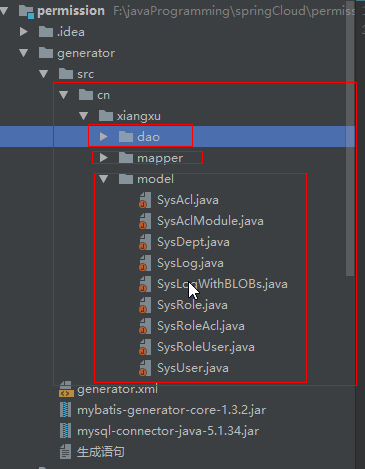
4 生成效果

执行成功后控制台输出

4.1 执行前的目录结构

4.2 执行后的目录结构
利用generator自动生成model(实体)、dao(接口)、mapper(映射)的更多相关文章
- mybatis自动生成model、dao及对应的mapper.xml文件
背景: 日常开发中,如果新建表,手动敲写model.dao和对应的mapper.xml文件,费时费力且容易出错, 所以采用mybatis自动生成model.dao及对应的mapper.xml文件.代码 ...
- 基于OCILIB的oracle数据库操作总结及自动生成Model和Dao的工具
基于OCILIB的oracle数据库操作总结 1. 类图 2. 基类BaseOCIDao的设计与实现 BaseOCIDao.h头文件 #pragma once /* ----- ...
- MyBatis 使用Generator自动生成Model , Dao, mapper
最近 我新建了一 个maven 项目,使用的是spring + springmvc + mybatis框架. 听说Mybatis可以自动生成model和mapper以及dao层,我就从网上查了查资 ...
- mybatis自动生成service、dao、mapper
1.config.properties ## 数据库连接参数 jdbc.driverClass = com.mysql.jdbc.Driver jdbc.url = jdbc:mysql://loca ...
- 使用MybatisGenerator自动生成Model,Mapping和Mapper文件
Mybatis和Hibernate都是持久层框架,MyBatis出现的比Hibernate晚,这两种框架我都用过,对于二者的优势我的感触不深,个人感觉MyBatis自动生成model,Mapping, ...
- 一个简单的Java代码生成工具—根据数据源自动生成bean、dao、mapper.xml、service、serviceImpl
目录结构 核心思想 通过properties文件获取数据源—>获取数据表的字段名称.字段类型等—>生成相应的bean实体类(po.model).dao接口(基本的增删改查).mapper. ...
- 使用mybatis-generator自动生成model、dao、mapping文件
参考文献:http://www.cnblogs.com/smileberry/p/4145872.html 一.所需库 1.mybatis-generator库 2.连接DB的驱动(此以mysql为例 ...
- idea使用generator自动生成model、mapper、mapper.xml(转)
原文链接:http://www.mamicode.com/info-detail-445217.html TEP 0.在Intellij IDEA创建maven项目(本过程比较简单,略) STEP 1 ...
- 使用Generator 自动生成 model mapper mapping 文件
1.下载包 地址http://download.csdn.net/detail/u012909091/7206091 2.下载完成解压文件到任意目录 3.删除下mybatis-generator-co ...
随机推荐
- C语言中静态申请内存遇到的错误分析
今天调试代码中,遇到了一个比较奇怪的打印,dump出来的数据只有前四位有值,其他后面的都为零. 出于直觉,应该是内存没有申请到.仔细核对代码之后,果真发现了一个语法错误,就是使用指针的指针时 ,对申请 ...
- C#winform程序安装在默认路径提示权限不足的问题
这个需要以管理员身份运行即可.在program.cs里面修改即可也可以在别的地方,如:C# 编程中可以使程序自动使用管理员身份运行,也就是我们常常看到一些程序的图标上会冒出个盾牌.方法:在源码的Pro ...
- 51Nod--1085背包问题
1085 背包问题 基准时间限制:1 秒 空间限制:131072 KB 分值: 0 难度:基础题 收藏 关注 在N件物品取出若干件放在容量为W的背包里,每件物品的体积为W1,W2--Wn(Wi为整 ...
- mongo安装,及远程连接
yum 安装mongo创建镜像 1 vi /etc/yum.repos.d/mongodb-org-3.6.repo添加一下路径 保存退出[mongodb-org-3.6]name=MongoDB R ...
- LNMP1.3 一键配置环境,简单方便
系统需求: CentOS/RHEL/Fedora/Debian/Ubuntu/Raspbian Linux系统 需要3GB以上硬盘剩余空间 需要128MB以上内存(如果为128MB的小内存VPS,Xe ...
- Jarvis OJ - [XMAN]level1 - Writeup——简单shellcode利用
100分的pwn 简单查看一下,果然还是比较简单的 放到ida中查看一下,有明显的溢出函数,并且在函数中打印出了字符串的地址,并且字符串比较长,没有NX保护 所以我们很容易想到构造shellcode, ...
- css3的动画特效--元素旋转
开发中,视觉要你实现一个元素的旋转问题,比如说如下图所示: 思路:首先动画动效肯定离不开anmimation动画. 和transition动画一样,animation动画也是CSS3动画的一种,这类动 ...
- 关于sqlmap使用手册
sqlmap 使用手册 官方wiki Github sqlmap也是渗透中常用的一个注入工具,可以用来检测sql注入漏洞. 功能与作用 完全支持MySQL,Oracle,PostgreSQL,Micr ...
- Python 练习冊,每天一个小程序
Python 练习冊,每天一个小程序 说明: Github 原文地址: 点击打开链接 Python 练习冊.每天一个小程序.注:将 Python 换成其它语言,大多数题目也试用 不会出现诸如「 ...
- Git版本号控制 为什么那么复杂 头大 (忍不住强烈吐槽)
想把自己的源代码保存到云端.想到了用Github.com,然后便開始看怎么使用GIT. 一開始,没有接触之前,想的非常easy的.应该就跟SVN几乎相同吧.写好了提交就能够了. 只是使用了之后才发现根 ...