
使用Spire.Doc组件利用模板导出Word文档
以前一直是用Office的组件实现Word文档导出,但是让客户在服务器安装Office,涉及到版权;而且Office安装,包括权限配置也是比较麻烦。
现在流行使用第三方组件来实现对Office的操作,有NPOI,Spire等第三方组件。开始考虑的是NPOI,毕竟它在操作Excel方面还是很强大的;但是不知道是它本身没有,还是我没找到,无法实现利用Word模板的标签插入内容,纯靠代码去生成Word文档,排版是个大问题。最终找到了Spire.Doc组件,轻松实现!
Spire的官网地址:https://www.e-iceblue.com/
1、项目中引用 Free Spire.Doc 组件,我是直接用NuGet下载包的.
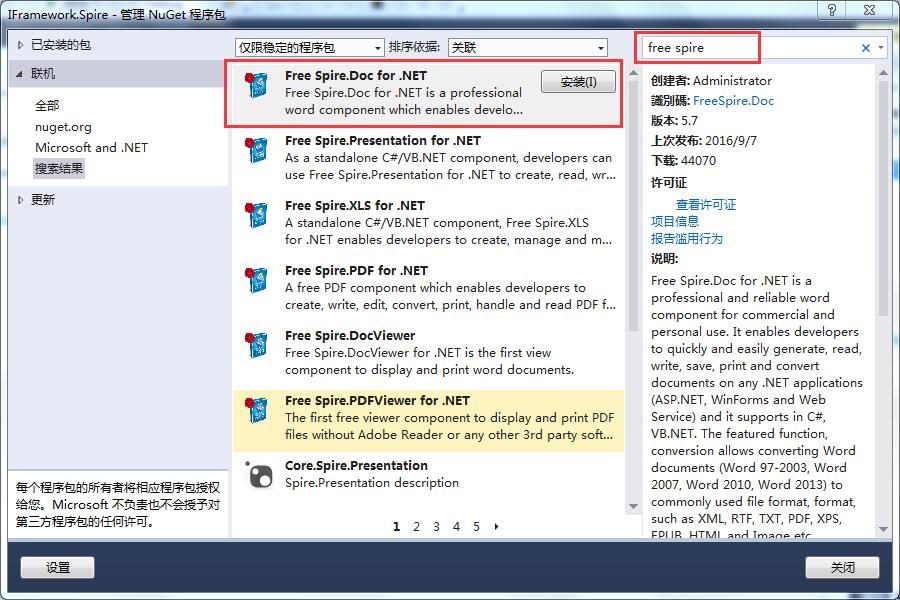
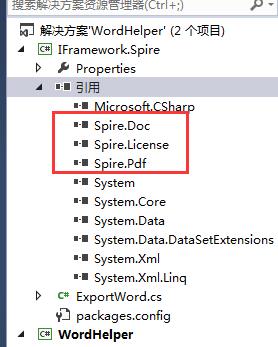
安装完后,会引用其三个组件:
2、Word 模板制作
打开Word,点击 文件->选项->自定义功能区,勾选上“开发工具”:

主要使用文本域控件,插入作为标签:
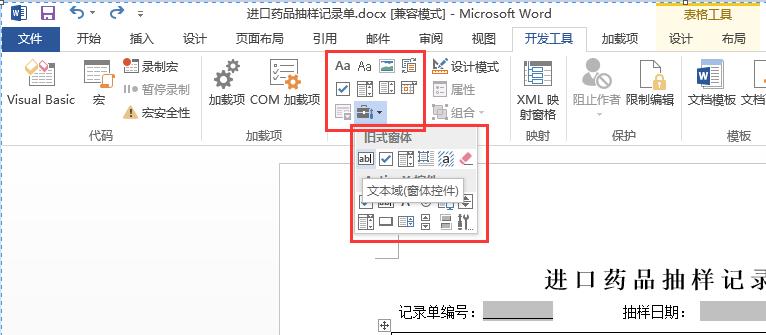
如果有需要,可以添加“下划线”,或者“字符边框”等效果:

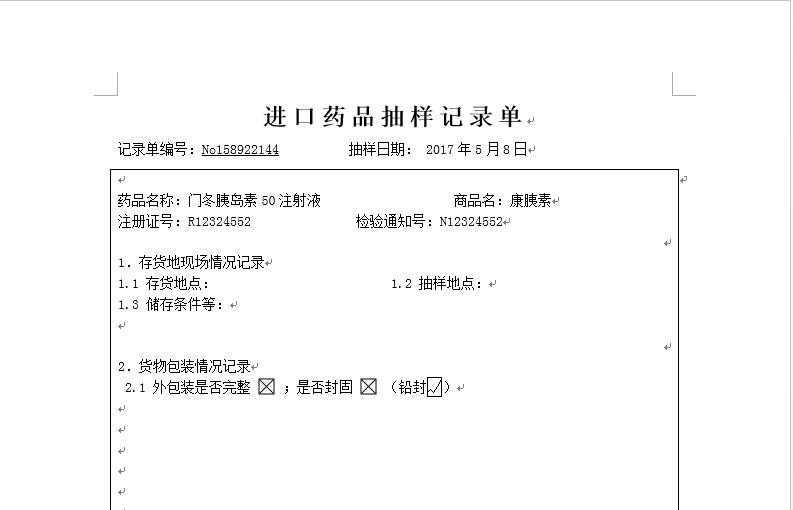
底下三个,前2个我用的是开发工具中的复选框(窗体控件)效果不是勾选的,是×号,效果不是客户想要的,所以使用了第二种解决方案“字符边框”,最后看导出的效果:
3、代码
可重用代码:
 using Spire.Doc;

 using Spire.Doc.Documents;

 using Spire.Doc.Fields;

 using System;

 using System.Collections.Generic;

 using System.ComponentModel;

 using System.IO;

 using System.Linq;

 using System.Text;

 using System.Threading.Tasks;

 namespace We.Framework.Spire

 {

     /// <summary>

     /// Sprie.Doc

     /// Designed by XIAO

     /// 2017-05-09

     /// </summary>

     public class WordHandler

     {

         public static bool ExportWordByFields<T>(T mod, string TempleteFilePath, string ExpFilePath)

         {

             if (mod == null)

             {

                 throw new Exception("模型为空!");

             }

             System.Reflection.PropertyInfo[] properties = mod.GetType().GetProperties(System.Reflection.BindingFlags.Instance | System.Reflection.BindingFlags.Public);

             if (properties.Length <= )

             {

                 throw new Exception("模型属性为空!");

             }

             if (!File.Exists(TempleteFilePath))

             {

                 throw new Exception("指定路径的模板文件不存在!");

             }

             try

             {

                 Document doc = new Document();

                 doc.LoadFromFile(TempleteFilePath);

                 #region 替换文字

                 //doc.Replace("海关", "海关口岸", true, true);

                 //doc.Replace("报验", "报检", true, true);

                 #endregion

                 //清除表单域阴影

                 doc.Properties.FormFieldShading = false;

                 //遍历Word模板中的文本域(field.name为文本域名称)

                 foreach (FormField field in doc.Sections[].Body.FormFields)

                 {

                     foreach (System.Reflection.PropertyInfo prop in properties)

                     {

                         string name = prop.Name; //属性名称

                         object value = prop.GetValue(mod, null);  //属性值

                         string des = ((DescriptionAttribute)Attribute.GetCustomAttribute(prop, typeof(DescriptionAttribute))).Description;// 属性描述值

                         //注意:文本域名称 == 模型中属性的 Description 值 !!!!!!

                         //也可以: 文本域名称 == 模型中属性的 Name 值 !!!!!!

                         if (field.Name == des)

                         {

                             if (field.DocumentObjectType == DocumentObjectType.TextFormField)   //文本域

                             {

                                 if (prop.PropertyType.Name == "Boolean")

                                 {

                                     field.Text = "√";   //插入勾选符号

                                     break;

                                 }

                                 else

                                 {

                                     field.Text = value.ToString();   //向Word模板中插入值

                                     break;

                                 }

                             }

                             else if (field.DocumentObjectType == DocumentObjectType.CheckBox)   //复选框

                             {

                                 (field as CheckBoxFormField).Checked = (value as bool?).HasValue ? (value as bool?).Value : false;

                             }

                         }

                     }

                 }

                 doc.SaveToFile(ExpFilePath, FileFormat.Docx);

                 doc.Close();

                 return true;

             }

             catch (Exception ex)

             {

                 string msg = ex.Message;

                 return false;

             }

         }

     }

 }
测试代码部分:
 using System;

 using System.Collections.Generic;

 using System.ComponentModel;

 using System.Linq;

 using System.Text;

 using System.Threading.Tasks;

 namespace WordHelper.TestModel

 {

     /// <summary>

     /// 抽样记录单

     /// </summary>

     public class SamplingRcd

     {

         [Description("记录单编号")]

         public string No { get; set; }

         [Description("年")]

         public int Year { get; set; }

         [Description("月")]

         public int Month { get; set; }

         [Description("日")]

         public int Day { get; set; }

         [Description("药品名称")]

         public string DrugName { get; set; }

         [Description("商品名")]

         public string GoodsName { get; set; }

         [Description("注册证号")]

         public string RegistNo { get; set; }

         [Description("检验通知号")]

         public string NoticeNo { get; set; }

         [Description("外包装是否完整")]

         public bool IsIntact { get; set; }

         [Description("是否封固")]

         public bool IsFixed { get; set; }

         [Description("铅封")]

         public bool IsPb { get; set; }

     }

 }
数据模型
         private void button1_Click(object sender, EventArgs e)

         {

             SamplingRcd mod = new SamplingRcd();

             mod.No = "No158922144";

             mod.Year = ;

             mod.Month = ;

             mod.Day = ;

             mod.DrugName = "门冬胰岛素50注射液";

             mod.GoodsName = "康胰素";

             mod.RegistNo = "R12324552";

             mod.NoticeNo = "N12324552";

             mod.IsIntact = true;

             mod.IsFixed = true;

             mod.IsPb = true;

             System.IO.Directory.SetCurrentDirectory(AppDomain.CurrentDomain.BaseDirectory);

             string templeteFileName = @"..\..\WordTemplete\进口药品抽样记录单.docx";

             string newFileName = string.Format("H:\\Exp_进口药品抽样记录单_{0}.docx", DateTime.Now.ToString("yyyyMMddHHmmss"));

             bool result = WordHandler.ExportWordByFields<SamplingRcd>(mod, templeteFileName, newFileName);

             if (result)

             {

                 MessageBox.Show("成功");

             }

             else

             {

                 MessageBox.Show("失败");

             }

         }
基本功能已经实现,还有待改进,希望各位提出宝贵意见!
(PS:如果有朋友知道NPOI如何实现类似功能的,望告知下!先谢谢了!^_^)
使用Spire.Doc组件利用模板导出Word文档的更多相关文章
- poi根据模板导出word文档
POI结构与常用类 Apache POI是Apache软件基金会的开源项目,POI提供API给Java程序对Microsoft Office格式档案读和写的功能. .NET的开发人员则可以利用NPOI ...
- Struts2利用iText导出word文档(包含表格)以提供下载
J2EE ExcelStrutsXML 在公司实习期间,带我的老师让我实现一功能——在显示课表的页面上上点击“导出文件“时能以word文档形式下载课表.将课表导出到excel里的功能他们已经实现了, ...
- 利用标签导出Word文档
1 using System; using System.Collections.Generic; using System.ComponentModel; using System.Data; us ...
- 利用NPOI导出Word文档帮助类
/// <summary> /// NPOI操作Word /// </summary> public class NpoiWordHelper { /// <summar ...
- 前台导出Word文档思路步骤总结(freemarker)
1. 需求是导出word带表格,表格列数不变,行数由数据库的值决定: 2. 导出最开始想的是直接前端导出,使用了jquery-wordexport插件,导出后,表格边框全没了,无法使用: 3. 采用了 ...
- .NET通过调用Office组件导出Word文档
.NET通过调用Office组件导出Word文档 最近做项目需要实现一个客户端下载word表格的功能,该功能是用户点击"下载表格",服务端将该用户的数据查询出来并生成数据到Word ...
- C#导出Word文档开源组件DocX
1.帮助文档,这东西找了很久,而且它版本很旧,还是英文,W8.1系统上打不开 http://download.csdn.net/detail/zuofangyouyuan/7673573 2.开源网址 ...
- JSP利用freemarker生成基于word模板的word文档
利用freemarker生成基于word模板的word文档 freemarker简介 FreeMarker是一个用Java语言编写的模板引擎,它基于模板来生成文本输出.FreeMarker与Web容器 ...
- Java 用Freemarker完美导出word文档(带图片)
Java 用Freemarker完美导出word文档(带图片) 前言 最近在项目中,因客户要求,将页面内容(如合同协议)导出成word,在网上翻了好多,感觉太乱了,不过最后还是较好解决了这个问题. ...
随机推荐
- 海量数据集利用Minhash寻找相似的集合【推荐优化】
MinHash 首先它是一种基于 Jaccard Index 相似度的算法,也是一种 LSH 的降维的方法,应用于大数据集的相似度检索.推荐系统.下边按我的理解介绍下MinHash 问题背景 给出N个 ...
- python编码问题之\"encode\"&\"decode\"
python encode decode 编码 decode的作用是将其他编码的字符串转换成unicode编码,如str1.decode('gb2312'),表示将gb2312编码的字符串str1转换 ...
- 实验楼-2-Linux基础快捷键
终端:本质上对应着Linux上的/dev/tty设备 shell:打开终端,shell则自动打开 可以在终端直接输入: echo "hello world" /*shell程序自动 ...
- 关于js参数传递矛盾新理解
之前看了很多人的解释,说js中,函数的参数传递都是值传递中不理解. 他们无非举了两个例子 在这两个例子中,第二个例子可以看出参数是由值传递的.因为函数内对象的变化没有影响到函数外对象的变化.但是在第一 ...
- 核心模块Path
核心模块Path 作用:用于帮助程序员来操作硬盘上的路径. 核心模块注意点:当引用核心模块的时候直接require('模块名'),不需要加任何路径或者后缀. Path中的常用API: dirname( ...
- 使用cocapods报错 [!] Your Podfile has had smart quotes sanitised. To avoid issues in the future, you should not use TextEdit for editing it. If you are not using TextEdit, you should turn off smart quotes
从github上下载的工程大部分都使用了cocapods,在install的时候可能会报错. 报错原因: 1.不要使用文本编辑去编辑Podfile文件,使用Xcode编辑,或者使用终端敲命令去编辑. ...
- python selenium2示例 - 生成 HTMLTestRunner 测试报告
前言 在python selenium2自动化测试过程中,一个合适的报告是必须的,而HTMLTestRunner模块为我们提供了一个很好的报告生成功能. 什么是HTMLTestRunner HTMLT ...
- CSS3——复杂选择器
今天把视频里的CSS3复杂选择器部分看完了,来整理一下学到的知识点. 1.兄弟选择器:同一位置级别,可称为兄弟元素 a.相邻兄弟选择器:next紧紧跟在[当前元素之后的](一个),指定选择器的元素 ...
- Struts2基础学习(二)—Action
一.ActionSupport 为了让用户开发的Action类更加规范,Struts2提供了一个Action接口,这个接口定义了Struts2的Action处理类应该实现的规范.下面是标准A ...
- Android批量验证渠道、版本号
功能:可校验单个或目录下所有apk文件的渠道号.版本号使用说明:1.copy需要校验的apk文件到VerifyChannelVersion目录下2.双击运行VerifyChannelVersion.b ...