
java文件的读写操作
java文件的读写操作主要是对输入流和输出流的操作,由于流的分类很多,所以概念很容易模糊,基于此,对于流的读写操作做一个小结。
1、根据数据的流向来分:
输出流:是用来写数据的,是由程序(内存)--->外界设备
输入流:是用来读数据的,是由外界设备--->程序(内存)
如何区分:一般来说输入流带有Input,输出流带有Output
2、根据流数据的格式来分:
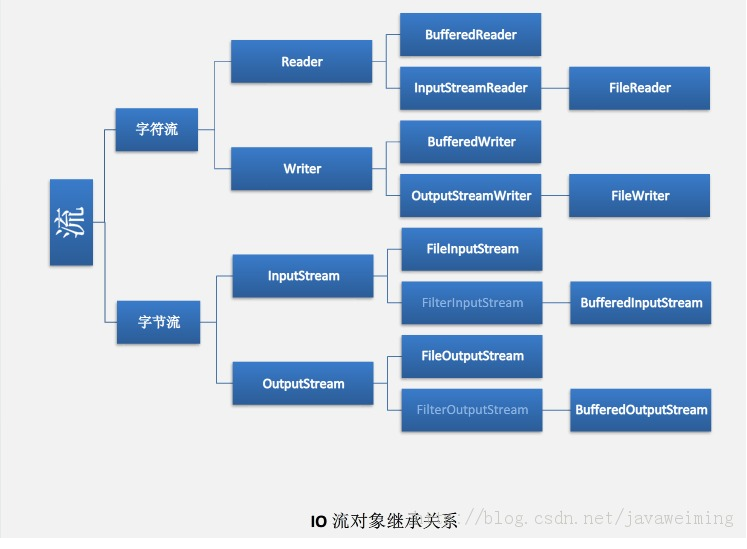
字节流:处理声音或者图片等二进制的数据的流,比如InputStream
字符流:处理文本数据(如txt文件)的流,比如InputStreamReader
如何区分:可用高低端流来区分,所有的低端流都是字节流,所有的高端流都是字符流
/**
* @Description: 获得控制台用户输入的信息
*/
public String getInputMessage() throws IOException{
System.out.println("请输入您的命令∶");
byte buffer[]=new byte[1024];
int count=System.in.read(buffer);
char[] ch=new char[count-2];//最后两位为结束符,删去不要
for(int i=0;i<count-2;i++)
ch[i]=(char)buffer[i];
String str=new String(ch);
return str;
}
/**
*
*
* @param srcFile 文件地址 例如:"f:" + File.separator + "testoyy"+File.separator+"test2.txt"
* @param content 写入文件的内容
* @throws Exception
*
* @Description: 将内容写入指定文件
*/
public void writeToTxtFile(String srcFile, String content) throws Exception{
File file = new File(srcFile) ;
//判断文件是否存在
if (!file.exists() != false)
{
file.createNewFile();
}
Writer out = null ; // 字符输出流
out = new OutputStreamWriter(new FileOutputStream(file)) ; // 字节流变为字符流
out.write(content) ; // 使用字符流输出
out.close() ;
}
/**
* 指定编码格式写文件
*
* @param srcFile 读取该文件的内容的地址 例如:"F:\\testoyy\\test.txt";
* @param srcCode 读取文件的编码 例如: "utf-8";
* @param distFile 写入文件内容的地址 例如:"F:\\testoyy\\test1.txt";
* @param distCode 写入文件的编码 例如: "utf-8";
* @return
* @throws Exception
*
* @Description: 指定编码格式将一个文件的内容复制到另外一个文件中
*/
public boolean writeToTxtFile(String srcFile, String srcCode,
String distFile, String distCode) throws Exception
{
//输出流
Writer writer = null;
try
{
File dist_File = new File(distFile);
//判断文件是否存在
if (!dist_File.exists() != false)
{
dist_File.createNewFile();
}
writer = new OutputStreamWriter(new FileOutputStream(dist_File),
"GBK");
File src_File = new File(srcFile);
//输入流
InputStreamReader read = new InputStreamReader(new FileInputStream(
src_File));
BufferedReader reader = new BufferedReader(read);
String line;
//逐行读取
while ((line = reader.readLine()) != null)
{
//写入文件内
writer.write(line);
}
} catch (Exception e)
{
// EmpExecutionContext.error(e,"指定编码格式写文件异常!");
throw e;
} finally
{
//关闭流
writer.close();
}
//返回结果
return true;
}
/**
* 以字符为单位读取文件
* @param fileName 文件地址 例如:"f:" + File.separator + "testoyy"+File.separator+"test2.txt"
* @return
*/
public String readFileByChars(String fileName)
{
File file = new File(fileName);
StringBuffer fileContent=new StringBuffer();
Reader reader = null;
try
{
reader = new InputStreamReader(new FileInputStream(file));
int tempchar;
// 一次读一个字节
while ((tempchar = reader.read()) != -1)
{
fileContent.append((char)tempchar);
}
//关闭流
reader.close();
} catch (Exception e)
{
//异常信息打印
//EmpExecutionContext.error(e,"以字符为单位读取文件异常!");
}finally
{
if (reader != null)
{
try
{
//关闭流
reader.close();
} catch (IOException e1)
{
//异常信息打印
//EmpExecutionContext.error(e1,"关闭流异常");
}
}
}
//返回读取到的数据
return fileContent.toString();
}
/**
* 读取第一行数据
* @param fileName
* @return
*/
public String readFileFirstLine(String fileName)
{
File filee = new File(fileName);
String tempString = null;
BufferedReader brr = null;
try
{
brr = new BufferedReader(new FileReader(filee));
tempString = brr.readLine();
brr.close();
} catch (IOException e)
{
//异常信息打印
//EmpExecutionContext.error(e,"读取文件第一行数据异常!");
} finally
{
if (brr != null)
{
try
{
//关闭流
brr.close();
} catch (IOException ioe)
{
//EmpExecutionContext.error(ioe,"文件流关闭异常!");
}
}
}
//返回数据
return tempString;
}
/**
* 以行为单位读取文件
* @param fileName 文件路径名 例如:"f:" + File.separator + "testoyy"+File.separator+"test2.txt"
* @return 文件内容
*/
public String readFileByLines(String fileName)
{
String phoneStr = null;
BufferedReader br = null;
try
{
File file = new File(fileName);
StringBuffer sb = new StringBuffer();
br = new BufferedReader(new FileReader(file));
String tempString = null;
// 一次读入一行,直到读入null为文件结束
while ((tempString = br.readLine()) != null)
{
//将读取到的数据添加到stringBuffer
sb.append(tempString.trim()).append(",");
}
//截取字符串
if (sb.lastIndexOf(",") != -1)
{
sb.deleteCharAt(sb.lastIndexOf(","));
}
phoneStr = sb.toString();
sb.setLength(0);
} catch (Exception e)
{
//异常信息打印
// EmpExecutionContext.error(e,"以行为单位读取文件异常!");
} finally
{
try
{
if (br != null)
{
//关闭流
br.close();
}
} catch (IOException ioe)
{
//异常信息打印
// EmpExecutionContext.error(ioe,"关闭文本流异常! ");
}
}
//返回读到的数据
return phoneStr;
}
java文件的读写操作的更多相关文章
- java 文件的读写操作
java 文件的读写操作 一.读: public String getSetting() { HttpServletRequest request=org.apache.struts2.Servle ...
- Java 对不同类型的数据文件的读写操作整合器[JSON,XML,CSV]-[经过设计模式改造](2020年寒假小目标03)
日期:2020.01.16 博客期:125 星期四 我想说想要构造这样一个通用文件读写器确实不容易,嗯~以后会添加更多的文件类型,先来熟悉一下文件内容样式: <?xml version=&quo ...
- android报错及解决2--Sdcard进行文件的读写操作报的异常
报错描述: 对Sdcard进行文件的读写操作的时候,报java.io.FileNotFoundException: /sdcard/testsd.txt (Permission denied),在往S ...
- 使用字符流(Writer、Reader)完成对文件的读写操作
字符流 字符输出流:Writer,对文件的操作使用子类FileWriter 字符输入流:Reader,对文件的操作使用子类FileReader 每次操作的是一个字符 文件字符操作流会自带缓存,默认大小 ...
- INI 文件的读写操作
在C#中对INI文件进行读写操作,在此要引入using System.Runtime.InteropServices; 命名空间,具体方法如下: #region 变量 private static r ...
- Android 对 properties文件的读写操作
-. 放在res中的properties文件的读取,例如对放在assets目录中的setting.properties的读取:PS:之所以这里只是有读取操作,而没有写的操作,是因为我发现不能对res下 ...
- C++学习48 对ASCII文件的读写操作
如果文件的每一个字节中均以ASCII代码形式存放数据,即一个字节存放一个字符,这个文件就是ASCII文件(或称字符文件).程序可以从ASCII文件中读入若干个字符,也可以向它输出一些字符. 对ASCI ...
- Delphi- ini文件的读写操作
一.读INI文件示例 procedure TForm1.FormCreate(Sender: TObject); Var MyIni :Tinifile; glAppPath :string; beg ...
- python使用装饰器对文件进行读写操作'及遍历文件目录
'''使用装饰器对文件进行读写操作''' # def check_permission(func): # '''演示嵌套函数定义及使用''' # def wrapper(*args,**kwargs) ...
随机推荐
- Zookepper(2015.08.16笔记)
2015.08.16zookepper Zookeeper 是 Google 的 Chubby一个开源的实现,是 Hadoop 的分布式协调服务(如同小区里面的供水.电的系统) 它包含一个简单的原 ...
- [UWP]了解模板化控件(2):模仿ContentControl
ContentControl是最简单的TemplatedControl,而且它在UWP出场频率很高.ContentControl和Panel是VisualTree的基础,可以说几乎所有VisualTr ...
- iOSiOS开发之数据存储之NSKeyedArchiver
1.概述 NSKeyedArchiver归档和plist文件存储不同的是NSKeyedArchiver可以直接保存对象.如果对象是NSString.NSDictionary.NSArray.NSDat ...
- 通过 dhcp-agent 访问 Metadata - 每天5分钟玩转 OpenStack(168)
OpenStack 默认通过 l3-agent 创建和管理 neutron-ns-metadata-proxy,进而与 nova-metadata-api 通信.但不是所有环境都有 l3-agent, ...
- Vue.js 插件开发详解
前言 随着 Vue.js 越来越火,Vue.js 的相关插件也在不断的被贡献出来,数不胜数.比如官方推荐的 vue-router.vuex 等,都是非常优秀的插件.但是我们更多的人还只停留在使用的阶段 ...
- [Android]使用RecyclerView替代ListView(四:SeizeRecyclerView)
以下内容为原创,欢迎转载,转载请注明 来自天天博客:<> [Android]使用RecyclerView替代ListView(四:SeizeRecyclerView) 在RecyclerV ...
- 第六章:3D向量类
第一节:类接口的设计 1.好的类在设计之前首先要回答下列问题:“这些类将包含哪些数据?”,“这个类将提供什么样的操作?”,“在哪些数据上执行操作?”. 我们已经知道我们要设计的是3D向量类,用来存储x ...
- iOS应用的几个阶段
- (BOOL)application:(UIApplication *)application didFinishLaunchingWithOptions:(NSDictionary *)launc ...
- 将ROS中的/sensor_msgs/NavSatFix数据导入google earth显示轨迹
将ros中的gps_msg数据导入google earth显示轨迹 [TOC] 1. 获取GPS数据 将ros中发布的gps topic输出到文本中 rostopic echo -p /gpsData ...
- c#FTP操作类,包含上传,下载,删除,获取FTP文件列表文件夹等Hhelp类
有些时间没发表文章了,之前用到过,这是我总结出来关于ftp相关操作一些方法,网上也有很多,但是没有那么全面,我的这些仅供参考和借鉴,希望能够帮助到大家,代码和相关引用我都复制粘贴出来了,希望大家喜欢 ...