
k8s-静态PV和动态PV
1、pv 简单介绍
PersistenVolume(PV):对存储资源创建和使用的抽象,使得存储作为集群中的资源管理 PV分为静态和动态,动态能够自动创建PV • PersistentVolumeClaim(PVC):让用户不需要关心具体的Volume实现细节 容器与PV、PVC之间的关系,可以如下图所示: 总的来说,PV是提供者,PVC是消费者,消费的过程就是绑定。 参考网址:1、https://www.cnblogs.com/weifeng1463/p/10037803.html 2、https://blog.csdn.net/qq_25611295/article/details/86065053
2、nfs 搭建:
yum install nfs-utils

vim /etc/exports

/data/k8s/ 172.16.1.0/24(sync,rw,no_root_squash)

systemctl start nfs;  systemctl start rpcbind

systemctl enable nfs

测试:

yum install nfs-utils

showmount -e 172.16.1.131
3、PersistentVolume 静态绑定 (手工创建PV、PVC)
[root@VM_0_48_centos prometheus]# cat mypv.yaml

apiVersion: v1

kind: PersistentVolume

metadata:

  name: pv001

spec:

  capacity:

    storage: 10Gi

  accessModes:

    - ReadWriteMany

  nfs:

    path: /data/k8s

    server: 172.19.0.14

[root@VM_0_48_centos prometheus]# cat mypvc.yaml   ###会根据大小和类型自动匹配到上面的PV

kind: PersistentVolumeClaim

apiVersion: v1

metadata:

  namespace: kube-system

  name: prometheus-claim

spec:

  accessModes:

    - ReadWriteMany

  resources:

    requests:

      storage: 10Gi

[root@VM_0_48_centos prometheus]# kubectl  get pv,pvc -n kube-system

NAME                     CAPACITY   ACCESS MODES   RECLAIM POLICY   STATUS   CLAIM                          STORAGECLASS   REASON   AGE

persistentvolume/pv001   10Gi       RWX            Retain           Bound    kube-system/prometheus-claim                           17m

NAME                                     STATUS   VOLUME   CAPACITY   ACCESS MODES   STORAGECLASS   AGE

persistentvolumeclaim/prometheus-claim   Bound    pv001    10Gi       RWX
4、PersistentVolume 静态PVC使用案例
apiVersion: apps/v1

kind: StatefulSet

metadata:

  name: prometheus

  namespace: kube-system

  labels:

    k8s-app: prometheus

    kubernetes.io/cluster-service: "true"

    addonmanager.kubernetes.io/mode: Reconcile

    version: v2.2.1

spec:

  serviceName: "prometheus"

  replicas: 1

  podManagementPolicy: "Parallel"

  updateStrategy:

   type: "RollingUpdate"

  selector:

    matchLabels:

      k8s-app: prometheus

  template:

    metadata:

      labels:

        k8s-app: prometheus

      annotations:

        scheduler.alpha.kubernetes.io/critical-pod: ''

    spec:

      priorityClassName: system-cluster-critical

      serviceAccountName: prometheus

      initContainers:

      - name: "init-chown-data"

        image: "busybox:latest"

        imagePullPolicy: "IfNotPresent"

        command: ["chown", "-R", "65534:65534", "/data"]

        volumeMounts:

        - name: prometheus-data

          mountPath: /data

          subPath: ""

      containers:

        - name: prometheus-server-configmap-reload

          image: "jimmidyson/configmap-reload:v0.1"

          imagePullPolicy: "IfNotPresent"

          args:

            - --volume-dir=/etc/config

            - --webhook-url=http://localhost:9090/-/reload

          volumeMounts:

            - name: config-volume

              mountPath: /etc/config

              readOnly: true

          resources:

            limits:

              cpu: 10m

              memory: 10Mi

            requests:

              cpu: 10m

              memory: 10Mi

        - name: prometheus-server

          image: "prom/prometheus:v2.2.1"

          imagePullPolicy: "IfNotPresent"

          args:

            - --config.file=/etc/config/prometheus.yml

            - --storage.tsdb.path=/data

            - --web.console.libraries=/etc/prometheus/console_libraries

            - --web.console.templates=/etc/prometheus/consoles

            - --web.enable-lifecycle

          ports:

            - containerPort: 9090

          readinessProbe:

            httpGet:

              path: /-/ready

              port: 9090

            initialDelaySeconds: 30

            timeoutSeconds: 30

          livenessProbe:

            httpGet:

              path: /-/healthy

              port: 9090

            initialDelaySeconds: 30

            timeoutSeconds: 30

          # based on 10 running nodes with 30 pods each

          resources:

            limits:

              cpu: 200m

              memory: 1000Mi

            requests:

              cpu: 200m

              memory: 1000Mi

          volumeMounts:

            - name: config-volume

              mountPath: /etc/config

            - name: prometheus-data

              mountPath: /data

              subPath: ""

      terminationGracePeriodSeconds: 300

      volumes:

        - name: config-volume

          configMap:

            name: prometheus-config

        - name: prometheus-data

          persistentVolumeClaim:   #申明使用静态PVC永久化存储

            claimName: prometheus-claim
5、动态PV,K8S调用资源对象自动创建PV。生产环境常用
当我们k8s业务上来的时候,大量的pvc,此时我们人工创建匹配的话,工作量就会非常大了,需要动态的自动挂载相应的存储。
我们需要使用到StorageClass,来对接存储,靠他来自动关联pvc,并创建pv。 Kubernetes支持动态供给的存储插件: https://kubernetes.io/docs/concepts/storage/storage-classes/ 因为NFS不支持动态存储,所以我们需要借用这个存储插件。 nfs动态相关部署可以参考: https://github.com/kubernetes-incubator/external-storage/tree/master/nfs-client/deploy
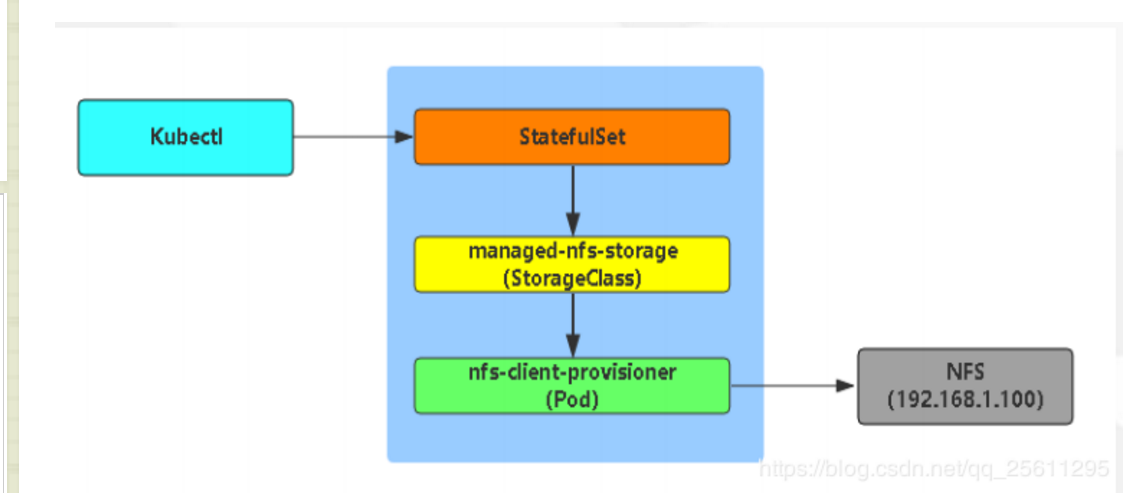
6、存储对象申明和授权。
定义一个storage

[root@VM_0_48_centos prometheus]# cat  storageclass-nfs.yaml

apiVersion: storage.k8s.io/v1beta1

kind: StorageClass

metadata:

  name: managed-nfs-storage

provisioner: fuseim.pri/ifs

因为storage自动创建pv需要经过kube-apiserver,所以要进行授权

[root@VM_0_48_centos prometheus]# cat    storageclass-rbac.yaml

apiVersion: v1

kind: ServiceAccount

metadata:

  name: nfs-client-provisioner

---

kind: ClusterRole

apiVersion: rbac.authorization.k8s.io/v1beta1

metadata:

  name: nfs-client-provisioner-runner

rules:

  - apiGroups: [""]

    resources: ["persistentvolumes"]

    verbs: ["get", "list", "watch", "create", "delete"]

  - apiGroups: [""]

    resources: ["persistentvolumeclaims"]

    verbs: ["get", "list", "watch", "update"]

  - apiGroups: ["storage.k8s.io"]

    resources: ["storageclasses"]

    verbs: ["get", "list", "watch"]

  - apiGroups: [""]

    resources: ["events"]

    verbs: ["list", "watch", "create", "update", "patch"]

---

kind: ClusterRoleBinding

apiVersion: rbac.authorization.k8s.io/v1beta1

metadata:

  name: run-nfs-client-provisioner

subjects:

  - kind: ServiceAccount

    name: nfs-client-provisioner

    namespace: default

roleRef:

  kind: ClusterRole

  name: nfs-client-provisioner-runner

  apiGroup: rbac.authorization.k8s.io

部署一个自动创建pv的服务

[root@VM_0_48_centos prometheus]# cat prometheus-statefulset.yaml

apiVersion: apps/v1

kind: StatefulSet

metadata:

  name: prometheus

  namespace: kube-system

  labels:

    k8s-app: prometheus

    kubernetes.io/cluster-service: "true"

    addonmanager.kubernetes.io/mode: Reconcile

    version: v2.2.1

spec:

  serviceName: "prometheus"

  replicas: 1

  podManagementPolicy: "Parallel"

  updateStrategy:

   type: "RollingUpdate"

  selector:

    matchLabels:

      k8s-app: prometheus

  template:

    metadata:

      labels:

        k8s-app: prometheus

      annotations:

        scheduler.alpha.kubernetes.io/critical-pod: ''

    spec:

      priorityClassName: system-cluster-critical

      serviceAccountName: prometheus

      initContainers:

      - name: "init-chown-data"

        image: "busybox:latest"

        imagePullPolicy: "IfNotPresent"

        command: ["chown", "-R", "65534:65534", "/data"]

        volumeMounts:

        - name: prometheus-data

          mountPath: /data

          subPath: ""

      containers:

        - name: prometheus-server-configmap-reload

          image: "jimmidyson/configmap-reload:v0.1"

          imagePullPolicy: "IfNotPresent"

          args:

            - --volume-dir=/etc/config

            - --webhook-url=http://localhost:9090/-/reload

          volumeMounts:

            - name: config-volume

              mountPath: /etc/config

              readOnly: true

          resources:

            limits:

              cpu: 10m

              memory: 10Mi

            requests:

              cpu: 10m

              memory: 10Mi

        - name: prometheus-server

          image: "prom/prometheus:v2.2.1"

          imagePullPolicy: "IfNotPresent"

          args:

            - --config.file=/etc/config/prometheus.yml

            - --storage.tsdb.path=/data

            - --web.console.libraries=/etc/prometheus/console_libraries

            - --web.console.templates=/etc/prometheus/consoles

            - --web.enable-lifecycle

          ports:

            - containerPort: 9090

          readinessProbe:

            httpGet:

              path: /-/ready

              port: 9090

            initialDelaySeconds: 30

            timeoutSeconds: 30

          livenessProbe:

            httpGet:

              path: /-/healthy

              port: 9090

            initialDelaySeconds: 30

            timeoutSeconds: 30

          # based on 10 running nodes with 30 pods each

          resources:

            limits:

              cpu: 200m

              memory: 1000Mi

            requests:

              cpu: 200m

              memory: 1000Mi

          volumeMounts:

            - name: config-volume

              mountPath: /etc/config

            - name: prometheus-data

              mountPath: /data

              subPath: ""

      terminationGracePeriodSeconds: 300

      volumes:

        - name: config-volume

          configMap:

            name: prometheus-config

        - name: prometheus-data

          persistentVolumeClaim:

            claimName: prometheus-claim
7、效果测试
[root@VM_0_48_centos prometheus]# cat test.yaml

apiVersion: v1

kind: Service

metadata:

  name: nginx

  labels:

    app: nginx

spec:

  ports:

  - port: 80

    name: web

  clusterIP: None

  selector:

    app: nginx

---

apiVersion: apps/v1

kind: StatefulSet

metadata:

  name: web

spec:

  serviceName: "nginx"

  replicas: 3

  selector:

    matchLabels:

      app: nginx

  template:

    metadata:

      labels:

        app: nginx

    spec:

      containers:

      - name: nginx

        image: nginx

        ports:

        - containerPort: 80

          name: web

        volumeMounts:

        - name: www

          mountPath: /usr/share/nginx/html

  volumeClaimTemplates:

  - metadata:

      name: www

    spec:

      accessModes: [ "ReadWriteOnce" ]

      storageClassName: "managed-nfs-storage"

      resources:

        requests:

          storage: 1Gi

kubectl exec -it web-0 sh

# cd /usr/share/nginx/html

# touch 1.txt
k8s-静态PV和动态PV的更多相关文章
- 4.k8s存储之Volume、PV、PVC和StatefulSet
3.Volume 容器磁盘上的文件的生命周期是短暂的,这就使得在容器中运行重要应用时会出现一些问题.首先,当容器崩溃时,kubelet 会重启它,但是容器中的文件将丢失--容器以干净的状态(镜像最初的 ...
- Kubernetes 动态PV使用
Kubernetes 动态PV使用 Kubernetes支持动态供给的存储插件:https://kubernetes.io/docs/concepts/storage/storage-classes/ ...
- 8.3 k8s部署jenkins,通过pv/pvc结合NFS服务器持久化
1.制作jenkins docker镜像 1.1 下载jenkins wget https://mirrors.tuna.tsinghua.edu.cn/jenkins/war-stable/2.30 ...
- Android GradientDrawable(shape标签定义) 静态使用和动态使用(圆角,渐变实现)
Android GradientDrawable使用优势: 1. 快速实现一些基本图形(线,矩形,圆,椭圆,圆环) 2. 快速实现一些圆角,渐变,阴影等效果 3. 代替图片设置为View的背景 4. ...
- C++ 系列:静态库与动态库
转载自http://www.cnblogs.com/skynet/p/3372855.html 这次分享的宗旨是——让大家学会创建与使用静态库.动态库,知道静态库与动态库的区别,知道使用的时候如何选择 ...
- Android开发4: Notification编程基础、Broadcast的使用及其静态注册、动态注册方式
前言 啦啦啦~(博主每次开篇都要卖个萌,大家是不是都厌倦了呢~) 本篇博文希望帮助大家掌握 Broadcast 编程基础,实现动态注册 Broadcast 和静态注册 Broadcast 的方式以及学 ...
- C++静态库与动态库
C++静态库与动态库 这次分享的宗旨是--让大家学会创建与使用静态库.动态库,知道静态库与动态库的区别,知道使用的时候如何选择.这里不深入介绍静态库.动态库的底层格式,内存布局等,有兴趣的同学,推荐一 ...
- Linux下Gcc生成和使用静态库和动态库详解(转)
一.基本概念 1.1什么是库 在windows平台和linux平台下都大量存在着库. 本质上来说库是一种可执行代码的二进制形式,可以被操作系统载入内存执行. 由于windows和linux的平台不同( ...
- VS中Debug和Realease、及静态库和动态库的区别整理(转)
原文出自:http://www.cnblogs.com/chensu/p/5632486.html 一.Debug和Realease区别产生的原因 Debug 通常称为调试版本,它包含调试信息,并且不 ...
随机推荐
- python数据操作--8
转:https://www.tuicool.com/wx/MB7nieb 数据类型 整数, 浮点数, 字符串, 布林值(True,False) 列表(list), 不可变的列表 Tuple, 集合(没 ...
- ICLR2021对比学习(Contrastive Learning)NLP领域论文进展梳理
本文首发于微信公众号「对白的算法屋」,来一起学AI叭 大家好,卷王们and懂王们好,我是对白. 本次我挑选了ICLR2021中NLP领域下的六篇文章进行解读,包含了文本生成.自然语言理解.预训练语言模 ...
- oeasy教您玩转python - 006 - # hello world
Hello World! 回忆上次内容 python3 的程序是一个 5.3M 的可执行文件 python3 里面全都是 cpu 指令 可以执行的那种指令 我们可以把指令对应的汇编找到 objdu ...
- 分布式事务框架-Litx补偿事务框架源码解析
前言 之前某段时间在研究分布式事务过程中,对实现原理比较好奇,于是去Gitee上找了几个人气比较高的框架进行学习,其中印象深刻的有Litx,因为Litx源码不多,且都是基于Spring和Dubbo底层 ...
- java8 stream详细
转载: https://zhuanlan.zhihu.com/p/299064490
- Myeclipse设置关键词自动提示功能以及取消空格和"="的自动补全
一.设置Myeclipse从a~z的自动提示功能 1. "window"→"Preferences"2. 选择"Java",展开," ...
- JMeter压力测试简单使用
原创:转载需注明原创地址 https://www.cnblogs.com/fanerwei222/p/11915535.html JMeter压力测试简单使用: 我们可以使用JMeter来测试一下自己 ...
- iOS UIWebView与JavaScript的交互 相关资料
UIWebView自适应宽度 iOS UIWebView中javascript与Objective-C交互.获取摄像头 iOS中JavaScript和OC交互 iOS与js交互,获取webview完整 ...
- Lesson14——NumPy 字符串函数之 Par3:字符串信息函数
NumPy 教程目录 1 字符串信息函数 1.1 numpy.char.count char.count(a, sub, start=0, end=None) 返回一个数组,其中包含 [start, ...
- Solution -「多校联训」光影交错
\(\mathcal{Description}\) Link. 一个游戏包含若干次卡牌抽取,每次以 \(p_l\) 的概率得到 \(+1\),\(p_d\) 的概率得到 \(-1\),否则得到 ...