
Mybatis-Plus的配置和基本使用
基本配置
首先新建一个springboot项目,然后导入数据库驱动,lombok和mybatis-plus依赖:
<!-- 数据库驱动 -->

<dependency>

    <groupId>mysql</groupId>

    <artifactId>mysql-connector-java</artifactId>

</dependency>

<!-- lombok -->

<dependency>

    <groupId>org.projectlombok</groupId>

    <artifactId>lombok</artifactId>

</dependency>

<!-- mybatis-plus -->

<!-- mybatis-plus 是自己开发,并非官方的! -->

<dependency>

    <groupId>com.baomidou</groupId>

    <artifactId>mybatis-plus-boot-starter</artifactId>

    <version>3.2.0</version>

</dependency>
然后再编写配置文件application.yml:
server:

  port: 8081

spring:

  datasource:

    username: ******

    password: ******

    url: jdbc:mysql://localhost:3306/mybatis_plus?useSSL=false&useUnicode=true&characterEncoding=utf-8&serverTimezone=GMT%2B8

    driver-class-name: com.mysql.cj.jdbc.Driver

# 配置日志

mybatis-plus:

  configuration:

    log-impl: org.apache.ibatis.logging.stdout.StdOutImpl
即配置数据源连接数据库的参数(用户名密码url等)
这里使用的是一个新建的数据库,通过Mybatis-Plus文档的操作新建user表:
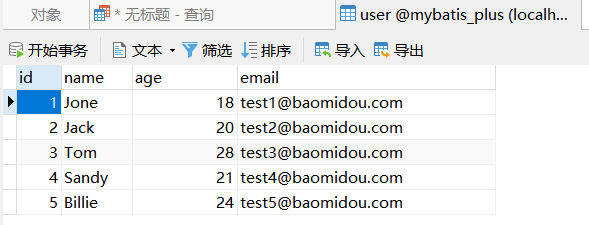
最后在启动类或者是配置类中加入@MapperScan注解:
@MapperScan("com.example.mapper") <---

@SpringBootApplication

public class DemoApplication {

    public static void main(String[] args) {

        SpringApplication.run(DemoApplication.class, args);

    }

}
简单使用
我们先编写user表对应的实体类:
@Data

@AllArgsConstructor

@NoArgsConstructor

public class User {

    private Long id;

    private String name;

    private Integer age;

    private String email;

}
然后编写对应的Mapper接口:
public interface UserMapper extends BaseMapper<User> {

}
然后即可在测试类中进行测试:
@SpringBootTest

public class UserTest {

    @Autowired

    private UserMapper userMapper;

    @Test

    public void testSelect() {

        System.out.println(("----- selectAll method test ------"));

        List<User> userList = userMapper.selectList(null);

        userList.forEach(System.out::println);

    }

}
运行结果:
User(id=1, name=Jone, age=18, email=test1@baomidou.com)

User(id=2, name=Jack, age=20, email=test2@baomidou.com)

User(id=3, name=Tom, age=28, email=test3@baomidou.com)

User(id=4, name=Sandy, age=21, email=test4@baomidou.com)

User(id=5, name=Billie, age=24, email=test5@baomidou.com)
代码生成器
导入依赖
<dependency>

    <groupId>com.baomidou</groupId>

    <artifactId>mybatis-plus-generator</artifactId>

    <version>3.2.0</version>

</dependency>

<dependency>

    <groupId>org.apache.velocity</groupId>

    <artifactId>velocity-engine-core</artifactId>

    <version>2.0</version>

</dependency>
生成器代码:
@SpringBootTest

public class CodeGenerator {

    @Test

    public void generate() {

        // 1、创建代码生成器

        AutoGenerator mpg = new AutoGenerator();

// 2、全局配置

        GlobalConfig gc = new GlobalConfig();

        String projectPath = System.getProperty("user.dir");

//System.out.println(projectPath);

        gc.setOutputDir(projectPath + "/src/main/java");

        gc.setAuthor("Zeng");

        gc.setOpen(false); //生成后是否打开资源管理器

        gc.setFileOverride(false); //重新生成时文件是否覆盖

        /*

         * mp生成service层代码,默认接口名称第一个字母有 I

         * UcenterService

         * */

        gc.setServiceName("%sService");    //去掉Service接口的首字母I

        gc.setIdType(IdType.ID_WORKER_STR); //主键策略

        gc.setDateType(DateType.ONLY_DATE);//定义生成的实体类中日期类型

        gc.setSwagger2(true);//开启Swagger2模式,如果开启则也代表着需要导入swagger的配置

        mpg.setGlobalConfig(gc);

// 3、数据源配置

        DataSourceConfig dsc = new DataSourceConfig();

        dsc.setUrl("jdbc:mysql://localhost:3306/mybatis_plus?serverTimeZone=GMT%2B8");

        dsc.setDriverName("com.mysql.cj.jdbc.Driver");

        dsc.setUsername("root");

        dsc.setPassword("root");

        dsc.setDbType(DbType.MYSQL);

        mpg.setDataSource(dsc);

// 4、包配置

        PackageConfig pc = new PackageConfig();

        pc.setModuleName("example"); //模块名

        pc.setParent("com");

        pc.setController("controller");

        pc.setEntity("entity");

        pc.setService("service");

        pc.setMapper("mapper");

        mpg.setPackageInfo(pc);

// 5、策略配置

        StrategyConfig strategy = new StrategyConfig();

        // 设置要映射的表名

        strategy.setInclude("user");

        strategy.setNaming(NamingStrategy.underline_to_camel);//数据库表映射到实体的命名策略

        strategy.setTablePrefix(pc.getModuleName() + "_"); //生成实体时去掉表前缀

        strategy.setColumnNaming(NamingStrategy.underline_to_camel);//数据库表字段映射到实体的命名策略

        strategy.setEntityLombokModel(true); // lombok 模型 @Accessors(chain = true) setter链式操作

        strategy.setRestControllerStyle(true); //restful api风格控制器

        strategy.setControllerMappingHyphenStyle(true); //url中驼峰转连字符

        mpg.setStrategy(strategy);

// 6、执行

        mpg.execute();

    }

}
运行结果:
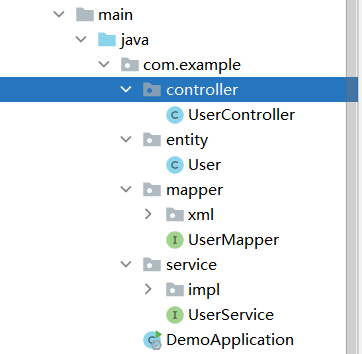
另外swagger2的配置:
<dependency>

    <groupId>io.springfox</groupId>

    <artifactId>springfox-swagger-ui</artifactId>

    <version>3.0.0</version>

</dependency>

<dependency>

    <groupId>io.springfox</groupId>

    <artifactId>springfox-swagger2</artifactId>

    <version>3.0.0</version>

</dependency>
查看生成的User实体类:
@Data

@EqualsAndHashCode(callSuper = false)

@Accessors(chain = true)

@ApiModel(value="User对象", description="")

public class User implements Serializable {

    private static final long serialVersionUID=1L;

    @ApiModelProperty(value = "主键ID")

    @TableId(value = "id", type = IdType.ID_WORKER_STR)

    private Long id;

    @ApiModelProperty(value = "姓名")

    private String name;

    @ApiModelProperty(value = "年龄")

    private Integer age;

    @ApiModelProperty(value = "邮箱")

    private String email;

}
进行相应的查询测试:
// 测试代码

@RestController

@RequestMapping("/example/user")

public class UserController {

    @Autowired

    private UserService userService;

    @RequestMapping("/{id}")

    public User getUserById(@PathVariable int id) {

        User user = userService.getById(id);

        return user;

    }

}
测试结果:
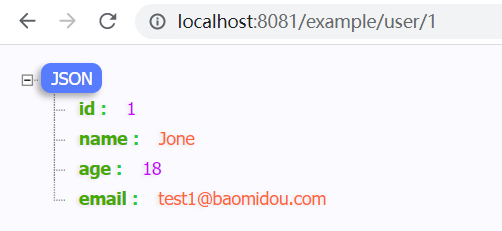
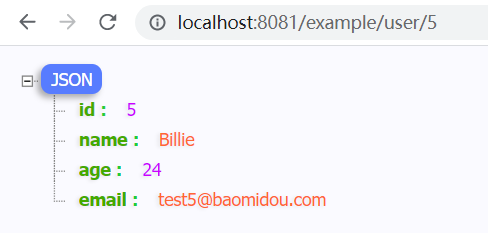
Mybatis-Plus的配置和基本使用的更多相关文章
- (转)springMVC+mybatis+ehcache详细配置
一. Mybatis+Ehcache配置 为了提高MyBatis的性能,有时候我们需要加入缓存支持,目前用的比较多的缓存莫过于ehcache缓存了,ehcache性能强大,而且位各种应用都提供了解决方 ...
- MyBatis学习(一)、MyBatis简介与配置MyBatis+Spring+MySql
一.MyBatis简介与配置MyBatis+Spring+MySql 1.1MyBatis简介 MyBatis 是一个可以自定义SQL.存储过程和高级映射的持久层框架.MyBatis 摒除了大部分的J ...
- Spring、Spring MVC、MyBatis整合文件配置详解
原文 http://www.cnblogs.com/wxisme/p/4924561.html 主题 MVC模式MyBatisSpring MVC 使用SSM框架做了几个小项目了,感觉还不错是时候总 ...
- ibatis mybatis sql语句配置 符号不兼容 大于号 小于号<!CDATA[ ]>
ibatis mybatis sql语句配置 符号不兼容 大于号 小于号<!CDATA[ ]> 因为这个是xml格式的,所以不允许出现类似">"这样的字符,但是都 ...
- MyBatis多数据源配置(读写分离)
原文:http://blog.csdn.net/isea533/article/details/46815385 MyBatis多数据源配置(读写分离) 首先说明,本文的配置使用的最直接的方式,实际用 ...
- spring,mybatis事务管理配置与@Transactional注解使用[转]
spring,mybatis事务管理配置与@Transactional注解使用[转] spring,mybatis事务管理配置与@Transactional注解使用 概述事务管理对于企业应用来说是至关 ...
- MyBatis学习 之 一、MyBatis简介与配置MyBatis+Spring+MySql
目录(?)[-] 一MyBatis简介与配置MyBatisSpringMySql MyBatis简介 MyBatisSpringMySql简单配置 搭建Spring环境 建立MySql数据库 搭建My ...
- MyBatis简介与配置MyBatis+Spring+MySql
MyBatis学习 之 一.MyBatis简介与配置MyBatis+Spring+MySql MyBatis学习 之 二.SQL语句映射文件(1)resultMap MyBatis学习 之 二.SQL ...
- 搭建 springboot 2.0 mybatis 读写分离 配置区分不同环境
最近公司打算使用springboot2.0, springboot支持HTTP/2,所以提前先搭建一下环境.网上很多都在springboot1.5实现的,所以还是有些差异的.接下来咱们一块看一下. 文 ...
- mybatis中resultMap配置细则
resultMap算是mybatis映射器中最复杂的一个节点了,能够配置的属性较多,我们在mybatis映射器配置细则这篇博客中已经简单介绍过resultMap的配置了,当时我们介绍了resultMa ...
随机推荐
- url参数接收的一些安全应用场景
越权漏洞,从原来的修改id越权到后面的自己加参数,减参数越权,到现在的加特殊字符.攻击手段在进步: 以php和java为例,聊聊参数接收的最大接受能力,可以插入哪些脏数据? demo1.php: &l ...
- excel VBA构造函数就是这么简单
Function test(a As Integer)'构造函数名字为test参数为a且为int型 If a >= 90 Then Debug.Print "优秀" ...
- 5、修改oracle的字符集
注意:修改字符集前需要将表空间进行数据泵备份: 5.1.修改server端字符集: 1.登录到oracle实例查看字符集: [oracle@slave-node2 ~]$ echo $ORACLE_S ...
- 14.6、mysql半同步插件的使用
1.半同步介绍: (1)从MySQL5.5开始,MySQL以插件的形式支持半同步复制.如何理解半同步呢?首先我们来看看异步,全同步的概念: 1)异步复制(Asynchronous replicatio ...
- 在FLEX中真正的隐藏一个组件,隐藏后不占据自身的位置. (转)
一直被这个问题困扰,就是在设置UI的Visible的时候,改组件的位置一直被占着,比较恶心,今天在这里发现了一个方法, 操作方法如下设置: includeInLayout为false即可 来自:htt ...
- Pptx的多路径形状转为WPF的Path
本文是将演示如何解析pptx文件的多路径的形状转换到WPF,绘制多个Shape的Path Shape Path 这是Pptx的[标注:弯曲曲线(无边框)]形状的OpenXml定义部分: <cal ...
- php解决约瑟夫环
今天偶遇一道算法题 "约瑟夫环"是一个数学的应用问题:一群猴子排成一圈,按1,2,-,n依次编号.然后从第1只开始数,数到第m只,把它踢出圈,从它后面再开始数, 再数到第m只,在把 ...
- Message /index.jsp (line: [17], column: [45]) The JSP specification requires that an attribute name is preceded by whitespace
Error: Message /index.jsp (line: [17], column: [45]) The JSP specification requires that an attribut ...
- 关于中文版的manpages
可以从下面下载对应的包: https://code.google.com/p/manpages-zh/ https://github.com/lidaobing/manpages-zh 目前只有一部分 ...
- 从2021强网杯的一道题学习docx文件操作
[强网先锋]寻宝 啊对就是这道题,大佬们都贼快,菜如我还得慢慢整 key1 大佬们都一笔带过,哎,虽然简单,但是也别这么虐我们啊 我来简单写一下吧 <?php header('Content-t ...