
springboot 2.0 自定义redis自动装配
首先创建maven项目 pom.xml:
<?xml version="1.0" encoding="UTF-8"?>

<project xmlns="http://maven.apache.org/POM/4.0.0" xmlns:xsi="http://www.w3.org/2001/XMLSchema-instance"

	xsi:schemaLocation="http://maven.apache.org/POM/4.0.0 http://maven.apache.org/xsd/maven-4.0.0.xsd">

	<parent>

		<groupId>com.tuling</groupId>

		<artifactId>tuling-springboot</artifactId>

		<version>0.0.1-SNAPSHOT</version>

	</parent>

	<modelVersion>4.0.0</modelVersion>

	<groupId>com.hnnd</groupId>

	<artifactId>redisoper-spring-boot-autoconfiguration</artifactId>

	<version>0.0.1-SNAPSHOT</version>

	<packaging>jar</packaging>

	<name>redisoper-spring-boot-autoconfiguration</name>

	<properties>

		<project.build.sourceEncoding>UTF-8</project.build.sourceEncoding>

		<project.reporting.outputEncoding>UTF-8</project.reporting.outputEncoding>

		<java.version>1.8</java.version>

	</properties>

	<dependencies>

		<dependency>

			<groupId>org.springframework.data</groupId>

			<artifactId>spring-data-redis</artifactId>

			<version>2.0.9.RELEASE</version>

		</dependency>

		<dependency>

			<groupId>redis.clients</groupId>

			<artifactId>jedis</artifactId>

			<version>2.9.0</version>

		</dependency>

		<!-- 自动配置的依赖-->

		<dependency>

			<groupId>org.springframework.boot</groupId>

			<artifactId>spring-boot-autoconfigure</artifactId>

		</dependency>

		<!-- 实体类映射属性文件需要的-->

		<dependency>

			<groupId>org.springframework.boot</groupId>

			<artifactId>spring-boot-configuration-processor</artifactId>

			<optional>true</optional>

		</dependency>

		<dependency>

			<groupId>com.google.guava</groupId>

			<artifactId>guava</artifactId>

			<version>18.0</version>

		</dependency>

		<dependency>

			<groupId>org.projectlombok</groupId>

			<artifactId>lombok</artifactId>

			<optional>true</optional>

			<version>1.16.18</version>

		</dependency>

	</dependencies>

</project>
自定义配置工程截图:

RedisOperAutoConfiguration类 是核心类
package com.redisoper;

import com.google.common.collect.Lists;

import lombok.extern.slf4j.Slf4j;

import org.springframework.beans.factory.annotation.Autowired;

import org.springframework.boot.autoconfigure.condition.ConditionalOnBean;

import org.springframework.boot.autoconfigure.condition.ConditionalOnClass;

import org.springframework.boot.autoconfigure.condition.ConditionalOnMissingBean;

import org.springframework.boot.autoconfigure.condition.ConditionalOnProperty;

import org.springframework.boot.context.properties.EnableConfigurationProperties;

import org.springframework.context.annotation.Bean;

import org.springframework.context.annotation.Configuration;

import redis.clients.jedis.JedisPool;

import redis.clients.jedis.JedisPoolConfig;

import redis.clients.jedis.JedisShardInfo;

import redis.clients.jedis.ShardedJedisPool;

import redis.clients.util.Hashing;

import redis.clients.util.Sharded;

import java.util.List;

/**

 * redis操作配置类

 * Created by Administrator on 2018/8/8.

 */

@Configuration  //开启配置

@EnableConfigurationProperties(value = {RedisConfigProperties.class,ShardedRedisConfigProperties.class})//开启使用映射实体对象

@ConditionalOnClass(value = {JedisPoolConfig.class, JedisPool.class})//存在JedisPoolConfig JedisPool时初始化该配置类

@Slf4j

public class RedisOperAutoConfiguration {

    @Autowired

    private RedisConfigProperties redisConfigProperties;

    @Autowired

    private ShardedRedisConfigProperties shardedRedisConfigProperties;

    public RedisOperAutoConfiguration(RedisConfigProperties redisConfigProperties,ShardedRedisConfigProperties shardedRedisConfigProperties) {

        this.redisConfigProperties = redisConfigProperties;

        this.shardedRedisConfigProperties = shardedRedisConfigProperties;

    }


   // 此处是redis集群配置,单机版可忽略

    @Bean

    @ConditionalOnMissingBean(ShardedJedisPool.class)

    @ConditionalOnProperty(prefix = "spring.ha.redis",name = "USEHA",havingValue ="false") //配置文件是否存在spring.ha.redis的配置

    public JedisPool jedisPool() {

        log.info("加载jedisPool");

        JedisPoolConfig jedisPoolConfig = new JedisPoolConfig();

        jedisPoolConfig.setMaxTotal(redisConfigProperties.getMaxTotal());

        jedisPoolConfig.setMaxIdle(redisConfigProperties.getMaxIdel());

        jedisPoolConfig.setMinIdle(redisConfigProperties.getMinIdel());

        jedisPoolConfig.setTestOnBorrow(redisConfigProperties.isTestOnBorrow());

        jedisPoolConfig.setTestOnReturn(redisConfigProperties.isTestOnRetrun());

        JedisPool  jedisPool = new JedisPool(jedisPoolConfig,redisConfigProperties.getRedis_server_ip(),redisConfigProperties.getRedis_server_port(),1000*1,redisConfigProperties.getRedis_pass());

        return jedisPool;

    }


  // 此处是集群配置 单机版忽略

    @Bean

    @ConditionalOnMissingBean(JedisPool.class)

    @ConditionalOnProperty(prefix = "spring.ha.redis",name = "USEHA",havingValue ="true") // 配置文件是否存在spring.ha.redis

    public ShardedJedisPool shardedJedisPool() {

        log.info("shardedJedisPool");

        JedisPoolConfig jedisPoolConfig = new JedisPoolConfig();

        jedisPoolConfig.setMaxIdle(shardedRedisConfigProperties.getMaxIdel());

        jedisPoolConfig.setMaxTotal(shardedRedisConfigProperties.getMaxTotal());

        jedisPoolConfig.setMinIdle(shardedRedisConfigProperties.getMinIdel());

        jedisPoolConfig.setTestOnReturn(shardedRedisConfigProperties.isTestOnRetrun());

        jedisPoolConfig.setTestOnBorrow(shardedRedisConfigProperties.isTestOnBorrow());

        jedisPoolConfig.setBlockWhenExhausted(true);

        JedisShardInfo jedisShardInfo = new JedisShardInfo(shardedRedisConfigProperties.getRedis_server_ip1(),shardedRedisConfigProperties.getRedis_server_port1());

        jedisShardInfo.setPassword(shardedRedisConfigProperties.getRedis_pass1());

        JedisShardInfo jedisShardInfo2 = new JedisShardInfo(shardedRedisConfigProperties.getRedis_server_ip2(),shardedRedisConfigProperties.getRedis_server_port2());

        jedisShardInfo2.setPassword(shardedRedisConfigProperties.getRedis_pass2());

        List<JedisShardInfo> shardInfos = Lists.newArrayList();

        shardInfos.add(jedisShardInfo);

        shardInfos.add(jedisShardInfo2);

        ShardedJedisPool shardingRedisPool = new ShardedJedisPool(jedisPoolConfig,shardInfos, Hashing.MURMUR_HASH, Sharded.DEFAULT_KEY_TAG_PATTERN);

        return shardingRedisPool;

    }

    @Bean

    @ConditionalOnBean(JedisPool.class) // 容器中存在JedisPool类则初始化该bean

    public RedisOperClient redisOperClient() {

        RedisOperClient redisOperClient = new RedisOperClient(jedisPool());

        return redisOperClient;

    }

    @Bean

    @ConditionalOnBean(ShardedJedisPool.class) //一样的道理

    public ShardedRedisOperClient shardedRedisOperClient() {

        ShardedRedisOperClient shardedRedisOperClient = new ShardedRedisOperClient(shardedJedisPool());

        return shardedRedisOperClient;

    }

}
@Configuration:这个配置就不用多做解释了,我们一直在使用

@EnableConfigurationProperties:这是一个开启使用配置参数的注解,value值就是我们配置实体参数映射的ClassType,将配置实体作为配置来源。

SpringBoot内置条件注解

有关@ConditionalOnXxx相关的注解这里要系统的说下,因为这个是我们配置的关键,根据名称我们可以理解为具有Xxx条件,当然它实际的意义也是如此,条件注解是一个系列,下面我们详细做出解释

@ConditionalOnBean:当SpringIoc容器内存在指定Bean的条件

@ConditionalOnClass:当SpringIoc容器内存在指定Class的条件

@ConditionalOnExpression:基于SpEL表达式作为判断条件

@ConditionalOnJava:基于JVM版本作为判断条件

@ConditionalOnJndi:在JNDI存在时查找指定的位置

@ConditionalOnMissingBean:当SpringIoc容器内不存在指定Bean的条件

@ConditionalOnMissingClass:当SpringIoc容器内不存在指定Class的条件

@ConditionalOnNotWebApplication:当前项目不是Web项目的条件

@ConditionalOnProperty:指定的属性是否有指定的值

@ConditionalOnResource:类路径是否有指定的值

@ConditionalOnSingleCandidate:当指定Bean在SpringIoc容器内只有一个,或者虽然有多个但是指定首选的Bean

@ConditionalOnWebApplication:当前项目是Web项目的条件

以上注解都是元注解@Conditional演变而来的,根据不用的条件对应创建以上的具体条件注解。
RedisConfigProperties类:
package com.redisoper;

import lombok.Data;

import org.springframework.boot.context.properties.ConfigurationProperties;

/**

 * 单机redis配置

 * Created by Administrator on 2018/8/8.

 */

@ConfigurationProperties("spring.redis")

@Data

public class RedisConfigProperties {

    /**

     * jedispool中jedis最大的可用实例

     */

    private Integer maxTotal = 50;

    /**

     * jedispool中jedis 最大空闲数

     */

    private Integer maxIdel = 20;

    /**

     * jedispool中最小空闲数

     */

    private Integer minIdel = 5;

    /**

     * 从连接池中借出的jedis都会经过测试

     */

    private boolean testOnBorrow = true;

    /**

     * 返回jedis到池中Jedis 实例都会经过测试

     */

    private boolean testOnRetrun = false;

    /**

     * IP

     */

    private String redis_server_ip;

    /**

     * port

     */

    private Integer redis_server_port;

    /**

     * 连接redis的password

     */

    private String redis_pass;

}
RedisOperClient类:
package com.redisoper;

import lombok.Data;

import lombok.extern.slf4j.Slf4j;

import redis.clients.jedis.Jedis;

import redis.clients.jedis.JedisPool;

import java.util.Collections;

/**

 * redis操作类

 * Created by Administrator on 2018/8/8.

 */

@Slf4j

public class RedisOperClient {

    private JedisPool jedisPool;

    public RedisOperClient(JedisPool jedisPool) {

        this.jedisPool = jedisPool;

    }

    /**

     * set 操作

     *

     * @param key   键

     * @param value 值

     * @return result

     */

    public String set(String key, String value) {

        Jedis jedis = null;

        String result = null;

        try {

            jedis = jedisPool.getResource();

            result = jedis.set(key, value);

        } catch (Exception e) {

            log.error("set key:{},value:{},error:{}", key, value, e);

            jedisPool.returnResource(jedis);

            return result;

        } finally {

            jedisPool.returnResource(jedis);

        }

        return result;

    }

    /**

     * list接口存储用作消息队列

     *

     * @param queueName 队列名称

     * @param value     消息

     * @return 成功

     */

    public long lpush(String queueName, String value) {

        Jedis jedis = null;

        Long result = null;

        try {

            jedis = jedisPool.getResource();

            result = jedis.lpush(queueName, value);

        } catch (Exception e) {

            log.error("lpush key:{},value:{},异常:{}", queueName, value, e);

            jedisPool.returnResource(jedis);

            return result;

        } finally {

            jedisPool.returnResource(jedis);

        }

        return result;

    }

    /**

     * 判断是否为空

     *

     * @param queueName 队列名称

     * @return true|false

     */

    public boolean isEmptyQueue(String queueName) {

        Jedis jedis = null;

        Long result = null;

        try {

            jedis = jedisPool.getResource();

            if (jedis.llen(queueName).intValue() == 0) {

                return false;

            }

            return true;

        } catch (Exception e) {

            log.error("isEmptyQueue key:{},异常:{}", queueName, e);

            jedisPool.returnResource(jedis);

            return false;

        } finally {

            jedisPool.returnResource(jedis);

        }

    }

    /**

     * 出队操作

     *

     * @param queueName 队列名称

     * @return 队首消息

     */

    public String rpop(String queueName) {

        Jedis jedis = null;

        String result = null;

        try {

            jedis = jedisPool.getResource();

            result = jedis.rpop(queueName);

        } catch (Exception e) {

            log.error("rpop key:{},异常:{}", queueName, e);

            jedisPool.returnResource(jedis);

            return result;

        } finally {

            jedisPool.returnResource(jedis);

        }

        return result;

    }

    public String set(String key, String value, String set_if_not_exits, String set_with_expire_time, int expire) {

        Jedis jedis = null;

        String result = null;

        try {

            jedis = jedisPool.getResource();

            result = jedis.set(key, value, set_if_not_exits, set_with_expire_time, expire);

        } catch (Exception e) {

            log.error("set key:{},value:{},set_if_not_exits:{},set_with_expire_time:{},expire:{},error:{}", key, value, set_if_not_exits, set_with_expire_time, expire, e);

            jedisPool.returnResource(jedis);

            return result;

        } finally {

            jedisPool.returnResource(jedis);

        }

        return result;

    }

    /**

     * setex 操作

     *

     * @param key        key 键

     * @param expireTime 过期时间(m)

     * @param value      值

     * @return String

     */

    public String setex(String key, int expireTime, String value) {

        Jedis jedis = null;

        String result = null;

        try {

            jedis = jedisPool.getResource();

            result = jedis.setex(key, expireTime, value);

        } catch (Exception e) {

            log.error("setex key:{},expireTime:{},value:{},error:{}", key, expireTime, value, e);

            jedisPool.returnResource(jedis);

            return result;

        } finally {

            jedisPool.returnResource(jedis);

        }

        return result;

    }

    /**

     * get 操作

     *

     * @param key 键

     * @return value

     */

    public String get(String key) {

        Jedis jedis = null;

        String result = null;

        try {

            jedis = jedisPool.getResource();

            result = jedis.get(key);

        } catch (Exception e) {

            log.error("get key:{}error:{}", key, e);

            jedisPool.returnResource(jedis);

            return result;

        } finally {

            jedisPool.returnResource(jedis);

        }

        return result;

    }

    /**

     * 让key失效

     *

     * @param key        键

     * @param expireTime 失效时间

     * @return Long

     */

    public Long expire(String key, int expireTime) {

        Jedis jedis = null;

        Long result = null;

        try {

            jedis = jedisPool.getResource();

            result = jedis.expire(key, expireTime);

        } catch (Exception e) {

            log.error("expire key:{},expireTime:{},error:{}", key, expireTime, e);

            jedisPool.returnResource(jedis);

            return result;

        } finally {

            jedisPool.returnResource(jedis);

        }

        return result;

    }

    /**

     * 判断key是否存在

     *

     * @param key 键

     * @return boolean

     */

    public boolean isExists(String key) {

        Jedis jedis = null;

        boolean result = false;

        try {

            jedis = jedisPool.getResource();

            result = jedis.exists(key);

        } catch (Exception e) {

            log.error("isExists key:{},error:{}", key, e);

            jedisPool.returnResource(jedis);

            return result;

        } finally {

            jedisPool.returnResource(jedis);

        }

        return result;

    }

    /**

     * 自增

     *

     * @param key key

     * @return Long

     */

    public Long incr(String key) {

        Jedis jedis = null;

        Long result = null;

        try {

            jedis = jedisPool.getResource();

            result = jedis.incr(key);

        } catch (Exception e) {

            log.error("incr key:{},error:{}", key, e);

            jedisPool.returnResource(jedis);

            return result;

        } finally {

            jedisPool.returnResource(jedis);

        }

        return result;

    }

    /**

     * 指定步长增加

     *

     * @param key  键

     * @param step 步长

     * @return Long

     */

    public Long incrBy(String key, Integer step) {

        Jedis jedis = null;

        Long result = null;

        try {

            jedis = jedisPool.getResource();

            result = jedis.incrBy(key, step);

        } catch (Exception e) {

            log.error("incrBy key:{},step:{},error:{}", key, step, e);

            jedisPool.returnResource(jedis);

            return result;

        } finally {

            jedisPool.returnResource(jedis);

        }

        return result;

    }

    /**

     * 递减

     *

     * @param key key

     * @return Long

     */

    public Long decr(String key) {

        Jedis jedis = null;

        Long result = null;

        try {

            jedis = jedisPool.getResource();

            result = jedis.decr(key);

        } catch (Exception e) {

            log.error("decr key:{},error:{}", key, e);

            jedisPool.returnResource(jedis);

            return result;

        } finally {

            jedisPool.returnResource(jedis);

        }

        return result;

    }

    /**

     * 指定步长递减

     *

     * @param key  键

     * @param step 步长

     * @return Long

     */

    public Long decrBy(String key, Integer step) {

        Jedis jedis = null;

        Long result = null;

        try {

            jedis = jedisPool.getResource();

            result = jedis.incrBy(key, step);

        } catch (Exception e) {

            log.error("decrBy key:{},step:{},error:{}", key, step, e);

            jedisPool.returnResource(jedis);

            return result;

        } finally {

            jedisPool.returnResource(jedis);

        }

        return result;

    }

    public Long del(String key) {

        Jedis jedis = null;

        Long result = null;

        try {

            jedis = jedisPool.getResource();

            result = jedis.del(key);

        } catch (Exception e) {

            log.error("del key:{},error:{}", key, e);

            jedisPool.returnResource(jedis);

            return result;

        } finally {

            jedisPool.returnResource(jedis);

        }

        return result;

    }

    public long eval(String script, String lock, String lockValue) {

        Jedis jedis = null;

        //删除锁失败

        long result = 0;

        try {

            jedis = jedisPool.getResource();

            result = (Long) jedis.eval(script, Collections.singletonList(lock), Collections.singletonList(lockValue));

            return result;

        } catch (Exception e) {

            log.error("eval script:{},lock:{},lockValue:{},error:{}", script, lock, lockValue, e);

            jedisPool.returnResource(jedis);

        } finally {

            jedisPool.returnResource(jedis);

        }

        return result;

    }

}
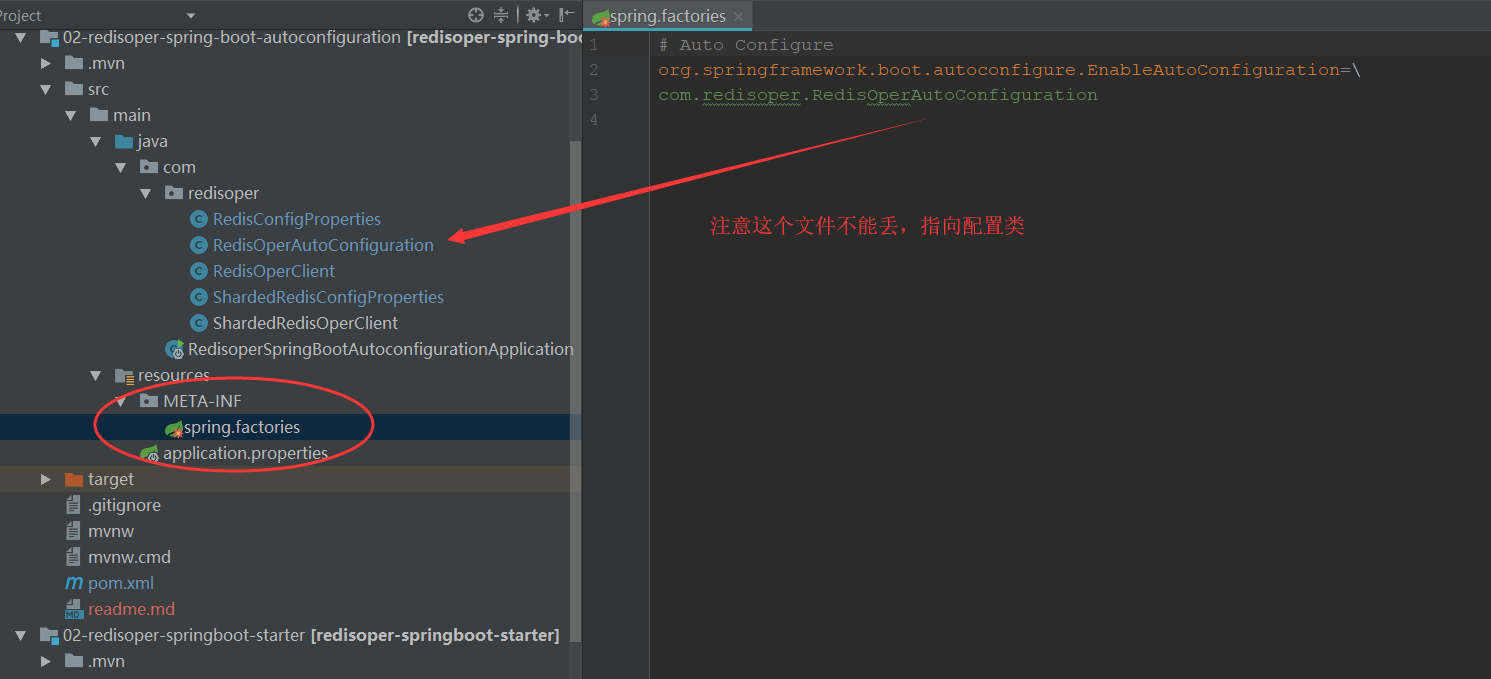
至此结束配置类,然后把这个项目打包程jar。
接着新建starter maven 工程:
pom.xml:
<?xml version="1.0" encoding="UTF-8"?>

<project xmlns="http://maven.apache.org/POM/4.0.0" xmlns:xsi="http://www.w3.org/2001/XMLSchema-instance"

	xsi:schemaLocation="http://maven.apache.org/POM/4.0.0 http://maven.apache.org/xsd/maven-4.0.0.xsd">

	<modelVersion>4.0.0</modelVersion>

	<groupId>com.hnnd</groupId>

	<artifactId>redisoper-springboot-starter</artifactId>

	<version>0.0.1-SNAPSHOT</version>

	<packaging>jar</packaging>

	<name>redisoper-springboot-starter</name>

	<parent>

		<groupId>com.tuling</groupId>

		<artifactId>tuling-springboot</artifactId>

		<version>0.0.1-SNAPSHOT</version> <!-- lookup parent from repository -->

	</parent>

	<properties>

		<project.build.sourceEncoding>UTF-8</project.build.sourceEncoding>

		<project.reporting.outputEncoding>UTF-8</project.reporting.outputEncoding>

		<java.version>1.8</java.version>

	</properties>

	<dependencies>

		<dependency>

			<groupId>org.springframework.boot</groupId>

			<artifactId>spring-boot-starter</artifactId>

		</dependency>


          <!-- 依赖刚刚自定义的配置jar-->

		<dependency>

			<groupId>com.hnnd</groupId>

			<artifactId>redisoper-spring-boot-autoconfiguration</artifactId>

			<version>0.0.1-SNAPSHOT</version>

		</dependency>

	</dependencies>

</project>
application.properties:
spring.redis.redis-server-ip=localhost

spring.redis.redis-server-port=6379

spring.redis.redis-pass=
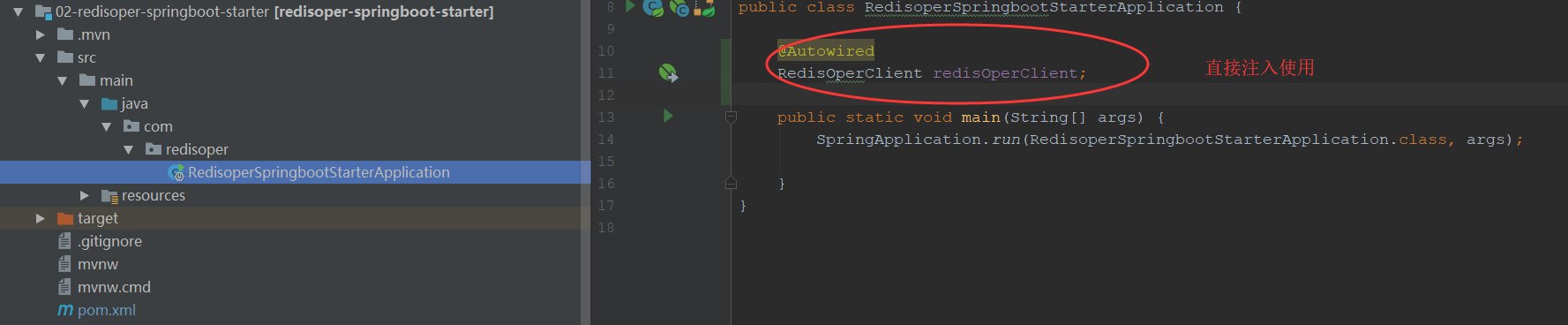
至此starter 工程 就可以直接使用在autoConfiguration工程自己配置的RedisOperClient 类 来操作redis,如果您把starter工程jar 包放在公司私服,那么同事就都能用你配置好的组件。多爽? 你就是传说的架构师。
欢迎来群 592495675 畅聊技术。
springboot 2.0 自定义redis自动装配的更多相关文章
- 8 -- 深入使用Spring -- 2...6 Spring 4.0 增强的自动装配和精确装配
8.2.6 Spring 4.0 增强的自动装配和精确装配 Spring提供了@Autowired 注解来指定自动装配,@Autowired可以修饰setter方法.普通方法.实例变量和构造器等.当使 ...
- Springboot 2.0 - 集成redis
序 最近在入门SpringBoot,然后在感慨 SpringBoot较于Spring真的方便多时,顺便记录下自己在集成redis时的一些想法. 1.从springboot官网查看redis的依赖包 & ...
- SpringBoot核心特性之组件自动装配
写在前面 spring boot能够根据依赖的jar包自动配置spring boot的应用,例如: 如果类路径中存在DispatcherServlet类,就会自动配置springMvc相关的Bean. ...
- springboot 2.0+ 自定义拦截器
之前项目的springboot自定义拦截器使用的是继承WebMvcConfigurerAdapter重写常用方法的方式来实现的. 以下WebMvcConfigurerAdapter 比较常用的重写接口 ...
- SpringBoot整合Shiro自定义Redis存储
Shiro Shiro 主要分为 安全认证 和 接口授权 两个部分,其中的核心组件为 Subject. SecurityManager. Realms,公共部分 Shiro 都已经为我们封装好了,我们 ...
- SpringBoot启动流程分析(五):SpringBoot自动装配原理实现
SpringBoot系列文章简介 SpringBoot源码阅读辅助篇: Spring IoC容器与应用上下文的设计与实现 SpringBoot启动流程源码分析: SpringBoot启动流程分析(一) ...
- 深入理解SpringBoot之自动装配
SpringBoot的自动装配是拆箱即用的基础,也是微服务化的前提.其实它并不那么神秘,我在这之前已经写过最基本的实现了,大家可以参考这篇文章.这次主要的议题是,来看看它是怎么样实现的,我们透过源代码 ...
- 从源码中理解Spring Boot自动装配原理
个人博客:槿苏的知识铺 一.什么是自动装配 SpringBoot 定义了一套接口规范,这套规范规定:SpringBoot在启动时会扫描外部引用jar包中的META-INF/spring.factori ...
- AutowireCapableBeanFactory 根据名称:自动装配的BeanFactory,其实也是对BeanFactory的增强
//自动装配的Bean 工厂 public interface AutowireCapableBeanFactory extends BeanFactory { //工厂没有自动装配的Bean int ...
随机推荐
- MongoDB中的数据聚合工具Aggregate和Group
周煦辰 2016-01-16 来说说MongoDB中的数据聚合工具. Aggregate是MongoDB提供的众多工具中的比较重要的一个,类似于SQL语句中的GROUP BY.聚合工具可以让开发人员直 ...
- ES5和ES6中的继承
看到一篇写的非常好的关于js继承的文章,其中对构造函数.原型.实例之间的关系的描述十分透彻,故转载作者文章以随时学习,并供大家共同进步! ES5 ES5中的继承,看图: function Super( ...
- Android之利用JSBridge库实现Html,JavaScript与Android的所有交互
java 和 js互通框架 WebViewJavascriptBridge是移动UIView和Html交互通信的桥梁,用作者的话来说就是实现java和js的互相调用的桥梁. 替代了WebView的自带 ...
- 51nod-1420-贪心
1420 数袋鼠好有趣 题目来源: CodeForces 基准时间限制:1 秒 空间限制:131072 KB 分值: 40 难度:4级算法题 收藏 关注 有n只袋鼠.每只袋鼠的大小用一个整数表示 ...
- UVA-820 Internet Bandwidth (最大流)
题目大意:单源单汇无向网络求最大流. 题目分析:入门级别的题.但是ISAP在这儿好像不大好使?... 代码如下: # include<iostream> # include<cstd ...
- UVA-1610 Party Games (构造)
题目大意:给出一系列字符串,构造出一个字符串大于等于其中的一半,小于另一半. 题目分析:取大小为中间的两个a,b(a<b).实际上就是找出第一个小于b的同时大于等于a的字符串,直接构造即可.要注 ...
- POJ 2409 Let it Bead (Polya定理)
题意 用k种颜色对n个珠子构成的环上色,旋转翻转后相同的只算一种,求不等价的着色方案数. 思路 Polya定理 X是对象集合{1, 2, --, n}, 设G是X上的置换群,用M种颜色染N种对象,则不 ...
- 非关联容器|hash|unordered_map/multimap,unordered_set/multiset
body, table{font-family: 微软雅黑; font-size: 10pt} table{border-collapse: collapse; border: solid gray; ...
- 【转】socket 通信简介
转自:http://blog.csdn.net/xiaoweige207/article/details/6211577/ “一切皆Socket!” 话虽些许夸张,但是事实也是,现在的网络编程几乎都是 ...
- C#如何弹出输入框
在C#中,进行windows窗体应用程序编程的时候,经常需要弹出输入框,输入密码,输入文本之类的.然而,C#中没有直接弹出输入框的语句,MessageBox只能显示一段消息而不能输入.我们需要调用Mi ...