
Unity Lighting - Emissive Materials 自发光材质(九)
Emissive Materials 自发光材质
Whilst Area Lights are not supported by Precomputed Realtime GI, similar soft lighting effects are still possible using ‘Emissive Materials.’ Like Area Lights, emissive materials emit light across their surface area. They contribute to bounced light in your scene and associated properties such as color and intensity can be changed during gameplay.
尽管预计算实时GI不支持区域灯光,但使用“发光材料”仍可实现类似的柔和灯光效果。与区域灯光一样,发光材料在其表面区域发光。它们有助于场景中的反射光线,并可在游戏过程中更改颜色和强度等相关属性。
‘Emission’ is a property of the Standard Shader which allows static objects in our scene to emit light. By default the value of ‘Emission’ is set to zero. This means no light will be emitted by objects assigned materials using the Standard Shader. The HDR color picker can be used to select colors with intensities beyond the 0-1 range in order to create bright light effects similar to those of Area Lights.
'发射'是标准着色器的一个属性,它允许我们场景中的静态物体发光。默认情况下'发射'的值被设置为零。这意味着使用标准着色器的物体指定材料不会发射光。 HDR颜色选择器可用于选择强度超过0-1范围的颜色,以创建类似于区域灯光的明亮灯光效果。
There is no range value for emissive materials but light emitted will again falloff at a quadratic rate. Emission will only be received by objects marked as ‘Static’ or “Lightmap Static’ from the Inspector. Similarly, emissive materials applied to non-static, or dynamic geometry such as characters will not contribute to scene lighting.
自发光材质没有范围值,但发射的光线会以二次方速率再次下降。自发光只能由inspector面包标记为“静态”或“光照贴图静态”的对象接收。同样,应用于非静态或动态几何体(如角色)的自发光材质也不会影响场景照明。
However, materials with an emission above zero will still appear to glow brightly on-screen even if they are not contributing to scene lighting. This effect can also be produced by selecting ‘None’ from the Standard Shader’s ‘Global Illumination’ Inspector property. Self-illuminating materials like these are a useful way to create effects such as neons or other visible light sources.
然而,即使没有对现场照明作出贡献,零辐照度以上的材质仍然会在屏幕上亮起。这种效果也可以通过从标准着色器的“‘Global Illumination(全局照明)”Inspector面板属性中选择“None无”来产生。像这些自发光材质是制作诸如霓虹灯或其他可见光源的效果的有用方式。
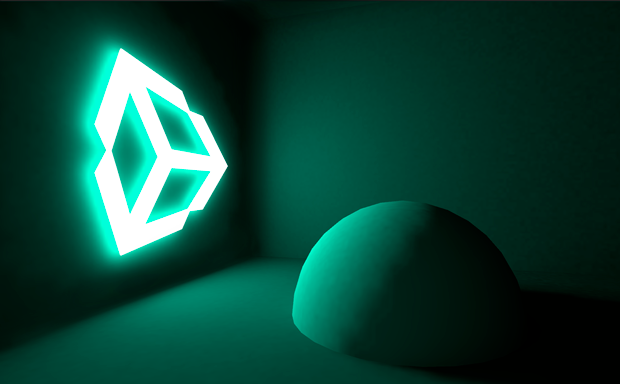 Simple neon sign created using the ‘Emission’ property of Unity’s Standard Shader. Notice how the emission from the sign is still shadowed by static geometry - in this case, the sphere.
使用Unity标准着色器的“Emission(辐射)”属性创建简单的霓虹灯。 请注意,在这种情况下标志的自发光仍然使静态几何体的球体产生阴影。
Emissive materials only directly affect static geometry in your scene. If you need dynamic, or non-static geometry - such as characters, to pick up light from emissive materials, Light Probes must be used. Changing emission values at gameplay will update Light Probes interactively and the results will be visible on any objects presently receiving light from those probes.
自发光材质仅直接影响场景中的静态几何体。 如果您需要动态或非静态几何体(如字符)来接受自发光材质的光,则必须使用Light Probes(光照探针)。 在游戏中更改辐照值将交互式更新光照探针,结果将作用于受到这些探针作用的任何对象上。
<wiz_tmp_tag id="wiz-table-range-border" contenteditable="false" style="display: none;">
Unity Lighting - Emissive Materials 自发光材质(九)的更多相关文章
- Unity Lighting(一)光照练习
Unity 2018.1.2f1 原文链接:https://www.youtube.com/watch?v=VnG2gOKV9dw Unity Lighting练习最终效果 眼睛.光源与物体 光学基础 ...
- 关于unity里pbr技术和材质 unity5默认shader和传统的对比
刚开始也不知道什么是pbr (Physically Based Rendering)后来才发现这是一种新的渲染方式 与之对应的是材质是pbs(Physically Based Shader) unit ...
- Unity Lighting - Reflections 反射(六)
Reflections 反射 Reflection Source 反射源 By default, objects in a scene are rendered using Unity’s ‘St ...
- Unity Lighting - Choosing a Rendering Path 选择渲染路径(三)
Choosing a Rendering Path 选择渲染路径 Unity supports a number of rendering techniques, or ‘paths’. An i ...
- 关于Unity中的几何体,材质和FBX模型
一.创建几何体的类型 1: 创建平面 Plane;2: 创建立方体 Cube;3: 创建球体 Sphere;4: 创建胶囊体 Capsule;5: 创建圆柱体 Cylinder;6: 3D文字 3D ...
- Unity Lighting - The Precompute Process 预计算过程(二)
The Precompute Process 预计算过程 In Unity, precomputed lighting is calculated in the background - eith ...
- Unity Lighting - Choosing a Lighting Technique 选择照明技术(一)
Choosing a Lighting Technique 选择照明技术 https://unity3d.com/cn/learn/tutorials/topics/graphics/choosi ...
- Unity Lighting - Lighting overview 照明概述
Lighting overview 照明概述 In order to calculate the shading of a 3D object, Unity needs to know the ...
- 【Unity】11.5 物理材质 (Physics Material)
分类:Unity.C#.VS2015 创建日期:2016-05-02 一.简介 物理材质 (Physics Material) 用于调整碰撞对象的摩擦力和反弹效果. 二.创建物理材质 要创建物理材质 ...
随机推荐
- Python中获取异常(try Exception)信息
异常信息的获取对于程序的调试非常重要,可以有助于快速定位有错误程序语句的位置. 这里获取异常(Exception)信息采用try...except...程序结构.如下所示: try: ... exce ...
- Boost noncopyable实现禁止拷贝的类
在C++中定义一个类,如果不明确定义拷贝构造函数和拷贝赋值操作符,编译期会为我们自动生成这两个函数.但是我们有时又希望禁止拷贝类的实例,这时可以私有化拷贝构造函数和拷贝赋值操作符即可. class d ...
- Oracle特有函数 case when decode exists 分页rownum
select * from EMP eselect * from dept dselect * from salgrade s--Oracle特有函数 case whenselect case 2 w ...
- webStorm安装以及集成git使用!
一:安装webstorm 百度网盘地址:https://pan.baidu.com/s/1K96mg7WYHc6X3odtk7_f2g 密码:2cgd 二:破解webstorm 1:选择liste ...
- javascript 中x++和++x的不同
x++和++x都是给x加一,但是前者是完成赋值之后再递增x,后者相反. 例如:如果x是5,y=x++会将y设置为5,x设置为6:而y=++x会将x和y都设置为6.
- 在express中HMR(合并express和webpack-dev-server)
在学习react的时候,经常用create-react-app来创建web应用,然而写到后面总有连自己服务器和数据库的需求,create-react-app创建的是一个webpack-dev-serv ...
- eclipse 打开一个新工程的基本设置
1.代码自动提示 Window -> Preferences -> Java -> Editor -> Content Assist -> Auto Activation ...
- Bootstrap01
Bootstrap01内容概要 一.使用Bootstrap的步骤 1.下载Bootstrap类库,包含三个部分,fonts,css,Bootstrap 2.导入项目中,在头部引入JQ,css和Boot ...
- 课时87. !important(掌握)
1.什么是important 作用:用于提升某个直接选中标签的选择器中的某个属性的优先级,可以将被指定的属性的优先级提升为最高. 注意点: 1.important只能用于直接选中,不能用于间接选中 p ...
- redis集群步骤(windows环境)
注:原文转自 https://blog.csdn.net/zsg88/article/details/73715947 ,仅用作为方便查阅 一 所需软件:Redis.Ruby语言运行环境.Redis的 ...