
[C#] Delegate, Multicase delegate, Event
声明:这篇博客翻译自:https://www.codeproject.com/Articles/1061085/Delegates-Multicast-delegates-and-Events-in-Csharp
第一次翻译英文博客,由于水平(技术水平+英语理解能力)有限/不足,肯定会有所疏漏/错误,请及时指正。
介绍:
在网络上搜索一下关于C#代理,事件,多播代理的文章,很多很多。不过还是有些地方讲的不明白/透彻。这篇博客将以简单易懂的方式来讲解这3个概念。下面先回答一下:
- 什么是delegate,在哪里使用delegate?
- 什么是multicast delegate?
- 何时使用delegate,Event
简要的答案:
下面的图解解释了delegate,multicase delegate, event之间的联系。
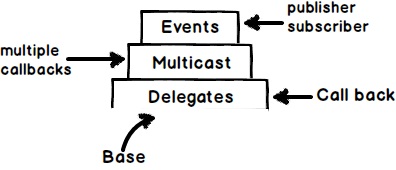
- Delegate是方法的指针,可以用作回调函数;
- Multicast delegate用作调用多个回调函数;
- Event封装了delegate,并且实现了订阅-发布模型;
- Event和multicase delegate都是delegate,因此delegate是event和multicase delegate的基础;
在本篇文章的剩余部分,我们将来更详细的理解上面这些话。
Delegate是方法指针
“Delegate是方法的指针”,你可以通过delegate来调用指向的方法。
通过下面3步创建delegate:
声明delegate,PS: 在这一步你将使用delegate关键字来声明委托,注意必须保证delegate的签名和需要指向的函数/方法签名一样/一致。例如下面代码中“SomeMethod()"无返回值且无输入参数。因此示例代码中的"SomeMethodPtr()"delegate定义是合适的;
创建一个delegate对象,PS: 当你创建了一个delegate之后,需要创建一个delegate的对象才能使用它,参考代码中注释Step2;
调用delegate,PS: 通过调用delegate的Invoke方法调用"SomeMethod".
    delegate void SomeMethodPtr();  // 1. Declare delegate

    static void Main(string[] args)

    {

        SomeMethodPtr ptrObject = SomeMethod;   // 2. Create object of delegate

        ptrObject.Invoke(); // 3. Invoke the delegate

    }

    static void SomeMethod()

    {

        // some code

    }
为什么要使用这种见解调用呢?
目前我们理解了delegate是方法/函数的指针。通过delegate间接调用一个方法有什么好处呢?
当我们需要调用的code在另外一个程序集中,例如下面的文件搜索类在一个其他assebmly中。PS:这个文件搜索代码只是一个模拟代码。
public class SearchFile

{

    public void Search()

    {

        // File search is happening

        for(int i=;i<;i++)

        {

            string str = "File " + i;

        }

    }

}
现在我们在另外一个单独的Console应用中调用上面的代码,当搜索完毕后,立刻通知UI并显示搜索的文件名。
static void Main(string[] args)

{

    SearchFile fl = new SearchFile();

    fl.Search();

}
换句话所我们需要一个CALLBACK(回调函数)当File Search结束后通知Console程序。这就是为什么说delegate是用来做回调函数的。
很多开发者想为什么不在Searh()方法中直接调用“Console.Write”进行输出呢。这样做会将UI技术和核心代码有耦合。如果我们把这段代码给WPF/WinForms程序调用,Console.Write做UI输出不适用.
    public class SearchFile

    {

        public void Search()

        {

            // File search is happening

            for (int i = ; i < ; i++)

            {

                string str = "File" + i;

                Console.Write(str);

            }

        }

    }
使用delegate实现一个回调函数
在SearchFile类中实现delegate,第一件事是暴露一个delegate的调用。在下面的SearchFile类中,定义一个WheretoCall的delegate,仔细观察Step1,2中的代码,此时的WheretoCall是空的,任何一个客户端程序想要有一个回调事件,传递一个签名一致的方法即可。
    public class SearchFile

    {

        public delegate void WheretoCall(string status);    // Step1

        public WheretoCall wheretoCall = null;      // Step 2

        public void Search()

        {

            // File search is happening

            for (int i = ; i < ; i++)

            {

                string str = "File" + i;

                wheretoCall(str);       // Step 3

            }

        }

    }
现在调用上述代码时只需要传递一个方法的引用到delegate指针即可。请看下面代码中Step 1
    static void Main(string[] args)

    {

        SearchFile fl = new SearchFile();

        fl.wheretoCall = CallHere;  // Step 1

        fl.Search();

    }

    static void CallHere(string message)

    {

        Console.Write(message);

    }
Multicast delegate(多播委托)

上面图示中SearchFile"类发送通知(广播)到3个订阅方法。我们可以把这种模式称为订阅发布架构。SearchFile类是发布者。
    static void CallHereToWriteToFile(string message)

    {

        System.IO.File.WriteAllText(@"c:\somtext.txt", message);

    }

    static void CallHereForConsole(string message)

    {

        Console.WriteLine(message);

    }

    static void CallHereToWriteInternally(string message)

    {

        messages.Add(message);

    }
为了实现上述目标,我们不需要修改SearchFile类,在客户端调用时使用“+=”将方法分配给“wheretoCall”代理。如果你不想订阅,使用"-="取消订阅即可。
    static void Main(string[] args)

    {

        SearchFile fl = new SearchFile();

        fl.wheretoCall += CallHereForConsole;

        fl.wheretoCall += CallHereToWriteToFile;

        fl.wheretoCall += CallHereToWriteInternally;

        fl.Search();

    }
Event -- 封装后的delegate
通过multicast delegate实现的订阅-发布者模式有一个严重的问题,订阅者可以修改这个delegate。在一个真实的订阅-发布者模式/广播模式中,订阅者只能订阅/取消订阅。
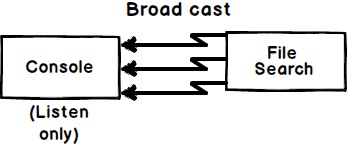
下面的代码中,订阅者可以将发布者delegete设置为NULL,并且可以自由调用delegate。
    static void Main(string[] args)

    {

        SearchFile f1 = new SearchFile();

        f1.wheretoCall += CallHereForConsole;

        f1.wheretoCall.Invoke("status"); // The client can invoke.

        f1.wheretoCall = null; // The delegate can be modified.

        f1.wheretoCall += CallHereToWriteInternally;

        f1.Search();

    }
下面使用event关键字封装delegate,
    public class SearchFile

    {

        public delegate void WheretoCall(string status);    // Step1

        public event WheretoCall wheretoCall = null;      // Step 2

        public void Search()

        {

            // File search is happening

            for (int i = ; i < ; i++)

            {

                string str = "File" + i;

                wheretoCall(str);       // Step 3

            }

        }

    }
编译客户端代码,出现如下错误:
这个错误的意思是对于一个Event事件你只能订阅(+=)或者取消订阅(-=)。
总结:

[C#] Delegate, Multicase delegate, Event的更多相关文章
- C#中的委托(Delegate)和事件(Event)
原文地址:C#中的委托(Delegate)和事件(Event) 作者:jiyuan51 把C#中的委托(Delegate)和事件(Event)放到现在讲是有目的的:给下次写的设计模式--观察者(Obs ...
- (转)C#中的委托(Delegate)和事件(Event)
转自:http://blog.chinaunix.net/uid-576762-id-2733751.html 把C#中的委托(Delegate)和事件(Event)放到现在讲是有目的的:给下次写 ...
- C# delegate和C# event
在基于Windows平台的程序设计中,事件(event)是一个很重要的概念.因为在几乎所有的Windows应用程序中,都会涉及大量的异步调用,比如响应点击按钮.处理Windows系统消息等,这些异步调 ...
- 重温委托(delegate)和事件(event)
1.delegate是什么 某种意义上来讲,你可以把delegate理解成C语言中的函数指针,它允许你传递一个类A的方法m给另一个类B的对象,使得类B的对象能够调用这个方法m,说白了就是可以把方法当作 ...
- 关于C# 委托(delegate)与事件(event)的用法及事例
C#中的委托和事件对于新手可能会有一点难理解,所以先从一个小例子入手,以便能更好的理解其如何使用.有一个学生每天定闹钟在早上6点起床,所以当每天早上6点的时候,闹钟就会响起来,从而学生才会按时起床. ...
- C# Delegate 匿名 Delegate
C#6.0新添加了 lambda的强力支持,用lambda的确可以节省好多代码,让代码看起来更简洁,更直观: 这里做一个笔记,C#的匿名委托 Demo class Program { static v ...
- c# 关键字delegate、event(委托与事件)[MSDN原文摘录][1]
A delegate is a type that safely encapsulates a method, similar to a function pointer in C and C++. ...
- .NET 中易混淆的概念(Delegate vs Event)
事件(event)是一个非常重要的概念,我们的程序时刻都在触发和接收着各种事件:鼠标点击事件,键盘事件,以及处理操作系统的各种事件.所谓事件就是 由某个对象发出的消息.比如用户按下了某个按钮,某个文件 ...
- delegate vs event
What are the differences between delegate and an event? An event declaration adds a layer of abstrac ...
随机推荐
- ES6必知必会 (九)—— Module
Module 1.ES6在语言标准的层面上,实现了模块功能,成为浏览器和服务器通用的模块解决方案,完全可以取代 CommonJS 和 AMD 规范,基本特点如下: 每一个模块只加载一次, 每一个JS只 ...
- 自定义redis session
1.思路 2.程序实现 1.用户系统类 这里模拟一个蹩脚的用户系统类(userSystem),如下: #coding=utf-8 #Redis实现用户系统 __author__ = 'beginman ...
- wpf 客户端【JDAgent桌面助手】开发详解-开篇
上周二 发表了一个帖子:wpf 客户端[JDAgent桌面助手]业余开发的终于完工了..晒晒截图... 没有想到不到一个周时间已经浏览量过8千,估计过几天就过万了..很开心啊.. 评论中好多网友问我要 ...
- 渐进式 jpg 和 交错式 gif png 提高图片站体验
渐进式 jpg 和 交错式 gif png 提高图片站体验= 渐进式的JPG比原始JPG还要小!! 让图片性感的露给你看~google picasa 和 smashing magazine 都有用到搞 ...
- Mybatis selectKey标签的keyProperty属性报错,关键字间隔不能有空格
源代码片段: <insert id="addAdminAction" parameterType="x.x.x.RoleVo"> <selec ...
- HDU 1043 八数码问题的多种解法
一.思路很简单,搜索.对于每一种状态,利用康托展开编码成一个整数.于是,状态就可以记忆了. 二.在搜索之前,可以先做个优化,对于逆序数为奇数的序列,一定无解. 三.搜索方法有很多. 1.最普通的:深搜 ...
- servlet的登陆案例
Users.java package com.po; public class Users { private String username; private String password; pu ...
- 消息队列kafka
消息队列kafka 为什么用消息队列 举例 比如在一个企业里,技术老大接到boss的任务,技术老大把这个任务拆分成多个小任务,完成所有的小任务就算搞定整个任务了. 那么在执行这些小任务的时候,可能 ...
- Spring cloud @RefreshScope使用
参数 @RestController @RefreshScope public class HomeController { @Value("${foo}") String foo ...
- StretchBlt
StretchBlt 函数从源矩形中复制一个位图到目标矩形,必要时按目前目标设备设置的模式进行图像的拉伸或压缩以满足目标矩形的尺寸. 原型: BOOL StretchBlt( HDC hdcDest ...