
[微软官网]One Windows Kernel
One Windows Kernel
https://techcommunity.microsoft.com/t5/Windows-Kernel-Internals/One-Windows-Kernel/ba-p/267142
Windows is one of the most versatile and flexible operating systems out there, running on a variety of machine architectures and available in multiple SKUs. It currently supports x86, x64, ARM and ARM64 architectures. Windows used to support Itanium, PowerPC, DEC Alpha, and MIPS (wiki entry). In addition, Windows supports a variety of SKUs that run in a multitude of environments; from data centers, laptops, Xbox, phones to embedded IOT devices such as ATM machines.
The most amazing aspect of all this is that the core of Windows, its kernel, remains virtually unchanged on all these architectures and SKUs. The Windows kernel scales dynamically depending on the architecture and the processor that it’s run on to exploit the full power of the hardware. There is of course some architecture specific code in the Windows kernel, however this is kept to a minimum to allow Windows to run on a variety of architectures.
In this blog post, I will talk about the evolution of the core pieces of the Windows kernel that allows it to transparently scale across a low power NVidia Tegra chip on the Surface RT from 2012, to the giant behemoths that power Azure data centers today.
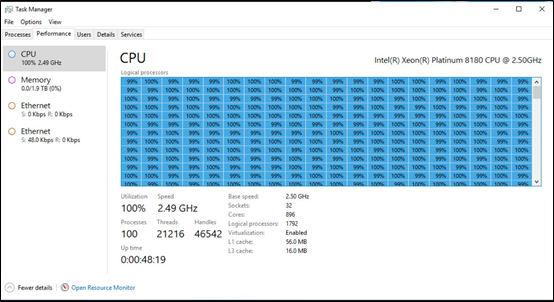
This is a picture of Windows taskmgr running on a pre-release Windows DataCenter class machine with 896 cores supporting 1792 logical processors and 2TB of RAM!
Evolution of one kernel
Before we talk about the details of the Windows kernel, I am going to take a small detour to talk about something called Windows refactoring. Windows refactoring plays a key part in increasing the reuse of Windows components across different SKUs, and platforms (e.g. client, server and phone). The basic idea of Windows refactoring is to allow the same DLL to be reused in different SKUs but support minor modifications tailored to the SKU without renaming the DLL and breaking apps.
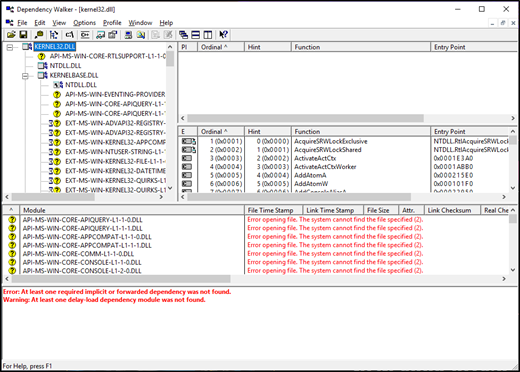
The base technology used for Windows refactoring are a lightly documented technology (entirely by design) called API sets. API sets are a mechanism that allows Windows to decouple the DLL from where its implementation is located. For example, API sets allow win32 apps to continue to use kernel32.dll but, the implementation of all the APIs are in a different DLL. These implementation DLLs can also be different depending on your SKU. You can see API sets in action if you launch dependency walker on a traditional Windows DLL; e.g. kernel32.dll.
With that detour into how Windows is built to maximize code reuse and sharing, let’s go into the technical depths of the kernel starting with the scheduler which is key to the scaling of Windows.
Kernel Components
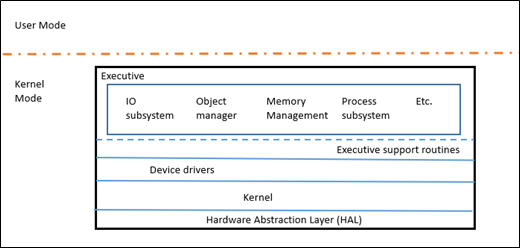
Windows NT is like a microkernel in the sense that it has a core Kernel (KE) that does very little and uses the Executive layer (Ex) to perform all the higher-level policy. Note that EX is still kernel mode, so it's not a true microkernel. The kernel is responsible for thread dispatching, multiprocessor synchronization, hardware exception handling, and the implementation of low-level machine dependent functions. The EX layer contains various subsystems which provide the bulk of the functionality traditionally thought of as kernel such as IO, Object Manager, Memory Manager, Process Subsystem, etc.
To get a better idea of the size of the components, here is a rough breakdown on the number of lines of code in a few key directories in the Windows kernel source tree (counting comments). There is a lot more to the Kernel not shown in this table.
|
Kernel subsystems |
Lines of code |
|
Memory Manager |
501, 000 |
|
Registry |
211,000 |
|
Power |
238,000 |
|
Executive |
157,000 |
|
Security |
135,000 |
|
Kernel |
339,000 |
|
Process sub-system |
116,000 |
For more information on the architecture of Windows, the “Windows Internals” series of books are a good reference.
Scheduler
With that background, let's talk a little bit about the scheduler, its evolution and how Windows kernel can scale across so many different architectures with so many processors.
A thread is the basic unit that runs program code and it is this unit that is scheduled by the Window scheduler. The Windows scheduler uses the thread priority to decide which thread to run and in theory the highest priority thread on the system always gets to run even if that entails preempting a lower priority thread.
As a thread runs and experiences quantum end (minimum amount of time a thread gets to run), its dynamic priority decays, so that a high priority CPU bound thread doesn’t run forever starving everyone else. When another waiting thread is awakened to run, it is given a priority boost based on the importance of the event that caused the wait to be satisfied (e.g. a large boost is for a foreground UI thread vs. a smaller one for completing disk I/O). A thread therefore runs at a high priority as long as it’s interactive. When it becomes CPU (compute) bound, its priority decays, and it is considered only after other, higher priority threads get their time on the CPU. In addition, the kernel arbitrarily boosts the priority of ready threads that haven't received any processor time for a given period of time to prevent starvation and correct priority inversions.
The Windows scheduler initially had a single ready queue from where it picked up the next highest priority thread to run on the processor. However, as Windows started supporting more and more processors the single ready queue turned out to be a bottleneck and around Windows Server 2003, the scheduler changed to one ready queue per processor. As Windows moved to multiple per processor queues, it avoided having a single global lock protecting all the queues and allowed the scheduler to make locally optimum decisions. This means that any point the single highest priority thread in the system runs but that doesn’t necessarily mean that the top N (N is number of cores) priority threads on the system are running. This proved to be good enough until Windows started moving to low power CPUs, e.g. in laptops and tablets. On these systems, not running a high priority thread (such as the foreground UI thread) caused the system to have noticeable glitches in UI. And so, in Windows 8.1, the scheduler changed to a hybrid model with per processor ready queues for affinitized (tied to a processor) work and shared ready queues between processors. This did not cause a noticeable impact on performance because of other architectural changes in the scheduler such as the dispatcher database lock refactoring which we will talk about later.
Windows 7 introduced something called the Dynamic Fair Share Scheduler; this feature was introduced primarily for terminal servers. The problem that this feature tried to solve was that one terminal server session which had a CPU intensive workload could impact the threads in other terminal server sessions. Since the scheduler didn’t consider sessions and simply used the priority as the key to schedule threads, users in different sessions could impact the user experience of others by starving their threads. It also unfairly advantages the sessions (users) who has a lot of threads because the sessions with more threads get more opportunity to be scheduled and received CPU time. This feature tried to add policy to the scheduler such that each session was treated fairly and roughly the same amount of CPU was available to each session. Similar functionality is available in Linux as well, with its Completely Fair Scheduler. In Windows 8, this concept was generalized as a scheduler group and added to the Windows Scheduler with each session in an independent scheduler group. In addition to the thread priority, the scheduler uses the scheduler groups as a second level index to decide which thread should run next. In a terminal server, all the scheduler groups are weighted equally and hence all sessions (scheduler groups) receive the same amount of CPU regardless of the number or priorities of the threads in the scheduler groups. In addition to its utility in a terminal server session, scheduler groups are also used to have fine grained control on a process at runtime. In Windows 8, Job objects were enhanced to support CPU rate control. Using the CPU rate control APIs, one can decide how much CPU a process can use, whether it should be a hard cap or a soft cap and receive notifications when a process meets those CPU limits. This is like the resource controls features available in cgroups on Linux.
Starting with Windows 7, Windows Server started supporting greater than 64 logical processors in a single machine. To add support for so many processors, Windows internally introduced a new entity called “processor group”. A group is a static set of up to 64 logical processors that is treated as a single scheduling entity. The kernel determines at boot time which processor belongs to which group and for machines with less than 64 cores, with the overhead of the group structure indirection is mostly not noticeable. While a single process can span groups (such as a SQL server instance), and individual thread could only execute within a single scheduling group at a time.
However, on machines with greater than 64 cores, Windows started showing some bottlenecks that prevented high performance applications such as SQL server from scaling their performance linearly with the number of processor cores. Thus, even if you added more cores and memory, the benchmarks wouldn’t show much increase in performance. And one of the main problems that caused this lack of performance was the contention around the Dispatcher database lock. The dispatcher database lock protected access to those objects that needed to be dispatched; i.e. scheduled. Examples of objects that were protected by this lock included threads, timers, I/O completion ports, and other waitable kernel objects (events, semaphores, mutants, etc.). Thus, in Windows 7 due to the impetus provided by the greater than 64 processor support, work was done to eliminate the dispatcher database lock and replace it with fine grained locks such as per object locks. This allowed benchmarks such as the SQL TPC-C to show a 290% improvement when compared to Windows 7 with a dispatcher database lock on certain machine configurations. This was one of the biggest performance boosts seen in Windows history, due to a single feature.
Windows 10 brought us another innovation in the scheduler space with CPU Sets. CPU Sets allow a process to partition the system such that its process can take over a group of processors and not allow any other process or system to run their threads on those processors. Windows Kernel even steers Interrupts from devices away from the processors that are part of your CPU set. This ensures that even devices cannot target their code on the processors which have been partitioned off by CPU sets for your app or process. Think of this as a low-tech Virtual Machine. As you can imagine this is a powerful capability and hence there are a lot of safeguards built-in to prevent an app developer from making the wrong choice within the API. CPU sets functionality are used by the customer when they use Game Mode to run their games.
Finally, this brings us to ARM64 support with Windows 10 on ARM. The ARM architecture supports a big.LITTLE architecture, big.LITTLE is a heterogenous architecture where the “big” core runs fast, consuming more power and the “LITTLE” core runs slow consuming less power. The idea here is that you run unimportant tasks on the little core saving battery. To support big.LITTLE architecture and provide great battery life on Windows 10 on ARM, the Windows scheduler added support for heterogenous scheduling which took into account the app intent for scheduling on big.LITTLE architectures.
By app intent, I mean Windows tries to provide a quality of service for apps by tracking threads which are running in the foreground (or starved of CPU) and ensuring those threads always run on the big core. Whereas the background tasks, services, and other ancillary threads in the system run on the little cores. (As an aside, you can also programmatically mark your thread as unimportant which will make it run on the LITTLE core.)
Work on Behalf: In Windows, a lot of work for the foreground is done by other services running in the background. E.g. In Outlook, when you search for a mail, the search is conducted by a background service (Indexer). If we simply, run all the services on the little core, then the experience and performance of the foreground app will be affected. To ensure, that these scenarios are not slow on big.LITTLE architectures, Windows actually tracks when an app calls into another process to do work on its behalf. When this happens, we donate the foreground priority to the service thread and force run the thread in the service on the big core.
That concludes our first (huge?) One Windows Kernel post, giving you an overview of the Windows Kernel Scheduler. We will have more similarly technical posts about the internals of the Windows Kernel.
Hari Pulapaka
(Windows Kernel Team)
[微软官网]One Windows Kernel的更多相关文章
- 微软官网下载windows系统有点全
第一步:访问:https://www.microsoft.com/zh-cn/software-download/windows10ISO/ 默认就只能下载win10,这怎么行呢.巨硬程序员貌似没做服 ...
- PHP环境配置-从Apache官网下载windows版apache服务器
由于个人有强迫倾向,下载软件都喜欢从官网下载,摸索了好久终于摸清楚怎么从Apache官网下载windows安装版的Apache服务器了,现在分享给大家. 进入apache服务器官网http://htt ...
- windows server 2008 各版本号下载地址(微软官网)
前言: 微软官网上下载系统的镜像文件要远比百度网盘下载起来得更快. Windows Server 2008 32-bit Standard(标准版)
- 从微软官网下载VS离线安装包的方法
这里描述是包括所有版本,截图以下载VS2017社区版为例: ①登入VS官网下载页面,选择需要的版本点击下载,下载页点此进入. ②下载完成后,打开下载文件所在文件夹,Windows 8.1及以上版本用户 ...
- 超详细教程2021新版oracle官网下载Windows JAVA-jdk11并安装配置(其他版本流程相同)
异想之旅:本人博客完全手敲,绝对非搬运,全网不可能有重复:本人无团队,仅为技术爱好者进行分享,所有内容不牵扯广告.本人所有文章发布平台为CSDN.博客园.简书和开源中国,后期可能会有个人博客,除此之外 ...
- 微软官网下载win10离线介质
1.打开google浏览器 2.搜索win10官网下载或者直接输入网址https://www.microsoft.com/zh-cn/software-download/windows10 3.按F1 ...
- [微软官网]windows server 内存限制
Memory Limits for Windows and Windows Server Releases https://docs.microsoft.com/zh-cn/windows/deskt ...
- 微软官网tools
DHCP/AD域插件: 远程管理工具(含DHCP/AD域) 安装网址: https://www.microsoft.com/zh-cn/download/details.aspx?id=7887 程序 ...
- [MS] 微软官网下载安装SQLSERVER2019的rpm
快速入门:安装 SQL Server 和 Red Hat 上创建数据库 https://docs.microsoft.com/zh-cn/sql/linux/quickstart-install-co ...
随机推荐
- hadoop运维笔记
一. 故障处理部分 1.1. spark提交任务报错java.lang.NoClassDefFoundError: com/alibaba/fastjson/JSON 报错原因: 在运行环境没有找 ...
- python 位运算【实测】
python 位运算符为 << 左移,>> 右移 3<<2 既 3 的二进制整体向左移两位 : : 可以这么算 3*(2的2次方)= 12 11>> ...
- 20155234 2016-2017-2《Java程序设计》课程总结
20155234 2016-2017-2<Java程序设计>课程总结 每周作业链接汇总 预备作业1:师生关系 预备作业2:优秀技能经验 预备作业3:虚拟机linux初接触 第一周作业:认识 ...
- 第八周课上额外项目:pwd的实现
项目要求: 1 学习pwd命令 2 研究pwd实现需要的系统调用(man -k; grep),写出伪代码 3 实现mypwd 4 测试mypwd 并且上交博客链接. 实验步骤 我首先不懂pwd到底是个 ...
- 实现Linux下dc的功能,计算后缀表达式的值
提交测试截图和码云练习项目链接,实现Linux下dc的功能,计算后缀表达式的值 -将运算符写在两个操作数之后的表达式称为"后缀表达式",如上面的中缀表达式可转换为后缀表达式1 2 ...
- 20155334 实验二 Java面向对象程序设计
实验二 Java面向对象程序设计 实验内容 初步掌握单元测试和TDD 理解并掌握面向对象三要素:封装.继承.多态 初步掌握UML建模 熟悉S.O.L.I.D原则 了解设计模式 实验要求 完成实验.撰写 ...
- [BZOJ1857][SCOI2010]传送带-[三分]
Description 传送门 Solution 三分套三分.代码简单但是证明苦兮兮.. 假如我们在AB上选了一个点G,求到该点到D的最小时间. 图中b与CD垂直.设目前从G到D所耗时间最短的路径为G ...
- XDS100V3连接Pandaboard ES OMAP4460开发板
1. 硬件连接如下 2. 使用CCS创建工程,不过好像没有ARM9的内核吧?为啥会出现? 3. 创建目标配置文件 4. 不过确实有ARM9的内核,两个A9内核,一个DSP C64X内核,两个M3的内核 ...
- python根据正则表达式的简单爬虫
今天根据正则表达式简单的爬了一下大众点评,把北京的美食爬了爬,(店铺名,人均消费,地址) import re import urllib.request from urllib.request imp ...
- mfs分布式系统从理论简介到实战部署
文章前面想说的话:这篇博客写出来真是有点累到了,本来昨天就基本就写好了,放在草稿里面,今天打开就没有了!!唉,就尼玛离我而去了,只有重写,然后中间虚拟机还“爆炸”重启又搞了一会,不容易呀!!希望各位博 ...